Sponsored

FSD Reading the speed signs wrong in one place

Oceanwolf

Active member
First Name
Onur
Joined
Dec 19, 2024
Threads
2
Messages
33
Reaction score
41
Location
California
Vehicles
Cybertruck AWD, Model 3, Model X (transferred to kids)
Occupation
Not Sure
Country flag
When we are driving towards Sonora, CA on CA-108, there is a section that changes the speed limit from 55 to 65. For some reason my CT does not change the speed limit accordingly. It works everywhere else. My Model X did not have any issues in the same location. I wonder if CT is reading the with Trailers 55mph sign instead. I noticed it both directions. The problem is when have FSD on, the cars behind you are not very patient with your speed. My model X only had issues on highway 101 where it got stuck with 55 in San Jose.
Sponsored

 

mongo

Well-known member
Joined
May 27, 2024
Threads
5
Messages
4,524
Reaction score
5,505
Location
SE Michigan
Vehicles
Cyberbeast
Country flag
When we are driving towards Sonora, CA on CA-108, there is a section that changes the speed limit from 55 to 65. For some reason my CT does not change the speed limit accordingly. It works everywhere else. My Model X did not have any issues in the same location. I wonder if CT is reading the with Trailers 55mph sign instead. I noticed it both directions. The problem is when have FSD on, the cars behind you are not very patient with your speed. My model X only had issues on highway 101 where it got stuck with 55 in San Jose.
No need to be stuck at 55. Use the right scroll wheel to change the max speed.
 

heems

Well-known member
Joined
Dec 17, 2023
Threads
14
Messages
314
Reaction score
656
Location
San Diego
Vehicles
2023 Model Y AWD, 2024 Cybertruck FS AWD
Country flag
Is there proof any signs are read by FSD? It could all be based on maps. How’d one know?
 

SCTesla

Well-known member
Joined
Jun 11, 2024
Threads
6
Messages
2,473
Reaction score
3,688
Location
USA
Vehicles
22 Model S, 24 CT
Country flag
Is there proof any signs are read by FSD? It could all be based on maps. How’d one know?
"Read" is a fickle word when it comes to this due to a patten by Mobileye, but essentially FSD does recognize speed limit signs, yes. What it recognizes will override map data and it's created issues since V12 launched. Minimum speeds, hwy signs, and other similar signs that are roughly the same size as a speed limit, the car can publish as a speed limit sign.

And there is a lot of proof; tests with home made signs, test by changing signs with black tape, a statement from Tesla in the release notes from 2020, and data from Greentheonly.


OP
OP

Oceanwolf

Active member
First Name
Onur
Joined
Dec 19, 2024
Threads
2
Messages
33
Reaction score
41
Location
California
Vehicles
Cybertruck AWD, Model 3, Model X (transferred to kids)
Occupation
Not Sure
Country flag
No need to be stuck at 55. Use the right scroll wheel to change the max speed.
I am still trying to figure out how Max Speed works. When I change it, the screen shows 80 but the car is still going at 55. I just disengage FSD and continue.
 

mongo

Well-known member
Joined
May 27, 2024
Threads
5
Messages
4,524
Reaction score
5,505
Location
SE Michigan
Vehicles
Cyberbeast
Country flag
I am still trying to figure out how Max Speed works. When I change it, the screen shows 80 but the car is still going at 55. I just disengage FSD and continue.
Use the accelerator to get up to the max speed then release it. It's been better about staying at that speed with the recent software.
 
OP
OP

Oceanwolf

Active member
First Name
Onur
Joined
Dec 19, 2024
Threads
2
Messages
33
Reaction score
41
Location
California
Vehicles
Cybertruck AWD, Model 3, Model X (transferred to kids)
Occupation
Not Sure
Country flag
If the speed limit sign (with the correct number) is visualized on the screen, that means FSD recognized it, but decided not to obey it for some reason. I see that regularly.
Next time I need to watch it a bit more carefully if the speed limit sign is shown on the screen. Most of the time it shows it correctly.
 

SCTesla

Well-known member
Joined
Jun 11, 2024
Threads
6
Messages
2,473
Reaction score
3,688
Location
USA
Vehicles
22 Model S, 24 CT
Country flag
Next time I need to watch it a bit more carefully if the speed limit sign is shown on the screen. Most of the time it shows it correctly.
IF you disengage, then re-engage, it will go back to whatever is published to the map...overriding the incorrect read. This is how I get around the minimum speed of 45 on I-95 in Georgia.


CyberGus

Well-known member
First Name
Gus
Joined
May 22, 2021
Threads
91
Messages
10,245
Reaction score
33,914
Location
Austin, TX
Vehicles
1981 DeLorean, 2024 Cybertruck
Occupation
IT Specialist
Country flag
FSD recognized it, but decided not to obey it for some reason
When I use FSD to go around the block at my home, it will stop on the wrong street right behind my house, even though the nav shows that it should continue around.

Oddly, it pulls over, masticates for about 30 seconds, and then pulls out and finishes.
 

cybercricket

Well-known member
Joined
Oct 31, 2024
Threads
13
Messages
659
Reaction score
798
Location
Oregon
Vehicles
Cybertruck
Country flag
Next time I need to watch it a bit more carefully if the speed limit sign is shown on the screen. Most of the time it shows it correctly.
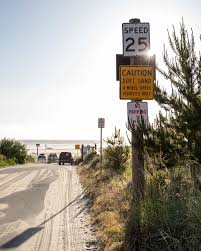
I've seen a couple of scenarios where FSD was likely to ignore the posted sign. One example is sometimes a sign may be posted on a pole shared with another sign of some kind, possibly like this:
Tesla Cybertruck FSD Reading the speed signs wrong in one place q=tbn:ANd9GcSga13GWsfbbOFqMbeyNZXh4Sk_KrNZS5L3PQ&s


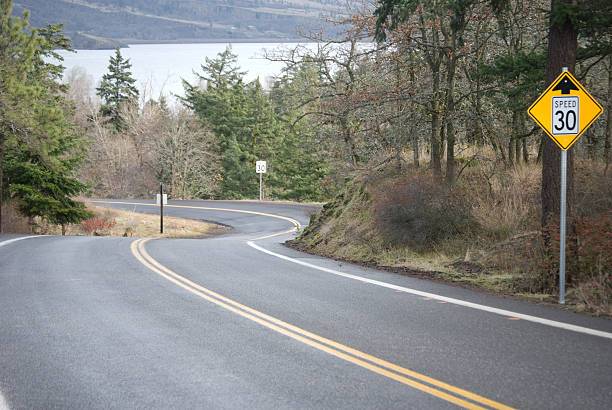
it may be confusing it with this

Tesla Cybertruck FSD Reading the speed signs wrong in one place s-curve-with-speed-limit-sign


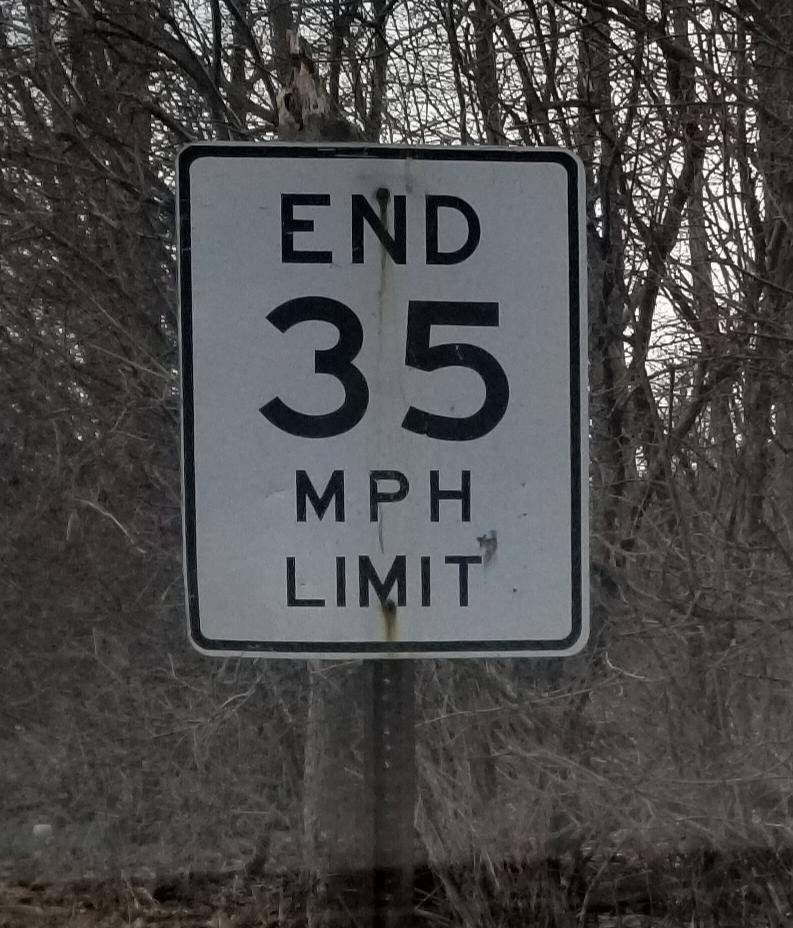
And the other scenario I've seen was something like this :

Tesla Cybertruck FSD Reading the speed signs wrong in one place 9bgqum0scwq21


It actually did the opposite - decided that the limit is in fact 35 while previously it was thinking it was 25 or something.
 

Crissa

Well-known member
First Name
Crissa
Joined
Jul 8, 2020
Threads
138
Messages
19,571
Reaction score
31,475
Location
Santa Cruz
Vehicles
2014 Zero S, 2013 Mazda 3
Country flag
I've seen a couple of scenarios where FSD was likely to ignore the posted sign. One example is sometimes a sign may be posted on a pole shared with another sign of some kind, possibly like this:
q=tbn:ANd9GcSga13GWsfbbOFqMbeyNZXh4Sk_KrNZS5L3PQ&s.jpg


it may be confusing it with this

s-curve-with-speed-limit-sign.jpg


And the other scenario I've seen was something like this :

9bgqum0scwq21.jpg


It actually did the opposite - decided that the limit is in fact 35 while previously it was thinking it was 25 or something.
Yep. Poor FSD is stuck being illiterate and having to match signs.

-Crissa
 

WormtownKris

Well-known member
First Name
Kris
Joined
May 27, 2023
Threads
1
Messages
415
Reaction score
1,061
Location
MA
Vehicles
2024 CyberTruck AWD, 2018 Model 3, 2013 F150, 2002 Hyundai Accent
Occupation
Outside Sales
Country flag
4 years ago, it was spot on. (Model 3). Now I don't know that I could even use FSD in my area (good thing I love driving the CT myself!) because it is so off on speed limits.
If I leave a neighborhood (say 25MPH) and turn onto a major route (say 45 or 50 mph), it will stay with the most recent speed limit it "saw", 25mph, until it passes another speed limit sign. All the maps on my phones, etc know what the speed limits are, but Teslas no longer do until they acknowledge a new speed limit sign.
Another frequent problem is yellow "hazard" speed limit signs. In my area, lots of "hazardous" areas have short decreased speed zones on YELLOW signs. These are completely ignored by our vehicles. Examples are highway offramps, sharp curves, and various areas enroute to the local ski mountain. If it's not a white rectangular sign, the speed limit does not exist. Some mountain roads go miles with only square yellow speed limit signs, so our Tesla vehicles think the whole thing is governed by the 20mph sign at the center of town, or the 45mph sign at the bottom if approaching from the opposite direction.
Wondering if I should perpetually log "Bug Reports" at every incidence or if that is a big waste of time. Seems this has been a problem for years.?‍♂
 

Crissa

Well-known member
First Name
Crissa
Joined
Jul 8, 2020
Threads
138
Messages
19,571
Reaction score
31,475
Location
Santa Cruz
Vehicles
2014 Zero S, 2013 Mazda 3
Country flag
Bug reports get classified, so... ehh, probably not a waste of time? How else will they know it's more of a problem than something else?

-Crissa
Sponsored


Top