mitch9
Well-known member
- First Name
- Mitch
- Joined
- Apr 19, 2021
- Threads
- 2
- Messages
- 213
- Reaction score
- 373
- Location
- Boston, MA
- Vehicles
- 2025 Dual Motor Cybertruck
- Occupation
- Engineer

- Thread starter
- #1
I added this to another thread, but no one has replied:
Just picked up a 2025 Dual Motor Cybertruck.. I have the WiFi disconnecting issue.
What I noticed is, when the vehicle "Goes to sleep" the WiFi disconnects.
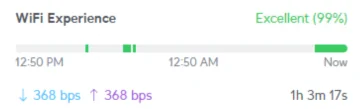
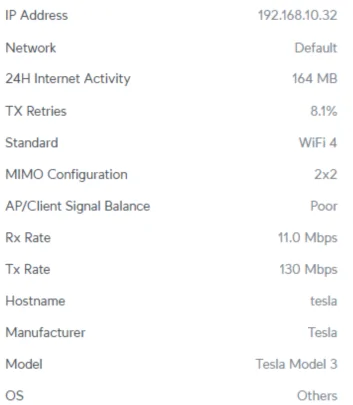
If I connect via my Tesla app, it "wakes it up" over the cellular connection, and I see it again connected to my Ubuiqiti network, signal strength -63dBm, the access point is directly above the CT on the 2nd floor, less than 15 feet away, construction is drywall ceiling and floor trusses, with 3/4" advantech flooring above, it never disconnects when the app is active and being used, only when it goes to sleep
I tried the "leave connected when in drive" checkbox, made no difference.
I did reboot it, made no difference
tried connecting to my WiFi network that is only 2.4Ghz, thought that was it, until it went to sleep again.. then disconnected
it is parked in my garage, which is the "home" address, its also plugged in the the Tesla Wall Connector as well.
trying to get the recent software update, which I am hoping may fix this issue.. but it won't stay connected long enough to get it.
Software v12 (2025.26.4)
Mitch
Just picked up a 2025 Dual Motor Cybertruck.. I have the WiFi disconnecting issue.
What I noticed is, when the vehicle "Goes to sleep" the WiFi disconnects.
If I connect via my Tesla app, it "wakes it up" over the cellular connection, and I see it again connected to my Ubuiqiti network, signal strength -63dBm, the access point is directly above the CT on the 2nd floor, less than 15 feet away, construction is drywall ceiling and floor trusses, with 3/4" advantech flooring above, it never disconnects when the app is active and being used, only when it goes to sleep
I tried the "leave connected when in drive" checkbox, made no difference.
I did reboot it, made no difference
tried connecting to my WiFi network that is only 2.4Ghz, thought that was it, until it went to sleep again.. then disconnected
it is parked in my garage, which is the "home" address, its also plugged in the the Tesla Wall Connector as well.
trying to get the recent software update, which I am hoping may fix this issue.. but it won't stay connected long enough to get it.
Software v12 (2025.26.4)
Mitch
Sponsored