Sponsored

oKurwaCoZaPudlo

Well-known member
Joined
Jan 9, 2024
Threads
7
Messages
46
Reaction score
69
Location
Denver, Colorado
Vehicles
Cyberbeast
Country flag
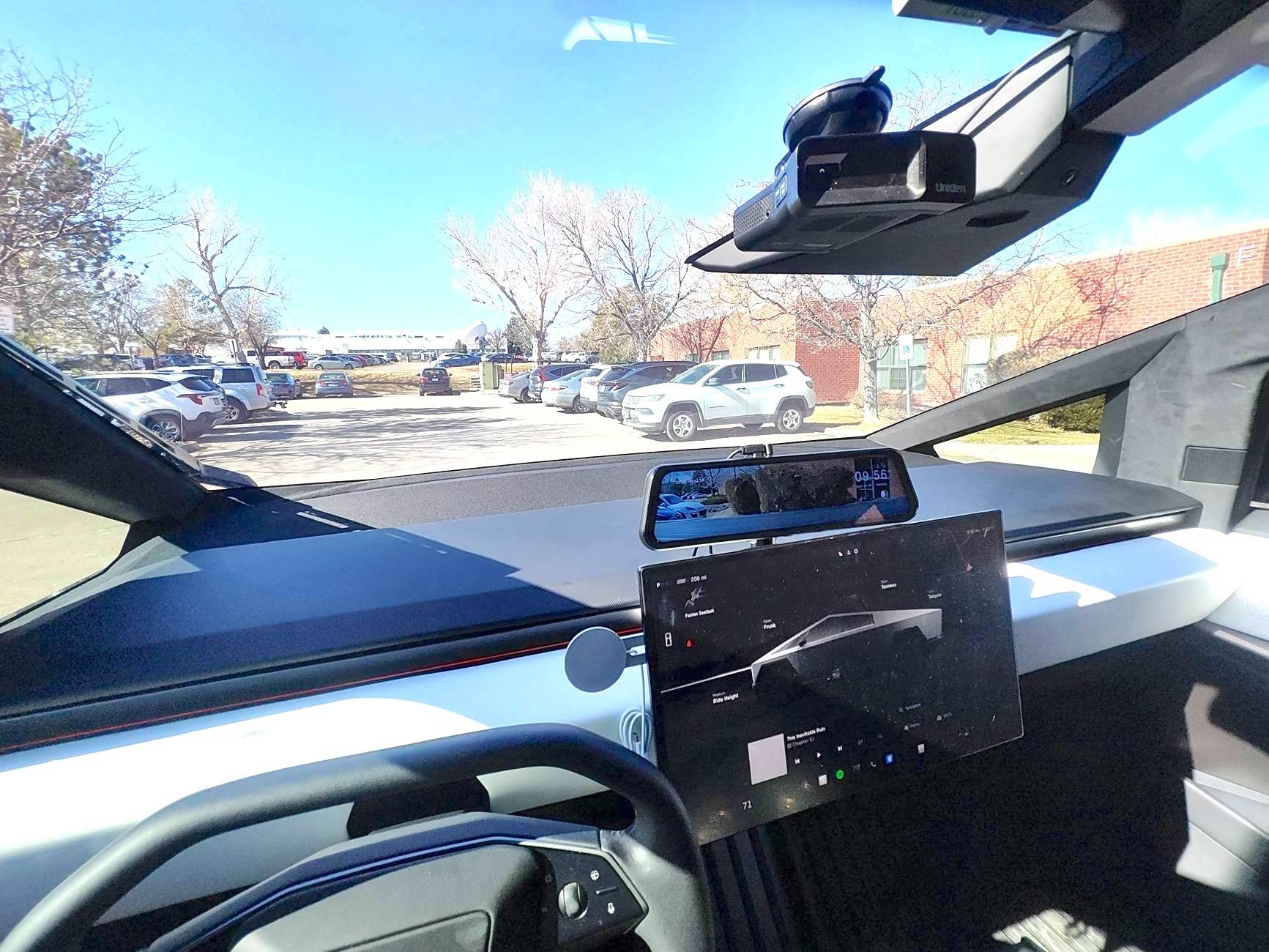
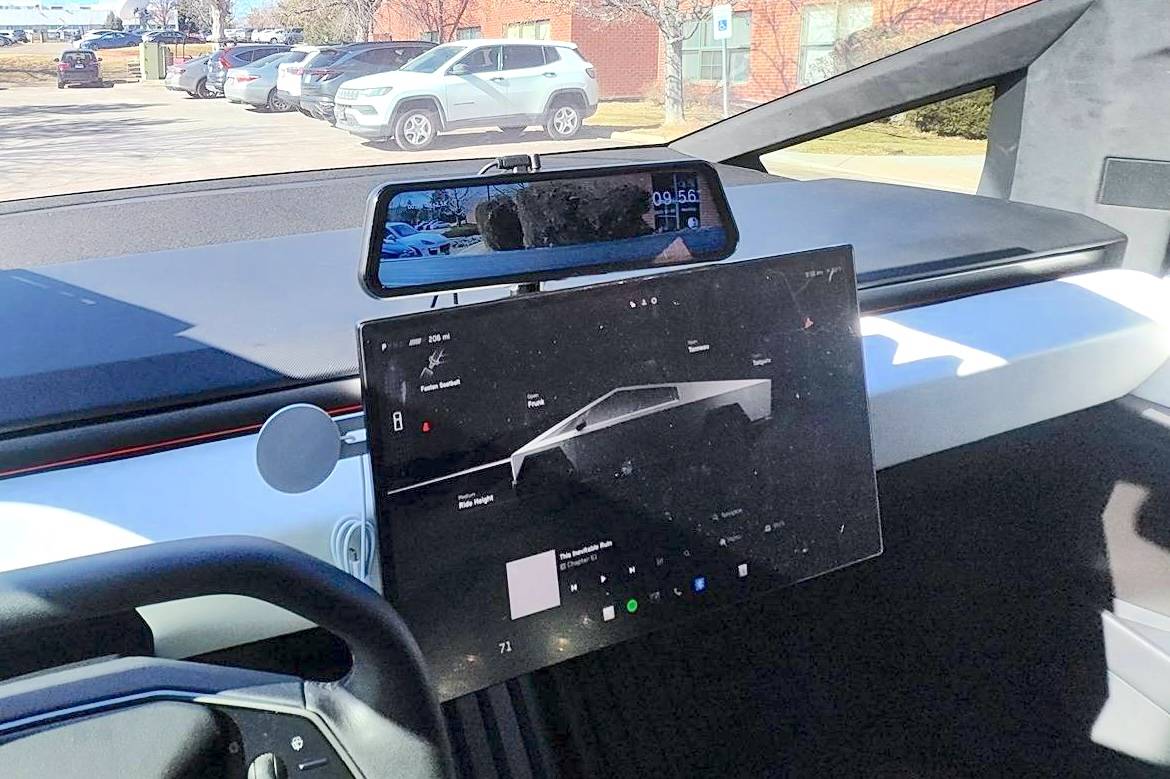
First, I had the mirror mounted in the traditional spot and I found that it was blocking my view too much. I decided to install it on top of the screen instead. I got the Wolfbox G900 Pro. I dont know if I would go with this mirror again. My gripe is that I cannot turn off any of the overlay information. I don't need the time to show up or the red blinking recording dot.

I routed the cables the traditional route that everyone uses.

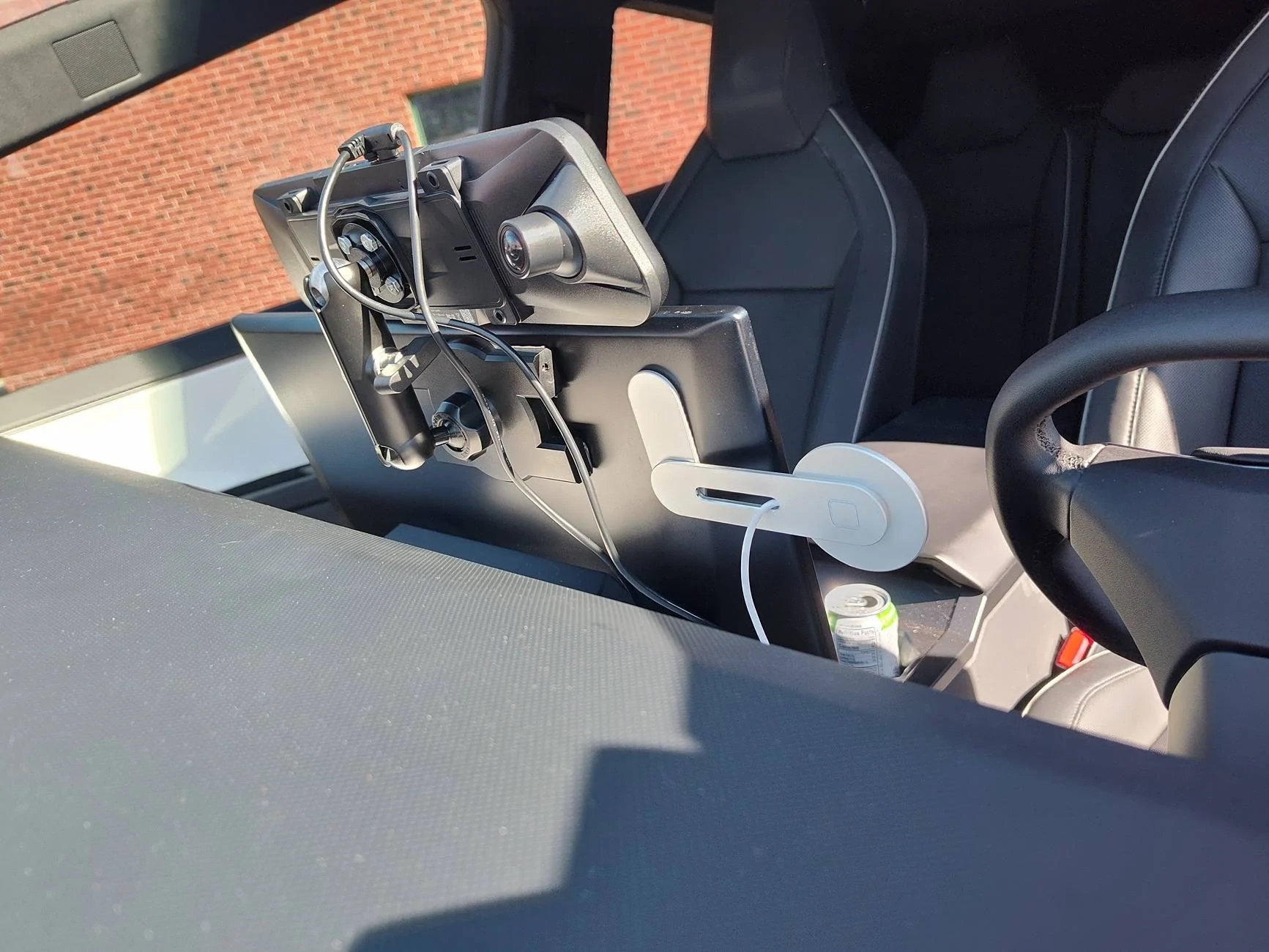
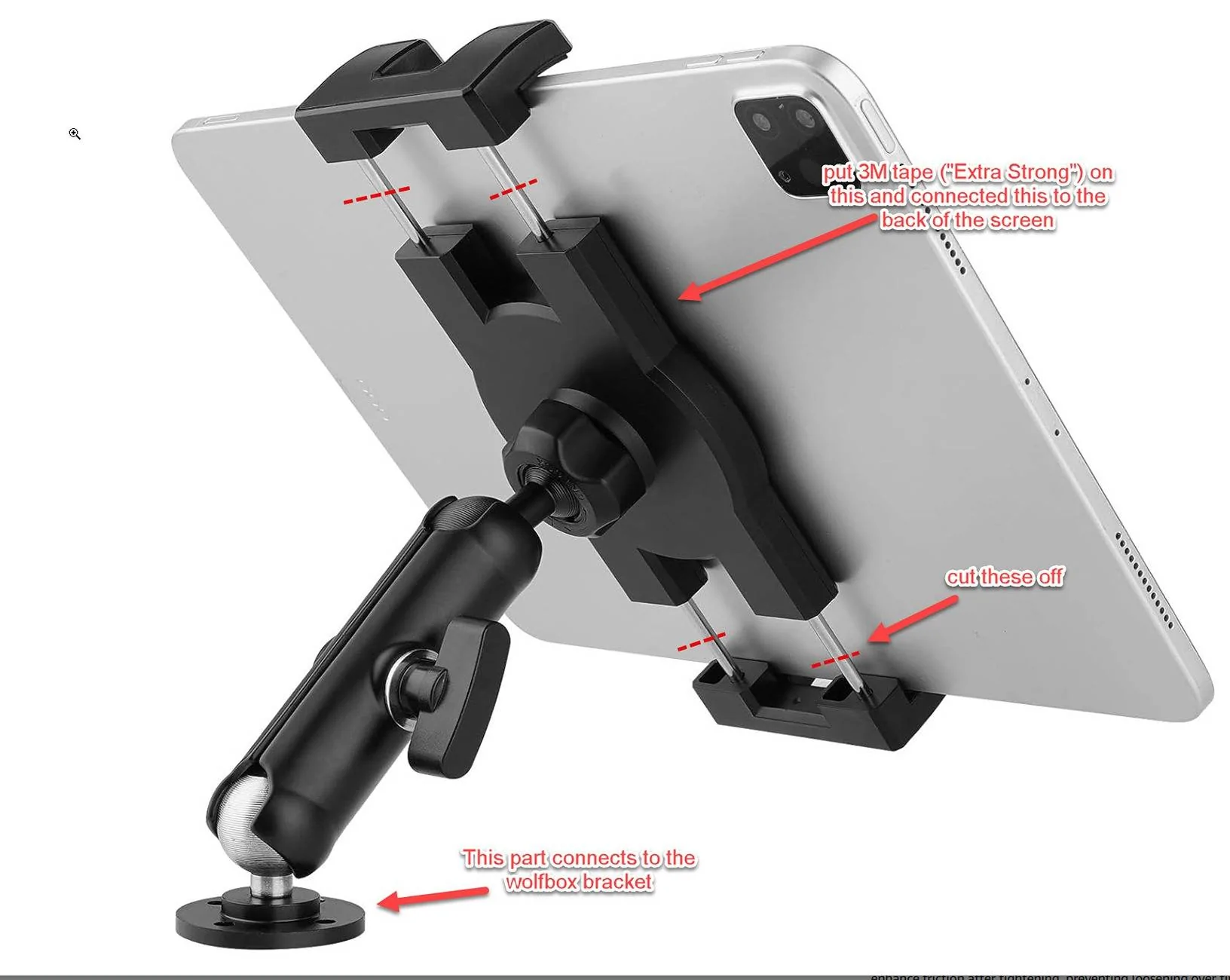
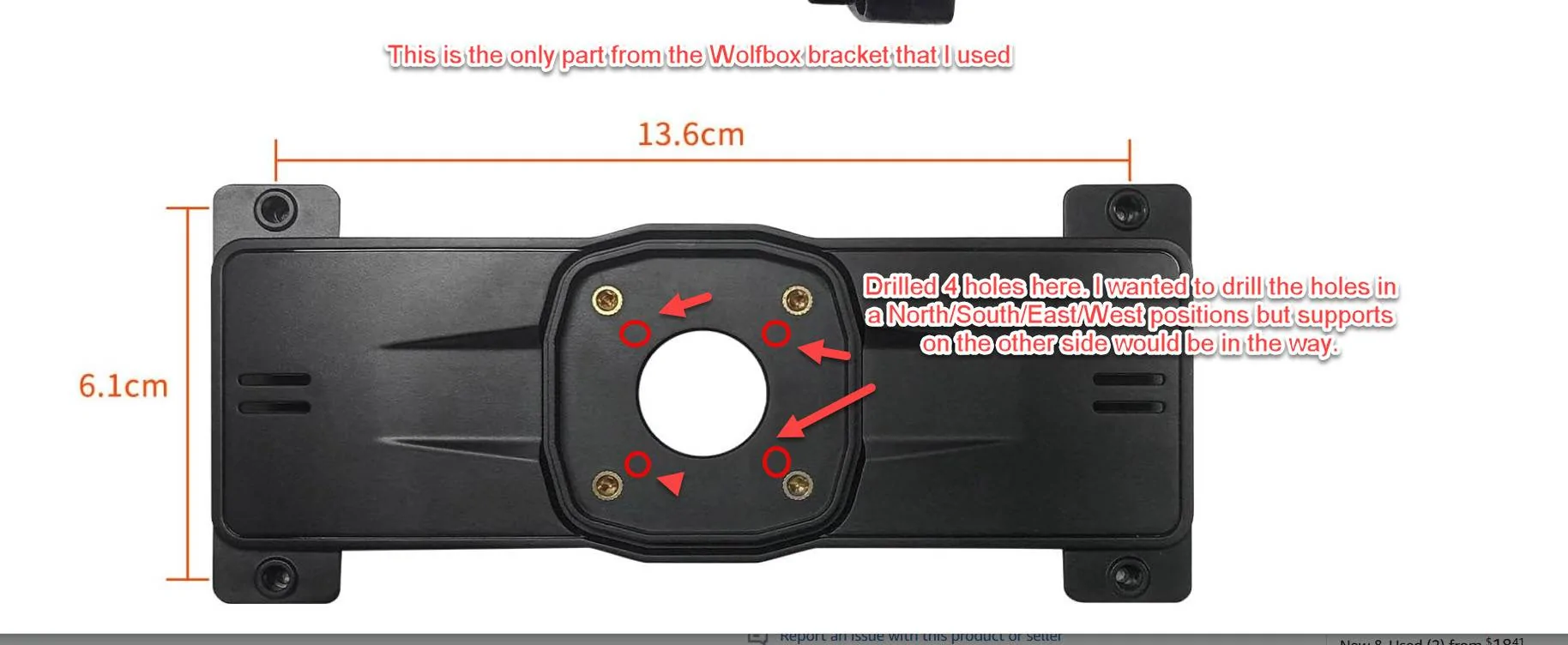
I got this bracket but only used the plate that connects to the mirror.
https://www.amazon.com/dp/B0BN31MBZP?ref=ppx_yo2ov_dt_b_fed_asin_title

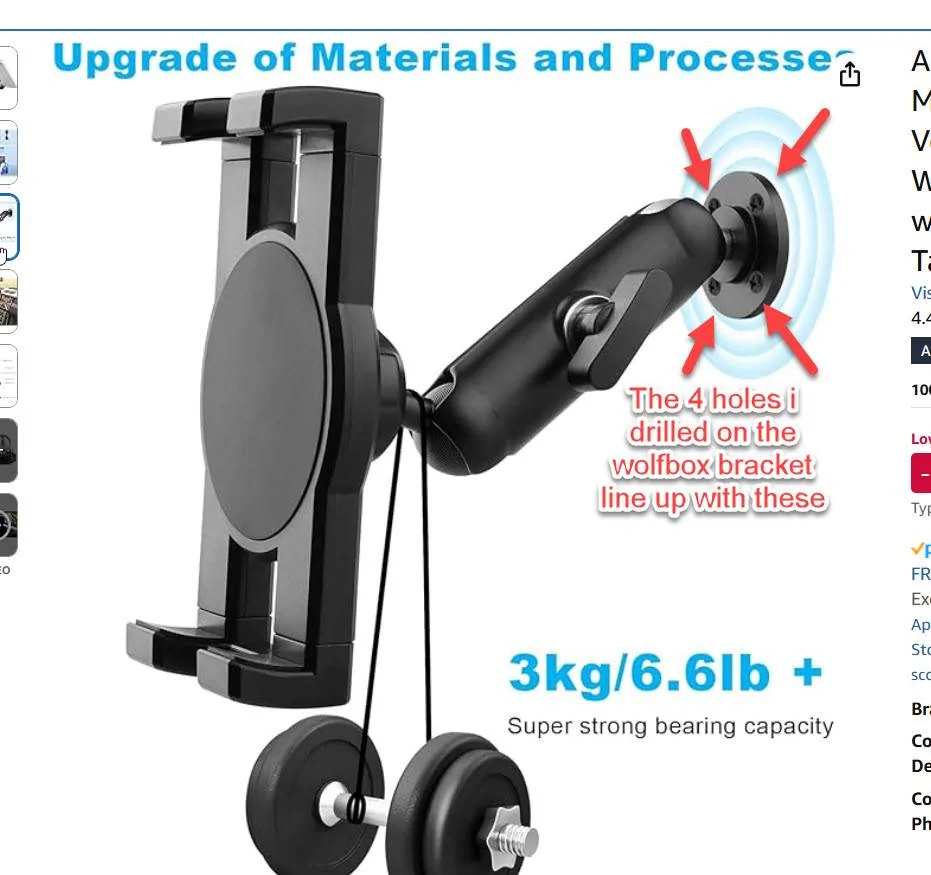
I had to modify this mount a little bit for it to work:
https://www.amazon.com/dp/B0D1DRP3F1?ref=ppx_yo2ov_dt_b_fed_asin_title

I connected it to power using this hookup:
https://www.amazon.com/dp/B08TBKF5M9?ref=ppx_yo2ov_dt_b_fed_asin_title

This person used the same power hookup as me:


Tesla Cybertruck Installed Wolfbox digital rear view mirror on back of the display screen IMG_20250303_095636259_HDR (1)


Tesla Cybertruck Installed Wolfbox digital rear view mirror on back of the display screen IMG_20250303_095636259_HDR


Tesla Cybertruck Installed Wolfbox digital rear view mirror on back of the display screen IMG_20250303_095651903_HDR
Sponsored


Wegas

New member
Joined
Mar 3, 2025
Threads
0
Messages
1
Reaction score
0
Location
Nevada
Vehicles
2023 Model Y, 2016 Model X 90D, 2024 FS CT VIN 037xxx
Country flag
I love your mounting location.

Can you give us more details about the mounting?
 

Gigahorse

Well-known member
Joined
Dec 19, 2023
Threads
18
Messages
2,828
Reaction score
3,186
Location
USA
Vehicles
AWD
Very interesting location
 

Sandman1962

Well-known member
First Name
Sel
Joined
Apr 18, 2023
Threads
12
Messages
265
Reaction score
514
Location
San Diego
Vehicles
Model S , Model X
Country flag
I like your out of the box thinking! I think I will keep my traditional location. The main screen for me is a little low for me and I wish the swivel screen kits would raise the screen rather than lower it.


REM

Well-known member
Joined
Dec 9, 2023
Threads
14
Messages
3,583
Reaction score
6,661
Location
NC
Vehicles
2020 Model 3 Standard Range++ & Diet Cybertruck, Dual Motor
Occupation
Professional Retard
Country flag
any pics of where the camera is mounted? Do you have it on the rear glass?
 

tide80

Member
First Name
Thomas
Joined
Apr 2, 2022
Threads
0
Messages
10
Reaction score
7
Location
Santa Cruz, CA USA
Vehicles
Cybertruck AWD FS
Occupation
Retired
Country flag
This is genius, exactly what I was wishing for. I really like how you placed the rear view display on the left side of the screen to make it easier for the driver to see.
This solution allows the purchase of larger rear view displays. I don't need GPS or front facing camera, I want only have the one camera that I will attach to wind flap above the bed. Now I need to find a rear view camera / display option that has 1) a narrow field of view 90 to 105 degrees 2) high resolution 2.5K or even 4K 3) high refresh rate 4) Sony Starvis IMX678 for the rear camera with WDR / HDR. 5) Auto dimming at night would be great.
 

DJAlan2000

Well-known member
First Name
Alan
Joined
Jul 9, 2024
Threads
4
Messages
504
Reaction score
397
Location
Oxnard, CA
Vehicles
Tesla Model Y-LR and our CyberTruck FS
Country flag
To me, this is a clunkier version of what is already on screen and looks terrible in comparison. Not a fan…
I think I have to agree... I already keep looking 'up' at the mirror only to see blackness (or someone in the back seat)... IF and when we replace our mirror, it will go in the 'normal' position...

The real issue is that some of us still drive OTHER cars as well (like my model Y) and they don't have the rear camera view that the CT does so it's VERY hard to switch every time I switch vehicles... Hard enough for me to remember that the CT has a 'mic' BUTTON instead of pressing the right scroll wheel (which toggles FSD)... I can deal with the turn signals, although I think it would have been better to put a button on each side of the 'wheel'... Left on left, right on right... simple...

Yet the biggest complaints are about not having a turn signal 'stalk'?

Yeah, I think we'll just mount it in the 'normal' position where we normally look anyway...
 

84Apollo3

Well-known member
First Name
Preston
Joined
Mar 4, 2023
Threads
9
Messages
136
Reaction score
120
Location
Charleston, SC
Vehicles
2018 Model 3
Occupation
Pilot
Country flag
I think I have to agree... I already keep looking 'up' at the mirror only to see blackness (or someone in the back seat)... IF and when we replace our mirror, it will go in the 'normal' position...

The real issue is that some of us still drive OTHER cars as well (like my model Y) and they don't have the rear camera view that the CT does so it's VERY hard to switch every time I switch vehicles... Hard enough for me to remember that the CT has a 'mic' BUTTON instead of pressing the right scroll wheel (which toggles FSD)... I can deal with the turn signals, although I think it would have been better to put a button on each side of the 'wheel'... Left on left, right on right... simple...

Yet the biggest complaints are about not having a turn signal 'stalk'?

Yeah, I think we'll just mount it in the 'normal' position where we normally look anyway...
I removed the little mirror and really like the extra view out of the windshield that deleting the rear view mirror provides. I use the digital rear view on the left side of the screen (unless I need a larger view) and have adapted enough to much prefer it over anything else. I also drive a Model 3 and really have no problem going back and fourth. If anything the Model 3 seems dated and clunky in comparison.


OP
OP

oKurwaCoZaPudlo

Well-known member
Joined
Jan 9, 2024
Threads
7
Messages
46
Reaction score
69
Location
Denver, Colorado
Vehicles
Cyberbeast
Country flag
To me, this is a clunkier version of what is already on screen and looks terrible in comparison. Not a fan…
I agree that its clunkier but this is the only place that works for me without sacrificing field of view from the window. Both the higher position and the larger screen is a big improvement on visibility. I can glance at the mirror while still having the road in my periphery.

With the on screen display, I lose periphery of the front end and then I have to spent milliseconds trying to figure out what the hell I'm looking at.
 

OldDirtyRobot

Well-known member
Joined
Apr 2, 2024
Threads
11
Messages
400
Reaction score
695
Location
Texas
Vehicles
Model Y, CT Dual Motor
Occupation
Regulatory Interpretation
Country flag
I like the rearview mirror upgrade but I'm not really understanding the value of the placement.
 
OP
OP

oKurwaCoZaPudlo

Well-known member
Joined
Jan 9, 2024
Threads
7
Messages
46
Reaction score
69
Location
Denver, Colorado
Vehicles
Cyberbeast
Country flag
I like the rearview mirror upgrade but I'm not really understanding the value of the placement.
Its a big mirror. The picture was taken with a .5 zoom so it doesn't look like it. but if you use the screen as a reference point, you get an idea of how big the mirror actually is. Initially, I had it in the traditional spot but it was taking up a large portion of my field of view of the right side of the windshield. The pillars are already limiting visibility.

To repeat what I said before:

"Both the higher position and the larger screen is a big improvement on visibility. I can glance at the mirror while still having the road in my periphery.

With the on screen display, I lose periphery of the front end and then I have to spend milliseconds trying to figure out what the hell I'm looking at."
 

Aerospace2061

Well-known member
Joined
Jan 1, 2024
Threads
21
Messages
74
Reaction score
108
Location
San Diego
Vehicles
Cybertruck All-Wheel Drive
First, I had the mirror mounted in the traditional spot and I found that it was blocking my view too much. I decided to install it on top of the screen instead. I got the Wolfbox G900 Pro. I dont know if I would go with this mirror again. My gripe is that I cannot turn off any of the overlay information. I don't need the time to show up or the red blinking recording dot.

I routed the cables the traditional route that everyone uses.

I got this bracket but only used the plate that connects to the mirror.
https://www.amazon.com/dp/B0BN31MBZP?ref=ppx_yo2ov_dt_b_fed_asin_title

I had to modify this mount a little bit for it to work:
https://www.amazon.com/dp/B0D1DRP3F1?ref=ppx_yo2ov_dt_b_fed_asin_title

I connected it to power using this hookup:
https://www.amazon.com/dp/B08TBKF5M9?ref=ppx_yo2ov_dt_b_fed_asin_title

This person used the same power hookup as me:


IMG_20250303_095636259_HDR (1).jpg


IMG_20250303_095636259_HDR.jpg


IMG_20250303_095651903_HDR.jpg
Great idea!!!
Sponsored


Top