Sponsored

rixos

Well-known member
First Name
Burak
Joined
Sep 24, 2024
Threads
0
Messages
72
Reaction score
118
Location
Sacramento,Ca
Vehicles
Cybertruck, ModelY
Country flag
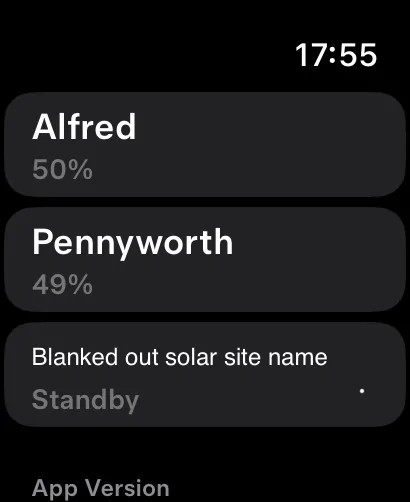
Watch App now shows multiple cars and solar and powerwall state.
Sponsored


rlhamil

Well-known member
First Name
Richard
Joined
Apr 1, 2020
Threads
6
Messages
553
Reaction score
603
Location
Glen Burnie, Maryland
Vehicles
2002 Trans Am WS6, 2018 Kia Sportage, 2024 Cyberbeast FS
Occupation
retired
Country flag
I updated the Tesla app on my iPhone and then opened the app on my Apple Watch. I also added the % charge on the Home Screen. My assumption/hope is that it does not keep the CyberTruck awake to get this data.
Or run the watch battery down faster, either.
 

The Tesla Guy

Well-known member
First Name
Daniel
Joined
Mar 15, 2024
Threads
7
Messages
440
Reaction score
401
Location
Washington
Website
youtubeteslaguy.com
Vehicles
23MS Plaid, 23MY, LR,Order-FoundationCyberTruck DM
Occupation
Retired
Country flag
OK, I installed it, however when I tried any of the functions on the watch, it says vehicle software update required.
So we’re going to have to wait until we get the right software likely the holiday update


MilliVanilli

Well-known member
Joined
Nov 30, 2023
Threads
9
Messages
146
Reaction score
277
Location
DMV
Vehicles
S
Country flag
For iOS users, go to the App Store, click your account details (avatar on the upper right corner), and look for the Tesla app for an update. If you don’t see it, swipe the page down to update apps with an update.
A shortcut is to long-press on the App Store icon and choose Updates.
 

rlhamil

Well-known member
First Name
Richard
Joined
Apr 1, 2020
Threads
6
Messages
553
Reaction score
603
Location
Glen Burnie, Maryland
Vehicles
2002 Trans Am WS6, 2018 Kia Sportage, 2024 Cyberbeast FS
Occupation
retired
Country flag
Apple Watch faces support extra features aka complications as that is called for watches. Watch apps can optionally offer complications. You can hold down on the watch face to edit it and add (limited slots, varies by face) or change the complications.

Mine presently shows altitude, weather, quick phone access and quick maps access.
 

kofitoshie

Member
First Name
Dgst77
Joined
Sep 14, 2024
Threads
2
Messages
22
Reaction score
62
Location
Co
Vehicles
Cybertruck
Country flag
Update tesla app
Updated the app and now I see it on my Apple Watch … this is the trick … look for the Apple Tesla app in the App Store , click on it … don’t hit on open …
 

dalton108

Well-known member
First Name
Dalton
Joined
Oct 17, 2020
Threads
132
Messages
3,982
Reaction score
7,965
Location
USA
Vehicles
‘24 FS/CB; ‘24 MX; ‘23 MS PLAID (Prior: ‘20-MY; ‘21-M3P) (Also: ‘14-FJ; ‘21-C8)
Occupation
Lawyer
Country flag
This is great but more than anything I want to use it as a key so I don’t have to have my phone with me all the time around the house particularly but unfortunately that’s going to require an update on my cars none of which have it yet and I’m sure the cybertruck will be last.


kofitoshie

Member
First Name
Dgst77
Joined
Sep 14, 2024
Threads
2
Messages
22
Reaction score
62
Location
Co
Vehicles
Cybertruck
Country flag
Pretty seamless integration… simply update your App on phone and Tesla App is automatically pushed to watch..

Your car needs a software update however also… so I am halfway there..

currently I can see my car status on the watch, but can not send commands till software arrives for car….

This is good progress..
Same here
 

AlmostHuman

Well-known member
Joined
May 1, 2024
Threads
7
Messages
985
Reaction score
1,349
Location
Earth
Vehicles
Model X, Cybertruck
Occupation
Human
Country flag
The app also supports complications. I added state of charge so I can always see battery % on my Watch. Awesome!

I see that and that is rad. I wonder if that will wake the vehicle more or not let it sleep as well.
 

cyberHoward

Well-known member
Joined
Nov 29, 2019
Threads
18
Messages
284
Reaction score
213
Location
Northern Ohio
Vehicles
Cybertruck AWD Foundation
Country flag
As of the second quarter of 2024, Android has a global market share of about 71.65%, while Apple's iOS has a market share of approximately 27.62%.

I am just saying.....
 

rlhamil

Well-known member
First Name
Richard
Joined
Apr 1, 2020
Threads
6
Messages
553
Reaction score
603
Location
Glen Burnie, Maryland
Vehicles
2002 Trans Am WS6, 2018 Kia Sportage, 2024 Cyberbeast FS
Occupation
retired
Country flag
I updated the Tesla app on my iPhone and then opened the app on my Apple Watch. I also added the % charge on the Home Screen. My assumption/hope is that it does not keep the CyberTruck awake to get this data.
I'm not a watch or even iPhone app developer, but from what I've seen of iOS/iPadOS app developer documentation (and doubtless even more so for the watch with its very limited battery), what apps can do when they're not displaying is limited (when they're in background, if you will). Background apps can even be stopped if memory is tight (also true on a Mac in some circumstances, but very rare there). The limitations are especially for power conservation, but also memory conservation (newer iPads can swap so that can be less critical on them), privacy, etc. In general, something in background cannot be using the microphone (or camera where applicable), since that would be intrusive. (iPhone, iPad, or watch may be doing its own listening for "Hey, Siri" but ignoring everything else)

A background app can stream audio, on the iPhone/iPad can show a reduced size video on top of whatever else is displaying, and at least some can access sensors. Continuous location access is power hungry, potentially privacy intrusive, and discouraged, better to define a big area (simple shape, square or rectangle maybe) and be notified when entering/leaving it. Apps can do additional things based on the time or a timer since last time they did it, and if stopped, will be restarted for that. That's pretty much it.

So probably the app saves the last reported percentage, and rarely if ever wakes up the truck to get new data, unless maybe you tap the complication or ask the app to take some action that requires waking the vehicle. Just like the iPhone app. That would be best in terms of not only not waking up the vehicle, but using as little extra power on the watch as possible.
Sponsored


Top