Sponsored

Audio system unavailable message after installing front light bar

MUTED

Member
Joined
Dec 10, 2025
Threads
2
Messages
18
Reaction score
12
Location
california
Vehicles
model 3, model x
Country flag
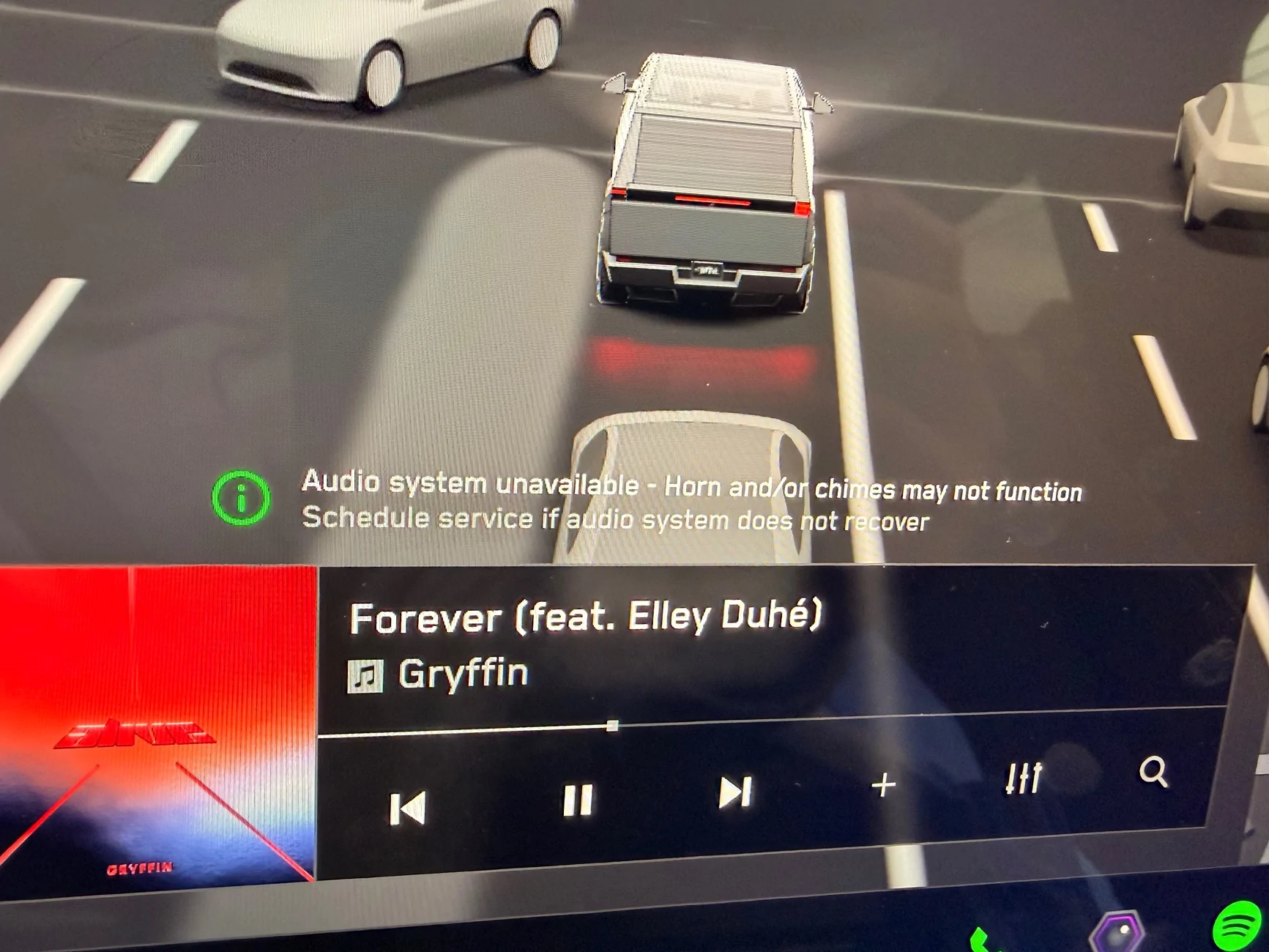
Has anyone had this message pop up?
I saw others on Reddit stating the message came up after installing an aftermarket camera/rearview mirror.
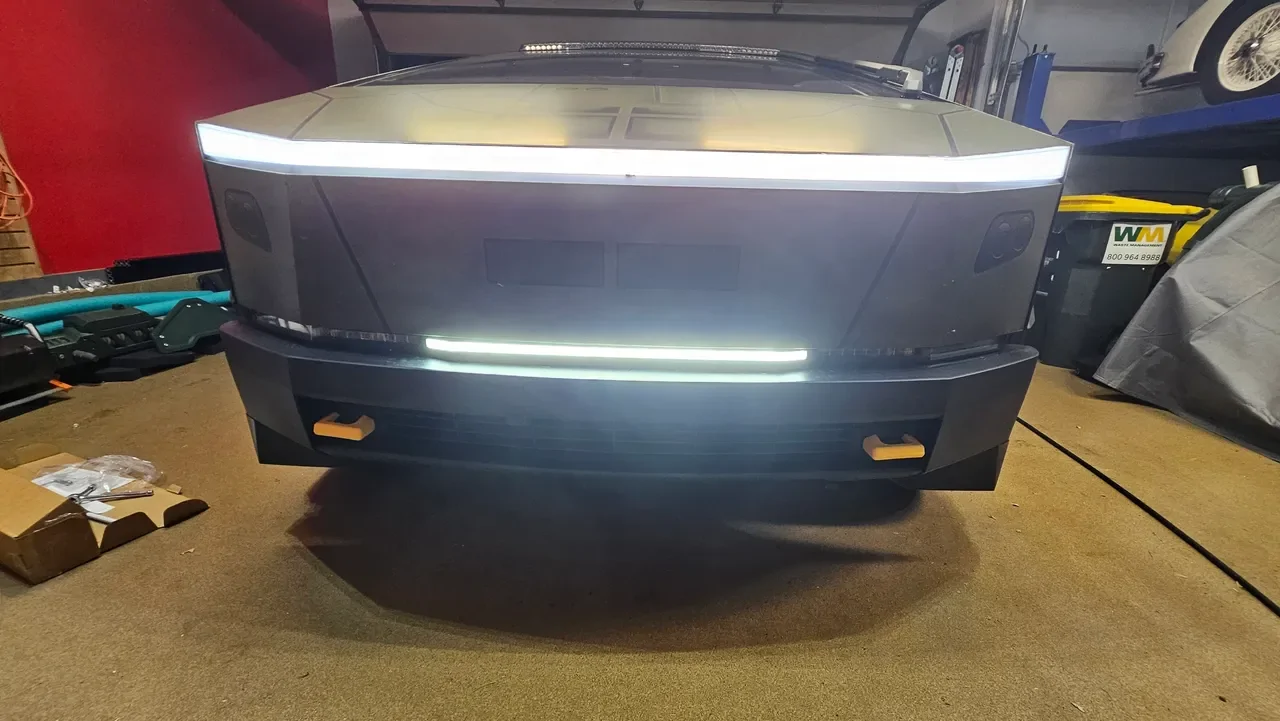
I installed the tesstudio front light bar this weekend, and since then the message has popped up, however the sound system works fine.
I’m assuming it has to do with where the light bar is drawing power from.
Thank you.

Tesla Cybertruck Audio system unavailable message after installing front light bar IMG_1670
Sponsored


mongo

Well-known member
Joined
May 27, 2024
Threads
5
Messages
4,520
Reaction score
5,495
Location
SE Michigan
Vehicles
Cyberbeast
Country flag
Has anyone had this message pop up?
I saw others on Reddit stating the message came up after installing an aftermarket camera/rearview mirror.
I installed the tesstudio front light bar this weekend, and since then the message has popped up, however the sound system works fine.
I’m assuming it has to do with where the light bar is drawing power from.
Thank you.
IMG_1670.webp
Did the install involve tee cable that you added to an inline connector? If so, that's likely the problem.

See similar thread:
https://www.cybertruckownersclub.co...-struggles-dont-let-this-happen-to-you.52020/
 

Kryptek

Well-known member
Joined
Apr 1, 2024
Threads
47
Messages
498
Reaction score
901
Location
Alaska
Vehicles
Cybertruck AWD Gray Interior VIN 4xxxx
Country flag
Might want to jump into service mode and mess around in those left column maybe you can recalibrate the horn or the audio sources and error will reset
 

REM

Well-known member
Joined
Dec 9, 2023
Threads
14
Messages
3,573
Reaction score
6,635
Location
NC
Vehicles
2020 Model 3 Standard Range++ & Diet Cybertruck, Dual Motor
Occupation
Professional Retard
Country flag
you probably have a module that needs to reset or recalibrate; that's why the message says "if audio system does not recover". That means it will eventually try to reset on its own.
 

T3s1a

Well-known member
Joined
Aug 20, 2024
Threads
2
Messages
84
Reaction score
147
Location
Orlando, FL
Vehicles
Cyberbeast
Country flag
I had the same light bar and the same error for almost a year. It never reset. No sign of issues with the audio system.

I had to remove it recently because the last update wouldn’t work for FSD. Somehow the splice would interfere with the seat sensor and FSD wouldn’t engage. After removal everything was normal again.


OP
OP

MUTED

Member
Joined
Dec 10, 2025
Threads
2
Messages
18
Reaction score
12
Location
california
Vehicles
model 3, model x
Country flag
I had the same light bar and the same error for almost a year. It never reset. No sign of issues with the audio system.

I had to remove it recently because the last update wouldn’t work for FSD. Somehow the splice would interfere with the seat sensor and FSD wouldn’t engage. After removal everything was normal again.
Wow that sucks.
The audio system does Work fine despite the error.
 
OP
OP

MUTED

Member
Joined
Dec 10, 2025
Threads
2
Messages
18
Reaction score
12
Location
california
Vehicles
model 3, model x
Country flag
Might want to jump into service mode and mess around in those left column maybe you can recalibrate the horn or the audio sources and error will reset
Hmm. I have no idea how to do that.
 
OP
OP

MUTED

Member
Joined
Dec 10, 2025
Threads
2
Messages
18
Reaction score
12
Location
california
Vehicles
model 3, model x
Country flag
you probably have a module that needs to reset or recalibrate; that's why the message says "if audio system does not recover". That means it will eventually try to reset on its own.
I’m not sure how to reset the module. I did do a hard reset of the truck. Error didn’t pop up initially then after 5 miles it came up.
 

REM

Well-known member
Joined
Dec 9, 2023
Threads
14
Messages
3,573
Reaction score
6,635
Location
NC
Vehicles
2020 Model 3 Standard Range++ & Diet Cybertruck, Dual Motor
Occupation
Professional Retard
Country flag
I’m not sure how to reset the module. I did do a hard reset of the truck. Error didn’t pop up initially then after 5 miles it came up.
We don't have the ability to reset all modules, so you may just need to give it some time.

Otherwise, I'd be concerned that your new light bar is causing some sort of intereference with the OEM components. At this point you should reach out to the manufacturer of the device.


IMO, I have a very short list of companies I would feel comfortable tapping directly into the wiring harness of this truck.
 
OP
OP

MUTED

Member
Joined
Dec 10, 2025
Threads
2
Messages
18
Reaction score
12
Location
california
Vehicles
model 3, model x
Country flag
We don't have the ability to reset all modules, so you may just need to give it some time.

Otherwise, I'd be concerned that your new light bar is causing some sort of intereference with the OEM components. At this point you should reach out to the manufacturer of the device.


IMO, I have a very short list of companies I would feel comfortable tapping directly into the wiring harness of this truck.
I agree. I was nervous about doing any electric aftermarket devices but the light out out of truck isn’t that great and didn’t expect tapping for 12v to be an issue.

Might have to tap directly to 12v battery and see if that disappears.


REM

Well-known member
Joined
Dec 9, 2023
Threads
14
Messages
3,573
Reaction score
6,635
Location
NC
Vehicles
2020 Model 3 Standard Range++ & Diet Cybertruck, Dual Motor
Occupation
Professional Retard
Country flag
I agree. I was nervous about doing any electric aftermarket devices but the light out out of truck isn’t that great and didn’t expect tapping for 12v to be an issue.

Might have to tap directly to 12v battery and see if that disappears.
wait, 12 volt? which exact lightbar did you get and where did you install it? need more details.
 

TeslaKen

Well-known member
First Name
Ken
Joined
Apr 26, 2024
Threads
107
Messages
1,239
Reaction score
1,695
Location
Overland Park
Website
www.halocybertruck.com
Vehicles
Cyberbeast, M3PD+, GT4, XK140OTS
Occupation
Currently Occupied
Country flag
I had the same light bar and the same error for almost a year. It never reset. No sign of issues with the audio system.

I had to remove it recently because the last update wouldn’t work for FSD. Somehow the splice would interfere with the seat sensor and FSD wouldn’t engage. After removal everything was normal again.
FYI it works again after a recent update, it no longer interferes with FSD / seat sensor so you can reinstall and it should work again for you. (it works for me and a few others that have posted here)
 

TeslaKen

Well-known member
First Name
Ken
Joined
Apr 26, 2024
Threads
107
Messages
1,239
Reaction score
1,695
Location
Overland Park
Website
www.halocybertruck.com
Vehicles
Cyberbeast, M3PD+, GT4, XK140OTS
Occupation
Currently Occupied
Country flag
never mind your right. It’s 48v.
That's not correct. If you bought the front light bar, meaning the LED strip that goes in between the headlights and replaces the black strip that is normally there, then that LED strip is powered by 12v that is tapped in at the passenger side footwell connection, and if you got an older version of the wiring harness that comes with the light bar then it is known to interfere with the speaker working and can throw the error you are seeing.

If you bought a light bar that goes on the roof of your vehicle similar to the factory light bar on the Beast version of the CT then it could be 48v, but that doesn't interfere with your stereo, so again, I'm pretty sure you bought the item mentioned in this article:
Starlink Bumper Light Bar from Teslaunch

Tesla Cybertruck Audio system unavailable message after installing front light bar rs=w_1280
Sponsored


Top