Sponsored

Zane Edwards

Well-known member
First Name
ZMAN
Joined
Feb 18, 2024
Threads
21
Messages
422
Reaction score
568
Location
California
Vehicles
Audi R8, BMW 4 Conv. MB GLS, Tesla CT AWD
Occupation
Exec
Country flag
Just installed this morning, then drove to work. During the 11 miles commute, several issues:

1. The map detoured twice. Initially I thought about road closures or traffic jams. I kept going the route as before, turned out nothing there.

2. At “No Turn on Red”, the car started to turn!

A great feature is the maximum speed can be adjusted by the right wheel, like other Tesla cars. The default for standard is the speed limit posted. But it can be changed in “Hurry” mode with percentage above speed limit. I usually drive 5-10 MPH above, so I chose 10% without the other option.

I also noticed that the car leaves more room from the car ahead when stops, makes me feel more comfortable.
This is the improvement I was waiting for........especially on longer trips having control over the actual speed is important
Sponsored


Sjohnson20

Well-known member
Joined
Nov 30, 2023
Threads
8
Messages
1,438
Reaction score
2,439
Location
Florida
Vehicles
Cybertruck AWD, Model Y
Country flag
Second trip. It was better. It stops much smoother but maybe a little too smooth now. But I think I prefer it like this instead of the bat out of hell approach it had before.

It went on every green light this time when it was the lead car. So far seems like they fixed that.

I changed it to hurry mode and it's still doing 20 in my neighborhood lol. Not sure whats up with that but it's not really a big deal.

So far hurry mode seems to be the best mode. I played around with the % on the max but it still does what it wants and sometimes goes below the speed limit.
 

Sjohnson20

Well-known member
Joined
Nov 30, 2023
Threads
8
Messages
1,438
Reaction score
2,439
Location
Florida
Vehicles
Cybertruck AWD, Model Y
Country flag
This is the improvement I was waiting for........especially on longer trips having control over the actual speed is important
There's still no real control you are just telling it to not go over a certain speed. It still just does whatever it feels like. I had to hit the accelerator multiple times to get it up to the speed limit.


TyPope

Well-known member
First Name
Ty
Joined
Mar 31, 2020
Threads
33
Messages
3,219
Reaction score
4,936
Location
Chesapeake Beach, MD
Vehicles
'23 MYLR, FS Cyberbeast 280xx
Occupation
Current Operations for... an organization
Country flag
I would as well. As cool as FSD is I get very annoyed I have to turn it off to send a text (yes I know that's bad). It is way too sensitive even if you're on a rural highway.
I don't have to turn mine off. I just press the button and say "Text Donna (or whoever)." Then, press the button when the window pops up, tell it my text and hit the button to send. Much better than picking up a phone. Like, is this 2005?
 

TruckGenio

Well-known member
Joined
Dec 12, 2019
Threads
4
Messages
112
Reaction score
101
Location
Boston
Vehicles
Cybertruck
Country flag
Ge4BJPqbUAEuGgg.jpeg


notateslaapp
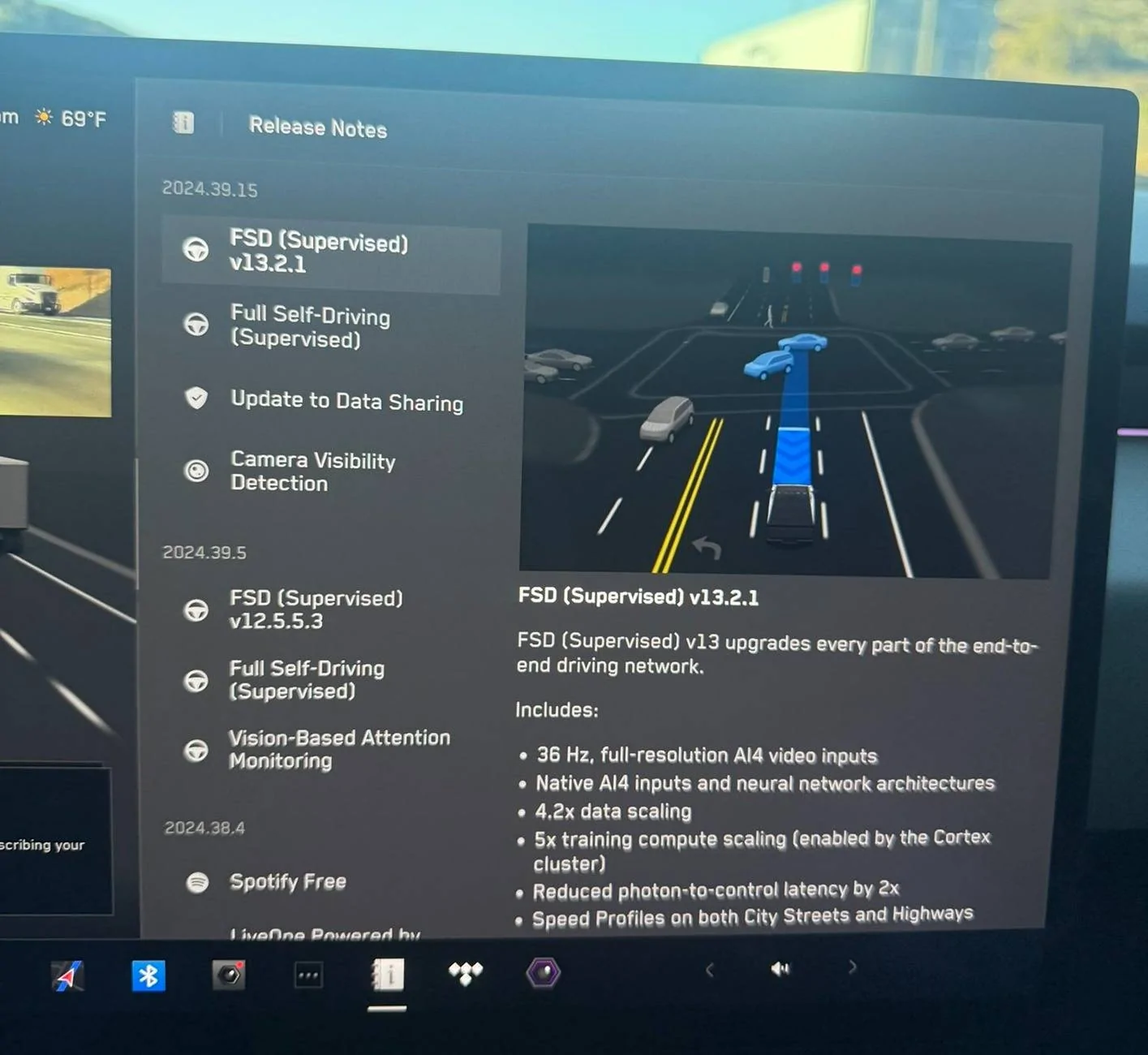
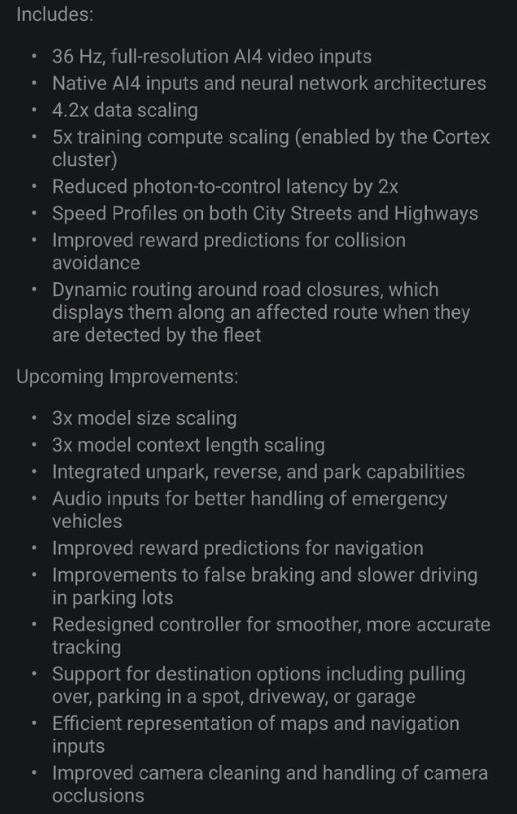
The Cybertruck and other HW4-based vehicles are receiving this update, however, the release notes for the Cybertruck differ from other models as shown below.

Editorial note: This version of FSD for the Cybertruck differs slightly from the other models. Some features that are in this update for other Tesla models are listed under upcoming improvements for the Cybertruck.

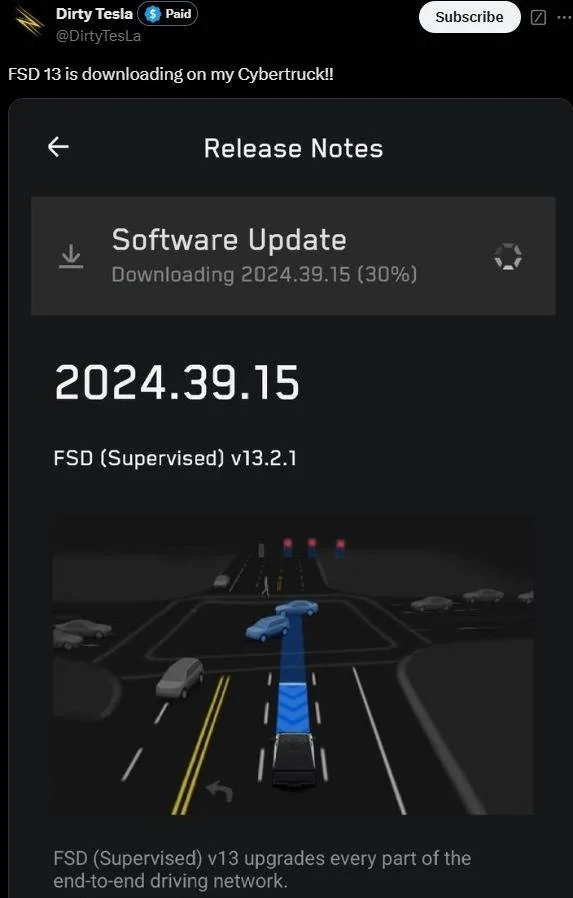
FSD 13 is downloading on my Cybertruck!! 1.webp

FSD 13 is downloading on my Cybertruck!! 2.jpg


Got V13 no noticeable difference during driver.
Still ignores the same stop signs as V12
Does not stop for school busses.
Still no summon
Speed profile is nice but not as good as just having autopilot or minimal lane changes
I expect it to improve faster but so far not impressed.
 

FlykidCT

Well-known member
First Name
Jon
Joined
Aug 8, 2024
Threads
1
Messages
59
Reaction score
80
Location
Texas
Vehicles
2024 Cybertruck
Occupation
Pilot
Country flag
My service center just updated it for me!
 

Zane Edwards

Well-known member
First Name
ZMAN
Joined
Feb 18, 2024
Threads
21
Messages
422
Reaction score
568
Location
California
Vehicles
Audi R8, BMW 4 Conv. MB GLS, Tesla CT AWD
Occupation
Exec
Country flag
There's still no real control you are just telling it to not go over a certain speed. It still just does whatever it feels like. I had to hit the accelerator multiple times to get it up to the speed limit.
so you can't use the steering wheel scroll to change the speed?
 

Doc John

Well-known member
First Name
John
Joined
Feb 1, 2024
Threads
13
Messages
57
Reaction score
68
Location
Virginia
Vehicles
Cybertruck, jeep, jeep
Country flag
So far with this latest update it is driving in the gutters on town roads and got to 49 in a 35 which will get you a ticket quick in our town. This update also doesn’t let you turn off the percent offset mode. Before this you could turn that off and just set a fixed speed over posted and easily adjust speed on the fly.


Sjohnson20

Well-known member
Joined
Nov 30, 2023
Threads
8
Messages
1,438
Reaction score
2,439
Location
Florida
Vehicles
Cybertruck AWD, Model Y
Country flag
I just did 4 more drives, all on streets.

Go on green seems to be fixed. I'm glad for that.

Lane changes seem a lot better on streets but maybe still a little late.

It's way way better at stopping behind traffic.

I only had to hit the brake once when it was making a right on red and a car was coming very fast to beat the light and it didn't notice.
 

tbuck

Well-known member
Joined
Nov 28, 2023
Threads
8
Messages
217
Reaction score
453
Location
Irving, TX
Vehicles
Cyberbeast
Country flag
I hope V13 ignores the minimum speed 40 signs in Georgia on I75 and I95. They aggravate the heck out of me.
FSD does not actually read the signs, it relies on the map data. So, if the speed is incorrect in FDS, it means the local municipality or county failed to update the central map data and so that fed up in to Google Maps database (which I believe Tesla uses - may be incorrect). You can use Google maps to report bad data so it can be corrected.
 
  • Like
Reactions: REM

Sjohnson20

Well-known member
Joined
Nov 30, 2023
Threads
8
Messages
1,438
Reaction score
2,439
Location
Florida
Vehicles
Cybertruck AWD, Model Y
Country flag
FSD does not actually read the signs, it relies on the map data. So, if the speed is incorrect in FDS, it means the local municipality or county failed to update the central map data and so that fed up in to Google Maps database (which I believe Tesla uses - may be incorrect). You can use Google maps to report bad data so it can be corrected.
I thought that but sometimes it changes to 40 right when it passes the sign. How do we report to google?
 

tbuck

Well-known member
Joined
Nov 28, 2023
Threads
8
Messages
217
Reaction score
453
Location
Irving, TX
Vehicles
Cyberbeast
Country flag
I thought that but sometimes it changes to 40 right when it passes the sign. How do we report to google?
It hits a GPS location with a speed 8ndicator, usually that is where the sign is planted. You will see the exact location of changes occur before or after the sign.

If Tesla is using Google Maps data, then you would do it in Google Maps. Tap and hold the location with the error. Select report a problem, then add or fix a road, and then select other. Be short and detailed in the description this is x direction on this road, the speed limit is actually Y or this is a no right turn on red intersection, etc.

I have no idea how long it would take to go from report to fix to Tesla, however.
Sponsored


Top