Sponsored

Charging settings and Schedule

TimeOut

Well-known member
Joined
Jun 6, 2024
Threads
0
Messages
66
Reaction score
133
Location
South Texas
Vehicles
Cybertruck Dual Motor
Occupation
Software Engineer
Country flag
Can you setup charge on solar? Our 2020 X still does not have this but I use it on the Cybertruck every day.

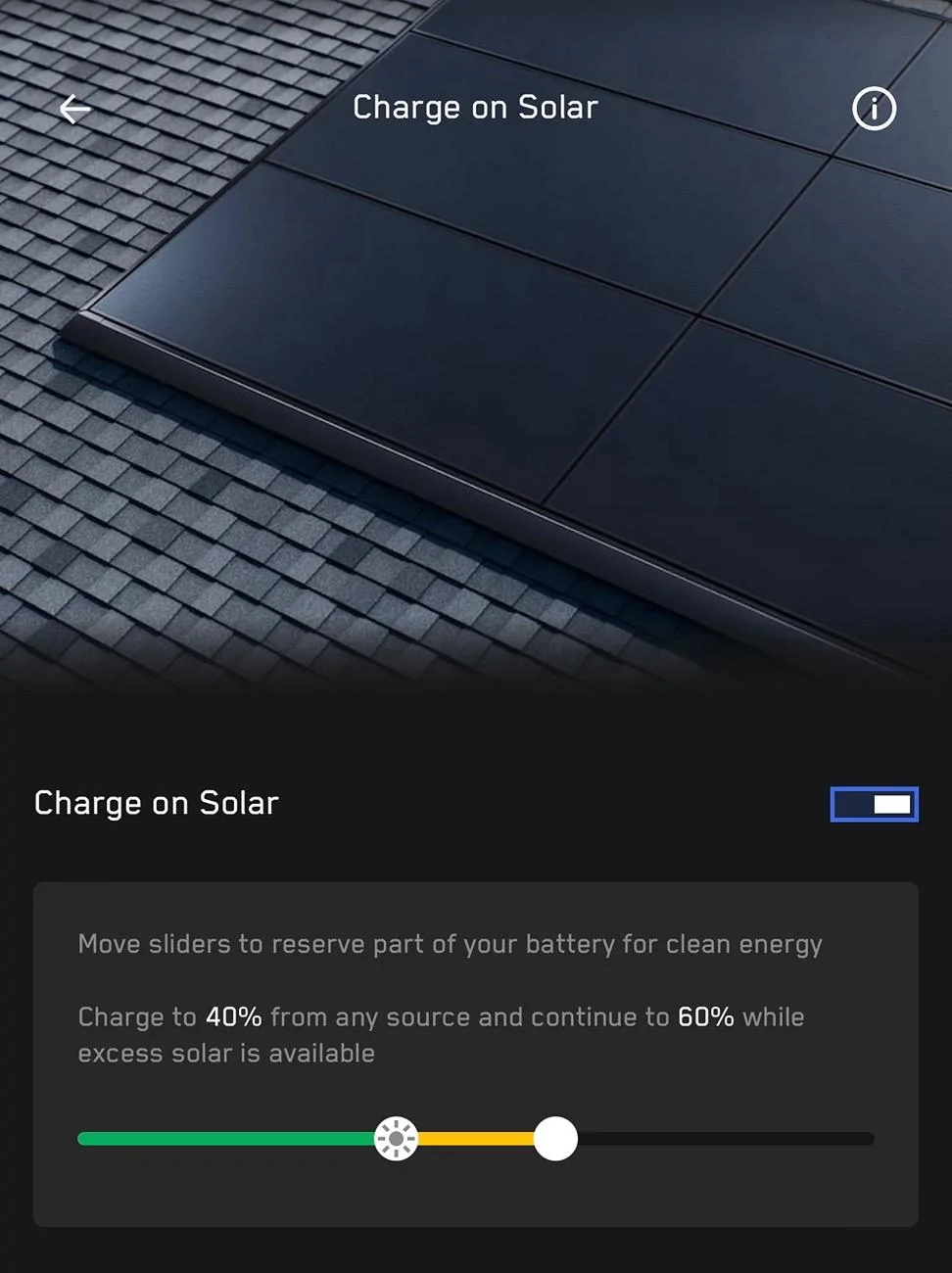
IMG_9160.jpeg
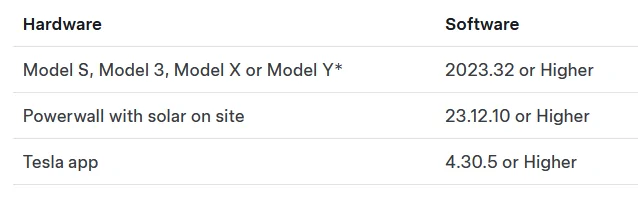
Nope, I think Charge On Solar needs a more recent firmware for my Solar setup. The firmware versions, I think, have to be approved by the electricity provider and they haven't in my area. My software version, for solar is still on 23.12.1.


Charge on Solar Version requirements.
Tesla Cybertruck Charging settings and Schedule 1721488894965-
Sponsored


AlmostHuman

Well-known member
Joined
May 1, 2024
Threads
7
Messages
985
Reaction score
1,349
Location
Earth
Vehicles
Model X, Cybertruck
Occupation
Human
Country flag
Nope, I think Charge On Solar needs a more recent firmware for my Solar setup. The firmware versions, I think, have to be approved by the electricity provider and they haven't in my area. My software version, for solar is still on 23.12.1.


Charge on Solar Version requirements.

1721488894965-we.png
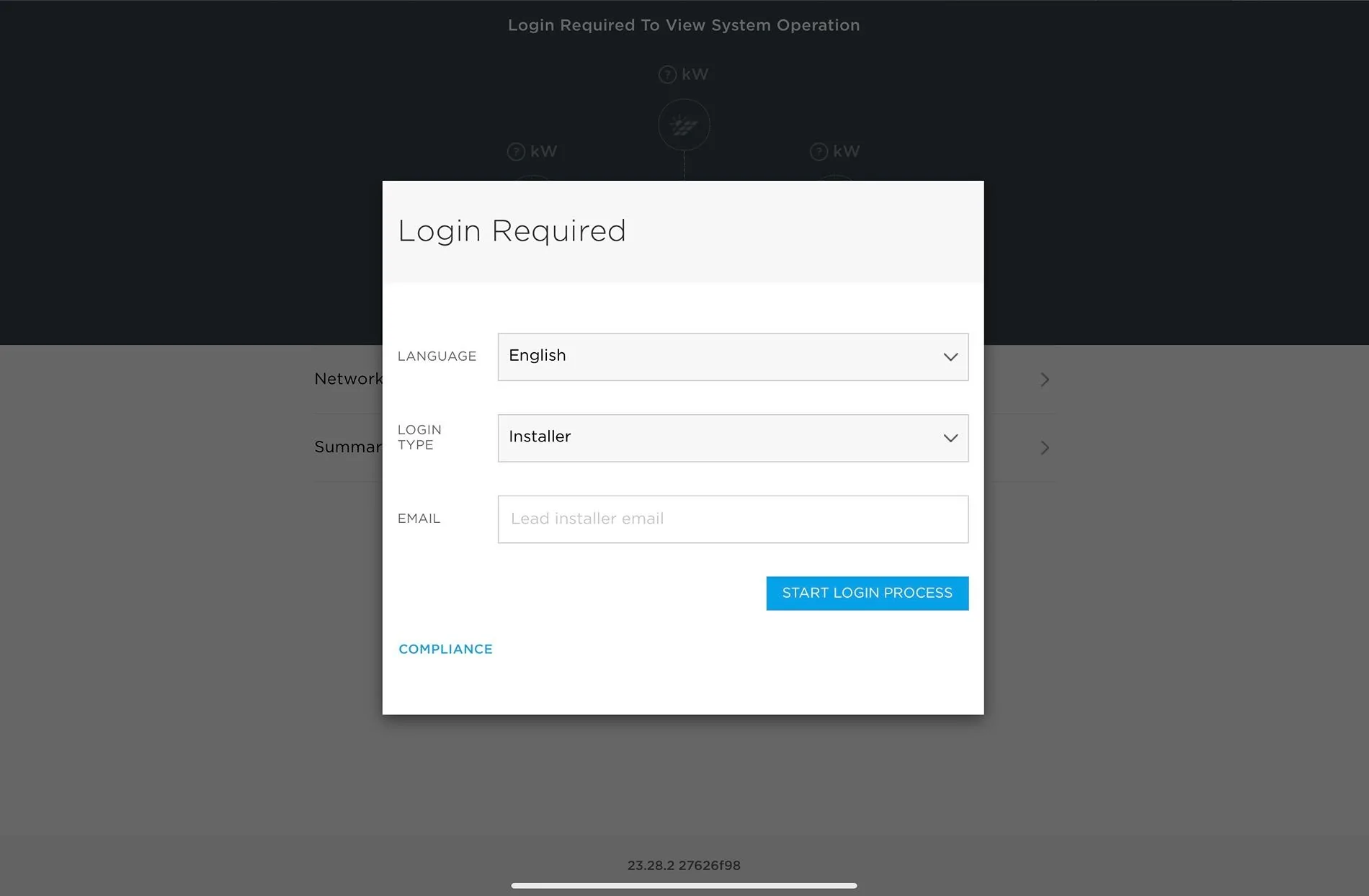
Can you access the web interface of the Backup Gateway for your system? I hard wired mine and gave it a static IP address so I can always jump on to check things out. If you can you can tell it to check for new firmware from that interface. If you can find the IP address of your Backup Gateway you can log in using the “Installer” Login Type
Tesla Cybertruck Charging settings and Schedule IMG_0431

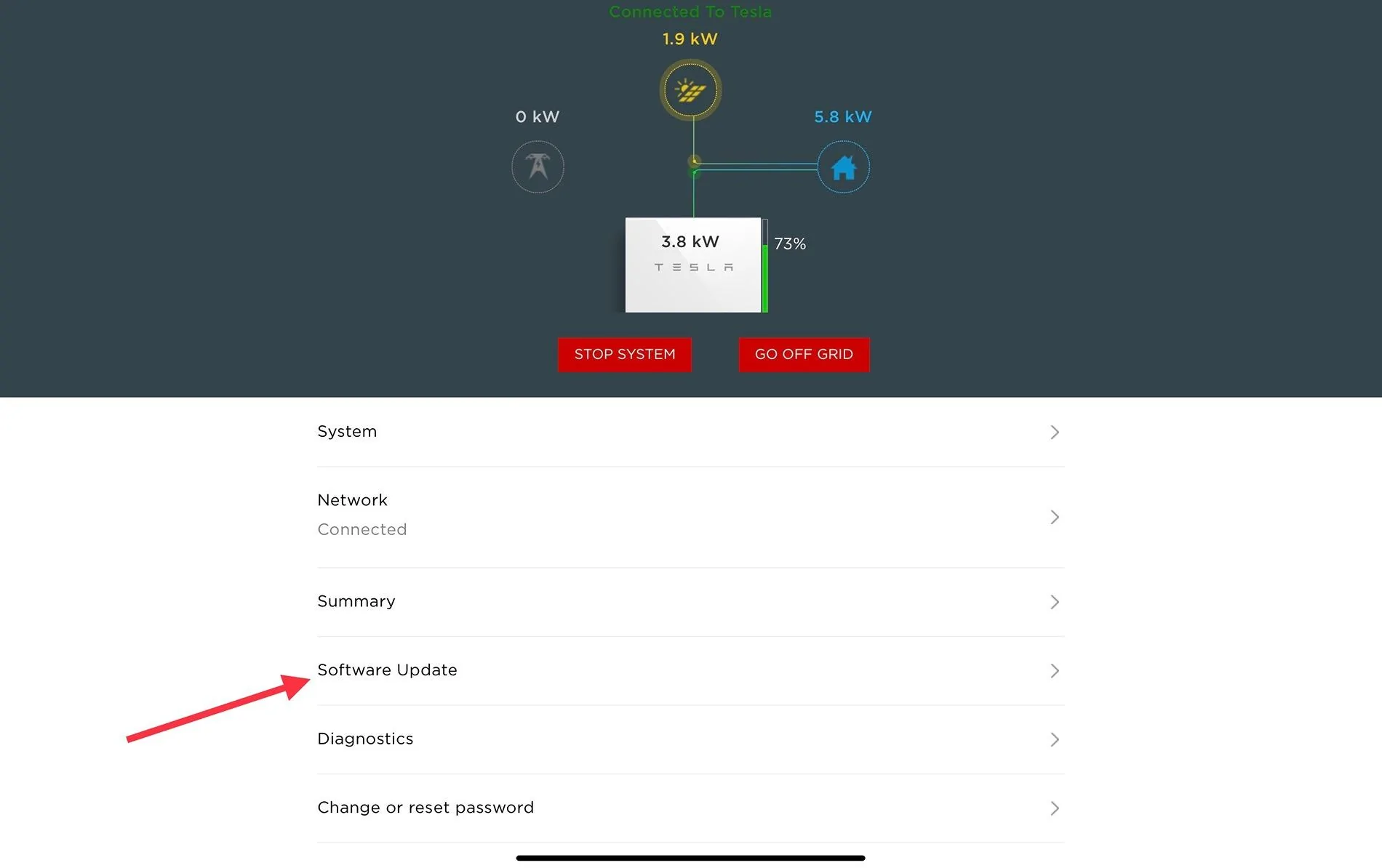
I think you can put whatever email you want in there, I just use the email from my Tesla account but it doesn’t ask for a password. You need to be next to one of the Powerwalls. When you click “Start Login Process” it will ask you to toggle the power switch on one of the Powerwalls. After that it will dump you in to the screen below and you can go in to Software Updates
Tesla Cybertruck Charging settings and Schedule IMG_0432

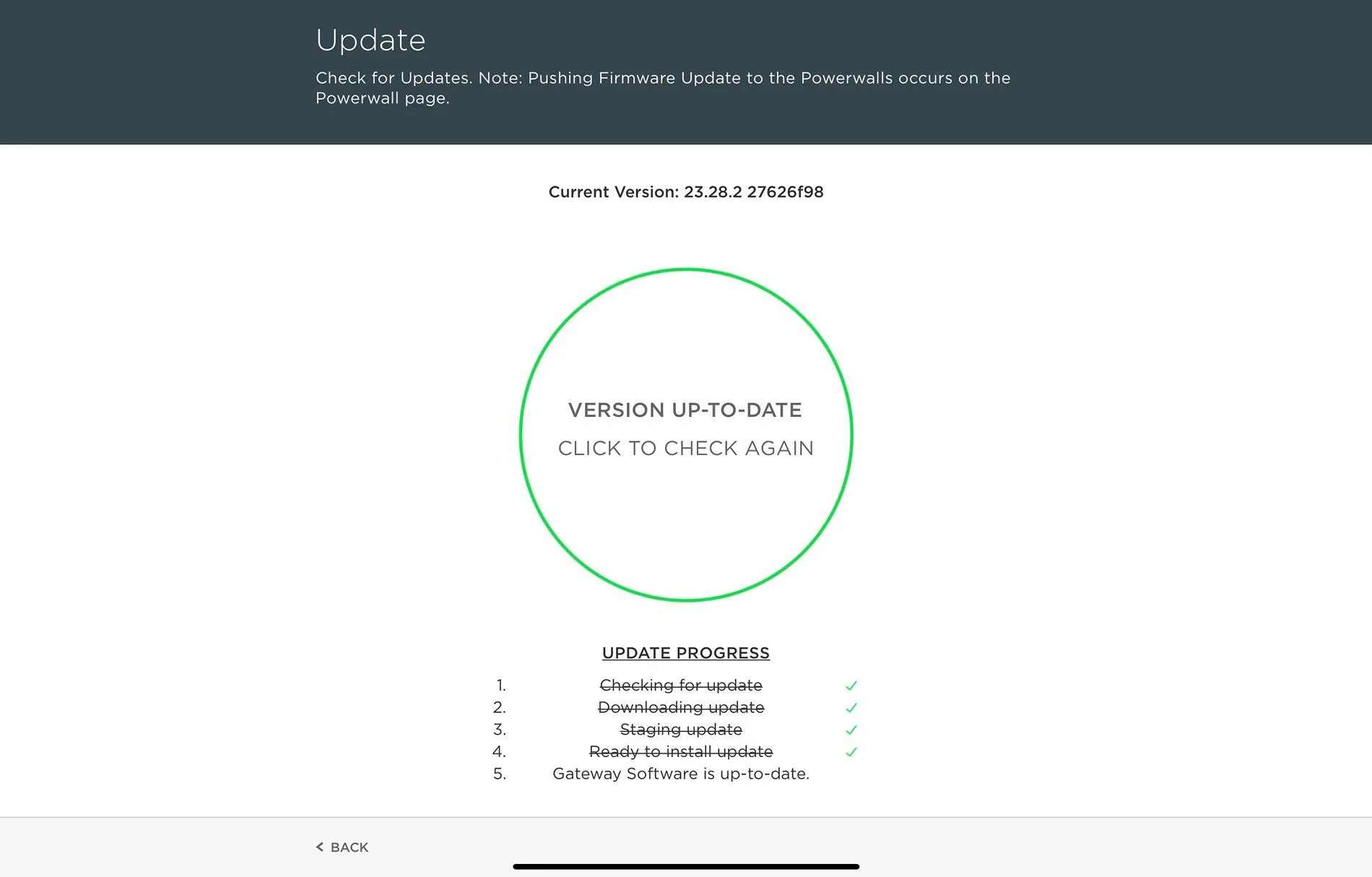
When you get in there it will show you the below screen and you can click in the green circle to have the system check for an update. It should check to see if there is an update an apply it.
Tesla Cybertruck Charging settings and Schedule IMG_0433

This should get you on the latest version, hopefully put you in a version that supports Charge on Solar.

Note it says “Pushing Firmware Update to the Powerwalls occurs on the Powerwall page” What that is talking about is in the Wizard for the system there is a screen where you can check to see if the Powerwalls have an update. I can post about that as well if you are interested and if the above update tasks don’t work for you.
 

TimeOut

Well-known member
Joined
Jun 6, 2024
Threads
0
Messages
66
Reaction score
133
Location
South Texas
Vehicles
Cybertruck Dual Motor
Occupation
Software Engineer
Country flag
Can you access the web interface of the Backup Gateway for your system? I hard wired mine and gave it a static IP address so I can always jump on to check things out. If you can you can tell it to check for new firmware from that interface. If you can find the IP address of your Backup Gateway you can log in using the “Installer” Login Type
IMG_0431.jpeg

I think you can put whatever email you want in there, I just use the email from my Tesla account but it doesn’t ask for a password. You need to be next to one of the Powerwalls. When you click “Start Login Process” it will ask you to toggle the power switch on one of the Powerwalls. After that it will dump you in to the screen below and you can go in to Software Updates
IMG_0432.jpeg

When you get in there it will show you the below screen and you can click in the green circle to have the system check for an update. It should check to see if there is an update an apply it.
IMG_0433.jpeg

This should get you on the latest version, hopefully put you in a version that supports Charge on Solar.

Note it says “Pushing Firmware Update to the Powerwalls occurs on the Powerwall page” What that is talking about is in the Wizard for the system there is a screen where you can check to see if the Powerwalls have an update. I can post about that as well if you are interested and if the above update tasks don’t work for you.
Yep, I do the 'update' about once a month and it spins at 'you are current'. It really does have to do with features in the release and if they are approved in my area.
 

igs

Well-known member
Joined
Aug 7, 2023
Threads
45
Messages
1,183
Reaction score
1,730
Location
CA
Vehicles
CT, MX, MY
Occupation
Tesla: "To maintain service life, the battery pack should be stored at a state of charge (SOC) of 15 to 50%."
Country flag


Cyber Satoshi

Well-known member
Joined
Jun 5, 2024
Threads
25
Messages
206
Reaction score
188
Location
Florida
Vehicles
Cybertruck
Country flag
I plug in and charge to around 58% when I get home. After the sentry mode drains over night I leave for work at about 54-55%. Total burn per day there and back is around 25%. Then repeat.

The internet says 20-60 is ideal from what I gather.... But probably extremely conservative.


Top