Sponsored

xmario

Active member
First Name
Marius
Joined
Mar 30, 2021
Threads
0
Messages
27
Reaction score
12
Location
Fort Lauderdale, FL
Vehicles
CT
Country flag
One uncertainty is now solved. Buy FSD now for 8k, and you will get unsupervised when it becomes available, for no additional cost. I saw this on X:
1769401291118-ej.webp
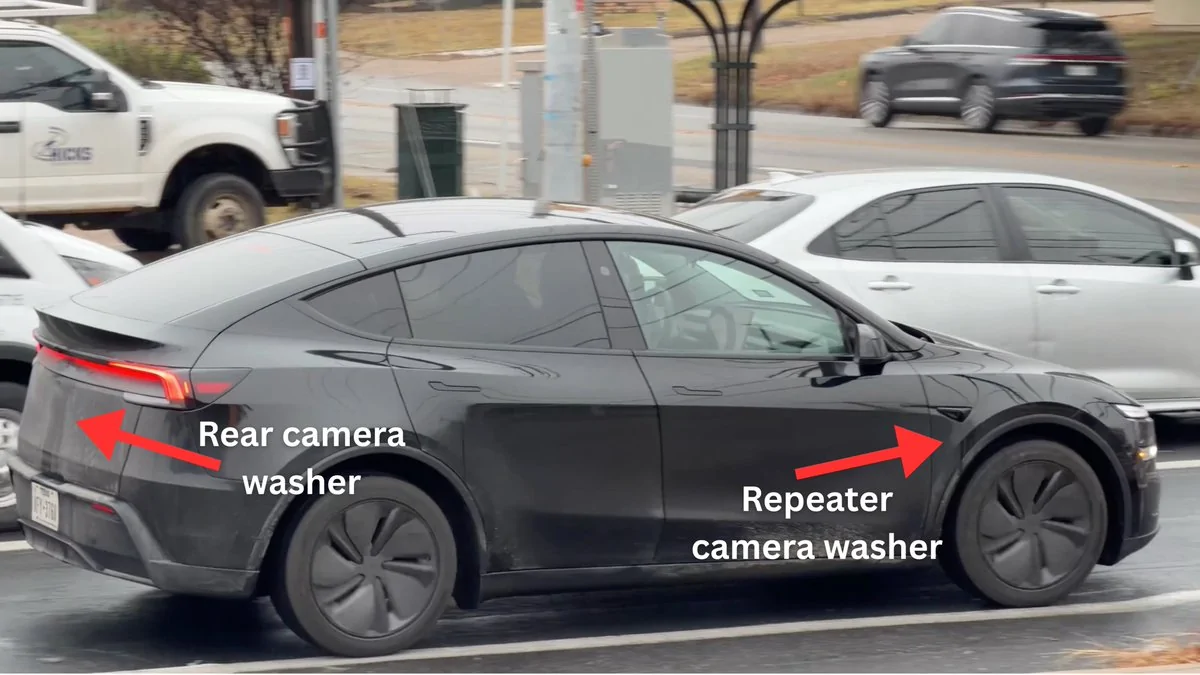
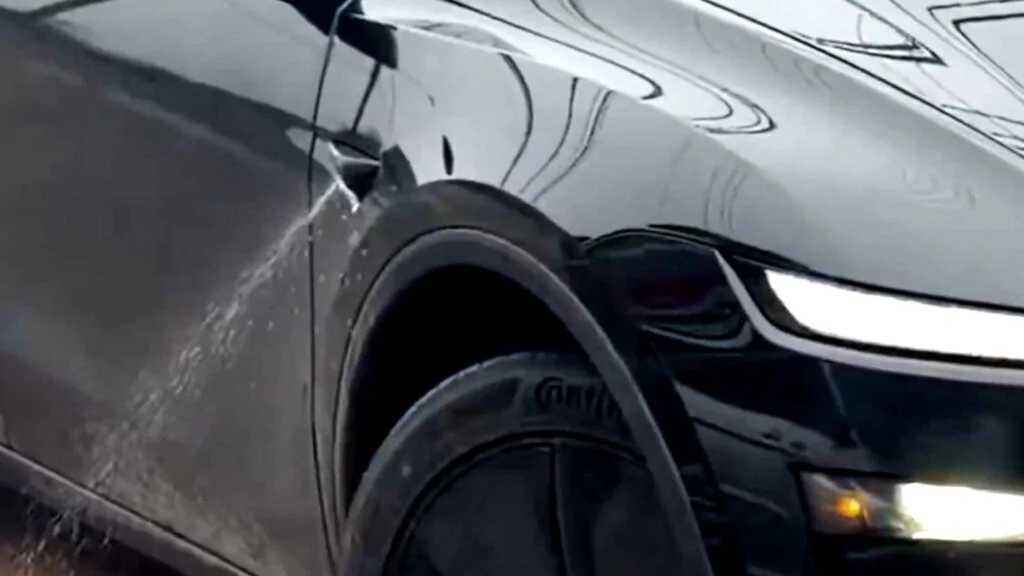
Fake News! Your Cybertruck or any current Model for that matter is Not capable of Unsupervised as they are missing the most basic feature: Camera Washers!
Imagine that big Semi passing you and splashing muddy water all over your side cameras while you are SLEEPING in you your Unsupervised vehicle and flowing traffic is flying you by at 80mph!
They are just now now prototyping them with washers and I super doubt they will hassle a retrofit. So yeah, you DON"T need to pay any additional fees as you will not even be eligible. Common sense. My hunch is washers will come to production same time with Ai5 this way they will have a double excuse to reset UFSD while you mumbling and stuttering just like the HW3 owners are to this day. Hello!
Sponsored
 

SCTesla

Well-known member
Joined
Jun 11, 2024
Threads
6
Messages
2,486
Reaction score
3,703
Location
USA
Vehicles
22 Model S, 24 CT
Country flag
Fake News! Your Cybertruck or any current Model for that matter is Not capable of Unsupervised as they are missing the most basic feature: Camera Washers!
Imagine that big Semi passing you and splashing muddy water all over your side cameras while you are SLEEPING in you your Unsupervised vehicle and flowing traffic is flying you by at 80mph!
They are just now now prototyping them with washers and I super doubt they will hassle a retrofit. So yeah, you DON"T need to pay any additional fees as you will not even be eligible. Common sense. My hunch is washers will come to production same time with Ai5 this way they will have a double excuse to reset UFSD while you mumbling and stuttering just like the HW3 owners are to this day. Hello!
Washers are already on the RT along with Starlink.

Tesla Cybertruck FSD going subscription only (one-time purchase no longer available after Feb 14) 1770325307715-fx

Tesla Cybertruck FSD going subscription only (one-time purchase no longer available after Feb 14) 1770325344036-iv
 

CTOWannabe

Well-known member
First Name
CTO
Joined
Feb 28, 2024
Threads
8
Messages
148
Reaction score
140
Location
US
Vehicles
2025 Cybertruck AWD
Country flag
Updates are automatic, not click. And every Tesla has basic connectivity for this purpose - you cannot turn it off.
Theyre not automatic for me. I must click them. And you have to pay for connectivity, so just don’t.
 

SCTesla

Well-known member
Joined
Jun 11, 2024
Threads
6
Messages
2,486
Reaction score
3,703
Location
USA
Vehicles
22 Model S, 24 CT
Country flag
Theyre not automatic for me. I must click them. And you have to pay for connectivity, so just don’t.
Foundation Series got it for free, but you're correct updates are not automatic to install. They download when connected to wifi


The Duke

Well-known member
Joined
Sep 26, 2024
Threads
7
Messages
74
Reaction score
114
Location
Fremont, CA
Vehicles
Model S, CyberTruck
Occupation
Engineer (retired)
Country flag
First off, stop wasting your hard work’s $8000 on gimmicks and first world problems unless you’re over 70 yrs old or are somewhat impaired.
Secondly, Unsupervised FSD does not exist! All you are paying for right now is the Supervised variant. Whenever the Unsupervised will arrive that will be a different product in itself that will cost more to subscribe to or purchase (if that returns), maybe 2x, 3x. You will be stuck with your Supervised FSD!
All that is until you trade in your car anyway or get it totaled by some idiot that clipped you at the intersection then its Goodbye to all your lifetime chauffeur dreams and back to subscription 101.
Or maybe you are willing to pay for use as is and are willing to invest in Tesla finishing this product.
 

PungoteagueDave

Well-known member
First Name
David
Joined
Mar 2, 2025
Threads
2
Messages
946
Reaction score
1,034
Location
Boynton Beach
Vehicles
‘25 Tesla Cybertruck, ‘26 Tesla MY Launch, ‘13 Porsche C4S, ‘26 BMW R1300 GSA
Occupation
retired
Country flag
Theyre not automatic for me. I must click them. And you have to pay for connectivity, so just don’t.
All Teslas have two levels of connectivity. There is no charge for the base level called Standard Connectivity that provides basic mapping, navigation and OTA updates. You cannot opt out of that and is included with every Tesla under an 8-year subscription. However, my older Teslas still have connectivity without any charges, including a 2013 model, so connectivity is still live after 12 years, no way to opt out or turn off. In addition to OTA, Standard connectivity provides basic maps and rerouting navigation but lacks traffic data.

The second level is called Premium Connectivity, costs $9.99/mo or $100/yr. It provides streaming functions, traffic, weather overlay, live sentry camera viewing, none of which work in Standard connectivity.

The above applies to the U.S., and I understand the rules may be different elsewhere, especially in markets where Tesla does not sell vehicles. However, we are seeing reports that even in Russia, standard connectivity is working fine.

Here are the facts on OTA updates:

Owners can postpone installing updates through the mobile app or in-car touchscreen when prompted - but only postpone - see below.

You can turn off automatic updates through Controls > Software > Software Update Preference to change settings, though this only pauses them, it does not stop them forever.

If a Tesla is never connected to Wi-Fi, it will not download updates, though this prevents receiving any improvements or fixes - so it is technically correct that an owner could avoid receiving OTA updates temporarily - however, be aware of these facts:

Tesla's warranty documents state that coverage is excluded for issues arising from failure to install available software updates.

For updates related to safety recalls, Tesla pushes these automatically without user involvement or approval, forcing the update regardless of user preference. This occurs via Standard Connectivity, and when it does, you do not get to pick and choose - your entire disk image is updated and you get the latest software version applicable to your vehicle. This is Tesla's ultimate "out" for your statement that you click (or not) for updates - eventually you get updated, no matter what.

Lastly, if you bring your car in for service, Tesla will typically update the software without your explicit authorization and may do so even if you request otherwise.

So be a wild horse all you want, but eventually the Tesla machine will tame us all.
 

xmario

Active member
First Name
Marius
Joined
Mar 30, 2021
Threads
0
Messages
27
Reaction score
12
Location
Fort Lauderdale, FL
Vehicles
CT
Country flag
There is a reason why neither Tesla nor Elon NEVER replied to Sawyer Merritt post on X about thE current FSD being sold as supervised or unsupervised. Nobody knows or cares for that matter. Hello
 

CTOWannabe

Well-known member
First Name
CTO
Joined
Feb 28, 2024
Threads
8
Messages
148
Reaction score
140
Location
US
Vehicles
2025 Cybertruck AWD
Country flag
All Teslas have two levels of connectivity. There is no charge for the base level called Standard Connectivity that provides basic mapping, navigation and OTA updates. You cannot opt out of that and is included with every Tesla under an 8-year subscription. However, my older Teslas still have connectivity without any charges, including a 2013 model, so connectivity is still live after 12 years, no way to opt out or turn off. In addition to OTA, Standard connectivity provides basic maps and rerouting navigation but lacks traffic data.

The second level is called Premium Connectivity, costs $9.99/mo or $100/yr. It provides streaming functions, traffic, weather overlay, live sentry camera viewing, none of which work in Standard connectivity.

The above applies to the U.S., and I understand the rules may be different elsewhere, especially in markets where Tesla does not sell vehicles. However, we are seeing reports that even in Russia, standard connectivity is working fine.

Here are the facts on OTA updates:

Owners can postpone installing updates through the mobile app or in-car touchscreen when prompted - but only postpone - see below.

You can turn off automatic updates through Controls > Software > Software Update Preference to change settings, though this only pauses them, it does not stop them forever.

If a Tesla is never connected to Wi-Fi, it will not download updates, though this prevents receiving any improvements or fixes - so it is technically correct that an owner could avoid receiving OTA updates temporarily - however, be aware of these facts:

Tesla's warranty documents state that coverage is excluded for issues arising from failure to install available software updates.

For updates related to safety recalls, Tesla pushes these automatically without user involvement or approval, forcing the update regardless of user preference. This occurs via Standard Connectivity, and when it does, you do not get to pick and choose - your entire disk image is updated and you get the latest software version applicable to your vehicle. This is Tesla's ultimate "out" for your statement that you click (or not) for updates - eventually you get updated, no matter what.

Lastly, if you bring your car in for service, Tesla will typically update the software without your explicit authorization and may do so even if you request otherwise.

So be a wild horse all you want, but eventually the Tesla machine will tame us all.
So to summarize if you don’t put your car on WiFi you won’t be upgraded if you don’t want.

I’ll roam free. YMMV.
 

PungoteagueDave

Well-known member
First Name
David
Joined
Mar 2, 2025
Threads
2
Messages
946
Reaction score
1,034
Location
Boynton Beach
Vehicles
‘25 Tesla Cybertruck, ‘26 Tesla MY Launch, ‘13 Porsche C4S, ‘26 BMW R1300 GSA
Occupation
retired
Country flag
So to summarize if you don’t put your car on WiFi you won’t be upgraded if you don’t want.

I’ll roam free. YMMV.
That’s not what I said and is not what happens. We have already had one update that was pushed as part of a recall and a couple more that made safety updates to existing systems. Those are mandatory. They are sent to every Tesla regardless of WiFi, and absent WiFi they come in through standard connectivity that you cannot turn off. Those updates are the entire disk image, as Tesla does not send targeted or partial updates - when they push it, you get everything to-date.

What this means is that you have already received updates, whether or not you wanted them. You will continue to receive such updates, regardless of your intent. Further, if you take your vehicle in for service, it will almost certainly be updated to the latest current version.

Look, I showed you that you were wrong about connectivity. This stuff isn’t hard - you can google all of it, which is what I did to make sure every element of the above is correct, although I knew it to be true before doing so. That search will take you to the Tesla documents verifying the above outline for how and when you can reject updates. Yes, you are partially correct that you can delay an update using the methods described above. But that’s all you are doing because you can neither turn off connectivity, nor can you avoid certain types of mandatory updates, at which time you will receive everything.

Here’s a test that allows you to prove that you do not receive updates and that you are on the original software delivered with your truck, or at least a version that is very old - what version of software currently shows in your app? I’ll start - I am on 2025.45.9., FSD v14.2.2.4. If you’ve somehow managed to cut off standard connectivity per your claim, your app can’t connect to the truck except if you are nearby and using Bluetooth, so you may need to check on the vehicle’s main screen.


CTOWannabe

Well-known member
First Name
CTO
Joined
Feb 28, 2024
Threads
8
Messages
148
Reaction score
140
Location
US
Vehicles
2025 Cybertruck AWD
Country flag
That’s not what I said and is not what happens. We have already had one update that was pushed as part of a recall and a couple more that made safety updates to existing systems. Those are mandatory. They are sent to every Tesla regardless of WiFi, and absent WiFi they come in through standard connectivity that you cannot turn off. Those updates are the entire disk image, as Tesla does not send targeted or partial updates - when they push it, you get everything to-date.

What this means is that you have already received updates, whether or not you wanted them. You will continue to receive such updates, regardless of your intent. Further, if you take your vehicle in for service, it will almost certainly be updated to the latest current version.

Look, I showed you that you were wrong about connectivity. This stuff isn’t hard - you can google all of it, which is what I did to make sure every element of the above is correct, although I knew it to be true before doing so. That search will take you to the Tesla documents verifying the above outline for how and when you can reject updates. Yes, you are partially correct that you can delay an update using the methods described above. But that’s all you are doing because you can neither turn off connectivity, nor can you avoid certain types of mandatory updates, at which time you will receive everything.

Here’s a test that allows you to prove that you do not receive updates and that you are on the original software delivered with your truck, or at least a version that is very old - what version of software currently shows in your app? I’ll start - I am on 2025.45.9., FSD v14.2.2.4. If you’ve somehow managed to cut off standard connectivity per your claim, your app can’t connect to the truck except if you are nearby and using Bluetooth, so you may need to check on the vehicle’s main screen.
 

doggod

Well-known member
First Name
Jef
Joined
May 27, 2025
Threads
1
Messages
117
Reaction score
89
Location
Mendocino County, California
Vehicles
Cybertruck, f150 lightning, Model S Plaid
Occupation
retired
Country flag
I see no reason Tesla will not offer the luxe package on cybertruck after February 14th. the services you get are subscription already. most likely these free services will end when you sell the car (remove it from your account). next owner will have to subscribe at the monthly fee. you really do not own FSD with the luxe package now, just able to use it for your life with the vehicle.
 

AlDente

Well-known member
First Name
Roberto
Joined
Dec 28, 2022
Threads
9
Messages
564
Reaction score
1,010
Location
CA
Vehicles
Tesla 2026 "Premium" Cybertruck DM
Occupation
Retired (of a fashion)
Country flag
I purchased FSD on my 2025 Model Y that I traded in on my "In Production" Cybertruck with a confirmed FSD transfer to my new Cybertruck. It was the discontinuance of purchased FSD that motivated me to move on the Cybertruck order. My plan is for the Cybertruck to be my last vehicle purchase and really don't mind the casual supervisor role and assumed responsibility of that role. My plan is to never own a vehicle that I can't steer and a 20 year ownership of the 2026 Cybertruck should get me pretty close to the finish line.

My mom lived to 104 so I might need a bit more than 20 years out of the Cybertruck but either way, it'll be my last vehicle purchase. My wife just rolls her eyes when I say that ... ;)
Sponsored


Top