I have no idea. But you can get more information from the site that is dedicated to creating Tesla Lightshows:
You can download it here: https://xlightshows.io
Thanks for sharing. I registered for an account earlier today to download a few but the website isn’t recognizing my login credentials. Already emailed them to get assistance. No reply yet.
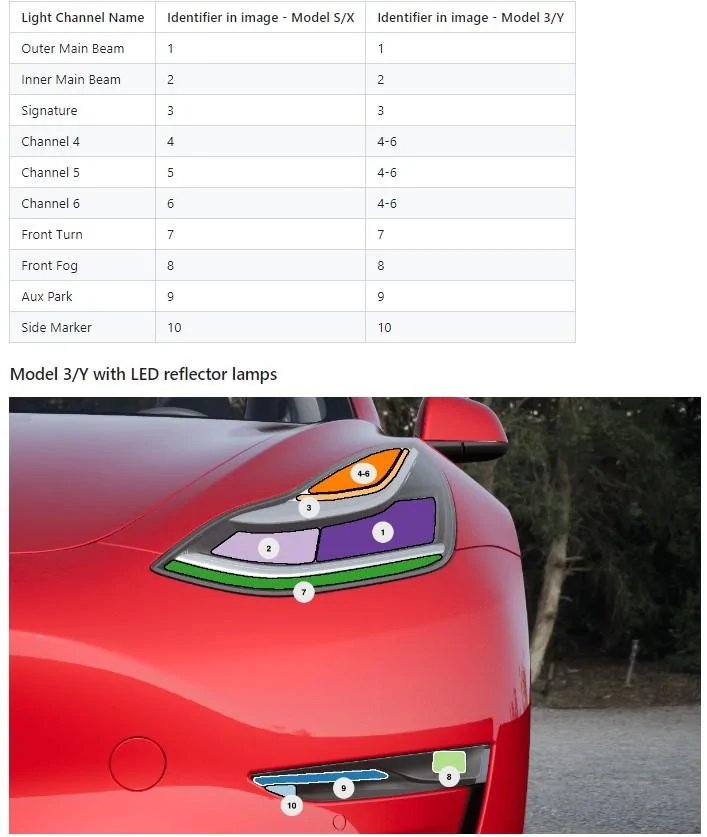
It's very fun, easy to create one. Just a little time consuming. It's important to understand the mapping of the light channel to the Cybertruck. Then you just turn on/off each channel based on the music track.
I downloaded the light show and it was awesome. I did the formatting of usb drive for it. I then later enabled my dashcam and it erased the light show. Does anyone know how to download a light show and/or lock sounds and still use dashcam after? I did ex-fat formatting and followed some videos online.
I downloaded the light show and it was awesome. I did the formatting of usb drive for it. I then later enabled my dashcam and it erased the light show. Does anyone know how to download a light show and/or lock sounds and still use dashcam after? I did ex-fat formatting and followed some videos online.
For my Model 3, I just use a small USB jump drive (4GB), create a folder named "LightShow" then save all the LightShows under this folder.
Each Light show will be under it's own name and will have 2 files each like:
- JingleBells.fseq
- JingleBells.mp3
- UltimateStarWars.fseq
- UltimateStarWars.mp3
etc.
When you choose the Light show option on the screen, you should have an option to pick which light show you want to play (this is how the Model 3 works)...
I downloaded the light show and it was awesome. I did the formatting of usb drive for it. I then later enabled my dashcam and it erased the light show. Does anyone know how to download a light show and/or lock sounds and still use dashcam after? I did ex-fat formatting and followed some videos online.
First, there are no stupid questions, only stupid people.
Second: the USB data layout for Tesla is weird. It expects each category (TeslaCam, Music, Lightshow) to be on a separate drive, but there's only 1 usable USB port (in the glovebox). The solution is to use a large USB stick and create multiple partitions, which show up as "drives" to the computer.
First, there are no stupid questions, only stupid people.
Second: the USB data layout for Tesla is weird. It expects each category (TeslaCam, Music, Lightshow) to be on a separate drive, but there's only 1 usable USB port (in the glovebox). The solution is to use a large USB stick and create multiple partitions, which show up as "drives" to the computer.
It's very fun, easy to create one. Just a little time consuming. It's important to understand the mapping of the light channel to the Cybertruck. Then you just turn on/off each channel based on the music track.
First, there are no stupid questions, only stupid people.
Second: the USB data layout for Tesla is weird. It expects each category (TeslaCam, Music, Lightshow) to be on a separate drive, but there's only 1 usable USB port (in the glovebox). The solution is to use a large USB stick and create multiple partitions, which show up as "drives" to the computer.
Three partition worked for me for a little while, then it stopped finding light shows in the 3rd partition, then it started ignoring the 3rd partition entirely. I copied the LightShow(s?) folder and contents to the MUSIC partition, and it worked again.
That's probably good enough, IMO. Music, BoomBox, LightShow might be mounted read-only, but TeslaCam has to be read/write.