Sponsored

Truck waking up every 30 mins.

Muns01

Member
Joined
May 29, 2024
Threads
2
Messages
15
Reaction score
9
Country flag
SW Version: 2024.14.7

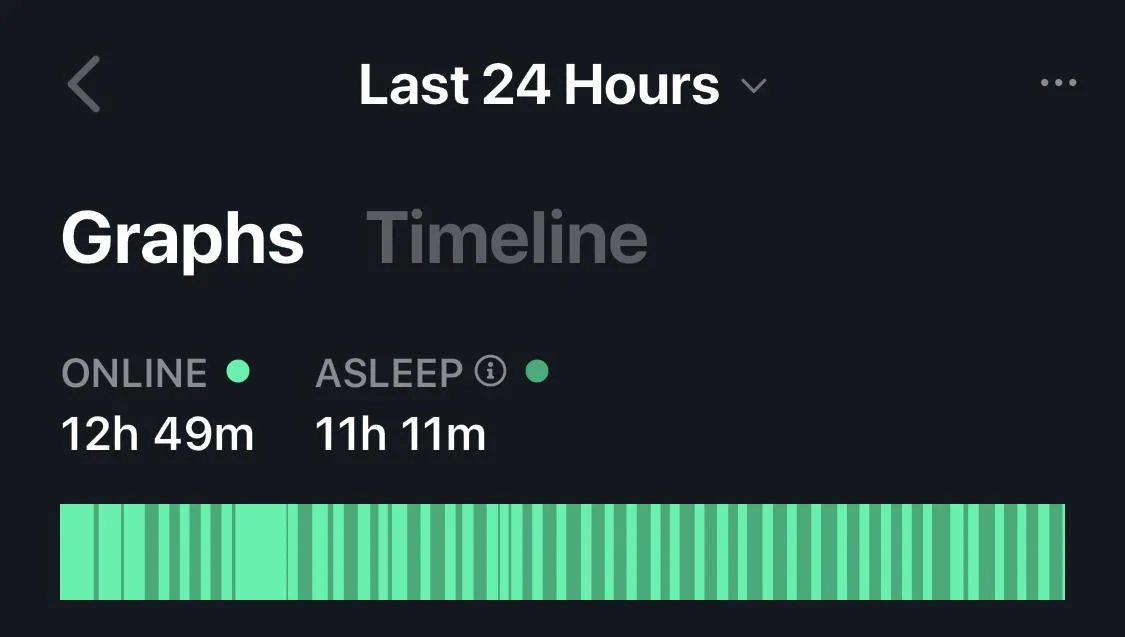
I know this has been discussed on another thread and in that case, the new SW updates have improved it, but I am a recent CT owner (1 week) and I have noticed that my truck wakes up every 30 mins and I hear the HV contactors making the deep clicks. My app never shows it 'sleeping for over 30 mins' unlike my Model 3, which shows hours. I have disabled any app access, turned off power outlets, and disabled sentry mode with no luck. Also make sure the phone was not near the truck to wake it up (turned off BT to do the test). I am also losing a few % overnight with the phantom drain.

Is everyone experiencing this or is it just me? Have you guys had your truck sleep for a few hrs (ie, when you open app after over night, in AM, have you seen it say "asleep for xx hours'?

Any info would be appreciated to characterize this and set my expectations before my service visit. Thxs.
Sponsored


 

Somugo

Active member
First Name
Somu
Joined
Jan 25, 2023
Threads
4
Messages
42
Reaction score
36
Location
Ohio
Vehicles
N/A
Occupation
IT
Country flag
SW Version: 2024.14.7

I know this has been discussed on another thread and in that case, the new SW updates have improved it, but I am a recent CT owner (1 week) and I have noticed that my truck wakes up every 30 mins and I hear the HV contactors making the deep clicks. My app never shows it 'sleeping for over 30 mins' unlike my Model 3, which shows hours. I have disabled any app access, turned off power outlets, and disabled sentry mode with no luck. Also make sure the phone was not near the truck to wake it up (turned off BT to do the test). I am also losing a few % overnight with the phantom drain.

Is everyone experiencing this or is it just me? Have you guys had your truck sleep for a few hrs (ie, when you open app after over night, in AM, have you seen it say "asleep for xx hours'?

Any info would be appreciated to characterize this and set my expectations before my service visit. Thxs.
Same here.

I also tried to power off it completely for a testing but could not do it. According to the manual, Safety->Power Off. But once I closed the door, the CT seems to be waken up already. I checked it half hour later, it still reports “sleeping for 10 mins" or so.
 

Pops

Well-known member
Joined
Dec 31, 2023
Threads
35
Messages
1,207
Reaction score
2,550
Location
Houston, TX
Vehicles
MY, CyberBeast
Country flag
Try turning off your phones bluetooth while you are at home and see if that makes a difference. Maybe you get too close to the truck and activate it through a wall.

I have seen my CT asleep for more than 8 hours before, but my drainage is extremely high with cabin overheat protection and sentry mode turned on.
 
Last edited:

Travis64

Well-known member
Joined
Jan 11, 2024
Threads
16
Messages
443
Reaction score
655
Location
NY
Vehicles
Tesla mp3 and awd cybertruck
Country flag
Yea its been like this for 2 months of ownership for me maybe even worse now


OP
OP

Muns01

Member
Joined
May 29, 2024
Threads
2
Messages
15
Reaction score
9
Country flag
I have a few questions for the folks who has responded, so I know if this is a case just for me or its an overall experience for everyone:

1. What is your average % drop in 24hrs? I am seeing 3% - 4% per 24 hrs.
2. My MA status never shows deep sleep more than 15 - 20 mins. Never seen it in hrs. Is this same for everyone?

Thank you for your inputs. It is appreciated.

Note, I am now at the latest version that just was released last night.
 

cybrtrk88

Well-known member
Joined
Feb 20, 2020
Threads
6
Messages
200
Reaction score
359
Location
San Diego
Vehicles
P3D
Country flag
Mine gets to about 45 mins to 1 hr 10 mins before i see the status change on the widget. Where do you see your % allocated to? Mine is mostly Mobile App and some in Standby, I've noticed it about 2-3% daily
 
OP
OP

Muns01

Member
Joined
May 29, 2024
Threads
2
Messages
15
Reaction score
9
Country flag
Mine gets to about 45 mins to 1 hr 10 mins before i see the status change on the widget. Where do you see your % allocated to? Mine is mostly Mobile App and some in Standby, I've noticed it about 2-3% daily
I see it in the app, when I launch it. Let me add the wizard and see the time, that might be a good way to see the status like yours. I am pretty sure mine never makes it past 30 mins. My Model 3 shows hours :). Thanks for the feedback
 

cybrtrk88

Well-known member
Joined
Feb 20, 2020
Threads
6
Messages
200
Reaction score
359
Location
San Diego
Vehicles
P3D
Country flag
I see it in the app, when I launch it. Let me add the wizard and see the time, that might be a good way to see the status like yours. I am pretty sure mine never makes it past 30 mins. My Model 3 shows hours :). Thanks for the feedback
No problem, check out the energy graph if you get a chance. That gives you a good idea where the energy went.
 

donnyb

Well-known member
First Name
Don
Joined
Nov 30, 2023
Threads
11
Messages
274
Reaction score
429
Location
Sacramento, Ca
Vehicles
Cybertruck Foundation AWD, Model Y
Country flag
I am having the same problem. I have tried it unplugged and plugged in. I have the third-party (Tessie) apps off from waking up the CT. Sensory mode is off.

Tesla Cybertruck Truck waking up every 30 mins. IMG_2499


Woodrick

Well-known member
First Name
Ed
Joined
Dec 30, 2023
Threads
6
Messages
4,786
Reaction score
4,762
Location
Gainesville Ga
Vehicles
Model 3, Model Y, Cybertruck AWD
Occupation
Consultant
Country flag
Try turning off your phones bluetooth while you are at home and see if that makes a difference. Maybe you get too close to the truck and activate it through a wall.

I have seen my CT asleep for more than 8 hours before, but my drainage is extremely high with cabin overheat protection and sentry mode turned on.
Sentry Mode = lots of drain and never lets the car go to sleep. (which it really needs to do)

Cabin overheat? Just turn it off, just wastes power.
 

Woodrick

Well-known member
First Name
Ed
Joined
Dec 30, 2023
Threads
6
Messages
4,786
Reaction score
4,762
Location
Gainesville Ga
Vehicles
Model 3, Model Y, Cybertruck AWD
Occupation
Consultant
Country flag
I am having the same problem. I have tried it unplugged and plugged in. I have the third-party (Tessie) apps off from waking up the CT. Sensory mode is off.

IMG_2499.jpeg
Apps "off" doesn't turn them off. You need to change your app password.
Make sure that cabin overheat is also off.
 

Pops

Well-known member
Joined
Dec 31, 2023
Threads
35
Messages
1,207
Reaction score
2,550
Location
Houston, TX
Vehicles
MY, CyberBeast
Country flag
Sentry Mode = lots of drain and never lets the car go to sleep. (which it really needs to do)

Cabin overheat? Just turn it off, just wastes power.
Unfortunately I cannot do that. I want Sentry mode, and without cabin overheat protection the wheel and roller buttons burn me when touched. Somethings in life are worth a few kilowatts!
 

Woodrick

Well-known member
First Name
Ed
Joined
Dec 30, 2023
Threads
6
Messages
4,786
Reaction score
4,762
Location
Gainesville Ga
Vehicles
Model 3, Model Y, Cybertruck AWD
Occupation
Consultant
Country flag
Unfortunately I cannot do that. I want Sentry mode, and without cabin overheat protection the wheel and roller buttons burn me when touched. Somethings in life are worth a few kilowatts!
I've had Sentry Mode for over 6 years and never turned it on, except for maybe a few minutes.
Open the door, let the heat out, pause for about 15 seconds and get in, the truck will be getting cool. And not using a Wh.

I'm not quite the temps of Houston, but pretty darn close.
Sponsored


Top