Sponsored

Anyone else still having Custom Lightshow issues?

Cybertruck26

Well-known member
First Name
Chris 🇺🇸 🇮🇪 🇨🇦
Joined
Apr 10, 2023
Threads
31
Messages
1,168
Reaction score
1,588
Location
Bay Area, CA
Vehicles
Cyberbeast (07/2024 delivery)
Occupation
Veteran, Engineer, Space 🤓
Country flag
Same USB stick, same files, all worked on previous software update version, then after one of the latter updates it just stopped.

Again, i can confirm that these lightshows worked before, so no file/stick issues. Now i only see the audio show up in USB, but custom lightshow is still greyed out... been like 4 updates now.

Any workaround/fix that I am unaware of would be appreciated.

Sponsored

 
Last edited:
DittoDan

Well-known member
First Name
Dan
Joined
May 18, 2021
Threads
14
Messages
183
Reaction score
303
Location
Rochester Hills, MI
Vehicles
2017 E-Smart, CyberBeast
Occupation
Lithium Battery Pack Designer
Country flag
You can make custom light shows? How do you do that?

Thank you,

Dan the Man from Michigan
 
OP
OP
Cybertruck26

Cybertruck26

Well-known member
First Name
Chris 🇺🇸 🇮🇪 🇨🇦
Joined
Apr 10, 2023
Threads
31
Messages
1,168
Reaction score
1,588
Location
Bay Area, CA
Vehicles
Cyberbeast (07/2024 delivery)
Occupation
Veteran, Engineer, Space 🤓
Country flag
You can make custom light shows? How do you do that?

Thank you,

Dan the Man from Michigan
Making them is quite tedious and a pain in the arse... It was like making stop motion animation to me, 15 hours of work for 2 seconds of results. You can use xLights to create show, but I would advise using a site like:

xlightshows.io
Tesla Light Share
 

Leemanpa

Well-known member
First Name
Lee
Joined
Jun 12, 2024
Threads
4
Messages
73
Reaction score
109
Location
Tomball, TX, just NW of Houston
Website
wa5lee.com
Vehicles
24 Toy Tundra, 24 Suburban, AWD CT Grey/AT
Occupation
Emergency Communications Instructor
Country flag
Same USB stick, same files, all worked on previous software update version, then after one of the latter updates it just stopped.

Again, i can confirm that these lightshows worked before, so no file/stick issues. Now i only see the audio show up in USB, but custom lightshow is still greyed out... been like 4 updates now.

Any workaround/fix that I am unaware of would be appreciated.
there is in fact, a workaround. Although it is a bit time-consuming.
Do a dual button reset.
About one minute after the screen comes back up, your custom light shows will be available.
If they are not, unplug the stick, wait five seconds, plug it back in.
then you can choose any custom light show on the stick.
However – this will only work until the next time the truck goes to sleep. Then the shows will disappear and you’ll have to go through that all over again.
I had my truck in for service, it is a known issue that Tesla is going to be working on, obviously they’ve had bigger fish to fry with software. But they say a fix will be coming. Who knows when?
Hope that helps!!
 
OP
OP
Cybertruck26

Cybertruck26

Well-known member
First Name
Chris 🇺🇸 🇮🇪 🇨🇦
Joined
Apr 10, 2023
Threads
31
Messages
1,168
Reaction score
1,588
Location
Bay Area, CA
Vehicles
Cyberbeast (07/2024 delivery)
Occupation
Veteran, Engineer, Space 🤓
Country flag
there is in fact, a workaround. Although it is a bit time-consuming.
Do a dual button reset.
About one minute after the screen comes back up, your custom light shows will be available.
If they are not, unplug the stick, wait five seconds, plug it back in.
then you can choose any custom light show on the stick.
However – this will only work until the next time the truck goes to sleep. Then the shows will disappear and you’ll have to go through that all over again.
I had my truck in for service, it is a known issue that Tesla is going to be working on, obviously they’ve had bigger fish to fry with software. But they say a fix will be coming. Who knows when?
Hope that helps!!
Wow! Thanks for that. It's funny you say that, bc I swear I did a reset and it worked once more...then stopped. I guess it wasn't just a fluke. Appreciate this! I hope they implement a fix soon.


tcmeyers

Well-known member
First Name
Troy
Joined
Feb 18, 2020
Threads
14
Messages
172
Reaction score
149
Location
Washington State
Vehicles
2024 Cybertruck Foundation AWD, 2018 Tesla Model X 100D
Occupation
Botanist
Country flag
there is in fact, a workaround. Although it is a bit time-consuming.
Do a dual button reset.
About one minute after the screen comes back up, your custom light shows will be available.
If they are not, unplug the stick, wait five seconds, plug it back in.
then you can choose any custom light show on the stick.
However – this will only work until the next time the truck goes to sleep. Then the shows will disappear and you’ll have to go through that all over again.
I had my truck in for service, it is a known issue that Tesla is going to be working on, obviously they’ve had bigger fish to fry with software. But they say a fix will be coming. Who knows when?
Hope that helps!!
I just found this thread because I got dual USB-A / USB-C flash drive so that I could try a lightshow. But it doesn't show up. It is MS-DOS FAT32, has the right folder name, so maybe it's this problem described here.

I tried the reset on my own before reading this but I probable didn't get the timing right. What I'm asking now, is this: .....when you do the 2 finger reset, is there a POP sound that sounds like a fuse or component exploding? The only 2 times I've done the reset I have heard that. The first time I totally expected the truck to be bricked.
 

Redfire

Well-known member
Joined
Sep 13, 2024
Threads
31
Messages
171
Reaction score
184
Location
Atlanta, ga
Vehicles
Cyber Beast
Country flag
I just found this thread because I got dual USB-A / USB-C flash drive so that I could try a lightshow. But it doesn't show up. It is MS-DOS FAT32, has the right folder name, so maybe it's this problem described here.

I tried the reset on my own before reading this but I probable didn't get the timing right. What I'm asking now, is this: .....when you do the 2 finger reset, is there a POP sound that sounds like a fuse or component exploding? The only 2 times I've done the reset I have heard that. The first time I totally expected the truck to be bricked.
For me none of that worked. I finally got something that does work although not perfect. I use a separate USB drive that does not contain the directory for Sentry or Dashcam. Just a clean drive with my Lightshow directory.

This setup actually works, but the moment I place the Sentry/Dashcam directories on the drive Lightshow no longer works. Very strange behavior, but this is what worked for me.

Good Luck!!!
 
OP
OP
Cybertruck26

Cybertruck26

Well-known member
First Name
Chris 🇺🇸 🇮🇪 🇨🇦
Joined
Apr 10, 2023
Threads
31
Messages
1,168
Reaction score
1,588
Location
Bay Area, CA
Vehicles
Cyberbeast (07/2024 delivery)
Occupation
Veteran, Engineer, Space 🤓
Country flag
I just found this thread because I got dual USB-A / USB-C flash drive so that I could try a lightshow. But it doesn't show up. It is MS-DOS FAT32, has the right folder name, so maybe it's this problem described here.

I tried the reset on my own before reading this but I probable didn't get the timing right. What I'm asking now, is this: .....when you do the 2 finger reset, is there a POP sound that sounds like a fuse or component exploding? The only 2 times I've done the reset I have heard that. The first time I totally expected the truck to be bricked.
Yeah, I think it's the speakers making a noise on the reset. i don't think it's anything to worry about my Model Y did it as well.
 

Leemanpa

Well-known member
First Name
Lee
Joined
Jun 12, 2024
Threads
4
Messages
73
Reaction score
109
Location
Tomball, TX, just NW of Houston
Website
wa5lee.com
Vehicles
24 Toy Tundra, 24 Suburban, AWD CT Grey/AT
Occupation
Emergency Communications Instructor
Country flag
I just found this thread because I got dual USB-A / USB-C flash drive so that I could try a lightshow. But it doesn't show up. It is MS-DOS FAT32, has the right folder name, so maybe it's this problem described here.

I tried the reset on my own before reading this but I probable didn't get the timing right. What I'm asking now, is this: .....when you do the 2 finger reset, is there a POP sound that sounds like a fuse or component exploding? The only 2 times I've done the reset I have heard that. The first time I totally expected the truck to be bricked.
Just the Audio system resetting. Happens to me too...

Still using the 2-button reset to get the Lightshows to all work... I really hope they fix it at some point!
 

tcmeyers

Well-known member
First Name
Troy
Joined
Feb 18, 2020
Threads
14
Messages
172
Reaction score
149
Location
Washington State
Vehicles
2024 Cybertruck Foundation AWD, 2018 Tesla Model X 100D
Occupation
Botanist
Country flag
Just the Audio system resetting. Happens to me too...

Still using the 2-button reset to get the Lightshows to all work... I really hope they fix it at some point!
Thank you, I’m glad it’s not just me getting the loud pop. As a point of reference I’m at FSD 12.5.5.2 = 2024.33.15

I’ve got a Model X also (2018) that does NOT pop so it was new to me and scary.


tcmeyers

Well-known member
First Name
Troy
Joined
Feb 18, 2020
Threads
14
Messages
172
Reaction score
149
Location
Washington State
Vehicles
2024 Cybertruck Foundation AWD, 2018 Tesla Model X 100D
Occupation
Botanist
Country flag
For me none of that worked. I finally got something that does work although not perfect. I use a separate USB drive that does not contain the directory for Sentry or Dashcam. Just a clean drive with my Lightshow directory.

This setup actually works, but the moment I place the Sentry/Dashcam directories on the drive Lightshow no longer works. Very strange behavior, but this is what worked for me.

Good Luck!!!
That’s interesting. The instructions I read (the Light Show app in the truck sends you to a web browser page in GitHub) say the drive can’t have the Sentry/Dashcam folders (mine don’t) but I’ve only inserted in the truck’s console cavity USB-C hole and one of the rear seat ones … I have NOT tried the one in the glove compartment because I didn’t want to unplug the Sentry one.

Are you saying you used the glove box hole?
 

Redfire

Well-known member
Joined
Sep 13, 2024
Threads
31
Messages
171
Reaction score
184
Location
Atlanta, ga
Vehicles
Cyber Beast
Country flag
That’s interesting. The instructions I read (the Light Show app in the truck sends you to a web browser page in GitHub) say the drive can’t have the Sentry/Dashcam folders (mine don’t) but I’ve only inserted in the truck’s console cavity USB-C hole and one of the rear seat ones … I have NOT tried the one in the glove compartment because I didn’t want to unplug the Sentry one.

Are you saying you used the glove box hole?
Yes. You can ONLY use the one in the glove box for light show. The others are for charging only and do not have a data function.
 

DarkEye

Well-known member
Joined
Nov 27, 2019
Threads
7
Messages
185
Reaction score
186
Location
Jacksonville, FL
Website
ts.la
Vehicles
'24 FS CT AWD, past Equinox, Hummer H3
Occupation
Retired
Country flag
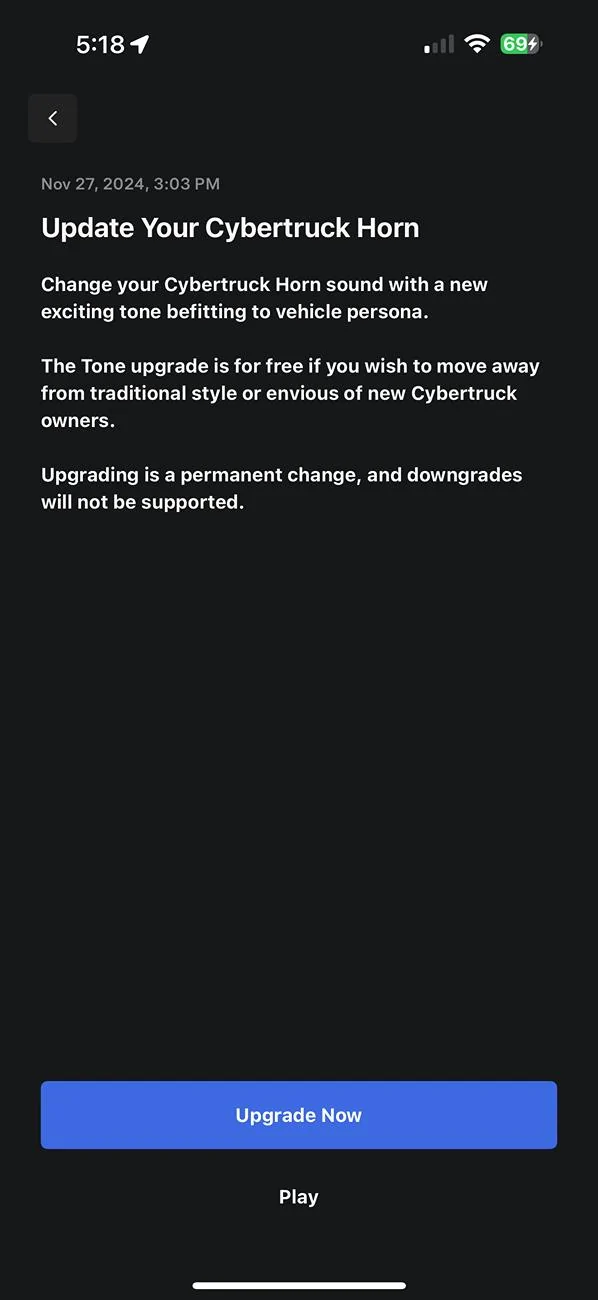
After updating to new horn sound I noticed that my custom downloaded Light Shows now are able to be picked in the list without having to reboot the screen. And stay there even after the CT goes to sleep. Not sure if this horn update fixed the Light Show issue or the last FW (2024.39.5) update.
 
OP
OP
Cybertruck26

Cybertruck26

Well-known member
First Name
Chris 🇺🇸 🇮🇪 🇨🇦
Joined
Apr 10, 2023
Threads
31
Messages
1,168
Reaction score
1,588
Location
Bay Area, CA
Vehicles
Cyberbeast (07/2024 delivery)
Occupation
Veteran, Engineer, Space 🤓
Country flag
After updating to new horn sound I noticed that my custom downloaded Light Shows now are able to be picked in the list without having to reboot the screen. And stay there even after the CT goes to sleep. Not sure if this horn update fixed the Light Show issue or the last FW (2024.39.5) update.
Wait... what was the horn update? I wasn't aware it came, I was off the forum all day.


Top