Sponsored

Failed screen tilt install - USB-C interference

NXTruck

Well-known member
Joined
Jul 16, 2023
Threads
4
Messages
99
Reaction score
77
Location
Illinois
Vehicles
X, Bronco, Ambo, Acela
Country flag
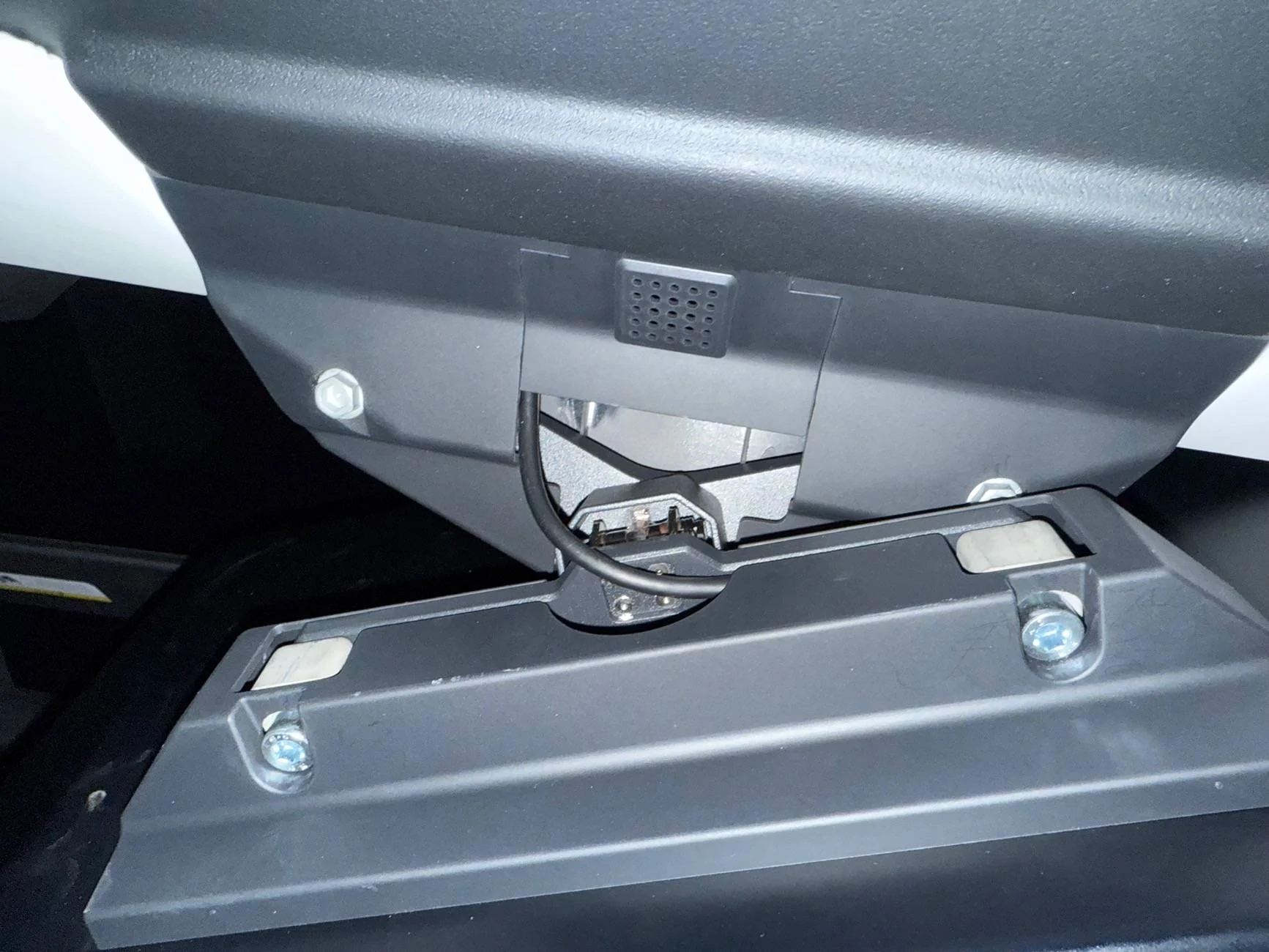
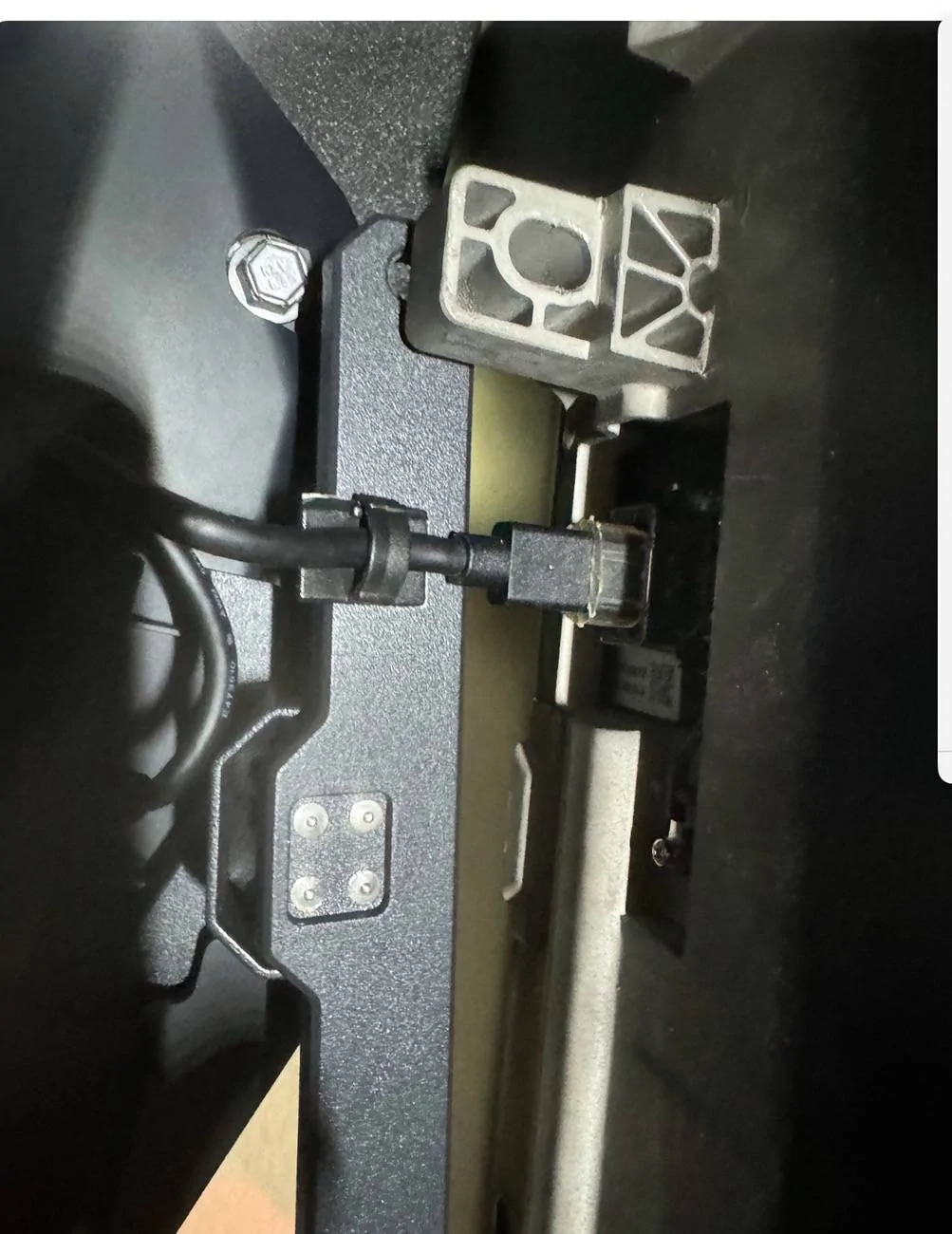
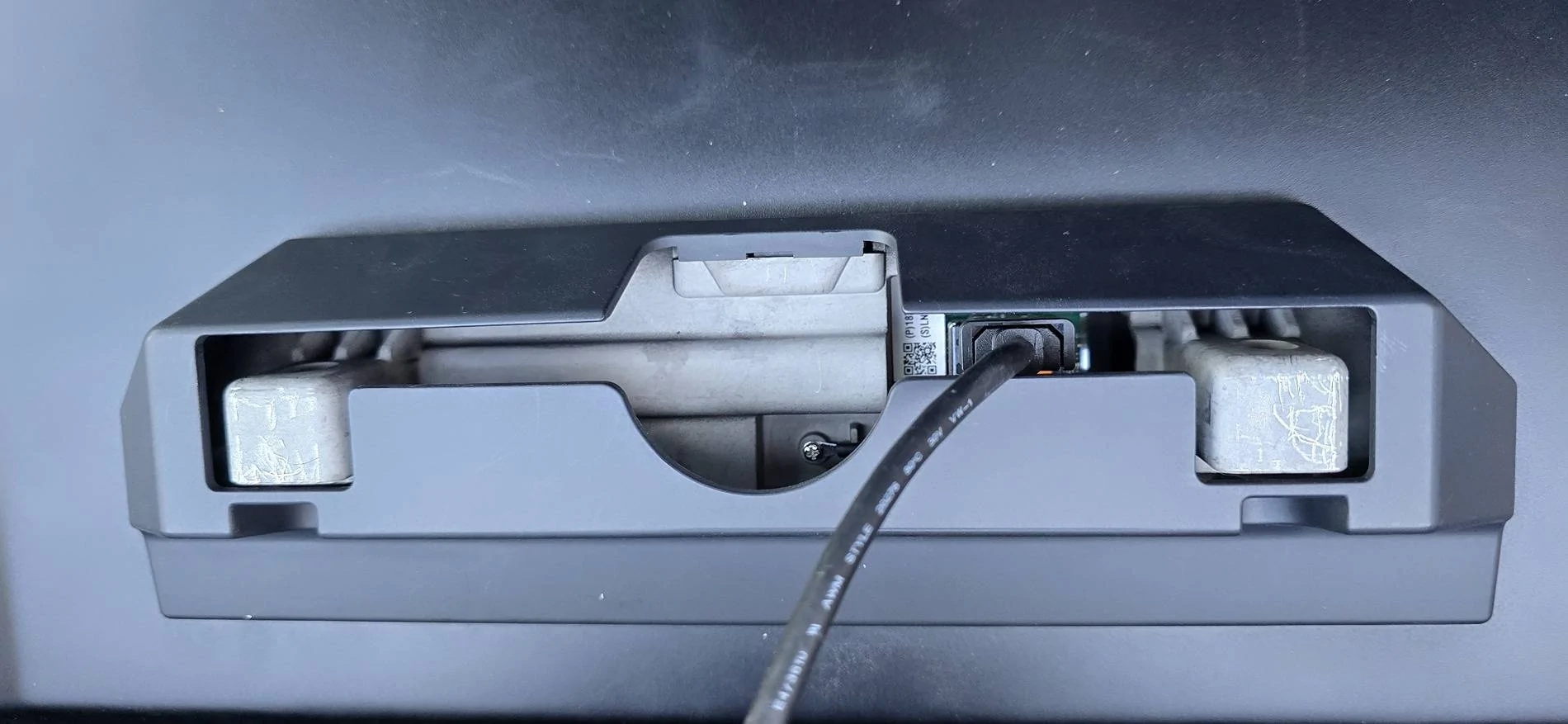
My install failed. The USB-C port is almost directly in line with the mounting bracket. All the install videos I see mention it’s close, but this is not close. It’s straight up in line with it. Did Tesla make a change? I also noticed that the bolts holding in the OEM screen are not hex sockets, meaning you cannot use the Allen wrench to take them out only a 10 mm wrench.

This also means you cannot use the factory bolts as instructed to reinstall as the new plastic doesn’t have relief for the socket.

I mounted the bracket and place the pick perpendicular to the surface showing the plane.

Tesla Cybertruck Failed screen tilt install - USB-C interference IMG_2186

I saw another post somewhere that ran into a similar issue and had to use washers to do the offset and trim plastic pieces. I’m not gonna do that.

Tesla Cybertruck Failed screen tilt install - USB-C interference IMG_2185
Sponsored

 
Last edited:

aeroguy

Well-known member
Joined
Sep 29, 2023
Threads
3
Messages
143
Reaction score
340
Location
VA
Vehicles
2013 Model S 90kWh, 2024 CT 6xxx, 2024 CT 6xxx
I don’t recall any issue with the bolts (6000s vin, so maybe that changed but they were still hex and I was able to tighten them without washers).

The length was tough. The instructions used the zip tie to try and secure the connection. I decided to forgo the zip tie and used electrical tape to secure the extension cable. That gave a bit more play in the cable and made it easier to install.
Tesla Cybertruck Failed screen tilt install - USB-C interference IMG_0614

Edit: just remembered and saw in the picture, the socket screws have to be used for the screen side. That might be your issue.
 
Last edited:
OP
OP

NXTruck

Well-known member
Joined
Jul 16, 2023
Threads
4
Messages
99
Reaction score
77
Location
Illinois
Vehicles
X, Bronco, Ambo, Acela
Country flag
Thanks for the pics. There is definitely too much interference to seat the right mount in your picture. Your bolts are definitely different than mine.
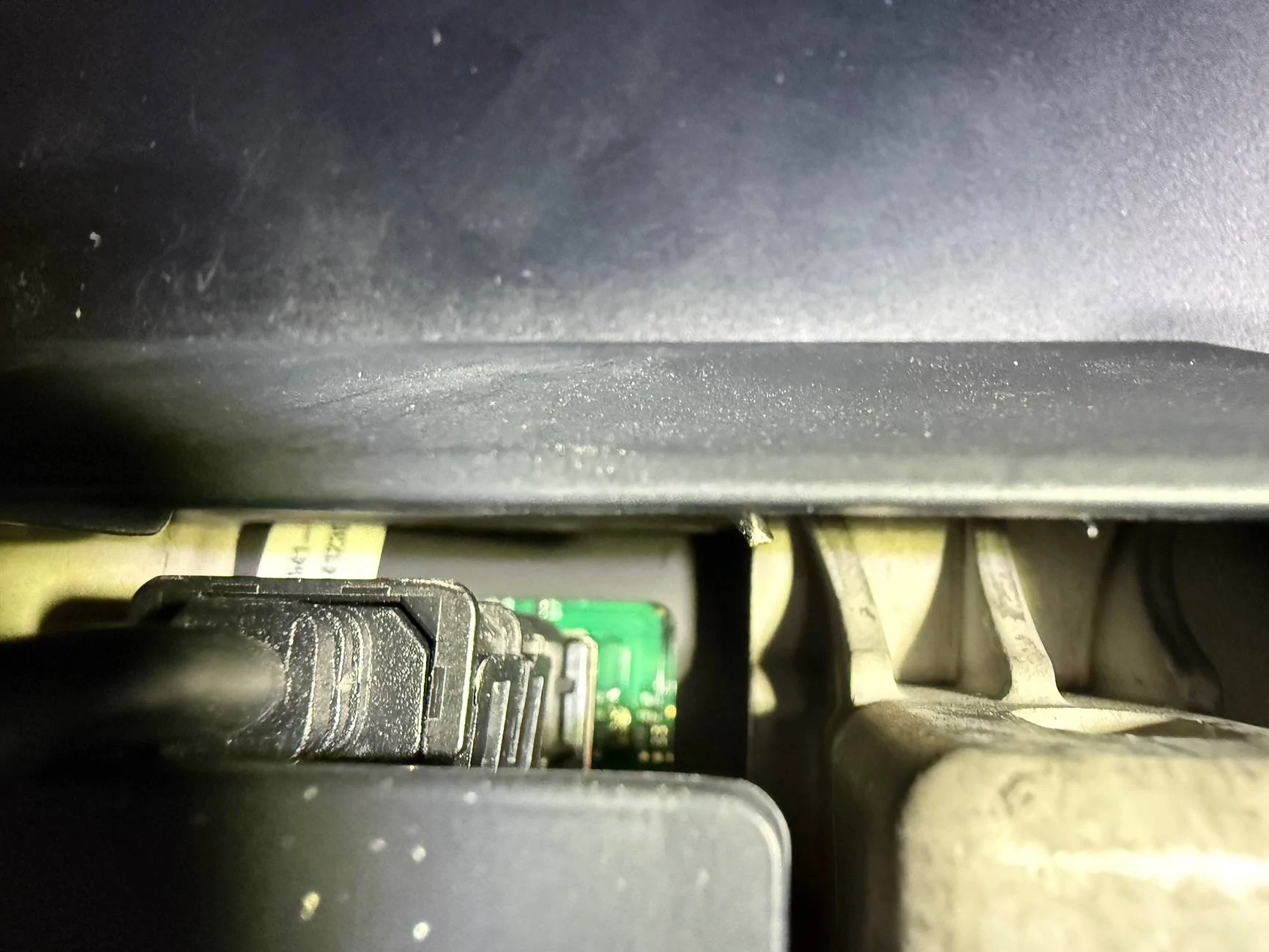
This is a good pic of how much in plane interference there is.
Tesla Cybertruck Failed screen tilt install - USB-C interference IMG_2184
 

aeroguy

Well-known member
Joined
Sep 29, 2023
Threads
3
Messages
143
Reaction score
340
Location
VA
Vehicles
2013 Model S 90kWh, 2024 CT 6xxx, 2024 CT 6xxx
What brand is this?
I have one from ANYSIX, the only option two months ago. Seeing a lot of other ones being advertised for less now, didn’t realize there were so many ithers. Not sure which one the OP has.

https://anysix.com/collections/best...le-dashboard-touch-screen-swiveling-mount-kit


Thanks for the pics. There is definitely too much interference to seat the right mount in your picture. Your bolts are definitely different than mine.
This is a good pic of how much in plane interference there is.
IMG_2184.webp
This looks like the original cable connector with maybe the original locking feature. The anysix swivel came with a short usb-C extension that required removing the locking bracket on the cable.


OP
OP

NXTruck

Well-known member
Joined
Jul 16, 2023
Threads
4
Messages
99
Reaction score
77
Location
Illinois
Vehicles
X, Bronco, Ambo, Acela
Country flag
This is the CyberGearCo version, which states to reinstall the retainer clip.
 

Art138

Well-known member
First Name
Art
Joined
May 25, 2023
Threads
14
Messages
1,184
Reaction score
1,088
Location
Weston,Florida
Vehicles
MYP,Ford GT & FS CYBERBEAST
Country flag
The attachment bar should slide over the USB plug. It’s a tight fit. I have vin 27xxxx and the bolts were not hex. I believe one manufacturer provisions all. I could be wrong.

Tesla Cybertruck Failed screen tilt install - USB-C interference IMG_2108
 

Edelstahl

Member
First Name
Peter
Joined
Dec 29, 2023
Threads
0
Messages
21
Reaction score
7
Location
Clemmons, NC
Vehicles
Model S Longrange
Country flag
I'm having the same issue with the bracket from Hansshow.

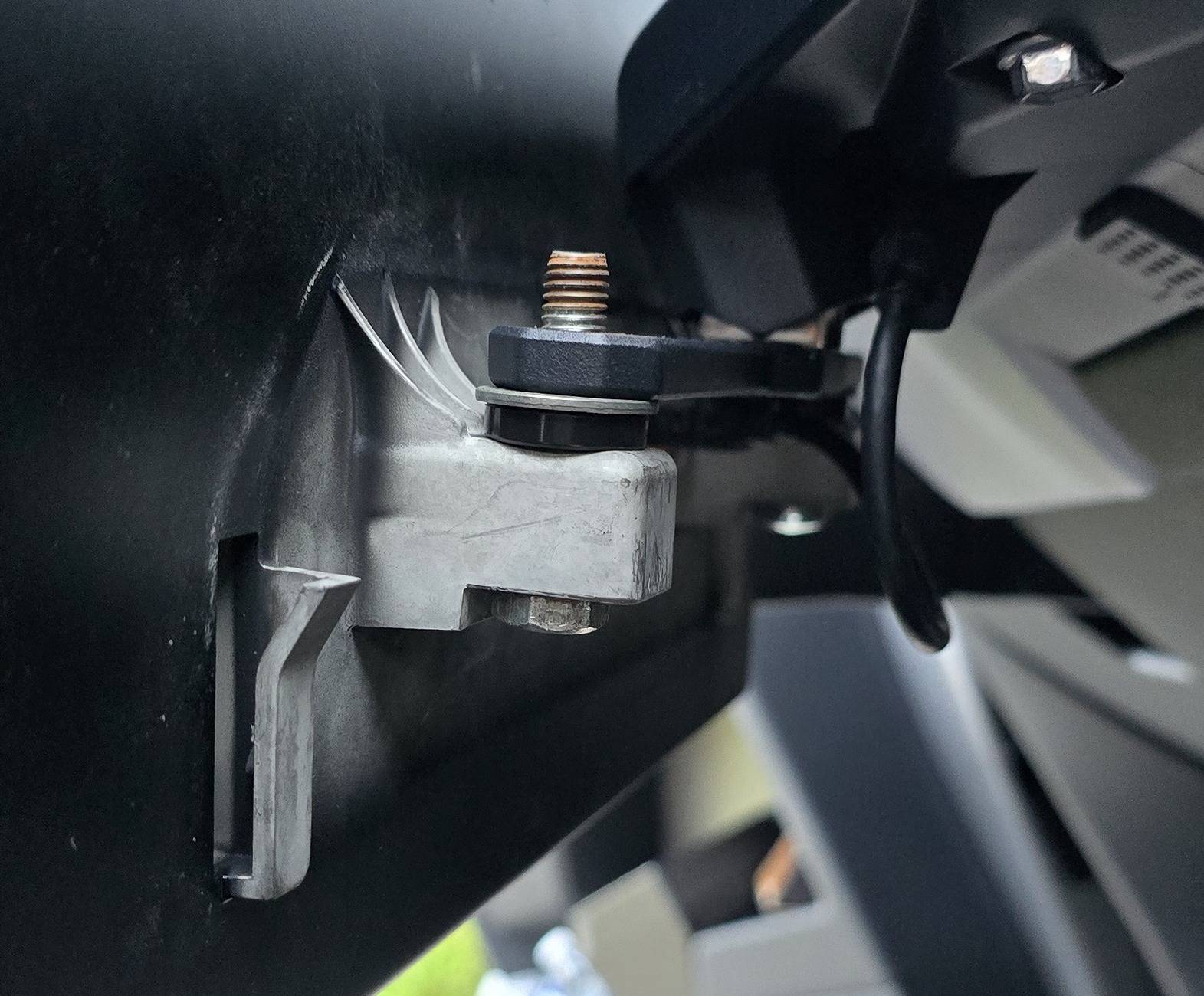
I've used a plastic spacer and a washer to get the bar away just far enough from interfering with the plug but that moves the screen lower by another 3/8" or so. The the rear cover of the screen won't fit with these spacers in place either but at least it's installed and works.

I've sent pictures to Hansshow today and will update this once they reply.

The USB plug is clearly in the way of where the bar goes. It's a bit blurry in the background but you can see how the usb plug now just fits below the bar.

I know it's a rusty bolt but It's all I could find at the moment. I'll replace it with a stainless bolt of course :)

I hope this helps someone.

I'll be back with a reply from Hansshow.


Greetings,
Peter

Tesla Cybertruck Failed screen tilt install - USB-C interference Rear cover attached


Tesla Cybertruck Failed screen tilt install - USB-C interference Spacers
 
OP
OP

NXTruck

Well-known member
Joined
Jul 16, 2023
Threads
4
Messages
99
Reaction score
77
Location
Illinois
Vehicles
X, Bronco, Ambo, Acela
Country flag
Crazy this is still an issue and no v2 exists. They must have cast a bazillion of these hoping for 250k CT a year or something. I returned it.
 

Art138

Well-known member
First Name
Art
Joined
May 25, 2023
Threads
14
Messages
1,184
Reaction score
1,088
Location
Weston,Florida
Vehicles
MYP,Ford GT & FS CYBERBEAST
Country flag
I'm having the same issue with the bracket from Hansshow.

I've used a plastic spacer and a washer to get the bar away just far enough from interfering with the plug but that moves the screen lower by another 3/8" or so. The the rear cover of the screen won't fit with these spacers in place either but at least it's installed and works.

I've sent pictures to Hansshow today and will update this once they reply.

The USB plug is clearly in the way of where the bar goes. It's a bit blurry in the background but you can see how the usb plug now just fits below the bar.

I know it's a rusty bolt but It's all I could find at the moment. I'll replace it with a stainless bolt of course :)

I hope this helps someone.

I'll be back with a reply from Hansshow.


Greetings,
Peter

Rear cover attached.jpg


Spacers.jpg
Are you using the new revised USB plug? The revised model fits similar to the OEM and will not detach as it has the plastic secure latch.

Tesla Cybertruck Failed screen tilt install - USB-C interference IMG_2231


Edelstahl

Member
First Name
Peter
Joined
Dec 29, 2023
Threads
0
Messages
21
Reaction score
7
Location
Clemmons, NC
Vehicles
Model S Longrange
Country flag
Are you using the new revised USB plug? The revised model fits similar to the OEM and will not detach as it has the plastic secure latch.

IMG_2231.jpeg
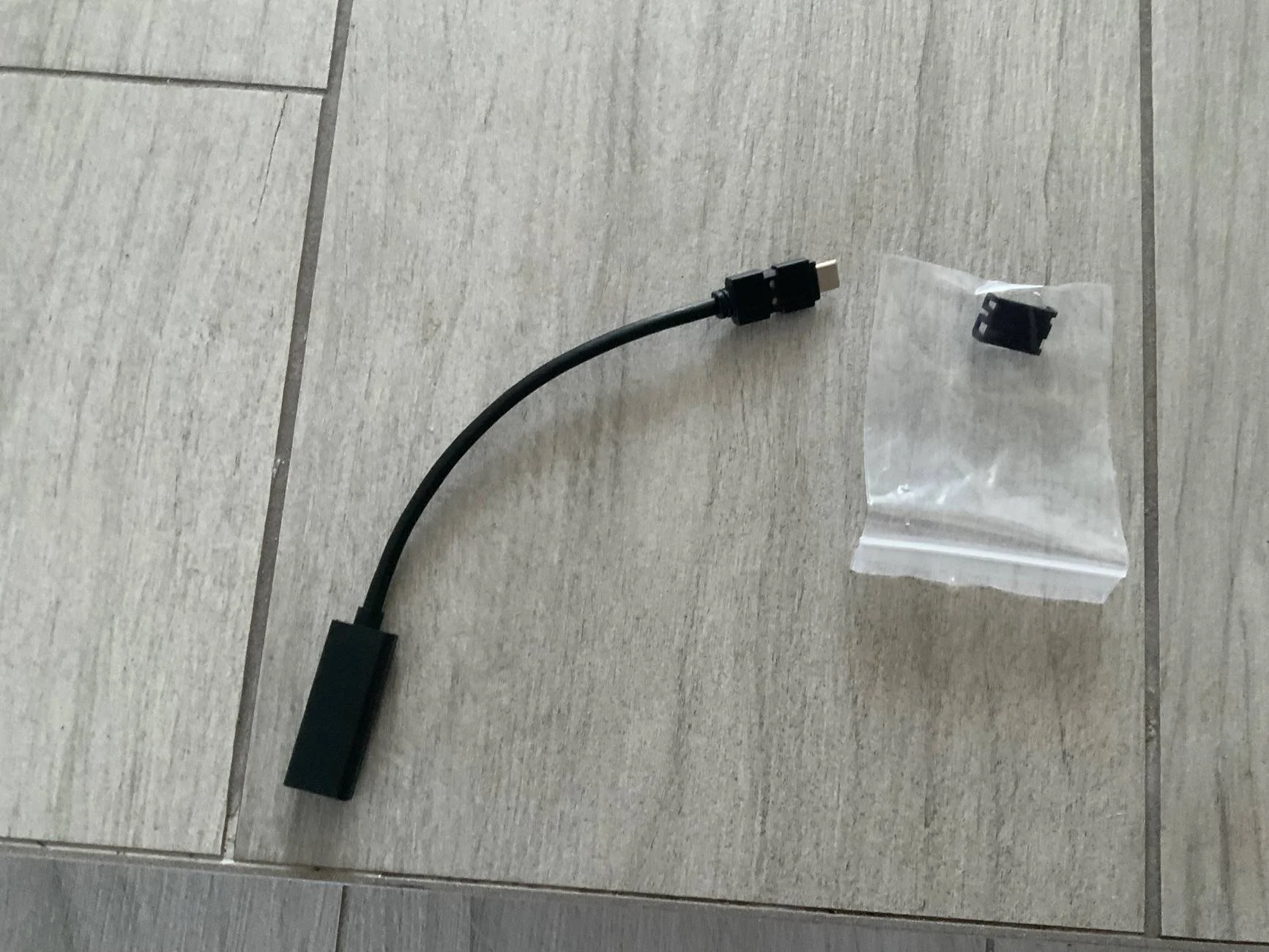
Thanks for your reply. Yes. That secure latch design works fine and also avoids plugging the extension in the wrong way. The problem is the male end that connects to the screen. By the time the safety clip that interfaces with the motherboard socket of the screen is attached to it, it becomes too fat and too long. One can plug in the supplied extension without that safety clip but it would still bend the USB connection uncomfortably as its a very tall plug and will likely wiggle loose over time, not to mention possibly break the PCB.
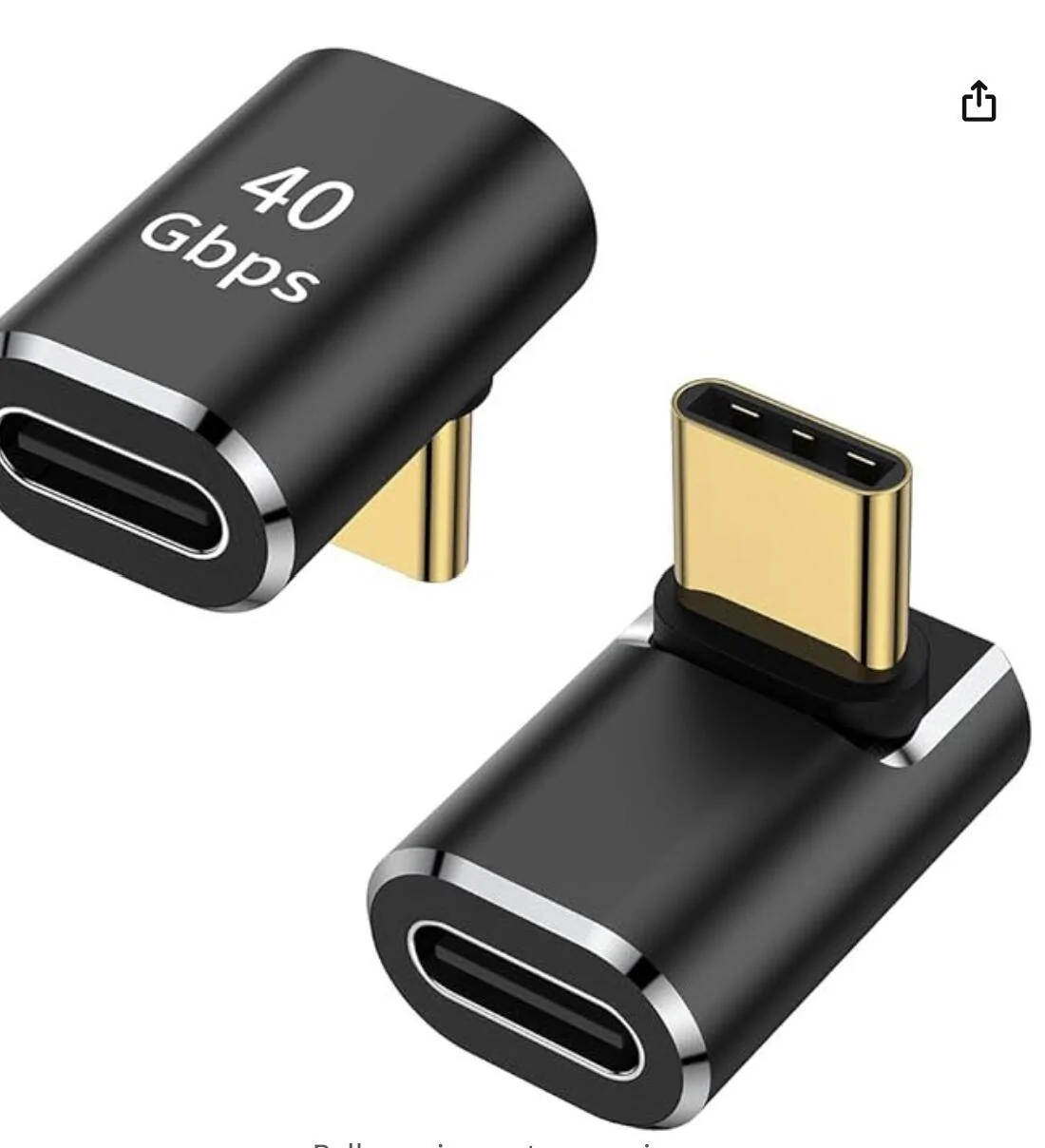
That male end needs to be a 90 deg plug design that can be secured to the mother board's special usb safety clip.

Tesla Cybertruck Failed screen tilt install - USB-C interference 90 deg usb adapter
 

Edelstahl

Member
First Name
Peter
Joined
Dec 29, 2023
Threads
0
Messages
21
Reaction score
7
Location
Clemmons, NC
Vehicles
Model S Longrange
Country flag
First follow up.
Hansshow customer service is not very helpful at all. At this point this is stuck with some customer service company that follows a script. I don't believe I'm talking to the makers/designers of the swivel mount. I've asked to escalate this to someone who has better knowledge of this issue. They claim they have not heard about anyone else having approached them with this issue. They are just brushing me off for now.

Not that I can do anything about that but it's a very pour way the way this is being handled right now.

The email Hansshow provides to reach customer support is: [email protected].
My concern was replied to by "Zcoo Tech Support | Customer Support".

I'll keep you posted...

Peter
 

Art138

Well-known member
First Name
Art
Joined
May 25, 2023
Threads
14
Messages
1,184
Reaction score
1,088
Location
Weston,Florida
Vehicles
MYP,Ford GT & FS CYBERBEAST
Country flag
About the only thing you can do at this point is return it. If you search the other threads the tolerance issue is repetitive. Obviously,the product across many vendors is made by one manufacturer in China. The vendors need to press the issue with them.
 

TickTock

Well-known member
Joined
Jul 27, 2023
Threads
41
Messages
856
Reaction score
1,822
Location
Phoenix, AZ
Vehicles
`11 Nissan Leaf; '18 Model 3; '18 Model S; '24 Beast
Occupation
Electrical Engineer
Country flag
My install failed. The USB-C port is almost directly in line with the mounting bracket. All the install videos I see mention it’s close, but this is not close. It’s straight up in line with it. Did Tesla make a change? I also noticed that the bolts holding in the OEM screen are not hex sockets, meaning you cannot use the Allen wrench to take them out only a 10 mm wrench.

This also means you cannot use the factory bolts as instructed to reinstall as the new plastic doesn’t have relief for the socket.

I mounted the bracket and place the pick perpendicular to the surface showing the plane.
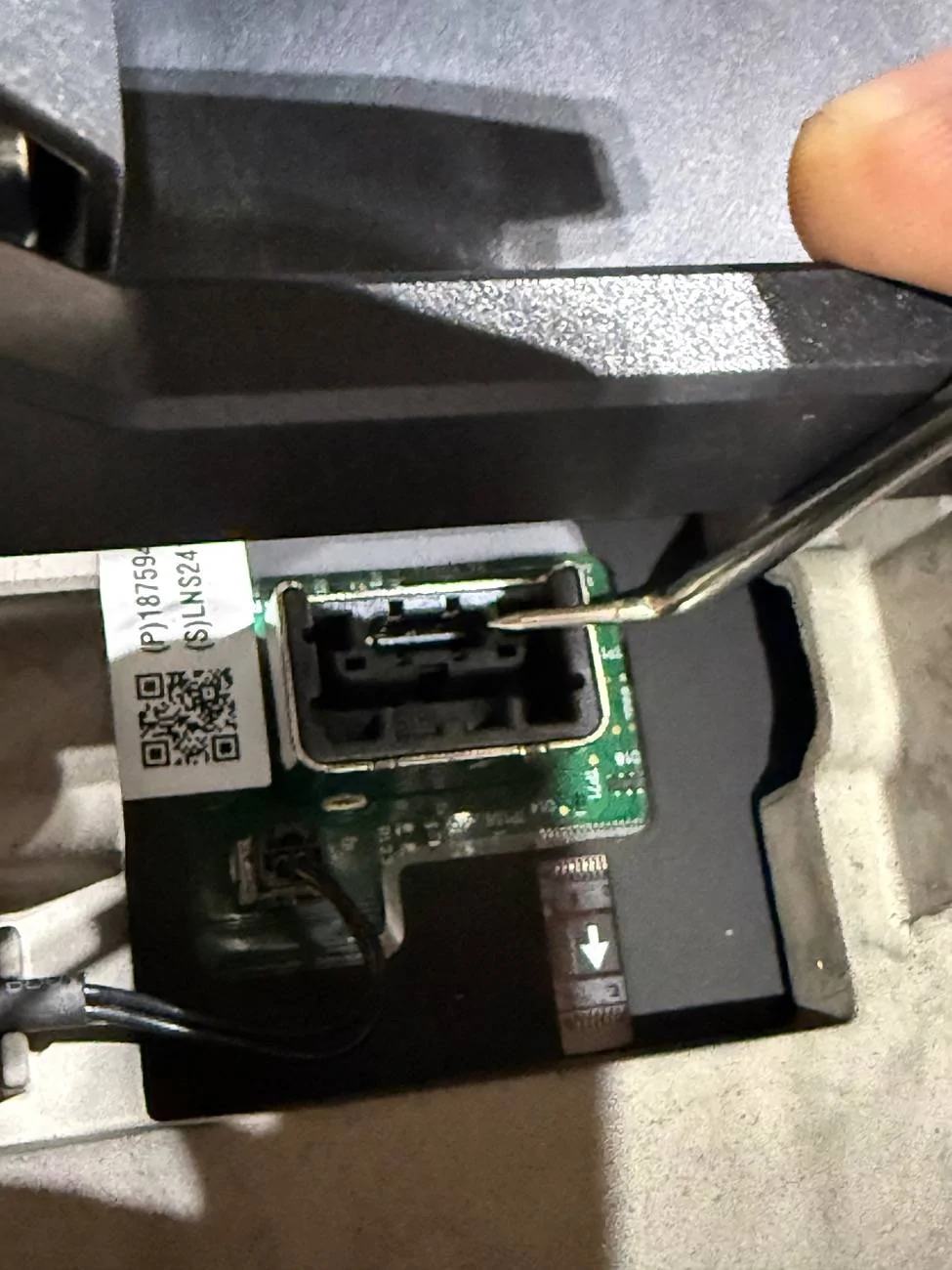
IMG_2186.jpeg

I saw another post somewhere that ran into a similar issue and had to use washers to do the offset and trim plastic pieces. I’m not gonna do that.
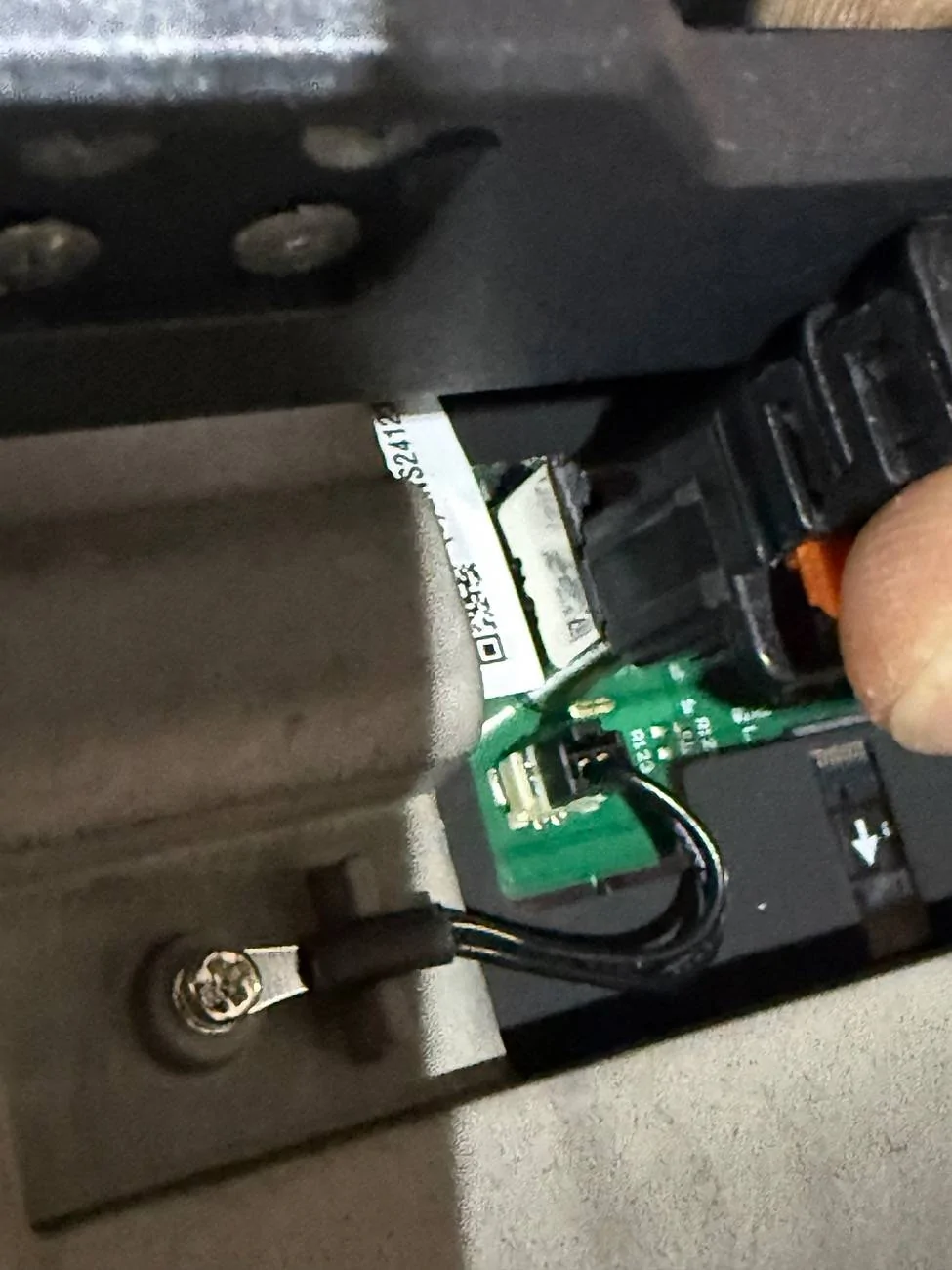
IMG_2185.jpeg
This is what worked for me. I didn't reinstall the clip and, instead, put shrink tubing around the connector (once I verified I had it in in the correct orientation)
https://www.amazon.com/dp/B0CQ56R5CC
Sponsored


Top