Sponsored

How to fix cable not secured error?

kappaknight

Well-known member
Joined
Sep 13, 2024
Threads
8
Messages
160
Reaction score
254
Location
Atlanta, Georgia
Vehicles
Cyberbeast
Country flag
Just picked up my first Tesla so I don’t have at home charging yet. I’ve been charging fine with the super chargers around town but yesterday we stopped at a location with a ChargePoint station. I popped the Tesla adaptor on and even though the light turned blue on the truck, I couldn’t initiate a charge due to this error.

Anyone know how to fix it? The plug seemed locked in. I couldn’t pull it out unless I released it from the app. ??‍♂

Screenshot is from Tessie, which tells me a number of other vehicles are seeing this issue, but how does one fix it?

Tesla Cybertruck How to fix cable not secured error? IMG_9544
Sponsored


HaulingAss

Well-known member
Joined
Oct 3, 2020
Threads
28
Messages
10,299
Reaction score
20,708
Location
Western Washington, USA
Vehicles
Cybertruck DM, 2010 F-150, 2018 Performance Model 3, 2024 Performance Model 3
Country flag
Just picked up my first Tesla so I don’t have at home charging yet. I’ve been charging fine with the super chargers around town but yesterday we stopped at a location with a ChargePoint station. I popped the Tesla adaptor on and even though the light turned blue on the truck, I couldn’t initiate a charge due to this error.

Anyone know how to fix it? The plug seemed locked in. I couldn’t pull it out unless I released it from the app. ??‍♂

Screenshot is from Tessie, which tells me a number of other vehicles are seeing this issue, but how does one fix it?
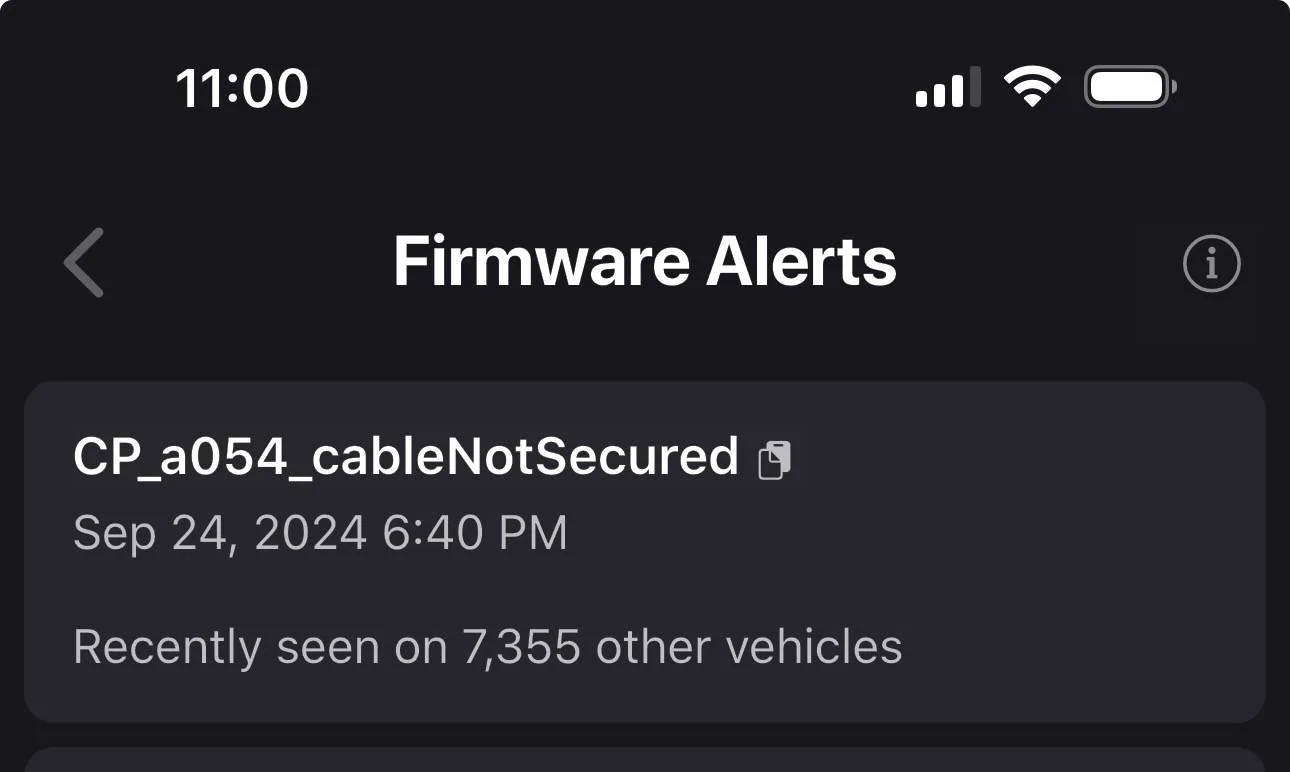
IMG_9544.jpeg
The easiest fix is not to use ChargePoint, EA, or other DCFC'ers requiring a CCS adapter! Too many networks, billing and privacy policies, too many accounts, etc. I'm sure some use cases, in some areas, benefit from 3rd party DCFC'ers, I'm just glad it's not me! Superchargers have served me well for over 6 years and I'm loathe to create more accounts and keep track of how to make them work. Plug and Play is where it's at as far as I'm concerned.

If I needed more options, that would be different, but I don't.
 

Jager

Well-known member
First Name
Jeff
Joined
May 25, 2020
Threads
25
Messages
338
Reaction score
1,089
Location
Virginia
Vehicles
2024 Cybertruck AWD, 2022 Model 3 LR AWD
Country flag
If you watch enough YouTube videos of non-Tesla EV's, you quickly see that any of the third-party DC Fast Charging outfits are hit or miss. Oftentimes they work. Sometimes they don't.

Tesla is the only EV manufacturer that has put considerable time, effort, and money into charging infrastructure. That's a shame, but that's the way it is.

As an aside, I wouldn't put too much stock in whatever errors/notifications a third-party app like Tessie puts out. Pay attention to what your CT is telling you, and the cabinet display of the charging company.
 

Outdoors

Well-known member
First Name
Outdoors
Joined
Nov 19, 2019
Threads
17
Messages
1,871
Reaction score
3,451
Location
North West Montana
Vehicles
S,3,Y,CT,CT(holding pattern) Slate is back on
Just picked up my first Tesla so I don’t have at home charging yet. I’ve been charging fine with the super chargers around town but yesterday we stopped at a location with a ChargePoint station. I popped the Tesla adaptor on and even though the light turned blue on the truck, I couldn’t initiate a charge due to this error.

Anyone know how to fix it? The plug seemed locked in. I couldn’t pull it out unless I released it from the app. ??‍♂

Screenshot is from Tessie, which tells me a number of other vehicles are seeing this issue, but how does one fix it?

IMG_9544.webp

Well I see no one wants to actually answer the question. Disconnect and start process over again. Ensure tight connections. Inspect pins for debris. Maybe try a different stall if possible.

Sometimes in other places there might not be other options. Canada rings a bell. In time I would think the NACS connecters would be added and the other charger cables would be removed.
 
OP
OP

kappaknight

Well-known member
Joined
Sep 13, 2024
Threads
8
Messages
160
Reaction score
254
Location
Atlanta, Georgia
Vehicles
Cyberbeast
Country flag
The easiest fix is not to use ChargePoint, EA, or other DCFC'ers requiring a CCS adapter! Too many networks, billing and privacy policies, too many accounts, etc.
Yeah, understandable. This wasn't a CCS though. This was a J1772 - not sure if that makes a difference.

Also, I was testing it out cause this would've been a free charge provided by the parking deck.


OP
OP

kappaknight

Well-known member
Joined
Sep 13, 2024
Threads
8
Messages
160
Reaction score
254
Location
Atlanta, Georgia
Vehicles
Cyberbeast
Country flag
Tesla is the only EV manufacturer that has put considerable time, effort, and money into charging infrastructure. That's a shame, but that's the way it is.

As an aside, I wouldn't put too much stock in whatever errors/notifications a third-party app like Tessie puts out. Pay attention to what your CT is telling you, and the cabinet display of the charging company.
I do see the quality difference. With that said, is it normal for the truck to light up blue (with everything seemingly ready to go) but still have this error spit out? The error did originate from Tesla's app. Tessie was just the one that cloned the message in a way that I can find it.
 

CyberJay

Well-known member
First Name
J
Joined
Dec 6, 2019
Threads
28
Messages
344
Reaction score
605
Location
NJ
Vehicles
Cybertruck AWD (two), Model Y
Occupation
Oncology Biotech Exec | GOD BLESS THE USA
Country flag
Just picked up my first Tesla so I don’t have at home charging yet. I’ve been charging fine with the super chargers around town but yesterday we stopped at a location with a ChargePoint station. I popped the Tesla adaptor on and even though the light turned blue on the truck, I couldn’t initiate a charge due to this error.

Anyone know how to fix it? The plug seemed locked in. I couldn’t pull it out unless I released it from the app. ??‍♂

Screenshot is from Tessie, which tells me a number of other vehicles are seeing this issue, but how does one fix it?

IMG_9544.jpeg
Apologies for the snark.

Best way to fix this error is only to use Tesla Superchargers. Hope you're not so badly strapped that you HAVE to use a non-Tesla charger....
 

Jager

Well-known member
First Name
Jeff
Joined
May 25, 2020
Threads
25
Messages
338
Reaction score
1,089
Location
Virginia
Vehicles
2024 Cybertruck AWD, 2022 Model 3 LR AWD
Country flag
I do see the quality difference. With that said, is it normal for the truck to light up blue (with everything seemingly ready to go) but still have this error spit out? The error did originate from Tesla's app. Tessie was just the one that cloned the message in a way that I can find it.
Couldn't tell you about that error, since I've never seen it. Based on its context, I would have tried removing, and then reattaching the charging handle. But ultimately, based upon the numerous, quirky failure modes that third-party DC Fast Charging companies have exhibited, I would not depend upon them. They simply are not reliable enough.

I think you have your answer.... your Supercharger experiences have been perfectly fine. Your first attempt at using a non-Tesla DC Fast Charger... not so much.

It's not you. And it's not your truck.
Sponsored


Top