Sponsored

How to schedule off-grid time on powerwall 3

hemiarch

Well-known member
First Name
Ace
Joined
Jan 22, 2025
Threads
116
Messages
8,363
Reaction score
9,607
Location
Arizona
Vehicles
2024 foundation AWD, 2024 model x
Occupation
Trauma Surgeon
Country flag
My service provider (APS here in Phoenix) has a very odd rate plan which uses the peak usage during peak hours for the entire month as a way to determine overall peak usage rate. They have a couple of other plans but all have significantly higher off-peak rates per kWh.
This is frustrating because all it takes is five minute of accidentally charging the car and running the dryer at the same time to shoot up the bill even though the rest of the month we draw almost nothing during these hours. Powerwall 3 mostly understands this ,but does not fully commit to using its own supply even with the backup reserve is set very low. It’s not a question of inverter size because we have two powerwalls and peak consumption is way below what they can handle. The peak hours are 4-7pm weekdays and I typically make it to 7pm with 80% or more left in the battery even on relatively cloudy days.
Last month I did an experiment where I went off grid every weekday right before peak hours and back on right after.
Despite the Phoenix summer arriving and much increased AC use, this resulted in a power bill drop from $192 dollars to $71.
I’d like to keep doing this. Is there a way to schedule off-grid time from 4-7pm on weekdays automatically? I have already scheduled “stop charging” on the Cybertruck and model x for peak hours and they seem to respect that command well.
I can’t think of another way to make powerwall actually respect this ridiculous rate plan.
Any input would be appreciated.
Sponsored

 
Last edited:

mongo

Well-known member
Joined
May 27, 2024
Threads
5
Messages
4,520
Reaction score
5,497
Location
SE Michigan
Vehicles
Cyberbeast
Country flag
My service provider (APS here in Phoenix) has a very odd rate plan which uses the peak usage during peak hours for the entire month as a way to determine overall peak usage rate. They have a couple of other plans but all have significantly higher off-peak rates per kWh.
This is frustrating because all it takes is five minute of accidentally charging the car and running the dryer at the same time to shoot up the bill even though the rest of the month we draw almost nothing during these hours. Powerwall 3 mostly understands this ,but does not fully commit to using its own supply even with the backup reserve is set very low. It’s not a question of inverter size because we have two powerwalls and peak consumption is way below what they can handle. The peak hours are 4-7pm weekdays and I typically make it to 7pm with 80% or more left in the battery even on relatively cloudy days.
Last month I did an experiment where I went off grid every weekday right before peak hours and back on right after.
Despite the Phoenix summer arriving and much increased AC use, this resulted in a power bill drop from $192 dollars to $71.
I’d like to keep doing this. Is there a way to schedule off-grid time from 4-7pm on weekdays automatically? I have already scheduled “stop charging” on the Cybertruck and model x for peak hours and they seem to respect that command well.
I can’t think of another way to make powerwall actually respect this ridiculous rate plan.
Any input would be appreciated.
I think you want to set up a custom rate plan with shoulder/ partial peak during that time period. What rate plan is your system currently set up for?
Overview:
https://www.tesla.com/support/energy/powerwall/mobile-app/time-based-control
Rate plan:
https://www.tesla.com/support/energ...ns#setting-up-your-rate-plan-from-list-anchor
What they mean:
https://www.tesla.com/support/energy/powerwall/mobile-app/time-based-control-user-guide
 
OP
OP
hemiarch

hemiarch

Well-known member
First Name
Ace
Joined
Jan 22, 2025
Threads
116
Messages
8,363
Reaction score
9,607
Location
Arizona
Vehicles
2024 foundation AWD, 2024 model x
Occupation
Trauma Surgeon
Country flag
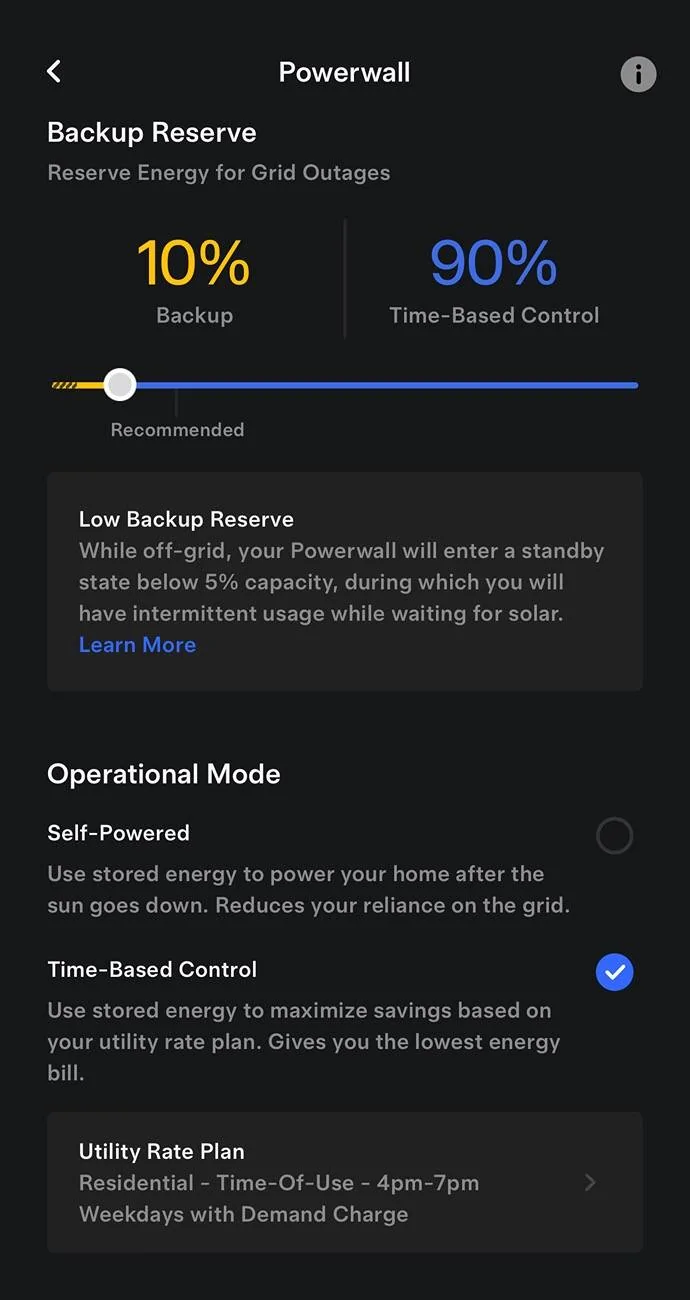
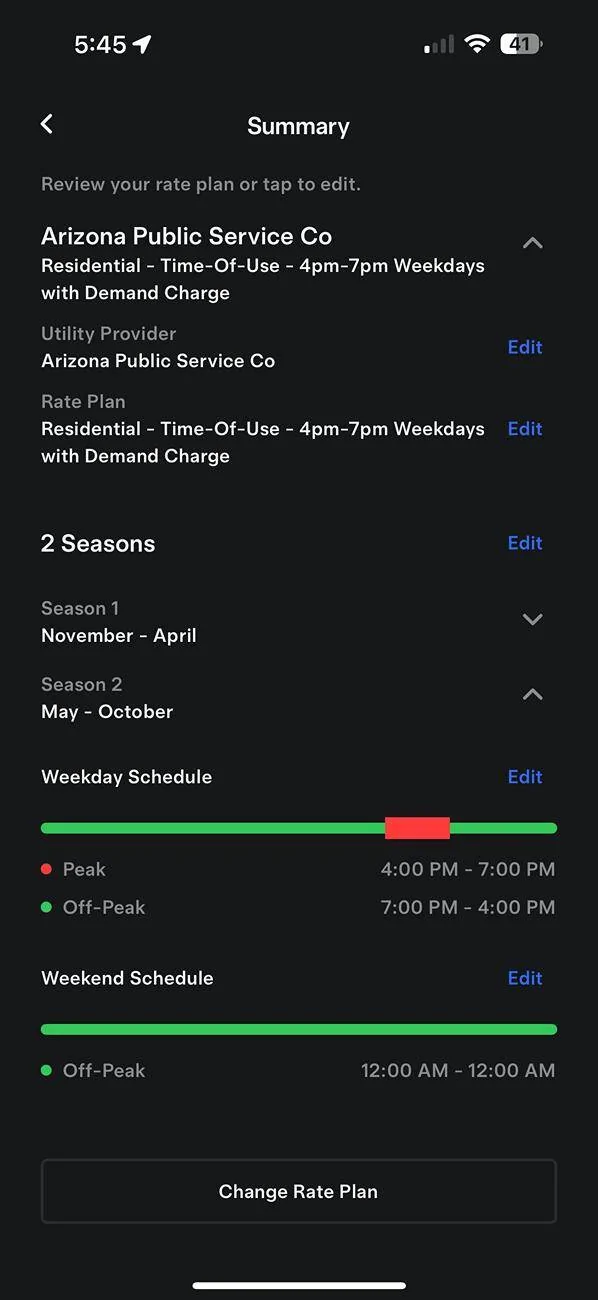
So, I think I’m doing that…
Does this look right to you?

Tesla Cybertruck How to schedule off-grid time on powerwall 3 IMG_3552

I have tried this with the backup reserve set higher too
 
OP
OP
hemiarch

hemiarch

Well-known member
First Name
Ace
Joined
Jan 22, 2025
Threads
116
Messages
8,363
Reaction score
9,607
Location
Arizona
Vehicles
2024 foundation AWD, 2024 model x
Occupation
Trauma Surgeon
Country flag
It’s the “demand charge” part it doesn’t seem to grasp


OP
OP
hemiarch

hemiarch

Well-known member
First Name
Ace
Joined
Jan 22, 2025
Threads
116
Messages
8,363
Reaction score
9,607
Location
Arizona
Vehicles
2024 foundation AWD, 2024 model x
Occupation
Trauma Surgeon
Country flag
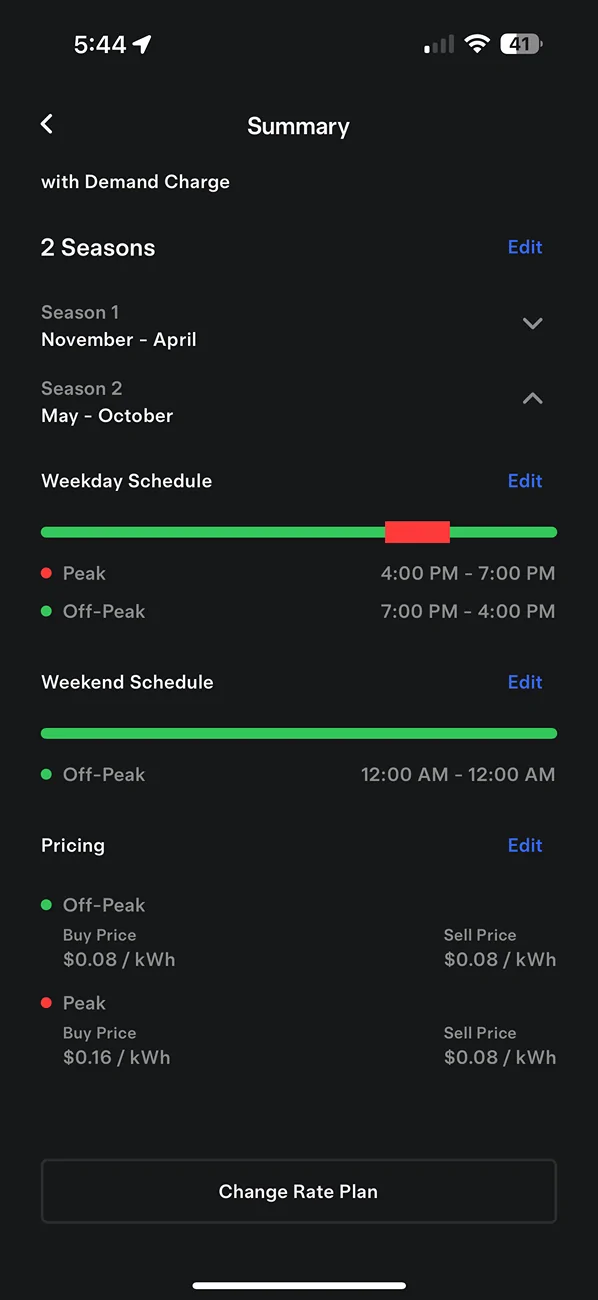
It just says “demand charge”. Not otherwise specified. Not” tyrannical overbillling for five minutes of accidental use.”? seriously though, I don’t know how to see what it means by “demand charge”
That’s what gets you. Not the 16 cents per kWh

Tesla Cybertruck How to schedule off-grid time on powerwall 3 IMG_3554


Tesla Cybertruck How to schedule off-grid time on powerwall 3 IMG_3553
 

mongo

Well-known member
Joined
May 27, 2024
Threads
5
Messages
4,520
Reaction score
5,497
Location
SE Michigan
Vehicles
Cyberbeast
Country flag
It just says “demand charge”. Not otherwise specified. Not” tyrannical overbillling for five minutes of accidental use.”? seriously though, I don’t know how to see what it means by “demand charge”
That’s what gets you. Not the 16 cents per kWh

IMG_3554.png


IMG_3553.png
Yeah... peak mode should avoid pulling from the grid if at all possible. Everything in the house runs through the Gateway and both PW3 charge and discharge normally?
 
OP
OP
hemiarch

hemiarch

Well-known member
First Name
Ace
Joined
Jan 22, 2025
Threads
116
Messages
8,363
Reaction score
9,607
Location
Arizona
Vehicles
2024 foundation AWD, 2024 model x
Occupation
Trauma Surgeon
Country flag
Yes. All the above statements are true. First I thought it might be vehicle charging because I think that preferentially will take the difference between UWC demand and solar production from the grid rather than drain the powerwalls due to “powerwall priority. “
So I turned off “charge on solar” and set a hard stop in the car menus right before peak time but that changed nothing. Going off grid did though. The price difference was pronounced.
That why I was looking for an automation to go off grid during APS gotcha hours.
 

SlegMD

Well-known member
Joined
Apr 24, 2023
Threads
1
Messages
1,616
Reaction score
2,986
Location
Arizona
Vehicles
Lexus
Occupation
Medical
Country flag
You have a Demand plan or Export plan? You might look online and scrutinize if it’s demand charge or rate. Not sure if you said you’re solar or not, export plan may benefit battery users. I am SRP so not sure what to expect with APS.
 

mongo

Well-known member
Joined
May 27, 2024
Threads
5
Messages
4,520
Reaction score
5,497
Location
SE Michigan
Vehicles
Cyberbeast
Country flag
Yes. All the above statements are true. First I thought it might be vehicle charging because I think that preferentially will take the difference between UWC demand and solar production from the grid rather than drain the powerwalls due to “powerwall priority. “
So I turned off “charge on solar” and set a hard stop in the car menus right before peak time but that changed nothing. Going off grid did though. The price difference was pronounced.
That why I was looking for an automation to go off grid during APS gotcha hours.
While on-grid, is the App power display is showing net import during peak times? (Wondering if utility meter and gateway agree)
Could try expanding the peak window slightly to force an update and see if that helps.
There are third party options for switching the system on/off grid, but I have no experience with them.


OP
OP
hemiarch

hemiarch

Well-known member
First Name
Ace
Joined
Jan 22, 2025
Threads
116
Messages
8,363
Reaction score
9,607
Location
Arizona
Vehicles
2024 foundation AWD, 2024 model x
Occupation
Trauma Surgeon
Country flag
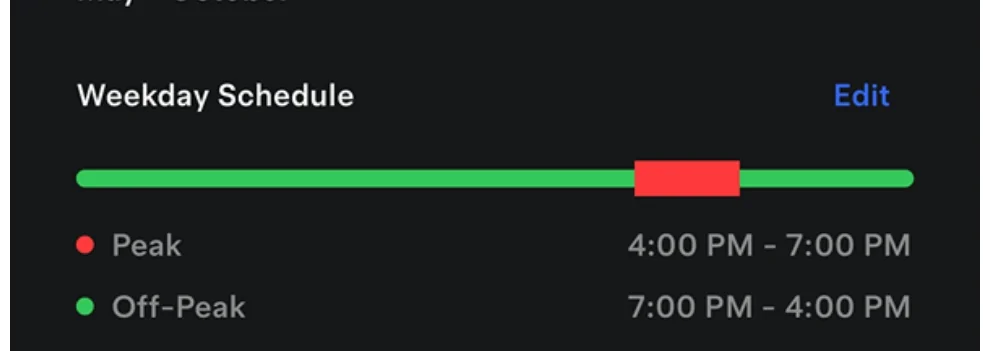
Not sure I understand what you mean by expanding the peak window. Wouldn’t I have to create a whole custom rate plan to do that? This is the Tesla generated APS plan profile.
Interesting question about the meter and app. Haven’t checked that. I will.
So basically just stand in front of the meter with my phone and see if what it reads and the app reads as consumption are the same?
 

mongo

Well-known member
Joined
May 27, 2024
Threads
5
Messages
4,520
Reaction score
5,497
Location
SE Michigan
Vehicles
Cyberbeast
Country flag
Not sure I understand what you mean by expanding the peak window. Wouldn’t I have to create a whole custom rate plan to do that? This is the Tesla generated APS plan profile.
Interesting question about the meter and app. Haven’t checked that. I will.
So basically just stand in front of the meter with my phone and see if what it reads and the app reads as consumption are the same?
I *think* you can click edit and bump start time to 3:45. (Don't have a system to test on).

Tesla Cybertruck How to schedule off-grid time on powerwall 3 SmartSelect_20250611_100732_Firefox


If Tesla app is showing it pulling from grid, then there is a settings / behavior issue. If it isn't, then yeah check what meter says versus what app says. Might be able to compare a month's energy bill to app reported usage.
 
OP
OP
hemiarch

hemiarch

Well-known member
First Name
Ace
Joined
Jan 22, 2025
Threads
116
Messages
8,363
Reaction score
9,607
Location
Arizona
Vehicles
2024 foundation AWD, 2024 model x
Occupation
Trauma Surgeon
Country flag
You’re right. Was very simple to edit. I made the peak hours 1500-2000 rather than 1600-1900 to see if it makes a difference
Sponsored


Top