MyFirstElectricTesla
Well-known member

- Thread starter
- #1
I've read put seats up would turn it off but not, what to do to turn it off when nobody is back there?
Sponsored

I've read put seats up would turn it off but not, what to do to turn it off when nobody is back there?
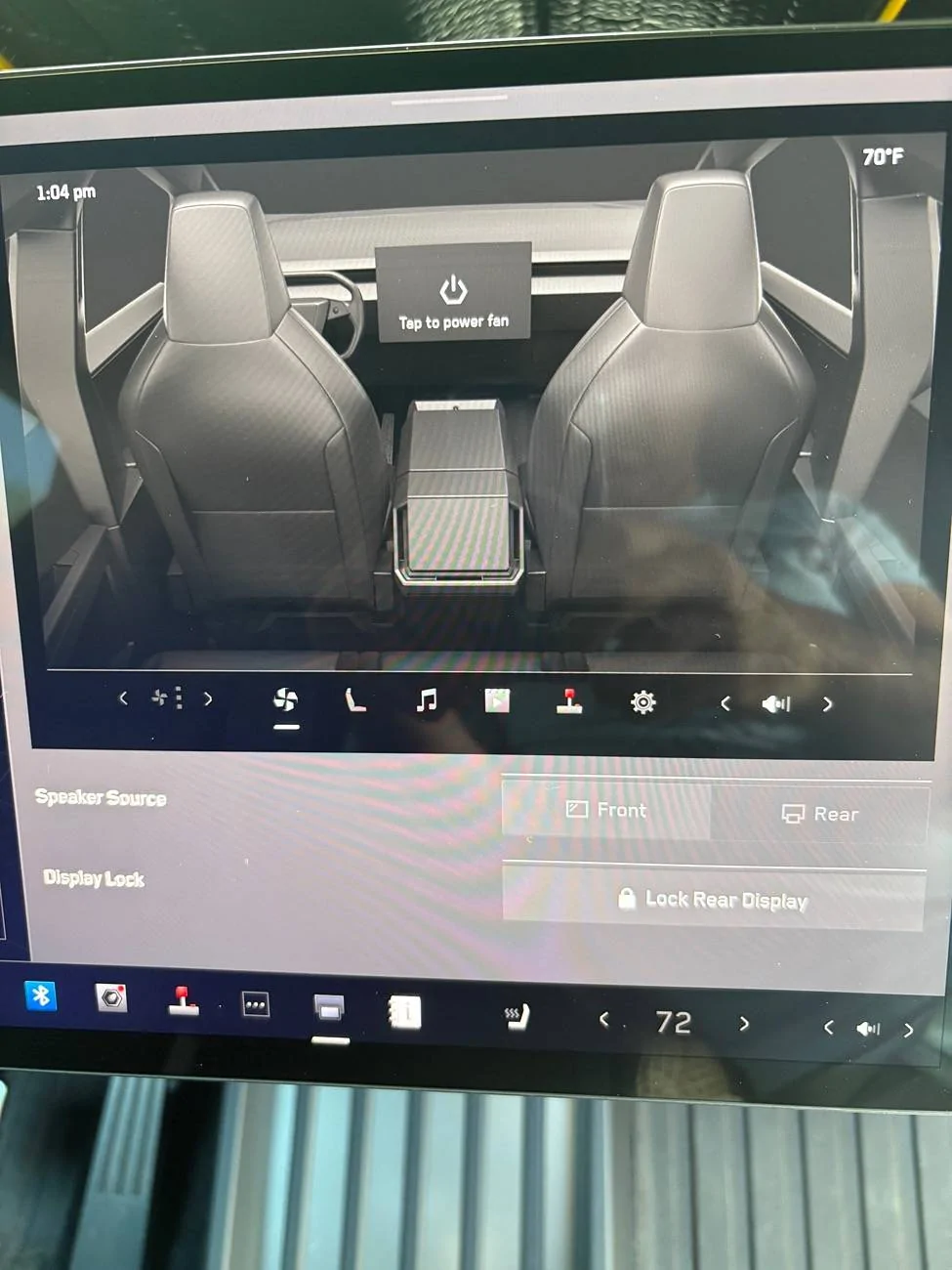
To control the rear screen from the front display, open the rear screen remote control app from the app launcher. Besides audio, video and climate controls, you can lock the rear display in the app or by touching Controls > Display > Lock Rear Display.
It didn't work. Screen is still on with a lock icon and won't turn off.While in Park click the three dots on the bottom of the main screen up front, then click the rear screen app... Basically brings the rear screen to the front for control.



Did you say that backwards or are you saying yours isn't working as intended?Mine is on with seats up. Off when seats down and unoccupied.
Make an appointment with the SC. Sounds like something needs to get fixed.It didn't work. Screen is still on with a lock icon and won't turn off.
Nope, I said it completely forwards and nope it's not working as intended.Did you say that backwards or are you saying yours isn't working as intended?
That's weird!Nope, I said it completely forwards and nope it's not working as intended.