Sponsored

LINKING DRIVER PROFILE TO A KEY (PHONE)

igs

Well-known member
Joined
Aug 7, 2023
Threads
45
Messages
1,183
Reaction score
1,730
Location
CA
Vehicles
CT, MX, MY
Occupation
Tesla: "To maintain service life, the battery pack should be stored at a state of charge (SOC) of 15 to 50%."
Country flag
Thanks, but where is the profile icon(person) on the phone (key) screen on the app?
Right next to each key, press the person icon to assign the profile to.
Sponsored


igs

Well-known member
Joined
Aug 7, 2023
Threads
45
Messages
1,183
Reaction score
1,730
Location
CA
Vehicles
CT, MX, MY
Occupation
Tesla: "To maintain service life, the battery pack should be stored at a state of charge (SOC) of 15 to 50%."
Country flag
Yes, I would highly recommend setting up a separate account for your spouse. Then add them via the app.
You don't have to do that and it only adds more complexity.

Instead of key -> profile you now have account -> key -> profile
 

dalton108

Well-known member
First Name
Dalton
Joined
Oct 17, 2020
Threads
130
Messages
3,947
Reaction score
7,869
Location
USA
Vehicles
ā€˜24 FS/CB; ā€˜24 MX; ā€˜23 MS PLAID (Prior: ā€˜20-MY; ā€˜21-M3P) (Also: ā€˜14-FJ; ā€˜21-C8)
Occupation
Lawyer
Country flag
Right next to each key, press the person icon to assign the profile to.
Let’s be careful not to confuse him any more than he is already.

The question he is asking here is: Where is this on the phone app?

The answer to that question is: It’s not on the phone app.

You can only do this from the screen inside the vehicle. Following the instructions I gave above.
 

tingmo13

Well-known member
First Name
tashi
Joined
Apr 10, 2024
Threads
0
Messages
531
Reaction score
1,005
Location
Colorado
Vehicles
tesla model Y
Occupation
teacher
Country flag
I've own/owned Tesla since 2018-the very early M3 RWD-and now 2025 M3 Highland & 2023 MY but do not own any cell phone for nearly 17 years. I've using the passive fob but lately found that the fob can't be used/added to both the Teslas. So, using keycard for the M3-that's my simple life.
 

dalton108

Well-known member
First Name
Dalton
Joined
Oct 17, 2020
Threads
130
Messages
3,947
Reaction score
7,869
Location
USA
Vehicles
ā€˜24 FS/CB; ā€˜24 MX; ā€˜23 MS PLAID (Prior: ā€˜20-MY; ā€˜21-M3P) (Also: ā€˜14-FJ; ā€˜21-C8)
Occupation
Lawyer
Country flag
I've own/owned Tesla since 2018-the very early M3 RWD-and now 2025 M3 Highland & 2023 MY but do not own any cell phone for nearly 17 years. I've using the passive fob but lately found that the fob can't be used/added to both the Teslas. So, using keycard for the M3-that's my simple life.
In my experience, it will link to multiple cars, but it only wants to play nice with one at a time. What I found is that when you’re moving from car to car you have to go in and re-pair it with the profile you want it on and then it’ll work with that car, but forget what it’s supposed to do with the one it was originally paired to. And then you have to repeat the process on and on. I stopped fighting it and now it’s just paired with whatever the last car it was working with, which I think is our model Y. Never use it anyway - I just got it from my wife as a bridge and to use for valets.


Bottom line: stays paired doesn’t really work right. And I agree with you this is a change from the past.
 
Last edited:


HaulingAss

Well-known member
Joined
Oct 3, 2020
Threads
28
Messages
10,298
Reaction score
20,704
Location
Western Washington, USA
Vehicles
Cybertruck DM, 2010 F-150, 2018 Performance Model 3, 2024 Performance Model 3
Country flag
Yes, I would highly recommend setting up a separate account for your spouse. Then add them via the app.
It's not necessary to have separate accounts for the Driver Profile to be linked to your phone; there's a setting for that.

I think it's in the center screen menu that lists the linked phones.
 

HaulingAss

Well-known member
Joined
Oct 3, 2020
Threads
28
Messages
10,298
Reaction score
20,704
Location
Western Washington, USA
Vehicles
Cybertruck DM, 2010 F-150, 2018 Performance Model 3, 2024 Performance Model 3
Country flag
I've own/owned Tesla since 2018-the very early M3 RWD-and now 2025 M3 Highland & 2023 MY but do not own any cell phone for nearly 17 years. I've using the passive fob but lately found that the fob can't be used/added to both the Teslas. So, using keycard for the M3-that's my simple life.
That's interesting. I haven't met anyone that doesn't have a cell phone (except for young children). May I ask why you decided to not use cellular phones?
 

tingmo13

Well-known member
First Name
tashi
Joined
Apr 10, 2024
Threads
0
Messages
531
Reaction score
1,005
Location
Colorado
Vehicles
tesla model Y
Occupation
teacher
Country flag
That's interesting. I haven't met anyone that doesn't have a cell phone (except for young children). May I ask why you decided to not use cellular phones?
it's not a challenge or resolution but never felt I need one-my wife too doesn't have one. I get 2 reactions: people who are addicted to phone think I'm weirdo but the rest think it's so amazing. Both our Tesla has Spotify with my son's account-the latest OTA update requires Tesla App in many features. My son said I just need cell phone just to get access-may be I'll look for a used one.
 
OP
OP

RAY INGRASSIA

Well-known member
First Name
RAY
Joined
Nov 13, 2024
Threads
11
Messages
108
Reaction score
160
Location
NEW SMYRNA BEACH, FLORIDA
Vehicles
2021 Defender, 2024 Cybertruck
Occupation
retired
Country flag
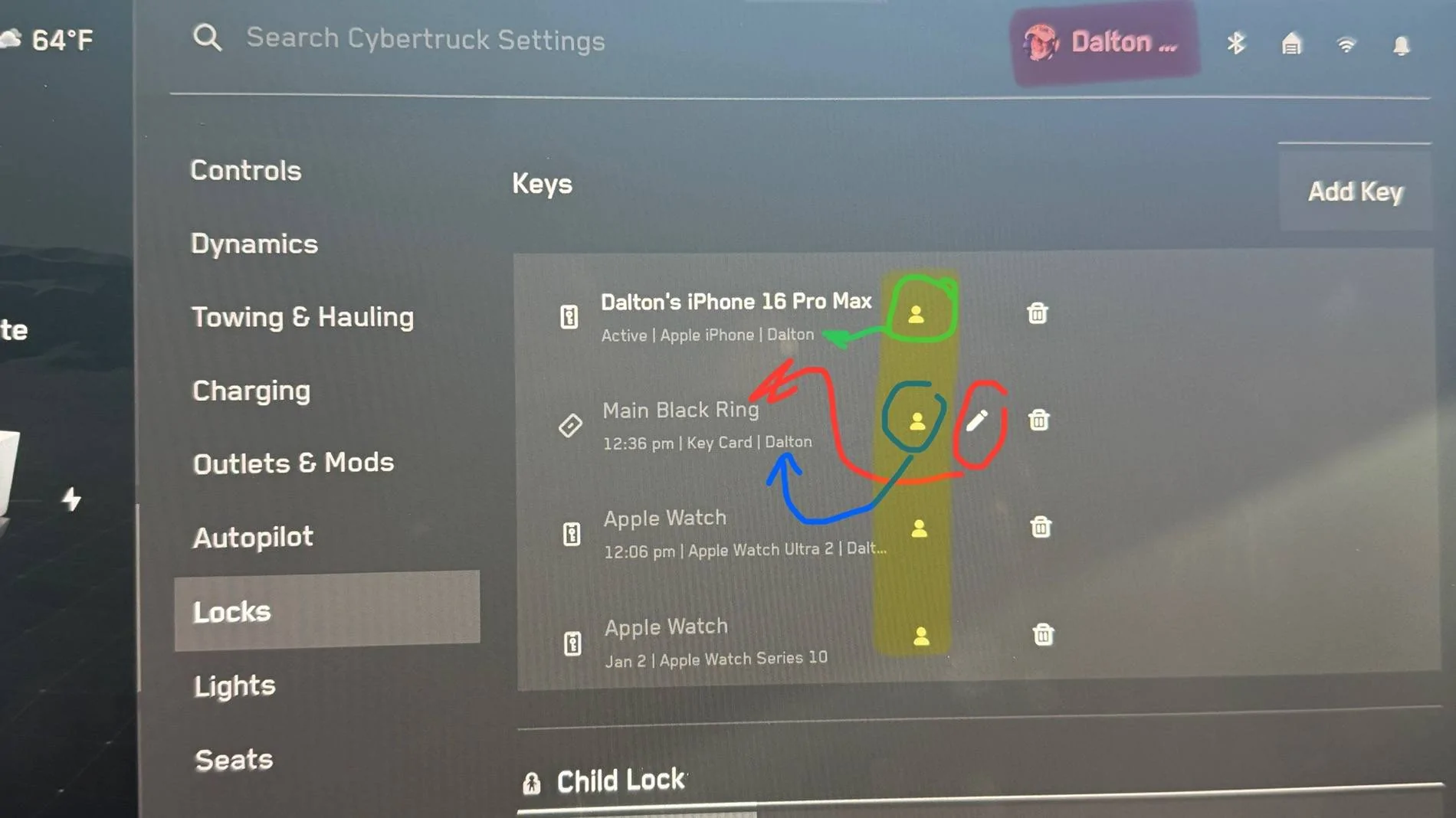
Let me see if I can try to make this a little bit simpler. What I have highlighted in pink at the top of the screen does two things: (1) it tells you which profile is active in the vehicle and (2) allows you to select between profiles (you’ll get a drop-down menu if you tap on it). [I think you already know this much.]

Then, for every key, phone or fob you have connected to your vehicle they will be listed under the ā€œLocksā€ menu and each one has a small silhouette of a human next to it. I have highlighted all of those in yellow. [This is the step I believe you’re missing.]

While the profile that you want to bind is active at the top of the screen you need to push the silhouette icon next to the key or phone or fob that you want bound to that profile. That can only be done from the locks menu not the profile select button at the top of the screen.

Is this making sense?

IMG_2846.jpeg
Dalton, makes perfect sense and it worked. Thank you so much for your patience with me. I love the truck, but at my age "change" is sometimes difficult to accommodate. Again, much thanks and safe travels. PS: Your knowledge of the truck makes me think you had something to do with its design :)
 

dalton108

Well-known member
First Name
Dalton
Joined
Oct 17, 2020
Threads
130
Messages
3,947
Reaction score
7,869
Location
USA
Vehicles
ā€˜24 FS/CB; ā€˜24 MX; ā€˜23 MS PLAID (Prior: ā€˜20-MY; ā€˜21-M3P) (Also: ā€˜14-FJ; ā€˜21-C8)
Occupation
Lawyer
Country flag
I’m very pleased that I was able to help you. No, I wish! I’m just a scum-sucking lawyer, I don’t have anything to do with automotive design at Tesla anywhere else.

I am, however, a techie and have owned/do own many Teslas. Some/most of these core functions are universal across the product line, and as an 80s kid, GUI’s are second nature to me.

Be well, enjoy the rig! Makes me happy to see folks your age (and my parents age) owning bleeding-edge technology and engaging in lifelong learning!

You’re awesome! Keep it up, sir!
 
Last edited:


HaulingAss

Well-known member
Joined
Oct 3, 2020
Threads
28
Messages
10,298
Reaction score
20,704
Location
Western Washington, USA
Vehicles
Cybertruck DM, 2010 F-150, 2018 Performance Model 3, 2024 Performance Model 3
Country flag
PS: Your knowledge of the truck makes me think you had something to do with its design :)
Honestly, you don't have to be the designer of the UI to know how to set up a new user profile. A lot of Tesla owners were able to point you in the right direction.

If I don't know how something works, I've found looking through the menu for 2-3 minutes usually clears up my misunderstandings. I can see how you missed the User Profile though, as it's not in the menu system proper, you click on the user profile at the top of the screen directly.
 
First Name
Jim
Joined
May 11, 2024
Threads
1
Messages
20
Reaction score
47
Location
People's Republic of California
Vehicles
CB, Fiat 500e
Country flag
I’m very pleased that I was able to help you. No, I wish! I’m just a scum-sucking lawyer, I don’t have anything to do with automotive design at Tesla anywhere else.

I am, however, a techie and have owned/do own many Teslas. Some/most of these core functions are universal across the product line, and as an 80s kid, GUI’s are second nature to me.

Be well, enjoy the rig! Makes me happy to see folks your age (and my parents age) owning bleeding-edge technology and engaging in lifelong learning!

You’re awesome! Keep it up, sir!
Your posts helped me figure out what the profile icon was doing - thank you! My only thing now is… the truck still doesn’t retrieve the profile of the respective phone key used to unlock the truck. ☹
I’m going to poke around and double check everything, but I may add this problem to the key card issues at my next service appointment.
 
First Name
Jim
Joined
May 11, 2024
Threads
1
Messages
20
Reaction score
47
Location
People's Republic of California
Vehicles
CB, Fiat 500e
Country flag
Your posts helped me figure out what the profile icon was doing - thank you! My only thing now is… the truck still doesn’t retrieve the profile of the respective phone key used to unlock the truck. ☹
I’m going to poke around and double check everything, but I may add this problem to the key card issues at my next service appointment.
If anyone’s following this thread, I had two issues up to (and through) 13.2.4:
- driver profile would not be automatically selected on driver entry (with properly configured profiles and keys)
- key cards would not unlock vehicle from b-pillar (but would be identified in the center console for driving)

After the update to 13.2.6, both these issues are resolved. Not saying they were explicit bugs with prior versions or explicit fixes with 13.2.6, but maybe the update somehow reset the features.

Pretty relieved I didn’t have to spend the time setting up a service appointment.
Sponsored


Top