Sponsored

CasaDelGato

Well-known member
First Name
John
Joined
Dec 4, 2022
Threads
11
Messages
78
Reaction score
88
Location
Greenbank, WA
Vehicles
EV F250 (conversion), Cybertruck
Occupation
Retired
Country flag
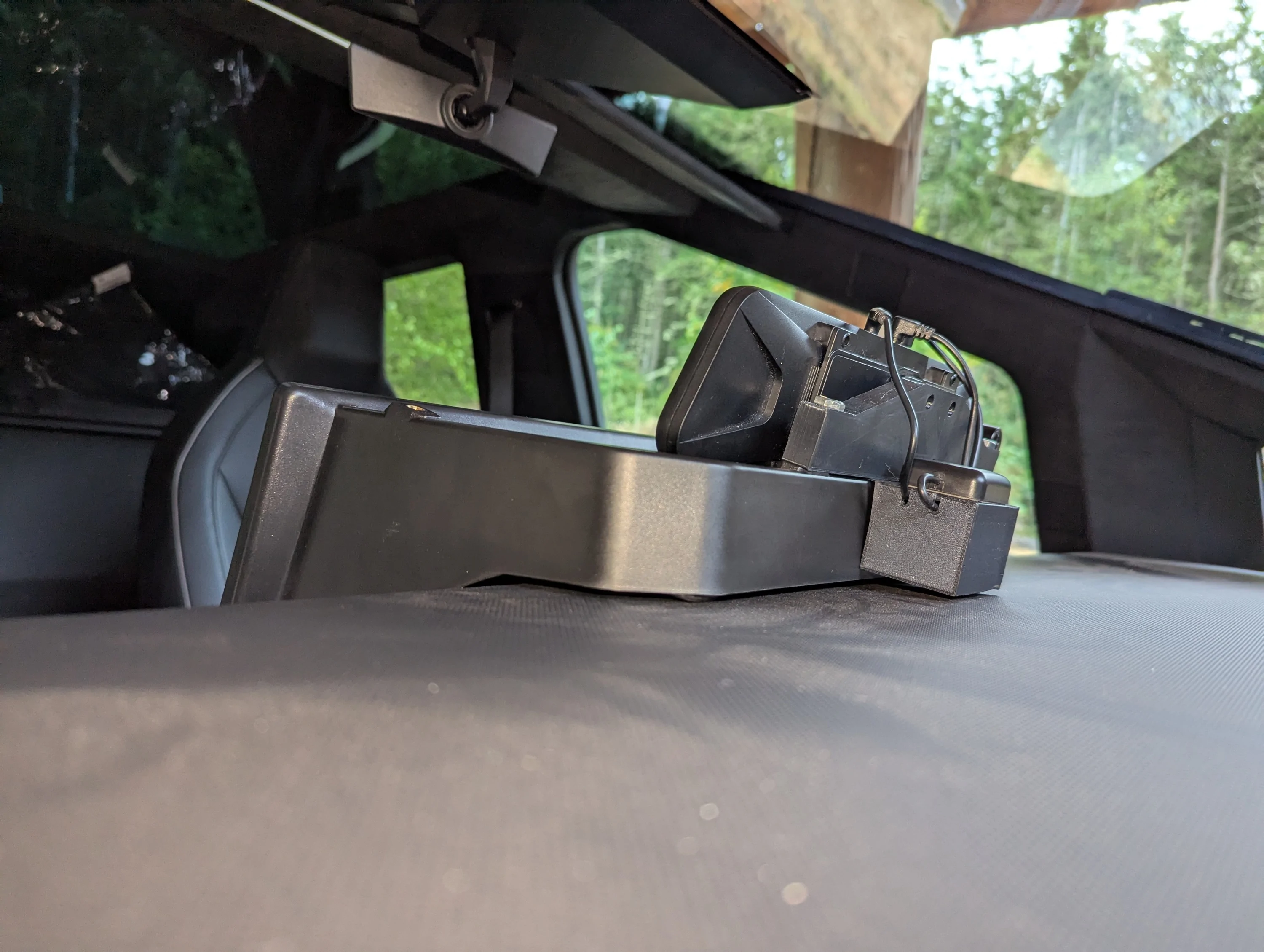
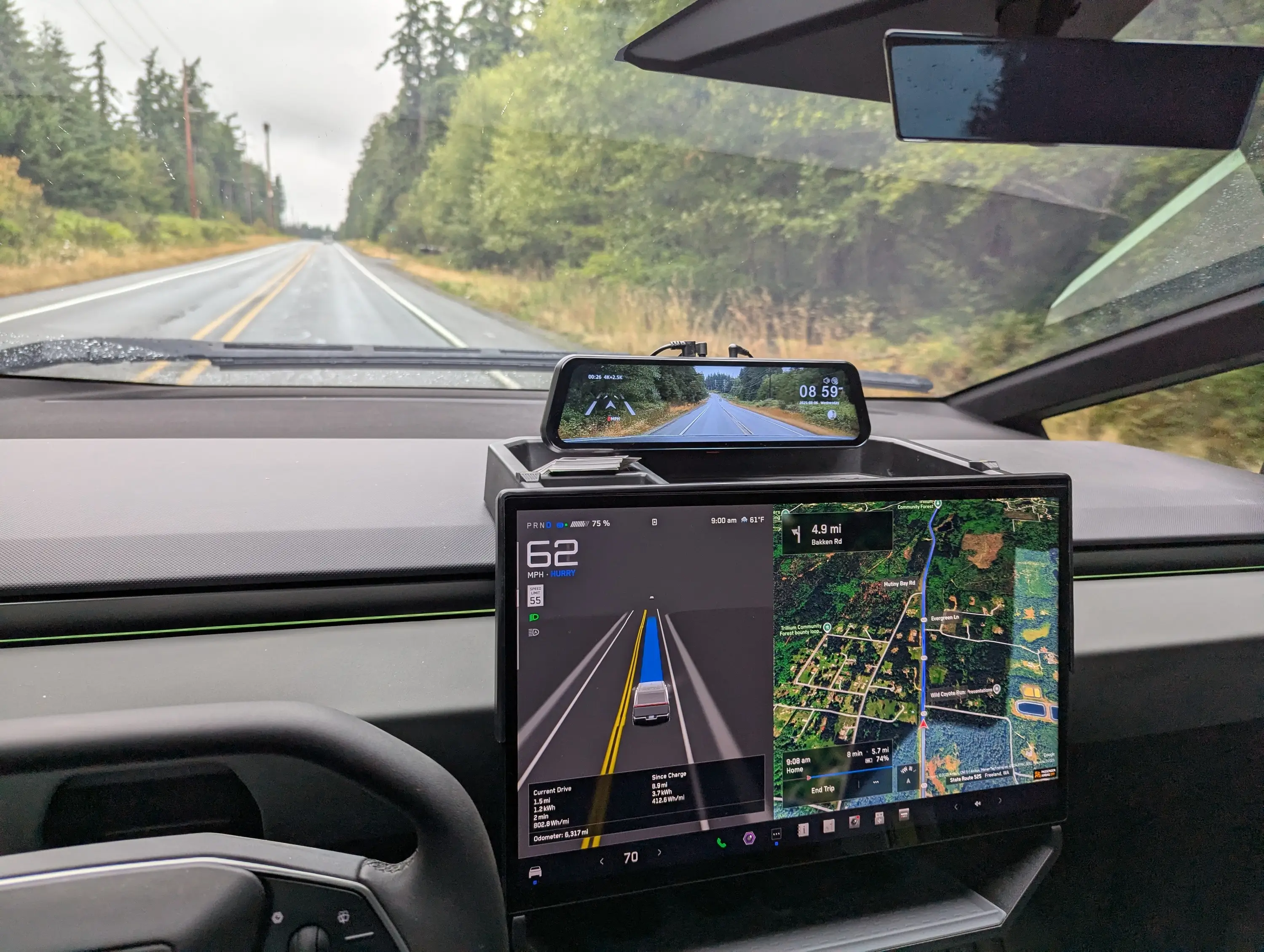
I just finished installing a @Wolfbox G900 pro - mainly to have a decent rear view. It's mounted to the dash tray behind my screen.

Full description of the setup on my website. https://www.casadelgato.com/EV/Cybertruck/Cybertruck.html
Tesla Cybertruck Installed Wolfbox G900 Pro Dashcam on Dash tray Wolfbox12


After owning my Cybertruck for a while, and hauling multiple loads, I realized that it REALLY needed a better rear-view camera. I really wanted to be able to see into the bed when the load was tall enough to prevent the cover from closing. The rear view mirror is almost completely useless.

I decided to install a Wolfbox G900 pro dashcam. I also didn't really want more of the upper windshield view blocked with a big display, and preferred keeping it down where I can see it and the main display at the same time.

I had noticed that the dash storage tray I had purchased (see Amazon Storage Tray) has standard threaded mounting holes for cameras. So I decided to mount it there.

Tesla Cybertruck Installed Wolfbox G900 Pro Dashcam on Dash tray Wolfbox12


Since I have a large 3D printer, I decided to make all the mount adapters that way. See Wolfbox mount on Thingiverse

Installation
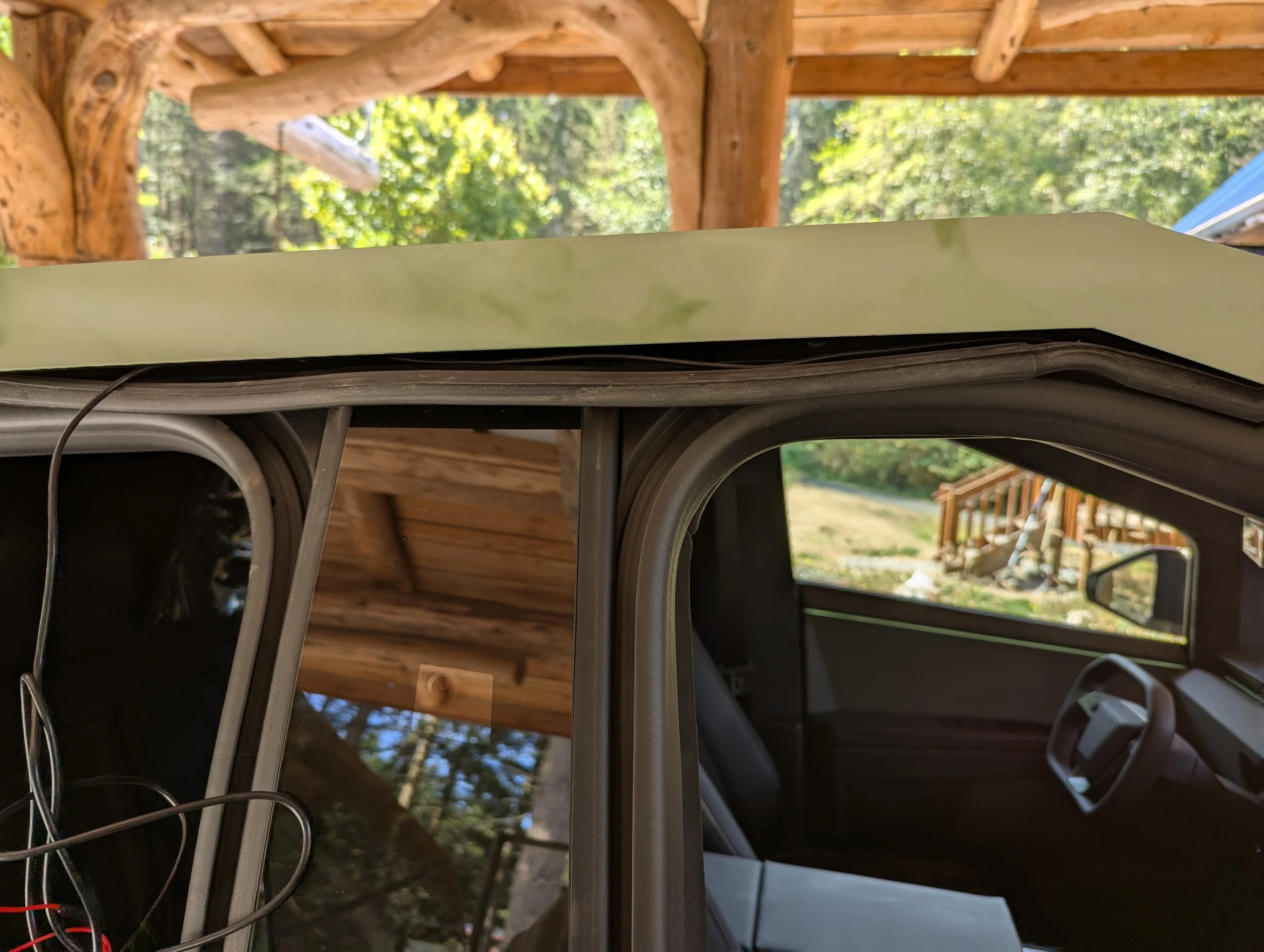
I had watched a couple videos on installing mirror mount dashcams, and used the info from them to figure out the route for the video cable. One of the things I found was that you do NOT have to remove either the B or C pillar covers. Just pull down the top gasket and run the video cable under it all the way across. At the very rear of the rear door, you will have to pull the gasket out of the back door jamb, then you can run the video cable up through the small gap under the top body panel to get it up into the area under the top plastic trim panel (which you have to pop up anyway.). After running the able, getting the gasket pushed back into the hole at the back requires you apply some lubricant to it. Then it slides in fairly easily.

Tesla Cybertruck Installed Wolfbox G900 Pro Dashcam on Dash tray Wolfbox01


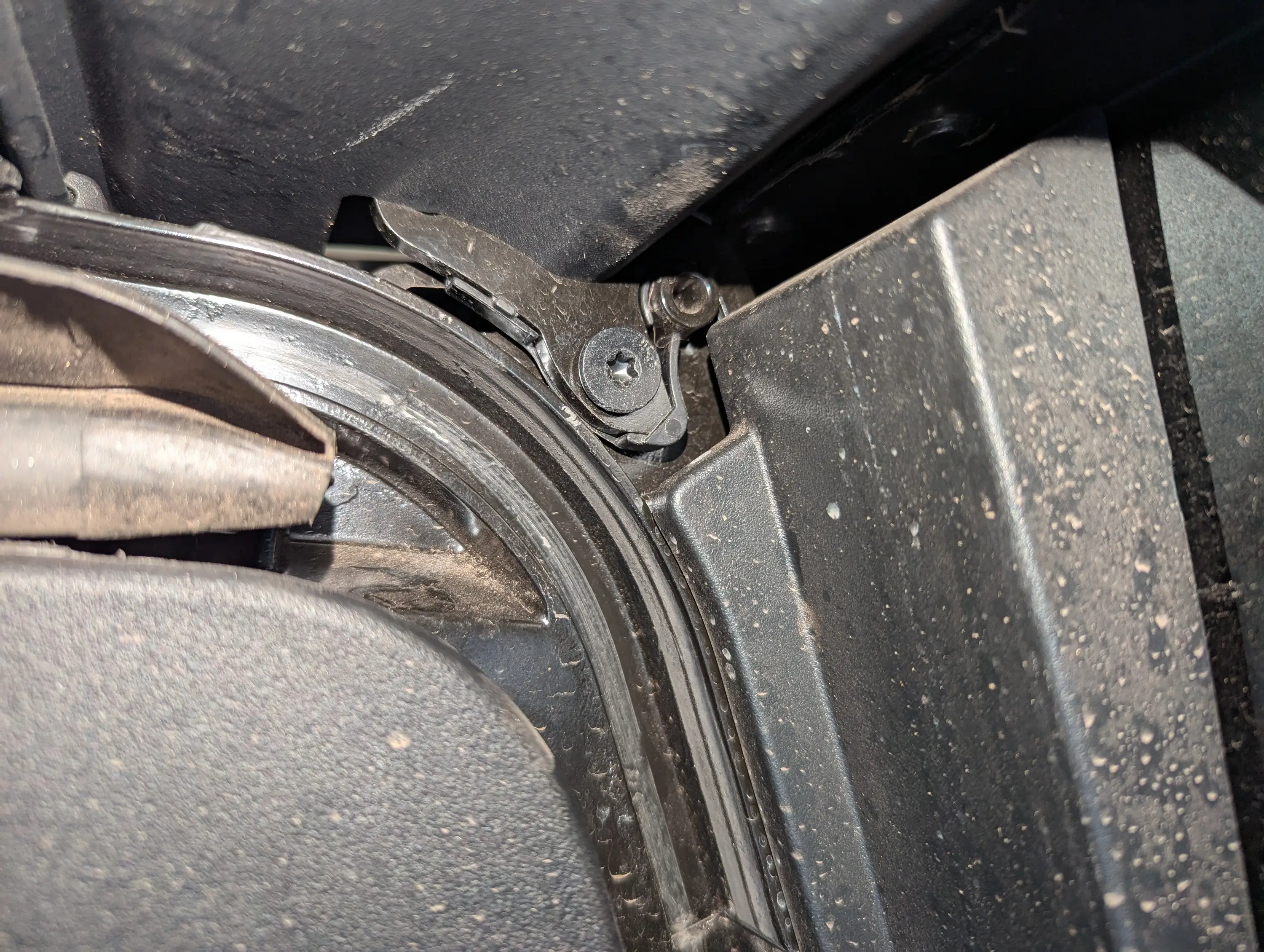
The next issue I found was that the Trim panel at the top/back of the bed did NOT want to pop off like the videos showed. I found that mine had a plastic retainer clip that had to be pressed to the side to allow the panel to pop up.

You can see the clip that starts under the star bit screw, and prevents the bracket from sliding up until the clip is pressed towards the back (left in this image) of the truck.

Tesla Cybertruck Installed Wolfbox G900 Pro Dashcam on Dash tray Wolfbox02


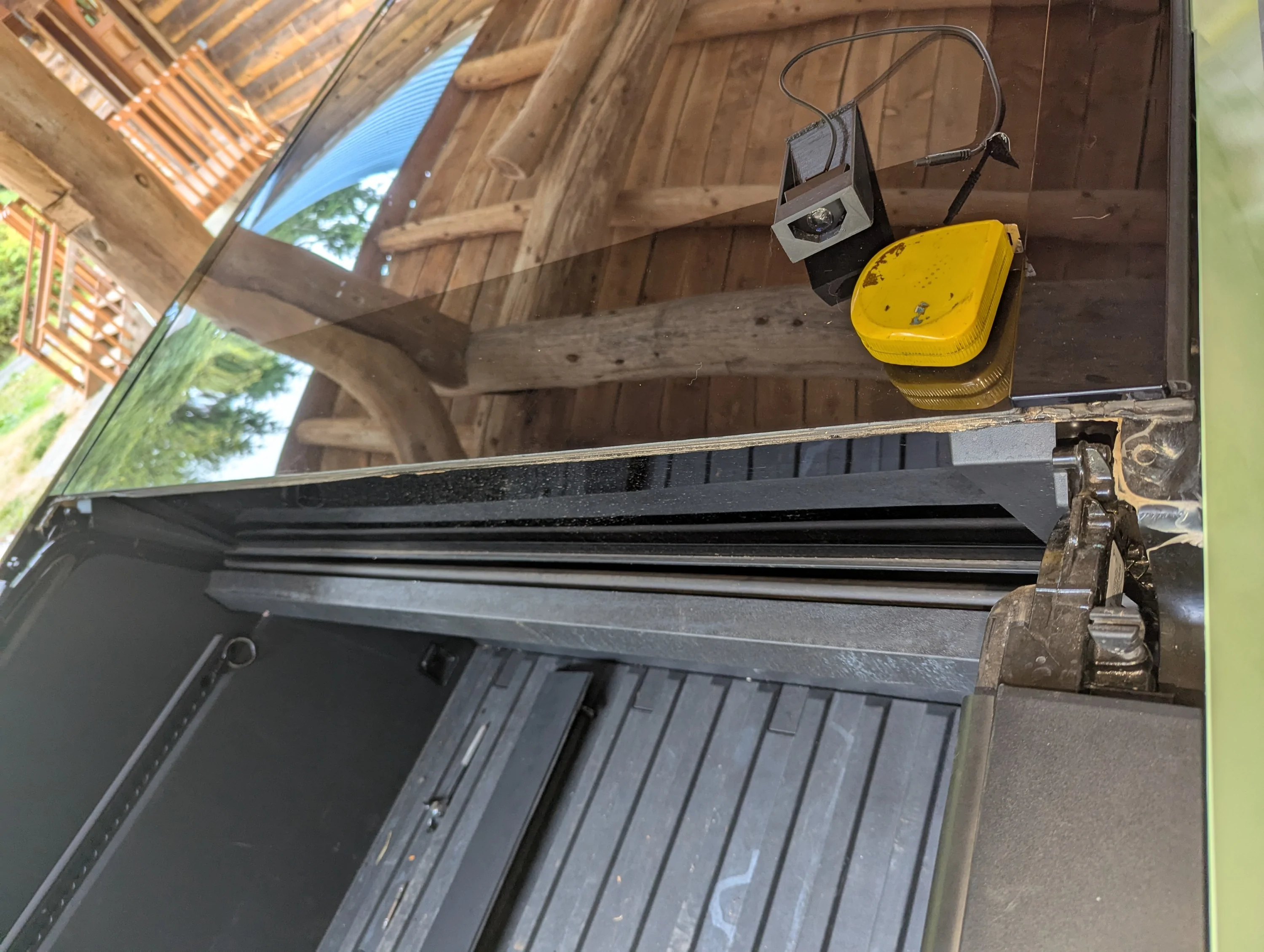
The videos also implied that you can just run the video cable along the gasket between the glass and the trim piece. Nope. There is a plug in the video cable that is too big to fit there. I ended up just allowing the cable to run under the trim piece, and used some pieces of tape to hold it in place. (3M double sided tape, just used it as regular tape. REALLY sticks...)

As you can see, I ended up taking the trim piece completely off, as I couldn't get the right side to snap back in place without tilting the trim piece up. Also, there is an alignment clip that holds up the rearward edge of the trim piece, and I had to lube it a bit as well so that it would snap into place.

Tesla Cybertruck Installed Wolfbox G900 Pro Dashcam on Dash tray Wolfbox03


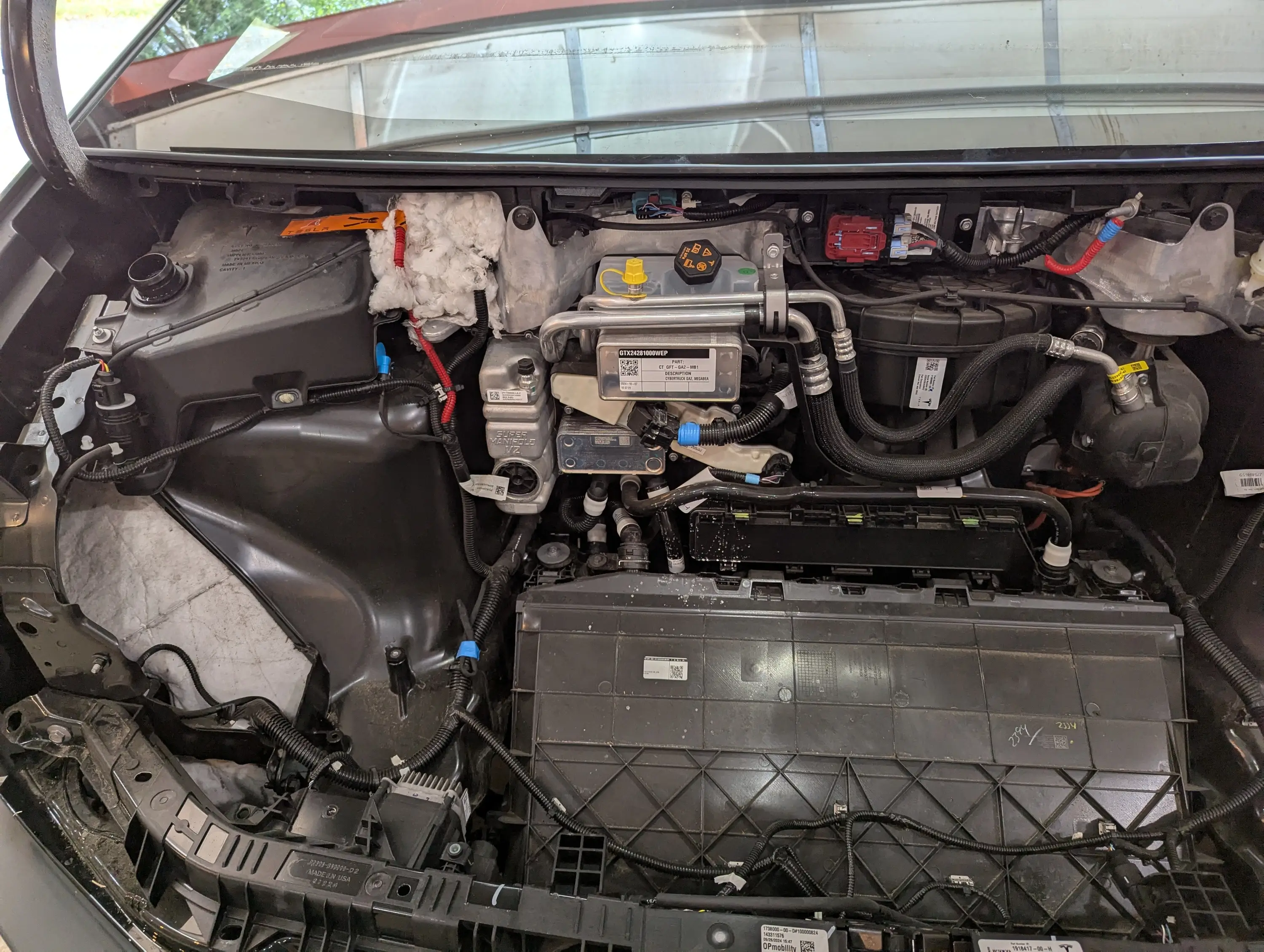
This is the view with the Frunk liner removed so that I can install a 48v to 12v power adapter, using the front Accessory Power. This power source (when enabled in the outlets screen), will turn on when the truck is "On". Exactly what I want for a Rear-view camera. The power leads are at the bottom left, held in place with a piece of blue tape.

Tesla Cybertruck Installed Wolfbox G900 Pro Dashcam on Dash tray Wolfbox04


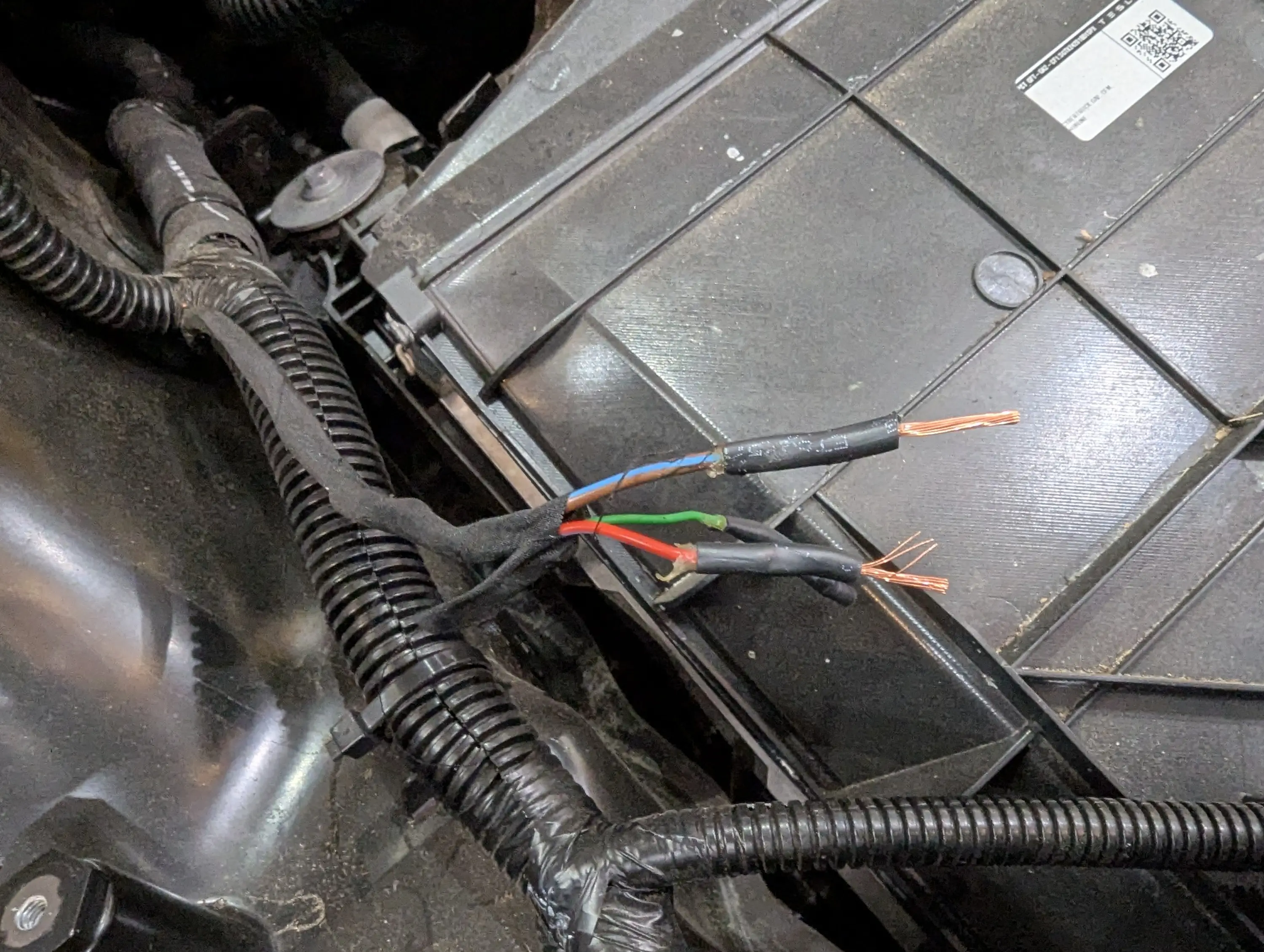
Separated out the +/- 48v wires, strip the ends for connectors.

Tesla Cybertruck Installed Wolfbox G900 Pro Dashcam on Dash tray Wolfbox05


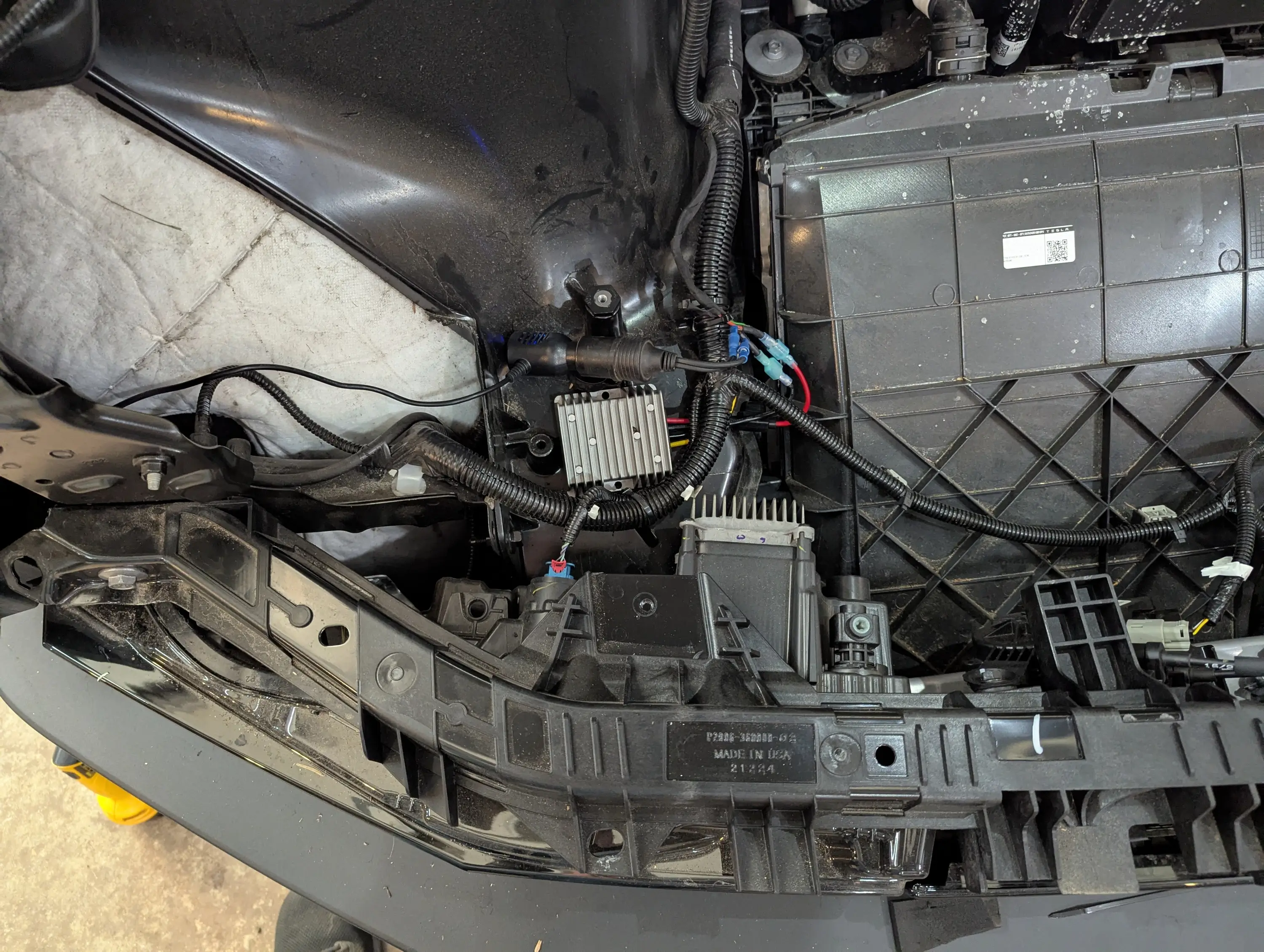
Installed the power converter (see: 48v to 12v converter. Since I didn't have the Wolfbox adapter that just wires in to the 12v system, I put a standard 12v lighter outlet on for the Wolfbox to plug in to. Note that while the power converter isn't physically mounted, it is held in place by it's wires being held down, along with there not being much room to move. I also padded the bottom of it so it wouldn't rattle.

Tesla Cybertruck Installed Wolfbox G900 Pro Dashcam on Dash tray Wolfbox06


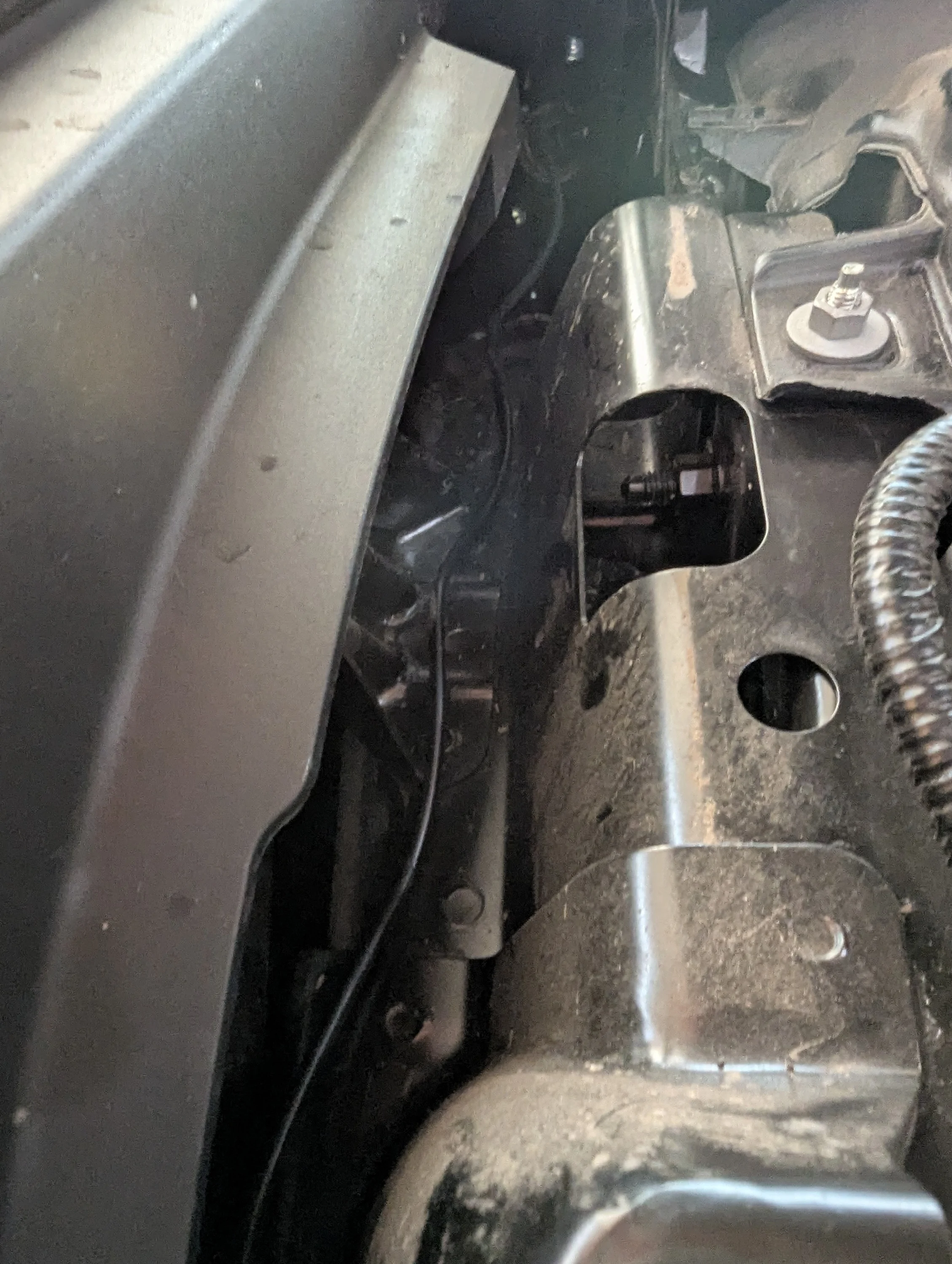
I really wanted to find a way to fish the wire through to the under-dash area, but couldn't figure that out. So I ran it along just inside the fender, to the door jamb.

Tesla Cybertruck Installed Wolfbox G900 Pro Dashcam on Dash tray Wolfbox07


then under the gasket and along side the video cable the rest of the way. Both cables are tucked up under the front edge of the dash panel.

Tesla Cybertruck Installed Wolfbox G900 Pro Dashcam on Dash tray Wolfbox08


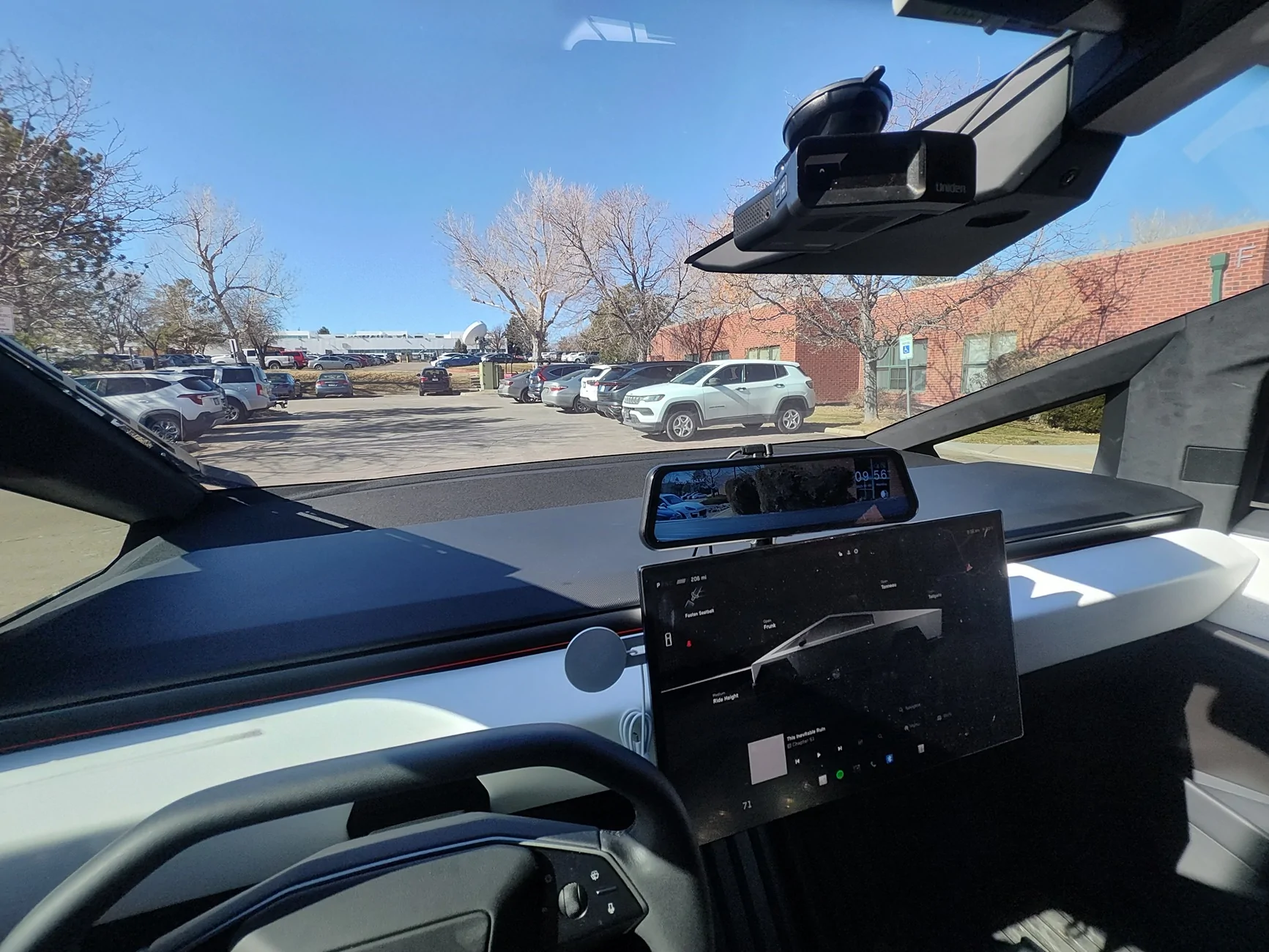
Camera mounted. Note that by mounting it right at the edge of the bed trim, it can see the bottom of part of the bed. (if you scroll the view down on the display.)

Tesla Cybertruck Installed Wolfbox G900 Pro Dashcam on Dash tray Wolfbox09


Dash rear view.

Tesla Cybertruck Installed Wolfbox G900 Pro Dashcam on Dash tray Wolfbox10
Sponsored


Nidavellir

Well-known member
Joined
Nov 22, 2019
Threads
24
Messages
294
Reaction score
278
Location
USA
Vehicles
AWD CyberTruck
Country flag
Looks cool. Also looking at your CyberTruck on your website it has a Talladega Nights vibe to it.
 

Zane Edwards

Well-known member
First Name
ZMAN
Joined
Feb 18, 2024
Threads
21
Messages
418
Reaction score
553
Location
California
Vehicles
Audi R8, BMW 4 Conv. MB GLS, Tesla CT AWD
Occupation
Exec
Country flag
I just finished installing a @Wolfbox G900 pro - mainly to have a decent rear view. It's mounted to the dash tray behind my screen.

Full description of the setup on my website. https://www.casadelgato.com/EV/Cybertruck/Cybertruck.html
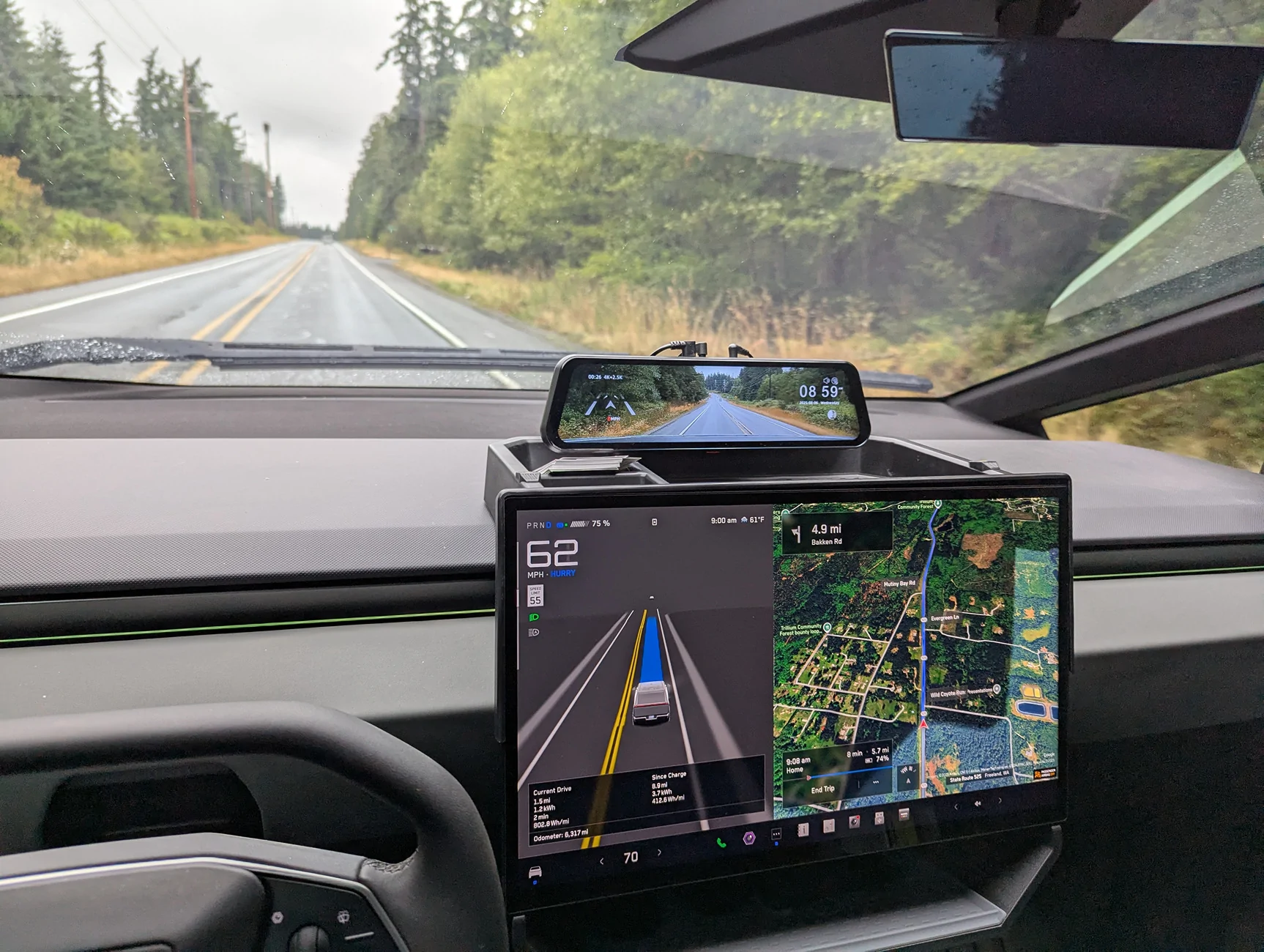
Wolfbox12.jpg


After owning my Cybertruck for a while, and hauling multiple loads, I realized that it REALLY needed a better rear-view camera. I really wanted to be able to see into the bed when the load was tall enough to prevent the cover from closing. The rear view mirror is almost completely useless.

I decided to install a Wolfbox G900 pro dashcam. I also didn't really want more of the upper windshield view blocked with a big display, and preferred keeping it down where I can see it and the main display at the same time.

I had noticed that the dash storage tray I had purchased (see Amazon Storage Tray) has standard threaded mounting holes for cameras. So I decided to mount it there.
Wolfbox12.jpg


Since I have a large 3D printer, I decided to make all the mount adapters that way. See Wolfbox mount on Thingiverse

Installation
I had watched a couple videos on installing mirror mount dashcams, and used the info from them to figure out the route for the video cable. One of the things I found was that you do NOT have to remove either the B or C pillar covers. Just pull down the top gasket and run the video cable under it all the way across. At the very rear of the rear door, you will have to pull the gasket out of the back door jamb, then you can run the video cable up through the small gap under the top body panel to get it up into the area under the top plastic trim panel (which you have to pop up anyway.). After running the able, getting the gasket pushed back into the hole at the back requires you apply some lubricant to it. Then it slides in fairly easily.
Wolfbox01.jpg


The next issue I found was that the Trim panel at the top/back of the bed did NOT want to pop off like the videos showed. I found that mine had a plastic retainer clip that had to be pressed to the side to allow the panel to pop up.

You can see the clip that starts under the star bit screw, and prevents the bracket from sliding up until the clip is pressed towards the back (left in this image) of the truck.
Wolfbox02.jpg


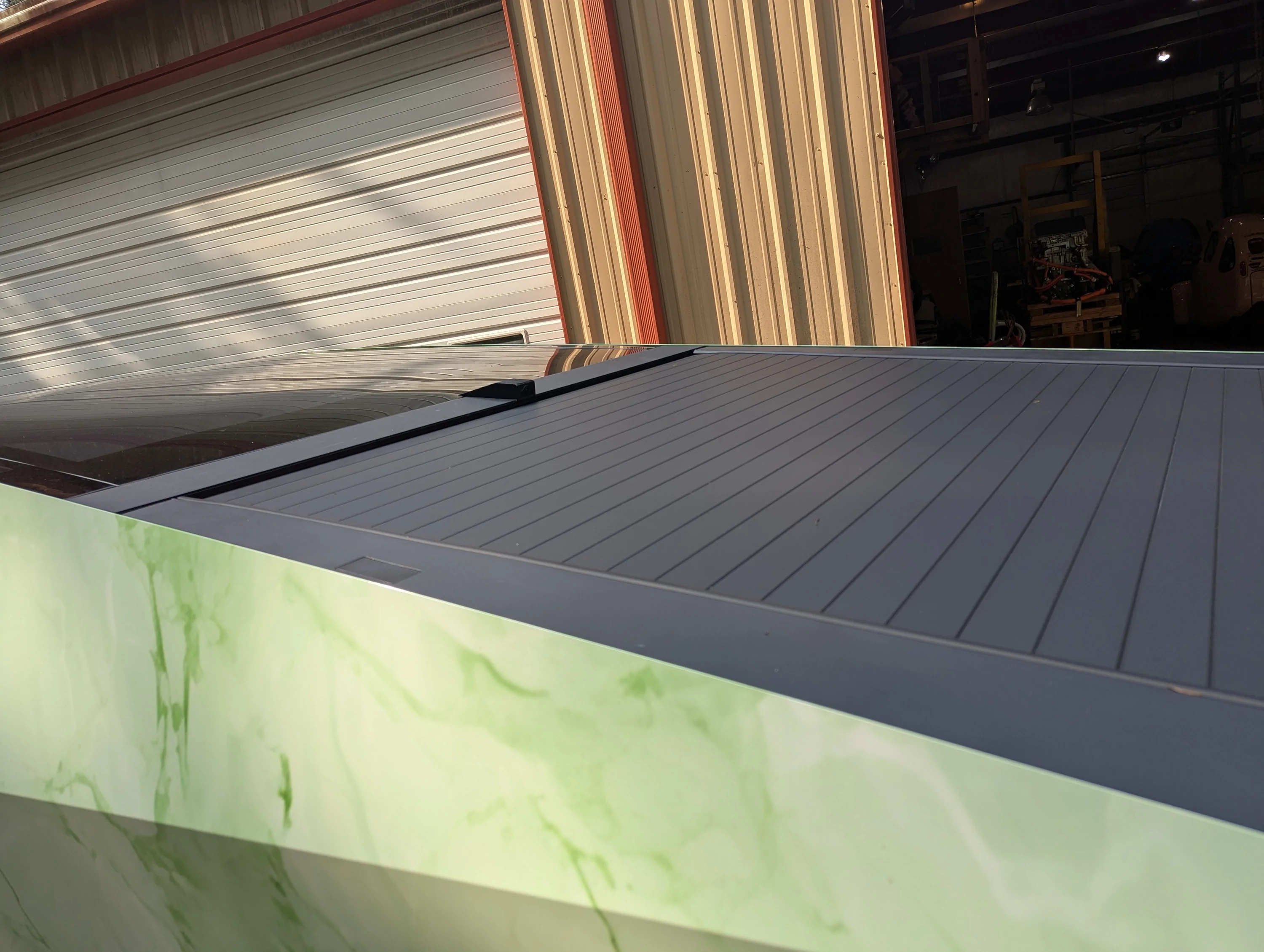
The videos also implied that you can just run the video cable along the gasket between the glass and the trim piece. Nope. There is a plug in the video cable that is too big to fit there. I ended up just allowing the cable to run under the trim piece, and used some pieces of tape to hold it in place. (3M double sided tape, just used it as regular tape. REALLY sticks...)

As you can see, I ended up taking the trim piece completely off, as I couldn't get the right side to snap back in place without tilting the trim piece up. Also, there is an alignment clip that holds up the rearward edge of the trim piece, and I had to lube it a bit as well so that it would snap into place.
Wolfbox03.jpg


This is the view with the Frunk liner removed so that I can install a 48v to 12v power adapter, using the front Accessory Power. This power source (when enabled in the outlets screen), will turn on when the truck is "On". Exactly what I want for a Rear-view camera. The power leads are at the bottom left, held in place with a piece of blue tape.
Wolfbox04.jpg


Separated out the +/- 48v wires, strip the ends for connectors.
Wolfbox05.jpg


Installed the power converter (see: 48v to 12v converter. Since I didn't have the Wolfbox adapter that just wires in to the 12v system, I put a standard 12v lighter outlet on for the Wolfbox to plug in to. Note that while the power converter isn't physically mounted, it is held in place by it's wires being held down, along with there not being much room to move. I also padded the bottom of it so it wouldn't rattle.
Wolfbox06.jpg


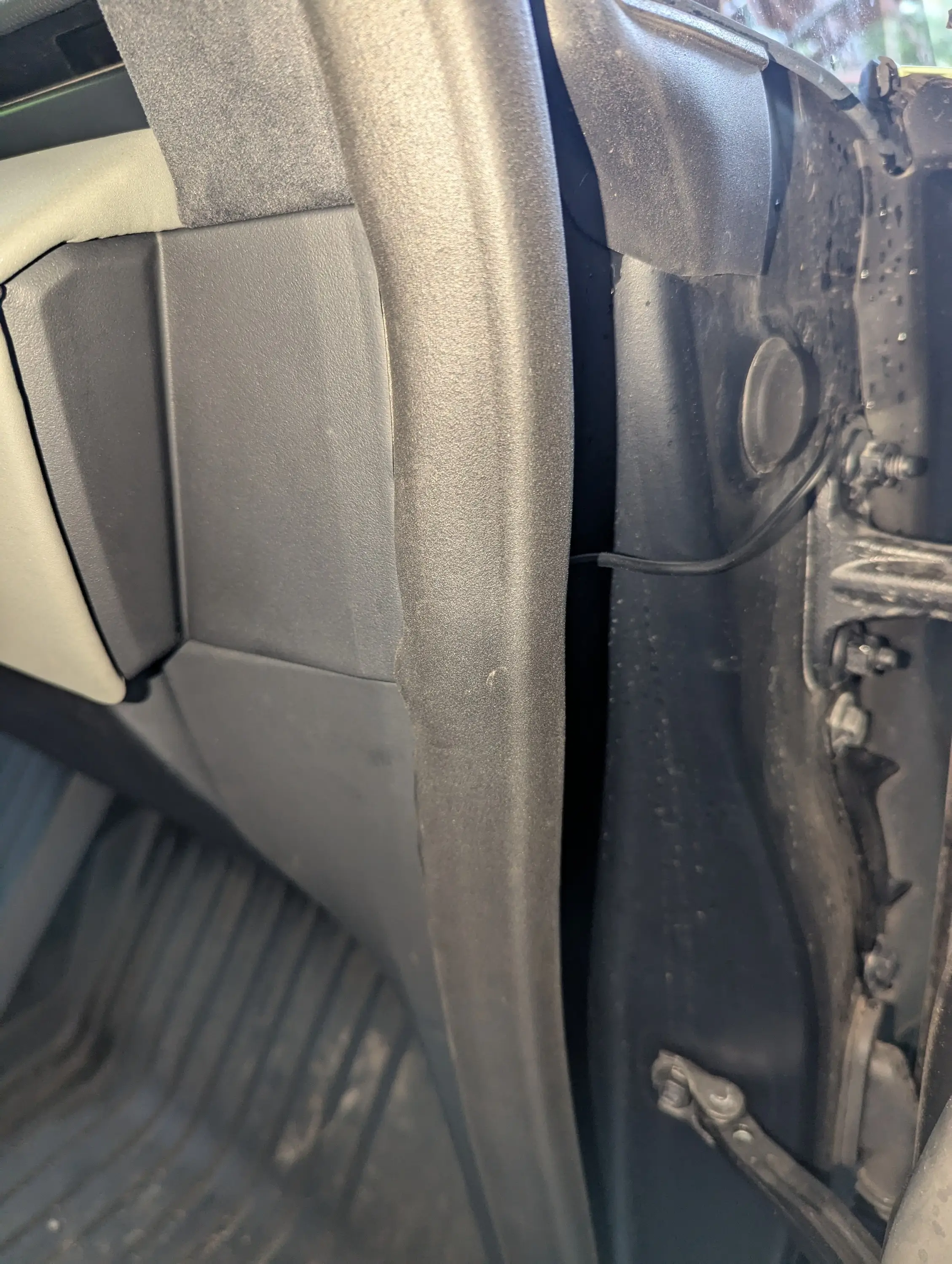
I really wanted to find a way to fish the wire through to the under-dash area, but couldn't figure that out. So I ran it along just inside the fender, to the door jamb.
Wolfbox07.jpg


then under the gasket and along side the video cable the rest of the way. Both cables are tucked up under the front edge of the dash panel.
Wolfbox08.jpg


Camera mounted. Note that by mounting it right at the edge of the bed trim, it can see the bottom of part of the bed. (if you scroll the view down on the display.)
Wolfbox09.jpg


Dash rear view.

Wolfbox10.jpg
Really looks good....I like that location. You going to keep the factory rearview?
 
OP
OP
CasaDelGato

CasaDelGato

Well-known member
First Name
John
Joined
Dec 4, 2022
Threads
11
Messages
78
Reaction score
88
Location
Greenbank, WA
Vehicles
EV F250 (conversion), Cybertruck
Occupation
Retired
Country flag
Really looks good....I like that location. You going to keep the factory rearview?
I'm seriously tempted to removed the (completely useless) rear-view mirror. It does block my view sometimes when signs are oddly placed.
Though if I do remove it, I'll have to come up with something to fill that hole with...


Zane Edwards

Well-known member
First Name
ZMAN
Joined
Feb 18, 2024
Threads
21
Messages
418
Reaction score
553
Location
California
Vehicles
Audi R8, BMW 4 Conv. MB GLS, Tesla CT AWD
Occupation
Exec
Country flag
OP
OP
CasaDelGato

CasaDelGato

Well-known member
First Name
John
Joined
Dec 4, 2022
Threads
11
Messages
78
Reaction score
88
Location
Greenbank, WA
Vehicles
EV F250 (conversion), Cybertruck
Occupation
Retired
Country flag
Some of those are pretty good. Though I'll want one that goes with the theme of my truck, so more need to make (or find) one that has a Cougar on it.
 
OP
OP
CasaDelGato

CasaDelGato

Well-known member
First Name
John
Joined
Dec 4, 2022
Threads
11
Messages
78
Reaction score
88
Location
Greenbank, WA
Vehicles
EV F250 (conversion), Cybertruck
Occupation
Retired
Country flag
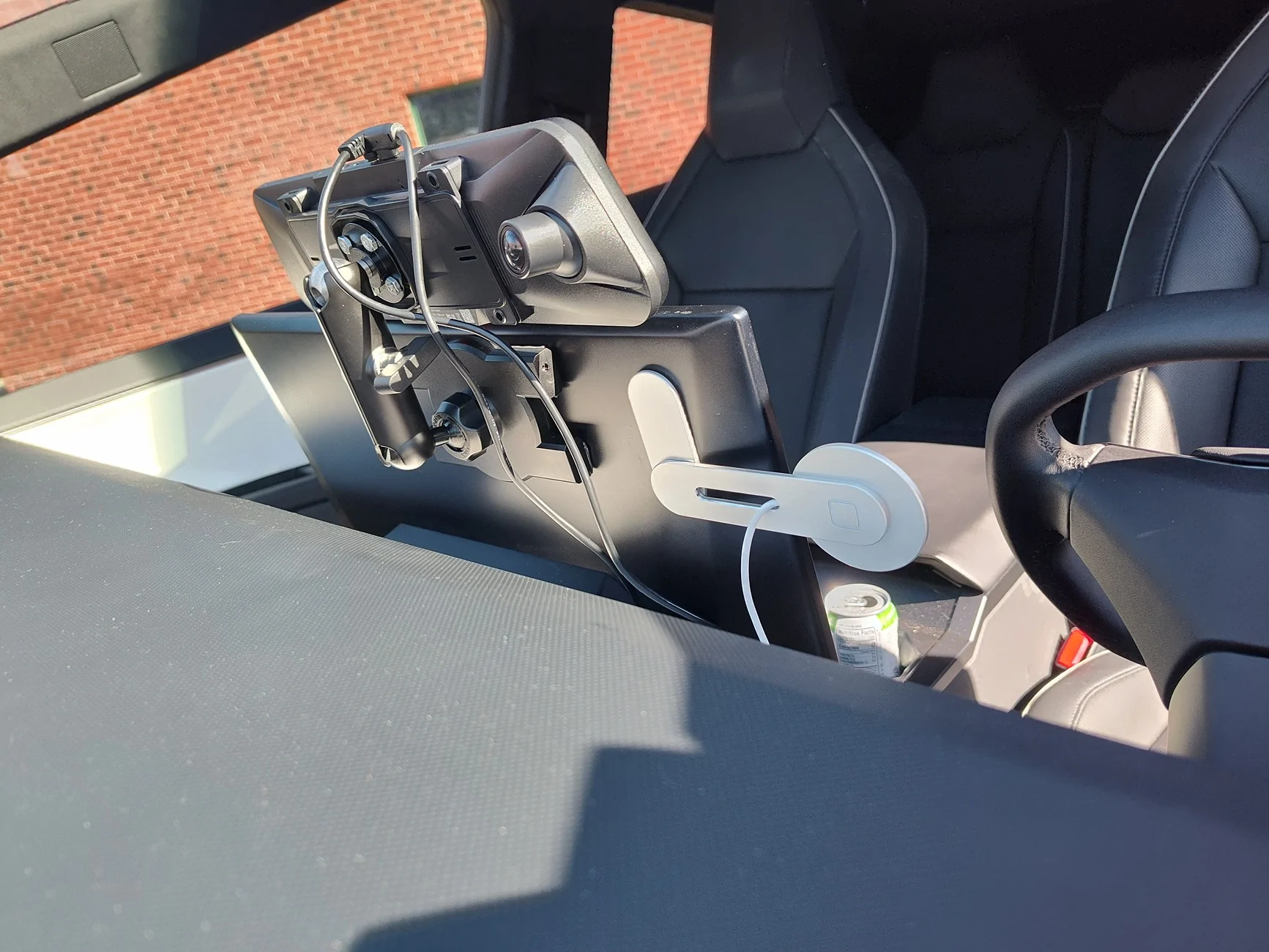
"Did a very similar thing except mine is mounted on the back of the screen."

Yup, though I have the tray and find it quite useful, and since it already had mounting holes....
 

Sousray

Well-known member
First Name
Ray
Joined
Apr 23, 2023
Threads
12
Messages
205
Reaction score
271
Location
San Antonio
Vehicles
2019 M3
Occupation
Engineer
Country flag
How did you remove the rear view from the screen view?
 

Gaximus

Well-known member
Joined
Jun 22, 2024
Threads
23
Messages
1,460
Reaction score
2,284
Location
Mead, CO
Vehicles
CyberBeast, Model 3, Jeep Wrangler, Yamaha R6
Occupation
Software Developer
Country flag
Dear Wolfbox,
Please make a version with the connections coming out the back, preferably a single pigtail that then breaks-out into all the inputs and outputs. I want this aftermarket accessory. I dont want it to look like an aftermarket accessory.


OP
OP
CasaDelGato

CasaDelGato

Well-known member
First Name
John
Joined
Dec 4, 2022
Threads
11
Messages
78
Reaction score
88
Location
Greenbank, WA
Vehicles
EV F250 (conversion), Cybertruck
Occupation
Retired
Country flag
How did you remove the rear view from the screen view?
That's one of the options in the Tesla control panel. Rear View can be Off is one of them.
 
OP
OP
CasaDelGato

CasaDelGato

Well-known member
First Name
John
Joined
Dec 4, 2022
Threads
11
Messages
78
Reaction score
88
Location
Greenbank, WA
Vehicles
EV F250 (conversion), Cybertruck
Occupation
Retired
Country flag
Dear Wolfbox,
Please make a version with the connections coming out the back, preferably a single pigtail that then breaks-out into all the inputs and outputs. I want this aftermarket accessory. I dont want it to look like an aftermarket accessory.
You might want to send that to Wolfbox.
I did my best to hide as much of the cabling as possible.
 

shopaholic

Well-known member
First Name
Gee
Joined
Sep 18, 2024
Threads
21
Messages
315
Reaction score
313
Location
East Bay
Vehicles
2025 CT AWD (67k VIN), 2018 Model 3LR(40k VIN) , BMWR1200S
Occupation
Retired
Country flag
I like the relocation of the mirror to a more line of sight placement. Wish these companies offer a frameless monitor with rectangular shape rather than the “ old rear view mirror “ copy !
 

Wolfbox

Well-known member
Site Sponsor
First Name
Florent
Joined
Mar 12, 2025
Threads
65
Messages
151
Reaction score
46
Location
CA
Vehicles
Cybertruck
Country flag
I just finished installing a @Wolfbox G900 pro - mainly to have a decent rear view. It's mounted to the dash tray behind my screen.

Full description of the setup on my website. https://www.casadelgato.com/EV/Cybertruck/Cybertruck.html
Wolfbox12.jpg


After owning my Cybertruck for a while, and hauling multiple loads, I realized that it REALLY needed a better rear-view camera. I really wanted to be able to see into the bed when the load was tall enough to prevent the cover from closing. The rear view mirror is almost completely useless.

I decided to install a Wolfbox G900 pro dashcam. I also didn't really want more of the upper windshield view blocked with a big display, and preferred keeping it down where I can see it and the main display at the same time.

I had noticed that the dash storage tray I had purchased (see Amazon Storage Tray) has standard threaded mounting holes for cameras. So I decided to mount it there.

Wolfbox12.jpg


Since I have a large 3D printer, I decided to make all the mount adapters that way. See Wolfbox mount on Thingiverse

Installation
I had watched a couple videos on installing mirror mount dashcams, and used the info from them to figure out the route for the video cable. One of the things I found was that you do NOT have to remove either the B or C pillar covers. Just pull down the top gasket and run the video cable under it all the way across. At the very rear of the rear door, you will have to pull the gasket out of the back door jamb, then you can run the video cable up through the small gap under the top body panel to get it up into the area under the top plastic trim panel (which you have to pop up anyway.). After running the able, getting the gasket pushed back into the hole at the back requires you apply some lubricant to it. Then it slides in fairly easily.

Wolfbox01.jpg


The next issue I found was that the Trim panel at the top/back of the bed did NOT want to pop off like the videos showed. I found that mine had a plastic retainer clip that had to be pressed to the side to allow the panel to pop up.

You can see the clip that starts under the star bit screw, and prevents the bracket from sliding up until the clip is pressed towards the back (left in this image) of the truck.

Wolfbox02.jpg


The videos also implied that you can just run the video cable along the gasket between the glass and the trim piece. Nope. There is a plug in the video cable that is too big to fit there. I ended up just allowing the cable to run under the trim piece, and used some pieces of tape to hold it in place. (3M double sided tape, just used it as regular tape. REALLY sticks...)

As you can see, I ended up taking the trim piece completely off, as I couldn't get the right side to snap back in place without tilting the trim piece up. Also, there is an alignment clip that holds up the rearward edge of the trim piece, and I had to lube it a bit as well so that it would snap into place.

Wolfbox03.jpg


This is the view with the Frunk liner removed so that I can install a 48v to 12v power adapter, using the front Accessory Power. This power source (when enabled in the outlets screen), will turn on when the truck is "On". Exactly what I want for a Rear-view camera. The power leads are at the bottom left, held in place with a piece of blue tape.

Wolfbox04.jpg


Separated out the +/- 48v wires, strip the ends for connectors.

Wolfbox05.jpg


Installed the power converter (see: 48v to 12v converter. Since I didn't have the Wolfbox adapter that just wires in to the 12v system, I put a standard 12v lighter outlet on for the Wolfbox to plug in to. Note that while the power converter isn't physically mounted, it is held in place by it's wires being held down, along with there not being much room to move. I also padded the bottom of it so it wouldn't rattle.

Wolfbox06.jpg


I really wanted to find a way to fish the wire through to the under-dash area, but couldn't figure that out. So I ran it along just inside the fender, to the door jamb.

Wolfbox07.jpg


then under the gasket and along side the video cable the rest of the way. Both cables are tucked up under the front edge of the dash panel.

Wolfbox08.jpg


Camera mounted. Note that by mounting it right at the edge of the bed trim, it can see the bottom of part of the bed. (if you scroll the view down on the display.)

Wolfbox09.jpg


Dash rear view.

Wolfbox10.jpg
Thanks for sharing this! It's a nice and detailed review, which inspires others a lot. And great mount you printed.


Top