Sponsored

Key cards are paired but do not unlock CT

LuckyStrike

Well-known member
First Name
Adam
Joined
Oct 5, 2024
Threads
3
Messages
50
Reaction score
96
Location
NC
Vehicles
Cybertruck, Volvo S60, Ford Expedition Max
Country flag
I have a service appt already scheduled that I added this issue to, but was curious if anyone else had this issue.

My key cards are both paired with the truck (original with purchase) but neither one of them actually unlocks it when I place it against the b pillar as instructed. They were working since July when I got the truck but at some point stopped. Thanks for any insight.
Sponsored
 

65SoYoLO

Well-known member
First Name
Keith
Joined
Feb 9, 2021
Threads
53
Messages
2,009
Reaction score
2,638
Location
Long Island NY
Vehicles
2024 CyberTruck
Occupation
Retired truck driver
Country flag
I never use them but now I have to check them.
 
OP
OP

LuckyStrike

Well-known member
First Name
Adam
Joined
Oct 5, 2024
Threads
3
Messages
50
Reaction score
96
Location
NC
Vehicles
Cybertruck, Volvo S60, Ford Expedition Max
Country flag
65SoYoLO. You may not remember, but we met in South Jersey in October when you were charging your CT at a WaWa before you went to Wharton to off-road. Hope it was a good trip
 

65SoYoLO

Well-known member
First Name
Keith
Joined
Feb 9, 2021
Threads
53
Messages
2,009
Reaction score
2,638
Location
Long Island NY
Vehicles
2024 CyberTruck
Occupation
Retired truck driver
Country flag
65SoYoLO. You may not remember, but we met in South Jersey in October when you were charging your CT at a WaWa before you went to Wharton to off-road. Hope it was a good trip
we had a good time, as any road trip is, but it was not challenging at all. BAsic flat ground with some sand and a few puddles.
 

dalton108

Well-known member
First Name
Dalton
Joined
Oct 17, 2020
Threads
132
Messages
4,067
Reaction score
8,202
Location
USA
Vehicles
‘24 FS/CB; ‘24 MX; ‘23 MS PLAID (Prior: ‘20-MY; ‘21-M3P) (Also: ‘14-FJ; ‘21-C8)
Occupation
Lawyer
Country flag
I have a service appt already scheduled that I added this issue to, but was curious if anyone else had this issue.

My key cards are both paired with the truck (original with purchase) but neither one of them actually unlocks it when I place it against the b pillar as instructed. They were working since July when I got the truck but at some point stopped. Thanks for any insight.
Let me just ask some stupid questions. Don’t know your experience level etc. so, I’m not trying to offend if these seem insulting.

1. Just confirming that you’re only trying this on the driver’s side and you’re moving the card around to try and find the exact spot?

2. Have you done a reboot? If not, I would recommend that.

3. If you look in “locks” under the main menu it should show you any key cards/phones that are assigned/bound to the car, and the last time that they were connected do you see them?

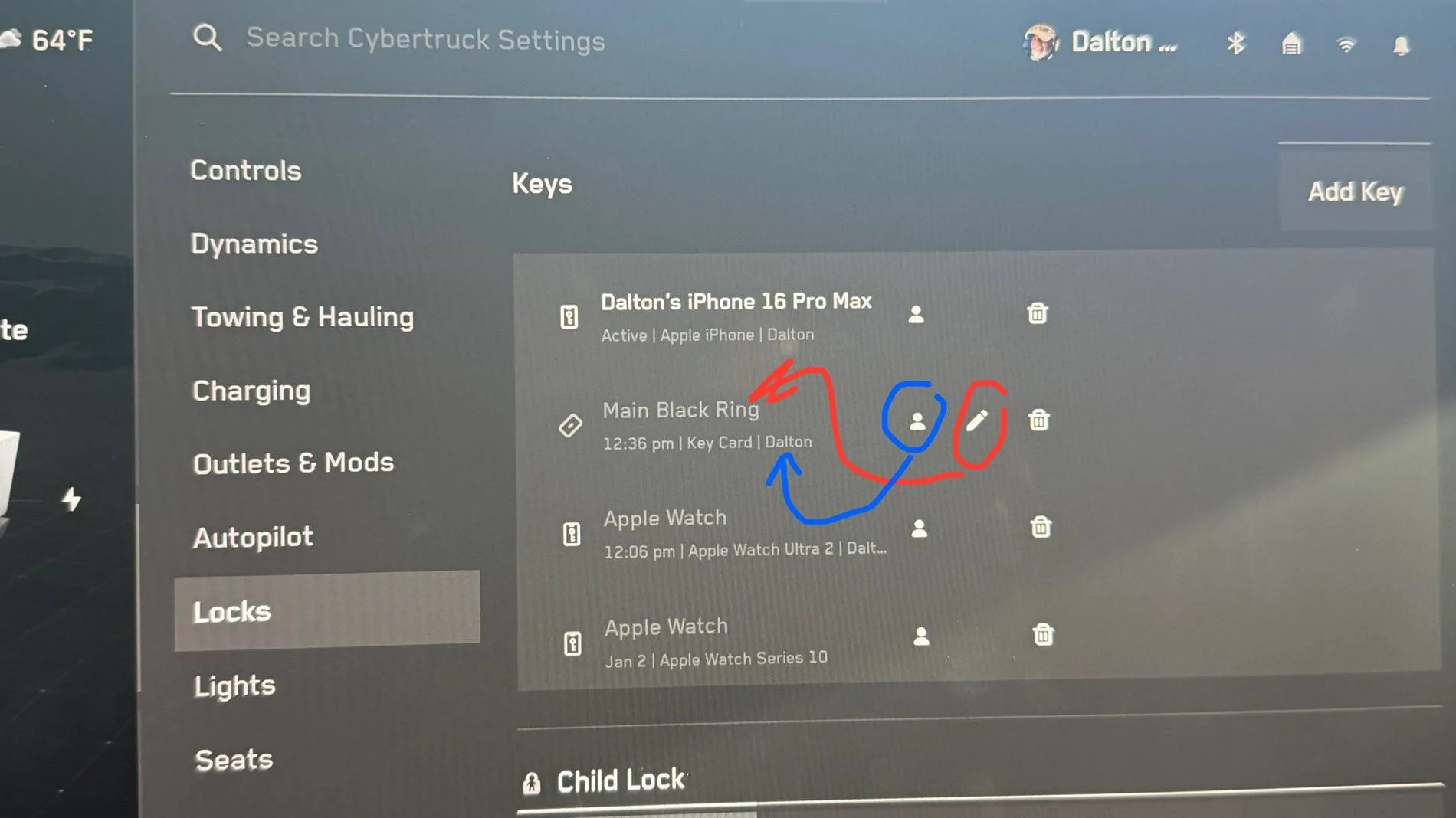
*Also, another pro tip here, in this menu you can assign the card to a particular user and their set up as well as name the card with the edit button. It’s very useful when you have four different rings and multiple cards attached to multiple cars like I do.

4. Irrespective of whether they seem to be unlocking the car, do they start (or allow you to start) the car?

Here’s what it looks like. Select the red circled icon to rename the card/device (except for some reason you cannot rename Apple watches you’ll see that I have two showing here but it does give you the model number so that you can distinguish which is which).

Select the icon circled in blue —> while you have the profile of the driver that you want to be associated with the item selected. When you tap it, it will assign that PROFILE to that CARD or item, and show the name of that user associated with it - as shown here.

Tesla Cybertruck Key cards are paired but do not unlock CT IMG_2846


Tesla Cybertruck Key cards are paired but do not unlock CT IMG_2844


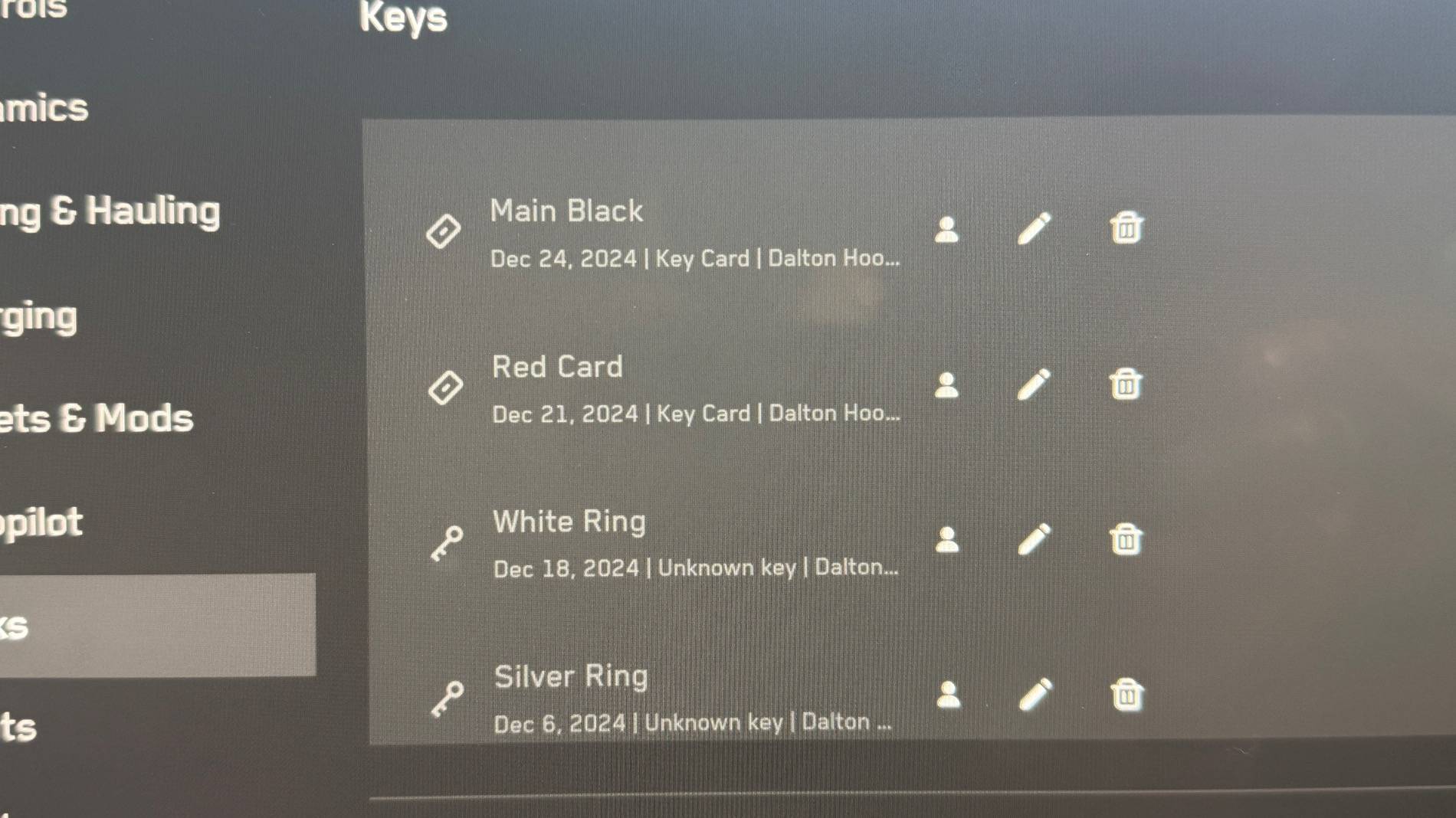
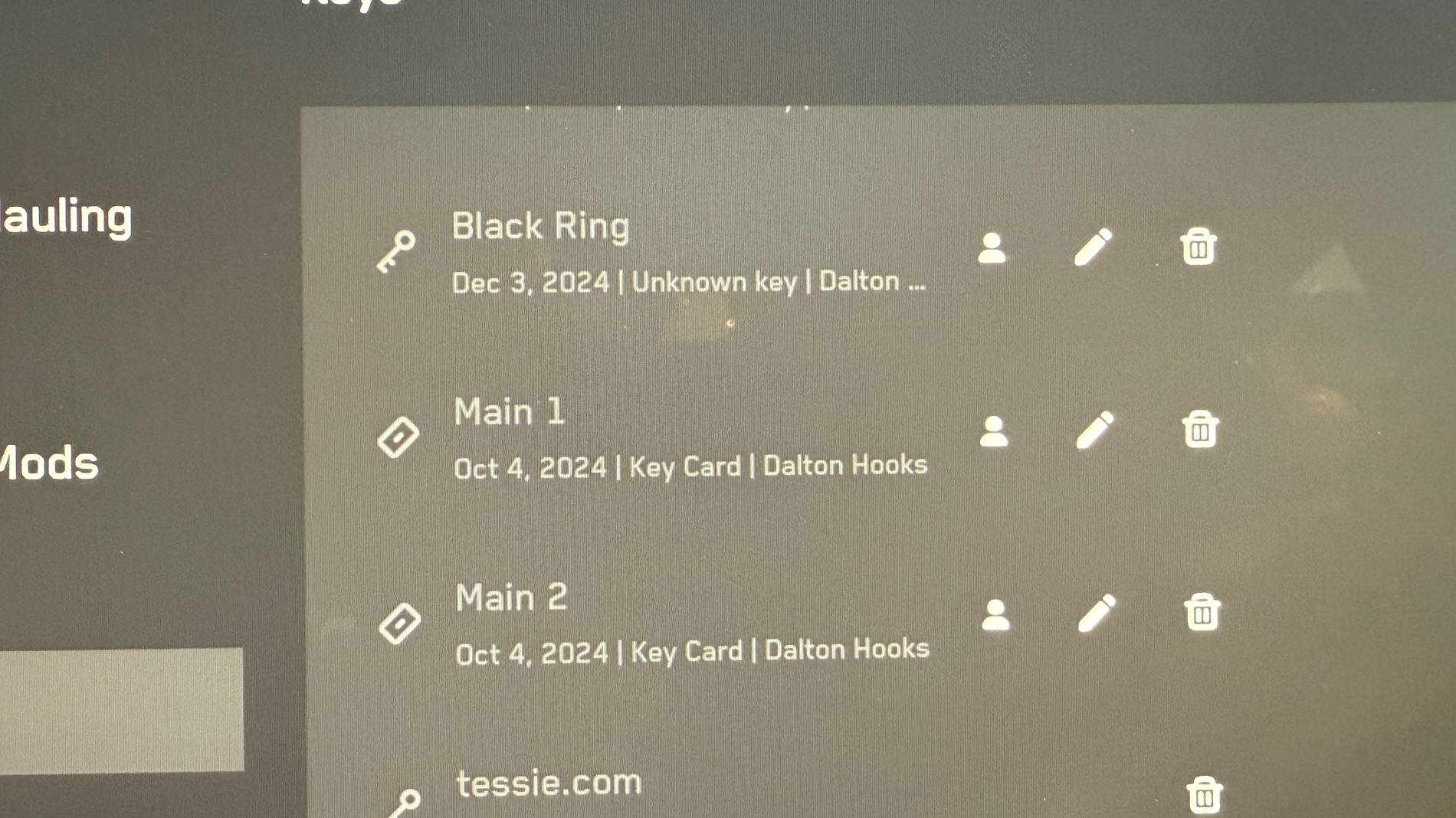
It will also show you any apps that have API’s bound to your vehicle as shown below.

Tesla Cybertruck Key cards are paired but do not unlock CT IMG_2845


The fact that it gives you the last time that any key card was used (or date if it happens to be on a different date) is a security feature. Should anything ever come up missing (or anything else) and if you have named the cards, you’ll know exactly when that entry was made.

As you can see here, the two cards that came with my car were last use in October when I finally got around to naming them.
 
Last edited:


BlueRealm

New member
First Name
Devin
Joined
Oct 19, 2023
Threads
0
Messages
3
Reaction score
0
Location
Dallas, TX
Vehicles
Ford Raptor, Pre ordered Cyber Truck
Occupation
CTO
Country flag
I’m having the same issue. Card works for driving but not locking / unlocking. It did work previously, but noticed when the valet couldn’t get in or lock it. I have a service appointment on the 21st.
 

Lasttoy

Well-known member
First Name
Paul
Joined
Apr 26, 2021
Threads
10
Messages
707
Reaction score
402
Location
St Augustine, FL
Vehicles
2013 & 2017 S. CT ordered 30 may
Occupation
Retired
Country flag
I don't depend on them. They never work. Cell is worse
 

Crissa

Well-known member
First Name
Crissa
Joined
Jul 8, 2020
Threads
138
Messages
19,571
Reaction score
31,477
Location
Santa Cruz
Vehicles
2014 Zero S, 2013 Mazda 3
Country flag
I don't depend on them. They never work. Cell is worse
This is... not the average Tesla driver's experience.

Perhaps there's an antenna that's disconnected in yours. There are several throughout the truck (including the B pillar for the cards) to give Bluetooth triangulation.

-Crissa
 

Pirogue007

Member
First Name
Richard
Joined
Aug 15, 2023
Threads
1
Messages
14
Reaction score
23
Location
Gramercy, LA
Vehicles
2001 Toyota Tundra, 2024 cybertruck AWD
Occupation
Retired
Country flag
I have a service appt already scheduled that I added this issue to, but was curious if anyone else had this issue.

My key cards are both paired with the truck (original with purchase) but neither one of them actually unlocks it when I place it against the b pillar as instructed. They were working since July when I got the truck but at some point stopped. Thanks for any insight.
Mine too ?‍♂


AbblePC

Well-known member
First Name
Jeffrey
Joined
Mar 12, 2024
Threads
0
Messages
220
Reaction score
197
Location
State College PA
Vehicles
16MS90D - 23MYP - 22MYP - 21MYLR - 23MXPlaid - 24CB AT Tires/White Int
Occupation
IT Managed Service Provider
Country flag
Go into settings and remove all keycards then re add them.
Way back we had an issue where cards got switched up on users and had to reset them by removing and adding back in with designated names for each.
 
  • Like
Reactions: REM

REM

Well-known member
Joined
Dec 9, 2023
Threads
14
Messages
3,635
Reaction score
6,768
Location
NC
Vehicles
2020 Model 3 Standard Range++ & Diet Cybertruck, Dual Motor
Occupation
Professional Retard
Country flag
First Name
Mike
Joined
Apr 19, 2024
Threads
4
Messages
12
Reaction score
17
Location
Florida
Vehicles
Cybertruck
Country flag
I have a service appt already scheduled that I added this issue to, but was curious if anyone else had this issue.

My key cards are both paired with the truck (original with purchase) but neither one of them actually unlocks it when I place it against the b pillar as instructed. They were working since July when I got the truck but at some point stopped. Thanks for any insight.
I thought I had the same problem. I found that I have to hold the card over the side camera for much longer than I would expect … everything else being so immediate makes that feel weird. Maybe try holding it over the camera for longer than you think you should have to?? ??‍♂
Sponsored


Top