Sponsored

Using Starlink (mini) wifi with Tesla Cybertruck, only for navigation?

GmP

Well-known member
First Name
Gerard
Joined
Dec 30, 2024
Threads
8
Messages
217
Reaction score
394
Location
Campbell, ca
Vehicles
cybertruck FS AWD
Occupation
Retired
Country flag
I recently got a Starlink mini and when going into an area with no cell reception I used it with my iPhone and iPad, works great.

Of course the Tesla maps/routing also doesn’t work in those Places. Googling about it I read several warnings that when you connect the car to the Starlink wifi, it will also download and upload a lot of other data, and will blow through the $50/50GB plan in no time.

Did any of the several Starlink users on this forum find a way to use Starlink for in car navigation, but not allowing “other data” usage?

How many days of “Tesla data” fit into the 50GB? Or is that not predictable?
Sponsored
 

rsilvers

Member
First Name
Robert
Joined
Apr 9, 2026
Threads
1
Messages
15
Reaction score
6
Location
USA
Vehicles
Cybertruck, Model-3P
Country flag
50 GB is huge. Navigation was designed around minimizing cell data and is not even a tiny fraction of that.
 
OP
OP
GmP

GmP

Well-known member
First Name
Gerard
Joined
Dec 30, 2024
Threads
8
Messages
217
Reaction score
394
Location
Campbell, ca
Vehicles
cybertruck FS AWD
Occupation
Retired
Country flag
50 GB is huge. Navigation was designed around minimizing cell data and is not even a tiny fraction of that.
Correct. My concern is not the Navigation data, but all “other” data that Tesla up/down loads. If not on cellular, and not on home WiFi, can I stop it from using Starlink WiFi? But still have it used for Navigation?
 

rsilvers

Member
First Name
Robert
Joined
Apr 9, 2026
Threads
1
Messages
15
Reaction score
6
Location
USA
Vehicles
Cybertruck, Model-3P
Country flag
I don't think so, but not sure why you would want to stop it from using Starlink since you don't get charged by the amount of data.
 
OP
OP
GmP

GmP

Well-known member
First Name
Gerard
Joined
Dec 30, 2024
Threads
8
Messages
217
Reaction score
394
Location
Campbell, ca
Vehicles
cybertruck FS AWD
Occupation
Retired
Country flag
I don't think so, but not sure why you would want to stop it from using Starlink since you don't get charged by the amount of data.
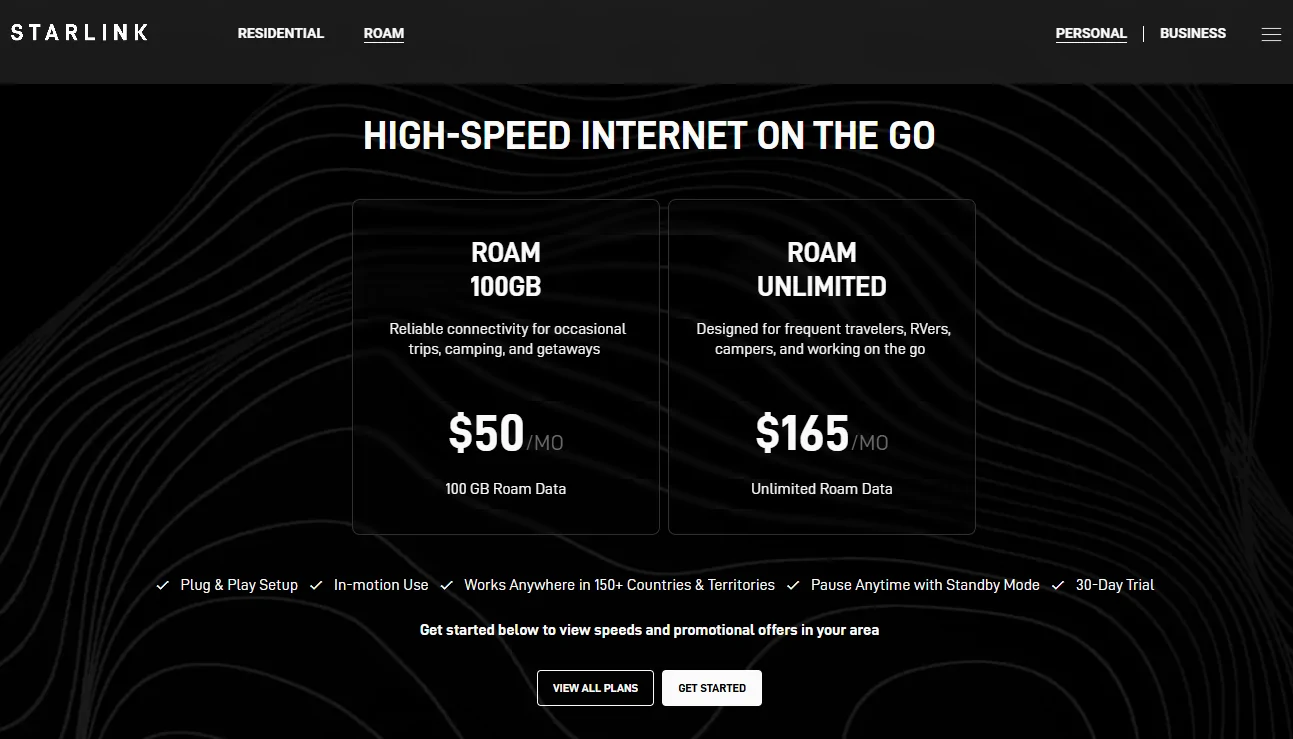
Starlink roam has two levels. A 50GB for $50 or an unlimited for $165. I want to stay below 50GB, since I use it only a few times each month, no use for unlimited data. And when I don’t expect it to use in a month I deactivate for that month upfront and pay only $5.


Loudness

Well-known member
First Name
Jay
Joined
Mar 11, 2024
Threads
23
Messages
355
Reaction score
1,214
Location
Atlanta
Vehicles
Cybertruck (AWD)
Country flag
Starlink roam has two levels. A 50GB for $50 or an unlimited for $165. I want to stay below 50GB, since I use it only a few times each month, no use for unlimited data. And when I don’t expect it to use in a month I deactivate for that month upfront and pay only $5.
They recently boosted it to 100GB, check it again:

Tesla Cybertruck Using Starlink (mini) wifi with Tesla Cybertruck, only for navigation? 1777187056374-19


And if you exceed the cap, you can still use it, it just has data limitations. It should easily be enough for nav: Policy Link

Tesla Cybertruck Using Starlink (mini) wifi with Tesla Cybertruck, only for navigation? 1777187122095-44
 

iceberg5xx

Active member
First Name
Bobby
Joined
Mar 24, 2024
Threads
2
Messages
39
Reaction score
32
Location
Bay Area, CA
Vehicles
Cyberbeast
Country flag
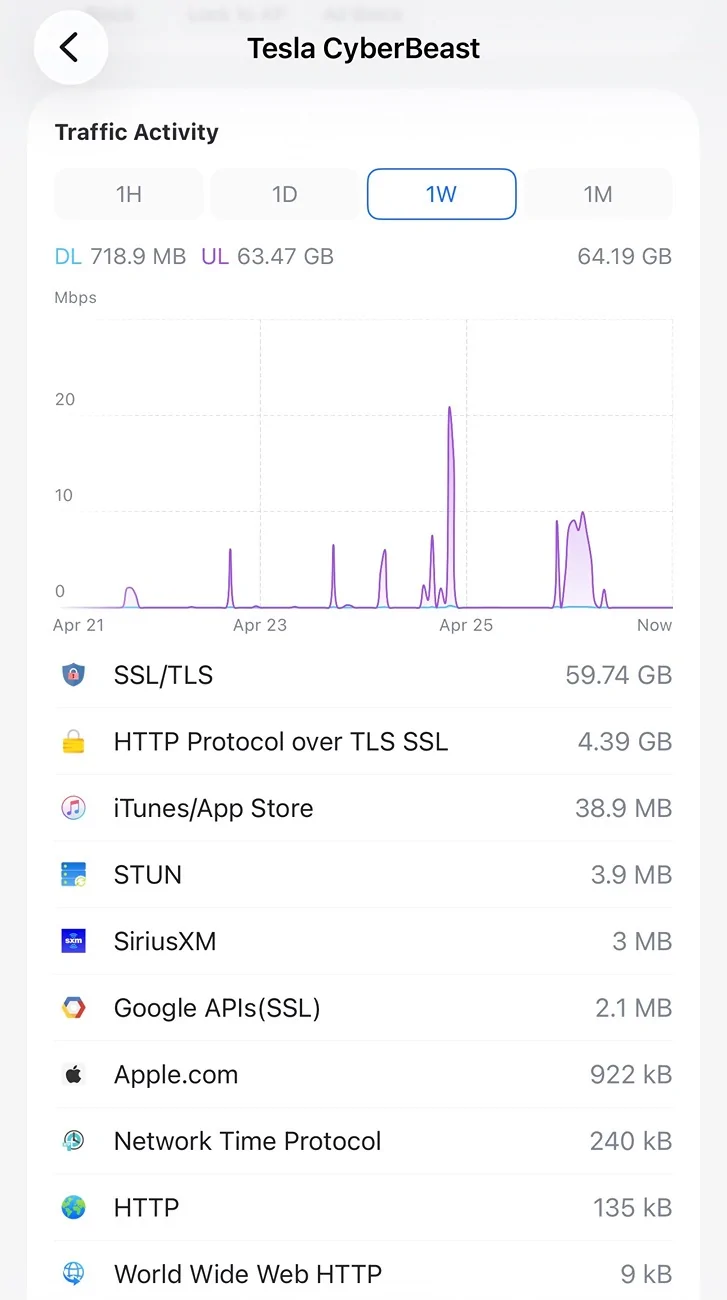
I think @GmP’s point is that when our CTs connect to Wi-Fi, they can upload a surprising amount of data. This is my last week of home network usage: 64 GB uploaded in what I’d consider a normal week.


That suggests the truck may be sending telemetry, camera/event data, software logs, or otherwise behaving as if it has unrestricted broadband available. On a 50 GB Starlink Roam/Mini priority plan, that could burn through the monthly cap quickly.


What I don’t know is whether Tesla queues those larger uploads until the vehicle is parked and on Wi-Fi. My truck is almost always stationary when connected to my home network, so it’s hard to tell if that’s intentional behavior or just coincidence.


If that is how it works, one possible workaround for Starlink users might be disabling Wi-Fi access to the truck while parked, or only enabling it when needed for updates.


Tesla Cybertruck Using Starlink (mini) wifi with Tesla Cybertruck, only for navigation? IMG_2134
 

CyberT

Well-known member
Joined
May 18, 2020
Threads
23
Messages
673
Reaction score
1,416
Location
Orange County, CA
Vehicles
2024 Cybertruck AWD and 2018 Model 3 LR RWD
Occupation
Service Technician
Country flag
I recently got a Starlink mini and when going into an area with no cell reception I used it with my iPhone and iPad, works great.
Of course the Tesla maps/routing also doesn’t work in those Places. Googling about it I read several warnings that when you connect the car to the Starlink wifi, it will also download and upload a lot of other data, and will blow through the $50/50GB plan in no time.

Did any of the several Starlink users on this forum find a way to use Starlink for in car navigation, but not allowing “other data” usage?

How many days of “Tesla data” fit into the 50GB? Or is that not predictable?
I had this data use question before. https://www.cybertruckownersclub.com/forum/threads/high-cybertruck-data-usage.38161/ Mongo's first reply was to disable the data sharing, since then I haven't gone over my data limits.


iceberg5xx

Active member
First Name
Bobby
Joined
Mar 24, 2024
Threads
2
Messages
39
Reaction score
32
Location
Bay Area, CA
Vehicles
Cyberbeast
Country flag
Totally understand, particularly if you are paying overages. Bummer is these uploads help improve FSD and other features.
 
OP
OP
GmP

GmP

Well-known member
First Name
Gerard
Joined
Dec 30, 2024
Threads
8
Messages
217
Reaction score
394
Location
Campbell, ca
Vehicles
cybertruck FS AWD
Occupation
Retired
Country flag
Thanks everyone for responding.

My take-away:
There is no simple setting in the car WiFI that “splits” traffic into the (massive) data up/down loads versus (just little) navigation, entertainment traffic. That would be a very useful feature I would think, also for the “premium connectivity” load.
However:
-the $50 plan is 100GB (not 50GB as I thought)
-when going over the 100GB, the costs will not increase, but the speed will slow down.
-when still a concern, limit or switch off “data sharing” as that consumes a lot of bandwidth.

Based on this I will use it “as is” and see what the usage is going to be.
 

Fugue

Well-known member
Joined
Nov 28, 2022
Threads
4
Messages
420
Reaction score
1,100
Location
Kentucky
Vehicles
Cybertruck AWD FSD, Model Y LR FSD
Occupation
Tech Industry Grunt
Country flag
when did you last use it? That plan doesn’t work when moving now.

stop moving and it works.

Bob
I'm just now learning this. That is disappointing.
 

EWELON

Well-known member
First Name
Rori
Joined
May 21, 2025
Threads
28
Messages
560
Reaction score
618
Location
Wynnewood,PA
Vehicles
2021 Model 3, 2025 Cybertruck AWD
Country flag
data sharing sends the shadow AI info to tesla. meaning if you dont have fsd on and you yourself are driving, the fsd predicts your behavior and tries to guess what youre going to do. that data is sent to tesla to help with training. thats how I understand what shadow ai does.

so if you do a lot of self driving then that data upload could theoretically be larger (this is total speculation by me)
Sponsored


Top