Sponsored

Would be nice if Rear View camera feed stayed on when the tonneau cover is closed and the blinker is activated

Joined
Jan 26, 2022
Threads
6
Messages
22
Reaction score
43
Location
Minnesota
Vehicles
Foundation Series AWD
Country flag
It would be a great feature for the Cybertruck if the rearview camera remained visible on the screen even when the tonneau cover is closed and the blinker is activated. Currently, activating the blinker causes the rearview camera to disappear from the screen.
Sponsored
 

Paul Scott

Well-known member
First Name
Paul
Joined
Jan 10, 2024
Threads
2
Messages
105
Reaction score
106
Location
Las Vegas, NV
Vehicles
2016 S, 2019 X, 2024 Cybertruck
Occupation
IT Director
Country flag
if you set the camera to on instead instead of auto, it will stay on when the tonneau is open. For it to stay on the blinker would require a software change. I agree I would like to be able to see the rare camera wall of blinker is on, but I don’t know how you would place that on the screen and make it look right.
 

DaBagBoy

Well-known member
Joined
May 8, 2024
Threads
15
Messages
364
Reaction score
374
Location
Lansing MI
Vehicles
3, Y, CT
Country flag
It would be a great feature for the Cybertruck if the rearview camera remained visible on the screen even when the tonneau cover is closed and the blinker is activated. Currently, activating the blinker causes the rearview camera to disappear from the screen.
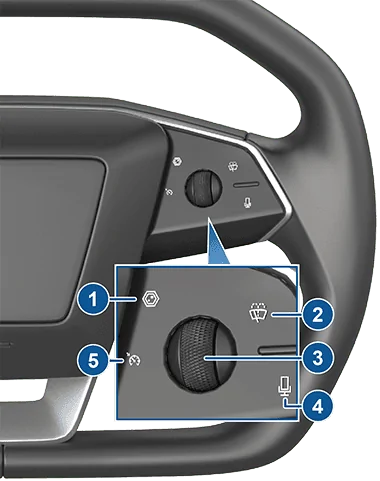
press the camera button to see a huge rearview and turn signal mirrors at the same time while turning.
It's on the steering wheel right hand upper left here is a pic #1


labelled #1
Tesla Cybertruck Would be nice if Rear View camera feed stayed on when the tonneau cover is closed and the blinker is activated 1719932573932-1d
 

agordon117

Well-known member
Joined
Jan 11, 2024
Threads
7
Messages
1,196
Reaction score
2,039
Location
Ohio
Vehicles
cybertruck foundation awd
Country flag
press the camera button to see a huge rearview and turn signal mirrors at the same time while turning.
It's on the steering wheel right hand upper left here is a pic #1


labelled #1
1719932573932-1d.png
that button will show the front camera until you swipe on the screen to change to rear, and it will not come on above 10mph. Pressing that button above 10mph only turns off the rear view image but does not bring up the big camera display.


AO-Pete

Well-known member
Site Sponsor
First Name
Pete
Joined
May 6, 2024
Threads
17
Messages
442
Reaction score
618
Location
Dallas/Fort Worth
Website
abstractocean.com
Vehicles
2024 CT, 2024 Model 3 Highland, 2022 R1T
Occupation
Founder & CEO
Country flag
Agreed. Since they cheaped out on having a digital rear-view (and losing the binnacle screen that was seen in early prototypes), they really need to improve the rear view experience. As a driver, I'm FAR more confident in the R1T (or M3 Highland) vs. the CT.
 

Crissa

Well-known member
First Name
Crissa
Joined
Jul 8, 2020
Threads
138
Messages
19,571
Reaction score
31,477
Location
Santa Cruz
Vehicles
2014 Zero S, 2013 Mazda 3
Country flag
Rear view on screen needs to be zoomed more or let us be able to select zoom , everything looks so far away , look in side mirror and they are a lot closer ?‍♂
That would require a different camera. Phones do this by having multiple cameras.

-Crissa


Nobell32

Well-known member
First Name
Norman
Joined
Apr 20, 2024
Threads
7
Messages
175
Reaction score
298
Location
California
Vehicles
CyberBeast Foundation
Country flag
that button will show the front camera until you swipe on the screen to change to rear, and it will not come on above 10mph. Pressing that button above 10mph only turns off the rear view image but does not bring up the big camera display.
I’d have to double check but I believe that if the turn signal is on pressing the button will bring the view of both side cameras and the rear view camera at any speed.
However if you are above 10mph then it effectively just remove the rear camera view. To get the front camera view at speed you need to select it on the touch screen.
 

wtibbit

Well-known member
First Name
Wayne
Joined
Aug 27, 2020
Threads
12
Messages
819
Reaction score
1,617
Location
DFW
Vehicles
Cybertruck AWD FS, Mercedes sedan, Corvette coupe, 1968 Cougar XR-7
Occupation
Retired Engineering Program Director
Country flag
,,,that button will show the front camera until you swipe on the screen to change to rear, and it will not come on above 10mph. Pressing that button above 10mph only turns off the rear view image but does not bring up the big camera display.
That's true.

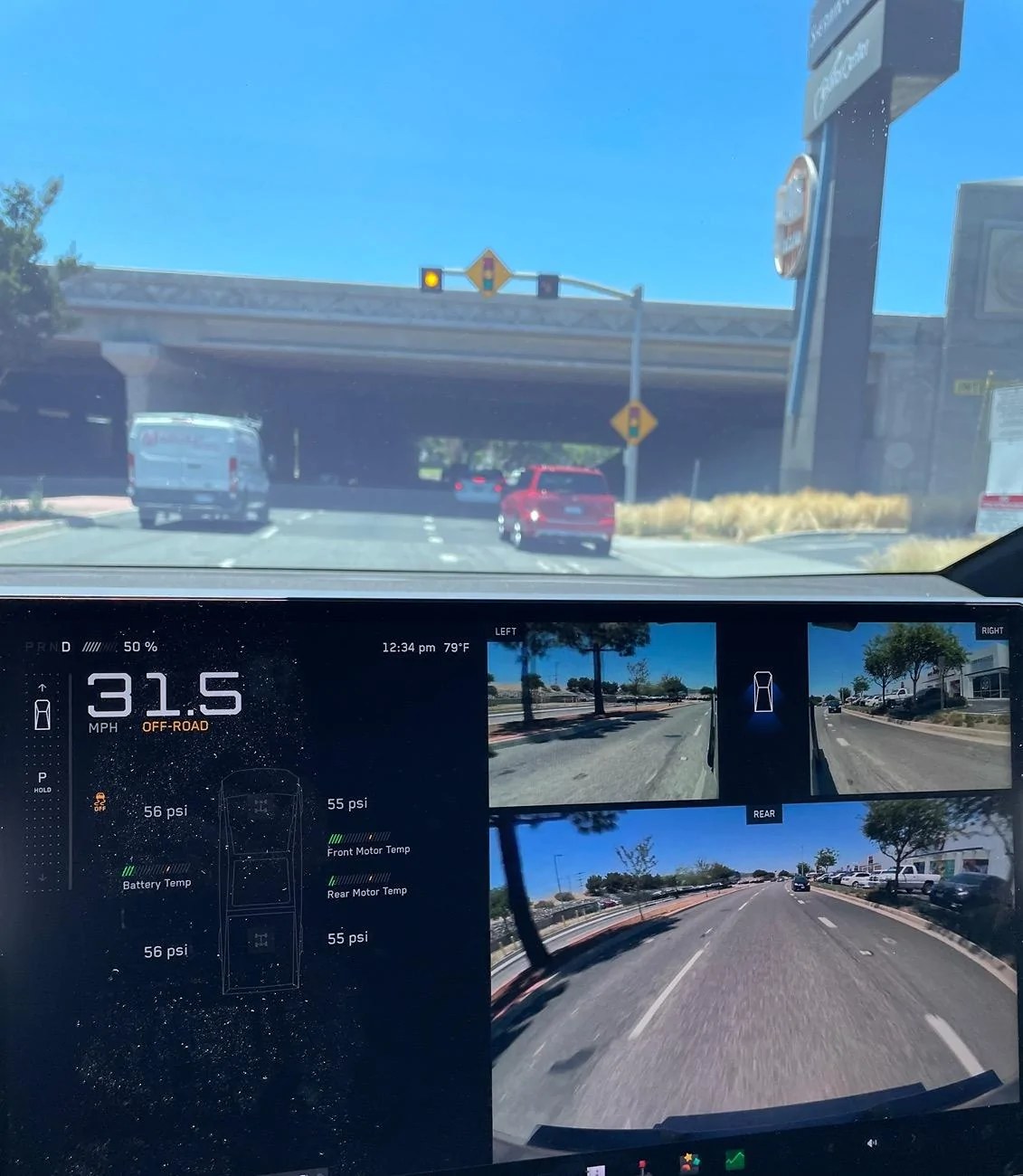
But, if you set up the camera icon in the "My Apps" section of the display, then touch that icon to launch the camera app instead of the pressing camera switch on the squircle the large images of the rear and side cameras will be displayed as shown in message #7 of this thread, regardless of speed. I just discovered this last night.

You can touch the car icon on the touch screen, between the side camera displays, to change from the rear view to the front view. If you press the camera button on the squircle in this state you'll revert to the smaller rear camera view display state.

I'll be leaving this larger camera display up whenever I'm not using the nav map.
 
Last edited:

Outdoors

Well-known member
First Name
Outdoors
Joined
Nov 19, 2019
Threads
18
Messages
1,924
Reaction score
3,516
Location
North West Montana
Vehicles
S,3,Y,CT,R2, Slate (order)


Top