Sponsored

myQ shortcut to open the garage manually from the main screen?

Flaunt

Active member
Joined
Jun 21, 2024
Threads
5
Messages
39
Reaction score
22
Location
california
Vehicles
model 3
Country flag
For those using myQ with your truck, is there a shortcut to open the garage manually from the main screen?

I don't want it to open automatically, so when I pull up, I have to physically go through the locks menu all the way just to open it. Any shortcuts?
Sponsored

 

Wolfgram

Well-known member
First Name
Joseph
Joined
May 26, 2020
Threads
11
Messages
201
Reaction score
606
Location
Florida
Vehicles
Model 3 Performance
Occupation
CTO
Country flag
Yes, setup the location of your garage door properly and the button to activate the garage door will appear automatically at the top of the screen when you get near your garage. ?
 
OP
OP

Flaunt

Active member
Joined
Jun 21, 2024
Threads
5
Messages
39
Reaction score
22
Location
california
Vehicles
model 3
Country flag
Yes, setup the location of your garage door properly and the button to activate the garage door will appear automatically at the top of the screen when you get near your garage. ?
Ok cool, I'll look into that. Is it under the myQ settings?
 

Woodrick

Well-known member
First Name
Ed
Joined
Dec 30, 2023
Threads
6
Messages
4,786
Reaction score
4,762
Location
Gainesville Ga
Vehicles
Model 3, Model Y, Cybertruck AWD
Occupation
Consultant
Country flag
For those using myQ with your truck, is there a shortcut to open the garage manually from the main screen?

I don't want it to open automatically, so when I pull up, I have to physically go through the locks menu all the way just to open it. Any shortcuts?
Why don't you want it to open the door? It does a mighty fine job of it.
 

Wolfgram

Well-known member
First Name
Joseph
Joined
May 26, 2020
Threads
11
Messages
201
Reaction score
606
Location
Florida
Vehicles
Model 3 Performance
Occupation
CTO
Country flag
Ok cool, I'll look into that. Is it under the myQ settings?
Yes, on the Cybertruck screen go into the MyQ settings and there is an option to establish the location of your garage door. It will instruct you to be parked just outside your garage door. This establishing the geolocation. I would provide more specific steps, but I'm not by my CT right now...


OP
OP

Flaunt

Active member
Joined
Jun 21, 2024
Threads
5
Messages
39
Reaction score
22
Location
california
Vehicles
model 3
Country flag
Yes, on the Cybertruck screen go into the MyQ settings and there is an option to establish the location of your garage door. It will instruct you to be parked just outside your garage door. This establishing the geolocation. I would provide more specific steps, but I'm not by my CT right now...

This worked. Thank you much
 

DoberManPin-Sure

Well-known member
First Name
Dober
Joined
May 2, 2024
Threads
4
Messages
195
Reaction score
326
Location
Texas
Vehicles
Foundation Edition Cyberbeast
Occupation
Attorney
Country flag
Why don't you want it to open the door? It does a mighty fine job of it.
In my case, I don’t want my driveway gate to open since my Dobes could be out on a potty break. Garage opening would be fine. Don’t know OP’s circumstances.
 

DoberManPin-Sure

Well-known member
First Name
Dober
Joined
May 2, 2024
Threads
4
Messages
195
Reaction score
326
Location
Texas
Vehicles
Foundation Edition Cyberbeast
Occupation
Attorney
Country flag
Yes, on the Cybertruck screen go into the MyQ settings and there is an option to establish the location of your garage door. It will instruct you to be parked just outside your garage door. This establishing the geolocation. I would provide more specific steps, but I'm not by my CT right now...
I looked for my MyQ settings this weekend without success. It wasn’t where MyQ or Tesla said it would be. I’m on the free trial. Might I need to pay for a subscription for it to appear? That would defeat purpose of a free trial, but so be it.

TIA!
 

ggogins

Active member
First Name
Greg
Joined
Mar 29, 2024
Threads
0
Messages
29
Reaction score
40
Location
Texas
Vehicles
Grand Wagoneer, ordered Cybertruck
Occupation
Programmer
Country flag
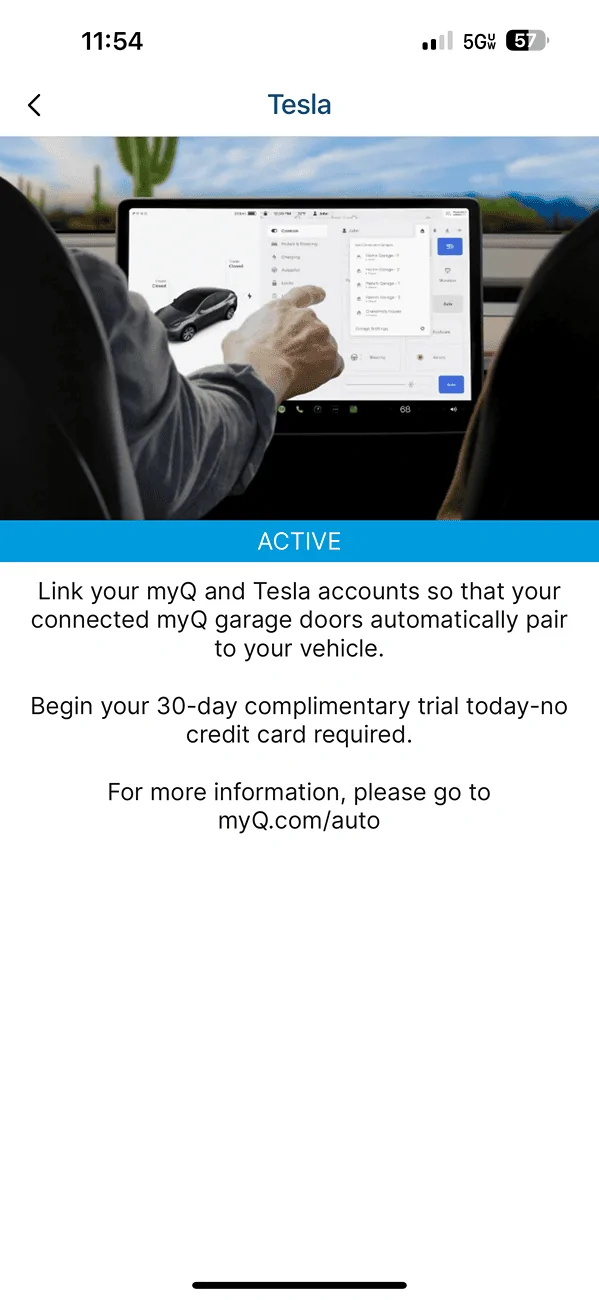
Does the MyQ app on your phone show an active connection to your Tesla account?

Tesla Cybertruck myQ shortcut to open the garage manually from the main screen? IMG_1466


Woodrick

Well-known member
First Name
Ed
Joined
Dec 30, 2023
Threads
6
Messages
4,786
Reaction score
4,762
Location
Gainesville Ga
Vehicles
Model 3, Model Y, Cybertruck AWD
Occupation
Consultant
Country flag
I looked for my MyQ settings this weekend without success. It wasn’t where MyQ or Tesla said it would be. I’m on the free trial. Might I need to pay for a subscription for it to appear? That would defeat purpose of a free trial, but so be it.

TIA!
Is this what you did? Since it's what's in the manual?

Smart Garage
myQ
Tesla Cybertruck myQ shortcut to open the garage manually from the main screen? IMG_1466
If equipped, Cybertruck can intelligently connect to your myQ® smart garage.
myQ is a smart garage control system that works seamlessly with Cybertruck, and allows you to remotely monitor and control your garage door from the vehicle's touchscreen or a paired phone. This is convenient if you forget to close your garage door, want to allow friends and family inside, or need to open and close it remotely (such as when receiving a package). By linking myQ with Cybertruck, the garage door can detect your vehicle nearby and automatically open or close to accommodate.
Follow these steps to set up myQ on your vehicle:
  1. Your garage door must be myQ compatible. Navigate to Controls > Garage icon. Use the myQ Compatibility tool (https://www.myq.com/app/myq-compatibility) to determine this.
  2. Ensure your garage is Wi-Fi compatible. myQ uses Wi-Fi to communicate with your smart phone and vehicle. Some garages will have a Wi-Fi or myQ symbol on the hub. Your garage must have a strong Wi-Fi signal to control and monitor your garage through your vehicle.
    Note
    If your garage is not compatible, you may be able to purchase an external myQ hub to use this feature.
  3. Download the myQ app from your smart phone's app store. Use the app to set up your account information and pair the garage to your phone. myQ requires a paid subscription, which you can purchase in the app.
  4. Check that your vehicle is running the latest available software version and has Wi-Fi or LTE connectivity.
  5. Navigate to Controls > Locks > myQ Connected Garage > Link Account and follow the instructions to pair the garage with Cybertruck. Once paired, monitoring and controlling the garage becomes available on the touchscreen, where you can further customize myQ.
 

AlphaG

Well-known member
First Name
Dipan
Joined
Mar 2, 2023
Threads
3
Messages
107
Reaction score
160
Location
South Texas
Vehicles
S63, Elise, Besst
Country flag
I looked for my MyQ settings this weekend without success. It wasn’t where MyQ or Tesla said it would be. I’m on the free trial. Might I need to pay for a subscription for it to appear? That would defeat purpose of a free trial, but so be it.

TIA!
MyQ Gates are not supported by Tesla. I found this out after setting up a myQ wireless hub. Linked my garage door and gate (both myQ) and everything works through the myQ app on my phone. Only the garage door shows up in the truck. So if your only myQ device is a gate, then you won't see anything.
 

DoberManPin-Sure

Well-known member
First Name
Dober
Joined
May 2, 2024
Threads
4
Messages
195
Reaction score
326
Location
Texas
Vehicles
Foundation Edition Cyberbeast
Occupation
Attorney
Country flag
Does the MyQ app on your phone show an active connection to your Tesla account?

Tesla Cybertruck myQ shortcut to open the garage manually from the main screen? {filename}
My garage is connected. I retrofitted the garage with a Chamberlain Smart Garage Control. My gate has been on my myQ account long before I got the CT or added the garage via that new control device, so not sure why it's not showing up on my CT's myQ list. I've pulled as close to the gate controller as I safely can and still no listing.
 

DoberManPin-Sure

Well-known member
First Name
Dober
Joined
May 2, 2024
Threads
4
Messages
195
Reaction score
326
Location
Texas
Vehicles
Foundation Edition Cyberbeast
Occupation
Attorney
Country flag
MyQ Gates are not supported by Tesla. I found this out after setting up a myQ wireless hub. Linked my garage door and gate (both myQ) and everything works through the myQ app on my phone. Only the garage door shows up in the truck. So if your only myQ device is a gate, then you won't see anything.
Good information, but terrible news. So the only myQ device I owned prior to the CT is the only myQ device that won't be recognized by my CT? That makes zero sense.

I've been using my phone app for both and guess I'll have to continue doing so. As frustrating as not being able to use Waze in my CT. An engineering and technological marvel that's inexplicably lacking on some really basic fronts here.

Guess I'm gonna sell it! NOT! ;)
Sponsored


Top