Sponsored

Navigate to supercharger not showing full address

dalton108

Well-known member
First Name
Dalton
Joined
Oct 17, 2020
Threads
132
Messages
3,999
Reaction score
8,026
Location
USA
Vehicles
‘24 FS/CB; ‘24 MX; ‘23 MS PLAID (Prior: ‘20-MY; ‘21-M3P) (Also: ‘14-FJ; ‘21-C8)
Occupation
Lawyer
Country flag
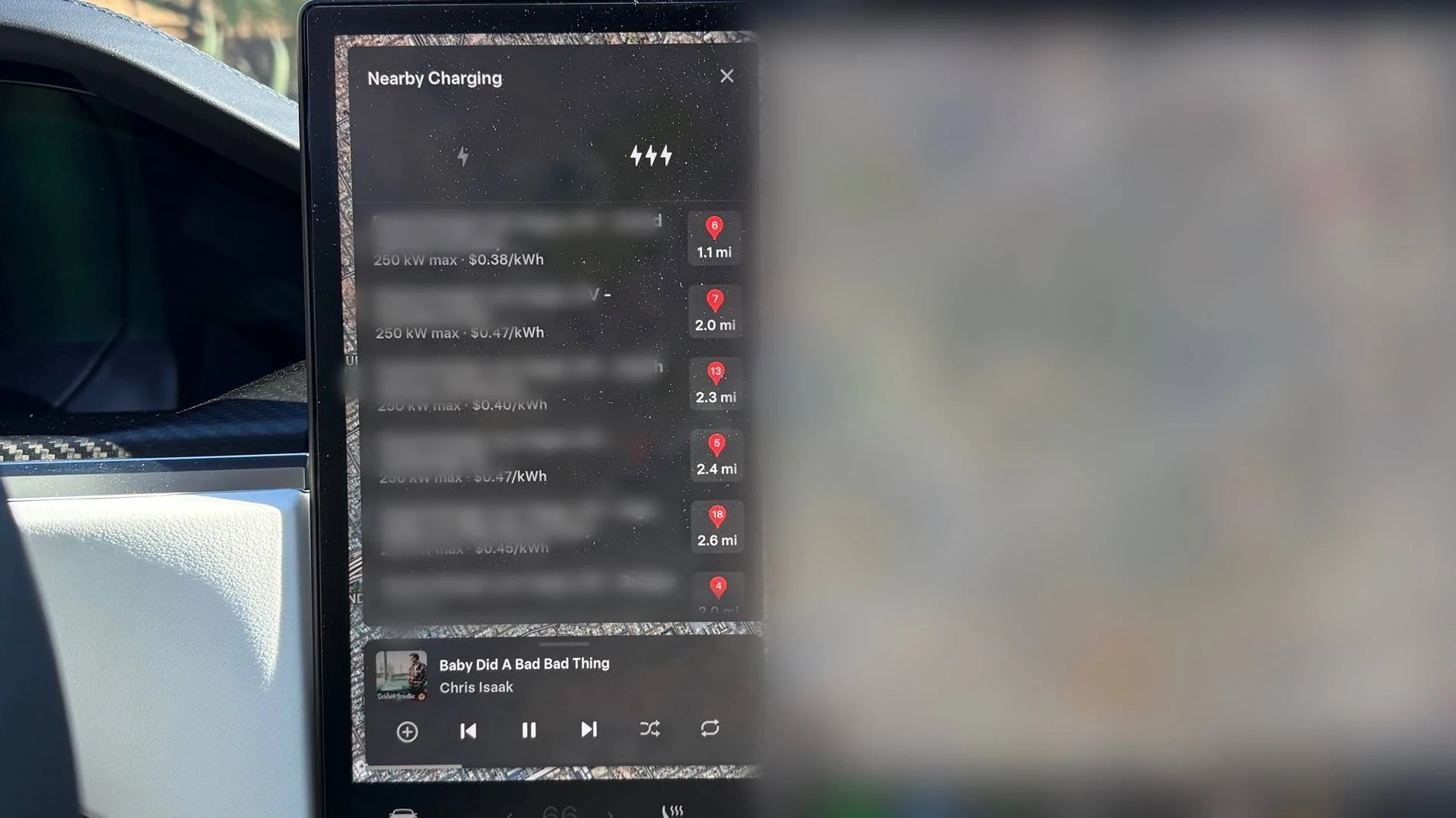
This has been a problem since day one on my Cyberbeast. Am I the only one experiencing this? I haven’t seen a single other person complain about it.

since the full description is cut off it’s always a crapshoot to whether I’m selecting the right charger if I try to do it from the list. The column is wider on all of my other Teslas and this just doesn’t happen. Is this a cybertruck issue or my cybertruck issue?

Picture 1 is my cybertruck, 2 is my plaid. In the plaid the column is much wider and you have a full description of the location of the supercharger. Any idea ideas?

Tesla Cybertruck Navigate to supercharger not showing full address IMG_1488


Tesla Cybertruck Navigate to supercharger not showing full address IMG_1490
Sponsored


HaulingAss

Well-known member
Joined
Oct 3, 2020
Threads
28
Messages
10,349
Reaction score
20,798
Location
Western Washington, USA
Vehicles
Cybertruck DM, 2010 F-150, 2018 Performance Model 3, 2024 Performance Model 3
Country flag
I've noticed this too, you have to select a Supercharger to find the details. You can also select a Supercharger from the map screen by touching it. Superchargers do not display by default, you must tap the screen to bring up four icons and then touch the one that displays Superchargers on the map view, then touch the Supercharger you want to navigate to.

One other thing Tesla owners should be aware of, especially now that cooler weather is coming, is that it's always best to navigate to a Supercharger as far in advance as possible, the battery will heat up more efficiently the more time you give it before arrival. Anything less than 45 minutes to an hour increases the chances the battery won't have enough time to pre-heat. Navigating to a Supercharger 5 minutes before charging doesn't provide much advantage at all if your battery is cold.
 
Last edited:
OP
OP
dalton108

dalton108

Well-known member
First Name
Dalton
Joined
Oct 17, 2020
Threads
132
Messages
3,999
Reaction score
8,026
Location
USA
Vehicles
‘24 FS/CB; ‘24 MX; ‘23 MS PLAID (Prior: ‘20-MY; ‘21-M3P) (Also: ‘14-FJ; ‘21-C8)
Occupation
Lawyer
Country flag
It’s weird right? It’s just that the column is too narrow to show all of the details and it’s an extra step to tap on it or to do it from the screen which never seems to be oriented right when I’m trying to select a supercharger from the map.

I was expecting this to get addressed pretty quick in one of the updates but I just don’t think there’s been enough complaining about it for it to have made their radar. Bigger fish to fry, surely.
 

HaulingAss

Well-known member
Joined
Oct 3, 2020
Threads
28
Messages
10,349
Reaction score
20,798
Location
Western Washington, USA
Vehicles
Cybertruck DM, 2010 F-150, 2018 Performance Model 3, 2024 Performance Model 3
Country flag
I was expecting this to get addressed pretty quick in one of the updates but I just don’t think there’s been enough complaining about it for it to have made their radar. Bigger fish to fry, surely.
it's amazing we get updates as quickly as we do and, like you mentioned, they have other priorities right now getting FSD adapted to a new platform (amongst other things). Tesla doesn't have very big software teams relative to what they produce, and how functional their software products are, I've always been impressed with how much they are able to do, and on such relatively fast timelines.
 

Woodrick

Well-known member
First Name
Ed
Joined
Dec 30, 2023
Threads
6
Messages
4,786
Reaction score
4,762
Location
Gainesville Ga
Vehicles
Model 3, Model Y, Cybertruck AWD
Occupation
Consultant
Country flag
This has been a problem since day one on my Cyberbeast. Am I the only one experiencing this? I haven’t seen a single other person complain about it.

since the full description is cut off it’s always a crapshoot to whether I’m selecting the right charger if I try to do it from the list. The column is wider on all of my other Teslas and this just doesn’t happen. Is this a cybertruck issue or my cybertruck issue?

Picture 1 is my cybertruck, 2 is my plaid. In the plaid the column is much wider and you have a full description of the location of the supercharger. Any idea ideas?
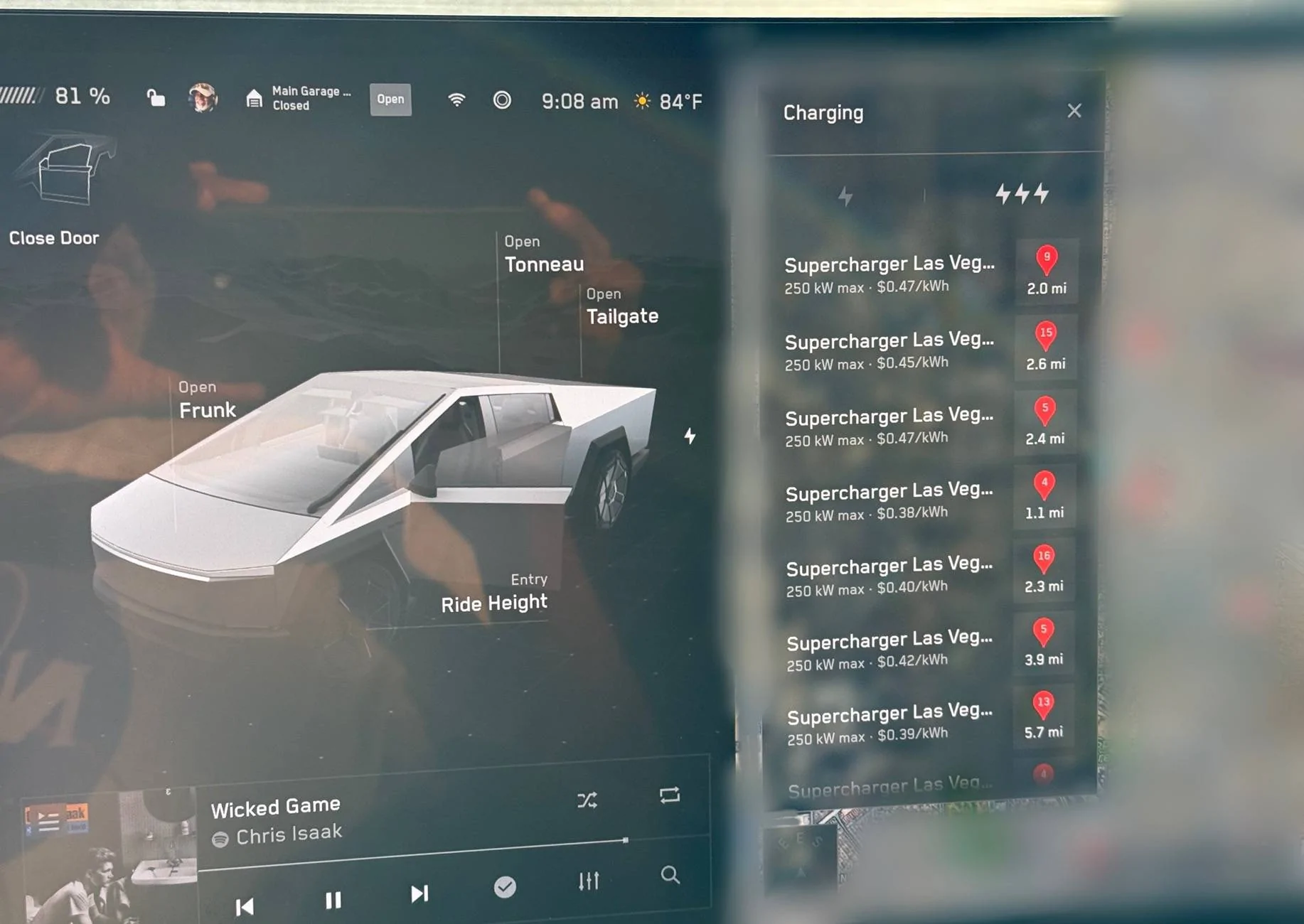
What about just looking at the map? And then selecting from there?
You know, the map that you greyed out.


Lasttoy

Well-known member
First Name
Paul
Joined
Apr 26, 2021
Threads
10
Messages
700
Reaction score
392
Location
St Augustine, FL
Vehicles
2013 & 2017 S. CT ordered 30 may
Occupation
Retired
Country flag
The normal screen does NOT show a super charger on screen. My S shows it when I drive by it
 
OP
OP
dalton108

dalton108

Well-known member
First Name
Dalton
Joined
Oct 17, 2020
Threads
132
Messages
3,999
Reaction score
8,026
Location
USA
Vehicles
‘24 FS/CB; ‘24 MX; ‘23 MS PLAID (Prior: ‘20-MY; ‘21-M3P) (Also: ‘14-FJ; ‘21-C8)
Occupation
Lawyer
Country flag
What exactly is your point? I want the software to work as they intended it to. as it does on my other 4 Teslas. The very simplest way to do this is to click on the lightning bolt and pick the one that is the closest in number of miles from me rather than scrutinizing a map while I’m driving. My workflow is not up for debate that’s a me thing; my choice not interested in your input on the matter.

Do I know how to do workarounds? YES!! Do you have any other stupid questions you’d like me to answer for you?

If you don’t have anything to contribute besides snark, you’re gonna want to avoid my posts - because you’re not going to like the results.

And for your edification, since we’re doing pedantry, what I did is “blur” the image graying out would involve using gray to cover the image. ?
 
Last edited:

Woodrick

Well-known member
First Name
Ed
Joined
Dec 30, 2023
Threads
6
Messages
4,786
Reaction score
4,762
Location
Gainesville Ga
Vehicles
Model 3, Model Y, Cybertruck AWD
Occupation
Consultant
Country flag
What exactly is your point? I want the software to work as they intended it to. as it does on my other 4 Teslas. The very simplest way to do this is to click on the lightning bolt and pick the one that is the closest in number of miles from me rather than scrutinizing a map while I’m driving. My workflow is not up for debate that’s a me thing; my choice not interested in your input on the matter.

Do I know how to do workarounds? YES!! Do you have any other stupid questions you’d like me to answer for you?

If you don’t have anything to contribute besides snark, you’re gonna want to avoid my posts - because you’re not going to like the results.

And for your edification, since we’re doing pedantry, what I did is “blur” the image graying out would involve using gray to cover the image. ?
Sorry, I missed your point, since the title really wasn't your point.

Simply, it's the difference between the single display 450,000 vehicles using it vs the 50,000 vehicle dual display vehicles.

Simply put, you may need to change your workflow. The difference in the screen sizes is probably the culprit.

And down to pedantics, your actually blurred out your point. (which is why I missed it)

You blurred out what I suspect is the longer names on the Model S.

If you are going to state a case, at least make it understandable.
 
OP
OP
dalton108

dalton108

Well-known member
First Name
Dalton
Joined
Oct 17, 2020
Threads
132
Messages
3,999
Reaction score
8,026
Location
USA
Vehicles
‘24 FS/CB; ‘24 MX; ‘23 MS PLAID (Prior: ‘20-MY; ‘21-M3P) (Also: ‘14-FJ; ‘21-C8)
Occupation
Lawyer
Country flag
Nobody else had a problem understanding it. And if you’re going to come here with snarky ideas about how somebody ought to be able to figure something out you probably want to put yourself in a position where you’re not demonstrating remedial reading comprehension/issues spotting skills.

You can tell the difference in the column length by looking at them! Clearly there’s additional information about the location in the wider column which is why it’s blurred. The reason that I didn’t need to block out the address on the cybertruck is because the column so narrow all you know is that I’m in Las Vegas. On my plaid, had I not blurred the obviously wider more detailed description, people could see what’s 2 miles from my then current location. I’m not interested in doxing myself to make things simpler for you. Beyond that I fully explained the problem in basic English without anyone needing to resort to the images to understand my concern. ?

Absolutely nothing that you needed to know was obfuscated by the parts of my post that I decided to blur. Other people were able to clearly follow the bouncing ball and weigh in just as I intended. I don’t need any advice on how to communicate my thoughts from you. Zero!

So you’re going to need to disabuse yourself of the notion that you’re in a position to condescend or provide “helpful tips” about anything. I’m confident that I’m a more experienced Tesla UI user than you are. By a lot.

This isn’t even a post asking for help! t is simply asking whether other people have observed what I’m observing. I’m very clear on the problem and that the solution has to come from Tesla.

The only thing I wanted to know was whether this was something that only I was seeing or that others were seeing as well under the overly abundant caution that I might’ve had a setting that was causing this rather than it just being a glitch. Obviously, it’s because of the different screen size of the truck - that was never my question.

You can add value or you can piss off. Your choice, but I’m telling you I’m not used to taking guff from people in person and I’m certainly not gonna take it here.

At this point, you’re beclowning yourself unnecessarily. Stop digging.
 

mongo

Well-known member
Joined
May 27, 2024
Threads
6
Messages
4,550
Reaction score
5,538
Location
SE Michigan
Vehicles
Cyberbeast
Country flag
Nobody else had a problem understanding it. And if you’re going to come here with snarky ideas about how somebody ought to be able to figure something out you probably want to put yourself in a position where you’re not demonstrating remedial reading comprehension/issues spotting skills.

You can tell the difference in the column length by looking at them! Clearly there’s additional information about the location in the wider column which is why it’s blurred. The reason that I didn’t need to block out the address on the cybertruck is because the column so narrow all you know is that I’m in Las Vegas. On my plaid, had I not blurred the obviously wider more detailed description, people could see what’s 2 miles from my then current location. I’m not interested in doxing myself to make things simpler for you. Beyond that I fully explained the problem in basic English without anyone needing to resort to the images to understand my concern. ?

Absolutely nothing that you needed to know was obfuscated by the parts of my post that I decided to blur. Other people were able to clearly follow the bouncing ball and weigh in just as I intended. I don’t need any advice on how to communicate my thoughts from you. Zero!

So you’re going to need to disabuse yourself of the notion that you’re in a position to condescend or provide “helpful tips” about anything. I’m confident that I’m a more experienced Tesla UI user than you are. By a lot.

This isn’t even a post asking for help! t is simply asking whether other people have observed what I’m observing. I’m very clear on the problem and that the solution has to come from Tesla.

The only thing I wanted to know was whether this was something that only I was seeing or that others were seeing as well under the overly abundant caution that I might’ve had a setting that was causing this rather than it just being a glitch. Obviously, it’s because of the different screen size of the truck - that was never my question.

You can add value or you can piss off. Your choice, but I’m telling you I’m not used to taking guff from people in person and I’m certainly not gonna take it here.

At this point, you’re beclowning yourself unnecessarily. Stop digging.
Yeah, the lack of full address is annoying.
On the plus side, it seems like Tesla updated the SW so when the map zooms in while driving, it does so at a level that leaves the next turn on the screen instead of overzooming and losing all context.


Woodrick

Well-known member
First Name
Ed
Joined
Dec 30, 2023
Threads
6
Messages
4,786
Reaction score
4,762
Location
Gainesville Ga
Vehicles
Model 3, Model Y, Cybertruck AWD
Occupation
Consultant
Country flag
Nobody else had a problem understanding it. And if you’re going to come here with snarky ideas about how somebody ought to be able to figure something out you probably want to put yourself in a position where you’re not demonstrating remedial reading comprehension/issues spotting skills.

You can tell the difference in the column length by looking at them! Clearly there’s additional information about the location in the wider column which is why it’s blurred. The reason that I didn’t need to block out the address on the cybertruck is because the column so narrow all you know is that I’m in Las Vegas. On my plaid, had I not blurred the obviously wider more detailed description, people could see what’s 2 miles from my then current location. I’m not interested in doxing myself to make things simpler for you. Beyond that I fully explained the problem in basic English without anyone needing to resort to the images to understand my concern. ?

Absolutely nothing that you needed to know was obfuscated by the parts of my post that I decided to blur. Other people were able to clearly follow the bouncing ball and weigh in just as I intended. I don’t need any advice on how to communicate my thoughts from you. Zero!

As a lawyer, I'm surprised that you equated "nobody else" to 3 people on a forum of 10's of thousands. You don't know how many people read your message and moved on because it didn't make sense.

No, you cannot point blank say that the column size difference is obvious. It's different pictures with different magnifications.

Yes, you are complaining about not being able to see the name of the Supercharger. You obfuscated the name of the Supercharger!

You didn't even seem to be showing the same window between the two pictures. One is nearby charging and the other I believe is charging somewhere else. Comparing Apples to Apples without having to obfuscate your information would have been helpful.
 
OP
OP
dalton108

dalton108

Well-known member
First Name
Dalton
Joined
Oct 17, 2020
Threads
132
Messages
3,999
Reaction score
8,026
Location
USA
Vehicles
‘24 FS/CB; ‘24 MX; ‘23 MS PLAID (Prior: ‘20-MY; ‘21-M3P) (Also: ‘14-FJ; ‘21-C8)
Occupation
Lawyer
Country flag
As a lawyer, I'm surprised that you equated "nobody else" to 3 people on a forum of 10's of thousands. You don't know how many people read your message and moved on because it didn't make sense.

No, you cannot point blank say that the column size difference is obvious. It's different pictures with different magnifications.

Yes, you are complaining about not being able to see the name of the Supercharger. You obfuscated the name of the Supercharger!

You didn't even seem to be showing the same window between the two pictures. One is nearby charging and the other I believe is charging somewhere else. Comparing Apples to Apples without having to obfuscate your information would have been helpful.
“Picture 1 is my cybertruck, 2 is my plaid. In the plaid the column is much wider and you have a full description of the location of the supercharger.”

??That’s English! Coupled with the title of my post, those words (without a single image) tell you everything you needed to know. That you were confused is a you problem.

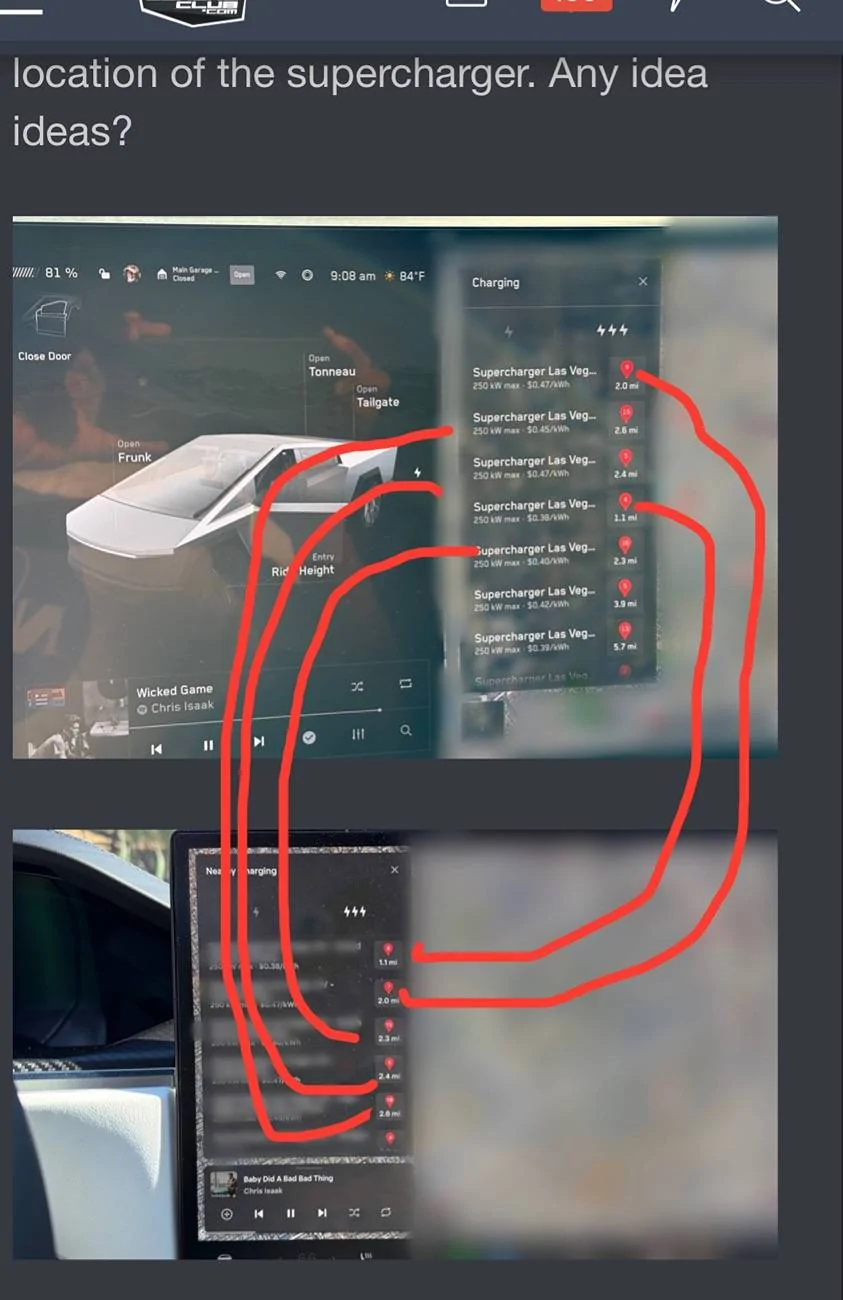
The vehicles were in the exact same undisclosed location at the time of the photos being taken. The fact that it doesn’t appear that way to you is irrelevant. It’s very clear, and I noticed it at the time, that the cars don’t even sort the superchargers in the same order.

Since you’re doing deep dive detective work, you should be able to ascertain that the distances listed for the locations between both photos that show the exact same distance are the same chargers. [I would’ve thought that they would just go in order of proximity, they obviously don’t.] This little mystery is unimportant, not part of my question, and not necessary for any competent reader to understand what I was asking.

Within just a few minutes of my post I got precisely what I wanted - someone to confirm that they were seeing the same thing (clipped off addresses) on their cybertruck. My mission was accomplished long before you showed up with your off-base assumptions and pissy attitude. So again, I’m supremely disinterested in your comms advice.

You can flail around in your embarrassment as long as you want, but I assure you, it’s better to just stop talking. Just stop. ✋
 
Last edited:
OP
OP
dalton108

dalton108

Well-known member
First Name
Dalton
Joined
Oct 17, 2020
Threads
132
Messages
3,999
Reaction score
8,026
Location
USA
Vehicles
‘24 FS/CB; ‘24 MX; ‘23 MS PLAID (Prior: ‘20-MY; ‘21-M3P) (Also: ‘14-FJ; ‘21-C8)
Occupation
Lawyer
Country flag
You didn't even seem to be showing the same window between the two pictures. One is nearby charging and the other I believe is charging somewhere else. Comparing Apples to Apples without having to obfuscate your information would have been helpful.
Here’s a map to help you understand an ancillary matter (as explained above) had no intentions to “Nancy Drew” this part until you showed up, but just so you can maybe understand, the vehicles are in the same place and are exactly the same distance from all of the chargers showing up, here you go!

This didn’t matter AT ALL to the question presented. Even if it had been completely different locations, the issue was: plaid; wide column, full info vs. cybertruck; narrow column, truncated information.

I was ALWAYS comparing apples to oranges. ?

Tesla Cybertruck Navigate to supercharger not showing full address IMG_1499
 
Last edited:

Woodrick

Well-known member
First Name
Ed
Joined
Dec 30, 2023
Threads
6
Messages
4,786
Reaction score
4,762
Location
Gainesville Ga
Vehicles
Model 3, Model Y, Cybertruck AWD
Occupation
Consultant
Country flag
Here’s a map to help you understand an ancillary matter (as explained above) had no intentions to “Nancy Drew” this part until you showed up, but just so you can maybe understand, the vehicles are in the same place and are exactly the same distance from all of the chargers showing up, here you go!

This didn’t matter AT ALL to the question presented. Even if it had been completely different locations, the issue was: plaid; wide column, full info vs. cybertruck; narrow column, truncated information.

I was ALWAYS comparing apples to oranges. ?
But we didn't know that. In that case, all you really needed to do was blur the last part of the address.
But if I (which no one cares) cared to know where you were at, at the time you took the pictures, you gave it away in the first pictures. It would take a very few minutes to try some permutations to see where the distance circles all converged.

But again, it's not a Model S, and the information is available on the map. Are you that stubborn that you can't change what you do?
Sponsored


Top