BrockN
Well-known member
- First Name
- Brock
- Joined
- Jan 1, 2025
- Threads
- 7
- Messages
- 410
- Reaction score
- 619
- Location
- Kamloops BC Canada
- Vehicles
- '24 FS Cybertruck, '23 MY, '15 MS
- Occupation
- Engineer

- Thread starter
- #1
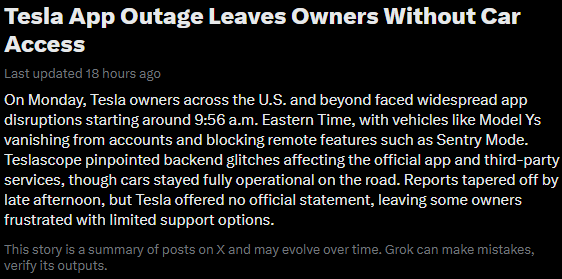
This still has me scratching my head.
I was staying at a friend's 5 hours from home. Got up in the morning to get some things done, the first being a supercharger stop.
I walked up to the truck with my phone in my pocket. It let me in. I set the nav to the supercharger and the HVAC kicked in to begin the preconditioning cycle. I spent a couple of minutes sorting myself out, letting the cabin get warm, then tried to get going by putting my foot on the brake. The screen popped up a message about no valid key on the phone and to use my card or begin pairing a phone. Huh? My phone worked to get me in the vehicle, so what's this about?
I tried a bunch of things, including restarting the app, but no joy. I tried the card and that was apparently ignored too. (although in hindsight, I might not have waved it close enough to the sensor. Maybe. I was trying everything at once to make my schedule.)
Next thing I know, the lights are flashing, including the trim lights in the cab. And the screen is off. So I rebooted the MCU using the scroll wheels. It booted, then shut down again after about 5 seconds of the screen being visible.
At this point, I sent a service request to Tesla via the app. After some texting back and forth, a representative called me and we discussed the issue. He agreed it needed a flatbed to come get me, but that would only happen if I could get it into tow mode. The twisting driveway I was on was never going to allow a flatbed to get to me, so rolling down was the only reasonable option. He could see no codes or warnings on his end to suggest what the problem was.
Problem was, the screen wouldn't stay on. How do you get Tow Mode enabled if the screen dies almost immediately? After a few reboots and quick touch screen pushes to get to the right screen, the button was greyed out. I ended up taking a photo so I could analyze what the screen was saying before it went blank. That resulted in the obvious requirement to have my foot on the brake. Another reboot and I was able to zip through the screens and enable Tow Mode. And at that point, the screen stayed alive.
Long story short, the truck finally arrived and we decided to try starting the CT after disabling Tow Mode. It worked. The truck drove onto the deck and off the deck at the Service Center. Tesla gave me a loaner and they took it inside for a review.
That afternoon they called, to say they could find absolutely nothing wrong. I should come get it. Fine, if there's no problem to be found, it can't very well be fixed!
Interesting note at this point. I tried setting my phone to be my loaner key, and it couldn't be done. That made me wonder if the phone had anything to do with the CT issue. I returned to Service and swapped vehicles. And again, my key wouldn't be detected by the CT. Key card did work though.
Service offered to set up my phone for me... LOL... after 11 years with Tesla, I should be able to manage that, but I figured why not, there was clearly a problem.
After 45 minutes of the service manager and lead tech trying to get it going, including going behind the frunk to do a complete system restart, it still wasn't working. App update confirmed. Phone rebooted, truck rebooted. I was out of time and had to leave. I suggested that the only thing we hadn't done was log out of the app and back in. So I did that, with them expressing doubts.
And.... the phone let me set up a connection to the truck! And 3 days later, everything is working properly.
So, what the frick happened?? I had 5 hours on the road to contemplate this and my best guess is:
My takeaway is that when something goes totally sideways like this, try logging out and back into the app as a possible fix.
If anyone has read this far, I wonder if they've seen anything similar? Or know what an unauthorized driver does to the alarm system?
I was staying at a friend's 5 hours from home. Got up in the morning to get some things done, the first being a supercharger stop.
I walked up to the truck with my phone in my pocket. It let me in. I set the nav to the supercharger and the HVAC kicked in to begin the preconditioning cycle. I spent a couple of minutes sorting myself out, letting the cabin get warm, then tried to get going by putting my foot on the brake. The screen popped up a message about no valid key on the phone and to use my card or begin pairing a phone. Huh? My phone worked to get me in the vehicle, so what's this about?
I tried a bunch of things, including restarting the app, but no joy. I tried the card and that was apparently ignored too. (although in hindsight, I might not have waved it close enough to the sensor. Maybe. I was trying everything at once to make my schedule.)
Next thing I know, the lights are flashing, including the trim lights in the cab. And the screen is off. So I rebooted the MCU using the scroll wheels. It booted, then shut down again after about 5 seconds of the screen being visible.
At this point, I sent a service request to Tesla via the app. After some texting back and forth, a representative called me and we discussed the issue. He agreed it needed a flatbed to come get me, but that would only happen if I could get it into tow mode. The twisting driveway I was on was never going to allow a flatbed to get to me, so rolling down was the only reasonable option. He could see no codes or warnings on his end to suggest what the problem was.
Problem was, the screen wouldn't stay on. How do you get Tow Mode enabled if the screen dies almost immediately? After a few reboots and quick touch screen pushes to get to the right screen, the button was greyed out. I ended up taking a photo so I could analyze what the screen was saying before it went blank. That resulted in the obvious requirement to have my foot on the brake. Another reboot and I was able to zip through the screens and enable Tow Mode. And at that point, the screen stayed alive.
Long story short, the truck finally arrived and we decided to try starting the CT after disabling Tow Mode. It worked. The truck drove onto the deck and off the deck at the Service Center. Tesla gave me a loaner and they took it inside for a review.
That afternoon they called, to say they could find absolutely nothing wrong. I should come get it. Fine, if there's no problem to be found, it can't very well be fixed!
Interesting note at this point. I tried setting my phone to be my loaner key, and it couldn't be done. That made me wonder if the phone had anything to do with the CT issue. I returned to Service and swapped vehicles. And again, my key wouldn't be detected by the CT. Key card did work though.
Service offered to set up my phone for me... LOL... after 11 years with Tesla, I should be able to manage that, but I figured why not, there was clearly a problem.
After 45 minutes of the service manager and lead tech trying to get it going, including going behind the frunk to do a complete system restart, it still wasn't working. App update confirmed. Phone rebooted, truck rebooted. I was out of time and had to leave. I suggested that the only thing we hadn't done was log out of the app and back in. So I did that, with them expressing doubts.
And.... the phone let me set up a connection to the truck! And 3 days later, everything is working properly.
So, what the frick happened?? I had 5 hours on the road to contemplate this and my best guess is:
- the phone app was happy with Tesla and allowed me to unlock.
- once inside, something happened between the app and Tesla and the key authorization was revoked. and in fact, the app was no longer able to communicate with the truck.
- in my haste to get going, I probably didn't give the key card enough time to register with the vehicle... maybe.
- without the key card, my efforts to get the truck going were seen as a theft in progress and the screen was shut down to prevent messing around with it.
- the theft scenario would perhaps explain the flashing lights at one point. But no audible alarm noise were heard... so I'm not sure about that.
- once I got to Tow Mode, the truck maybe gave me some slack on the theft assumption and calmed down enough to allow us to scan the card and drive onto the truck.
My takeaway is that when something goes totally sideways like this, try logging out and back into the app as a possible fix.
If anyone has read this far, I wonder if they've seen anything similar? Or know what an unauthorized driver does to the alarm system?
Sponsored