Sponsored

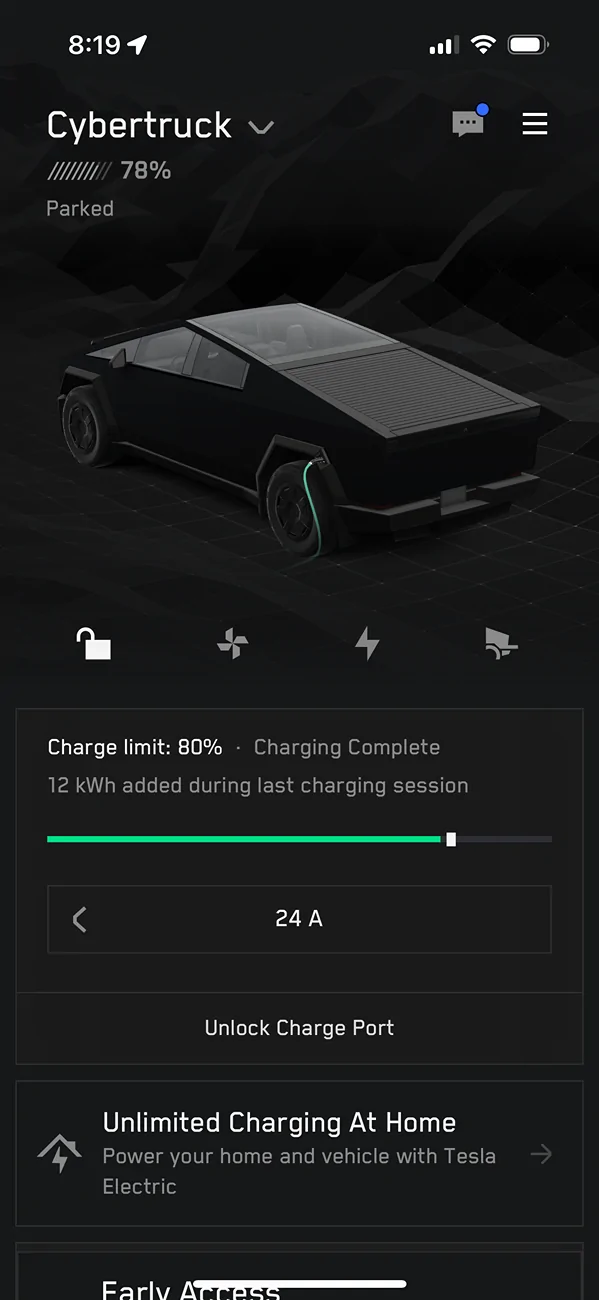
Charge limit 80, Wake Up to 78. Wtf?

SASpursCT

Member
First Name
Ryan
Joined
Mar 3, 2025
Threads
3
Messages
21
Reaction score
8
Location
San Antonio
Vehicles
Cybertruck, MY
Occupation
Commercial Real Estate
Country flag
Tesla Cybertruck Charge limit 80, Wake Up to 78. Wtf? IMG_8949


I’ve turned off all preconditioning just to be clear. No cabin cooling or anything

I live in Texas. Yes hot
CT is garaged nightly

So can someone tell me why I wake up many days, not all but many, to a 78% charge?

almost positive this is never the case with my wife’s MY sitting right next to my CT. She’s 80 every single morning
Sponsored

 

Gundo

Well-known member
First Name
Gundo
Joined
Aug 16, 2020
Threads
8
Messages
278
Reaction score
619
Location
Connecticut
Vehicles
Porsche C2S
Country flag
Grok says:

When your Tesla is set to charge to 80% but only reaches 78%, this is typically normal behavior due to the limitations of the Battery Management System (BMS) and external factors affecting the battery. Here’s why this happens and what you can do:

### Why It Stops at 78%:
1. **BMS Estimation Inaccuracy**:
- The BMS estimates the state of charge (SOC) based on voltage, temperature, and other factors, but it’s not perfectly precise. The displayed SOC is an approximation, and small variations (e.g., 1-2% under or over the set limit) are common as the system recalibrates after charging stops.[](https://www.teslaownersonline.com/threads/inconsistency-between-charge-level-requested-and-charge-level-displayed-after-charging-is-completed.25966/)[](https://www.reddit.com/r/TeslaModelY/comments/17li732/charging_limit_set_to_80_but_car_only_charged_to/)[](https://www.reddit.com/r/TeslaModel3/comments/18nqqiq/set_charge_to_80_and_it_only_charges_to_79/)
- For example, the BMS may stop charging when it hits 80% but recalculate to 78% after the battery settles or due to cell balancing, which consumes a small amount of energy to equalize cell voltages.[](https://teslamotorsclub.com/tmc/threads/charges-to-84-when-charge-set-to-80.309024/)

2. **Temperature Effects**:
- Battery temperature impacts SOC readings. If the battery is cooler (e.g., in an unheated garage), the SOC may appear slightly lower after charging due to reduced available capacity at lower temperatures. For instance, a user reported a 1% drop in displayed SOC in a 55°F garage.[](https://www.teslaownersonline.com/threads/inconsistency-between-charge-level-requested-and-charge-level-displayed-after-charging-is-completed.25966/)
- If the battery is preconditioning (heating or cooling) during charging, it may draw energy, resulting in a slightly lower final SOC.[](https://www.reddit.com/r/TeslaModelY/comments/17li732/charging_limit_set_to_80_but_car_only_charged_to/)

3. **Charging Buffer**:
- Tesla’s charging system may stop slightly below the target to avoid overcharging stress on lithium-ion batteries, especially with Nickel Cobalt Aluminum (NCA) batteries. This helps prolong battery life, as keeping the battery at exactly 80% for extended periods can accelerate degradation.[](https://goodfellasautotn.com/tesla/why-does-my-tesla-only-charge-to-80-percent/)

4. **Firmware or Charger Variability**:
- Some users report that specific Tesla firmware updates (e.g., 2018.42.3) or charger types (e.g., trickle charger vs. Tesla Wall Connector) can cause the SOC to consistently stop 1-2% below the target. For instance, a trickle charger was noted to stop at 79% while a Wall Connector hit 80%.[](https://support.teslafi.com/communities/1/topics/5125-charge-state-end-rounding-down)[](https://www.reddit.com/r/TeslaModel3/comments/18nqqiq/set_charge_to_80_and_it_only_charges_to_79/)
- Scheduled charging or conflicts in settings (e.g., TeslaFi or app schedules) can also cause the car to stop short if the schedule misaligns with the charge limit.[](https://goodfellasautotn.com/tesla/why-does-my-tesla-only-charge-to-80-percent/)[](https://teslamotorsclub.com/tmc/threads/scheduled-charging-will-not-reach-charge-limit.332032/)

5. **Battery Type and Chemistry**:
- If your Tesla has an NCA battery (common in Model 3/Y Long Range or Performance), the 80% limit is recommended to minimize degradation, and the BMS may conservatively stop slightly below to optimize longevity. Lithium Iron Phosphate (LFP) batteries, found in some Standard Range models, are less sensitive to charging limits and may behave differently.[](https://thedriven.io/2023/04/04/debunking-the-80-20-limits-on-ev-battery-charging-more-fud-from-fossil-fuel-industry/)

### What You Can Do:
1. **Adjust the Charge Limit**:
- Set the charge limit to 81% or 82% to compensate for the 1-2% shortfall. Many users report this ensures the final SOC is closer to their desired 80%.[](https://www.cybertruckownersclub.com/forum/threads/charge-limit-set-to-80-truck-is-asleep-at-79.24153/)[](https://www.reddit.com/r/TeslaModelY/comments/15x8f6g/charging_limit_set_to_80_but_every_time_i_charge/)
- You can adjust this via the Tesla touchscreen (Charging screen > drag the slider) or the Tesla app (Charging > Set Charge Limit).

2. **Use Scheduled Charging**:
- Enable the “Schedule Departure” feature in the Tesla app or car to finish charging just before your departure time. This minimizes the time the battery sits at a higher SOC and can help maintain the target charge by warming the battery, potentially reducing SOC drift.[](https://www.cybertruckownersclub.com/forum/threads/charge-limit-set-to-80-truck-is-asleep-at-79.24153/)[](https://support.teslafi.com/communities/1/topics/1558-schedule-a-charge-that-finishes-at-a-specific-time)

3. **Check Charging Equipment**:
- If using a non-Tesla charger (e.g., J1772 with adapter) or a trickle charger, verify its compatibility and settings. Some chargers may cause slight variations in SOC. A Tesla Wall Connector or high-amperage charger (e.g., 48A) tends to be more consistent.[](https://teslamotorsclub.com/tmc/threads/charges-to-84-when-charge-set-to-80.309024/)[](https://www.reddit.com/r/TeslaModel3/comments/18nqqiq/set_charge_to_80_and_it_only_charges_to_79/)

4. **Monitor Temperature**:
- If your car is in a cold environment (e.g., below 40°F), precondition the battery before charging using the Tesla app (Climate > Precondition). This can stabilize SOC readings by ensuring the battery is at an optimal temperature.[](https://www.tesla.com/support/range)

5. **Deep Discharge Calibration**:
- If the issue persists, perform a deep discharge to recalibrate the BMS. Discharge the battery to around 10-15% (avoid going below 5%), then charge to 80% or 90%. This can help the BMS better estimate SOC, though it’s not a frequent necessity.[](https://optiwatt.com/blog/why-does-my-tesla-battery-limit-decline-over-time)

6. **Contact Tesla Service (if needed)**:
- If the SOC consistently stops more than 2-3% below the target (e.g., 76% when set to 80%) or you receive error messages (e.g., BMS_a063, HVP_w038), contact Tesla Service. This could indicate a firmware bug or rare hardware issue, though such cases are uncommon.[](https://teslamotorsclub.com/tmc/threads/scheduled-charging-will-not-reach-charge-limit.332032/)

### Key Notes:
- A 1-2% variation (78% instead of 80%) is normal and not a cause for concern. It doesn’t significantly impact range (e.g., ~3-6 miles on a Model 3/Y Long Range) and aligns with Tesla’s battery health recommendations.[](https://teslamotorsclub.com/tmc/threads/charges-to-84-when-charge-set-to-80.309024/)[](https://goodfellasautotn.com/tesla/why-does-my-tesla-only-charge-to-80-percent/)
- For daily driving, Tesla recommends 80% for NCA batteries to balance range and longevity. Charging to 100% is fine for occasional trips but should be done just before driving to avoid sitting at full charge.[](https://goodfellasautotn.com/tesla/why-does-my-tesla-only-charge-to-80-percent/)[](https://www.tesla.com/support/range)
- If you’re using third-party apps like TeslaFi, ensure their settings align with the car’s charge limit to avoid discrepancies.[](https://support.teslafi.com/communities/1/topics/5125-charge-state-end-rounding-down)

If the issue persists beyond a 2% shortfall or you notice other anomalies (e.g., charging errors), let me know more details about your Tesla model, charger type, and firmware version, and I can dig deeper!
 

TyPope

Well-known member
First Name
Ty
Joined
Mar 31, 2020
Threads
33
Messages
3,219
Reaction score
4,936
Location
Chesapeake Beach, MD
Vehicles
'23 MYLR, FS Cyberbeast 280xx
Occupation
Current Operations for... an organization
Country flag
That's the long answer. Mine does this: Before setting up scheduled charging, I had the same issue. It would charge up when I got home and plugged it in. It would finish by midnight and then just slowly lose charge until morning. If I left early enough, it would be at 78% sometimes. Sometimes, I'd get out there and could tell it was actively charging (must have dropped down enough to initiate a new charge "session".

Anyway, figure out when you leave every day and just have it finish charging either at that time or just before that time.
 

CyberGus

Well-known member
First Name
Gus
Joined
May 22, 2021
Threads
91
Messages
10,248
Reaction score
33,929
Location
Austin, TX
Vehicles
1981 DeLorean, 2024 Cybertruck
Occupation
IT Specialist
Country flag
Anyway, figure out when you leave every day and just have it finish charging either at that time or just before that time.
This is the way.

By using Scheduled Charging, you gain many benefits:
  • Reduce degradation via lower average SoC
  • Ease the load on the grid by charging at non-peak hours
  • Off-peak charging also has rate benefits from some utilities
  • Pack is already warmed by charging when you depart, improving performance
 

TyPope

Well-known member
First Name
Ty
Joined
Mar 31, 2020
Threads
33
Messages
3,219
Reaction score
4,936
Location
Chesapeake Beach, MD
Vehicles
'23 MYLR, FS Cyberbeast 280xx
Occupation
Current Operations for... an organization
Country flag
This is the way.

By using Scheduled Charging, you gain many benefits:
  • Reduce degradation via lower average SoC
  • Ease the load on the grid by charging at non-peak hours
  • Off-peak charging also has rate benefits from some utilities
  • Pack is already warmed by charging when you depart, improving performance
It would be nice if I could do scheduled departure AND scheduled charging in one fell swoop... Right now, I have to set up both weekly and for the weekend.


CyberGus

Well-known member
First Name
Gus
Joined
May 22, 2021
Threads
91
Messages
10,248
Reaction score
33,929
Location
Austin, TX
Vehicles
1981 DeLorean, 2024 Cybertruck
Occupation
IT Specialist
Country flag
It would be nice if I could do scheduled departure AND scheduled charging in one fell swoop... Right now, I have to set up both weekly and for the weekend.
Right. Scheduled Charging just sets a fixed time to begin to charge, so the completion time will vary by how much charge is needed.

Conversely, Scheduled Departure works backwards from the desired time to leave, initiating the charge at the appropriate time to complete by departure. However, it also conditions the cabin, and this is not really necessary for me. I can just say "Alexa, start the truck" as I'm putting on my shoes and it'll be ready.
 

Jhodgesatmb

Well-known member
First Name
Jack
Joined
Dec 1, 2019
Threads
89
Messages
6,490
Reaction score
9,025
Location
San Francisco Bay area
Website
www.arbor-studios.com
Vehicles
Tesla Cybertruck FS AWD, Tesla Model Y LR
Occupation
Retired AI researcher
Country flag
IMG_8949.png


I’ve turned off all preconditioning just to be clear. No cabin cooling or anything

I live in Texas. Yes hot
CT is garaged nightly

So can someone tell me why I wake up many days, not all but many, to a 78% charge?

almost positive this is never the case with my wife’s MY sitting right next to my CT. She’s 80 every single morning
All of our Teslas vary a percent above or below on home charging. I’ve never lost any sleep over it.
 

TyPope

Well-known member
First Name
Ty
Joined
Mar 31, 2020
Threads
33
Messages
3,219
Reaction score
4,936
Location
Chesapeake Beach, MD
Vehicles
'23 MYLR, FS Cyberbeast 280xx
Occupation
Current Operations for... an organization
Country flag
Right. Scheduled Charging just sets a fixed time to begin to charge, so the completion time will vary by how much charge is needed.

Conversely, Scheduled Departure works backwards from the desired time to leave, initiating the charge at the appropriate time to complete by departure. However, it also conditions the cabin, and this is not really necessary for me. I can just say "Alexa, start the truck" as I'm putting on my shoes and it'll be ready.
I've got that. I use Scheduled Departure. BUT, I ALSO have to set conditioning time so it won't be freezing/hot as satan's nutsack in there.
 
OP
OP
SASpursCT

SASpursCT

Member
First Name
Ryan
Joined
Mar 3, 2025
Threads
3
Messages
21
Reaction score
8
Location
San Antonio
Vehicles
Cybertruck, MY
Occupation
Commercial Real Estate
Country flag
This is the way.

By using Scheduled Charging, you gain many benefits:
  • Reduce degradation via lower average SoC
  • Ease the load on the grid by charging at non-peak hours
  • Off-peak charging also has rate benefits from some utilities
  • Pack is already warmed by charging when you depart, improving performance
I have it set to begin charging at midnight.

I’ll try the scheduled departure and see if that helps it out.
 

Beetlebug62

Well-known member
First Name
Ken
Joined
Mar 24, 2025
Threads
6
Messages
458
Reaction score
804
Location
Maine, USA
Vehicles
2018 Tesla Model 3 LR-AWD, 2025 CyberTruck dual-motor
Occupation
retired
Country flag
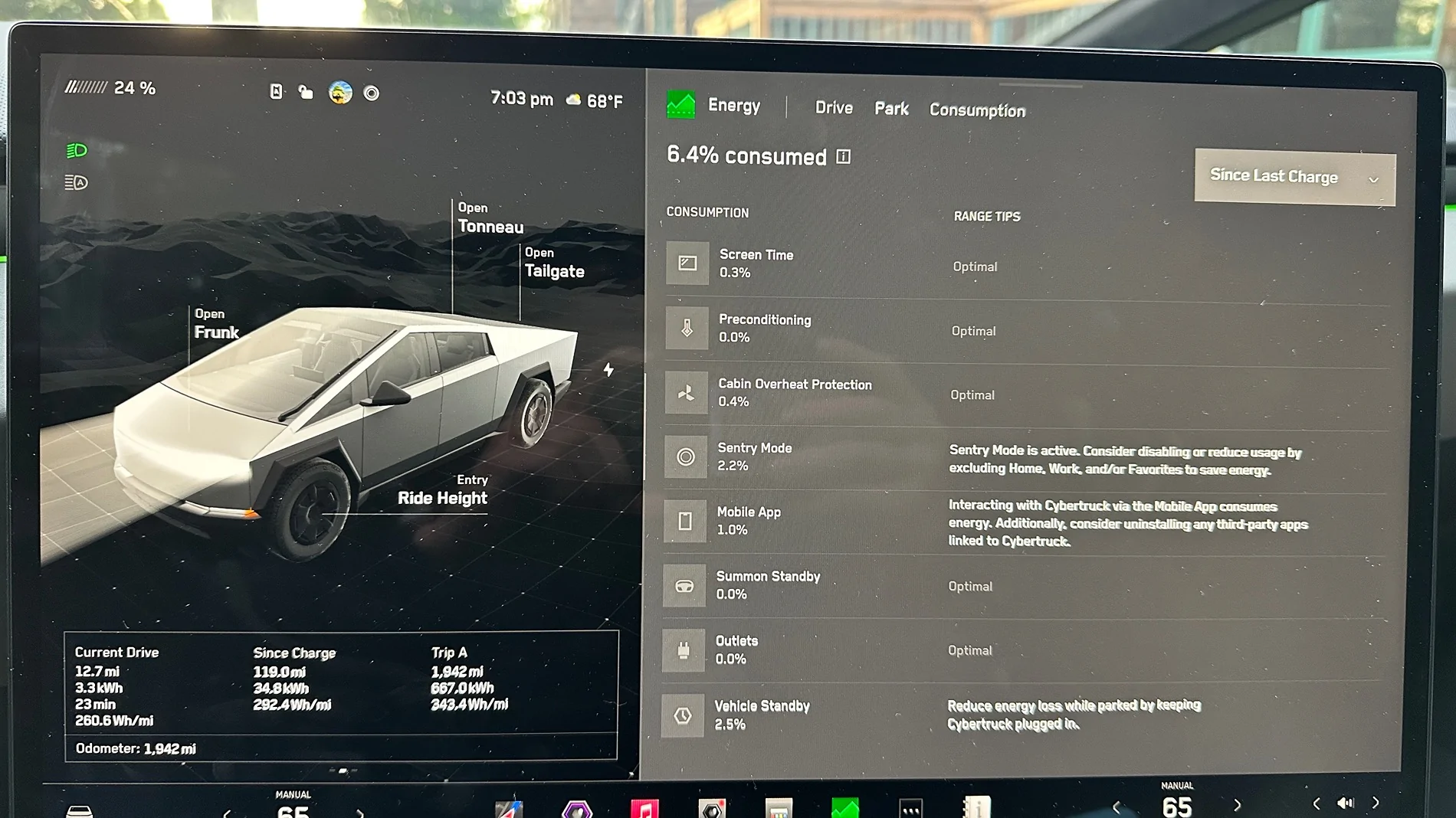
What does the Energy>Park screen show? Is the difference in the last line, Vehicle Standby? To me that's the vehicle fudge factor, but possibly due to BMS temperature adjustments. Your truck's battery is warm/hot when you enter the cooler garage. By morning the battery has cooled to ambient from when you charged it the night before. That may show up as a small loss in the Vehicle Standby line.
Tesla Cybertruck Charge limit 80, Wake Up to 78. Wtf? IMG_1572


koolio

Well-known member
Joined
Dec 4, 2024
Threads
3
Messages
1,046
Reaction score
1,104
Location
Greater Boston, MA
Vehicles
2024 Cybertruck, 2024 Model 3 (former: 2020 Model Y)
Country flag
I've seen this occur as well...but am 99% sure the reason is due to ambient temperature changes. Mine is garaged and over the past few days, I charged it to 80% (gotta love free energy via Charge on Solar!). Overnight, the temps dropped to the 60s (Boston area) and in the morning the truck was at 78 or 79%. I didn't drive that day, and it got back up to 80-85 degrees...and battery was showing 80% again.
 
  • Like
Reactions: Mal

That Beast Mode

Well-known member
First Name
Phil
Joined
Mar 15, 2025
Threads
14
Messages
1,349
Reaction score
1,799
Location
New Jersey
Vehicles
Cybertruck
Country flag
I think it does this to protect the battery from constantly charging so much to protect it from phantom drain. When you set it to 80% instead of it clicking on and charging every time it drops to 79, it will wait till it loses 2-3% before it charges it self. If you need 80 for some reason, just set it to 82 and you should be fine.
Sponsored


Top