Sponsored

REM

Well-known member
Joined
Dec 9, 2023
Threads
14
Messages
3,635
Reaction score
6,767
Location
NC
Vehicles
2020 Model 3 Standard Range++ & Diet Cybertruck, Dual Motor
Occupation
Professional Retard
Country flag
Nice find and thanks for sharing. Great to know map changes are instantly used by the vehicle.
yep! Tesla's API connection to Google maps has always been a 'living' data set.
Sponsored

 
Last edited:

REM

Well-known member
Joined
Dec 9, 2023
Threads
14
Messages
3,635
Reaction score
6,767
Location
NC
Vehicles
2020 Model 3 Standard Range++ & Diet Cybertruck, Dual Motor
Occupation
Professional Retard
Country flag
And here I thought Tesla updated its own maps based on Teslas driving around and tracking where they went. Makes sense now why it never updated its maps for new roads that I have driven on a hundred times over the years and I just thought the Tesla map learning system was stupid.
Tesla does have their own mapping, but they have an algorithm that balances out, looking for the very best accuracy. Sometimes it's their map, sometimes it's Google.
 

axhoaxho

Well-known member
First Name
A
Joined
Nov 22, 2019
Threads
4
Messages
159
Reaction score
391
Location
Bay Area
Vehicles
Tesla Model T
Country flag
That's pretty amazing, OP!


Sometimes I have difficulties explaining to people how technologically advanced the Cybertruck is.
 
OP
OP
speedstuff

speedstuff

Well-known member
First Name
Jason
Joined
Nov 27, 2024
Threads
19
Messages
136
Reaction score
309
Location
El Dorado Hills
Vehicles
26 CT Beast, 24 FS CT Beast, 25 MSP, 23 C8 Z06, 22 GMC 2500HD
Occupation
ecom
Country flag
Not that this matters for us yet, but Tesla uses OpenStreetMaps, for its summons data. You can edit it in the same way to make all the roads around your house a "parking lot" with direction(which way traffic can flow). I did this for my Model S, and could use summons around my land.
Oh this ^ is next for me to try. I have to try that on the MSP! Sounds sweet
 

65SoYoLO

Well-known member
First Name
Keith
Joined
Feb 9, 2021
Threads
53
Messages
2,008
Reaction score
2,638
Location
Long Island NY
Vehicles
2024 CyberTruck
Occupation
Retired truck driver
Country flag
Nice mansion.


Trekboy

Well-known member
First Name
Mark
Joined
Sep 1, 2023
Threads
1
Messages
195
Reaction score
350
Location
Redding, CA USA
Vehicles
Tesla Model 3, Cybertruck
Country flag
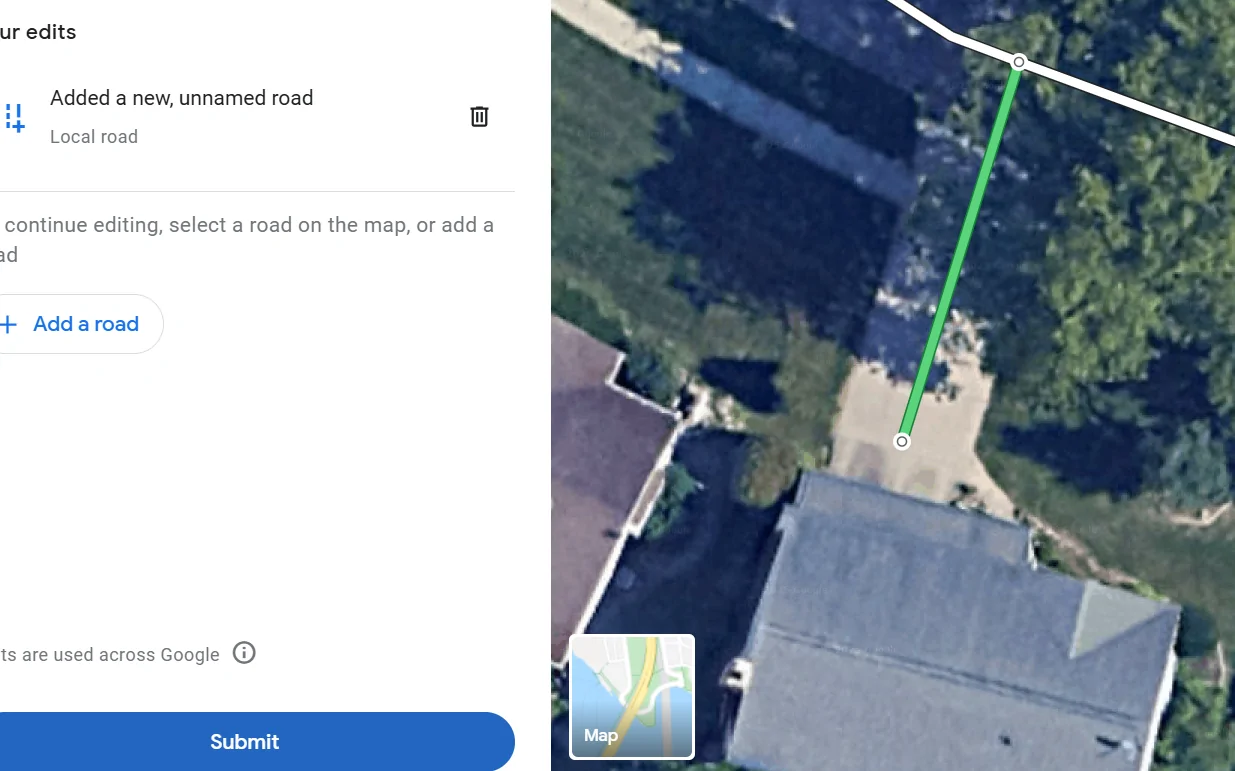
Although I live in an urban area, I had a similar experience with my CT/FSD and the map system. In my case, FSD attempted to use a private, gated driveway to get to my preferred parking spot in the back of my home. Using a desktop, I went to Google Maps, selected Edit Map, further selected Add or Fix a Road and noted the private driveway accordingly. A couple days later I was outside when a drone flew over my house and the referenced private driveway. That evening I received an email saying that my edit had been accepted by Google and within another day or so the map was updated. Now my CT consistently drives to my preferred entry using available public access points (i.e. an alley). Loved being able to fix this situation directly myself and without any hassle!
Wow, excellent info, and I'm amazed they followed up with a drone to verify.
 

tcmeyers

Well-known member
First Name
Troy
Joined
Feb 18, 2020
Threads
14
Messages
175
Reaction score
156
Location
Washington State
Vehicles
2024 Cybertruck Foundation AWD, 2018 Tesla Model X 100D
Occupation
Botanist
Country flag
Is there a way to set a speed limit? Though the map knows to turn onto my gravel road and proceed to the end, the truck turns in and wants to continue going 40 MPH. Ten or less is way more appropriate.


collisc

Member
First Name
Scott
Joined
May 30, 2025
Threads
1
Messages
20
Reaction score
49
Location
SoCal
Vehicles
FS CT AWD
Country flag
Wow, excellent info, and I'm amazed they followed up with a drone to verify.
I was as well. Thought they’d simply check the satellite view as it’s plain enough there. I suppose the drone gave them the most accurate and real time answer.
 

10killer75

Active member
First Name
Sean
Joined
Aug 11, 2024
Threads
1
Messages
29
Reaction score
32
Location
Oklahoma
Vehicles
Cyberbeast
Country flag
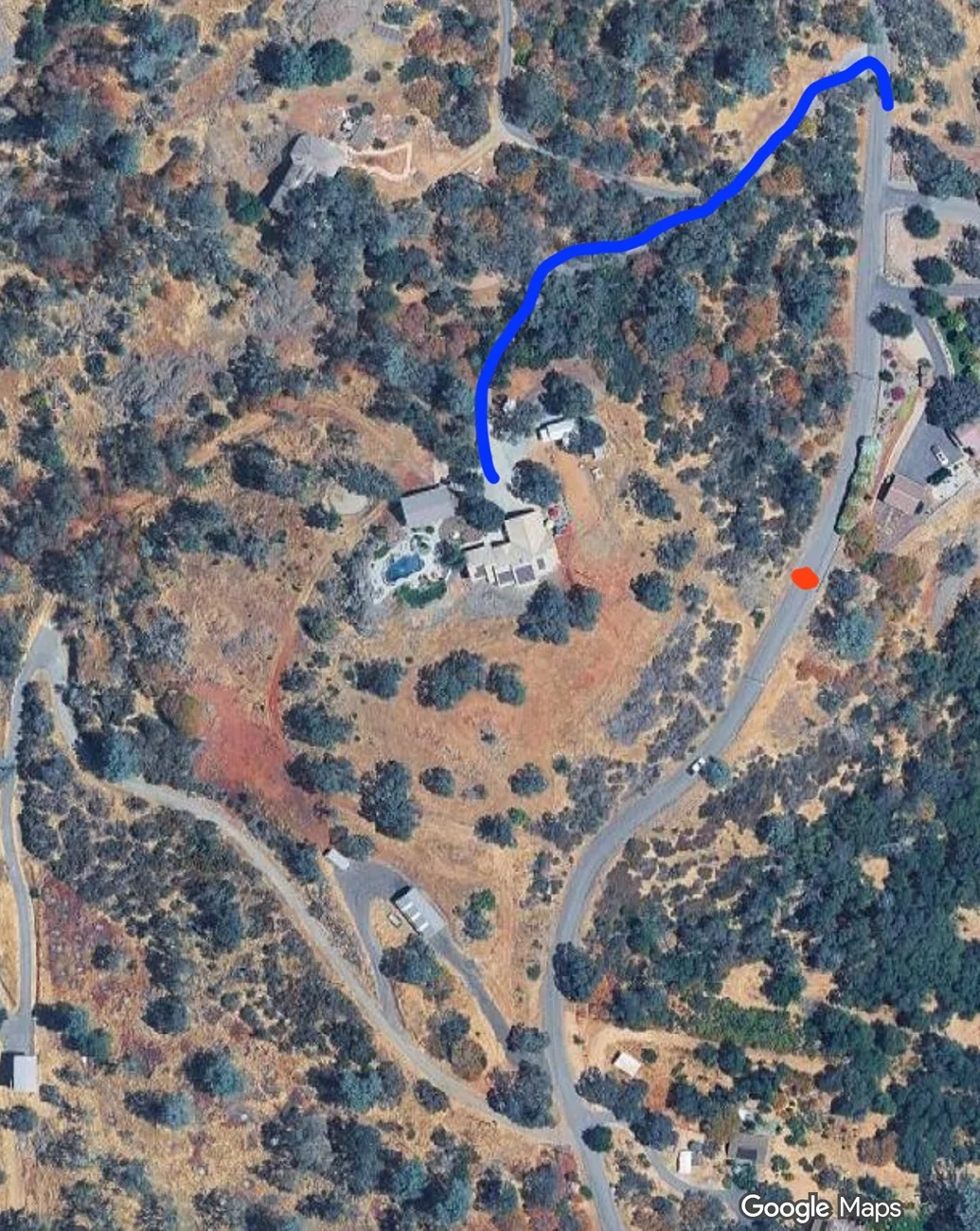
I struggled with FSD in my CT when it came to my property. I live on acreage and FSD would stop along the main community road nearest to my home marker.

The driveway to access my property is covered by trees in many areas - these trees obstructed the satellite view.

The incomplete satellite view of my unmapped / private road seemed to block google maps from creating a full path to the house.

This is why my 'home point' for my address was not accessible by FSD using my driveway.

I took a shot in the dark and used the 'edit' map option on google maps from a pc - this edit allows you to draw where the road is and send that in for review.

The edit was accepted and a couple hours later google maps online would show my driveway from the main street to the house.

I went for a drive and used FSD to get home, and wow, it drove right up the driveway I edited and parked in front of the house.

Until this, I only had a suspicion that google maps data is used to that level in FSD - but now we know for sure.

Very cool stuff and I wanted to share with others that may be looking for a similar solution.

(on the picture - FSD used to stop at red dot saying arrived - now it drives the proper way and follows the blue line which is the new updated edit on googlemaps)

mapedit.webp
Thank you so much for this! I just edited my road, my beast cuts corners very bad and always goes off the road. I just edited the maps, lets see if it gets approved and works. Very exciting!
 
  • Like
Reactions: REM

Bruisershockey

Well-known member
First Name
Jeremy
Joined
Sep 20, 2024
Threads
5
Messages
77
Reaction score
86
Location
Powhatan, Virginia
Vehicles
2024 Cyberbeast
Occupation
retired
Country flag
I struggled with FSD in my CT when it came to my property. I live on acreage and FSD would stop along the main community road nearest to my home marker.

The driveway to access my property is covered by trees in many areas - these trees obstructed the satellite view.

The incomplete satellite view of my unmapped / private road seemed to block google maps from creating a full path to the house.

This is why my 'home point' for my address was not accessible by FSD using my driveway.

I took a shot in the dark and used the 'edit' map option on google maps from a pc - this edit allows you to draw where the road is and send that in for review.

The edit was accepted and a couple hours later google maps online would show my driveway from the main street to the house.

I went for a drive and used FSD to get home, and wow, it drove right up the driveway I edited and parked in front of the house.

Until this, I only had a suspicion that google maps data is used to that level in FSD - but now we know for sure.

Very cool stuff and I wanted to share with others that may be looking for a similar solution.

(on the picture - FSD used to stop at red dot saying arrived - now it drives the proper way and follows the blue line which is the new updated edit on googlemaps)

mapedit.webp
that is super cool. im on 25 acres in viriginia and im about to do the same thing. also, incredible property man. congrats
 

DaBagBoy

Well-known member
Joined
May 8, 2024
Threads
15
Messages
364
Reaction score
374
Location
Lansing MI
Vehicles
3, Y, CT
Country flag
Thanks for reporting that. I had thought the only way to edit Google Maps was through the Waze Editor. I have a similar problem to you, but my driveway isn't as long. PLUS, FSD would sometimes want to pass my driveway allegedly to stop directly mid-property and sometimes pulls right into my driveway and then gets confused closer to the house.
Awesome thread! thanks all my cars have refused to pull into my driveway as well. Just added a "road" for my driveway -- hope it works
Tesla Cybertruck FSD in rural areas and unmarked driveways - how I updated mine by submitting Google map edit 1758121562693-h
Sponsored


Top