Sponsored

CyberGus

Well-known member
First Name
Gus
Joined
May 22, 2021
Threads
91
Messages
10,312
Reaction score
34,173
Location
Austin, TX
Vehicles
1981 DeLorean, 2024 Cybertruck
Occupation
IT Specialist
Country flag
Yeah. When it’s convenient they say that and when it’s not , the opposite. There is no winning
She used to complain about FSD, but now she only complains when I take over hahahahah
Sponsored


Gaximus

Well-known member
Joined
Jun 22, 2024
Threads
23
Messages
1,475
Reaction score
2,311
Location
Mead, CO
Vehicles
CyberBeast, Model 3, Jeep Wrangler, Yamaha R6
Occupation
Software Developer
Country flag
So how do you do this? Very interested.
It has been a while since I did this, but go to openstreetmaps.com. Create an account. Go to your location and edit map. The editing tools were very primitive, but they worked.
 

cyberos

Well-known member
Joined
Jul 9, 2024
Threads
24
Messages
219
Reaction score
461
Location
Austin, TX
Vehicles
RX 350h, Cybertruck AWD
Occupation
Generative AI
Country flag
I struggled with FSD in my CT when it came to my property. I live on acreage and FSD would stop along the main community road nearest to my home marker.

The driveway to access my property is covered by trees in many areas - these trees obstructed the satellite view.

The incomplete satellite view of my unmapped / private road seemed to block google maps from creating a full path to the house.

This is why my 'home point' for my address was not accessible by FSD using my driveway.

I took a shot in the dark and used the 'edit' map option on google maps from a pc - this edit allows you to draw where the road is and send that in for review.

The edit was accepted and a couple hours later google maps online would show my driveway from the main street to the house.

I went for a drive and used FSD to get home, and wow, it drove right up the driveway I edited and parked in front of the house.

Until this, I only had a suspicion that google maps data is used to that level in FSD - but now we know for sure.

Very cool stuff and I wanted to share with others that may be looking for a similar solution.

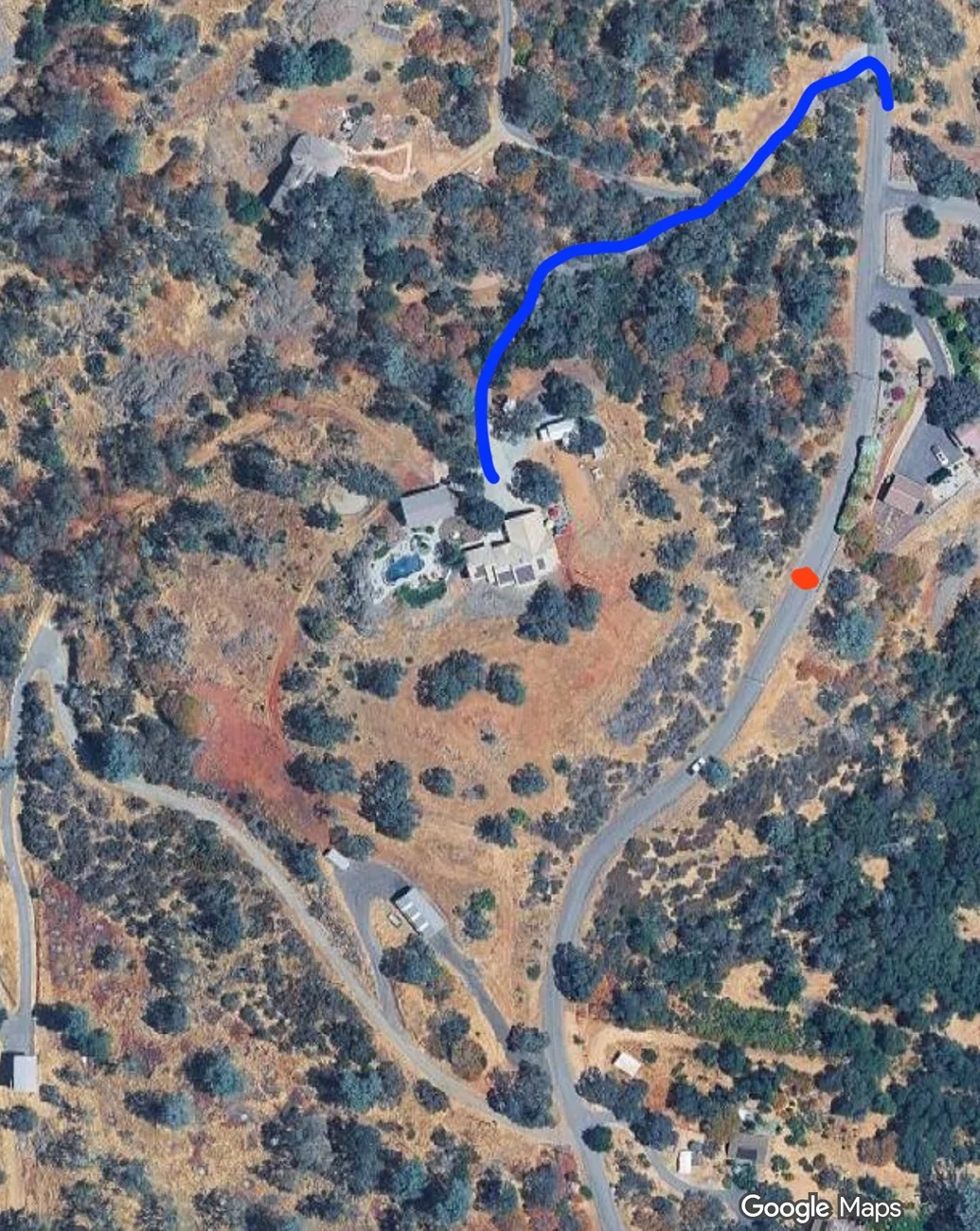
(on the picture - FSD used to stop at red dot saying arrived - now it drives the proper way and follows the blue line which is the new updated edit on googlemaps)

mapedit.webp
Really good post
 

CasaDelGato

Well-known member
First Name
John
Joined
Dec 4, 2022
Threads
11
Messages
78
Reaction score
89
Location
Greenbank, WA
Vehicles
EV F250 (conversion), Cybertruck
Occupation
Retired
Country flag
It has been a while since I did this, but go to openstreetmaps.com. Create an account. Go to your location and edit map. The editing tools were very primitive, but they worked.
I did my edit in Google maps.
I tried to look at openstreetmaps -but FireFox refuses to let me see that site due to certificate issues.
 

Beetlebug62

Well-known member
First Name
Ken
Joined
Mar 24, 2025
Threads
6
Messages
468
Reaction score
814
Location
Maine, USA
Vehicles
2018 Tesla Model 3 LR-AWD, 2025 CyberTruck dual-motor
Occupation
retired
Country flag
So how do you do this? Very interested.
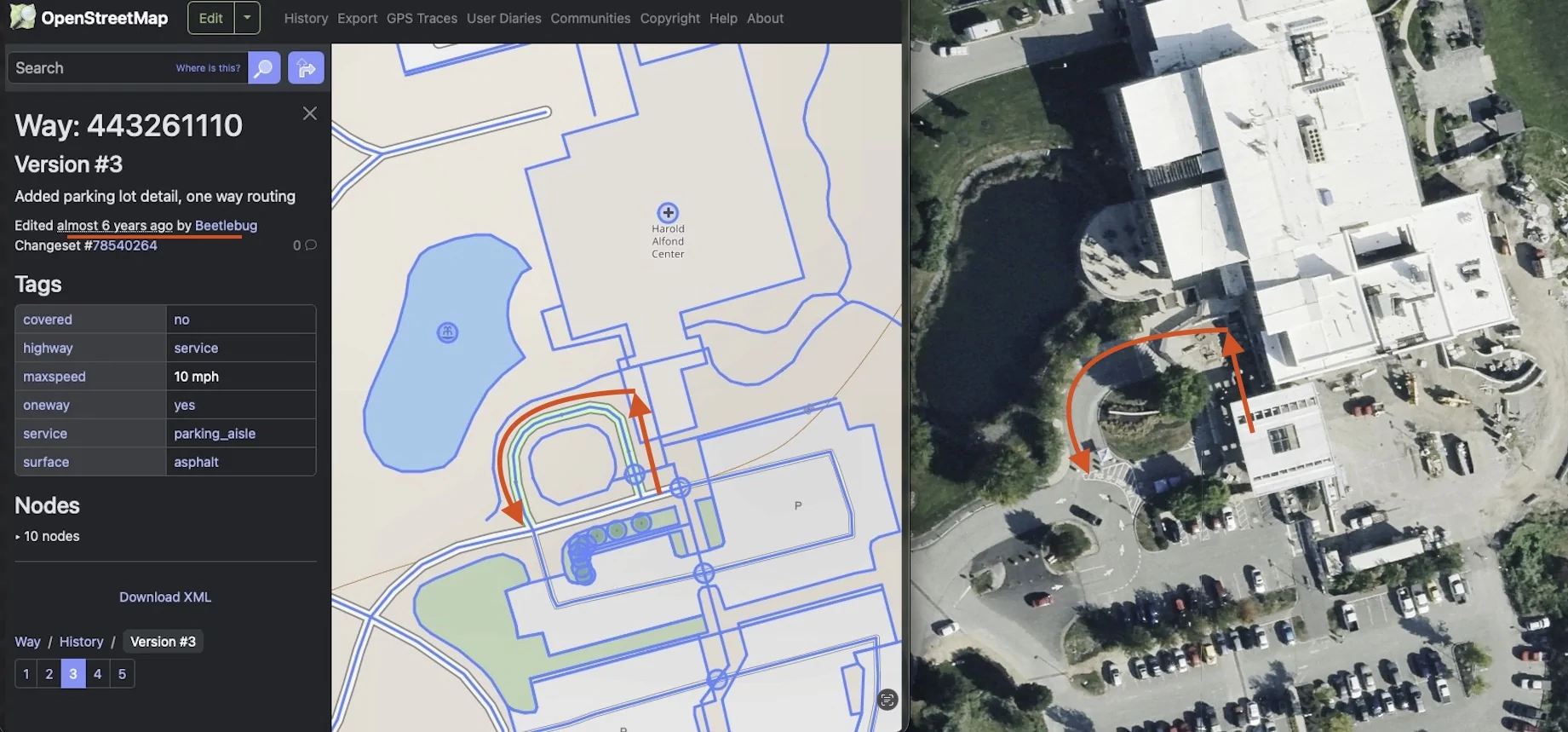
6yrs ago, I did an edit at the local oncology parking lot. There's a one-way roundabout. Using summon, the car will drive right in the middle of the lane, which is far from the curb. I edited it to bring the thru-lane closer to the curb, under the actual awning for patient pickup. They did not like that, and took my edit out. Yay. The editing tools aren't granular enough.
Tesla Cybertruck FSD in rural areas and unmarked driveways - how I updated mine by submitting Google map edit by default 2025-09-28 at 12.01.47 PM


I did it so I could use summon to bring the car closer to the curb when picking up my mom, in a wheelchair.


GlennMattV

Well-known member
First Name
Glenn
Joined
Sep 22, 2022
Threads
3
Messages
51
Reaction score
19
Location
Louisiana
Vehicles
2024 Dual Motor AWD CyberTruck
Country flag
I struggled with FSD in my CT when it came to my property. I live on acreage and FSD would stop along the main community road nearest to my home marker.

The driveway to access my property is covered by trees in many areas - these trees obstructed the satellite view.

The incomplete satellite view of my unmapped / private road seemed to block google maps from creating a full path to the house.

This is why my 'home point' for my address was not accessible by FSD using my driveway.

I took a shot in the dark and used the 'edit' map option on google maps from a pc - this edit allows you to draw where the road is and send that in for review.

The edit was accepted and a couple hours later google maps online would show my driveway from the main street to the house.

I went for a drive and used FSD to get home, and wow, it drove right up the driveway I edited and parked in front of the house.

Until this, I only had a suspicion that google maps data is used to that level in FSD - but now we know for sure.

Very cool stuff and I wanted to share with others that may be looking for a similar solution.

(on the picture - FSD used to stop at red dot saying arrived - now it drives the proper way and follows the blue line which is the new updated edit on googlemaps)

mapedit.webp
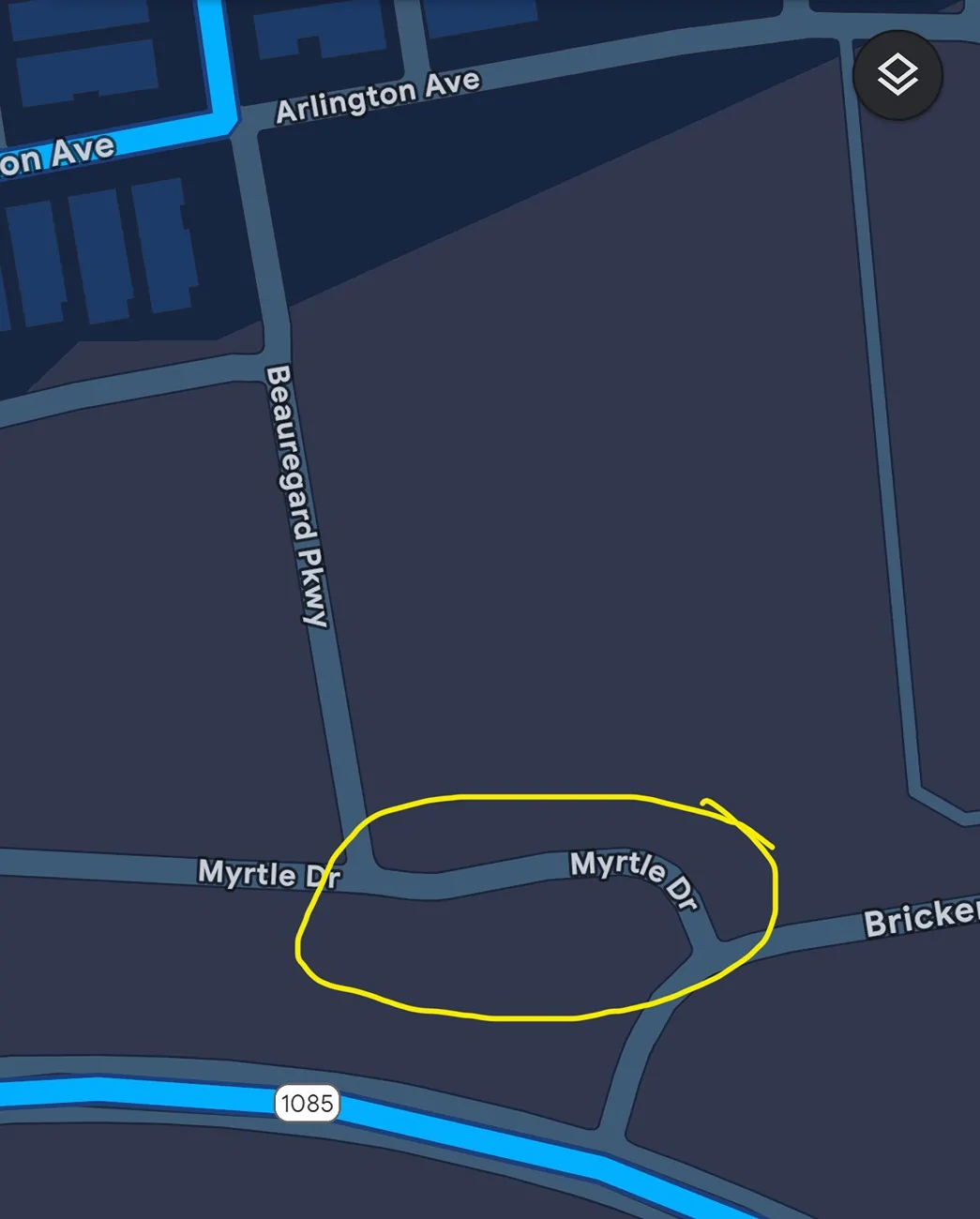
I have this same issue. I made an edit to google maps. It took approximately 3 weeks to get it approved. The new section of road shows on Google maps, but our CT has yet to show it on the navigation map. Any ideas on how often Tesla updates the map?

Thanks in advance,
 
OP
OP
speedstuff

speedstuff

Well-known member
First Name
Jason
Joined
Nov 27, 2024
Threads
19
Messages
136
Reaction score
309
Location
El Dorado Hills
Vehicles
26 CT Beast, 24 FS CT Beast, 25 MSP, 23 C8 Z06, 22 GMC 2500HD
Occupation
ecom
Country flag
Mine took immediately when it was showing on google maps. So if you go to google maps on a PC does it show directions to your location correct and updated? (or does it show the dots you put?)
 

GlennMattV

Well-known member
First Name
Glenn
Joined
Sep 22, 2022
Threads
3
Messages
51
Reaction score
19
Location
Louisiana
Vehicles
2024 Dual Motor AWD CyberTruck
Country flag
Mine took immediately when it was showing on google maps. So if you go to google maps on a PC does it show directions to your location correct and updated? (or does it show the dots you put?)
New section seems to be solid. See attachment. I’m wondering if I need to look at the other streets to see if anything is wrong with them. The circled section does not even show up on the CT map. It is still missing.

Tesla Cybertruck FSD in rural areas and unmarked driveways - how I updated mine by submitting Google map edit IMG_0043
 
OP
OP
speedstuff

speedstuff

Well-known member
First Name
Jason
Joined
Nov 27, 2024
Threads
19
Messages
136
Reaction score
309
Location
El Dorado Hills
Vehicles
26 CT Beast, 24 FS CT Beast, 25 MSP, 23 C8 Z06, 22 GMC 2500HD
Occupation
ecom
Country flag
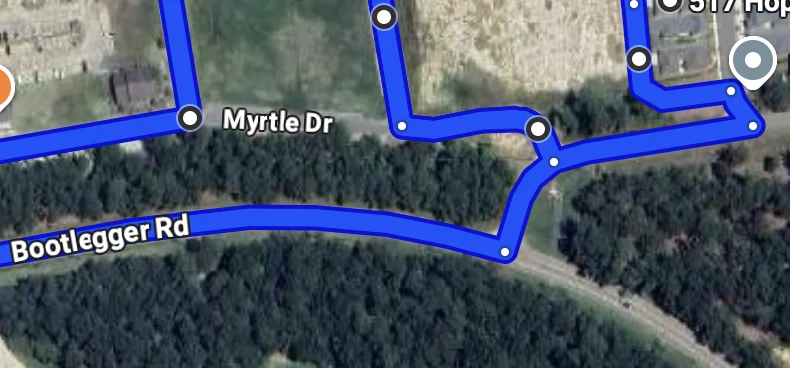
I found the street just by using two of the street names. that being said I poked around and cant find an issue. I would make a 'trip' on google maps that you think should use that road, and then when looking in the map route image - on the bottom right there is a 'send feedback' link (really small) - it will give you options to submit changes that was as well. I had one that was fixed for me that way also. Best of luck and hope you get it to your satisfaction!

Tesla Cybertruck FSD in rural areas and unmarked driveways - how I updated mine by submitting Google map edit Screenshot 2025-10-11 at 9.24.13 AM
 

GlennMattV

Well-known member
First Name
Glenn
Joined
Sep 22, 2022
Threads
3
Messages
51
Reaction score
19
Location
Louisiana
Vehicles
2024 Dual Motor AWD CyberTruck
Country flag
I found the street just by using two of the street names. that being said I poked around and cant find an issue. I would make a 'trip' on google maps that you think should use that road, and then when looking in the map route image - on the bottom right there is a 'send feedback' link (really small) - it will give you options to submit changes that was as well. I had one that was fixed for me that way also. Best of luck and hope you get it to your satisfaction!

Screenshot 2025-10-11 at 9.24.13 AM.webp
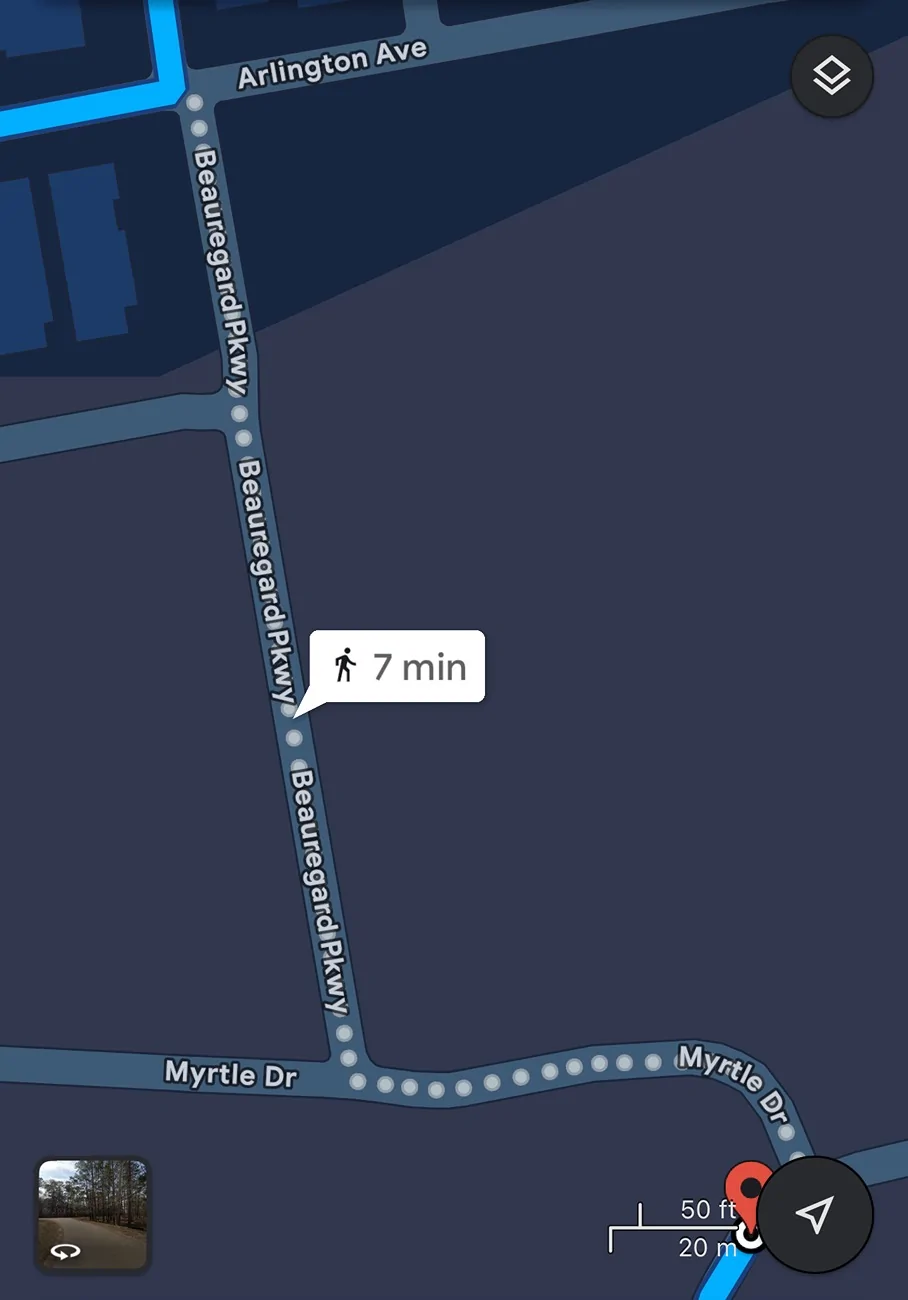
I did as you suggested and this is what I get. I will try the send feedback option.

Update… Google app does not have a feedback option that I can see.

Tesla Cybertruck FSD in rural areas and unmarked driveways - how I updated mine by submitting Google map edit IMG_0047
 
Last edited:

CasaDelGato

Well-known member
First Name
John
Joined
Dec 4, 2022
Threads
11
Messages
78
Reaction score
89
Location
Greenbank, WA
Vehicles
EV F250 (conversion), Cybertruck
Occupation
Retired
Country flag
Well, Google maps doesn't show the new private roads, but it did show the change in Pin location for my house.
When I did the edits, I did receive notification that my edits were accepted.

And I just checked by "Edit the map" again. In Edit, It shows my new private roads as dotted lines, says I submitted the changes on 9/23.

Note that Tesla Nav does NOT use the new Pin location.
Sponsored


Top