Sponsored

DarkEye

Well-known member
Joined
Nov 27, 2019
Threads
7
Messages
185
Reaction score
186
Location
Jacksonville, FL
Website
ts.la
Vehicles
'24 FS CT AWD, past Equinox, Hummer H3
Occupation
Retired
Country flag
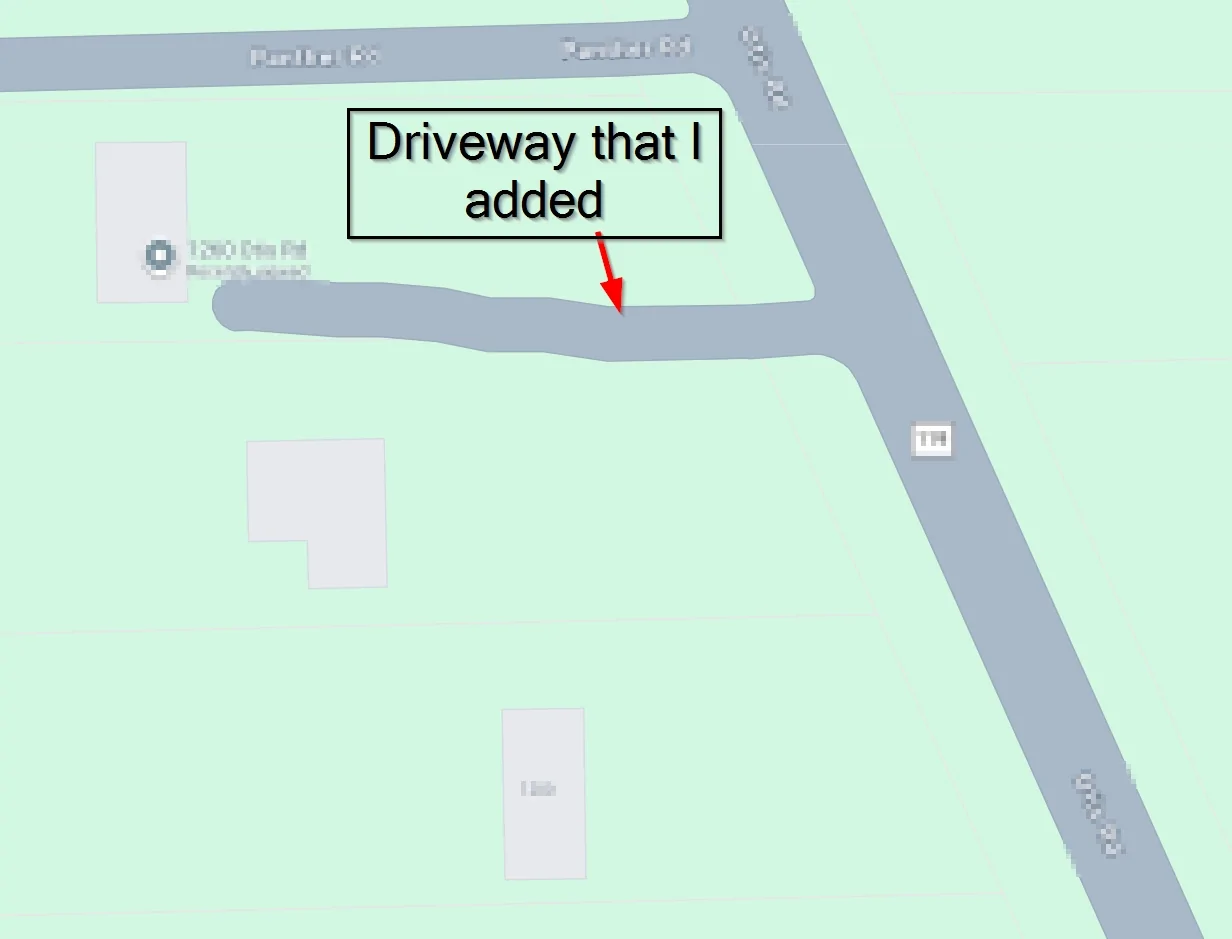
I've added my private driveway as a road but can't figure out how to do it as a parking lot. Google maps now shows my driveway as a road but my CT still won't turn down my driveway. It just stops on the main road in front of my driveway.
2025-09-19 11_05_21-Total Commander (x64) 11.55 - Jacksonville Electric Authority.webp
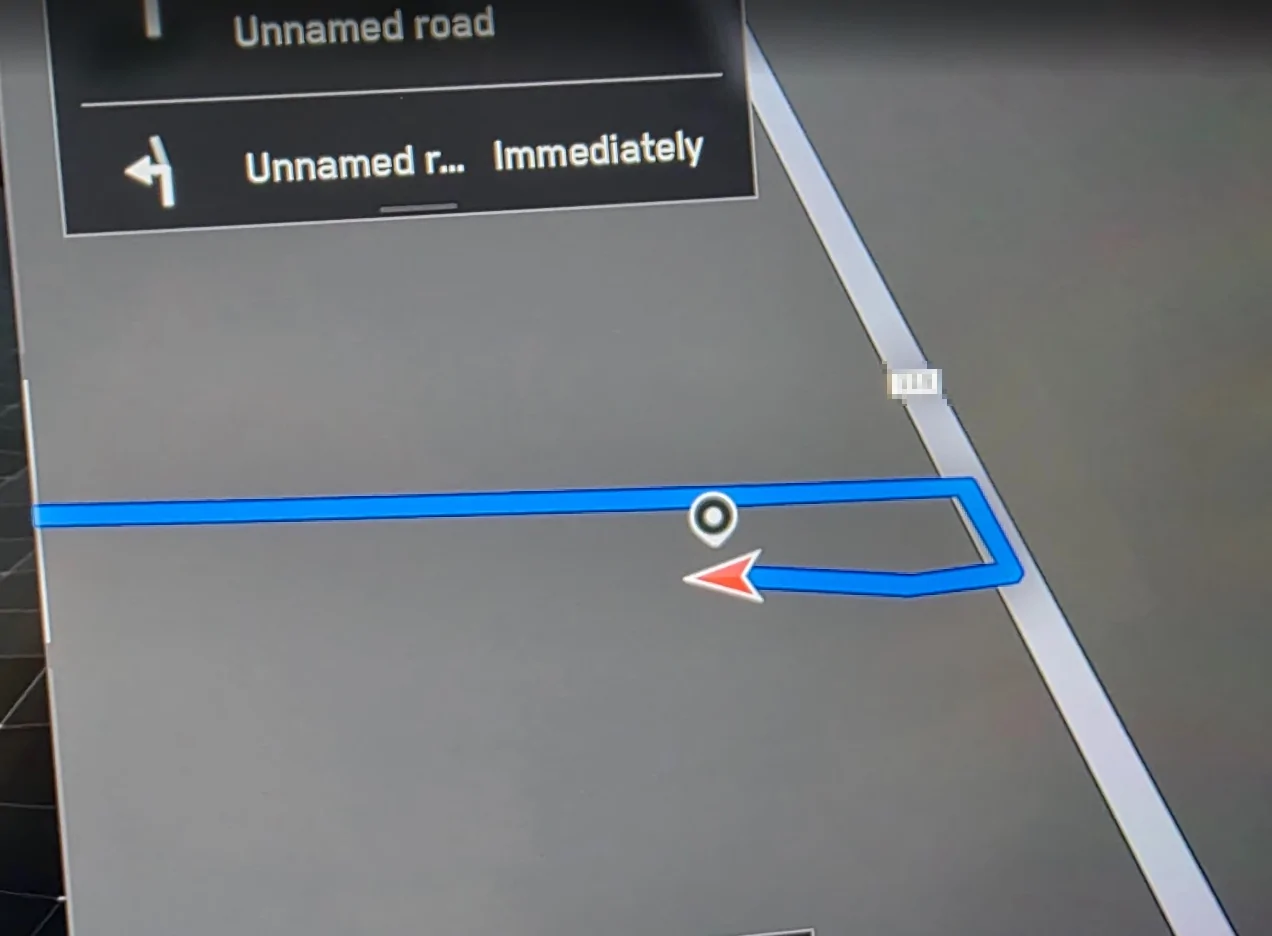
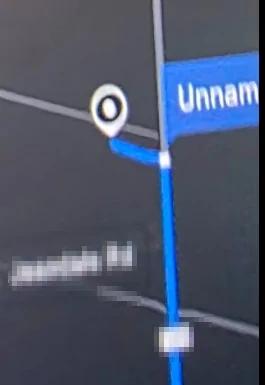
Looks like my CT nav has added my driveway to the map now. Tried it out in FSD on way home but it still won't turn down my driveway. It wants to still turn down the other road to the left past my driveway. I'll have to test now if my CT will allow to start FSD from my driveway and pull out to main road.
Tesla Cybertruck FSD in rural areas and unmarked driveways - how I updated mine by submitting Google map edit 2025-09-19 13_18_53-Settings

Tesla Cybertruck FSD in rural areas and unmarked driveways - how I updated mine by submitting Google map edit 2025-09-19 13_25_03-Settings
Sponsored


AverageJoe

Well-known member
First Name
John
Joined
Jun 15, 2025
Threads
15
Messages
317
Reaction score
367
Location
Olive Hill, KY
Vehicles
2024 CT AWD, 2022 MYP, 2016 MX 90D
Occupation
Retired Military, House Husband
Country flag
Looks like my CT nav has added my driveway to the map now. Tried it out in FSD on way home but it still won't turn down my driveway. It wants to still turn down the other road to the left past my driveway. I'll have to test now if my CT will allow to start FSD from my driveway and pull out to main road.
2025-09-19 13_18_53-Settings.webp

2025-09-19 13_25_03-Settings.webp
In the first picture it looks like your address is on the road going left to right instead of vertical. Maybe you can edit the entrance location
 

CyberGus

Well-known member
First Name
Gus
Joined
May 22, 2021
Threads
91
Messages
10,312
Reaction score
34,176
Location
Austin, TX
Vehicles
1981 DeLorean, 2024 Cybertruck
Occupation
IT Specialist
Country flag
Looks like my CT nav has added my driveway to the map now. Tried it out in FSD on way home but it still won't turn down my driveway. It wants to still turn down the other road to the left past my driveway. I'll have to test now if my CT will allow to start FSD from my driveway and pull out to main road.
2025-09-19 13_18_53-Settings.webp

2025-09-19 13_25_03-Settings.webp
The navigation really doesn't like unnamed roads. Try giving it a name, like "Cybertruck Place" hahaha or even the same name as your street.
 

DarkEye

Well-known member
Joined
Nov 27, 2019
Threads
7
Messages
185
Reaction score
186
Location
Jacksonville, FL
Website
ts.la
Vehicles
'24 FS CT AWD, past Equinox, Hummer H3
Occupation
Retired
Country flag
In the first picture it looks like your address is on the road going left to right instead of vertical. Maybe you can edit the entrance location
Here is another view of me returning home and CT slowed down but would not turn into my driveway and was going to turn left onto next dirt road instead. There is no access to my property from the dirt road going left to right. I added a name to my driveway to see if this will allow FSD to turn onto my driveway now. We'll see if that helps when I test it later.

Tesla Cybertruck FSD in rural areas and unmarked driveways - how I updated mine by submitting Google map edit 2025-09-19 16_06_51-NVIDIA GeForce Overlay
 

collisc

Member
First Name
Scott
Joined
May 30, 2025
Threads
1
Messages
20
Reaction score
49
Location
SoCal
Vehicles
FS CT AWD
Country flag
That looks like a fantastic drive, FSD or not.

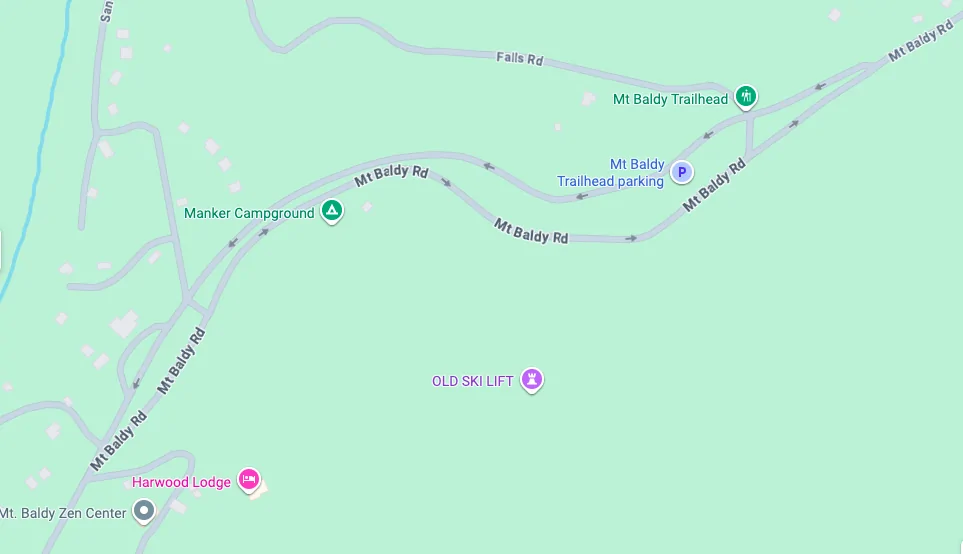
I examined the route on Mt. Baldy Road in Google Maps, and the only place I see one-way indicated is where it splits into a boulevard, near the resort:

Screenshot 2025-09-18 at 10.26.49 AM.webp


The hairpin turns beyond that all look "normal". The only anomalies are where someone thought it would be a good idea to construct a road at the apex of a hairpin turn (Iron Gate and Wagon Wheel). I'd need to invoke the API to dig into the data further, but I don't have the time currently.
Yes, the one-ways you found are accurate and FSD performs them correctly. The issue where it has consistently crossed over to oncoming traffic occurs in the hairpin near the following Google+ codes 7945+3HW Mt Baldy, CA, 7946+M7R Mt Baldy, CA and while driving in the downhill direction. I haven’t had a chance to see if the latest CT software update causes any changes to FSD performance here but if the issue is within Google’s map data then unlikely CT would behave differently.


pgetty99

Member
Joined
Nov 26, 2024
Threads
1
Messages
17
Reaction score
3
Location
Ottawa
Vehicles
Cybertruck
Country flag
Can this approach be used to get CT to definitively park in my driveway? So far, it's only done so once or twice. Sometimes parks in neighbors' driveway a few times.usually pulls up in front of my home.
 

cadamo001

Well-known member
First Name
Chris
Joined
May 16, 2024
Threads
4
Messages
174
Reaction score
291
Location
Jackson, NJ
Vehicles
Model 3 Highland, Cyberbeast
Occupation
Sales
Country flag
THIS 100% worked for me! Not sure I'm going to use it but it worked. I edited Google Maps and added my driveway as a "parking lot". Gave it a random name like Adamo Lane or something like that. This morning on the way home I noticed FSD trying to pull into my driveway. Pulled in and went all the way up to the place I park it when I'm not parking it in the garage. THANK YOU for letting us know about that!
 

flyinglow

Well-known member
First Name
Rick
Joined
Mar 14, 2024
Threads
4
Messages
150
Reaction score
170
Location
Sierra foothills, CA
Vehicles
BMW 335i, F250
Country flag
I struggled with FSD in my CT when it came to my property. I live on acreage and FSD would stop along the main community road nearest to my home marker.

The driveway to access my property is covered by trees in many areas - these trees obstructed the satellite view.

The incomplete satellite view of my unmapped / private road seemed to block google maps from creating a full path to the house.

This is why my 'home point' for my address was not accessible by FSD using my driveway.

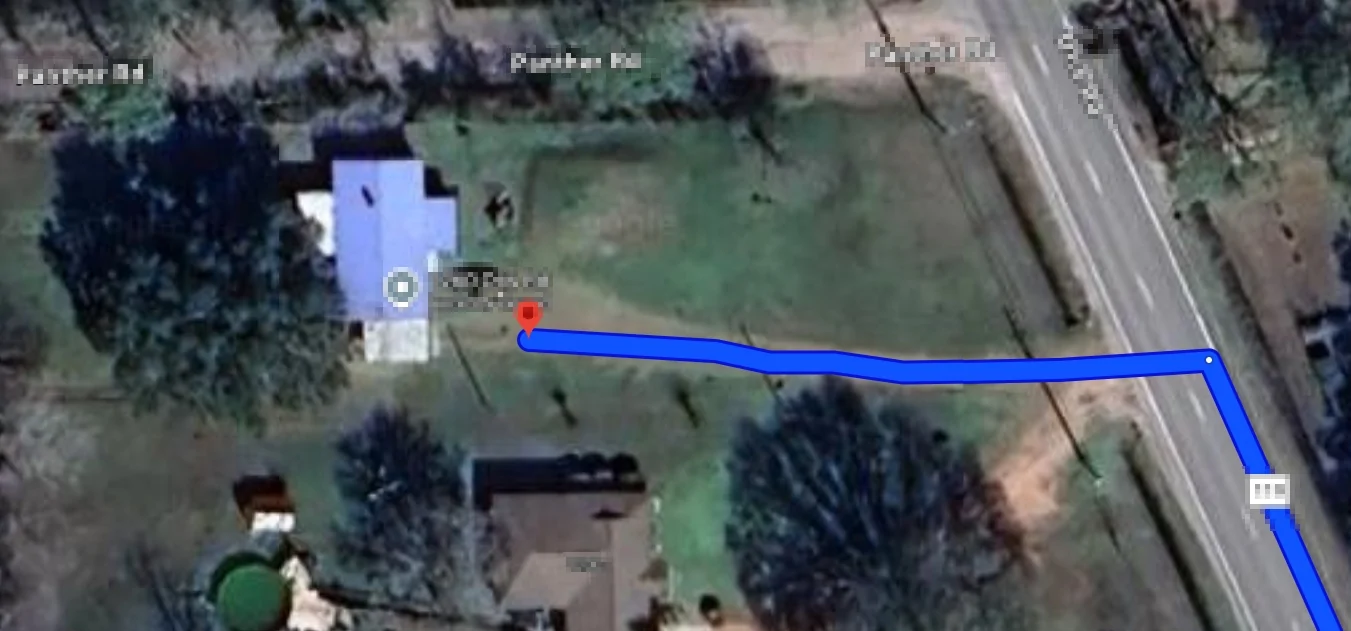
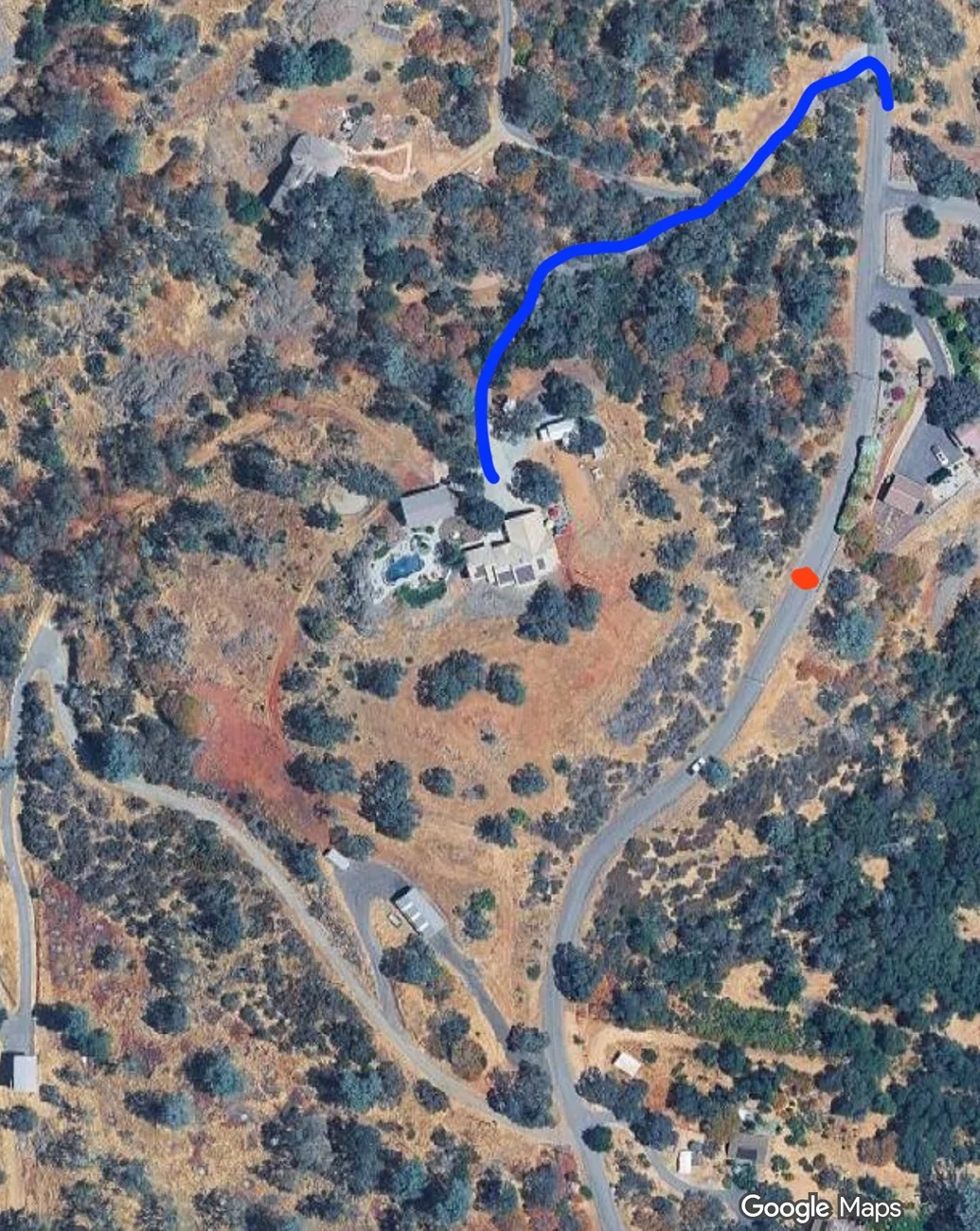
I took a shot in the dark and used the 'edit' map option on google maps from a pc - this edit allows you to draw where the road is and send that in for review.

The edit was accepted and a couple hours later google maps online would show my driveway from the main street to the house.

I went for a drive and used FSD to get home, and wow, it drove right up the driveway I edited and parked in front of the house.

Until this, I only had a suspicion that google maps data is used to that level in FSD - but now we know for sure.

Very cool stuff and I wanted to share with others that may be looking for a similar solution.

(on the picture - FSD used to stop at red dot saying arrived - now it drives the proper way and follows the blue line which is the new updated edit on googlemaps)

mapedit.webp
Useful info but I always chuckle when someone is bugged they actually have to drive 1000 ft or so.
 

ModelXer

Well-known member
Joined
Sep 7, 2023
Threads
0
Messages
126
Reaction score
86
Location
NY
Vehicles
Model X
Country flag
I struggled with FSD in my CT when it came to my property. I live on acreage and FSD would stop along the main community road nearest to my home marker.

The driveway to access my property is covered by trees in many areas - these trees obstructed the satellite view.

The incomplete satellite view of my unmapped / private road seemed to block google maps from creating a full path to the house.

This is why my 'home point' for my address was not accessible by FSD using my driveway.

I took a shot in the dark and used the 'edit' map option on google maps from a pc - this edit allows you to draw where the road is and send that in for review.

The edit was accepted and a couple hours later google maps online would show my driveway from the main street to the house.

I went for a drive and used FSD to get home, and wow, it drove right up the driveway I edited and parked in front of the house.

Until this, I only had a suspicion that google maps data is used to that level in FSD - but now we know for sure.

Very cool stuff and I wanted to share with others that may be looking for a similar solution.

(on the picture - FSD used to stop at red dot saying arrived - now it drives the proper way and follows the blue line which is the new updated edit on googlemaps)

mapedit.webp
Excellent information! That's a big help.
 

CyberGus

Well-known member
First Name
Gus
Joined
May 22, 2021
Threads
91
Messages
10,312
Reaction score
34,176
Location
Austin, TX
Vehicles
1981 DeLorean, 2024 Cybertruck
Occupation
IT Specialist
Country flag
Yes, the one-ways you found are accurate and FSD performs them correctly. The issue where it has consistently crossed over to oncoming traffic occurs in the hairpin near the following Google+ codes 7945+3HW Mt Baldy, CA, 7946+M7R Mt Baldy, CA and while driving in the downhill direction. I haven’t had a chance to see if the latest CT software update causes any changes to FSD performance here but if the issue is within Google’s map data then unlikely CT would behave differently.
I don't see any defects in the map data at those locations. I can even map a route with the API:

https://developers-dot-devsite-v2-p...639566|34.25597300917855, -117.63971343175045


The only weird thing I see is in the satellite view, where the map data skews from the photos so that the line is not down the center of the road, but I would think that would be true just about everywhere. I believe the satellite view is just a visual overlay and is not used in path calculations.


Crissa

Well-known member
First Name
Crissa
Joined
Jul 8, 2020
Threads
138
Messages
19,571
Reaction score
31,477
Location
Santa Cruz
Vehicles
2014 Zero S, 2013 Mazda 3
Country flag
Is the hairpin to the right?

FSD doesn't always do hairpins on a slope correctly to begin with, it really needs some more mechanical approach to technical maneuvers it doesn't use frequently. 'Secondary thinking'.

-Crissa
 

DarkEye

Well-known member
Joined
Nov 27, 2019
Threads
7
Messages
185
Reaction score
186
Location
Jacksonville, FL
Website
ts.la
Vehicles
'24 FS CT AWD, past Equinox, Hummer H3
Occupation
Retired
Country flag
THIS 100% worked for me! Not sure I'm going to use it but it worked. I edited Google Maps and added my driveway as a "parking lot". Gave it a random name like Adamo Lane or something like that. This morning on the way home I noticed FSD trying to pull into my driveway. Pulled in and went all the way up to the place I park it when I'm not parking it in the garage. THANK YOU for letting us know about that!
How did you add your driveway as a "parking lot"? I was able to add my driveway but did not see any option to mark it as a "parking lot". Did you do this in the web browser or app version of Google Maps?
 

desertmarcy

Well-known member
First Name
Marcia
Joined
Aug 22, 2024
Threads
4
Messages
92
Reaction score
110
Location
Tucson, Arizona
Vehicles
2024 Cyberbeast, 2018 Model X
Country flag
I have a situation where FSD tries to turn on a soon to be road in a new development that is not yet built out to get to my house. The neighbors worked with the developer and no roads in this new neighborhood are supposed to connect to ours. There is an old, old, dirt jeep trail in existence that is not really a road, it might be picking that up. I edited/deleted a short section of that road so it doesn't go through. IDK if Google Maps will accept that change. The 'real' road to get to my house is another 1/4 mile or so south of the problem spot that FSD always tells me to turn. I always have to take FSD off at that spot and it is annoying.
 

cadamo001

Well-known member
First Name
Chris
Joined
May 16, 2024
Threads
4
Messages
174
Reaction score
291
Location
Jackson, NJ
Vehicles
Model 3 Highland, Cyberbeast
Occupation
Sales
Country flag
How did you add your driveway as a "parking lot"? I was able to add my driveway but did not see any option to mark it as a "parking lot". Did you do this in the web browser or app version of Google Maps?
Web
 

IraS

Member
First Name
Ira
Joined
Oct 14, 2021
Threads
2
Messages
14
Reaction score
16
Location
New Jersey
Vehicles
2020 MY
Country flag
Thanks for the information. I was able to add my long stone driveway to Google Maps (9/23/2025). Google took the update in a day (9/24/2025). Now waiting for it to populate to Tesla's map, then will work on getting the address in the correct place for FSD. Pretty cool!

Update 9/26/2025: Now appears on Tesla's mapping. And my house address updated to the correct place on the new driveway "road"!
Sponsored

 
Last edited:


Top