Sponsored

AC Charging issues after installing 2025.20.6

LiveFreeOrDieBob

Well-known member
First Name
Bob
Joined
Oct 13, 2022
Threads
4
Messages
123
Reaction score
131
Location
New Hampshire
Vehicles
F150, Cyberbeast
Occupation
Contact Center Consulting
Country flag
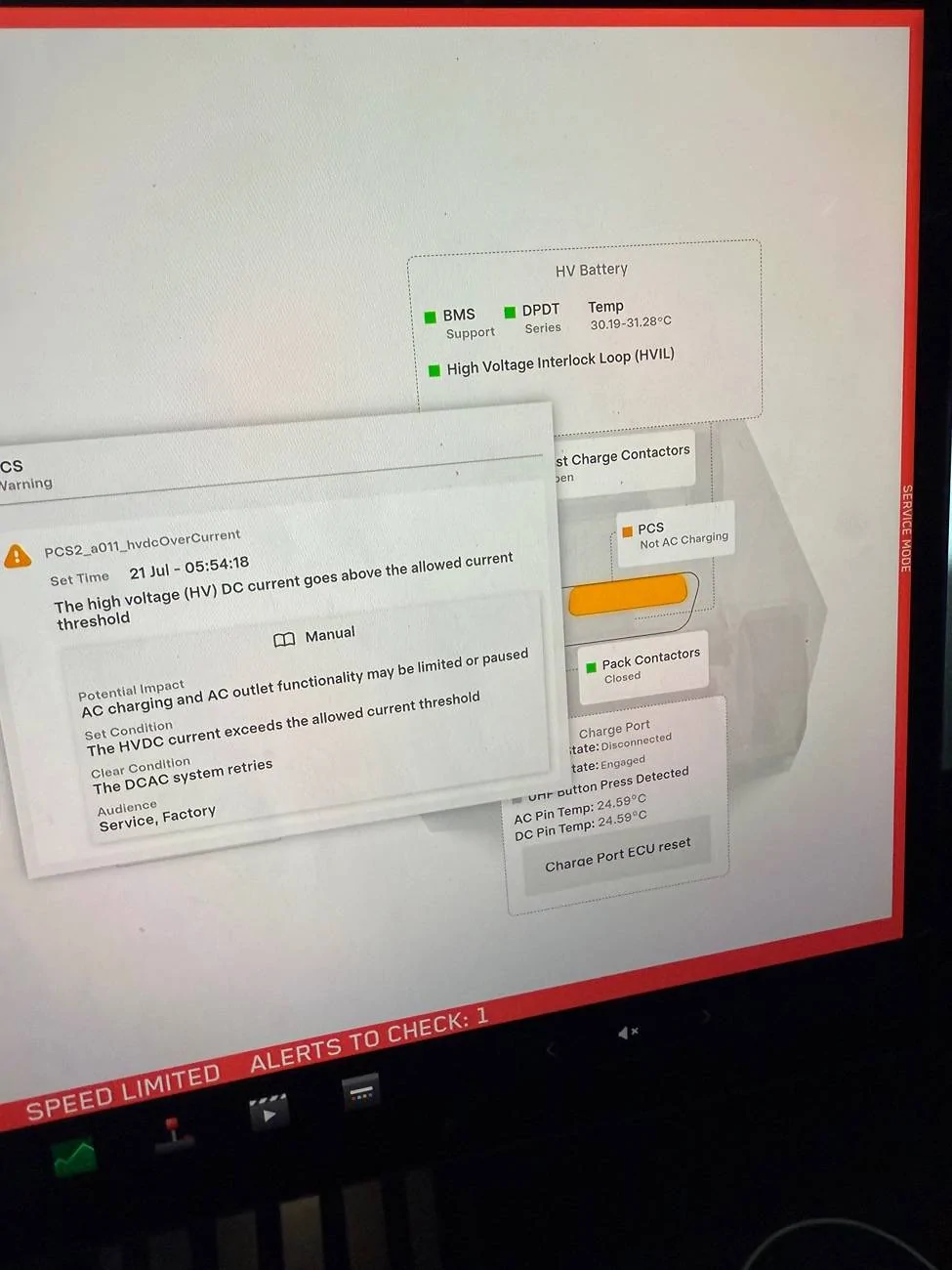
Basically I installed 2025.20.6 Monday afternoon, but didn't need to drive the truck at all so left the truck overnight without looking at it other than to set it to charge to 100% because I had to go on a long trip in the morning. But when I looked in the morning, I noticed that it had stopped in the low 90% range and said that charging had stopped. I had an error message on the touchscreen above the audio/trip/tires card saying that "AC charging and AC Outlet functionality was disabled" and that I should bring it in for service. A look in Service Mode showed three notifications - PCS2_a137, PCS2_a095, and PCS2_a094. I narrowed it down to the PCS module, which had a warning PCS2_a011_hvdcOverCurrent on it, and the self-test for DPDT failed with a raw result of 0x69d even though each individual test passed.
A short time later I went back out to the truck to take more pictures but the error message above the media card was gone. The SC said that if the customer-facing message was gone then it was probably fine even though there was still an active alert (PCS2_a011_hvdcOverCurrent). It drove fine all day, but I noticed when I got it home (with 3% remaining!) that it will now only charge at 24amps. If I hit the "stop charging" button, it shows "this location capable of 48amps" but as soon as I click "start charging" I hear the relay flip and then the "this location capable of" switches down to 24amps.
I wonder if this is that issue with a loose ethernet cable that I read about somewhere... Anyone else experience this and know how to fix it or does it really require a service center visit?
Sponsored

 

mongo

Well-known member
Joined
May 27, 2024
Threads
5
Messages
4,520
Reaction score
5,496
Location
SE Michigan
Vehicles
Cyberbeast
Country flag
Basically I installed 2025.20.6 Monday afternoon, but didn't need to drive the truck at all so left the truck overnight without looking at it other than to set it to charge to 100% because I had to go on a long trip in the morning. But when I looked in the morning, I noticed that it had stopped in the low 90% range and said that charging had stopped. I had an error message on the touchscreen above the audio/trip/tires card saying that "AC charging and AC Outlet functionality was disabled" and that I should bring it in for service. A look in Service Mode showed three notifications - PCS2_a137, PCS2_a095, and PCS2_a094. I narrowed it down to the PCS module, which had a warning PCS2_a011_hvdcOverCurrent on it, and the self-test for DPDT failed with a raw result of 0x69d even though each individual test passed.
A short time later I went back out to the truck to take more pictures but the error message above the media card was gone. The SC said that if the customer-facing message was gone then it was probably fine even though there was still an active alert (PCS2_a011_hvdcOverCurrent). It drove fine all day, but I noticed when I got it home (with 3% remaining!) that it will now only charge at 24amps. If I hit the "stop charging" button, it shows "this location capable of 48amps" but as soon as I click "start charging" I hear the relay flip and then the "this location capable of" switches down to 24amps.
I wonder if this is that issue with a loose ethernet cable that I read about somewhere... Anyone else experience this and know how to fix it or does it really require a service center visit?
By "this location capable of", do you mean the yy in xx/yy on the charge screen? Or is there a message I don't recall?
Only charging at 24A sounds like half of the AC-DC converter has failed.
Could try dual scroll wheel reset and Power Off to see if it's a transient error.
 
  • Like
Reactions: REM

Tletellier

New member
First Name
Tyler
Joined
May 5, 2024
Threads
0
Messages
1
Reaction score
0
Location
Eldorado Hills, CA
Vehicles
Cybertruck, model Y
Country flag
Having the exact same issue. I’ve rebooted (duel scroll) etc. every level 2 charge I have tried including the 2 I have at home that normally charges at 48 amps only allows the truck to charge at 24 amps. I have the same error message when checking the service notes in service mode. Anyone confirm its firmware related?
Tesla Cybertruck AC Charging issues after installing 2025.20.6 IMG_0098
 

DaKodaks

Active member
First Name
George
Joined
May 8, 2024
Threads
1
Messages
32
Reaction score
16
Location
NEW YORK
Vehicles
Model 3, BMW X5, Cybertruck
Country flag
I have the same alert message PCS2_a094 Alert message. Cannot charge. Says schedule service. This happened after the software update
 

jenkins007

Active member
First Name
Matthew
Joined
Jul 16, 2024
Threads
2
Messages
35
Reaction score
25
Location
San Sntonio
Vehicles
Cybertruck Beast
Occupation
Fun
Country flag
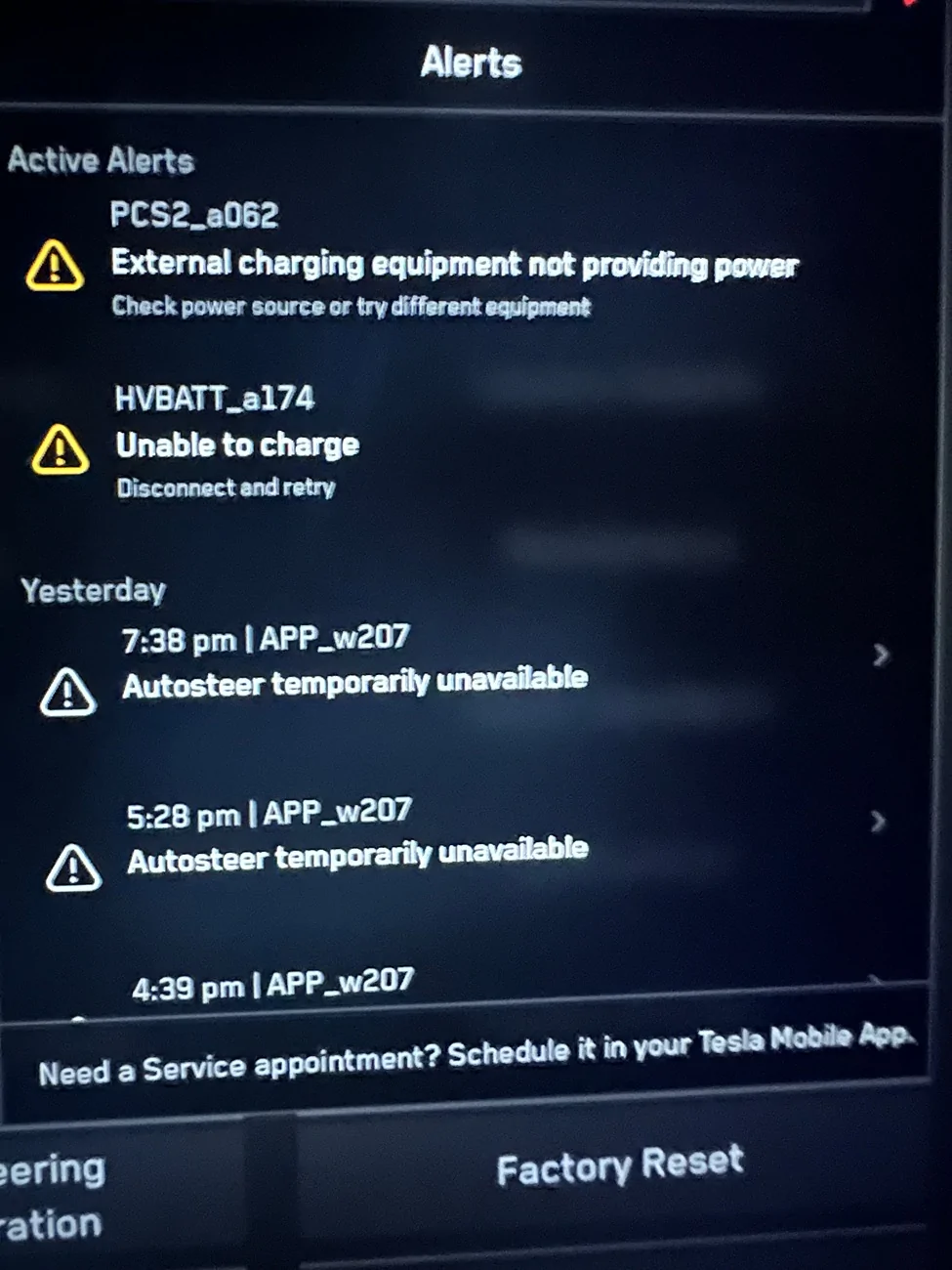
Interesting. My CT had an error message charging after this update too. But it is more serious.
“External charging equipment not providing power
Check power source or try a different equipment”
Their error message shows whether I use the wall charger or direct connect to the house outlet. (I have a 50 amp 220 V outlet. I used to use before I get received the wall charger.)
I’m taking it in to SC on Tuesday. The good news is the cost estimate is $0.
The bad news is, I can’t charge it at all so I’m limited in my driving the next two days.


mongo

Well-known member
Joined
May 27, 2024
Threads
5
Messages
4,520
Reaction score
5,496
Location
SE Michigan
Vehicles
Cyberbeast
Country flag
Interesting. My CT had an error message charging after this update too. But it is more serious.
“External charging equipment not providing power
Check power source or try a different equipment”
Their error message shows whether I use the wall charger or direct connect to the house outlet. (I have a 50 amp 220 V outlet. I used to use before I get received the wall charger.)
I’m taking it in to SC on Tuesday. The good news is the cost estimate is $0.
The bad news is, I can’t charge it at all so I’m limited in my driving the next two days.
It there a Supercharger nearby to try?
 

REM

Well-known member
Joined
Dec 9, 2023
Threads
14
Messages
3,573
Reaction score
6,637
Location
NC
Vehicles
2020 Model 3 Standard Range++ & Diet Cybertruck, Dual Motor
Occupation
Professional Retard
Country flag
This is probably a module firmware stuck after the update, so a MCU reboot probably won't do anything.

Check the service menu for more details to see if anything is out of spec.
 

Charmed

Member
First Name
Michael
Joined
Apr 18, 2024
Threads
1
Messages
9
Reaction score
6
Location
Florida
Vehicles
Cybertruck
Country flag
I upgraded to 2025.26.8 last night. Woke up to PCS2_a094 and a few related ones. Home charger, mobile charger and Supercharger do not charge the truck. First available appointment Sept 24 and that is 23 days away. :D. I guess a tow will be in my future since I have a 45% charge. I will call Telsa support tomorrow. I will post my resolution unless someone beats me to it.
 

DaKodaks

Active member
First Name
George
Joined
May 8, 2024
Threads
1
Messages
32
Reaction score
16
Location
NEW YORK
Vehicles
Model 3, BMW X5, Cybertruck
Country flag
I have the same alert message PCS2_a094 Alert message. Cannot charge. Says schedule service. This happened after the software update
Update:
Scheduled service. Service is available only on the 8th. I have only 47% charge. Sent a message to service if I can get a n early appointment. Keeping my fingers crossed.


Charmed

Member
First Name
Michael
Joined
Apr 18, 2024
Threads
1
Messages
9
Reaction score
6
Location
Florida
Vehicles
Cybertruck
Country flag
I upgraded to 2025.26.8 last night. Woke up to PCS2_a094 and a few related ones. Home charger, mobile charger and Supercharger do not charge the truck. First available appointment Sept 24 and that is 23 days away. :D. I guess a tow will be in my future since I have a 45% charge. I will call Telsa support tomorrow. I will post my resolution unless someone beats me to it.
 

Charmed

Member
First Name
Michael
Joined
Apr 18, 2024
Threads
1
Messages
9
Reaction score
6
Location
Florida
Vehicles
Cybertruck
Country flag
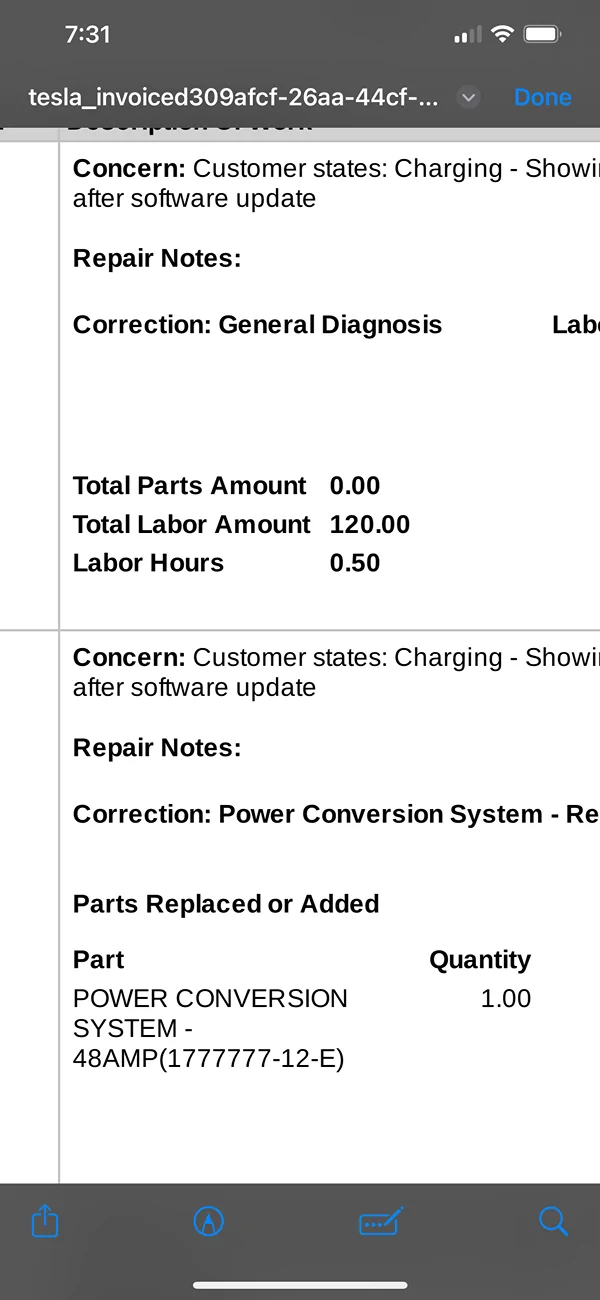
The Tesla service center was kind enough to trigger a redownload of the most current software just in case. It didn't fix the charging issue. They gave me a loaner and are replacing part (s) related to the Power Conversion System i.e. PCS2. I knew my cybertruck was not charging at 48 amps but 24 amps for the @ last month. I assumed incorrectly that was normal.
 

mahdir35

Well-known member
First Name
RaĂşl
Joined
May 10, 2024
Threads
1
Messages
245
Reaction score
350
Location
San Diego
Vehicles
Foundation Series AWD
Occupation
Project Manager
Country flag
Update:
Scheduled service. Service is available only on the 8th. I have only 47% charge. Sent a message to service if I can get a n early appointment. Keeping my fingers crossed.
Go up to the service center “in person” and explain the urgency. They will have to help you immediately
 

DaKodaks

Active member
First Name
George
Joined
May 8, 2024
Threads
1
Messages
32
Reaction score
16
Location
NEW YORK
Vehicles
Model 3, BMW X5, Cybertruck
Country flag
Update:
Scheduled service. Service is available only on the 8th. I have only 47% charge. Sent a message to service if I can get a n early appointment. Keeping my fingers crossed.
Sent message to service, they said to come to the service at the earliest.
 

DaKodaks

Active member
First Name
George
Joined
May 8, 2024
Threads
1
Messages
32
Reaction score
16
Location
NEW YORK
Vehicles
Model 3, BMW X5, Cybertruck
Country flag
Received cost update from service $120.
Tesla Cybertruck AC Charging issues after installing 2025.20.6 IMG_3510
Sponsored


Top