Sponsored

changing the view on the big screen

sefar

Well-known member
First Name
se
Joined
Jun 17, 2021
Threads
29
Messages
341
Reaction score
481
Location
Missouri
Vehicles
Model S 100d, Cyberbeast FS
Country flag
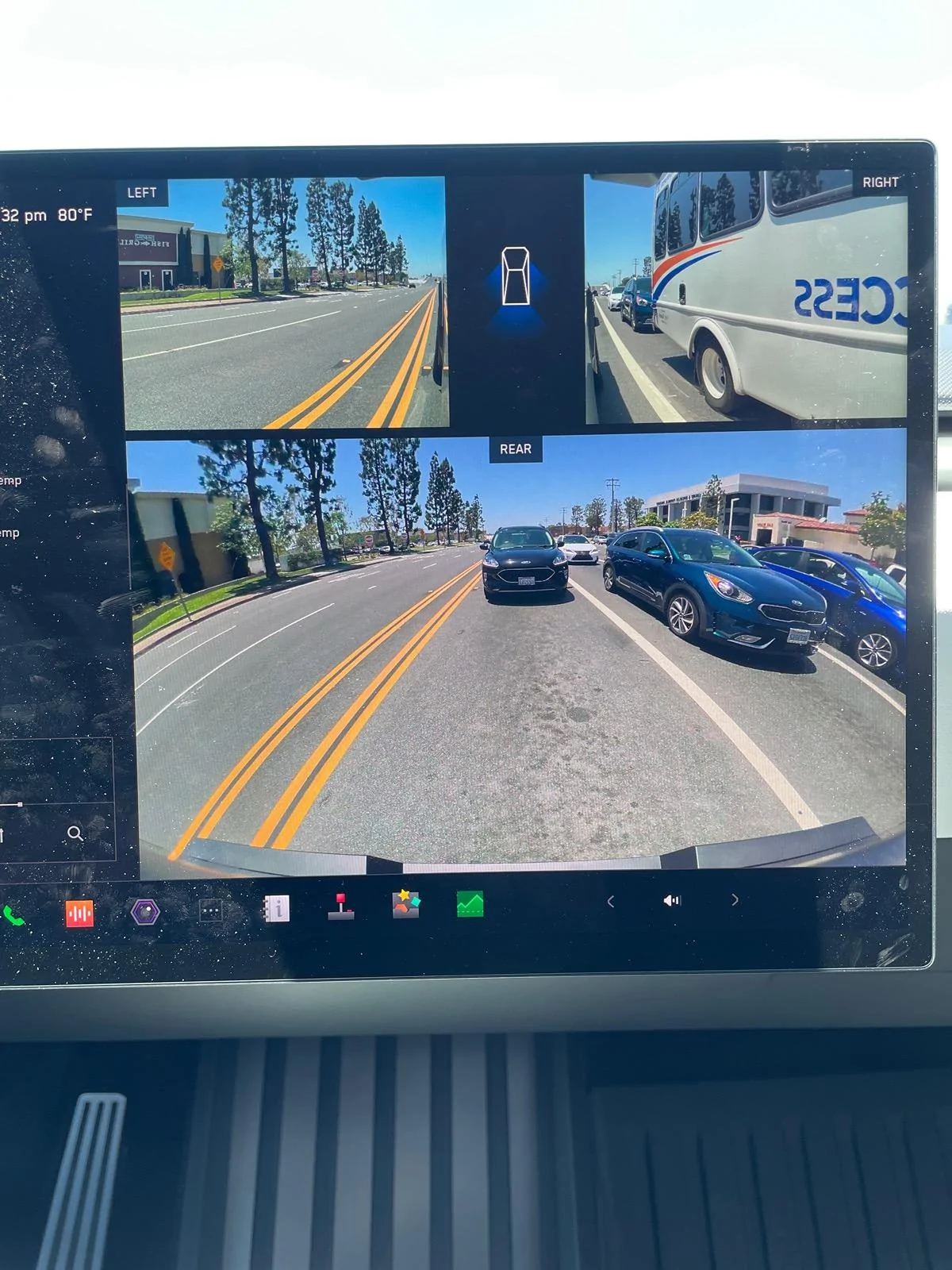
I can't find this in the manual, so I hope the hivemind can help. Is there a setting to get rid of the view of the truck and other lanes on the left side of the screen? I would prefer to have the nav and mirrors on the display- that view of what traffic looks like is not helpful to me. Plus I prefer the big picture of the rear view with the sides as well.

thanks.
Sponsored


JayWebbMD

Well-known member
First Name
Jay
Joined
May 1, 2024
Threads
5
Messages
46
Reaction score
92
Location
Pensacola, FL
Vehicles
2011 Audi TTS, 2023 Genesis GV70, awaiting Beast
Country flag
Agree with the sentiment. Lots of high value screen real estate dedicated to a minimally helpful animation. The animation would be helpful if the vehicles in my blind spot weren’t covered by the Apple Music display, but currently it’s a total waste. Interesting that you can slide the rear view camera display to the right side of the display, but you can’t enlarge it and you can’t move the music display. Seems like it would be a trivial thing for Tesla to implement, but I guess we just have to wait and hope.
 

HaulingAss

Well-known member
Joined
Oct 3, 2020
Threads
28
Messages
10,305
Reaction score
20,716
Location
Western Washington, USA
Vehicles
Cybertruck DM, 2010 F-150, 2018 Performance Model 3, 2024 Performance Model 3
Country flag
I like it. The left side of the display includes your speedometer. I'm so glad I don't have to adjust the height of my steering wheel so I can peer through the steering wheel and see my speed. Federal law mandates all cars have a speedometer so you cannot reconfigure the left side of the screen out of the picture, it's the equivalent of the instrument cluster in a traditional ICE car.
 

Woodrick

Well-known member
First Name
Ed
Joined
Dec 30, 2023
Threads
6
Messages
4,786
Reaction score
4,762
Location
Gainesville Ga
Vehicles
Model 3, Model Y, Cybertruck AWD
Occupation
Consultant
Country flag
I can't find this in the manual, so I hope the hivemind can help. Is there a setting to get rid of the view of the truck and other lanes on the left side of the screen? I would prefer to have the nav and mirrors on the display- that view of what traffic looks like is not helpful to me. Plus I prefer the big picture of the rear view with the sides as well.

thanks.
You do have an option. Visualizations, Speed, Audio and a few other settings on a half screen or full screen.
In full screen, Nave become a small shadow like thing in the upper right. Grab the center grab handle and pull right to get there.

The rear-view camera can be pinned on and moved as desired.


Woodrick

Well-known member
First Name
Ed
Joined
Dec 30, 2023
Threads
6
Messages
4,786
Reaction score
4,762
Location
Gainesville Ga
Vehicles
Model 3, Model Y, Cybertruck AWD
Occupation
Consultant
Country flag
I like it. The left side of the display includes your speedometer. I'm so glad I don't have to adjust the height of my steering wheel so I can peer through the steering wheel and see my speed. Federal law mandates all cars have a speedometer so you cannot reconfigure the left side of the screen out of the picture, it's the equivalent of the instrument cluster in a traditional ICE car.
I've travelled a LOT over the last 25 years and I carried a Garmin GPS and stuck it in the center, mainly so that I could see the speed. Having a good nav solution when most cars are terrible didn't hurt either.

Whoever put the instrument gauge behind a steering wheel .... Don't get me started!
 
OP
OP

sefar

Well-known member
First Name
se
Joined
Jun 17, 2021
Threads
29
Messages
341
Reaction score
481
Location
Missouri
Vehicles
Model S 100d, Cyberbeast FS
Country flag
You do have an option. Visualizations, Speed, Audio and a few other settings on a half screen or full screen.
In full screen, Nave become a small shadow like thing in the upper right. Grab the center grab handle and pull right to get there.

The rear-view camera can be pinned on and moved as desired.
Where the heck is that? I don't find it in the manual or settings. I am pushing every button.
 

SCTesla

Well-known member
Joined
Jun 11, 2024
Threads
6
Messages
2,470
Reaction score
3,685
Location
USA
Vehicles
22 Model S, 24 CT
Country flag
Where the heck is that? I don't find it in the manual or settings. I am pushing every button.
You drag the right most portion of the visualization and it goes full screen, but that's the opposite of what you are looking for.

It's what I use on my cars with FSD.


Lasttoy

Well-known member
First Name
Paul
Joined
Apr 26, 2021
Threads
10
Messages
699
Reaction score
389
Location
St Augustine, FL
Vehicles
2013 & 2017 S. CT ordered 30 may
Occupation
Retired
Country flag
I want map on entire screen when normal driving.
I remember 6 years ago my screen was at 2000 feet. Now it's 10000. Worthless. If I expand it. Last a few seconds.
Oh well
 

Woodrick

Well-known member
First Name
Ed
Joined
Dec 30, 2023
Threads
6
Messages
4,786
Reaction score
4,762
Location
Gainesville Ga
Vehicles
Model 3, Model Y, Cybertruck AWD
Occupation
Consultant
Country flag
I want map on entire screen when normal driving.
I remember 6 years ago my screen was at 2000 feet. Now it's 10000. Worthless. If I expand it. Last a few seconds.
Oh well
Full map doesn't provide the space for driving specific controls.

As to the map zoom, have you changed the map display options? North Up, Heading Up, Route up?
 

Woodrick

Well-known member
First Name
Ed
Joined
Dec 30, 2023
Threads
6
Messages
4,786
Reaction score
4,762
Location
Gainesville Ga
Vehicles
Model 3, Model Y, Cybertruck AWD
Occupation
Consultant
Country flag
Mines a S. 2017
Sorry, missed that.

But the Cybertruck that you have on order isn't a Model S and has a relatively different UI. No dashboard display, so the center display has to take two functions.
Sponsored


Top