Sponsored

Dangerous UI bug found

cybergriz

Well-known member
First Name
Karl
Joined
Apr 20, 2024
Threads
19
Messages
187
Reaction score
346
Location
Lancaster PA
Vehicles
Cybertruck
Occupation
Self employed
Country flag
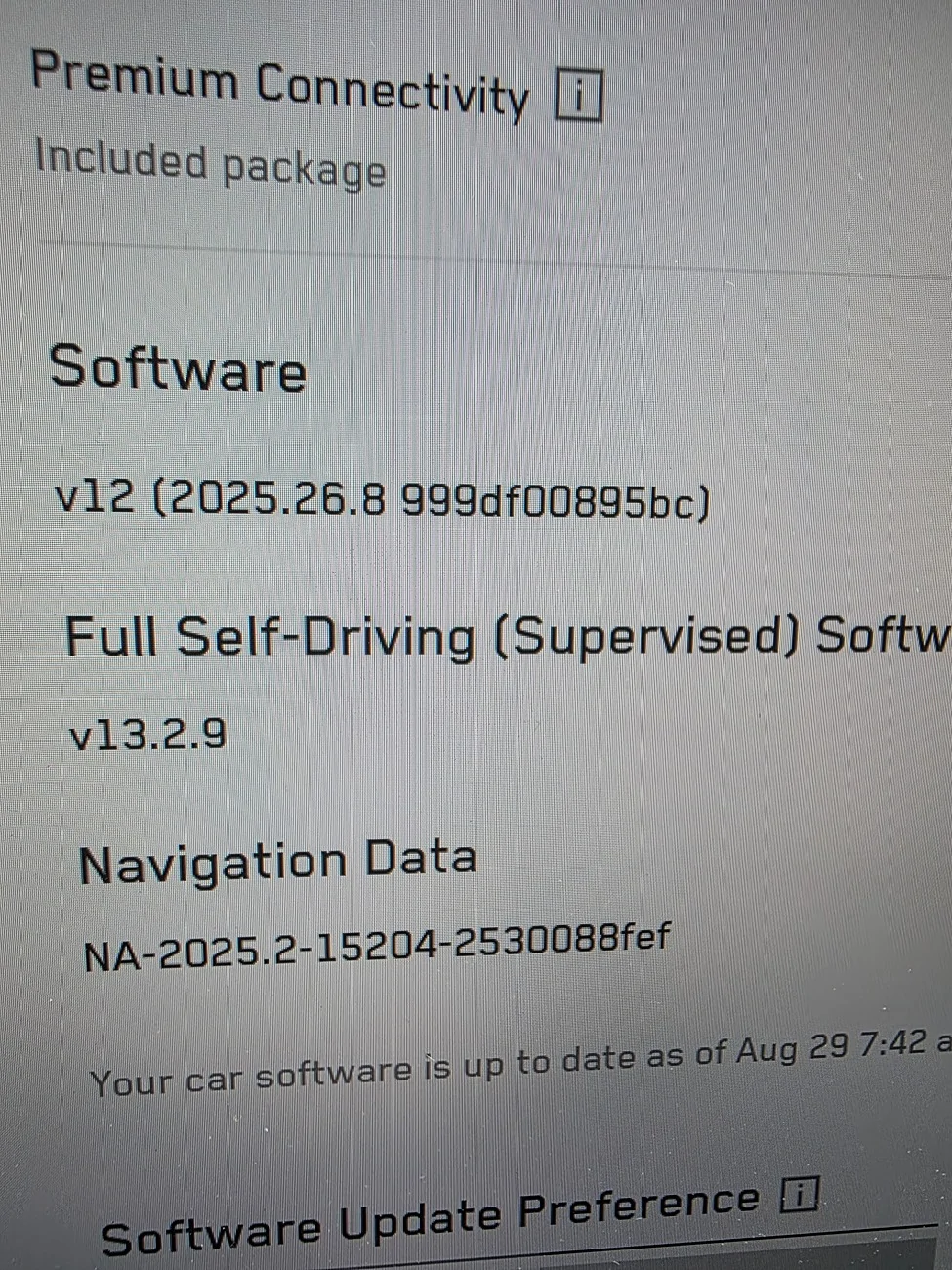
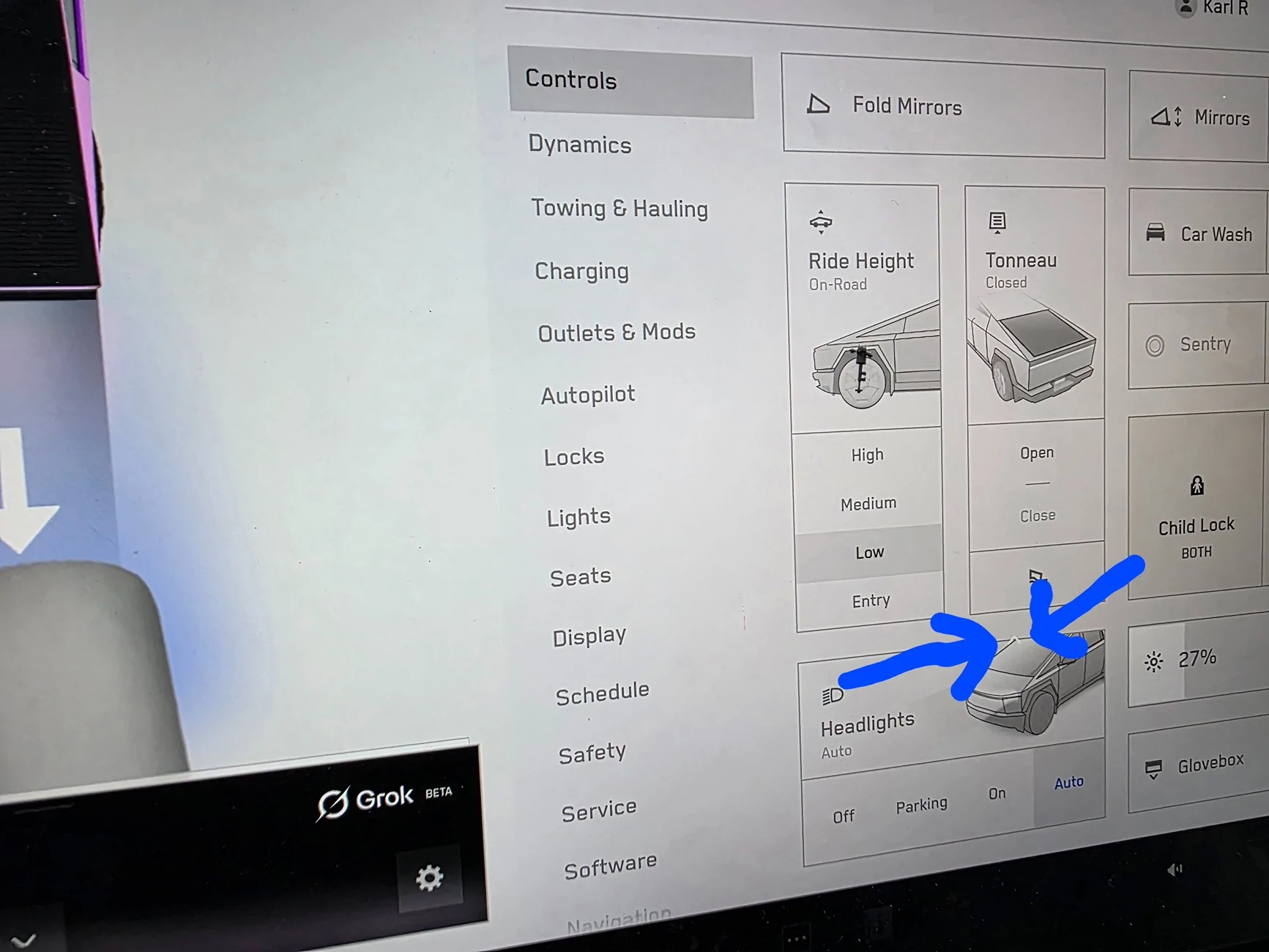
Hi yall, idk if it's always been this way, but I found a dangerous bug in the UI. When you are viewing the Controls Menu, then press the Camera button on the steering wheel, the camera does not appear, only the little white arrows that indicate the forward/reverse view appears, over top of the Controls Menu. THIS ONLY happens when you are in reverse. When. You are in park or drive, no bug. Anyone else seeing this? I reversed and unfolded my mirrors this morning, went for the camera button and got this.

Tesla Cybertruck Dangerous UI bug found 20250829_074841


Tesla Cybertruck Dangerous UI bug found 20250829_074311
Sponsored


mongo

Well-known member
Joined
May 27, 2024
Threads
5
Messages
4,521
Reaction score
5,499
Location
SE Michigan
Vehicles
Cyberbeast
Country flag
Hi yall, idk if it's always been this way, but I found a dangerous bug in the UI. When you are viewing the Controls Menu, then press the Camera button on the steering wheel, the camera does not appear, only the little white arrows that indicate the forward/reverse view appears, over top of the Controls Menu. THIS ONLY happens when you are in reverse. When. You are in park or drive, no bug. Anyone else seeing this? I reversed and unfolded my mirrors this morning, went for the camera button and got this.
20250829_074841.jpg


20250829_074311.jpg
If you are in reverse (cameras are up)
And bring up the controls screen (cameras are hidden)
Then press the camera button, it draws the arrows but doesn't dismiss the controls screen.
Seems the bug is either drawing the arrows or not dismissing the controls panel.

Either way, it doesn't seem dangerous since it's obvious the cameras aren't there (versys frozen image). All one needs to do is dismiss the controls screen.

You can use voice command "unfold mirrors" to avoid the controls blocking the camera view.
 
OP
OP
cybergriz

cybergriz

Well-known member
First Name
Karl
Joined
Apr 20, 2024
Threads
19
Messages
187
Reaction score
346
Location
Lancaster PA
Vehicles
Cybertruck
Occupation
Self employed
Country flag
The buttons on the steering wheel are obviously considered critical, and for safety. The behavior of these critical buttons should always be consistent. What is the point in defending a bug? Some people just make me shake my head.
 

Gaximus

Well-known member
Joined
Jun 22, 2024
Threads
23
Messages
1,461
Reaction score
2,286
Location
Mead, CO
Vehicles
CyberBeast, Model 3, Jeep Wrangler, Yamaha R6
Occupation
Software Developer
Country flag
This is not a dangerous bug. If you moving in reverse and pull up a screen that covers the cameras, then you’re telling the system you don’t NEED these to reverse. If you need the cameras in a hurry, stop reversing. Your responsibility to reverse safely even with no reverse camera. Bug yes, dangerous no
 

no%X#XMVk65v#cq

Well-known member
First Name
J
Joined
Sep 11, 2024
Threads
8
Messages
273
Reaction score
628
Location
USA
Vehicles
CT FS AWD
I just tried it. When in reverse the camera app is always open (I believe this is federal mandate).The button on the steering wheel no longer launches the app (since it's already opened), it now toggles back and forth between reverse/forward view. So your button is still performing the exact same function, it's just that you've opened a menu on top of it. The solution would be locking out opening menus while in reverse. Since opening menus in reverse is something you're into, I'm guessing you don't want that. Just swipe down on your menu when you're done, and voila, camera's back!


OP
OP
cybergriz

cybergriz

Well-known member
First Name
Karl
Joined
Apr 20, 2024
Threads
19
Messages
187
Reaction score
346
Location
Lancaster PA
Vehicles
Cybertruck
Occupation
Self employed
Country flag
The camera button should work the same in every context. I don't understand the defenders of this bug. Why is it okay with you that the camera button brings up the cameras in every other situation except when the vehicle is in reverse
 
OP
OP
cybergriz

cybergriz

Well-known member
First Name
Karl
Joined
Apr 20, 2024
Threads
19
Messages
187
Reaction score
346
Location
Lancaster PA
Vehicles
Cybertruck
Occupation
Self employed
Country flag
The camera button should work the same in every context. I don't understand the defenders of this bug. Why is it okay with you that the camera button brings up the cameras in every other situation except when the vehicle is in reverse
You guys also are missing the obvious, the white arrows that indicate the camera should be visible or on the screen but the camera is not. It's a UI bug, I'm just trying to report it for everyone's safety. It goes without saying that there are tons of ways to get around bugs that doesn't mean they shouldn't be reported. You guys seriously have your heads up your you know what
 
OP
OP
cybergriz

cybergriz

Well-known member
First Name
Karl
Joined
Apr 20, 2024
Threads
19
Messages
187
Reaction score
346
Location
Lancaster PA
Vehicles
Cybertruck
Occupation
Self employed
Country flag
Oh okay I get it it's the word dangerous, I see, sorry I forgot to mention that I was a huge fan of the product. It's a bug.
 
OP
OP
cybergriz

cybergriz

Well-known member
First Name
Karl
Joined
Apr 20, 2024
Threads
19
Messages
187
Reaction score
346
Location
Lancaster PA
Vehicles
Cybertruck
Occupation
Self employed
Country flag
Yeah, literally no matter what you are doing in your cyber truck the camera button always brings up the camera. In every single instance. Except, for when you are in reverse and on the control screen. Anyone defending this bug, You guys are idiots. Sorry deal with it
 

no%X#XMVk65v#cq

Well-known member
First Name
J
Joined
Sep 11, 2024
Threads
8
Messages
273
Reaction score
628
Location
USA
Vehicles
CT FS AWD
The camera button should work the same in every context.
Ok, but it doesn't. At highway speed it toggles the rear view camera on/off. At low speed it launches the camera app. In reverse (or i think anytime the camera app is open) it toggles the view forward/back. It's not a bug, or dangerous. It's just how it's programmed. The little arrows show up because the menu is on top of the camera as there's no way to close it completely when reversing.


Ruffles

Well-known member
First Name
Steve
Joined
Jun 21, 2024
Threads
15
Messages
213
Reaction score
369
Location
WA
Vehicles
Cyberbeast
Country flag
In the software world, this would be a Sev3 type of bug. Not a Sev1 or Sev2. Annoying yes, but its a corner case and has a simple work around. While it could be safety related, its not the default behavior because after you shifted to reverse and had the cameras up, you selected this screen. You could have unfolded your mirrors first or used the side cameras to see instead of unfolding your mirrors.
 

TyPope

Well-known member
First Name
Ty
Joined
Mar 31, 2020
Threads
33
Messages
3,212
Reaction score
4,928
Location
Chesapeake Beach, MD
Vehicles
'23 MYLR, FS Cyberbeast 280xx
Occupation
Current Operations for... an organization
Country flag
I thought the mirrors always unfolded as you opened the driver's door. I didn't realize there was a way to make them NOT unfold (or a reason). I suppose if you were too close to a wall or something. Huh... learning occurring.
 

no%X#XMVk65v#cq

Well-known member
First Name
J
Joined
Sep 11, 2024
Threads
8
Messages
273
Reaction score
628
Location
USA
Vehicles
CT FS AWD
Yeah, literally no matter what you are doing in your cyber truck the camera button always brings up the camera. In every single instance. Except, for when you are in reverse and on the control screen. Anyone defending this bug, You guys are idiots. Sorry deal with it
I've been kind and politely explained why you're experiencing this. Meanwhile you're name calling and having a meltdown. Time to bid you adieu friend.
 

mongo

Well-known member
Joined
May 27, 2024
Threads
5
Messages
4,521
Reaction score
5,499
Location
SE Michigan
Vehicles
Cyberbeast
Country flag
I thought the mirrors always unfolded as you opened the driver's door. I didn't realize there was a way to make them NOT unfold (or a reason). I suppose if you were too close to a wall or something. Huh... learning occurring.
Garage clearance
 

misterk9

Active member
Joined
Mar 12, 2024
Threads
0
Messages
30
Reaction score
57
Location
Florida
Vehicles
26CB 26Y (16X 17X 183 20Y 24CT)
Occupation
Retired
Country flag
Yeah, literally no matter what you are doing in your cyber truck the camera button always brings up the camera. In every single instance. Except, for when you are in reverse and on the control screen. Anyone defending this bug, You guys are idiots. Sorry deal with it
Contact Sean Duffy at the DOT for such life threatening situations. Problem is, his head is stuck you know where, but he will get around to it.
U.S. Department of Transportation
1200 New Jersey Ave, SE
Washington, DC 20590
Sponsored


Top