Sponsored

Disable wireless charging pad?

Status
Not open for further replies.

tmeyer3

Well-known member
First Name
Trevor
Joined
Jun 27, 2021
Threads
31
Messages
2,036
Reaction score
3,614
Location
CA
Website
www.meyerwine.com
Vehicles
Model 3, '73 GMC truck, Wrangler, Tractors
Occupation
Computer Scientist, Vintner
Country flag
Yes, you can disable it by unplugging it. Remove the center console front trim fascia by carefully pulling the sides away, toward the driver/passenger doors. Once removed, the wire harness is shared with the floor light, but you can unplug the chargers separately to keep the floor light operational
Edit: sorry this was already covered very well.
Sponsored

 

HaulingAss

Well-known member
Joined
Oct 3, 2020
Threads
28
Messages
10,305
Reaction score
20,715
Location
Western Washington, USA
Vehicles
Cybertruck DM, 2010 F-150, 2018 Performance Model 3, 2024 Performance Model 3
Country flag
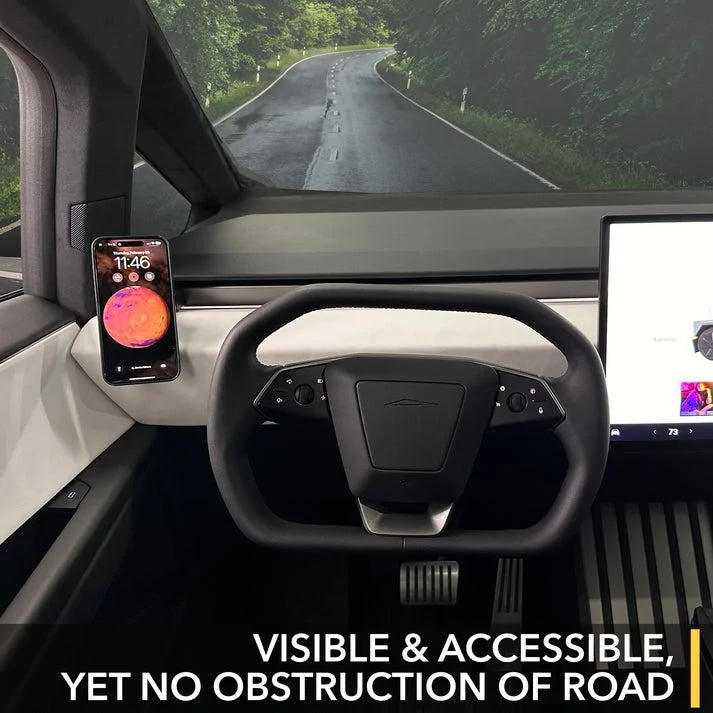
I have this phone holder from Twraps. Do people not like these?
3_04e70f61-5b01-4cee-9a8b-183ce240755a.jpg
No, I don't like that.

In fact, my phone stays in my pocket most of the time I'm driving so I don't forget it and leave it in the car. But when I put my phone on the designated spot, it charges quickly and never gets overly warm. It's a Samsung S8+. I think some phones, escpecially the smaller ones, are very sensitive to their exact position on the wireless charging pad.

If I had a phone that tended to overheat when charging, I would experiment with different positions by shimming the phone higher or left or right. When I found the spot that didn't cause it to overheat, I would put more permanent shims in the spot, so the phone could only be placed in that one position. The wireless charging coil is installed in different locations in different phones and it's important that it's centered on the wireless charging spot to avoid overheating.
 

Woodrick

Well-known member
First Name
Ed
Joined
Dec 30, 2023
Threads
6
Messages
4,786
Reaction score
4,762
Location
Gainesville Ga
Vehicles
Model 3, Model Y, Cybertruck AWD
Occupation
Consultant
Country flag
Every In-Car Wireless Phone Charger Sucks

You are right, but his main point is Tesla could address this with proper ventilation at the charging point. Or allow the charger to be disabled via software. Or put USB ports outside the center console. There are cars that do this on the market. If there is a known issue, manufactures should include a known solution.

EDIT: Funny side note. I know cars with ventilated wireless chargers exist, I have seen the videos. But every search I do only shows chargers that attach to the AC vents.
Have you tried running a cable out of the center console to charge a phone?

It's not problem at all. The tray in the console even has a gap for the wires to come up. The cover has no problems closing with a cable out.

I have a semi-permanent cable run for the few times I need to fast charge, but more for other devices that I have with me.

Of course, Apple could have not broken their standards as well.
If Tesla were to have made is a MagSafe connector, that would have excluded many phones. (and made Tesla pay Apple royalties!!!)
 

Woodrick

Well-known member
First Name
Ed
Joined
Dec 30, 2023
Threads
6
Messages
4,786
Reaction score
4,762
Location
Gainesville Ga
Vehicles
Model 3, Model Y, Cybertruck AWD
Occupation
Consultant
Country flag
Yes, you can disable it by unplugging it. Remove the center console front trim fascia by carefully pulling the sides away, toward the driver/passenger doors. Once removed, the wire harness is shared with the floor light, but you can unplug the chargers separately to keep the floor light operational
Edit: sorry this was already covered very well.
And it disables the card reader?


tmeyer3

Well-known member
First Name
Trevor
Joined
Jun 27, 2021
Threads
31
Messages
2,036
Reaction score
3,614
Location
CA
Website
www.meyerwine.com
Vehicles
Model 3, '73 GMC truck, Wrangler, Tractors
Occupation
Computer Scientist, Vintner
Country flag
And it disables the card reader?
Yes, it would. I don't know this as I haven't tried or looked into it, but if the reader is on a different circuit than the charger, you might be able to insert a disconnect/interrupt on the charger loop only.
 

wtibbit

Well-known member
First Name
Wayne
Joined
Aug 27, 2020
Threads
12
Messages
819
Reaction score
1,617
Location
DFW
Vehicles
Cybertruck AWD FS, Mercedes sedan, Corvette coupe, 1968 Cougar XR-7
Occupation
Retired Engineering Program Director
Country flag
That is right, you can see in the error codes that NFC is no longer working.

As a side note, I was hoping to do a MOD and put USB ports on the front of the center console, but as you can see in the pictures, the USB outlet is not very accessible and the wiring harness is way more complicated. There are about 50 wires going in for 1 USB-C port and an ambient light.

Even the orange cable going to the 12v outlet has 5 wires... why would you need 5 wires for DC? Maybe its wired in parallel with a 5th wire for a switch? Its actually the 120v outlet.
It’s interesting that you experimented with this approach, Pops. Let me suggest a hack that is much more simple, easy and cheap, doesn’t affect any other functions of the pads and is guaranteed to keep your phone from charging or overheating.

Cut a piece of medium density 3/16” or ¼” foam to fit the pads. Put the foam on the pad and lay the phone on the foam. The foam holds the phone far enough away from the pad to prevent any significant engery transfer to the phone. No attempted charging and no heat. If you need to use your card key move the foam or slip the card under the foam.

If you need to charge your phone use a cable to the USB-C port in the console storage; it passes though a gap at the front of the armrest/lid.

It’s easy and it works.
 
Last edited:

Jacob

Well-known member
First Name
Jacob
Joined
Jan 11, 2020
Threads
19
Messages
265
Reaction score
456
Location
Michigan
Vehicles
69 BB Vette, 83 Cutlass
Country flag
OK. I'm going to say it as it is (at least from my perspective). I have a Galaxy S10 that I've been wirelessly charging for years on little, QI pads with no problem. All different brands. My phone gets unacceptably hot on the Cybertruck's wireless chargers (by a VERY large margin). There is SOMETHING NOT RIGHT with the Cybertruck's wireless chargers. Period.
 

TyPope

Well-known member
First Name
Ty
Joined
Mar 31, 2020
Threads
33
Messages
3,212
Reaction score
4,926
Location
Chesapeake Beach, MD
Vehicles
'23 MYLR, FS Cyberbeast 280xx
Occupation
Current Operations for... an organization
Country flag
Yes, the phone gets too hot, and the charging speed is low. Now I only use USB-C to charge my phone, it's fast.
First person to figure out how to unplug the wireless charger and repurpose that power feed to two usb-c chargers wins.


jf64k

Well-known member
Joined
Dec 12, 2023
Threads
34
Messages
1,227
Reaction score
1,989
Location
Los Angeles
Vehicles
2020 MYLR (Lola), 2024 FS AWD (Deckard 263-54)
Country flag
I flip the phone around, so it's face down on the charger.

iPhone 15 Pro Max and mine got really hot on the CT charger.

It charged fine in the 2022 MY loaner I had while they replaced the wiper motor and sail appliques.

Weird that they can't get that right in the CT.
 

SCTesla

Well-known member
Joined
Jun 11, 2024
Threads
6
Messages
2,468
Reaction score
3,683
Location
USA
Vehicles
22 Model S, 24 CT
Country flag
I flip the phone around, so it's face down on the charger.

iPhone 15 Pro Max and mine got really hot on the CT charger.

It charged fine in the 2022 MY loaner I had while they replaced the wiper motor and sail appliques.

Weird that they can't get that right in the CT.
It's not just Apple phones. Occurs with Samsung and Google phones as well. Some people don't experience it, so it could be install related or just low end product, but it's not near the level of the MS or even the M3/Y, which is worse than my MS chargers.
 

kewellxi

Well-known member
First Name
Xi
Joined
Feb 1, 2024
Threads
1
Messages
49
Reaction score
31
Location
CA
Vehicles
Cybertruck
Country flag
First person to figure out how to unplug the wireless charger and repurpose that power feed to two usb-c chargers wins.
I don't know how to do that, I use the USB-C charge port in the middle box.
 

Cyber Satoshi

Well-known member
Joined
Jun 5, 2024
Threads
25
Messages
206
Reaction score
188
Location
Florida
Vehicles
Cybertruck
Country flag
I have an iPhone 14 Pro and it's crazy hot while charging in the CT... makes this feature unusable, IMO... I knew this was a issue before taking deliver and it's not a deal breaker, but It's very disappointing. Would be awesome to have a wireless charger there...

Would be cool if you could turn down the power on the wireless charger so as to reduce heat but still lightly / slowly charge the phone.
 

scottysize

Well-known member
First Name
Scott
Joined
Dec 4, 2019
Threads
3
Messages
128
Reaction score
181
Location
Sanger, TX
Vehicles
Model 3
Occupation
DBA
Country flag
I put my phone in face down. Serves as a safety device, since I cannot see notifications that pop up while driving. I'm sure if you turn it in to Tesla, they'll tell you the phone heater is working as described.
Sponsored

 
Status
Not open for further replies.


Top