Sponsored

FSD 13 vs 14.1 vs 14.2 - my experience and thoughts

tbuck

Well-known member
Joined
Nov 28, 2023
Threads
8
Messages
217
Reaction score
453
Location
Irving, TX
Vehicles
Cyberbeast
Country flag
Today, I had my first trip of any distance with FSD 14.2 (about 80 miles round trip). Over the previous weekend, I had a 300 mile round trip on 14.1. A few weeks prior to that, I had a 500 mile round trip on 13. These are my experiences, comparisons, and thoughts moving from one to the next over the past few weeks.

Short version - generally, improvements over time. I truly appreciate FSD and will continue to use it - supervised! However, there are some big issues with 14 that do need to be addressed, and it relates to data and some of the decisions being made by the vehicle. The biggest issue (for me) is the underlying speed limit data and how the vehicle does (or actually appears to not) read speed limit signs. If we cannot rely on the vehicles data and decision making to follow the speed limits (or at least, recognize them), we cannot trust the vehicle in situations in which lives are on the line.

I am going to run through some specific scenarios I encounter on a regular basis on any trip using recent examples and compare my experience on the last version of FSD 13 the truck received (I keep the software up-to-date), FSD 14.1, and FSD 14.2. I know there are a lot of different opinions on what is "safe" and what is not - these are my opinions and thoughts after over 1 million miles of driving in over a dozen countries with few incidents (there actually were two speeding tickets - one in 1991 in Germany and another in 2005-ish in Plano, Texas).

Speed limit changes - Always been an issue and it still is. Sometimes the truck sees a change in the speed limit - sometimes it does not for a while - while other times it just plain ignores them.

- When speed limits step down. In Texas, we have a number of highways that pass through small towns (if you ever drive from Dallas/Fort Worth to Amarillo, you know what I mean), so the speed limit will drop from 70/75 down to 45/55 and sometimes down to 30/35 before stepping back up when leaving town.
  1. 13 - Usually saw the changes and abruptly slowed down (almost was rear-ended twice because of this). When speed limits stepped back up, it took forever to get back to the posted speed limit (regardless of the speed profile used). I ended up using the right scroll wheel to step things down more smoothly - pre-empting the slow down, and had to hit the accelerator pedal to get things back to speed.
  2. 14.1 - Saw the speed steps and slowed more realistically! Sped up in a more timely manner
  3. 14.2 - Just went three miles past six 35 mph speed limit signs (one with radar) and just kept thinking it was 45 mph - even kept going 45 mph when turning onto a 30 mph residential street. 13 and 14.1 on the same road sometimes missed the first one, but not all of them. Unfortunately, without the ability to override what the truck thought was the speed limit, I had no choice but to disengage after it passed the 30 mph sign.
- Speed limits - regardless of where you live and what you think - a speed limit is a speed limit and if you go too far over it, you will be ticketed. In some places (think residential zones with kids riding bikes, people pulling out of garages, and people walking around), the speed limit is the speed limit. The truck just doesn't get it right at times. You can argue that it "misread" the sign or saw something else it "mistook" for a speed limit. I would have to argue to the contrary. I have personally experienced times when I was the only one on the road, soft daylight, sign as clear as day, and it ignores it. Or, no sign anywhere on a rural highway and it drops from 70 mph down to 45 mph. This was my aha moment - a year prior this same stretch of road had a long-term construction project, during which the speed limit was dropped to 45 mph for over a year before returning to 70 mph after completion. This says that the truck uses the underlying map data - or at least uses it as a primary means of determining the speed limit. The map (lower right corner) tells us it is a Google Maps base layer. However, when I have my phone on its charger (mounted behind the screen), I can set my destination in Google Maps on my phone and it shows the correct speed limit. Sorry Telsa, bad data can lead to bad outcomes.
  1. 13 - Usually got it right - sometimes missed it. At least I could dial the speed back using the scroll wheel.
  2. 14.1 - Usually got it right - sometimes missed it - less often. The speed profiles let me go up in speed, but not down in speed. Without control of the max speed, I had no choice but to disengage. My example from last week was a small town with a speed limit of 30 mph - but the truck thought it was 55 mph.
  3. 14.2 - Not sure what is going on here. The speed profiles are definitely not as aggressive, and sloth takes me a few miles per hour below the posted limit, but (as mentioned before), went over three miles past several 35 mph signs and not once slowed down from what it thought was a 45 mph zone. it even kept that when I turned onto a 30 mph residential street.
- Hesitation - sometimes, the truck waits a bit too long.

  1. 13 - Waited too long sometimes, but always took off safely
  2. 14.1 - Definitely comes to a complete stop at all stop signs for a full second. Takes off like there is a race, and would slow down and wiggle the steering wheel for several seconds before it made a decision or I took over. The most awkward situation being a rural highway that went through the downtown of a small rural town. It ended at a t-intersection with a stoplight and we were making a right turn. When approaching the stop light, the steering wheel started to wiggle, the truck slowed way down (light was green), and it crept along straddling the line between the left and right turn lanes until I had to take over as others were approaching from behind and I was blocking both lanes. Making an unprotected left turn onto a divided rural highway (70 mph) was indecision on the take off as well - it just kept creeping without any traffic coming.
  3. 14.2 - I did not run into an indecision on this first drive, but it still stops for a full second and is off to the races when it decides to go.

- Taking the right exit
  1. 13 - It would always get to the exit - sometimes with little time left to actually take it, but it would get there.
  2. 14.1 - Was pleasantly surprised! It turned on the blinker early enough (sometimes too early) and got in the right lane at least a quarter mile prior to the exit.
  3. 14.2 - Was about to drive right past it - ignoring the navigation. I literally took over to make the exit at the last second.
- Starting/Stopping at stop signs
  1. 13 - would always stop and took off at a calm pace that was not jolting.
  2. 14.1 - always stopped, but took off as if it was late for an important event - shocking the passengers (myself included). Was also indecisive at times with the steering wheel moving back and forth as if it was undecided.
  3. 14.2 - still stopping and still rocketing off the start line.
- Freeways - Let's face it. Most of our journeys outside of town will be down the highways and freeways - long and sometimes boring trips during which I really appreciate FSD. However, nothing is perfect and sometimes questionable.

  1. 13 - Usually did pretty well (except for speed limits and accelerating to/holding the max speed set). It would have issues by not leaving enough room in front of the truck to let others merge onto the road and found another issue in high winds - it would have difficulty holding its lane. In one experience, it drifted over the yellow line in the left lane and then did not compensate when passing a truck and just about slammed into it when the truck blocked the wind coming off the Rockies in SW Colorado. Passing - usually on the right unless there is slow traffic in the right lane or congestion.
  2. 14.1 - Surprised it actually slowed down to allow merging traffic on the road! Then, an hour later, when two lanes merged into one - it decided to play hardball and would not let someone merge in - and they were playing the same game - had to disengage. The right lane was open-season - even if the left lane was completely vacant. It did this regularly for over 100 miles.
  3. 14.2 - Nope - not happening here. When merging back onto the freeway, instead of accelerating or decelerating to a spot in front of or behind the car we were approaching in the right lane, it started getting over to where he was (not a confidence building experience). Looks like it is back to left-hand passing! In the same situation I had with 14.1 over the past weekend, 14.2 went to the right (in standard mode as well).
- Hugging the left side of the lane and passing semis
  1. 13 - V.13 really liked hugging the left side of the lane - but hated when I did it. It would also swing wide when passing the cab of a semi - sometimes crossing the yellow line and riding the rumble strip. Later versions of 13 allowed me to put gentle pressure on the wheel to coax the truck back to center (much appreciated).
  2. 14.1 - No wide swings to pass semis and pretty much kept to the center of the lane!
  3. 14.2 - No wide swings and stayed in the center of the lane!
- The dreaded left turn scenarios
  1. 13 - Two situations I experienced here. Specifically, when turning onto a divided road from the left turn lane, the left rear wheel would often (not always) hit the curb when completing the turn. Had two instances when the truck turned onto a two-lane road (not divided) and into the oncoming lane with traffic coming (wife was not happy).
  2. 14.1 - Did not happen, even on the most commonly hit curb!
  3. 14.2 - Only passed the most commonly hit curb once so far, but did superbly (lane centering is probably helping)!
From my first experience with FSD 12 (almost a year ago), to 14.2 today, things have gotten much better overall. With each major release, there were always things that regressed, but improved over a brief time period. I am generally pleased with FSD and enjoy how much more relaxed and refreshed I am on a long trip and will continue to use it - supervised. However, some things are just not improving and software decisions are making them harder to live with - removing the ability to set the max speed as the vehicle cannot reliably recognize a change in the speed limit being my vote for the most dangerous. You can disagree, but when I see the vehicle wanting to go 50% over the speed limit with kids walking and riding bikes down the road will always overrule your disagreement. I hope Tesla gets serious about the quality of the data it is using to make decisions and look forward to continued improvement.
Sponsored


DittoDan

Well-known member
First Name
Dan
Joined
May 18, 2021
Threads
14
Messages
183
Reaction score
303
Location
Rochester Hills, MI
Vehicles
2017 E-Smart, CyberBeast
Occupation
Lithium Battery Pack Designer
Country flag
Very
Today, I had my first trip of any distance with FSD 14.2 (about 80 miles round trip). Over the previous weekend, I had a 300 mile round trip on 14.1. A few weeks prior to that, I had a 500 mile round trip on 13. These are my experiences, comparisons, and thoughts moving from one to the next over the past few weeks.

Short version - generally, improvements over time. I truly appreciate FSD and will continue to use it - supervised! However, there are some big issues with 14 that do need to be addressed, and it relates to data and some of the decisions being made by the vehicle. The biggest issue (for me) is the underlying speed limit data and how the vehicle does (or actually appears to not) read speed limit signs. If we cannot rely on the vehicles data and decision making to follow the speed limits (or at least, recognize them), we cannot trust the vehicle in situations in which lives are on the line.

I am going to run through some specific scenarios I encounter on a regular basis on any trip using recent examples and compare my experience on the last version of FSD 13 the truck received (I keep the software up-to-date), FSD 14.1, and FSD 14.2. I know there are a lot of different opinions on what is "safe" and what is not - these are my opinions and thoughts after over 1 million miles of driving in over a dozen countries with few incidents (there actually were two speeding tickets - one in 1991 in Germany and another in 2005-ish in Plano, Texas).

Speed limit changes - Always been an issue and it still is. Sometimes the truck sees a change in the speed limit - sometimes it does not for a while - while other times it just plain ignores them.

- When speed limits step down. In Texas, we have a number of highways that pass through small towns (if you ever drive from Dallas/Fort Worth to Amarillo, you know what I mean), so the speed limit will drop from 70/75 down to 45/55 and sometimes down to 30/35 before stepping back up when leaving town.
  1. 13 - Usually saw the changes and abruptly slowed down (almost was rear-ended twice because of this). When speed limits stepped back up, it took forever to get back to the posted speed limit (regardless of the speed profile used). I ended up using the right scroll wheel to step things down more smoothly - pre-empting the slow down, and had to hit the accelerator pedal to get things back to speed.
  2. 14.1 - Saw the speed steps and slowed more realistically! Sped up in a more timely manner
  3. 14.2 - Just went three miles past six 35 mph speed limit signs (one with radar) and just kept thinking it was 45 mph - even kept going 45 mph when turning onto a 30 mph residential street. 13 and 14.1 on the same road sometimes missed the first one, but not all of them. Unfortunately, without the ability to override what the truck thought was the speed limit, I had no choice but to disengage after it passed the 30 mph sign.
- Speed limits - regardless of where you live and what you think - a speed limit is a speed limit and if you go too far over it, you will be ticketed. In some places (think residential zones with kids riding bikes, people pulling out of garages, and people walking around), the speed limit is the speed limit. The truck just doesn't get it right at times. You can argue that it "misread" the sign or saw something else it "mistook" for a speed limit. I would have to argue to the contrary. I have personally experienced times when I was the only one on the road, soft daylight, sign as clear as day, and it ignores it. Or, no sign anywhere on a rural highway and it drops from 70 mph down to 45 mph. This was my aha moment - a year prior this same stretch of road had a long-term construction project, during which the speed limit was dropped to 45 mph for over a year before returning to 70 mph after completion. This says that the truck uses the underlying map data - or at least uses it as a primary means of determining the speed limit. The map (lower right corner) tells us it is a Google Maps base layer. However, when I have my phone on its charger (mounted behind the screen), I can set my destination in Google Maps on my phone and it shows the correct speed limit. Sorry Telsa, bad data can lead to bad outcomes.
  1. 13 - Usually got it right - sometimes missed it. At least I could dial the speed back using the scroll wheel.
  2. 14.1 - Usually got it right - sometimes missed it - less often. The speed profiles let me go up in speed, but not down in speed. Without control of the max speed, I had no choice but to disengage. My example from last week was a small town with a speed limit of 30 mph - but the truck thought it was 55 mph.
  3. 14.2 - Not sure what is going on here. The speed profiles are definitely not as aggressive, and sloth takes me a few miles per hour below the posted limit, but (as mentioned before), went over three miles past several 35 mph signs and not once slowed down from what it thought was a 45 mph zone. it even kept that when I turned onto a 30 mph residential street.
- Hesitation - sometimes, the truck waits a bit too long.

  1. 13 - Waited too long sometimes, but always took off safely
  2. 14.1 - Definitely comes to a complete stop at all stop signs for a full second. Takes off like there is a race, and would slow down and wiggle the steering wheel for several seconds before it made a decision or I took over. The most awkward situation being a rural highway that went through the downtown of a small rural town. It ended at a t-intersection with a stoplight and we were making a right turn. When approaching the stop light, the steering wheel started to wiggle, the truck slowed way down (light was green), and it crept along straddling the line between the left and right turn lanes until I had to take over as others were approaching from behind and I was blocking both lanes. Making an unprotected left turn onto a divided rural highway (70 mph) was indecision on the take off as well - it just kept creeping without any traffic coming.
  3. 14.2 - I did not run into an indecision on this first drive, but it still stops for a full second and is off to the races when it decides to go.

- Taking the right exit
  1. 13 - It would always get to the exit - sometimes with little time left to actually take it, but it would get there.
  2. 14.1 - Was pleasantly surprised! It turned on the blinker early enough (sometimes too early) and got in the right lane at least a quarter mile prior to the exit.
  3. 14.2 - Was about to drive right past it - ignoring the navigation. I literally took over to make the exit at the last second.
- Starting/Stopping at stop signs
  1. 13 - would always stop and took off at a calm pace that was not jolting.
  2. 14.1 - always stopped, but took off as if it was late for an important event - shocking the passengers (myself included). Was also indecisive at times with the steering wheel moving back and forth as if it was undecided.
  3. 14.2 - still stopping and still rocketing off the start line.
- Freeways - Let's face it. Most of our journeys outside of town will be down the highways and freeways - long and sometimes boring trips during which I really appreciate FSD. However, nothing is perfect and sometimes questionable.

  1. 13 - Usually did pretty well (except for speed limits and accelerating to/holding the max speed set). It would have issues by not leaving enough room in front of the truck to let others merge onto the road and found another issue in high winds - it would have difficulty holding its lane. In one experience, it drifted over the yellow line in the left lane and then did not compensate when passing a truck and just about slammed into it when the truck blocked the wind coming off the Rockies in SW Colorado. Passing - usually on the right unless there is slow traffic in the right lane or congestion.
  2. 14.1 - Surprised it actually slowed down to allow merging traffic on the road! Then, an hour later, when two lanes merged into one - it decided to play hardball and would not let someone merge in - and they were playing the same game - had to disengage. The right lane was open-season - even if the left lane was completely vacant. It did this regularly for over 100 miles.
  3. 14.2 - Nope - not happening here. When merging back onto the freeway, instead of accelerating or decelerating to a spot in front of or behind the car we were approaching in the right lane, it started getting over to where he was (not a confidence building experience). Looks like it is back to left-hand passing! In the same situation I had with 14.1 over the past weekend, 14.2 went to the right (in standard mode as well).
- Hugging the left side of the lane and passing semis
  1. 13 - V.13 really liked hugging the left side of the lane - but hated when I did it. It would also swing wide when passing the cab of a semi - sometimes crossing the yellow line and riding the rumble strip. Later versions of 13 allowed me to put gentle pressure on the wheel to coax the truck back to center (much appreciated).
  2. 14.1 - No wide swings to pass semis and pretty much kept to the center of the lane!
  3. 14.2 - No wide swings and stayed in the center of the lane!
- The dreaded left turn scenarios
  1. 13 - Two situations I experienced here. Specifically, when turning onto a divided road from the left turn lane, the left rear wheel would often (not always) hit the curb when completing the turn. Had two instances when the truck turned onto a two-lane road (not divided) and into the oncoming lane with traffic coming (wife was not happy).
  2. 14.1 - Did not happen, even on the most commonly hit curb!
  3. 14.2 - Only passed the most commonly hit curb once so far, but did superbly (lane centering is probably helping)!
From my first experience with FSD 12 (almost a year ago), to 14.2 today, things have gotten much better overall. With each major release, there were always things that regressed, but improved over a brief time period. I am generally pleased with FSD and enjoy how much more relaxed and refreshed I am on a long trip and will continue to use it - supervised. However, some things are just not improving and software decisions are making them harder to live with - removing the ability to set the max speed as the vehicle cannot reliably recognize a change in the speed limit being my vote for the most dangerous. You can disagree, but when I see the vehicle wanting to go 50% over the speed limit with kids walking and riding bikes down the road will always overrule your disagreement. I hope Tesla gets serious about the quality of the data it is using to make decisions and look forward to continued improvement.

Very good writeup, especially on the speed. The only thing I might add, is that I hate that they took the ability to dial in the the speed you wanted to go. When I take highway trips I drive 65-67 mph. They have taken that away totally. When I use sloth mode, only on time for a couple of miles, it drives me 1 mph slower, then went back to the speed limit. There are several reasons why I would want to drive below the speed limit, but I’m really saddened that they took that away.

hopefully they will bring it back or make Sloth mode 5 mph slower that the speed limit.

on the speed limits, here in Michigan, Tesla’s mapping is ALL MESSED UP. Here, it routinely slows the truck down to 55 in a 70 mph road. Also it does 25 in a 45 mph road. It never slows down in construction zones, where the fines are double. As far as I can tell, Tesla is using Google Maps to tell the truck how fast It can go. As others have mentioned, they should change the programming to read the speed limit signs, that would solve 95% of the mph problems.

I hope this helps,

Dan the Man From Michgan
 

no%X#XMVk65v#cq

Well-known member
First Name
J
Joined
Sep 11, 2024
Threads
8
Messages
273
Reaction score
628
Location
USA
Vehicles
CT FS AWD
I can't understand why it gets the speed limit so wrong. I flat do not believe it reads speed limit signs with the cameras. Every other nav app I've ever used gets this right, Tesla gets it wrong. It's so frustrating because other than that FSD is so good!
 

Jhodgesatmb

Well-known member
First Name
Jack
Joined
Dec 1, 2019
Threads
89
Messages
6,488
Reaction score
9,025
Location
San Francisco Bay area
Website
www.arbor-studios.com
Vehicles
Tesla Cybertruck FS AWD, Tesla Model Y LR
Occupation
Retired AI researcher
Country flag
Today, I had my first trip of any distance with FSD 14.2 (about 80 miles round trip). Over the previous weekend, I had a 300 mile round trip on 14.1. A few weeks prior to that, I had a 500 mile round trip on 13. These are my experiences, comparisons, and thoughts moving from one to the next over the past few weeks.

Short version - generally, improvements over time. I truly appreciate FSD and will continue to use it - supervised! However, there are some big issues with 14 that do need to be addressed, and it relates to data and some of the decisions being made by the vehicle. The biggest issue (for me) is the underlying speed limit data and how the vehicle does (or actually appears to not) read speed limit signs. If we cannot rely on the vehicles data and decision making to follow the speed limits (or at least, recognize them), we cannot trust the vehicle in situations in which lives are on the line.

I am going to run through some specific scenarios I encounter on a regular basis on any trip using recent examples and compare my experience on the last version of FSD 13 the truck received (I keep the software up-to-date), FSD 14.1, and FSD 14.2. I know there are a lot of different opinions on what is "safe" and what is not - these are my opinions and thoughts after over 1 million miles of driving in over a dozen countries with few incidents (there actually were two speeding tickets - one in 1991 in Germany and another in 2005-ish in Plano, Texas).

Speed limit changes - Always been an issue and it still is. Sometimes the truck sees a change in the speed limit - sometimes it does not for a while - while other times it just plain ignores them.

- When speed limits step down. In Texas, we have a number of highways that pass through small towns (if you ever drive from Dallas/Fort Worth to Amarillo, you know what I mean), so the speed limit will drop from 70/75 down to 45/55 and sometimes down to 30/35 before stepping back up when leaving town.
  1. 13 - Usually saw the changes and abruptly slowed down (almost was rear-ended twice because of this). When speed limits stepped back up, it took forever to get back to the posted speed limit (regardless of the speed profile used). I ended up using the right scroll wheel to step things down more smoothly - pre-empting the slow down, and had to hit the accelerator pedal to get things back to speed.
  2. 14.1 - Saw the speed steps and slowed more realistically! Sped up in a more timely manner
  3. 14.2 - Just went three miles past six 35 mph speed limit signs (one with radar) and just kept thinking it was 45 mph - even kept going 45 mph when turning onto a 30 mph residential street. 13 and 14.1 on the same road sometimes missed the first one, but not all of them. Unfortunately, without the ability to override what the truck thought was the speed limit, I had no choice but to disengage after it passed the 30 mph sign.
- Speed limits - regardless of where you live and what you think - a speed limit is a speed limit and if you go too far over it, you will be ticketed. In some places (think residential zones with kids riding bikes, people pulling out of garages, and people walking around), the speed limit is the speed limit. The truck just doesn't get it right at times. You can argue that it "misread" the sign or saw something else it "mistook" for a speed limit. I would have to argue to the contrary. I have personally experienced times when I was the only one on the road, soft daylight, sign as clear as day, and it ignores it. Or, no sign anywhere on a rural highway and it drops from 70 mph down to 45 mph. This was my aha moment - a year prior this same stretch of road had a long-term construction project, during which the speed limit was dropped to 45 mph for over a year before returning to 70 mph after completion. This says that the truck uses the underlying map data - or at least uses it as a primary means of determining the speed limit. The map (lower right corner) tells us it is a Google Maps base layer. However, when I have my phone on its charger (mounted behind the screen), I can set my destination in Google Maps on my phone and it shows the correct speed limit. Sorry Telsa, bad data can lead to bad outcomes.
  1. 13 - Usually got it right - sometimes missed it. At least I could dial the speed back using the scroll wheel.
  2. 14.1 - Usually got it right - sometimes missed it - less often. The speed profiles let me go up in speed, but not down in speed. Without control of the max speed, I had no choice but to disengage. My example from last week was a small town with a speed limit of 30 mph - but the truck thought it was 55 mph.
  3. 14.2 - Not sure what is going on here. The speed profiles are definitely not as aggressive, and sloth takes me a few miles per hour below the posted limit, but (as mentioned before), went over three miles past several 35 mph signs and not once slowed down from what it thought was a 45 mph zone. it even kept that when I turned onto a 30 mph residential street.
- Hesitation - sometimes, the truck waits a bit too long.

  1. 13 - Waited too long sometimes, but always took off safely
  2. 14.1 - Definitely comes to a complete stop at all stop signs for a full second. Takes off like there is a race, and would slow down and wiggle the steering wheel for several seconds before it made a decision or I took over. The most awkward situation being a rural highway that went through the downtown of a small rural town. It ended at a t-intersection with a stoplight and we were making a right turn. When approaching the stop light, the steering wheel started to wiggle, the truck slowed way down (light was green), and it crept along straddling the line between the left and right turn lanes until I had to take over as others were approaching from behind and I was blocking both lanes. Making an unprotected left turn onto a divided rural highway (70 mph) was indecision on the take off as well - it just kept creeping without any traffic coming.
  3. 14.2 - I did not run into an indecision on this first drive, but it still stops for a full second and is off to the races when it decides to go.

- Taking the right exit
  1. 13 - It would always get to the exit - sometimes with little time left to actually take it, but it would get there.
  2. 14.1 - Was pleasantly surprised! It turned on the blinker early enough (sometimes too early) and got in the right lane at least a quarter mile prior to the exit.
  3. 14.2 - Was about to drive right past it - ignoring the navigation. I literally took over to make the exit at the last second.
- Starting/Stopping at stop signs
  1. 13 - would always stop and took off at a calm pace that was not jolting.
  2. 14.1 - always stopped, but took off as if it was late for an important event - shocking the passengers (myself included). Was also indecisive at times with the steering wheel moving back and forth as if it was undecided.
  3. 14.2 - still stopping and still rocketing off the start line.
- Freeways - Let's face it. Most of our journeys outside of town will be down the highways and freeways - long and sometimes boring trips during which I really appreciate FSD. However, nothing is perfect and sometimes questionable.

  1. 13 - Usually did pretty well (except for speed limits and accelerating to/holding the max speed set). It would have issues by not leaving enough room in front of the truck to let others merge onto the road and found another issue in high winds - it would have difficulty holding its lane. In one experience, it drifted over the yellow line in the left lane and then did not compensate when passing a truck and just about slammed into it when the truck blocked the wind coming off the Rockies in SW Colorado. Passing - usually on the right unless there is slow traffic in the right lane or congestion.
  2. 14.1 - Surprised it actually slowed down to allow merging traffic on the road! Then, an hour later, when two lanes merged into one - it decided to play hardball and would not let someone merge in - and they were playing the same game - had to disengage. The right lane was open-season - even if the left lane was completely vacant. It did this regularly for over 100 miles.
  3. 14.2 - Nope - not happening here. When merging back onto the freeway, instead of accelerating or decelerating to a spot in front of or behind the car we were approaching in the right lane, it started getting over to where he was (not a confidence building experience). Looks like it is back to left-hand passing! In the same situation I had with 14.1 over the past weekend, 14.2 went to the right (in standard mode as well).
- Hugging the left side of the lane and passing semis
  1. 13 - V.13 really liked hugging the left side of the lane - but hated when I did it. It would also swing wide when passing the cab of a semi - sometimes crossing the yellow line and riding the rumble strip. Later versions of 13 allowed me to put gentle pressure on the wheel to coax the truck back to center (much appreciated).
  2. 14.1 - No wide swings to pass semis and pretty much kept to the center of the lane!
  3. 14.2 - No wide swings and stayed in the center of the lane!
- The dreaded left turn scenarios
  1. 13 - Two situations I experienced here. Specifically, when turning onto a divided road from the left turn lane, the left rear wheel would often (not always) hit the curb when completing the turn. Had two instances when the truck turned onto a two-lane road (not divided) and into the oncoming lane with traffic coming (wife was not happy).
  2. 14.1 - Did not happen, even on the most commonly hit curb!
  3. 14.2 - Only passed the most commonly hit curb once so far, but did superbly (lane centering is probably helping)!
From my first experience with FSD 12 (almost a year ago), to 14.2 today, things have gotten much better overall. With each major release, there were always things that regressed, but improved over a brief time period. I am generally pleased with FSD and enjoy how much more relaxed and refreshed I am on a long trip and will continue to use it - supervised. However, some things are just not improving and software decisions are making them harder to live with - removing the ability to set the max speed as the vehicle cannot reliably recognize a change in the speed limit being my vote for the most dangerous. You can disagree, but when I see the vehicle wanting to go 50% over the speed limit with kids walking and riding bikes down the road will always overrule your disagreement. I hope Tesla gets serious about the quality of the data it is using to make decisions and look forward to continued improvement.
The problem is that FSD has been trained on simulations and videos but hasn’t been reinforced for the right behavior (most notably signs). This must be intentional. I don’t know if I can trust it but I really want to be able to. If I cannot control the speed then Tesla has to recognize and respond to all signs.
 

Aces-Truck

Well-known member
First Name
Kevin
Joined
Apr 25, 2020
Threads
11
Messages
243
Reaction score
332
Location
Snohomish County, WA
Vehicles
2024 AWD Cybertruck, 2025 MY
Occupation
Mechanical Engineer
Country flag
If Elon wants to make another big leap in FSD usability, Tesla needs to setup an easy way to tell the car what the current speed limit is (when it has it wrong). How to do it? one way is to disengage FSD, record the speed limit error. Another is to have a UI way. Say, if you tap the speed limit on the screen, have the UI provide a popup to correct it. There has to be an easy way to fix this problem, and help the car learn....


SCTesla

Well-known member
Joined
Jun 11, 2024
Threads
6
Messages
2,473
Reaction score
3,687
Location
USA
Vehicles
22 Model S, 24 CT
Country flag
I can't understand why it gets the speed limit so wrong. I flat do not believe it reads speed limit signs with the cameras. Every other nav app I've ever used gets this right, Tesla gets it wrong. It's so frustrating because other than that FSD is so good!
It gets it wrong because of Tesla's reading. Google Maps, TomTom, Openstreets (the three sources Tesla uses)almost always have the correct speed, but Tesla overrules that data with the cameras and fleet data (as leaked by Green). They are getting it wrong on a fleet level. It's odd because most of the time the car sees a sign, even brand new sign and publishes it on the screen, but often still overrides with the wrong Speed Limit.

Tesla uses default speed limits on roads it doesn't know the speed, 45 on most, 55 on others...30 in residential.
 

BeachDweller

Well-known member
Joined
Dec 1, 2024
Threads
10
Messages
164
Reaction score
247
Location
the South
Vehicles
CB Beast (ordering), Prius
Country flag
If Elon wants to make another big leap in FSD usability, Tesla needs to setup an easy way to tell the car what the current speed limit is (when it has it wrong). How to do it? one way is to disengage FSD, record the speed limit error. Another is to have a UI way. Say, if you tap the speed limit on the screen, have the UI provide a popup to correct it. There has to be an easy way to fix this problem, and help the car learn....
That is a great idea!!
And you’re right, seemingly easy to implement.
 

CyberWalrus

Well-known member
Joined
Sep 6, 2025
Threads
1
Messages
125
Reaction score
244
Location
FL
Vehicles
CYBERTRUCK
Country flag
From my experience, FSD reads the speed signs and updates the speed limit accordingly. Nether less, I noticed it reverts to existing speed limit data on temporary speed limit changes. For example, few days ago on NJ Turnpike, the traffic update signs lists 65, FSD updates, but noticed after a short distance it went back to 45. Was traveling 70-75 with flow of traffic, It didn't abruptly slow down.
 

sharpgator

Well-known member
First Name
Scott
Joined
Feb 23, 2024
Threads
6
Messages
309
Reaction score
342
Location
Birmingham, AL
Vehicles
26 AWD CT, M3
Country flag
14.2 has made FSD almost unusable for me. For some reason, it has all the interstates in my area as a 55 speed limit. When I pass a speed limit sign, you can tell that it reads 70 correctly but still displays the speed limit as 55. Under 14.1, the same thing happened but, it appeared, somewhere deep inside the truck's brain, it really knew the speed limit was 70.
 

Rhineg

Active member
First Name
Geoff
Joined
Jan 29, 2025
Threads
3
Messages
37
Reaction score
72
Location
Near Philly, PA
Vehicles
2024 Cybertruck
Occupation
Retired
Country flag
Today, I had my first trip of any distance with FSD 14.2 (about 80 miles round trip). Over the previous weekend, I had a 300 mile round trip on 14.1. A few weeks prior to that, I had a 500 mile round trip on 13. These are my experiences, comparisons, and thoughts moving from one to the next over the past few weeks.

Short version - generally, improvements over time. I truly appreciate FSD and will continue to use it - supervised! However, there are some big issues with 14 that do need to be addressed, and it relates to data and some of the decisions being made by the vehicle. The biggest issue (for me) is the underlying speed limit data and how the vehicle does (or actually appears to not) read speed limit signs. If we cannot rely on the vehicles data and decision making to follow the speed limits (or at least, recognize them), we cannot trust the vehicle in situations in which lives are on the line.

I am going to run through some specific scenarios I encounter on a regular basis on any trip using recent examples and compare my experience on the last version of FSD 13 the truck received (I keep the software up-to-date), FSD 14.1, and FSD 14.2. I know there are a lot of different opinions on what is "safe" and what is not - these are my opinions and thoughts after over 1 million miles of driving in over a dozen countries with few incidents (there actually were two speeding tickets - one in 1991 in Germany and another in 2005-ish in Plano, Texas).

Speed limit changes - Always been an issue and it still is. Sometimes the truck sees a change in the speed limit - sometimes it does not for a while - while other times it just plain ignores them.

- When speed limits step down. In Texas, we have a number of highways that pass through small towns (if you ever drive from Dallas/Fort Worth to Amarillo, you know what I mean), so the speed limit will drop from 70/75 down to 45/55 and sometimes down to 30/35 before stepping back up when leaving town.
  1. 13 - Usually saw the changes and abruptly slowed down (almost was rear-ended twice because of this). When speed limits stepped back up, it took forever to get back to the posted speed limit (regardless of the speed profile used). I ended up using the right scroll wheel to step things down more smoothly - pre-empting the slow down, and had to hit the accelerator pedal to get things back to speed.
  2. 14.1 - Saw the speed steps and slowed more realistically! Sped up in a more timely manner
  3. 14.2 - Just went three miles past six 35 mph speed limit signs (one with radar) and just kept thinking it was 45 mph - even kept going 45 mph when turning onto a 30 mph residential street. 13 and 14.1 on the same road sometimes missed the first one, but not all of them. Unfortunately, without the ability to override what the truck thought was the speed limit, I had no choice but to disengage after it passed the 30 mph sign.
- Speed limits - regardless of where you live and what you think - a speed limit is a speed limit and if you go too far over it, you will be ticketed. In some places (think residential zones with kids riding bikes, people pulling out of garages, and people walking around), the speed limit is the speed limit. The truck just doesn't get it right at times. You can argue that it "misread" the sign or saw something else it "mistook" for a speed limit. I would have to argue to the contrary. I have personally experienced times when I was the only one on the road, soft daylight, sign as clear as day, and it ignores it. Or, no sign anywhere on a rural highway and it drops from 70 mph down to 45 mph. This was my aha moment - a year prior this same stretch of road had a long-term construction project, during which the speed limit was dropped to 45 mph for over a year before returning to 70 mph after completion. This says that the truck uses the underlying map data - or at least uses it as a primary means of determining the speed limit. The map (lower right corner) tells us it is a Google Maps base layer. However, when I have my phone on its charger (mounted behind the screen), I can set my destination in Google Maps on my phone and it shows the correct speed limit. Sorry Telsa, bad data can lead to bad outcomes.
  1. 13 - Usually got it right - sometimes missed it. At least I could dial the speed back using the scroll wheel.
  2. 14.1 - Usually got it right - sometimes missed it - less often. The speed profiles let me go up in speed, but not down in speed. Without control of the max speed, I had no choice but to disengage. My example from last week was a small town with a speed limit of 30 mph - but the truck thought it was 55 mph.
  3. 14.2 - Not sure what is going on here. The speed profiles are definitely not as aggressive, and sloth takes me a few miles per hour below the posted limit, but (as mentioned before), went over three miles past several 35 mph signs and not once slowed down from what it thought was a 45 mph zone. it even kept that when I turned onto a 30 mph residential street.
- Hesitation - sometimes, the truck waits a bit too long.

  1. 13 - Waited too long sometimes, but always took off safely
  2. 14.1 - Definitely comes to a complete stop at all stop signs for a full second. Takes off like there is a race, and would slow down and wiggle the steering wheel for several seconds before it made a decision or I took over. The most awkward situation being a rural highway that went through the downtown of a small rural town. It ended at a t-intersection with a stoplight and we were making a right turn. When approaching the stop light, the steering wheel started to wiggle, the truck slowed way down (light was green), and it crept along straddling the line between the left and right turn lanes until I had to take over as others were approaching from behind and I was blocking both lanes. Making an unprotected left turn onto a divided rural highway (70 mph) was indecision on the take off as well - it just kept creeping without any traffic coming.
  3. 14.2 - I did not run into an indecision on this first drive, but it still stops for a full second and is off to the races when it decides to go.

- Taking the right exit
  1. 13 - It would always get to the exit - sometimes with little time left to actually take it, but it would get there.
  2. 14.1 - Was pleasantly surprised! It turned on the blinker early enough (sometimes too early) and got in the right lane at least a quarter mile prior to the exit.
  3. 14.2 - Was about to drive right past it - ignoring the navigation. I literally took over to make the exit at the last second.
- Starting/Stopping at stop signs
  1. 13 - would always stop and took off at a calm pace that was not jolting.
  2. 14.1 - always stopped, but took off as if it was late for an important event - shocking the passengers (myself included). Was also indecisive at times with the steering wheel moving back and forth as if it was undecided.
  3. 14.2 - still stopping and still rocketing off the start line.
- Freeways - Let's face it. Most of our journeys outside of town will be down the highways and freeways - long and sometimes boring trips during which I really appreciate FSD. However, nothing is perfect and sometimes questionable.

  1. 13 - Usually did pretty well (except for speed limits and accelerating to/holding the max speed set). It would have issues by not leaving enough room in front of the truck to let others merge onto the road and found another issue in high winds - it would have difficulty holding its lane. In one experience, it drifted over the yellow line in the left lane and then did not compensate when passing a truck and just about slammed into it when the truck blocked the wind coming off the Rockies in SW Colorado. Passing - usually on the right unless there is slow traffic in the right lane or congestion.
  2. 14.1 - Surprised it actually slowed down to allow merging traffic on the road! Then, an hour later, when two lanes merged into one - it decided to play hardball and would not let someone merge in - and they were playing the same game - had to disengage. The right lane was open-season - even if the left lane was completely vacant. It did this regularly for over 100 miles.
  3. 14.2 - Nope - not happening here. When merging back onto the freeway, instead of accelerating or decelerating to a spot in front of or behind the car we were approaching in the right lane, it started getting over to where he was (not a confidence building experience). Looks like it is back to left-hand passing! In the same situation I had with 14.1 over the past weekend, 14.2 went to the right (in standard mode as well).
- Hugging the left side of the lane and passing semis
  1. 13 - V.13 really liked hugging the left side of the lane - but hated when I did it. It would also swing wide when passing the cab of a semi - sometimes crossing the yellow line and riding the rumble strip. Later versions of 13 allowed me to put gentle pressure on the wheel to coax the truck back to center (much appreciated).
  2. 14.1 - No wide swings to pass semis and pretty much kept to the center of the lane!
  3. 14.2 - No wide swings and stayed in the center of the lane!
- The dreaded left turn scenarios
  1. 13 - Two situations I experienced here. Specifically, when turning onto a divided road from the left turn lane, the left rear wheel would often (not always) hit the curb when completing the turn. Had two instances when the truck turned onto a two-lane road (not divided) and into the oncoming lane with traffic coming (wife was not happy).
  2. 14.1 - Did not happen, even on the most commonly hit curb!
  3. 14.2 - Only passed the most commonly hit curb once so far, but did superbly (lane centering is probably helping)!
From my first experience with FSD 12 (almost a year ago), to 14.2 today, things have gotten much better overall. With each major release, there were always things that regressed, but improved over a brief time period. I am generally pleased with FSD and enjoy how much more relaxed and refreshed I am on a long trip and will continue to use it - supervised. However, some things are just not improving and software decisions are making them harder to live with - removing the ability to set the max speed as the vehicle cannot reliably recognize a change in the speed limit being my vote for the most dangerous. You can disagree, but when I see the vehicle wanting to go 50% over the speed limit with kids walking and riding bikes down the road will always overrule your disagreement. I hope Tesla gets serious about the quality of the data it is using to make decisions and look forward to continued improvement.
Thanks for excellent review. Another observation from this update. Cameras fantasizing about obstacles. When I try to back out of my driveway, CT thinks I am about to hit something behind me when nothing is there. [Update] It turns out the cameras may have thought the leaves at the end of my driveway might have been an orange cat. After I raked, the issue stopped.
 
Last edited:


MetroWestMA

Active member
First Name
MetroWestMA
Joined
Jan 11, 2025
Threads
0
Messages
25
Reaction score
38
Location
Boston
Vehicles
Cyberbeast Foundation
Country flag
I did not realize in 14.2 how it sometimes gets stuck driving very slow, even in Mad Max or Hurry mode unltil I was taking the Pike out of Boston last night.

In 13.x you could always make it go faster of you wanted.

From Grok:

How FSD v14.2 Handles Speed Limits

Based on the latest release notes, user reports from Cybertruck owners, and Tesla's ongoing vision-based architecture, FSD v14.2 primarily uses a hybrid approach but leans heavily on map data for core speed limit enforcement, with improved vision-based sign reading as a secondary input. Here's the breakdown:

Primary Mechanism: Map Data with Vision Augmentation

  • Map Data Dominance: Like v14.1.x, v14.2 relies on pre-loaded HD map data (updated OTA) for the baseline speed limit displayed on the touchscreen and used for automatic speed adjustments. This ensures consistency in mapped areas but can lead to errors if maps are outdated (e.g., post-construction changes).
  • Vision Integration (Sign Reading): v14.2 includes an upgraded neural network vision encoder that leverages higher-resolution camera features (from your HW4 setup) to better detect and interpret speed limit signs, emergency vehicles, obstacles, and road markings in real-time. This is a step up from v14.1, where sign detection was less reliable, but it's still not the primary override—the system cross-references signs with maps to confirm and adjust.
    • How It Works in Practice: If a sign contradicts the map (e.g., a temporary 55 mph sign on a 75 mph highway), v14.2 may briefly react to the sign (slowing down) but often reverts to map data after a short distance, as seen in Cybertruck tests on I-35 where it misread frontage road signs and abruptly dropped to 55 mph before correcting.
  • Speed Profiles and Offsets: You can still apply offsets (e.g., Chill: +2 mph, Standard: +5 mph, Hurry: +10 mph) relative to the detected limit, but these are tied to the map/sign hybrid. No fixed manual override (e.g., always +9 mph) in v14.2, which can frustrate in mismatched scenarios.
 

Djinndjinn

Well-known member
Joined
May 15, 2020
Threads
23
Messages
164
Reaction score
217
Location
Pennsylvania
Vehicles
Models S, Cybertruck
Country flag
Assigning Incorrect speed limit has been extremely problematic for me in every FSD version, and somewhat worse in 14.2. At the end of the day, aren’t we drivers held accountable for the posted visual speed limit (I.e. the sign), and if no posting, then the legal limit for that type of road? So why does Tesla prioritize maps (that are often wrong) over visible signs?
 

georgek43

Well-known member
First Name
George
Joined
Jan 16, 2025
Threads
1
Messages
122
Reaction score
190
Location
Florida
Vehicles
2026 awd cybertruck
Country flag
Today, I had my first trip of any distance with FSD 14.2 (about 80 miles round trip). Over the previous weekend, I had a 300 mile round trip on 14.1. A few weeks prior to that, I had a 500 mile round trip on 13. These are my experiences, comparisons, and thoughts moving from one to the next over the past few weeks.

Short version - generally, improvements over time. I truly appreciate FSD and will continue to use it - supervised! However, there are some big issues with 14 that do need to be addressed, and it relates to data and some of the decisions being made by the vehicle. The biggest issue (for me) is the underlying speed limit data and how the vehicle does (or actually appears to not) read speed limit signs. If we cannot rely on the vehicles data and decision making to follow the speed limits (or at least, recognize them), we cannot trust the vehicle in situations in which lives are on the line.

I am going to run through some specific scenarios I encounter on a regular basis on any trip using recent examples and compare my experience on the last version of FSD 13 the truck received (I keep the software up-to-date), FSD 14.1, and FSD 14.2. I know there are a lot of different opinions on what is "safe" and what is not - these are my opinions and thoughts after over 1 million miles of driving in over a dozen countries with few incidents (there actually were two speeding tickets - one in 1991 in Germany and another in 2005-ish in Plano, Texas).

Speed limit changes - Always been an issue and it still is. Sometimes the truck sees a change in the speed limit - sometimes it does not for a while - while other times it just plain ignores them.

- When speed limits step down. In Texas, we have a number of highways that pass through small towns (if you ever drive from Dallas/Fort Worth to Amarillo, you know what I mean), so the speed limit will drop from 70/75 down to 45/55 and sometimes down to 30/35 before stepping back up when leaving town.
  1. 13 - Usually saw the changes and abruptly slowed down (almost was rear-ended twice because of this). When speed limits stepped back up, it took forever to get back to the posted speed limit (regardless of the speed profile used). I ended up using the right scroll wheel to step things down more smoothly - pre-empting the slow down, and had to hit the accelerator pedal to get things back to speed.
  2. 14.1 - Saw the speed steps and slowed more realistically! Sped up in a more timely manner
  3. 14.2 - Just went three miles past six 35 mph speed limit signs (one with radar) and just kept thinking it was 45 mph - even kept going 45 mph when turning onto a 30 mph residential street. 13 and 14.1 on the same road sometimes missed the first one, but not all of them. Unfortunately, without the ability to override what the truck thought was the speed limit, I had no choice but to disengage after it passed the 30 mph sign.
- Speed limits - regardless of where you live and what you think - a speed limit is a speed limit and if you go too far over it, you will be ticketed. In some places (think residential zones with kids riding bikes, people pulling out of garages, and people walking around), the speed limit is the speed limit. The truck just doesn't get it right at times. You can argue that it "misread" the sign or saw something else it "mistook" for a speed limit. I would have to argue to the contrary. I have personally experienced times when I was the only one on the road, soft daylight, sign as clear as day, and it ignores it. Or, no sign anywhere on a rural highway and it drops from 70 mph down to 45 mph. This was my aha moment - a year prior this same stretch of road had a long-term construction project, during which the speed limit was dropped to 45 mph for over a year before returning to 70 mph after completion. This says that the truck uses the underlying map data - or at least uses it as a primary means of determining the speed limit. The map (lower right corner) tells us it is a Google Maps base layer. However, when I have my phone on its charger (mounted behind the screen), I can set my destination in Google Maps on my phone and it shows the correct speed limit. Sorry Telsa, bad data can lead to bad outcomes.
  1. 13 - Usually got it right - sometimes missed it. At least I could dial the speed back using the scroll wheel.
  2. 14.1 - Usually got it right - sometimes missed it - less often. The speed profiles let me go up in speed, but not down in speed. Without control of the max speed, I had no choice but to disengage. My example from last week was a small town with a speed limit of 30 mph - but the truck thought it was 55 mph.
  3. 14.2 - Not sure what is going on here. The speed profiles are definitely not as aggressive, and sloth takes me a few miles per hour below the posted limit, but (as mentioned before), went over three miles past several 35 mph signs and not once slowed down from what it thought was a 45 mph zone. it even kept that when I turned onto a 30 mph residential street.
- Hesitation - sometimes, the truck waits a bit too long.

  1. 13 - Waited too long sometimes, but always took off safely
  2. 14.1 - Definitely comes to a complete stop at all stop signs for a full second. Takes off like there is a race, and would slow down and wiggle the steering wheel for several seconds before it made a decision or I took over. The most awkward situation being a rural highway that went through the downtown of a small rural town. It ended at a t-intersection with a stoplight and we were making a right turn. When approaching the stop light, the steering wheel started to wiggle, the truck slowed way down (light was green), and it crept along straddling the line between the left and right turn lanes until I had to take over as others were approaching from behind and I was blocking both lanes. Making an unprotected left turn onto a divided rural highway (70 mph) was indecision on the take off as well - it just kept creeping without any traffic coming.
  3. 14.2 - I did not run into an indecision on this first drive, but it still stops for a full second and is off to the races when it decides to go.

- Taking the right exit
  1. 13 - It would always get to the exit - sometimes with little time left to actually take it, but it would get there.
  2. 14.1 - Was pleasantly surprised! It turned on the blinker early enough (sometimes too early) and got in the right lane at least a quarter mile prior to the exit.
  3. 14.2 - Was about to drive right past it - ignoring the navigation. I literally took over to make the exit at the last second.
- Starting/Stopping at stop signs
  1. 13 - would always stop and took off at a calm pace that was not jolting.
  2. 14.1 - always stopped, but took off as if it was late for an important event - shocking the passengers (myself included). Was also indecisive at times with the steering wheel moving back and forth as if it was undecided.
  3. 14.2 - still stopping and still rocketing off the start line.
- Freeways - Let's face it. Most of our journeys outside of town will be down the highways and freeways - long and sometimes boring trips during which I really appreciate FSD. However, nothing is perfect and sometimes questionable.

  1. 13 - Usually did pretty well (except for speed limits and accelerating to/holding the max speed set). It would have issues by not leaving enough room in front of the truck to let others merge onto the road and found another issue in high winds - it would have difficulty holding its lane. In one experience, it drifted over the yellow line in the left lane and then did not compensate when passing a truck and just about slammed into it when the truck blocked the wind coming off the Rockies in SW Colorado. Passing - usually on the right unless there is slow traffic in the right lane or congestion.
  2. 14.1 - Surprised it actually slowed down to allow merging traffic on the road! Then, an hour later, when two lanes merged into one - it decided to play hardball and would not let someone merge in - and they were playing the same game - had to disengage. The right lane was open-season - even if the left lane was completely vacant. It did this regularly for over 100 miles.
  3. 14.2 - Nope - not happening here. When merging back onto the freeway, instead of accelerating or decelerating to a spot in front of or behind the car we were approaching in the right lane, it started getting over to where he was (not a confidence building experience). Looks like it is back to left-hand passing! In the same situation I had with 14.1 over the past weekend, 14.2 went to the right (in standard mode as well).
- Hugging the left side of the lane and passing semis
  1. 13 - V.13 really liked hugging the left side of the lane - but hated when I did it. It would also swing wide when passing the cab of a semi - sometimes crossing the yellow line and riding the rumble strip. Later versions of 13 allowed me to put gentle pressure on the wheel to coax the truck back to center (much appreciated).
  2. 14.1 - No wide swings to pass semis and pretty much kept to the center of the lane!
  3. 14.2 - No wide swings and stayed in the center of the lane!
- The dreaded left turn scenarios
  1. 13 - Two situations I experienced here. Specifically, when turning onto a divided road from the left turn lane, the left rear wheel would often (not always) hit the curb when completing the turn. Had two instances when the truck turned onto a two-lane road (not divided) and into the oncoming lane with traffic coming (wife was not happy).
  2. 14.1 - Did not happen, even on the most commonly hit curb!
  3. 14.2 - Only passed the most commonly hit curb once so far, but did superbly (lane centering is probably helping)!
From my first experience with FSD 12 (almost a year ago), to 14.2 today, things have gotten much better overall. With each major release, there were always things that regressed, but improved over a brief time period. I am generally pleased with FSD and enjoy how much more relaxed and refreshed I am on a long trip and will continue to use it - supervised. However, some things are just not improving and software decisions are making them harder to live with - removing the ability to set the max speed as the vehicle cannot reliably recognize a change in the speed limit being my vote for the most dangerous. You can disagree, but when I see the vehicle wanting to go 50% over the speed limit with kids walking and riding bikes down the road will always overrule your disagreement. I hope Tesla gets serious about the quality of the data it is using to make decisions and look forward to continued improvement.
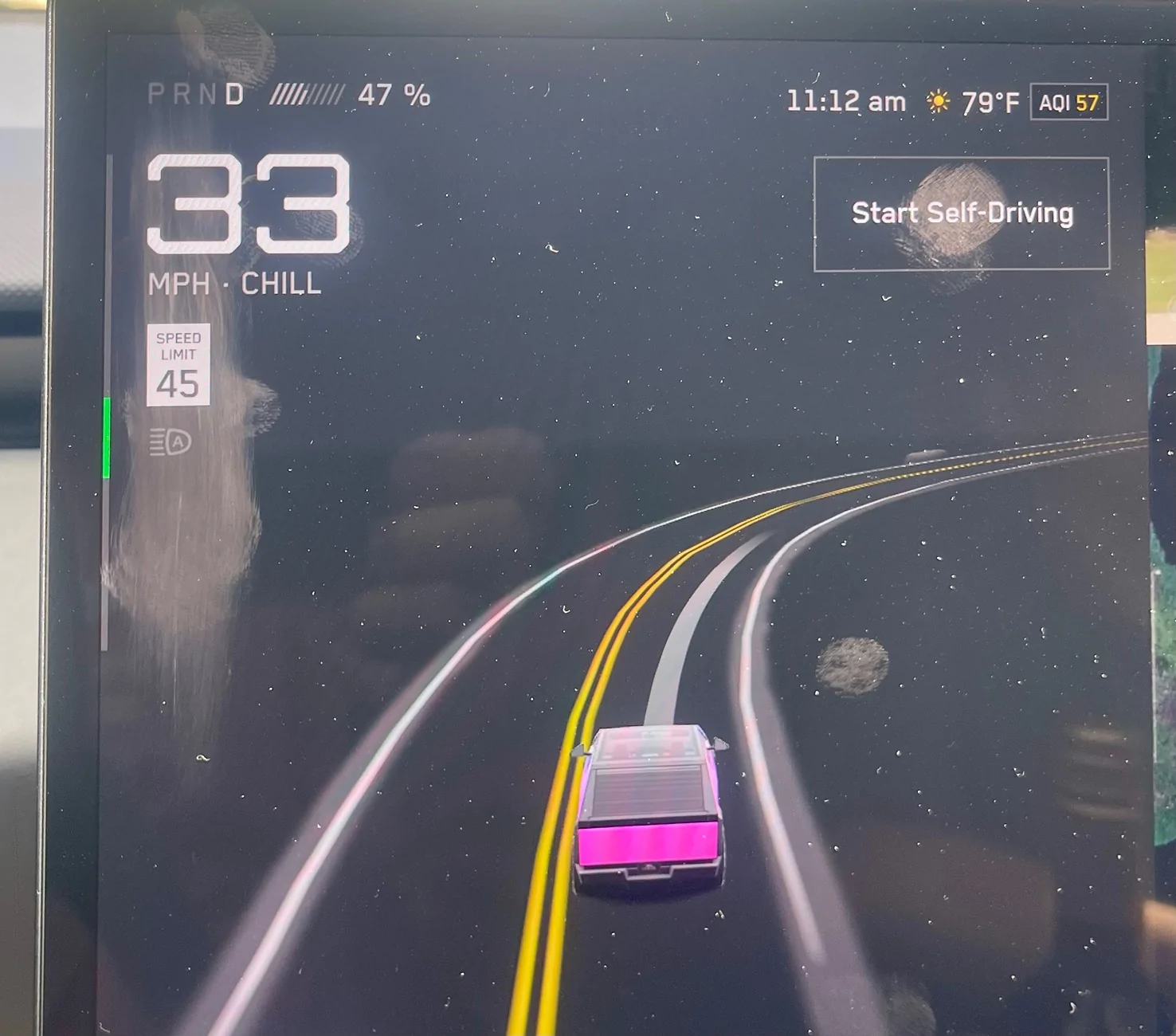
You have summarized my experience almost exactly. Lots of things can improve (over time) but if we cannot control maximum speed to be safe and legal when the vehicle is operating on bad data, FSD is a failure. Here’s a screen shot from a few minutes ago- I’m on my home street, 35mph speed limit/ recommended 25mph, many pedestrians and bicyclists, but FSD thinks it’s 45mph and speeds up to what it thinks is the speed limit, and then beyond. The only way to keep it legal and safe is to disengage FSD, or not even start FSD. Who wants that as the only option? Especially when it was working just fine before the update. Generally, my opinion of FSD14 is that there are some improvements, and FSD has improved over time, but overall FSD14 is a step back in usability due to the elimination of driver control of maximum speed. Specifically for me, I used FSD almost 100% of the time before FSD14, now with FSD14 I can no longer do that. Tesla needs to either fix the speed limit data (a near impossibility) or return the ability to the driver to override the frequently erroneous system set maximum speed.

Tesla Cybertruck FSD 13 vs 14.1 vs 14.2 - my experience and thoughts IMG_3810
 

esqtom

Active member
First Name
tom
Joined
Mar 13, 2025
Threads
10
Messages
27
Reaction score
6
Location
atlanta
Vehicles
Darlene
Occupation
Depends on the day
Country flag
Today, I had my first trip of any distance with FSD 14.2 (about 80 miles round trip). Over the previous weekend, I had a 300 mile round trip on 14.1. A few weeks prior to that, I had a 500 mile round trip on 13. These are my experiences, comparisons, and thoughts moving from one to the next over the past few weeks.

Short version - generally, improvements over time. I truly appreciate FSD and will continue to use it - supervised! However, there are some big issues with 14 that do need to be addressed, and it relates to data and some of the decisions being made by the vehicle. The biggest issue (for me) is the underlying speed limit data and how the vehicle does (or actually appears to not) read speed limit signs. If we cannot rely on the vehicles data and decision making to follow the speed limits (or at least, recognize them), we cannot trust the vehicle in situations in which lives are on the line.

I am going to run through some specific scenarios I encounter on a regular basis on any trip using recent examples and compare my experience on the last version of FSD 13 the truck received (I keep the software up-to-date), FSD 14.1, and FSD 14.2. I know there are a lot of different opinions on what is "safe" and what is not - these are my opinions and thoughts after over 1 million miles of driving in over a dozen countries with few incidents (there actually were two speeding tickets - one in 1991 in Germany and another in 2005-ish in Plano, Texas).

Speed limit changes - Always been an issue and it still is. Sometimes the truck sees a change in the speed limit - sometimes it does not for a while - while other times it just plain ignores them.

- When speed limits step down. In Texas, we have a number of highways that pass through small towns (if you ever drive from Dallas/Fort Worth to Amarillo, you know what I mean), so the speed limit will drop from 70/75 down to 45/55 and sometimes down to 30/35 before stepping back up when leaving town.
  1. 13 - Usually saw the changes and abruptly slowed down (almost was rear-ended twice because of this). When speed limits stepped back up, it took forever to get back to the posted speed limit (regardless of the speed profile used). I ended up using the right scroll wheel to step things down more smoothly - pre-empting the slow down, and had to hit the accelerator pedal to get things back to speed.
  2. 14.1 - Saw the speed steps and slowed more realistically! Sped up in a more timely manner
  3. 14.2 - Just went three miles past six 35 mph speed limit signs (one with radar) and just kept thinking it was 45 mph - even kept going 45 mph when turning onto a 30 mph residential street. 13 and 14.1 on the same road sometimes missed the first one, but not all of them. Unfortunately, without the ability to override what the truck thought was the speed limit, I had no choice but to disengage after it passed the 30 mph sign.
- Speed limits - regardless of where you live and what you think - a speed limit is a speed limit and if you go too far over it, you will be ticketed. In some places (think residential zones with kids riding bikes, people pulling out of garages, and people walking around), the speed limit is the speed limit. The truck just doesn't get it right at times. You can argue that it "misread" the sign or saw something else it "mistook" for a speed limit. I would have to argue to the contrary. I have personally experienced times when I was the only one on the road, soft daylight, sign as clear as day, and it ignores it. Or, no sign anywhere on a rural highway and it drops from 70 mph down to 45 mph. This was my aha moment - a year prior this same stretch of road had a long-term construction project, during which the speed limit was dropped to 45 mph for over a year before returning to 70 mph after completion. This says that the truck uses the underlying map data - or at least uses it as a primary means of determining the speed limit. The map (lower right corner) tells us it is a Google Maps base layer. However, when I have my phone on its charger (mounted behind the screen), I can set my destination in Google Maps on my phone and it shows the correct speed limit. Sorry Telsa, bad data can lead to bad outcomes.
  1. 13 - Usually got it right - sometimes missed it. At least I could dial the speed back using the scroll wheel.
  2. 14.1 - Usually got it right - sometimes missed it - less often. The speed profiles let me go up in speed, but not down in speed. Without control of the max speed, I had no choice but to disengage. My example from last week was a small town with a speed limit of 30 mph - but the truck thought it was 55 mph.
  3. 14.2 - Not sure what is going on here. The speed profiles are definitely not as aggressive, and sloth takes me a few miles per hour below the posted limit, but (as mentioned before), went over three miles past several 35 mph signs and not once slowed down from what it thought was a 45 mph zone. it even kept that when I turned onto a 30 mph residential street.
- Hesitation - sometimes, the truck waits a bit too long.

  1. 13 - Waited too long sometimes, but always took off safely
  2. 14.1 - Definitely comes to a complete stop at all stop signs for a full second. Takes off like there is a race, and would slow down and wiggle the steering wheel for several seconds before it made a decision or I took over. The most awkward situation being a rural highway that went through the downtown of a small rural town. It ended at a t-intersection with a stoplight and we were making a right turn. When approaching the stop light, the steering wheel started to wiggle, the truck slowed way down (light was green), and it crept along straddling the line between the left and right turn lanes until I had to take over as others were approaching from behind and I was blocking both lanes. Making an unprotected left turn onto a divided rural highway (70 mph) was indecision on the take off as well - it just kept creeping without any traffic coming.
  3. 14.2 - I did not run into an indecision on this first drive, but it still stops for a full second and is off to the races when it decides to go.

- Taking the right exit
  1. 13 - It would always get to the exit - sometimes with little time left to actually take it, but it would get there.
  2. 14.1 - Was pleasantly surprised! It turned on the blinker early enough (sometimes too early) and got in the right lane at least a quarter mile prior to the exit.
  3. 14.2 - Was about to drive right past it - ignoring the navigation. I literally took over to make the exit at the last second.
- Starting/Stopping at stop signs
  1. 13 - would always stop and took off at a calm pace that was not jolting.
  2. 14.1 - always stopped, but took off as if it was late for an important event - shocking the passengers (myself included). Was also indecisive at times with the steering wheel moving back and forth as if it was undecided.
  3. 14.2 - still stopping and still rocketing off the start line.
- Freeways - Let's face it. Most of our journeys outside of town will be down the highways and freeways - long and sometimes boring trips during which I really appreciate FSD. However, nothing is perfect and sometimes questionable.

  1. 13 - Usually did pretty well (except for speed limits and accelerating to/holding the max speed set). It would have issues by not leaving enough room in front of the truck to let others merge onto the road and found another issue in high winds - it would have difficulty holding its lane. In one experience, it drifted over the yellow line in the left lane and then did not compensate when passing a truck and just about slammed into it when the truck blocked the wind coming off the Rockies in SW Colorado. Passing - usually on the right unless there is slow traffic in the right lane or congestion.
  2. 14.1 - Surprised it actually slowed down to allow merging traffic on the road! Then, an hour later, when two lanes merged into one - it decided to play hardball and would not let someone merge in - and they were playing the same game - had to disengage. The right lane was open-season - even if the left lane was completely vacant. It did this regularly for over 100 miles.
  3. 14.2 - Nope - not happening here. When merging back onto the freeway, instead of accelerating or decelerating to a spot in front of or behind the car we were approaching in the right lane, it started getting over to where he was (not a confidence building experience). Looks like it is back to left-hand passing! In the same situation I had with 14.1 over the past weekend, 14.2 went to the right (in standard mode as well).
- Hugging the left side of the lane and passing semis
  1. 13 - V.13 really liked hugging the left side of the lane - but hated when I did it. It would also swing wide when passing the cab of a semi - sometimes crossing the yellow line and riding the rumble strip. Later versions of 13 allowed me to put gentle pressure on the wheel to coax the truck back to center (much appreciated).
  2. 14.1 - No wide swings to pass semis and pretty much kept to the center of the lane!
  3. 14.2 - No wide swings and stayed in the center of the lane!
- The dreaded left turn scenarios
  1. 13 - Two situations I experienced here. Specifically, when turning onto a divided road from the left turn lane, the left rear wheel would often (not always) hit the curb when completing the turn. Had two instances when the truck turned onto a two-lane road (not divided) and into the oncoming lane with traffic coming (wife was not happy).
  2. 14.1 - Did not happen, even on the most commonly hit curb!
  3. 14.2 - Only passed the most commonly hit curb once so far, but did superbly (lane centering is probably helping)!
From my first experience with FSD 12 (almost a year ago), to 14.2 today, things have gotten much better overall. With each major release, there were always things that regressed, but improved over a brief time period. I am generally pleased with FSD and enjoy how much more relaxed and refreshed I am on a long trip and will continue to use it - supervised. However, some things are just not improving and software decisions are making them harder to live with - removing the ability to set the max speed as the vehicle cannot reliably recognize a change in the speed limit being my vote for the most dangerous. You can disagree, but when I see the vehicle wanting to go 50% over the speed limit with kids walking and riding bikes down the road will always overrule your disagreement. I hope Tesla gets serious about the quality of the data it is using to make decisions and look forward to continued improvement.
Today, I had my first trip of any distance with FSD 14.2 (about 80 miles round trip). Over the previous weekend, I had a 300 mile round trip on 14.1. A few weeks prior to that, I had a 500 mile round trip on 13. These are my experiences, comparisons, and thoughts moving from one to the next over the past few weeks.

Short version - generally, improvements over time. I truly appreciate FSD and will continue to use it - supervised! However, there are some big issues with 14 that do need to be addressed, and it relates to data and some of the decisions being made by the vehicle. The biggest issue (for me) is the underlying speed limit data and how the vehicle does (or actually appears to not) read speed limit signs. If we cannot rely on the vehicles data and decision making to follow the speed limits (or at least, recognize them), we cannot trust the vehicle in situations in which lives are on the line.

I am going to run through some specific scenarios I encounter on a regular basis on any trip using recent examples and compare my experience on the last version of FSD 13 the truck received (I keep the software up-to-date), FSD 14.1, and FSD 14.2. I know there are a lot of different opinions on what is "safe" and what is not - these are my opinions and thoughts after over 1 million miles of driving in over a dozen countries with few incidents (there actually were two speeding tickets - one in 1991 in Germany and another in 2005-ish in Plano, Texas).

Speed limit changes - Always been an issue and it still is. Sometimes the truck sees a change in the speed limit - sometimes it does not for a while - while other times it just plain ignores them.

- When speed limits step down. In Texas, we have a number of highways that pass through small towns (if you ever drive from Dallas/Fort Worth to Amarillo, you know what I mean), so the speed limit will drop from 70/75 down to 45/55 and sometimes down to 30/35 before stepping back up when leaving town.
  1. 13 - Usually saw the changes and abruptly slowed down (almost was rear-ended twice because of this). When speed limits stepped back up, it took forever to get back to the posted speed limit (regardless of the speed profile used). I ended up using the right scroll wheel to step things down more smoothly - pre-empting the slow down, and had to hit the accelerator pedal to get things back to speed.
  2. 14.1 - Saw the speed steps and slowed more realistically! Sped up in a more timely manner
  3. 14.2 - Just went three miles past six 35 mph speed limit signs (one with radar) and just kept thinking it was 45 mph - even kept going 45 mph when turning onto a 30 mph residential street. 13 and 14.1 on the same road sometimes missed the first one, but not all of them. Unfortunately, without the ability to override what the truck thought was the speed limit, I had no choice but to disengage after it passed the 30 mph sign.
- Speed limits - regardless of where you live and what you think - a speed limit is a speed limit and if you go too far over it, you will be ticketed. In some places (think residential zones with kids riding bikes, people pulling out of garages, and people walking around), the speed limit is the speed limit. The truck just doesn't get it right at times. You can argue that it "misread" the sign or saw something else it "mistook" for a speed limit. I would have to argue to the contrary. I have personally experienced times when I was the only one on the road, soft daylight, sign as clear as day, and it ignores it. Or, no sign anywhere on a rural highway and it drops from 70 mph down to 45 mph. This was my aha moment - a year prior this same stretch of road had a long-term construction project, during which the speed limit was dropped to 45 mph for over a year before returning to 70 mph after completion. This says that the truck uses the underlying map data - or at least uses it as a primary means of determining the speed limit. The map (lower right corner) tells us it is a Google Maps base layer. However, when I have my phone on its charger (mounted behind the screen), I can set my destination in Google Maps on my phone and it shows the correct speed limit. Sorry Telsa, bad data can lead to bad outcomes.
  1. 13 - Usually got it right - sometimes missed it. At least I could dial the speed back using the scroll wheel.
  2. 14.1 - Usually got it right - sometimes missed it - less often. The speed profiles let me go up in speed, but not down in speed. Without control of the max speed, I had no choice but to disengage. My example from last week was a small town with a speed limit of 30 mph - but the truck thought it was 55 mph.
  3. 14.2 - Not sure what is going on here. The speed profiles are definitely not as aggressive, and sloth takes me a few miles per hour below the posted limit, but (as mentioned before), went over three miles past several 35 mph signs and not once slowed down from what it thought was a 45 mph zone. it even kept that when I turned onto a 30 mph residential street.
- Hesitation - sometimes, the truck waits a bit too long.

  1. 13 - Waited too long sometimes, but always took off safely
  2. 14.1 - Definitely comes to a complete stop at all stop signs for a full second. Takes off like there is a race, and would slow down and wiggle the steering wheel for several seconds before it made a decision or I took over. The most awkward situation being a rural highway that went through the downtown of a small rural town. It ended at a t-intersection with a stoplight and we were making a right turn. When approaching the stop light, the steering wheel started to wiggle, the truck slowed way down (light was green), and it crept along straddling the line between the left and right turn lanes until I had to take over as others were approaching from behind and I was blocking both lanes. Making an unprotected left turn onto a divided rural highway (70 mph) was indecision on the take off as well - it just kept creeping without any traffic coming.
  3. 14.2 - I did not run into an indecision on this first drive, but it still stops for a full second and is off to the races when it decides to go.

- Taking the right exit
  1. 13 - It would always get to the exit - sometimes with little time left to actually take it, but it would get there.
  2. 14.1 - Was pleasantly surprised! It turned on the blinker early enough (sometimes too early) and got in the right lane at least a quarter mile prior to the exit.
  3. 14.2 - Was about to drive right past it - ignoring the navigation. I literally took over to make the exit at the last second.
- Starting/Stopping at stop signs
  1. 13 - would always stop and took off at a calm pace that was not jolting.
  2. 14.1 - always stopped, but took off as if it was late for an important event - shocking the passengers (myself included). Was also indecisive at times with the steering wheel moving back and forth as if it was undecided.
  3. 14.2 - still stopping and still rocketing off the start line.
- Freeways - Let's face it. Most of our journeys outside of town will be down the highways and freeways - long and sometimes boring trips during which I really appreciate FSD. However, nothing is perfect and sometimes questionable.

  1. 13 - Usually did pretty well (except for speed limits and accelerating to/holding the max speed set). It would have issues by not leaving enough room in front of the truck to let others merge onto the road and found another issue in high winds - it would have difficulty holding its lane. In one experience, it drifted over the yellow line in the left lane and then did not compensate when passing a truck and just about slammed into it when the truck blocked the wind coming off the Rockies in SW Colorado. Passing - usually on the right unless there is slow traffic in the right lane or congestion.
  2. 14.1 - Surprised it actually slowed down to allow merging traffic on the road! Then, an hour later, when two lanes merged into one - it decided to play hardball and would not let someone merge in - and they were playing the same game - had to disengage. The right lane was open-season - even if the left lane was completely vacant. It did this regularly for over 100 miles.
  3. 14.2 - Nope - not happening here. When merging back onto the freeway, instead of accelerating or decelerating to a spot in front of or behind the car we were approaching in the right lane, it started getting over to where he was (not a confidence building experience). Looks like it is back to left-hand passing! In the same situation I had with 14.1 over the past weekend, 14.2 went to the right (in standard mode as well).
- Hugging the left side of the lane and passing semis
  1. 13 - V.13 really liked hugging the left side of the lane - but hated when I did it. It would also swing wide when passing the cab of a semi - sometimes crossing the yellow line and riding the rumble strip. Later versions of 13 allowed me to put gentle pressure on the wheel to coax the truck back to center (much appreciated).
  2. 14.1 - No wide swings to pass semis and pretty much kept to the center of the lane!
  3. 14.2 - No wide swings and stayed in the center of the lane!
- The dreaded left turn scenarios
  1. 13 - Two situations I experienced here. Specifically, when turning onto a divided road from the left turn lane, the left rear wheel would often (not always) hit the curb when completing the turn. Had two instances when the truck turned onto a two-lane road (not divided) and into the oncoming lane with traffic coming (wife was not happy).
  2. 14.1 - Did not happen, even on the most commonly hit curb!
  3. 14.2 - Only passed the most commonly hit curb once so far, but did superbly (lane centering is probably helping)!
From my first experience with FSD 12 (almost a year ago), to 14.2 today, things have gotten much better overall. With each major release, there were always things that regressed, but improved over a brief time period. I am generally pleased with FSD and enjoy how much more relaxed and refreshed I am on a long trip and will continue to use it - supervised. However, some things are just not improving and software decisions are making them harder to live with - removing the ability to set the max speed as the vehicle cannot reliably recognize a change in the speed limit being my vote for the most dangerous. You can disagree, but when I see the vehicle wanting to go 50% over the speed limit with kids walking and riding bikes down the road will always overrule your disagreement. I hope Tesla gets serious about the quality of the data it is using to make decisions and look forward to continued improvement.
 

shopaholic

Well-known member
First Name
Gee
Joined
Sep 18, 2024
Threads
22
Messages
318
Reaction score
319
Location
East Bay
Vehicles
2025 CT AWD (67k VIN), 2018 Model 3LR(40k VIN) , BMWR1200S
Occupation
Retired
Country flag
Agree with all the speed limit issues. Since FSD 14, CT gives lane change indicator but doesn’t change lanes even when the lane is free and it’s not even a needed lane change!
Sponsored


Top