Sponsored

j8m8h

New member
First Name
Jay
Joined
Jun 20, 2024
Threads
0
Messages
1
Reaction score
2
Location
Washington State
Vehicles
Tesla Model S, Tesla Model 3
Country flag
I struggled with FSD in my CT when it came to my property. I live on acreage and FSD would stop along the main community road nearest to my home marker.

The driveway to access my property is covered by trees in many areas - these trees obstructed the satellite view.
Great Find! I updated mine today. I had the same issue where it stopped up the street from my driveway.

Update 1: After three days the changes I made were approved by Google. 24 hours later the changes appear on desktop google maps, now just waiting for the updates to hit my CT.

Update 2: 1 day later, after work I jumped in my CT and it already had the 'home' destination mapped out. To my surprise, as I got closer to where it usually stops, I saw the new road appear and I was driven up to my house! @speedstuff, thank you so much for sharing. Absolutely amazing tip!
Sponsored

 
Last edited:
PungoteagueDave

Well-known member
First Name
David
Joined
Mar 2, 2025
Threads
2
Messages
974
Reaction score
1,061
Location
Boynton Beach
Vehicles
ā€˜25 Tesla Cybertruck, ā€˜26 Tesla MY Launch, ā€˜13 Porsche C4S, ā€˜26 BMW R1300 GSA
Occupation
retired
Country flag
Is there a way to set a speed limit? Though the map knows to turn onto my gravel road and proceed to the end, the truck turns in and wants to continue going 40 MPH. Ten or less is way more appropriate.
My CT reads the speed limit signs I put on my mile-long driveway. I had them professionally made to be identical to the nearby limits signs on roadways. The truck sees and recognizes 15 mph as soon as it turn into the private road/driveway, which is named and shown on google maps, although I own it and it has no other properties associated with it.
 

PungoteagueDave

Well-known member
First Name
David
Joined
Mar 2, 2025
Threads
2
Messages
974
Reaction score
1,061
Location
Boynton Beach
Vehicles
ā€˜25 Tesla Cybertruck, ā€˜26 Tesla MY Launch, ā€˜13 Porsche C4S, ā€˜26 BMW R1300 GSA
Occupation
retired
Country flag
I wonder when you add a road to the map will that show up on everyone’s Google map?
Yes, I edited the map at my Florida property, where it would routinely route vehicles into a HOA gate that is permanently locked. I eliminated the ability to make any turns at that gate and it immediately showed up in Google Maps. You must be approved as an editor - there is a process, and promises must be made.
 

CasaDelGato

Well-known member
First Name
John
Joined
Dec 4, 2022
Threads
11
Messages
78
Reaction score
89
Location
Greenbank, WA
Vehicles
EV F250 (conversion), Cybertruck
Occupation
Retired
Country flag
I've had a similar problem with my long, looped, branched, driveway.
I just updated google. How long does it take for them to accept a change?
 

JES1964

Well-known member
First Name
Jonathan
Joined
Oct 27, 2024
Threads
8
Messages
103
Reaction score
102
Location
Chapel Hill
Vehicles
CyberBeast
Occupation
Data & Technology
Country flag
I struggled with FSD in my CT when it came to my property. I live on acreage and FSD would stop along the main community road nearest to my home marker.

The driveway to access my property is covered by trees in many areas - these trees obstructed the satellite view.

The incomplete satellite view of my unmapped / private road seemed to block google maps from creating a full path to the house.

This is why my 'home point' for my address was not accessible by FSD using my driveway.

I took a shot in the dark and used the 'edit' map option on google maps from a pc - this edit allows you to draw where the road is and send that in for review.

The edit was accepted and a couple hours later google maps online would show my driveway from the main street to the house.

I went for a drive and used FSD to get home, and wow, it drove right up the driveway I edited and parked in front of the house.

Until this, I only had a suspicion that google maps data is used to that level in FSD - but now we know for sure.

Very cool stuff and I wanted to share with others that may be looking for a similar solution.

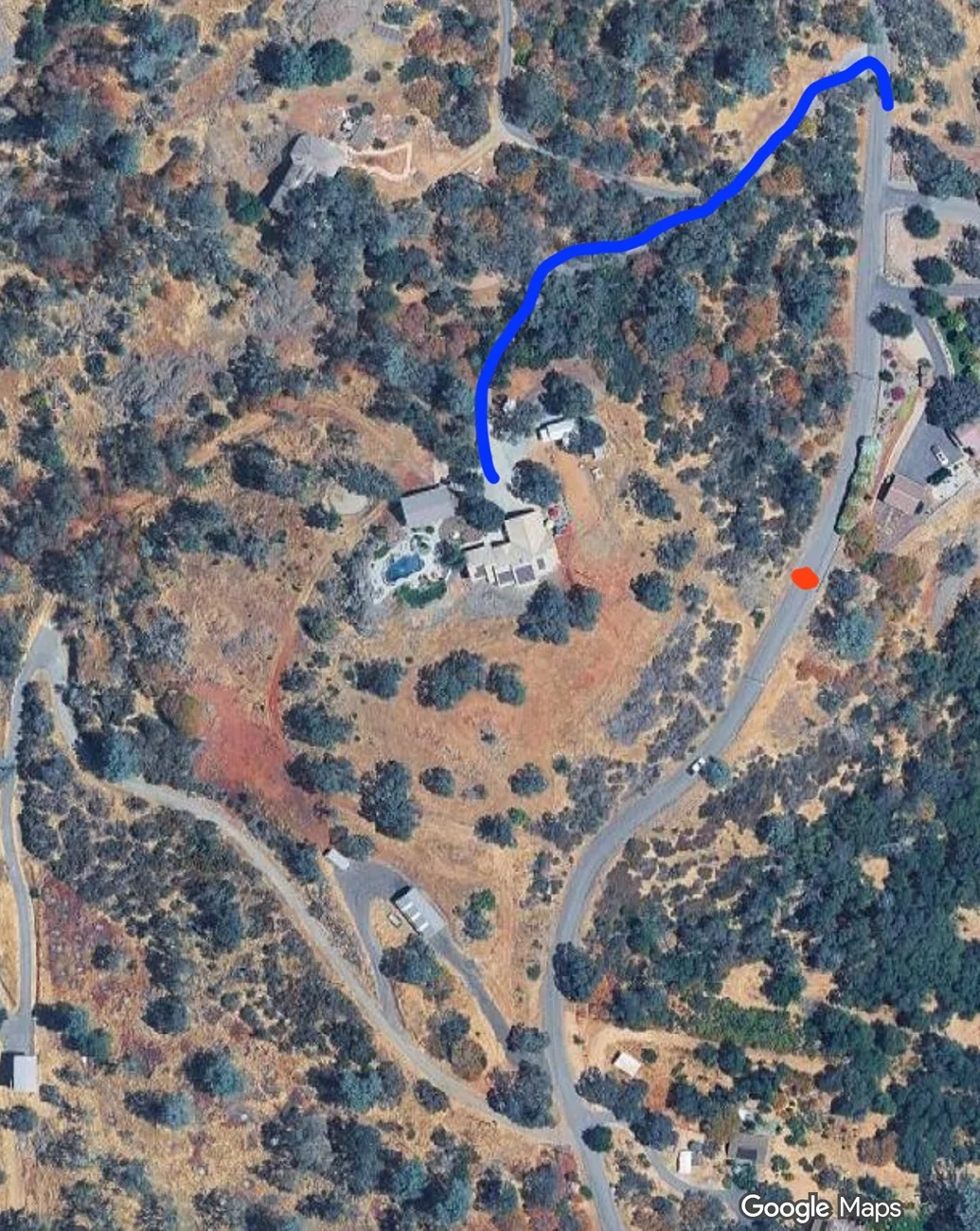
(on the picture - FSD used to stop at red dot saying arrived - now it drives the proper way and follows the blue line which is the new updated edit on googlemaps)

mapedit.webp
Thank you @speedstfor this fantastic stroke of ingenuity. I would never have thought this was possible or that I should try. I will be doing this over the weekend, thank you.


Freeseframe

Well-known member
Joined
Jun 26, 2020
Threads
1
Messages
74
Reaction score
97
Location
Iowa
Vehicles
2024 Cybertruck AWD; 2019 Model X; 2017 F150 SuperCrew
Country flag
I've had a similar problem with my long, looped, branched, driveway.
I just updated google. How long does it take for them to accept a change?
Sounds like we have a similar set-up I updated the map to add my driveway to our house tucked in the woods on 9/16 and it still shows my edit as "pending". From reading posts here it seems to vary in terms of time. We share a main drive with a neighbor so not sure if that's complicating any automated review with the various branches and addresses accessible by our drive.
 

ModelXer

Well-known member
Joined
Sep 7, 2023
Threads
0
Messages
126
Reaction score
86
Location
NY
Vehicles
Model X
Country flag
Great Find! I updated mine today. I had the same issue where it stopped up the street from my driveway.
Now, if I could get my MX to back into my driveway, that would be heaven. 😃
 

CasaDelGato

Well-known member
First Name
John
Joined
Dec 4, 2022
Threads
11
Messages
78
Reaction score
89
Location
Greenbank, WA
Vehicles
EV F250 (conversion), Cybertruck
Occupation
Retired
Country flag
Well, I updated the map a couple days ago, Google accepted the changes.
As of last night, it appears that the Tesla maps aren't updated yet. I wonder how long that takes?
 

CasaDelGato

Well-known member
First Name
John
Joined
Dec 4, 2022
Threads
11
Messages
78
Reaction score
89
Location
Greenbank, WA
Vehicles
EV F250 (conversion), Cybertruck
Occupation
Retired
Country flag
Though, this does remind me of the other problem with FSD vs my driveway.
When I come home, the route shown includes my driveway (in blue) and it does navigate it properly.
When I leave home - the route shown starts out in the street, at the point perpendicular to my house. FSD will then often make a wrong turn in the driveway, apparently because going the wrong way will bring you slightly closer to the road sooner - and then require you to loop all the way around to actually get to the road.
 

collisc

Member
First Name
Scott
Joined
May 30, 2025
Threads
1
Messages
20
Reaction score
49
Location
SoCal
Vehicles
FS CT AWD
Country flag
Is the hairpin to the right?

FSD doesn't always do hairpins on a slope correctly to begin with, it really needs some more mechanical approach to technical maneuvers it doesn't use frequently. 'Secondary thinking'.

-Crissa
Hairpin was to the left and it seems to oversteer into oncoming.


collisc

Member
First Name
Scott
Joined
May 30, 2025
Threads
1
Messages
20
Reaction score
49
Location
SoCal
Vehicles
FS CT AWD
Country flag
I don't see any defects in the map data at those locations. I can even map a route with the API:
...
The only weird thing I see is in the satellite view, where the map data skews from the photos so that the line is not down the center of the road, but I would think that would be true just about everywhere. I believe the satellite view is just a visual overlay and is not used in path calculations.
Good research Gus! Maybe it's just an oversteer situation resulting from the gains being used in the CT's steer-by-wire controller. I drove the route again a couple times this week. On one day, conditions included patches of dense fog and drizzle to further challenge FSD. Again, there were a couple locations around hairpin turns where it steered into the oncoming lane or in one case exited FSD altogether with the flashing warning for me to take over.

As others have mentioned, FSD has difficulty with potholes and road debris. Taking mountain roads such as this one, falling rocks are frequent and the CT doesn't do anything to miss them. Or I should say, I haven't discovered the largest rock through which the truck will not alter its course.

Thanks for your insights. Looking forward to running this route with v14!
 

CTOWannabe

Well-known member
First Name
CTO
Joined
Feb 28, 2024
Threads
8
Messages
151
Reaction score
142
Location
US
Vehicles
2025 Cybertruck AWD
Country flag
I struggled with FSD in my CT when it came to my property. I live on acreage and FSD would stop along the main community road nearest to my home marker.

The driveway to access my property is covered by trees in many areas - these trees obstructed the satellite view.

The incomplete satellite view of my unmapped / private road seemed to block google maps from creating a full path to the house.

This is why my 'home point' for my address was not accessible by FSD using my driveway.

I took a shot in the dark and used the 'edit' map option on google maps from a pc - this edit allows you to draw where the road is and send that in for review.

The edit was accepted and a couple hours later google maps online would show my driveway from the main street to the house.

I went for a drive and used FSD to get home, and wow, it drove right up the driveway I edited and parked in front of the house.

Until this, I only had a suspicion that google maps data is used to that level in FSD - but now we know for sure.

Very cool stuff and I wanted to share with others that may be looking for a similar solution.

(on the picture - FSD used to stop at red dot saying arrived - now it drives the proper way and follows the blue line which is the new updated edit on googlemaps)

mapedit.webp
This is super interesting. My truck will drive on our 'non road' roads even though they are not on the map.
 

hemiarch

Well-known member
First Name
Ace
Joined
Jan 22, 2025
Threads
119
Messages
8,588
Reaction score
9,919
Location
Arizona
Vehicles
2024 foundation AWD, 2024 model x
Occupation
Trauma Surgeon
Country flag
Not that this matters for us yet, but Tesla uses OpenStreetMaps, for its summons data. You can edit it in the same way to make all the roads around your house a "parking lot" with direction(which way traffic can flow). I did this for my Model S, and could use summons around my land.
So how do you do this? Very interested.
 

CyberGus

Well-known member
First Name
Gus
Joined
May 22, 2021
Threads
91
Messages
10,312
Reaction score
34,173
Location
Austin, TX
Vehicles
1981 DeLorean, 2024 Cybertruck
Occupation
IT Specialist
Country flag
As others have mentioned, FSD has difficulty with potholes and road debris
Yesterday I was pulling out of a parking space and misjudged the curb. Not a problem, except the property put boulders inside the curbs, and I scraped the crap out of my rocker panel.

My S.O.’s reaction? ā€œI bet FSD wouldn’t have done thatā€ šŸ˜‚
 

hemiarch

Well-known member
First Name
Ace
Joined
Jan 22, 2025
Threads
119
Messages
8,588
Reaction score
9,919
Location
Arizona
Vehicles
2024 foundation AWD, 2024 model x
Occupation
Trauma Surgeon
Country flag
Yesterday I was pulling out of a parking space and misjudged the curb. Not a problem, except the property put boulders inside the curbs, and I scraped the crap out of my rocker panel.

My S.O.’s reaction? ā€œI bet FSD wouldn’t have done thatā€ šŸ˜‚
Yeah. When it’s convenient they say that and when it’s not , the opposite. There is no winning
Sponsored


Top