Sponsored

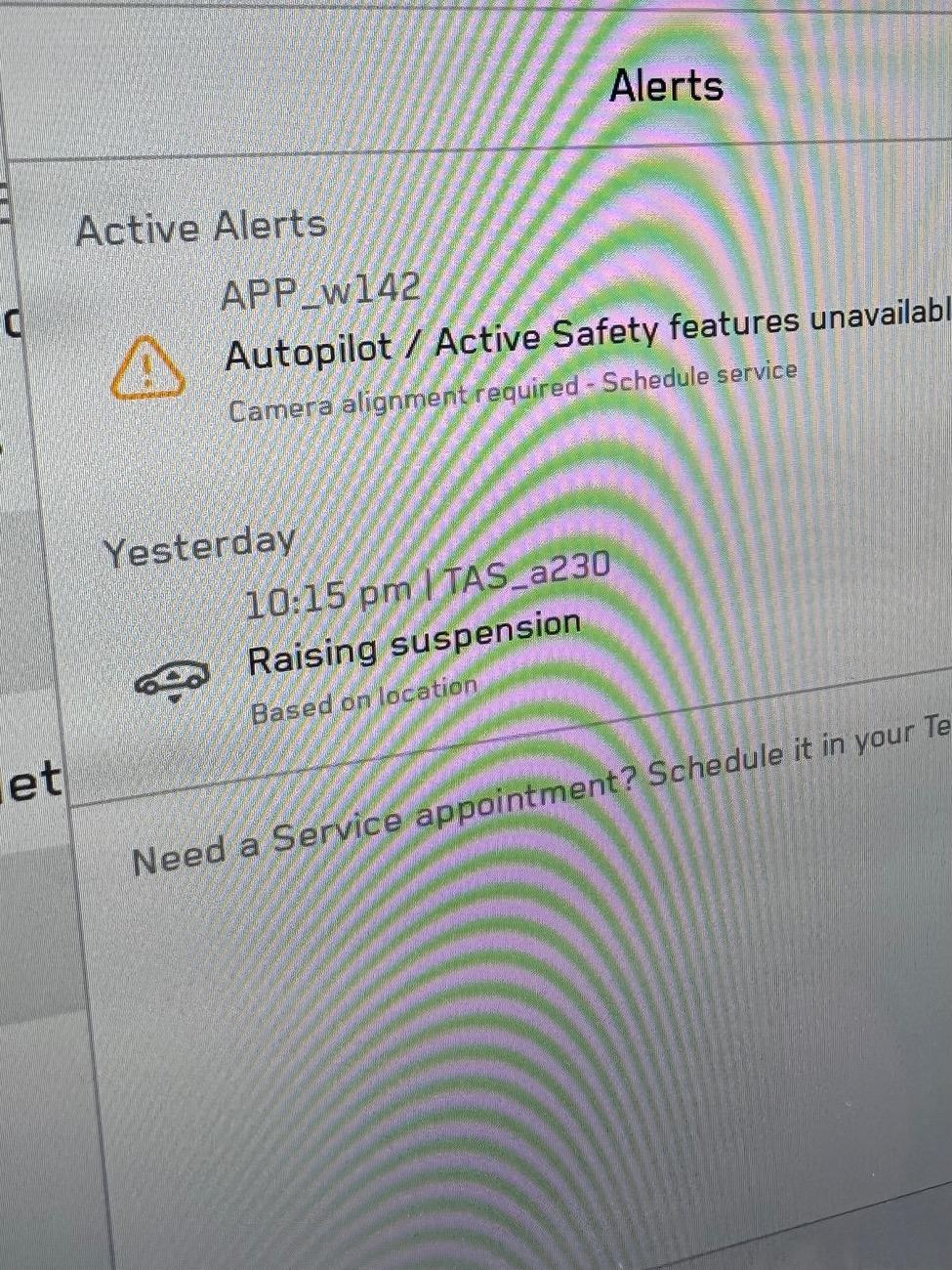
HOLD UP! APP_w142: Camera alignment required - schedule service

NitroScot

Well-known member
First Name
Scot
Joined
Feb 3, 2024
Threads
7
Messages
50
Reaction score
43
Location
Los Angeles
Vehicles
Cybertruck
Occupation
Nitro Ice Cream
Country flag
TL;DR - if you get this error try washing/cleaning the camera from the service menu and then clear calibration - instead of scheduling an appointment!!

Last week before a road trip from LA to Vegas I got this error
APP_w142
Autopilot / Active Safety features unavailable
Camera alignment required - Schedule service
- I could no longer enable the cruise control or get auto breaking.
I already had an appointment scheduled for some damage to trim and the metal trim strip on the front door getting loose.
I informed them that I had to leave for Las Vegas in two days so only do the things that were important for a long trip like the camera alignment.
I got a message in the app that the car was ready the next day at 5 o’clock. I showed up and the car was not there. The representative had no idea where it was. I showed him the message in the app and he said that it was auto generated. He made some calls and found out that it was at another lot about 2 miles away, but it wasn’t ready. I told him I needed to get the car tomorrow by 9 AM.
He said no problem and I came back in the morning, but the car wasn’t there. After another hour of phone calls, they brought me the vehicle. It was still in service mode and the camera alignment had not been done. The only thing they had done in the day and a half that they had it was insert the screw into the pedal (wasn’t loose at all) and replace the non-defective bolts in my (not loose)
They promised me that I could bring it back on Monday to have the rest of the work done. I came back on Monday reached out to them via the app. No response Tuesday no response Wednesday. I’m told oh sorry we didn’t see any of these messages, the next available date for service is August 1.
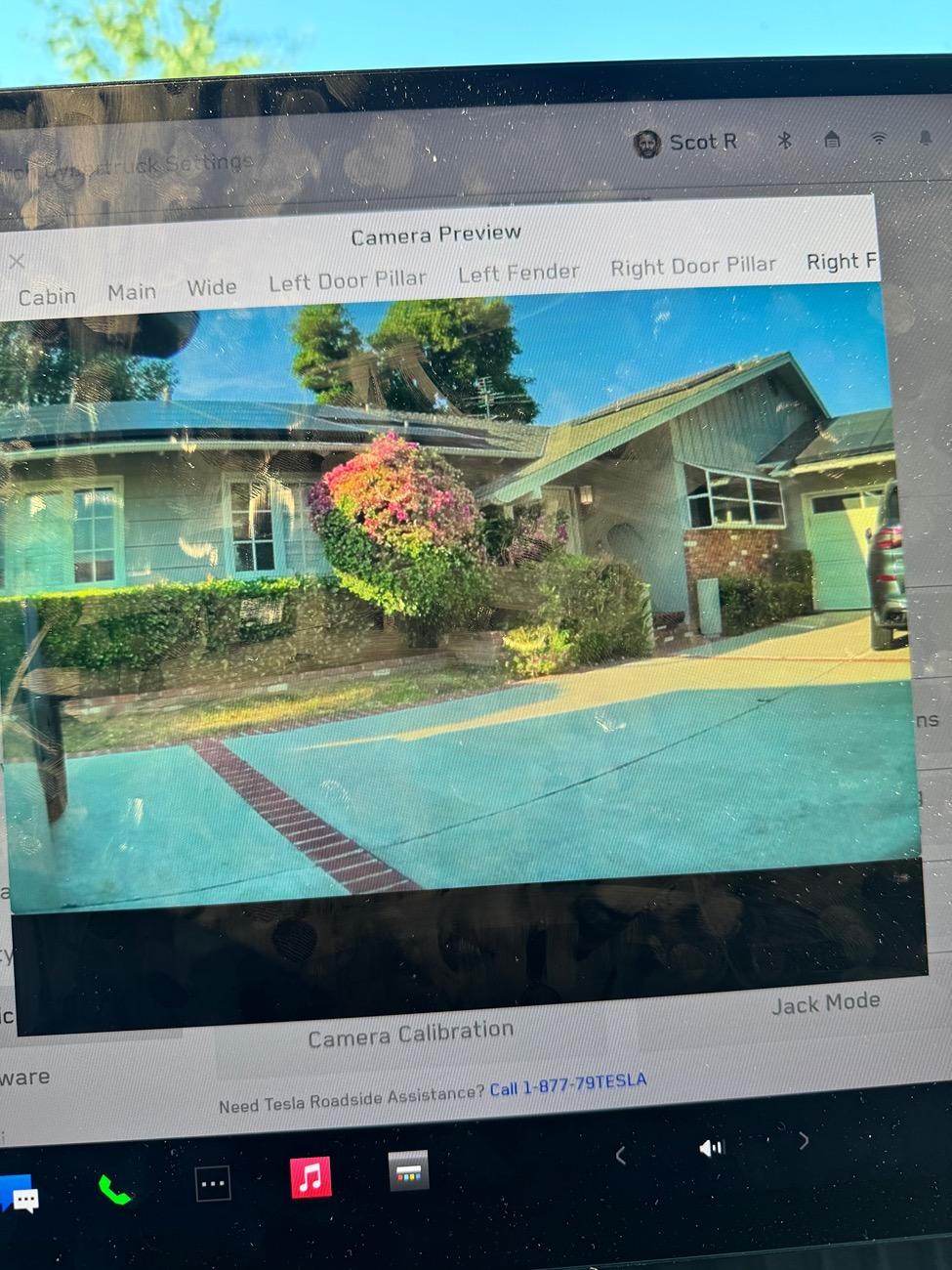
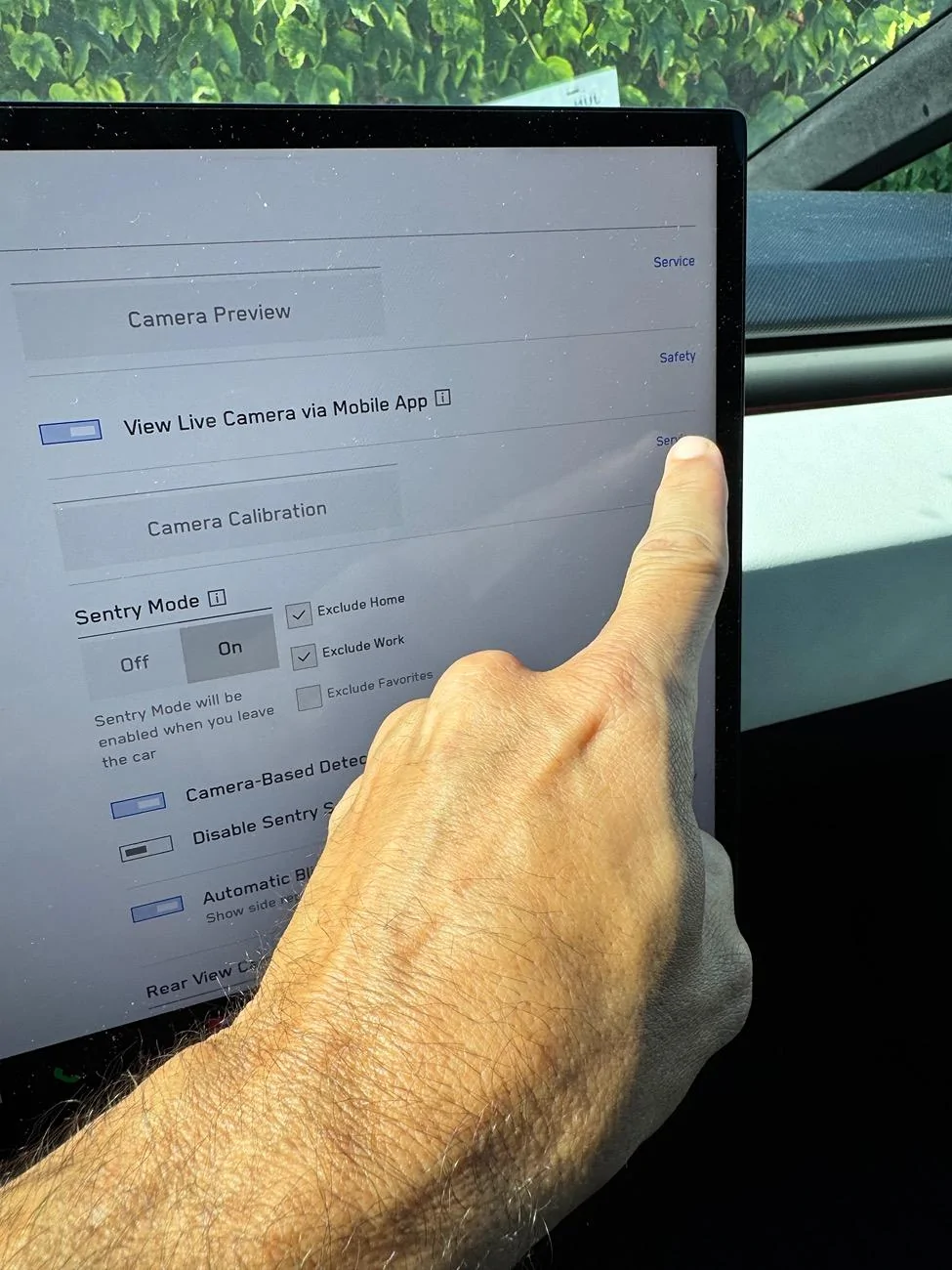
I went into the car and checked the cameras via the calibration menu. The front camera appeared to be blurry. I went out front and tried to wipe it clean. It was still blurry. I assume that the camera module was defective. I figured I would see if there was any kind of camera module alignment button so I searched camera in the menus. There was a setting for wash camera or clean camera. I push that button and voila it fixed it. The camera seems to have a shield in front of it so wiping just does the front. I think the wash does underneath.
The autopilot 100% works after calibrating for a 10 minute drive.
I’m shocked that nobody at Tesla service even thought to have me check that or to try it so too long don’t read if you get an error for camera alignment just try washing them from the menu. You’re welcome.

Tesla Cybertruck HOLD UP! APP_w142: Camera alignment required - schedule service IMG_0359


Tesla Cybertruck HOLD UP! APP_w142: Camera alignment required - schedule service IMG_0353


Tesla Cybertruck HOLD UP! APP_w142: Camera alignment required - schedule service IMG_0354


Tesla Cybertruck HOLD UP! APP_w142: Camera alignment required - schedule service IMG_2751
Sponsored


gaubong053

Well-known member
First Name
Tuan
Joined
Jan 20, 2024
Threads
3
Messages
99
Reaction score
137
Location
Sacramento, CA
Vehicles
MXP, Cybertruck AWD FS.
Occupation
Software engineer
Country flag
I had the same message. Did camera calibration twice, but eventually it would come back. So Tesla manually did camera calibration and it fixed the issue.
 

tmeyer3

Well-known member
First Name
Trevor
Joined
Jun 27, 2021
Threads
31
Messages
2,036
Reaction score
3,614
Location
CA
Website
www.meyerwine.com
Vehicles
Model 3, '73 GMC truck, Wrangler, Tractors
Occupation
Computer Scientist, Vintner
Country flag
TL;DR - if you get this error try washing/cleaning the camera from the service menu and then clear calibration - instead of scheduling an appointment!!

Last week before a road trip from LA to Vegas I got this error
APP_w142
Autopilot / Active Safety features unavailable
Camera alignment required - Schedule service
- I could no longer enable the cruise control or get auto breaking.
I already had an appointment scheduled for some damage to trim and the metal trim strip on the front door getting loose.
I informed them that I had to leave for Las Vegas in two days so only do the things that were important for a long trip like the camera alignment.
I got a message in the app that the car was ready the next day at 5 o’clock. I showed up and the car was not there. The representative had no idea where it was. I showed him the message in the app and he said that it was auto generated. He made some calls and found out that it was at another lot about 2 miles away, but it wasn’t ready. I told him I needed to get the car tomorrow by 9 AM.
He said no problem and I came back in the morning, but the car wasn’t there. After another hour of phone calls, they brought me the vehicle. It was still in service mode and the camera alignment had not been done. The only thing they had done in the day and a half that they had it was insert the screw into the pedal (wasn’t loose at all) and replace the non-defective bolts in my (not loose)
They promised me that I could bring it back on Monday to have the rest of the work done. I came back on Monday reached out to them via the app. No response Tuesday no response Wednesday. I’m told oh sorry we didn’t see any of these messages, the next available date for service is August 1.
I went into the car and checked the cameras via the calibration menu. The front camera appeared to be blurry. I went out front and tried to wipe it clean. It was still blurry. I assume that the camera module was defective. I figured I would see if there was any kind of camera module alignment button so I searched camera in the menus. There was a setting for wash camera or clean camera. I push that button and voila it fixed it. The camera seems to have a shield in front of it so wiping just does the front. I think the wash does underneath.
The autopilot 100% works after calibrating for a 10 minute drive.
I’m shocked that nobody at Tesla service even thought to have me check that or to try it so too long don’t read if you get an error for camera alignment just try washing them from the menu. You’re welcome.
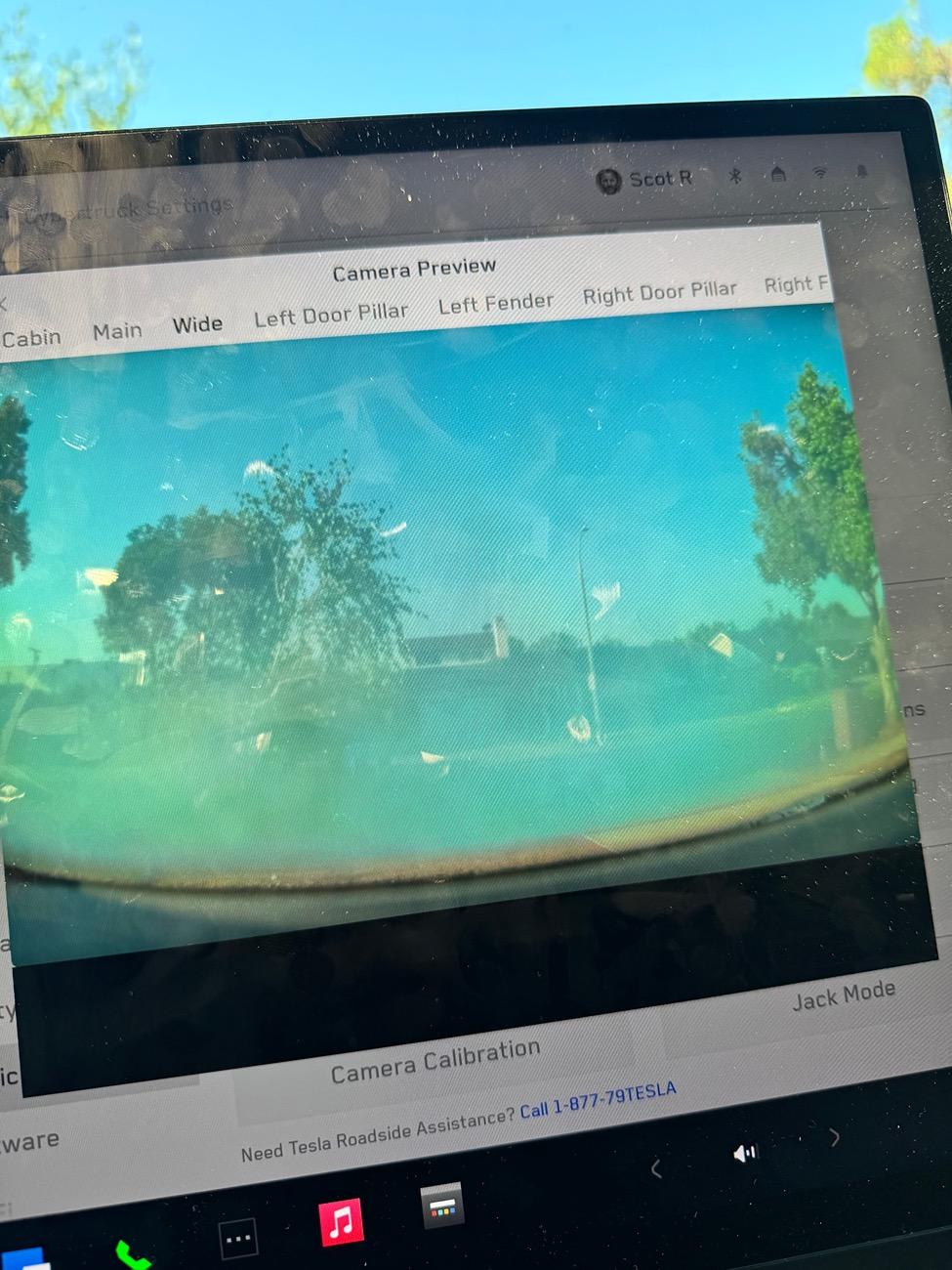
IMG_0359.jpeg


IMG_0353.jpeg


IMG_0354.jpeg


IMG_2751.jpeg
Great tip!!
 

tmeyer3

Well-known member
First Name
Trevor
Joined
Jun 27, 2021
Threads
31
Messages
2,036
Reaction score
3,614
Location
CA
Website
www.meyerwine.com
Vehicles
Model 3, '73 GMC truck, Wrangler, Tractors
Occupation
Computer Scientist, Vintner
Country flag
I'm not seeing a camera wash option. Just a clear calibration. Where was this at?
 
OP
OP

NitroScot

Well-known member
First Name
Scot
Joined
Feb 3, 2024
Threads
7
Messages
50
Reaction score
43
Location
Los Angeles
Vehicles
Cybertruck
Occupation
Nitro Ice Cream
Country flag
I'm not seeing a camera wash option. Just a clear calibration. Where was this at?
The front-facing camera is equipped with a sprayer nozzle. To clean the front-facing camera, touch the app launcher, select the Camera app, and press the spray icon.
It’s in the camera app!!!
 
  • Like
Reactions: 2me


av8rdude

Member
First Name
Scott
Joined
Dec 26, 2023
Threads
0
Messages
21
Reaction score
33
Location
Milton, GA
Vehicles
Cybertruck AWD, 2022 Model Y Performance
Occupation
Pilot
Country flag
I had this same warning/notification off and on for a month or longer. When I cleared the calibration it would clear for a period of time. But always come back. Service appointment is 6 weeks out and FSD is imminent. I decided to try to fix it myself after looking at the online service manual.

PRO TIP. The front camera adjustment is inside the hole when you remove the rear view mirror. You do not need to remove the camera housing cover or anything else....easy peasy if I could do it again :rolleyes:
 
Last edited:
OP
OP

NitroScot

Well-known member
First Name
Scot
Joined
Feb 3, 2024
Threads
7
Messages
50
Reaction score
43
Location
Los Angeles
Vehicles
Cybertruck
Occupation
Nitro Ice Cream
Country flag
So it’s the camera in the front top mold, not in front bumper?
 

kewellxi

Well-known member
First Name
Xi
Joined
Feb 1, 2024
Threads
1
Messages
49
Reaction score
31
Location
CA
Vehicles
Cybertruck
Country flag
I had this same warning/notification off and on for a month or longer. When I cleared the calibration it would clear for a period of time. But always come back. Service appointment is 6 weeks out and FSD is imminent. I decided to try to fix it myself after looking at the online service manual.

PRO TIP. The front camera adjustment is inside the hole when you remove the review view mirror. You do not need to remove the camera housing cover or anything else....easy peasy if I could do it again :rolleyes:
Thanks for the pro tip!
 

mstatkus

Well-known member
First Name
Mark
Joined
Jun 28, 2024
Threads
0
Messages
203
Reaction score
183
Location
WA
Vehicles
Cybertruck, Model Y, Model 3
Occupation
DevOps
Country flag
I just got the APP_w142 error. Trying to clear camera calibration. Feel like this was post my attempt of the Hansshow rear view mirror screen which I abandoned after noticing his difficult the install would be. I’m hoping this isn’t another service visit as I didn’t really touch the front cameras at all.


TorqMonstr

Well-known member
First Name
Scott
Joined
Oct 26, 2024
Threads
2
Messages
68
Reaction score
124
Location
Los Angeles
Vehicles
Beast, M3, MY
Occupation
Auto Mechanic
Country flag
From the look of your fish-eye camera the inside of the windshield may be fogged. This happens on new vehicles as the interior components off-gass and can cause this hazing.

It shouldn't be too difficult to pull down the covers and clean this area, just don't spray anything on the cameras themselves.

Good luck and keep us posted.
 

mstatkus

Well-known member
First Name
Mark
Joined
Jun 28, 2024
Threads
0
Messages
203
Reaction score
183
Location
WA
Vehicles
Cybertruck, Model Y, Model 3
Occupation
DevOps
Country flag
Wild, I had the APP_w142 pop up after several rains but I had also installed a rear view mirror screen and it would come and go. I got worried I messed up the cameras in the windshield some how. I cleaned the facia camera and so far 50 miles without it coming back.
 

Flexbomb

Member
Joined
Mar 17, 2025
Threads
0
Messages
7
Reaction score
6
Location
Ontario
Vehicles
Cybertruck, Model 3
Country flag
I just had this same error pop up _w142. I booked service, but after seeing this thread, all I did was hit the front camera with 2 squirts of washing and the error went away.

This is probably something that can be solved with the "camera partially obstructed, wash front camera" or even automatically wash it via software update. I'm guessing this would save a lot of service requests to squirt the camera with fluid.
Sponsored


Top