Sponsored

Is there a way to save a specific route path?

scottyah

Well-known member
First Name
Scott
Joined
Dec 14, 2022
Threads
13
Messages
461
Reaction score
817
Location
San Diego, CA
Vehicles
2025 AWD CT
Occupation
~ ~ C Y B E R S P O O N ~ ~
Country flag
It would be nice if you could RECORD a Route and then save it, like you can on several Trail GPS systems. I honestly still have no idea how to save Points to travel to that the FSD will remember like my Son's House, I always have to type in his address, How about a Favorites list or better yet, read it off your contacts list for ones that have addresses.
I do really miss that about google maps, just typing in my sisters name and it knows the address.
 

Sjohnson20

Well-known member
Joined
Nov 30, 2023
Threads
8
Messages
1,435
Reaction score
2,438
Location
Florida
Vehicles
Cybertruck AWD, Model Y
Country flag
Really need this option. Hopefully they will add it in a future update. I want to save my exact route.
 

Gaximus

Well-known member
Joined
Jun 22, 2024
Threads
23
Messages
1,461
Reaction score
2,286
Location
Mead, CO
Vehicles
CyberBeast, Model 3, Jeep Wrangler, Yamaha R6
Occupation
Software Developer
Country flag
typically what I do when I want a custom route, which I have to do when I go on base, because the north gate is closed and I need to route around it, is have several stops saved as favorites , then just remove the stops as I get near them. It’s very cumbersome, but it works.


65SoYoLO

Well-known member
First Name
Keith
Joined
Feb 9, 2021
Threads
51
Messages
1,978
Reaction score
2,578
Location
Long Island NY
Vehicles
2024 CyberTruck
Occupation
Retired truck driver
Country flag
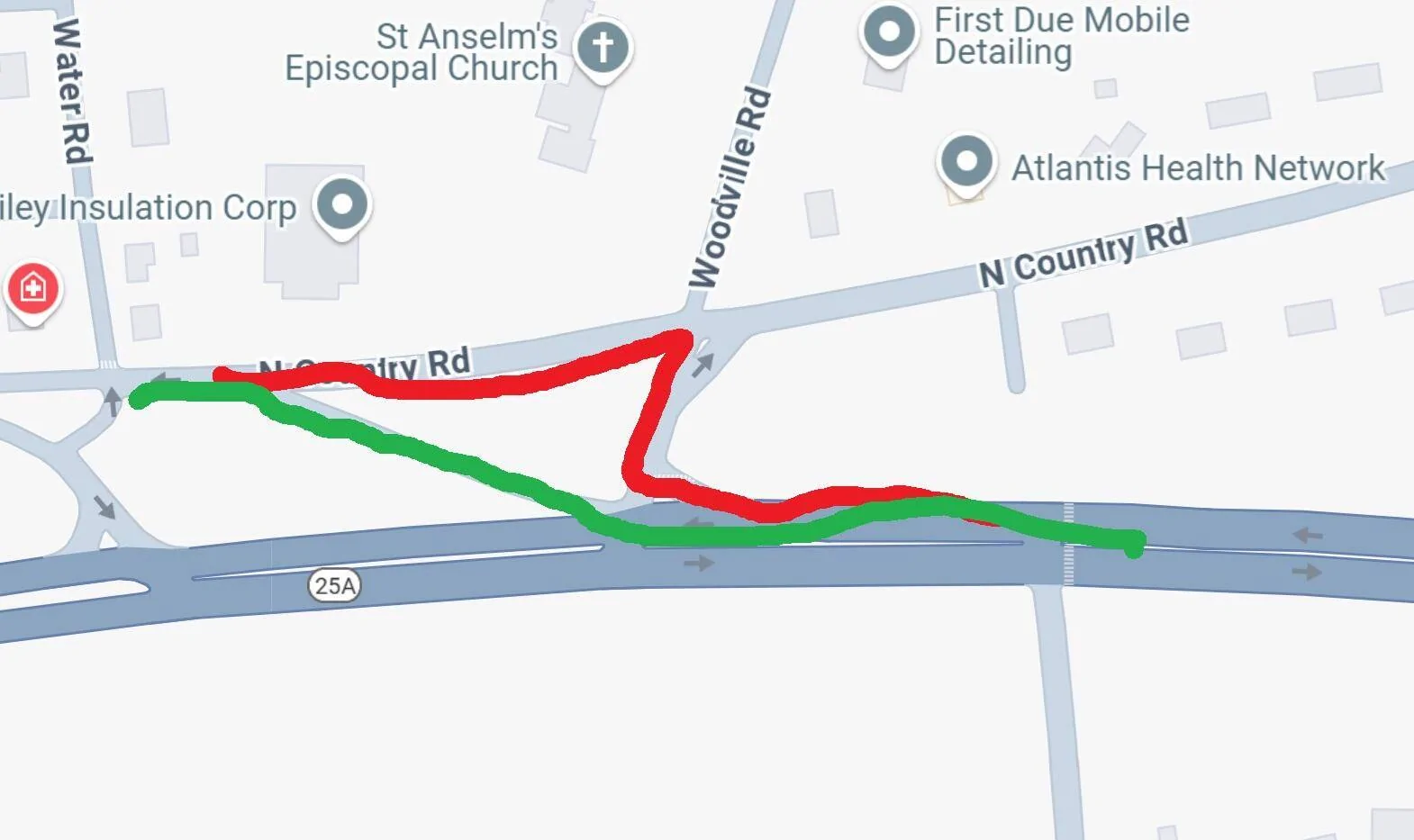
THIS, is one of the top 5 issues with the truck. The GPS takes the dumb way. Perfect case in point
The truck wants to take the red route.
The logical way is the green route.
This is just one example.
(expert graphics rendering-65SoYOLO)
Tesla Cybertruck Is there a way to save a specific route path? 1747229091556-wk
 

DaBagBoy

Well-known member
Joined
May 8, 2024
Threads
15
Messages
362
Reaction score
371
Location
Lansing MI
Vehicles
3, Y, CT
Country flag
I haven’t found a way. How do you add Favorites?
To add favorite destinations to your Tesla's navigation system, follow these steps:
  1. Search for a Location: Tap the search bar on the touchscreen map and enter the address or name of the destination (e.g., a friend’s house, gym, or coffee shop). You can also use voice commands by pressing the voice command button on the steering wheel and saying, “Navigate to [destination].”
  2. Select the Destination: Once the location appears, let the navigation system map the route. A black pin will mark the destination on the map.
  3. Add to Favorites: Tap the black pin on the map. A dialog box will pop up. Press the star or heart icon in this box, then select “Add to Favorites.” You may be prompted to name the favorite or accept the default name. Confirm to save it.
  4. Access Favorites: To navigate to a saved favorite later, tap the search bar, select “Favorites,” and choose the destination from the list.
Additional Tips:
  • Current Location: To save your current location as a favorite, press and hold a spot on the map, then tap the star icon in the dialog box that appears.
  • Mobile App: You can send destinations to your Tesla using the Tesla app or by sharing locations from Google Maps or Apple Maps on your phone, but adding favorites directly via the app isn’t supported.
  • Driver Profiles: Favorites are tied to individual driver profiles, so each driver must set their own. They don’t sync between profiles.
  • Limits: There’s no confirmed limit on the number of favorites, with users reporting up to 10 or more saved locations.
If favorites don’t save, ensure the car is powered on when saving, as some users report issues with favorites disappearing after the car powers off. For more details, check Tesla’s navigation guide at tesla.com or YouTube tutorials like “How to Add Favourites in Tesla Navigation.”
 

65SoYoLO

Well-known member
First Name
Keith
Joined
Feb 9, 2021
Threads
51
Messages
1,978
Reaction score
2,578
Location
Long Island NY
Vehicles
2024 CyberTruck
Occupation
Retired truck driver
Country flag
typically what I do when I want a custom route, which I have to do when I go on base, because the north gate is closed and I need to route around it, is have several stops saved as favorites , then just remove the stops as I get near them. It’s very cumbersome, but it works.
cumbersome is an understatement. I have to do that on several trips during the day since the truck want to take the ridiculous way, and I actually got 2 strikes because of that. Another was trying to split the HVAC control! I got 4 strikes in less then a week.
 

NSCyber

Well-known member
Joined
Jun 2, 2024
Threads
29
Messages
197
Reaction score
209
Location
LA
Vehicles
AWD Cybertruck
Country flag
It would be nice if you could RECORD a Route and then save it, like you can on several Trail GPS systems. I honestly still have no idea how to save Points to travel to that the FSD will remember like my Son's House, I always have to type in his address, How about a Favorites list or better yet, read it off your contacts list for ones that have addresses.

This would also come in handy for those that live in an apartment complex with a multi-story garage. We could record the route so it knows how to maneauver the complex and park itself


Seribus

Well-known member
Joined
Jun 14, 2024
Threads
19
Messages
255
Reaction score
260
Location
NC
Vehicles
Cybertruck Foundation Series AWD
Country flag
What if you set the route in a maps app like Google Maps, then send that route to truck and then in truck favorite the route? Just thinking out loud and haven't tried it yet. This is a pet peeve of mine too.
 

Thunderstrike44

Well-known member
First Name
Brian
Joined
Aug 17, 2022
Threads
9
Messages
184
Reaction score
180
Location
North Liberty, IN
Vehicles
2024 CyberTruck Dual Mtr., 2007 Jeep Rubicon, Ram 1500 Diesel
Occupation
Control Engineering Programming Manager
Country flag
What if you set the route in a maps app like Google Maps, then send that route to truck and then in truck favorite the route? Just thinking out loud and haven't tried it yet. This is a pet peeve of mine too.
I will give it try , I am thinking it might just save destinations not the way to get there but it a valid question.
 

65SoYoLO

Well-known member
First Name
Keith
Joined
Feb 9, 2021
Threads
51
Messages
1,978
Reaction score
2,578
Location
Long Island NY
Vehicles
2024 CyberTruck
Occupation
Retired truck driver
Country flag
What if you set the route in a maps app like Google Maps, then send that route to truck and then in truck favorite the route? Just thinking out loud and haven't tried it yet. This is a pet peeve of mine too.
when I send a route from my phone to the truck with multiple stops, it only acknowledges the first stop.
 

scottyah

Well-known member
First Name
Scott
Joined
Dec 14, 2022
Threads
13
Messages
461
Reaction score
817
Location
San Diego, CA
Vehicles
2025 AWD CT
Occupation
~ ~ C Y B E R S P O O N ~ ~
Country flag
This would also come in handy for those that live in an apartment complex with a multi-story garage. We could record the route so it knows how to maneauver the complex and park itself
Shoot, even for people like me with an alley. I'll have to try the Favorites thing to a set point, because as far as I remember I could only set my address as Home- which tries to get me to street park in the front.
Sponsored


Top