Sponsored

Memory Storage Device for Sentry Mode / Cameras ?

rudedawg78

Well-known member
First Name
Ernie
Joined
Jun 8, 2020
Threads
46
Messages
1,814
Reaction score
3,019
Location
South Carolina
Vehicles
2024 AWD Cybertruck (Foundation Series) "Wraith"
Occupation
Retired USAF, Emergency Manager
Country flag
The Foundation Series CT's come with the same 128G thumbdrive. I just swapped it out for a Samsung T7 with 4 partitions, so that I could have separate partitions for the TeslaCam, Music (my MP3 collection), Boombox (for truck sound effects) and LightShow (not really sure what this is about yet....). The port in the glovebox is a USB-A port, not a USB-C port. The T7 does come with an A to C cable, and it is backward compatible with USB 2.0
Do you have the 1TB or 2B Samsung T7? Also, how much space do you have specifically allocated to each specific partition (music, boombox, teslacam, and lightshow)?

I am assuming that you have most of the space allocated to TeslaCam?

Thanks.
 

sjarriel

Active member
First Name
Scott
Joined
May 10, 2024
Threads
2
Messages
44
Reaction score
61
Location
Houston, TX
Vehicles
Dual motor CyberTruck (Foundation Series)
Occupation
Retired
Country flag
Do you have the 1TB or 2B Samsung T7? Also, how much space do you have specifically allocated to each specific partition (music, boombox, teslacam, and lightshow)?

I am assuming that you have most of the space allocated to TeslaCam?

Thanks.

I purchased a 2TB T7 drive. Paritions are ~1TB for TeslaCam, ~500G for Music, and ~250G each for LightShow and Boombox.
 

rudedawg78

Well-known member
First Name
Ernie
Joined
Jun 8, 2020
Threads
46
Messages
1,814
Reaction score
3,019
Location
South Carolina
Vehicles
2024 AWD Cybertruck (Foundation Series) "Wraith"
Occupation
Retired USAF, Emergency Manager
Country flag
I purchased a 2TB T7 drive. Paritions are ~1TB for TeslaCam, ~500G for Music, and ~250G each for LightShow and Boombox.
Thank you. I think I am going to mimic your setup and see how that goes. I appreciate you sharing.


CyberGus

Well-known member
First Name
Gus
Joined
May 22, 2021
Threads
91
Messages
10,237
Reaction score
33,890
Location
Austin, TX
Vehicles
1981 DeLorean, 2024 Cybertruck
Occupation
IT Specialist
Country flag
I purchased a 2TB T7 drive. Partitions are ~1TB for TeslaCam, ~500G for Music, and ~250G each for LightShow and Boombox.
Thank you. I think I am going to mimic your setup and see how that goes. I appreciate you sharing.
While you have plenty of space to work with, I know of no use for Boombox other than replacement horn sounds, limited to 5. There are many LightShow files publicly available, but they're small, basically the size of 1 song.
 

Kuiper__Belt

Well-known member
First Name
Michael
Joined
Mar 18, 2024
Threads
13
Messages
402
Reaction score
315
Location
Madison, MS
Vehicles
Cybertruck - Cyberbeast
Occupation
Telehealth Solutions Architect
Country flag
Where do yall buy actual mp3s from these days lol? Or can you download Spotify songs directly to the truck like you can with an iPhone? I have been using Spotify for years and haven’t bought an MP3 in probably 10 years.
 

CyberGus

Well-known member
First Name
Gus
Joined
May 22, 2021
Threads
91
Messages
10,237
Reaction score
33,890
Location
Austin, TX
Vehicles
1981 DeLorean, 2024 Cybertruck
Occupation
IT Specialist
Country flag
Where do yall buy actual mp3s from these days lol? Or can you download Spotify songs directly to the truck like you can with an iPhone? I have been using Spotify for years and haven’t bought an MP3 in probably 10 years.
I buy music from Apple
 

Juicememelord

Member
First Name
MattyB
Joined
Jun 29, 2024
Threads
2
Messages
15
Reaction score
6
Location
Mickleton, NJ, United States
Vehicles
Cybertruck
Occupation
Scientist
Country flag
Just to confirm, you can use either SSDs or thumb drives for recordings, as well as storage for games, etc.?
Maybe I missed, but I don't think anyone answered your question. Looks like many are to busy telling you what you should and shouldn't do. Lol.

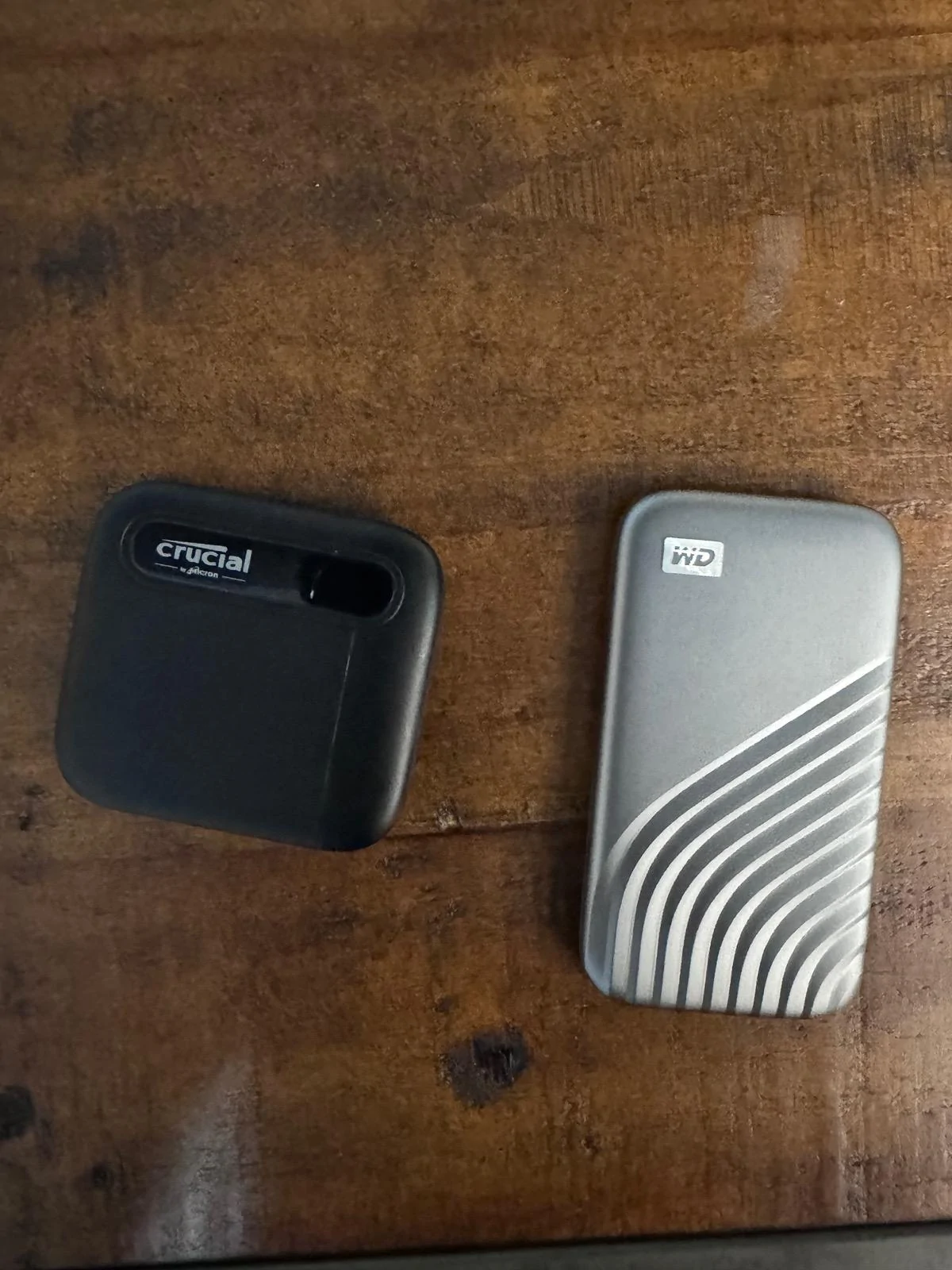
YES, you can use either. Some people on here say the thumb drives are more reliable and have less issues for different reasons. I don't know if that's true or not. However I did use Velcro I stick on my drive and then on the inside of the glovebox to keep it from sliding around. I also used a solid state drive which is pretty well established to be more reliable than a standard HDD.

Couple things I learned when researching, buying, and putting in a new one that might save you some time looking into this (and yes I realize this is oversimplified but it might help others as well).

1) The Cybertruck comes with a thumb drive (at least the founders edition I have came with one). As others have mentioned Tesla sells others you can buy. However, according to people on Reddit, Tesla just rebadges Samsung drives and, in true Tesla fashion, jacks up the price.

2) For some reason the Cybertruck uses the older USB 2.0 speed. Because it's older you can usually find USB 2.0 external drives on sale (I bet there will be some in sale on prime day coming up July 16). Also, all the new ones are backwards compatible (ex. 3.0 would work) but it will go at USB 2.0 data transfer feeds.

3) There is a lot of space in the glovebox (unless you put a bunch of other stuff in there obviously), so you don't need to pay a lot more for one of the super small ones. I fact I have a bunch of old drives lying around and all the ones I have, even the ones that feel like they are the size and weight of a brick fit.

4) As others have mentioned it's USB A (ie. the rectangle connector that everyone used before the smaller USB-Cs came around). I don't know if people here have mentioned it but USB C to USB A adapters WILL work (ex. USB C drive -> USB C to USB A cable -> Cybertruck).

5) The Cybertruck can format the drive after you connect it for the first time. (I don't think my model 3 or the other models have this, but I could be wrong). Thus, don't worry about the posts on here describing how to format it, outside software/programs, etc. Just buy one, connect it, and touch the option on the Cybertruck screen to "format drive".
 
  • Like
Reactions: AV7


rudedawg78

Well-known member
First Name
Ernie
Joined
Jun 8, 2020
Threads
46
Messages
1,814
Reaction score
3,019
Location
South Carolina
Vehicles
2024 AWD Cybertruck (Foundation Series) "Wraith"
Occupation
Retired USAF, Emergency Manager
Country flag
Maybe I missed, but I don't think anyone answered your question. Looks like many are to busy telling you what you should and shouldn't do. Lol.

YES, you can use either. Some people on here say the thumb drives are more reliable and have less issues for different reasons. I don't know if that's true or not. However I did use Velcro I stick on my drive and then on the inside of the glovebox to keep it from sliding around. I also used a solid state drive which is pretty well established to be more reliable than a standard HDD.

Couple things I learned when researching, buying, and putting in a new one that might save you some time looking into this (and yes I realize this is oversimplified but it might help others as well).

1) The Cybertruck comes with a thumb drive (at least the founders edition I have came with one). As others have mentioned Tesla sells others you can buy. However, according to people on Reddit, Tesla just rebadges Samsung drives and, in true Tesla fashion, jacks up the price.

2) For some reason the Cybertruck uses the older USB 2.0 speed. Because it's older you can usually find USB 2.0 external drives on sale (I bet there will be some in sale on prime day coming up July 16). Also, all the new ones are backwards compatible (ex. 3.0 would work) but it will go at USB 2.0 data transfer feeds.

3) There is a lot of space in the glovebox (unless you put a bunch of other stuff in there obviously), so you don't need to pay a lot more for one of the super small ones. I fact I have a bunch of old drives lying around and all the ones I have, even the ones that feel like they are the size and weight of a brick fit.

4) As others have mentioned it's USB A (ie. the rectangle connector that everyone used before the smaller USB-Cs came around). I don't know if people here have mentioned it but USB C to USB A adapters WILL work (ex. USB C drive -> USB C to USB A cable -> Cybertruck).

5) The Cybertruck can format the drive after you connect it for the first time. (I don't think my model 3 or the other models have this, but I could be wrong). Thus, don't worry about the posts on here describing how to format it, outside software/programs, etc. Just buy one, connect it, and touch the option on the Cybertruck screen to "format drive".
Thank you for the thorough response. It is funny, because right before I read this, I was formatting and partitioning my 2TB SSD drive. Actually one of the drives someone recommended in this thread (Samsung T7 Touch). I followed Tesla's guidance and formatted it as exFAT and I created separate partitions for TeslaCam, Music, Boombox, and LightShow. Thank you for the velcro idea, I definitely want to do that because I know this drive will slide around a lot. I get my Cybertruck on Monday and will see if my drive setup works and the CT recognizes everything that is on it.
 

wtibbit

Well-known member
First Name
Wayne
Joined
Aug 27, 2020
Threads
12
Messages
819
Reaction score
1,617
Location
DFW
Vehicles
Cybertruck AWD FS, Mercedes sedan, Corvette coupe, 1968 Cougar XR-7
Occupation
Retired Engineering Program Director
Country flag
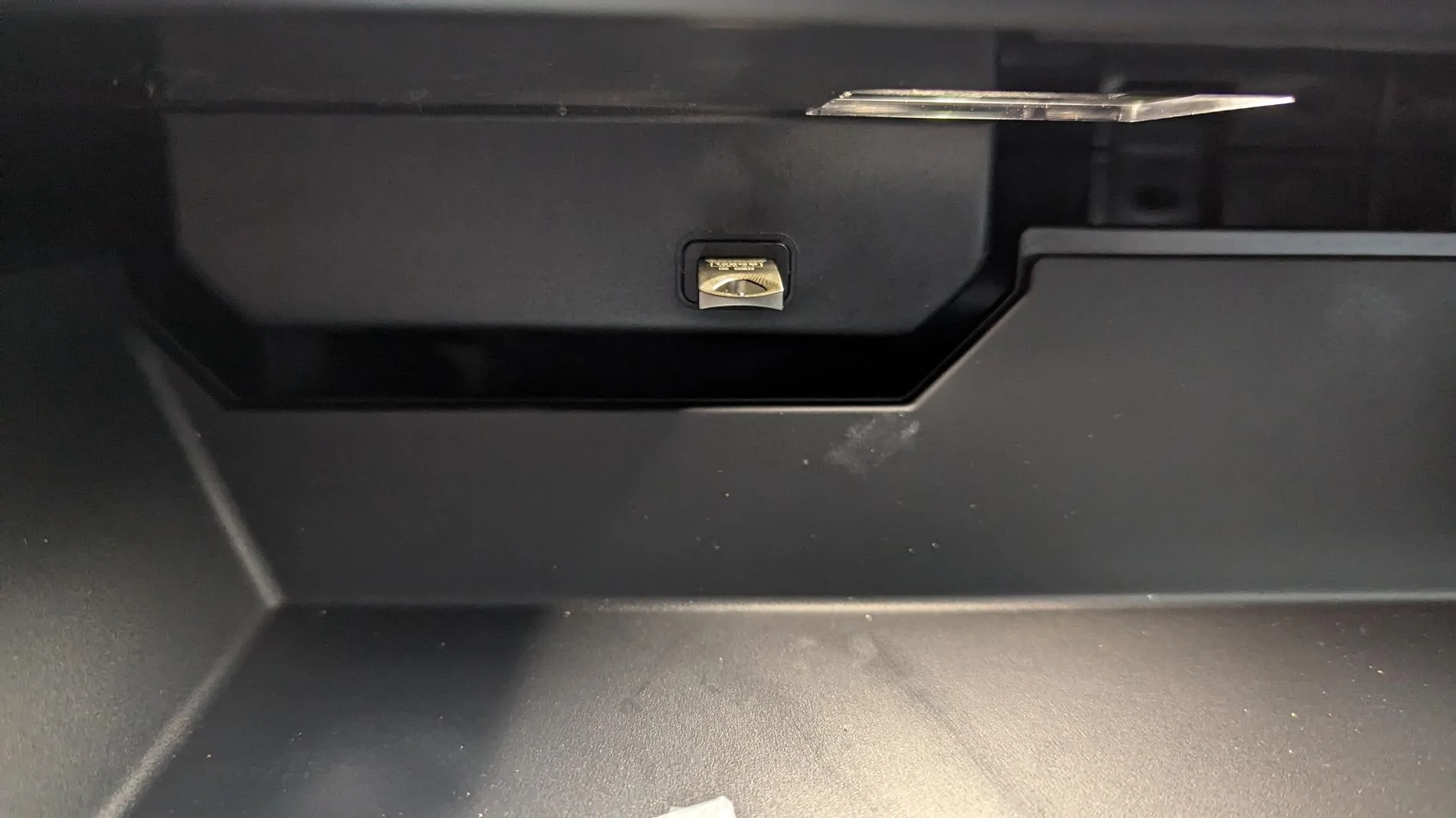
It's on the back wall of the glovebox, silver USB thumb drive
1000031205.jpg
That's a good shot of the stock Tesla thumb drive installed in its location. The back wall of the glovebox is cut out to clear the structure with the USB port. That structure doesn't move with the glovebox, so a large object in the glovebox could be forced against the thumb drive when the glovebox is closed.

I replaced the stock thumb drive with a very small micro SD reader and a 512 MB SanDisk high endurance micro SD card that was developed for constantly operating security cameras. The card is entirely contained in the reader and the installed reader extends just ½ inch from the USB port. This change doubles my storage and reduces the chance of having some object jam against the thumb drive and damage something.

The reader I chose gets low reviews for how difficult it is to remove the card from the reader and how removing the card sometimes damages the reader. I didn't have either of these issues. Also, I'm not planning to remove and replace the card often, if at all. If the reader does get damaged the package comes with three readers for less than $5. Here are links for the two devices.

https://a.co/d/7ojsgEt

https://a.co/d/8enDw4F
 

rudedawg78

Well-known member
First Name
Ernie
Joined
Jun 8, 2020
Threads
46
Messages
1,814
Reaction score
3,019
Location
South Carolina
Vehicles
2024 AWD Cybertruck (Foundation Series) "Wraith"
Occupation
Retired USAF, Emergency Manager
Country flag
There's no way that will fit in the Cybertruck right?
Sure it will. The glovebox will accommodate a pretty large (physical size and digital space) hard drive. Just recommend using velcro or something like that to prevent it from sliding around inside the glovebox.
 

Greyfish

Active member
Joined
Jun 3, 2024
Threads
4
Messages
31
Reaction score
49
Location
Maryland
Vehicles
2024 MS, 2024 CT AWD
Country flag
Just installed the 1TB drive from Tesla in my CyberTruck. It's about 1" X 1.5" X .25" with the connector coming out of the large flat side (but is offset). Fits great, lays flat against the back wall of the glovebox and doesn't stick out like the default one (no Velcro or other support needed, the connector holds it tightly in place). It was pre-formatted and works great!
Sponsored

 
Last edited:
  • Like
Reactions: REM


Top