Sponsored

My cameras stopped working :(

daddyd

Well-known member
Joined
Apr 13, 2024
Threads
19
Messages
63
Reaction score
61
Location
Utah
Vehicles
Cybertruck
Country flag
Have had the truck for a week. Everything was fine until I had it wrapped today. After the day of getting wrapped in his shop, now there is a yellow Triangle notice that says that Autopilot feature wont work. And now side cameras don’t work. Only front and back. And I can’t view my cameras from the app like I used to. Anyone else have this problem? Is there a way to reset things? Anyone have success with this problem and fixing it?
Sponsored


 

igs

Well-known member
Joined
Aug 7, 2023
Threads
45
Messages
1,183
Reaction score
1,730
Location
CA
Vehicles
CT, MX, MY
Occupation
Tesla: "To maintain service life, the battery pack should be stored at a state of charge (SOC) of 15 to 50%."
Country flag
Your wrapper didn't reconnect the camera.
 

BigAl

Well-known member
First Name
Al
Joined
May 17, 2020
Threads
11
Messages
285
Reaction score
590
Location
Texas
Vehicles
CyberTruck
Occupation
Retired
Country flag
Did he take the fender flairs off? If so he removed the cameras.
 

txtravwill

Well-known member
First Name
Travis
Joined
Apr 25, 2024
Threads
7
Messages
511
Reaction score
611
Location
Marble Falls, TX
Vehicles
Tesla, BMW, Ford
Country flag
what does that even mean? Where would he have disconnected it?
Usually when the fenders are removed for a wrap, you have to disconnect the side cameras on them to get them off. Lots of videos on this and it easy.

Some folks have issues when reconnected but I think you may be able to enter service mode if so and trigger new calibration again.

Usually when reconnected are fine though


BLU-UFO

Active member
Joined
Mar 18, 2024
Threads
1
Messages
44
Reaction score
48
Location
SOCAL
Vehicles
Model S Plaid and McLaren 765LT Spider
Country flag
what does that even mean? Where would he have disconnected it?
Most likely when they pulled the fender flares to tuck the film they didn’t reconnect the cameras mounted inside them.
 
OP
OP

daddyd

Well-known member
Joined
Apr 13, 2024
Threads
19
Messages
63
Reaction score
61
Location
Utah
Vehicles
Cybertruck
Country flag
So I am a Tesla newbie and had to figure this out step by step by googling. But for someone else that needs to reset cameras this is what you do. Fixed it for me :)

Go to menu
Software
Long press on Cybertruck logo
Password to enter: service
Enable the secret menu by holding right signal and brake for 8 seconds.
Once inside menu go to Assistance, then cameras. All should be green. My 2 were red. Click Reset DAS.

the cameras all came back online as green
 

Makeodds101

Well-known member
First Name
Ro
Joined
Dec 20, 2022
Threads
12
Messages
195
Reaction score
302
Location
Rhode Island
Vehicles
CYBERTRUCK AWD
Country flag
So I am a Tesla newbie and had to figure this out step by step by googling. But for someone else that needs to reset cameras this is what you do. Fixed it for me :)

Go to menu
Software
Long press on Cybertruck logo
Password to enter: service
Enable the secret menu by holding right signal and brake for 8 seconds.
Once inside menu go to Assistance, then cameras. All should be green. My 2 were red. Click Reset DAS.

the cameras all came back online as green
I’ll just screenshot this… you never know. Mine is getting wrapped now.
 

CyberGus

Well-known member
First Name
Gus
Joined
May 22, 2021
Threads
91
Messages
10,236
Reaction score
33,889
Location
Austin, TX
Vehicles
1981 DeLorean, 2024 Cybertruck
Occupation
IT Specialist
Country flag
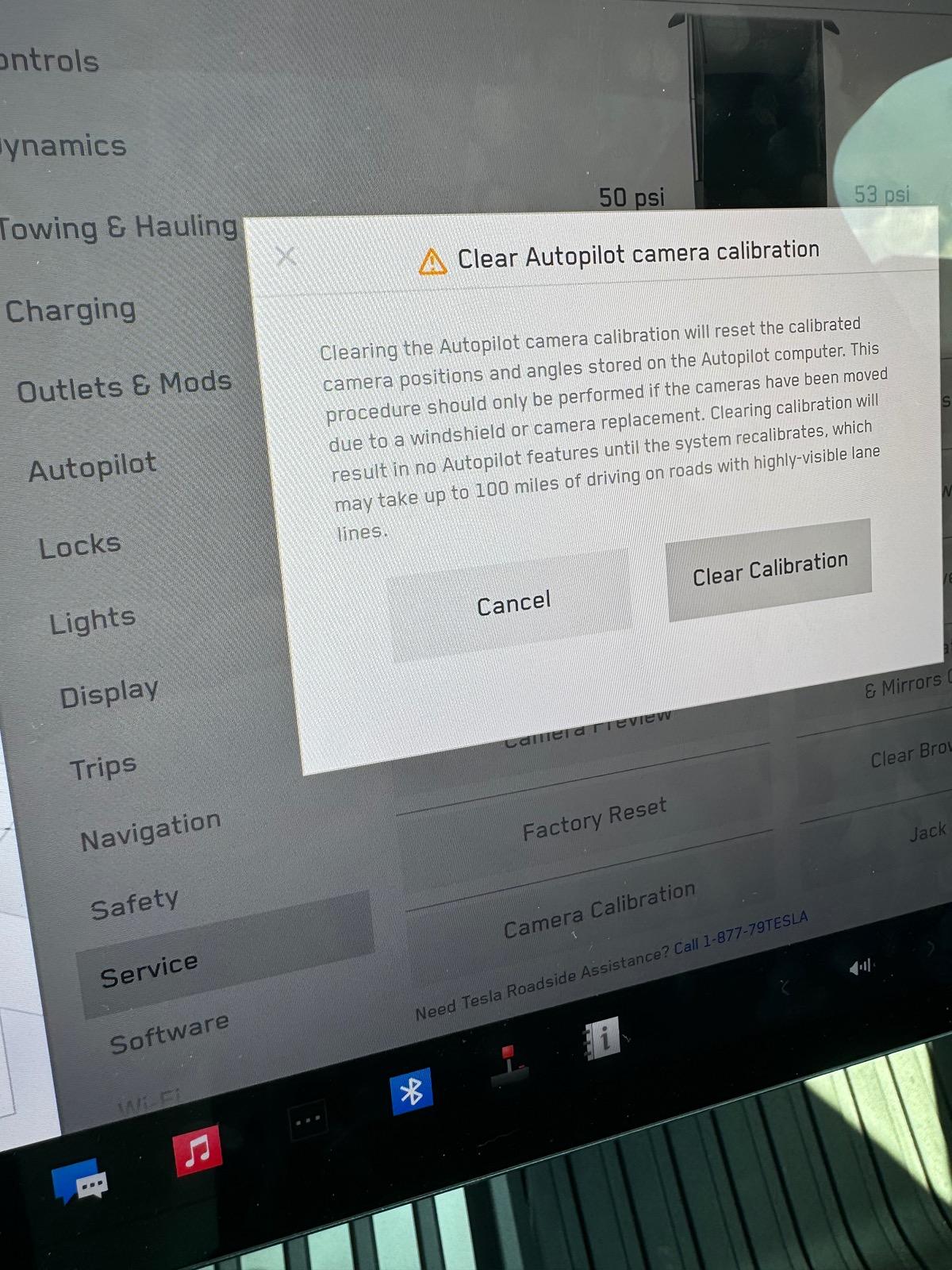
Tesla Cybertruck My cameras stopped working :( IMG_0095

You can also force a camera calibration from the main menu without using Service Mode, but IDK if this is the same thing.
 

Makeodds101

Well-known member
First Name
Ro
Joined
Dec 20, 2022
Threads
12
Messages
195
Reaction score
302
Location
Rhode Island
Vehicles
CYBERTRUCK AWD
Country flag
So I am a Tesla newbie and had to figure this out step by step by googling. But for someone else that needs to reset cameras this is what you do. Fixed it for me :)

Go to menu
Software
Long press on Cybertruck logo
Password to enter: service
Enable the secret menu by holding right signal and brake for 8 seconds.
Once inside menu go to Assistance, then cameras. All should be green. My 2 were red. Click Reset DAS.

the cameras all came back online as green
Just did it when I got my truck… you saved me a headache
 

Known-Background

Well-known member
Joined
Jan 15, 2024
Threads
38
Messages
282
Reaction score
484
Location
Pennsylvania
Vehicles
ModelY, Cybertruck AWD
Country flag
So I am a Tesla newbie and had to figure this out step by step by googling. But for someone else that needs to reset cameras this is what you do. Fixed it for me :)

Go to menu
Software
Long press on Cybertruck logo
Password to enter: service
Enable the secret menu by holding right signal and brake for 8 seconds.
Once inside menu go to Assistance, then cameras. All should be green. My 2 were red. Click Reset DAS.

the cameras all came back online as green
This just worked for me! Love this forum
Sponsored


Top