Sponsored

LiveFreeOrDieBob

Well-known member
First Name
Bob
Joined
Oct 13, 2022
Threads
4
Messages
123
Reaction score
131
Location
New Hampshire
Vehicles
F150, Cyberbeast
Occupation
Contact Center Consulting
Country flag
This worked for me, without first receiving the message.

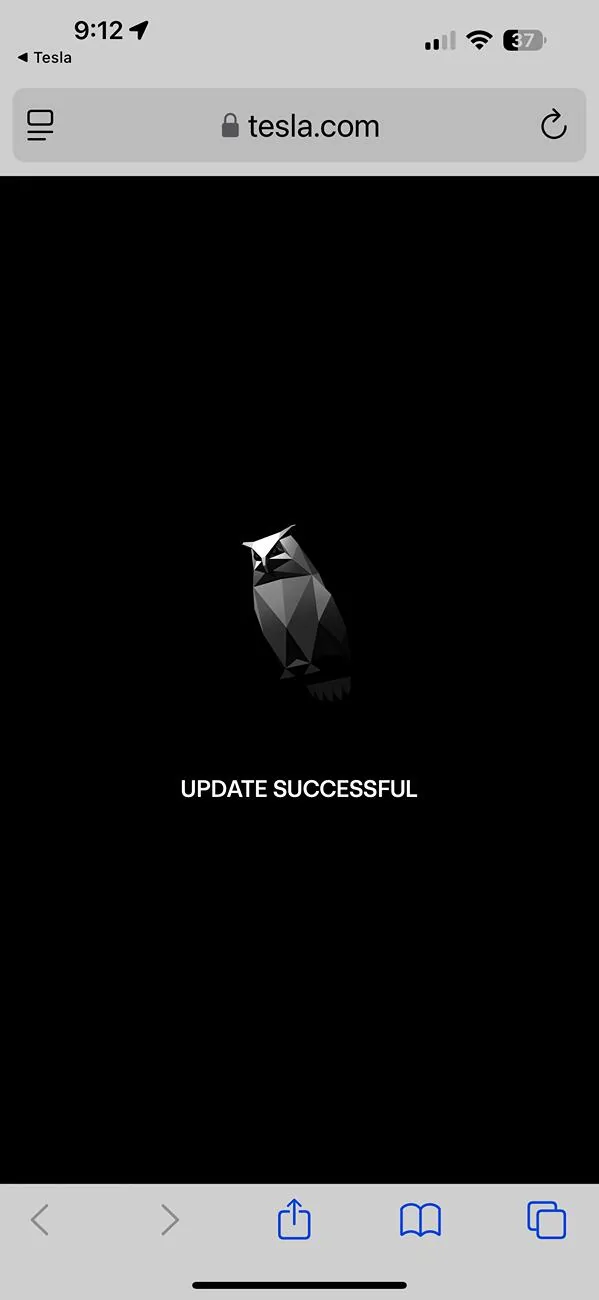
Inserting my information into the url text and browsing to that link resulted in a response page showing the cyber owl and "UPDATE SUCCESSFUL" text. The charge happened sometime within a few minutes of getting the response.

Here are three suggestions:
1. Make sure you want the new horn. You can't go back to the old one - at least, for now.
2. Replace the right and left brackets and the text between them with your VIN and reservation number.
3. Include the "RN" in your reservation number.

Happy cyberhonking!
One more thing - make sure you are using '%24' and not '$' in the option code portion of the URL. It has to be URL-encoded to work, which is basically the way "special characters" like '$' are encoded when used in web addresses. I noticed earlier in the thread that someone put the option code as $CTH1 (CTH1 is probably CyberTruck Horn 1?) and that *is* the option code for the new horn, but you can't put that in the URL with the dollar sign, you have to URL-encode it first.
BTW - if there is anyone out there who is choosing NOT to do this and has the original horn, I wonder if you'd be able to see if there is an option code for the old horn. I'd be surprised if there was, since this option code is referencing a firmware update versus the old horn being a physical horn, but would be interesting to confirm. Maybe if there IS an option code for the old horn, we could change it back by substituting that old option code into the URL?
To see the option codes for your truck (not for the faint of heart/non-techies) you can go on your web browser to the Tesla site, log in, and then view the Details popup for your truck.
Sponsored


 
First Name
Anthony
Joined
Nov 28, 2024
Threads
3
Messages
21
Reaction score
36
Location
NY
Vehicles
Cybertruck Beast | Model Y Performance
Occupation
IT
Country flag
Mine is working today as well, maybe there were delays for some of us getting the download ¯\_(ツ)_/¯
 
Joined
Jul 31, 2024
Threads
6
Messages
21
Reaction score
19
Location
Ohio
Vehicles
Cybertruck AWD Foundation Series, Y
Country flag
https://www.tesla.com/vehicle-update/upgrades?vin=7G2CEHED9RA030776&optionCode=$CTH1&rn=RN114767243
One more thing - make sure you are using '%24' and not '$' in the option code portion of the URL. It has to be URL-encoded to work, which is basically the way "special characters" like '$' are encoded when used in web addresses. I noticed earlier in the thread that someone put the option code as $CTH1 (CTH1 is probably CyberTruck Horn 1?) and that *is* the option code for the new horn, but you can't put that in the URL with the dollar sign, you have to URL-encode it first.
BTW - if there is anyone out there who is choosing NOT to do this and has the original horn, I wonder if you'd be able to see if there is an option code for the old horn. I'd be surprised if there was, since this option code is referencing a firmware update versus the old horn being a physical horn, but would be interesting to confirm. Maybe if there IS an option code for the old horn, we could change it back by substituting that old option code into the URL?
To see the option codes for your truck (not for the faint of heart/non-techies) you can go on your web browser to the Tesla site, log in, and then view the Details popup for your truck.

This 100% worked for me. Paste this into a different browser. It went from no horn to the new Cyber horn. Scared the heck out of my wife this morning :)


cybertruckig

Active member
First Name
Jen
Joined
Feb 23, 2023
Threads
2
Messages
27
Reaction score
31
Location
Indiana
Website
www.instagram.com
Vehicles
Tesla Model 3P + Cybertruck
Occupation
Digital Creative & Business Owner
Country flag
I got the update message, but I'm reluctant since it can't be changed back! It might get annoying after a while, not that I do much honking :)
 

wtibbit

Well-known member
First Name
Wayne
Joined
Aug 27, 2020
Threads
12
Messages
819
Reaction score
1,617
Location
DFW
Vehicles
Cybertruck AWD FS, Mercedes sedan, Corvette coupe, 1968 Cougar XR-7
Occupation
Retired Engineering Program Director
Country flag
I got the update message, but I'm reluctant since it can't be changed back! It might get annoying after a while, not that I do much honking :)
Then, I recommend you hold off until you hear it live, from a Cybertruck. You won't get the full outdoor effect even from a good sound system indoors.


Beerman2011

Member
First Name
Jay
Joined
Sep 17, 2024
Threads
1
Messages
16
Reaction score
11
Location
Virginia
Vehicles
Cybertruck Dual Motor
Country flag
https://www.tesla.com/vehicle-update/upgrades?vin=7G2CEHED9RA030776&optionCode=$CTH1&rn=RN114767243

Paste this in a new browser with your info. It worked for me when mine went silent for a few days.
Thanks! I tried this, and got a "Update Successful" - but still no horn. We will see what happens over night. You might want to change this response so it doesn't show your VIN and RN. Not sure if others can accidently reset things for you. Very much appreciated!
 

Sjohnson20

Well-known member
Joined
Nov 30, 2023
Threads
8
Messages
1,428
Reaction score
2,431
Location
Florida
Vehicles
Cybertruck AWD, Model Y
Country flag
I used the message they sent me in the Tesla app and it seems to have worked, The horn has changed to the new one.
Sponsored


Top