
Sponsored

Speedr
Well-known member
- Joined
- Dec 17, 2023
- Threads
- 15
- Messages
- 665
- Reaction score
- 1,403
- Location
- Florida
- Vehicles
- Dual Motor Cybertruck

Sentry mode, overheat protection, or both are probably on for it to go down that much, that fast. At least in my experience...Man, I hope the drain goes down. My truck has gone from 92% to 56% since Sunday night. Roughly 84 hours. That's almost half a percent per hour. I forgot to turn off cabin overheat protection, but still. Yikes

Dmayo305
Well-known member
- First Name
- Doug
- Joined
- Dec 25, 2023
- Threads
- 8
- Messages
- 292
- Reaction score
- 313
- Location
- Las Vegas
- Vehicles
- Previous: 2014 MS, 2016 MX, 2017.5 MS. Current: 2023 MX, 2024 CT
- Occupation
- Pilot
Both were. I turned off COP, but sentry is still on. It's parked in an airport garage, so probably lots of people walking up to it to take pictures. I tried to hide it in a corner, but you know how it goes. I'm not turning off Sentry, just in case.Sentry mode, overheat protection, or both are probably on for it to go down that much, that fast. At least in my experience...

edc
Well-known member
- First Name
- C
- Joined
- Dec 12, 2023
- Threads
- 15
- Messages
- 242
- Reaction score
- 464
- Location
- CA
- Vehicles
- Tesla Model X, Y, Cybertruck
Yeah agree it's your sentry mode . Its a cybertruck turn it off if you're at the airport. It will auto turn off at 20%. but if you know you'll make it then its okBoth were. I turned off COP, but sentry is still on. It's parked in an airport garage, so probably lots of people walking up to it to take pictures. I tried to hide it in a corner, but you know how it goes. I'm not turning off Sentry, just in case.

SpykeDaddy
Well-known member
- First Name
- Michael
- Joined
- Jan 10, 2024
- Threads
- 2
- Messages
- 146
- Reaction score
- 241
- Location
- Marine on St. Croix
- Vehicles
- 2010 Roadster, 2024 CyberTruck, 2026 Model Y Premium
This updated fixed my side view video feeds that had gone completely black (full view and in turn signal mode). (A side note to the individual who had WIFI issues. I also use Eero at home and have no connection issues with the CT.)
eousphoros
Well-known member
- First Name
- Patrick
- Joined
- Jan 10, 2024
- Threads
- 3
- Messages
- 150
- Reaction score
- 200
- Location
- California
- Vehicles
- Model 3, CyberTruck
One thing that is unfortunate about the cybertruck is it only seems to support wpa or wpa 2 on 2.4ghz. No wpa3 support which is crazy at this point.
Dmayo305
Well-known member
- First Name
- Doug
- Joined
- Dec 25, 2023
- Threads
- 8
- Messages
- 292
- Reaction score
- 313
- Location
- Las Vegas
- Vehicles
- Previous: 2014 MS, 2016 MX, 2017.5 MS. Current: 2023 MX, 2024 CT
- Occupation
- Pilot
Interesting. I run a separate network for WPA2 devices and WPA 3 devices... I'm fairly certain I've used the WPA 3 network with the CT... I'll double check when I get home tonight.One thing that is unfortunate about the cybertruck is it only seems to support wpa or wpa 2 on 2.4ghz. No wpa3 support which is crazy at this point.

araxara
Active member
- First Name
- Alex
- Joined
- Jan 25, 2024
- Threads
- 0
- Messages
- 37
- Reaction score
- 56
- Location
- Tucson, AZ
- Vehicles
- CT, Model X, Lucid Air (DE-R)
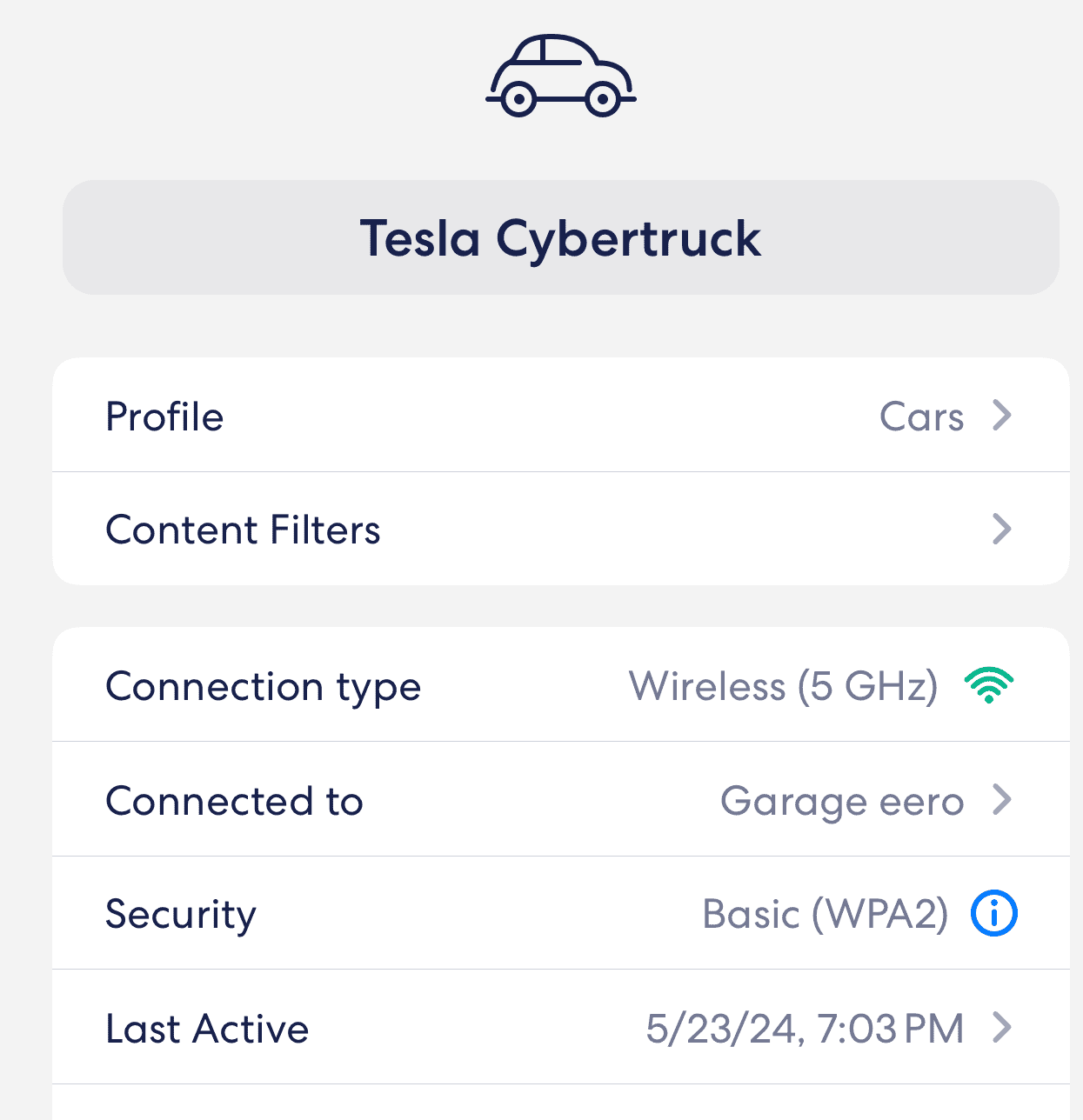
Here it’s connected to 5gHz and WPA2. I have WPA3 enabled:One thing that is unfortunate about the cybertruck is it only seems to support wpa or wpa 2 on 2.4ghz. No wpa3 support which is crazy at this point.
eousphoros
Well-known member
- First Name
- Patrick
- Joined
- Jan 10, 2024
- Threads
- 3
- Messages
- 150
- Reaction score
- 200
- Location
- California
- Vehicles
- Model 3, CyberTruck
Hmm mine has never connected to my 5ghz network and definitely refuses to connect when I have WPA 3 enabled. Ended up setting up a dedicated network for it so I wouldn't have to degrade my entire home network security in order to get it online.Here it’s connected to 5gHz and WPA2. I have WPA3 enabled:

sdocquir
Member
- First Name
- Selim
- Joined
- Apr 1, 2024
- Threads
- 0
- Messages
- 12
- Reaction score
- 16
- Location
- Wichita, KS
- Vehicles
- Cybertruck
Interestingly, this update actually made my side views go black, when they were working before. Reboot doesn't resolve it.d my side view video feeds that
bemis
Active member
- Joined
- Dec 16, 2023
- Threads
- 3
- Messages
- 41
- Reaction score
- 44
- Location
- Detroit, MI
- Vehicles
- 2018 Model 3 AWD
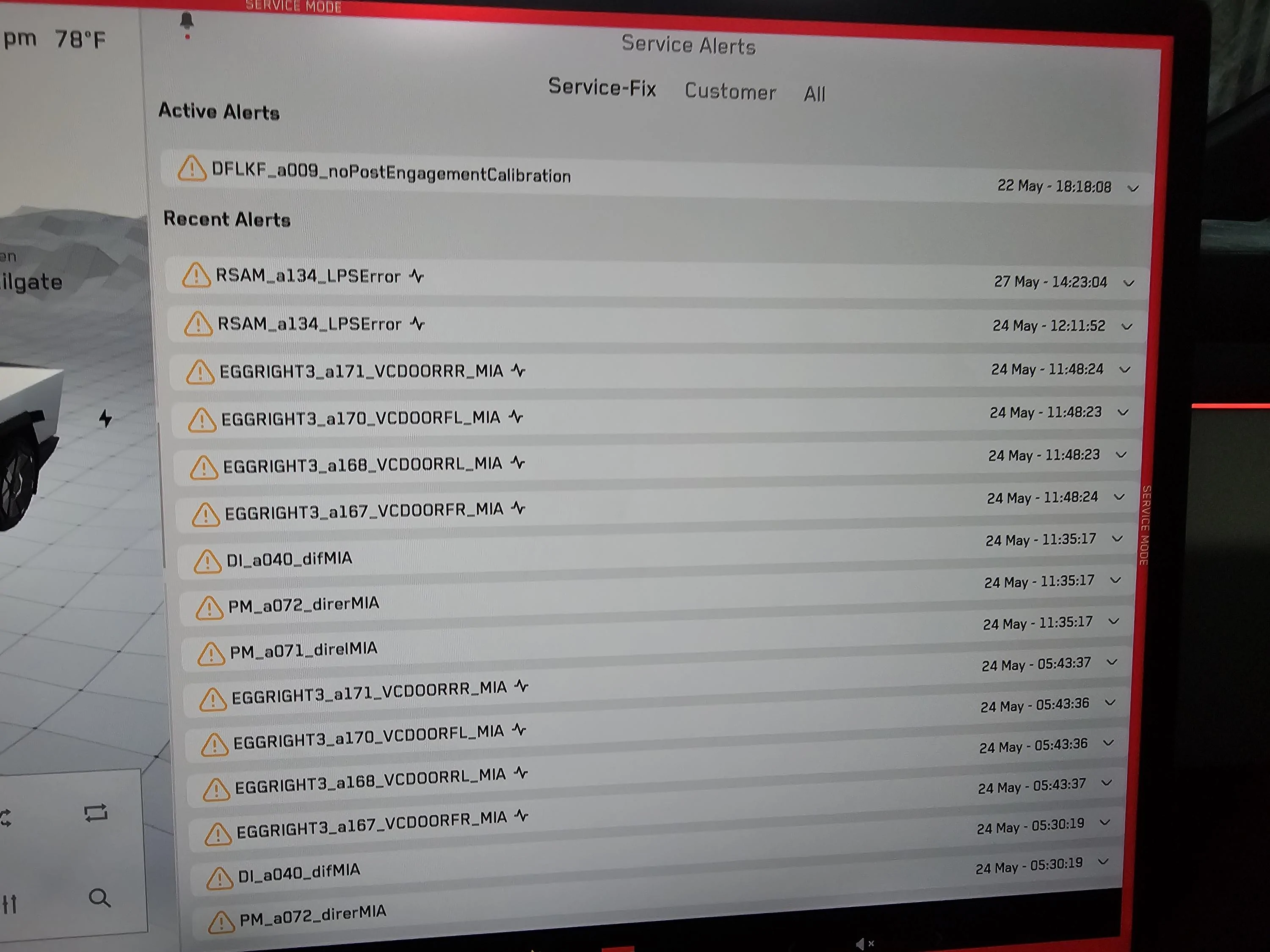
Installed this update while I was away on vacation...thought it was weird the truck was draining without recharging since I left it plugged in. Got home to see an error that it 'reached maximum charge limit' and won't charge anymore, and a bunch of errors. Since the battery drained to < 50% while I was gone, just drove it to the service center while I still had enough charge. Waiting to hear what they say
I tried requesting a software reinstall yesterday, but it never completed to the point of being able to install, even letting it sit overnight

I tried requesting a software reinstall yesterday, but it never completed to the point of being able to install, even letting it sit overnight

ggogins
Active member
- First Name
- Greg
- Joined
- Mar 29, 2024
- Threads
- 0
- Messages
- 29
- Reaction score
- 40
- Location
- Texas
- Vehicles
- Grand Wagoneer, ordered Cybertruck
- Occupation
- Programmer
I have eeros and are experiencing the exact same thing you are. Refuses to reconnect without a reboot. And luck finding a solution?I guess this update did not "fix" my WiFi issue. When I drove off after the update, the suspension seemed very hard/stiff, even though it was set to the most comfortable level. I could feel all the bumps and the travel after going over a speed bump was hard, like the truck back-end went down hard. When I got to my destination, I did a reboot and the suspension went back to "normal." I know in the past many people would say to reboot Tesla's after a software update - just in case.
araxara
Active member
- First Name
- Alex
- Joined
- Jan 25, 2024
- Threads
- 0
- Messages
- 37
- Reaction score
- 56
- Location
- Tucson, AZ
- Vehicles
- CT, Model X, Lucid Air (DE-R)
No solution so far. I did notice that it actually constantly tries to reconnect, because I see the car connection in eero come and go. Interestingly, when it does connect briefly, it has a bunch of IP6 addresses (external, internal & link-local). But when it truly connects (with a green checkmark), it only shows the IP4 address. I was tempted to turn off IP6 support, but I may have other devices using it.I have eeros and are experiencing the exact same thing you are. Refuses to reconnect without a reboot. And luck finding a solution?
My 2023 Model X does not have this problem.
ggogins
Active member
- First Name
- Greg
- Joined
- Mar 29, 2024
- Threads
- 0
- Messages
- 29
- Reaction score
- 40
- Location
- Texas
- Vehicles
- Grand Wagoneer, ordered Cybertruck
- Occupation
- Programmer
Good observation, I have IP6 on as well. I may turn it off and see what happens.No solution so far. I did notice that it actually constantly tries to reconnect, because I see the car connection in eero come and go. Interestingly, when it does connect briefly, it has a bunch of IP6 addresses (external, internal & link-local). But when it truly connects (with a green checkmark), it only shows the IP4 address. I was tempted to turn off IP6 support, but I may have other devices using it.
My 2023 Model X does not have this problem.
Sponsored


