
Sponsored
sharpgator
Well-known member
- First Name
- Scott
- Joined
- Feb 23, 2024
- Threads
- 6
- Messages
- 308
- Reaction score
- 342
- Location
- Birmingham, AL
- Vehicles
- 26 AWD CT, M3

I believe your alarm has to be triggered before you get a view from you phone.
CYBEAST
Well-known member
- First Name
- Jason
- Joined
- Dec 17, 2023
- Threads
- 14
- Messages
- 308
- Reaction score
- 427
- Location
- Destin, Florida
- Vehicles
- Cyber Beast
- Occupation
- Real Estate
Ditto. I can’t figure out how to see any of the dash cam footage either
Celiboy
Well-known member
- First Name
- Marcel
- Joined
- May 3, 2023
- Threads
- 8
- Messages
- 983
- Reaction score
- 1,513
- Location
- Clovis, California
- Vehicles
- 2018 Model 3, 2022 Model Y, 2024 AWD Cybertruck
- Occupation
- Family Nurse Practitioner, Psychiatric Mental Health Nurse Practitioner
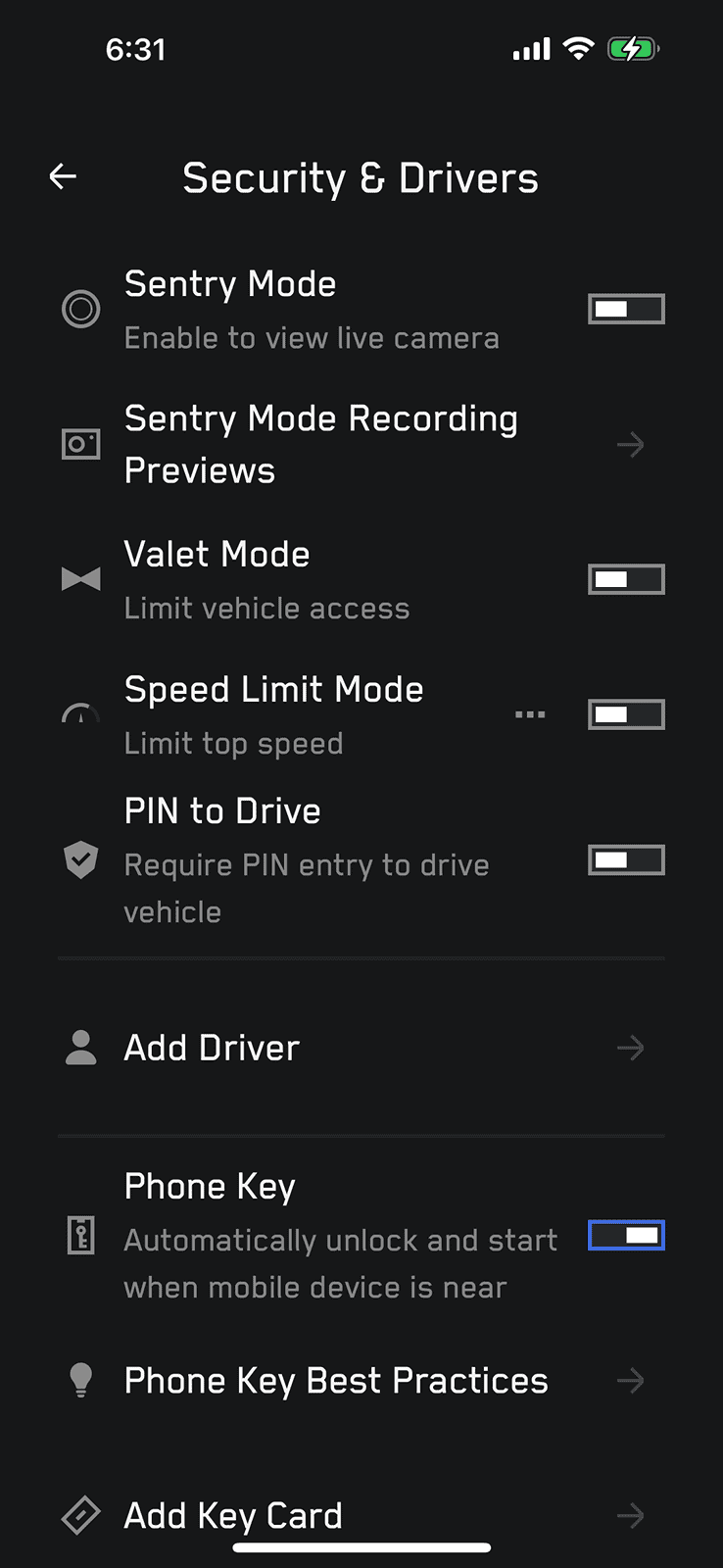
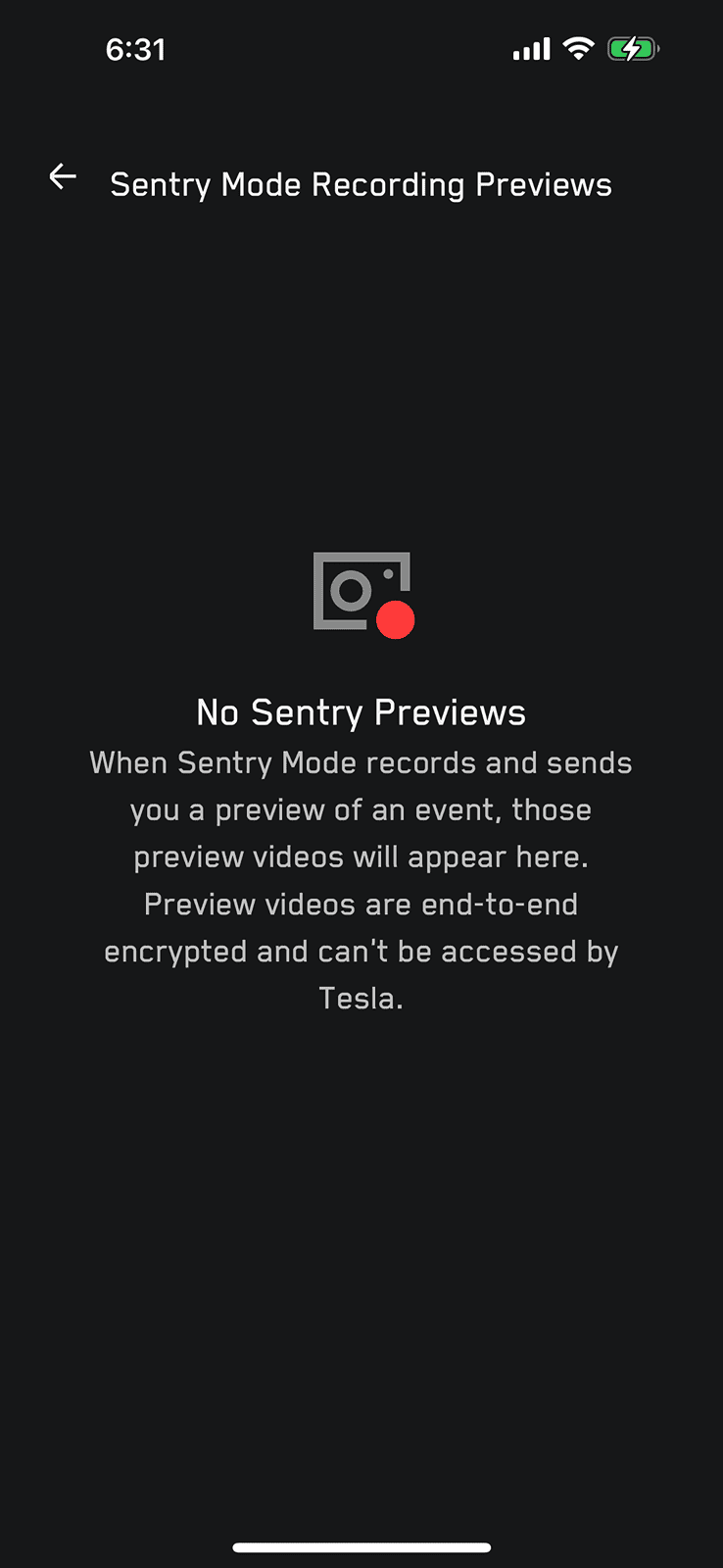
I may not be understanding what you’re asking so please bare with me if you already know this. With sentry mode enabled, you can get to the previews in the Tesla app through the “security and drivers” section. The second option from the top will be to see the preview video. However there is a disclaimer when you click on the preview that if it records and sends you one it’ll be there. I haven’t used the feature yet so I don’t have an answer if it’s not sending the clips at all. Hopefully this helps a little.My 2020 Y does not offer "Sentry mode previews" but the CT suggests I can review previews on my phone?
For some reason I'm not seeing any previews?
Any ideas how to enable?
Aegeas
Member
- Joined
- Dec 27, 2023
- Threads
- 3
- Messages
- 19
- Reaction score
- 29
- Location
- Washington
- Vehicles
- Cybertruck Cyberbeast
Having the exact same issue. Sentry events happen but I never receive the previews in the app.

ideaXfactory
Well-known member
Same issue.

Aegeas
Member
- Joined
- Dec 27, 2023
- Threads
- 3
- Messages
- 19
- Reaction score
- 29
- Location
- Washington
- Vehicles
- Cybertruck Cyberbeast
Still nobody else watching this issue?

MilliVanilli
Well-known member
I’m pretty sure you only get a preview video for critical Sentry incidents (like someone hitting your parked car). Tesla didn’t make it very clear, though.

Venusfly
Active member
- First Name
- Jochen
- Joined
- Jan 1, 2024
- Threads
- 7
- Messages
- 40
- Reaction score
- 82
- Location
- Ann Arbor
- Vehicles
- Raptor, H1, early order Cybertruck
I have the same issue with no videos in the I-phone app.
1) If a video is only triggered by a major alarm event, can someone please clarify so we know?
2) Is disabling sentry sounds going to affect this functionality?
3) While we are on this topic, how do I retrieve/view sentry or dashcam videos when in the CT? I saw them once while playing around, and can’t figure out how to view them again.
Much appreciated.
1) If a video is only triggered by a major alarm event, can someone please clarify so we know?
2) Is disabling sentry sounds going to affect this functionality?
3) While we are on this topic, how do I retrieve/view sentry or dashcam videos when in the CT? I saw them once while playing around, and can’t figure out how to view them again.
Much appreciated.

CyberGus
Well-known member
- First Name
- Gus
- Joined
- May 22, 2021
- Threads
- 91
- Messages
- 10,238
- Reaction score
- 33,893
- Location
- Austin, TX
- Vehicles
- 1981 DeLorean, 2024 Cybertruck
- Occupation
- IT Specialist
“You can view recorded footage on the touchscreen when Cybertruck is in Park. Touch the Dashcam icon located in the app launcher. The tabs display a list of all video clips, organized by location and timestamp. Pause, rewind, fast forward, and delete clips as needed. Swipe to the right or press and hold to quickly delete certain clips.”how do I retrieve/view sentry or dashcam videos when in the CT?
https://www.tesla.com/ownersmanual/...tml#GUID-C66C55E4-B64F-4104-905C-2E43671CCA7B
Aegeas
Member
- Joined
- Dec 27, 2023
- Threads
- 3
- Messages
- 19
- Reaction score
- 29
- Location
- Washington
- Vehicles
- Cybertruck Cyberbeast
This is not in the vehicle interface. This is in the app. There should be previews populating into the app and they aren’t there. Something is broken.
CarMan ElecTruck
Well-known member
- Joined
- Feb 13, 2024
- Threads
- 4
- Messages
- 794
- Reaction score
- 886
- Location
- Other Earth
- Vehicles
- LeftFoot RightFoot
This is a little misleading.. I think the reality is that only the recorded events which triggers the alarm (siren or honks) will be sent…
not ALL recordings.
I too would like clarity as I noticed this long ago.
not ALL recordings.
I too would like clarity as I noticed this long ago.
Sponsored


