Sponsored

BobSaidSo

Active member
First Name
Jawn
Joined
Jan 28, 2024
Threads
0
Messages
42
Reaction score
91
Location
OR
Vehicles
Cybertruck
Country flag
Weird! Waiting for my update but this is exciting news.
Our Cybertruck seems to also be sleeping now even though still on 14.11. Waiting for update 20.1, however looks like vampire drain might have been addressed in the cloud as before last night, we were losing about 6-8 miles each night in drain. Will check more today as we will not be driving today.
Sponsored


AlmostHuman

Well-known member
Joined
May 1, 2024
Threads
7
Messages
987
Reaction score
1,350
Location
Earth
Vehicles
Model X, Cybertruck
Occupation
Human
Country flag
It's just semantics/definition.
The public doesn't know how the controls screen and terminology will change once FSD is rolled out, but there is a screen named "Autopilot" and, except for the FSD on/off slider, everything on that screen is working on my truck. Personally, I think the screen will look just like this for those future buyers who don't pay for FSD.

If you look at you Autopilot controls screen, there are two major functions:

  • Traffic Aware Cruise Control [this is active}
and
  • Full Self Driving. [not active - grayed out] <-this is huge, but ALL of the controls on this AUTOPILOt screen work except for this one
Under TACC there is this control
  • Cruise Follow Distance

There are a number of other Autopilot screen settings that work now and I suspect will be similar once FSD is turned on.

  • Set Speed
  • Offset (to speed limit for the set point)
  • Speed Limit Warning (On/Off, Displayed, Chime)
  • Speed Limit (Relative or Absolute)
  • Offset (for speed limit)
  • Forward Collision Warning (Off, Late, Medium, Early)
  • Lane Departure Avoidance (Off, Warning)
  • Automatic Emergency Braking
  • Obstacle Aware Acceleration
  • Traffic Aware Cruise Control Chime
  • Green Traffic Light Chime
I know tone can be hard in text so please read my messages about this as totally chill. I’m not trying to be frustrating at anyone here.

Those settings you are talking about are not Autopilot screen settings. Most of those are basic safety settings.

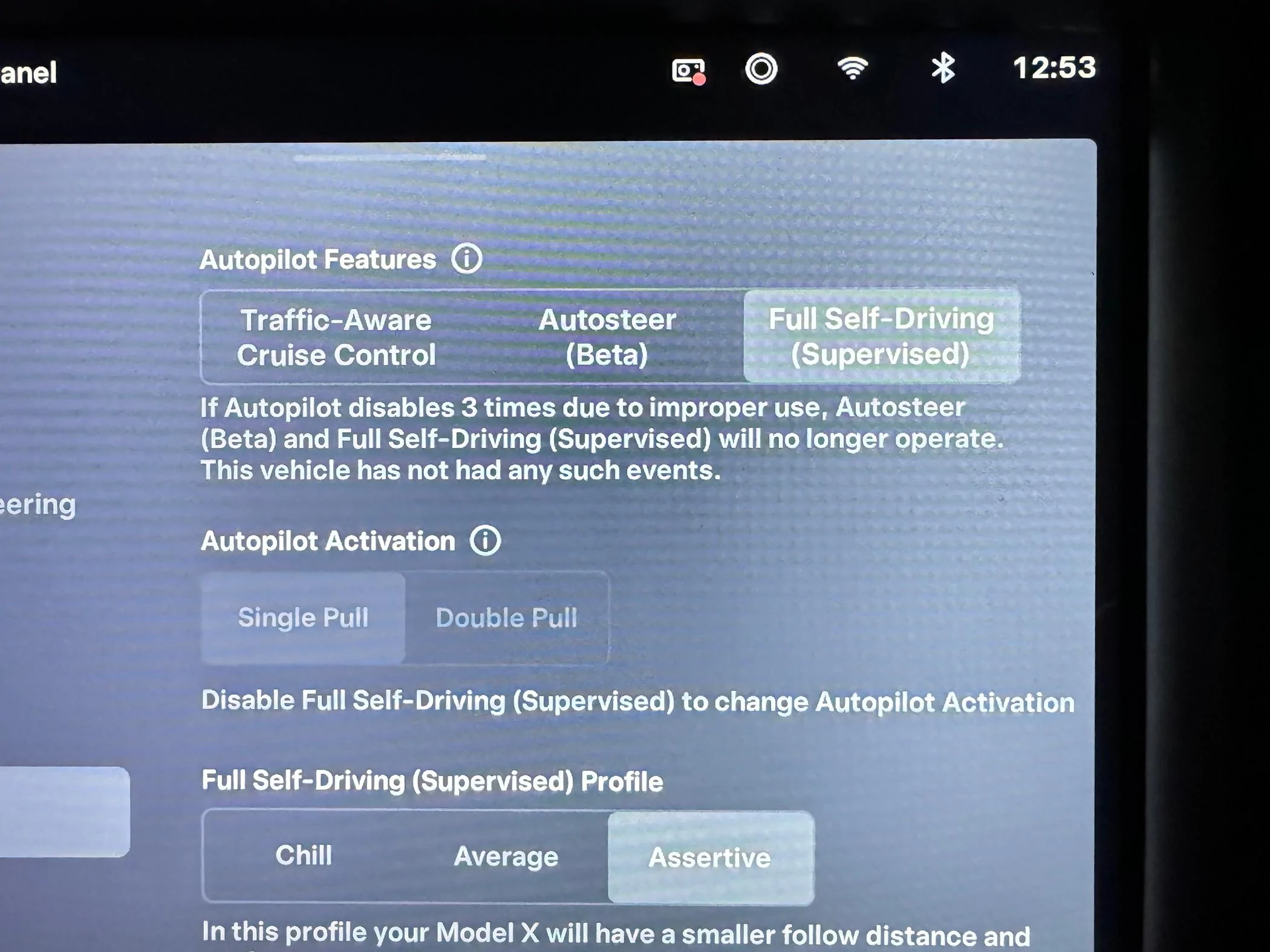
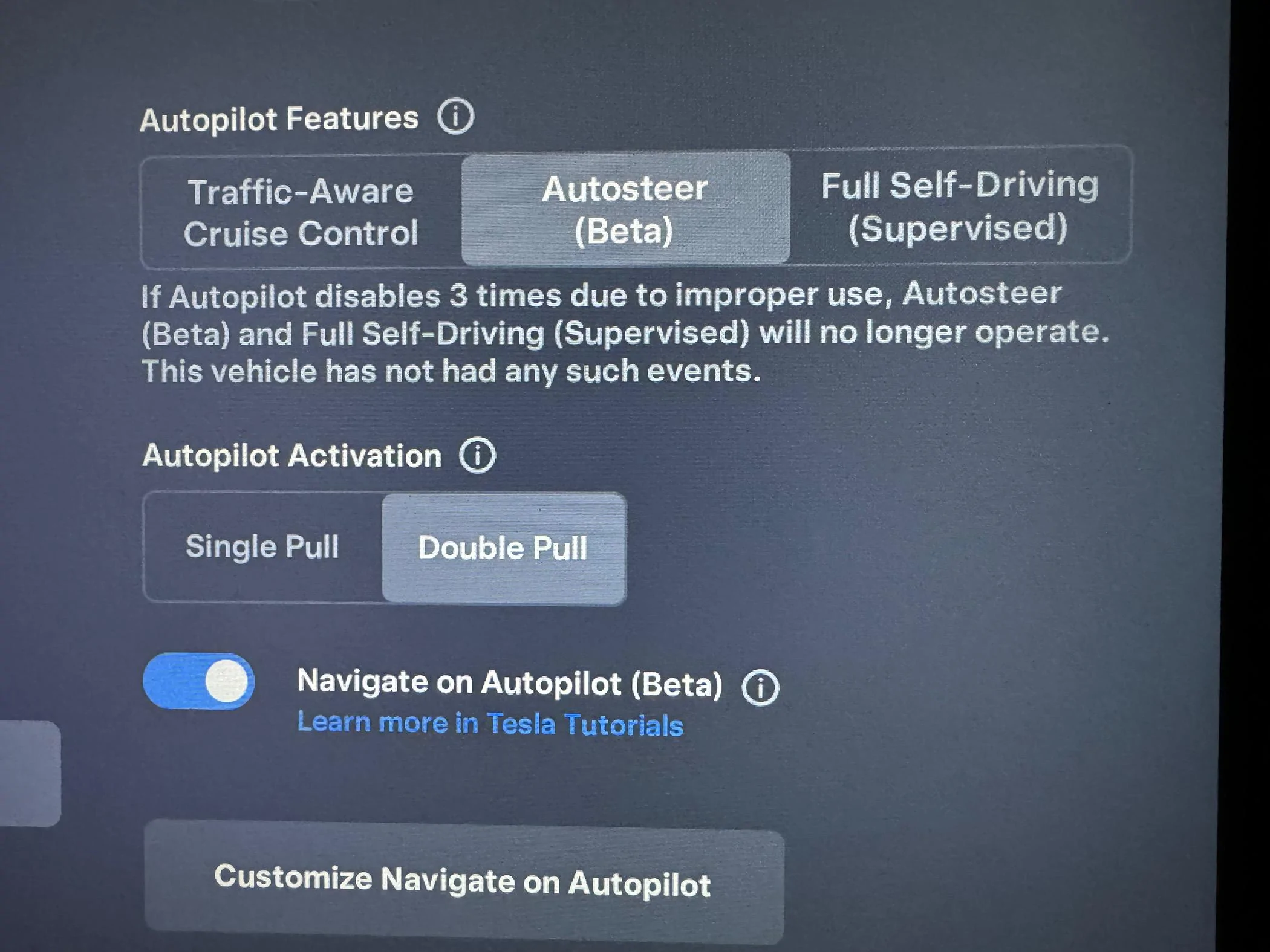
I think it is important however that we understand there are three different settings available when you have FSD on a Tesla vehicle.

Traffic-Aware Cruise Control
Autosteer (Beta) (which can have ”Navigate on Autopilot (Beta)” enabled if you want.*
Full Self-Driving (Supervised)

Right now (to the best of my understanding) all Cybertrucks have only Traffic-Aware Cruise Control. This is not autopilot, autosteer, or FSD.

*The Navigate on Autopilot is what we all had before FSD which allows the ride to change lanes for you (with some settings for that) and follow a route you have set while on a freeway/highway.

Please know I am not trying to be an a$$ or anything, just trying to make sure anyone reading this thread that may not understand all of the settings can get a good understanding. I am also not saying I know everything or that I am absolutely correct here :)

For example on our 2020 Model X:

Tesla Cybertruck Software update 2024.20.1 -- AUTO HVAC improvements for hot weather. The A/C cools down the cabin faster, and maintains comfort at lower noise levels. IMG_8675

Tesla Cybertruck Software update 2024.20.1 -- AUTO HVAC improvements for hot weather. The A/C cools down the cabin faster, and maintains comfort at lower noise levels. IMG_8676
 

PeterOT

Well-known member
First Name
Peter
Joined
Mar 5, 2024
Threads
5
Messages
95
Reaction score
174
Location
San Jose, CA
Vehicles
2019 Model S, 2023 Model Y, Cybertruck
Country flag
How do you engage the TACC in the Cybertruck? I thought it was just a double press of the left scroll wheel. And I swear I did exactly that to engage it successfully last week, however now every time I try it, all it does is pause my music.
 

CyberFreak

Banned
Well-known member
Banned
Joined
Jan 24, 2024
Threads
3
Messages
369
Reaction score
344
Location
USA
Vehicles
CT
Country flag
Interestingly the vampire drain/30min sleep limit seem to have been addressed even prior to installing the update. How is this possible?


OP
OP
wtibbit

wtibbit

Well-known member
First Name
Wayne
Joined
Aug 27, 2020
Threads
12
Messages
819
Reaction score
1,617
Location
DFW
Vehicles
Cybertruck AWD FS, Mercedes sedan, Corvette coupe, 1968 Cougar XR-7
Occupation
Retired Engineering Program Director
Country flag
I know tone can be hard in text so please read my messages about this as totally chill. I’m not trying to be frustrating at anyone here.

Those settings you are talking about are not Autopilot screen settings. Most of those are basic safety settings.

I think it is important however that we understand there are three different settings available when you have FSD on a Tesla vehicle.

Traffic-Aware Cruise Control
Autosteer (Beta) (which can have ”Navigate on Autopilot (Beta)” enabled if you want.*
Full Self-Driving (Supervised)

Right now (to the best of my understanding) all Cybertrucks have only Traffic-Aware Cruise Control. This is not autopilot, autosteer, or FSD.

*The Navigate on Autopilot is what we all had before FSD which allows the ride to change lanes for you (with some settings for that) and follow a route you have set while on a freeway/highway.

Please know I am not trying to be an a$$ or anything, just trying to make sure anyone reading this thread that may not understand all of the settings can get a good understanding. I am also not saying I know everything or that I am absolutely correct here :)

For example on our 2020 Model X:

IMG_8675.webp

IMG_8676.webp
Those settings I described are exactly what is shown on the Autopilot control screen on my Cybertruck. I'm a little puzzled why you would think that showing the actual screen on the truck or listing those settings could do anything but help someone get a good understanding of what functions currently work on the truck.

With that, I won't participate in any further discussion about this topic within this thread. I'll just wait quietly for the release of FSD for the Cybertruck.
 

Woodrick

Well-known member
First Name
Ed
Joined
Dec 30, 2023
Threads
6
Messages
4,786
Reaction score
4,762
Location
Gainesville Ga
Vehicles
Model 3, Model Y, Cybertruck AWD
Occupation
Consultant
Country flag
What the hell ... Mine is still at 14.1
Chill, it can take days or weeks for the fleet to update. You will get it offered when Tesla is ready. NOTHING that you can do can make it come faster.
 

sharpgator

Well-known member
First Name
Scott
Joined
Feb 23, 2024
Threads
6
Messages
312
Reaction score
345
Location
Birmingham, AL
Vehicles
26 AWD CT, M3
Country flag
How do you engage the TACC in the Cybertruck? I thought it was just a double press of the left scroll wheel. And I swear I did exactly that to engage it successfully last week, however now every time I try it, all it does is pause my music.
Right scroll wheel is TACC
 

sharpgator

Well-known member
First Name
Scott
Joined
Feb 23, 2024
Threads
6
Messages
312
Reaction score
345
Location
Birmingham, AL
Vehicles
26 AWD CT, M3
Country flag
I'm still on 14.11 but my vampire drain has dropped considerably today. The Tessie app is reading it at 0%. That's a big deal. I was usually in the 3-6% range prior to today.
 

Woodrick

Well-known member
First Name
Ed
Joined
Dec 30, 2023
Threads
6
Messages
4,786
Reaction score
4,762
Location
Gainesville Ga
Vehicles
Model 3, Model Y, Cybertruck AWD
Occupation
Consultant
Country flag
If your definition of Autopilot is: it steers for you and keeps you in your lane, then, for you, Autopilot doesn’t work.

When I click on the Autopilot menu item on the controls screen and see that ALL of the Autopilot function selections except FSD work, and those functions work as expected while I’m driving, then, for me, Autopilot works.

Depending on definitions, YMMV…. and that’s OK.
And when you get FSD, that screen changes. While it may not be available for Cybertruck, it is the same screen used on the cars.


Woodrick

Well-known member
First Name
Ed
Joined
Dec 30, 2023
Threads
6
Messages
4,786
Reaction score
4,762
Location
Gainesville Ga
Vehicles
Model 3, Model Y, Cybertruck AWD
Occupation
Consultant
Country flag
OK. You convinced me. I'll just quit using it since my truck's Autopilot can't be working ;).

When you get your Cybertruck, hopefully you'll include FSD in your order or your Autopilot won't work, too.

Over and out....
You are being confused by a screen that has things turned off.
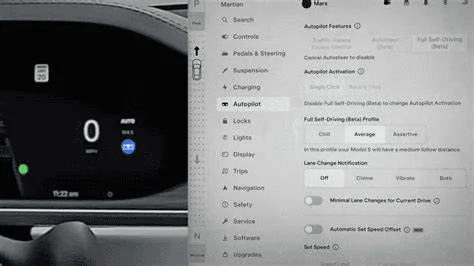
While this picture that I found has lousy resolution, you see the different options under Autopilot.

Tesla Cybertruck Software update 2024.20.1 -- AUTO HVAC improvements for hot weather. The A/C cools down the cabin faster, and maintains comfort at lower noise levels. 1717967031162-sn
 

Woodrick

Well-known member
First Name
Ed
Joined
Dec 30, 2023
Threads
6
Messages
4,786
Reaction score
4,762
Location
Gainesville Ga
Vehicles
Model 3, Model Y, Cybertruck AWD
Occupation
Consultant
Country flag
It's just semantics/definition.
The public doesn't know how the controls screen and terminology will change once FSD is rolled out, but there is a screen named "Autopilot" and, except for the FSD on/off slider, everything on that screen is working on my truck. Personally, I think the screen will look just like this for those future buyers who don't pay for FSD.

If you look at you Autopilot controls screen, there are two major functions:

  • Traffic Aware Cruise Control [this is active}
and
  • Full Self Driving. [not active - grayed out] <-this is huge, but ALL of the controls on this AUTOPILOt screen work except for this one
Under TACC there is this control
  • Cruise Follow Distance

There are a number of other Autopilot screen settings that work now and I suspect will be similar once FSD is turned on.

  • Set Speed
  • Offset (to speed limit for the set point)
  • Speed Limit Warning (On/Off, Displayed, Chime)
  • Speed Limit (Relative or Absolute)
  • Offset (for speed limit)
  • Forward Collision Warning (Off, Late, Medium, Early)
  • Lane Departure Avoidance (Off, Warning)
  • Automatic Emergency Braking
  • Obstacle Aware Acceleration
  • Traffic Aware Cruise Control Chime
  • Green Traffic Light Chime
You seem to forget that there are about 5 million Teslas on the road running pretty much this exact same interface. Since you don't appear to own any other Teslas you are not familiar with what the interface looks like, when populated.
 

Woodrick

Well-known member
First Name
Ed
Joined
Dec 30, 2023
Threads
6
Messages
4,786
Reaction score
4,762
Location
Gainesville Ga
Vehicles
Model 3, Model Y, Cybertruck AWD
Occupation
Consultant
Country flag
Weird! Waiting for my update but this is exciting news.
Go to the vehicle, open settings, go to software, about half-way down on the scrolled down page is what software you have and if your software is up to date.


I can tell you now, that software releases are NEVER consistent across the fleet. They aren't even consistent across Models.
Updates take days, week, and sometimes a month to roll out.

There is NOTHING that you can do to make the software come faster. It will get offered to your vehicle when Tesla wants it to be.

Chill
 

MyFirstElectricTesla

Well-known member
Joined
Mar 21, 2024
Threads
67
Messages
539
Reaction score
440
Location
SoCal
Vehicles
Benz
Country flag
I'm not sure I would upgrade to 20.1. Just got back and check the app: 2 days sleeping.

I think I'm gonna wait for FSD upgrade, just don't want to mess with 14.11 while vampire drain is gone for now.
Sponsored


Top