Sponsored

Supercharger charging time estimate?

Idrenak

Well-known member
First Name
Doug
Joined
Apr 27, 2023
Threads
10
Messages
54
Reaction score
146
Location
Liberty Mo
Vehicles
Ram 1500
Occupation
Business owner
Country flag
I've had my truck for a little over a month and have a trip coming up. I've never charged the truck anywhere but at home. How much time should I plan on spending at a super charger for each stop? I did a search on the forums but couldn't find anything.
Sponsored


 

Gaximus

Well-known member
Joined
Jun 22, 2024
Threads
23
Messages
1,460
Reaction score
2,284
Location
Mead, CO
Vehicles
CyberBeast, Model 3, Jeep Wrangler, Yamaha R6
Occupation
Software Developer
Country flag
Put your trip in the app, or in the map under the screen. and it'll tell you where to stop and how long you'll be there. It's very accurate. It'll round up to the nearest 5 minute increment, for your charging time.
 

dmrasm

Member
First Name
David
Joined
Mar 31, 2024
Threads
0
Messages
22
Reaction score
24
Location
OR
Vehicles
Cybertruck, 4Runner, sienna
Occupation
Bone Carpenter
Country flag
If you allow the navigation on your truck to plan the charging stops it will plan for about 30-45 minutes of charging per session. It will typically charge to about 70-80% and you will run it down to about 20%. Charging speeds slow way down after 80-85%. I just did 1300 miles from Oregon to San Diego and these were my typical numbers if I let the app do its thing. You can of course choose to charge for longer (the app will notify you when you have sufficient charge to continue your planned trip) and this will allow for less frequent charging stops. In the end total time spent charging will be comparable if you charge according to the app vs charging longer for fewer stops. On my trip I would occasionally charge for longer up to 95% if I knew I was going to be at that location for longer getting lunch or something. When I got back to the truck it would usually update the charging stops if I charged longer but sometimes it wouldn’t so I would typically end the navigation and input my destination again so that it would recalculate the stops appropriately.
 

Woodrick

Well-known member
First Name
Ed
Joined
Dec 30, 2023
Threads
6
Messages
4,786
Reaction score
4,762
Location
Gainesville Ga
Vehicles
Model 3, Model Y, Cybertruck AWD
Occupation
Consultant
Country flag
I've had my truck for a little over a month and have a trip coming up. I've never charged the truck anywhere but at home. How much time should I plan on spending at a super charger for each stop? I did a search on the forums but couldn't find anything.
Use the Tesla built-in nav system, it will take care of you, it will make it nearly impossible to run out of charge.
Just go to the vehicle right now, hot the mic button and say, "Navigate to XXX". It will think for a second or two and give you it's recommended route. It will list each charging stop and the time that you will need to stay at each one.

Of course the next time you do the same thing, it may give you a different answer, because your current charge level may be different. But even if the charge level is identical, it can be different because it uses current traffic conditions and even how many people are headed to the selected Supercharger as decision criteria.

The nav system is now AI based and as many AI solutions can do, it may hallucinate a solution. They are easy to see because they can include back-tracking, stupid charging recommendations, like leave the house at 100% and go 5 miles and stop for 20 minutes to charge back up to 100%. If this happens, just get it to recalculate.

In general, you will have options and don't have to go to the specific Superchargers that the nav system suggests. If you'd rather go to another one, just add it as a waypoint. By adding it as a waypoint, it makes sure that the batteries are properly preconditioned when you get there for the fastest charging.
For example, if going east, a Columbia Mo Supercharger, may be recommended as a stop. There's three in Columbia and you can probably choose any of them.
The first, to the west is at a Hy-Vee
The next is at Bandana's BBQ
And the last is Holiday Inn.
The nav probably won't pick the last, because that's a 150kW Supercharger and takes longer than a 250kW (assuming that you are currently less than 50% charge). Between the other two, things like are you hungry and want BBQ can come into play.
In the car, it will show the amenities and if you click on it, the vehicle will search for the nearby options.

Don't charge over 80% at a Supercharger, it's too slow and extremely seldom needed.

Trust the nav, always make sure that you are routing to your destination. I often set home as my destination and add my actual destination as a waypoint, then I know I can make it out and back. (FYI return Superchargers are seldom the same as outbound)

If the nav is watching out over you, and it feels that you may not be able to reach your next Supercharger, it will even suggest that you slow down below a certain speed to make sure you get there.


Trust the nav, let the nav watch over you. But the nav only offers suggestion, if something else sound better, add it as a waypoint.

Always make sure that you arrive with some driving around charge and get to a Supercharger to charge.


Gaximus

Well-known member
Joined
Jun 22, 2024
Threads
23
Messages
1,460
Reaction score
2,284
Location
Mead, CO
Vehicles
CyberBeast, Model 3, Jeep Wrangler, Yamaha R6
Occupation
Software Developer
Country flag
In my experience with the Model S and Model 3, you should never be charging over 80%, there is on stretch on a common road trip I make where I needed the full 98% to make it to my final destination(Tesla has since added a charger there). But I usually charge anywhere from 5- 25 minutes, any longer than that and I start manually adding chargers to the route plan. Which means I drive 100-180 miles per stretch to the next charger. Batteries charge fastest from 20%-80% and even faster from 60%-80%, so the more. But if you get to 45% and it'll get next charger at 20% charge, then leave, it's just a waste of time to sit there any longer. The car will tell you "You have enough charge to make it to your next stop" That's your queue to go. I'll have everyone in the car and buckled in, ready for that prompt.
 

REM

Well-known member
Joined
Dec 9, 2023
Threads
14
Messages
3,573
Reaction score
6,636
Location
NC
Vehicles
2020 Model 3 Standard Range++ & Diet Cybertruck, Dual Motor
Occupation
Professional Retard
Country flag

GatorCyber

Well-known member
Joined
Mar 14, 2024
Threads
13
Messages
599
Reaction score
714
Location
Florida
Vehicles
2024 Cybertruck FS; 2023 Model X (w/FSD)
Occupation
Real Estate Developer
Country flag
Get in your Tesla.
Enter destination into NAV.
Route planner will answer all your questions about you trip and charging.
 

Woodrick

Well-known member
First Name
Ed
Joined
Dec 30, 2023
Threads
6
Messages
4,786
Reaction score
4,762
Location
Gainesville Ga
Vehicles
Model 3, Model Y, Cybertruck AWD
Occupation
Consultant
Country flag
In my experience with the Model S and Model 3, you should never be charging over 80%, there is on stretch on a common road trip I make where I needed the full 98% to make it to my final destination(Tesla has since added a charger there). But I usually charge anywhere from 5- 25 minutes, any longer than that and I start manually adding chargers to the route plan. Which means I drive 100-180 miles per stretch to the next charger. Batteries charge fastest from 20%-80% and even faster from 60%-80%, so the more. But if you get to 45% and it'll get next charger at 20% charge, then leave, it's just a waste of time to sit there any longer. The car will tell you "You have enough charge to make it to your next stop" That's your queue to go. I'll have everyone in the car and buckled in, ready for that prompt.
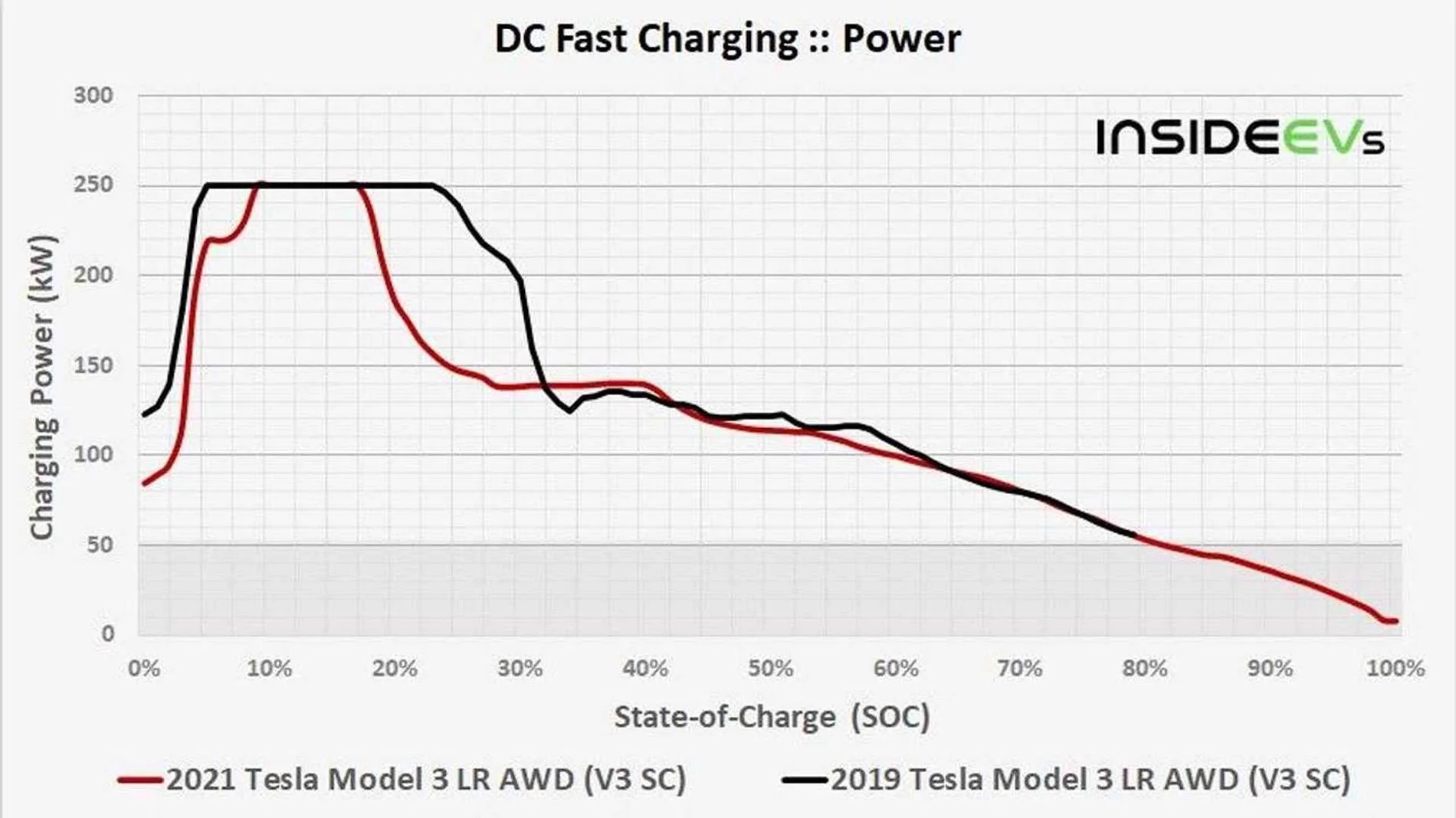
Mostly right, except that batteries charge their fastest from 0-50%. 50-80% takes as long as 0-50% does.
The higher the SoC of the battery, the slower it charges.
 

Gaximus

Well-known member
Joined
Jun 22, 2024
Threads
23
Messages
1,460
Reaction score
2,284
Location
Mead, CO
Vehicles
CyberBeast, Model 3, Jeep Wrangler, Yamaha R6
Occupation
Software Developer
Country flag
Mostly right, except that batteries charge their fastest from 0-50%. 50-80% takes as long as 0-50% does.
The higher the SoC of the battery, the slower it charges.
That sounds right. Except it does charge pretty slow under 10%. Most of my trips I stay under 50% charge. Once you get of the range anxiety it’s not so bad. Took about 3 800 mile trips for me.
Tesla Cybertruck Supercharger charging time estimate? 1723743444039-ma


Woodrick

Well-known member
First Name
Ed
Joined
Dec 30, 2023
Threads
6
Messages
4,786
Reaction score
4,762
Location
Gainesville Ga
Vehicles
Model 3, Model Y, Cybertruck AWD
Occupation
Consultant
Country flag
That sounds right. Except it does charge pretty slow under 10%. Most of my trips I stay under 50% charge. Once you get of the range anxiety it’s not so bad. Took about 3 800 mile trips for me.
1723743444039-ma.jpg
Read and understand what the graph says. And I will say that my results are definitely a little different.

It doesn't say under 10%. it's more like 5%. And you know how many miles that is? 7 miles.
How many people are going to roll in to a Supercharger at less than 7 miles remaining? (I do know that I have a few times.)

Every time that I've plugged in at a low state of charge, that ramp-up isn't because of the batteries, it's the Superchargers ramping up. And I'm at over 250kW as soon as the Supercharger can give it to me.
And don't blink, because it takes well less than 2 minutes to pass 10%!

On the road I rarely go above 60%.
 

Gaximus

Well-known member
Joined
Jun 22, 2024
Threads
23
Messages
1,460
Reaction score
2,284
Location
Mead, CO
Vehicles
CyberBeast, Model 3, Jeep Wrangler, Yamaha R6
Occupation
Software Developer
Country flag
Read and understand what the graph says. And I will say that my results are definitely a little different.

It doesn't say under 10%. it's more like 5%. And you know how many miles that is? 7 miles.
How many people are going to roll in to a Supercharger at less than 7 miles remaining? (I do know that I have a few times.)

Every time that I've plugged in at a low state of charge, that ramp-up isn't because of the batteries, it's the Superchargers ramping up. And I'm at over 250kW as soon as the Supercharger can give it to me.
And don't blink, because it takes well less than 2 minutes to pass 10%!

On the road I rarely go above 60%.
Agreed but supercharger ramping up or battery ramping up doesn’t matter, still takes longer. But I was just saying that it’s probably best to roll into a supercharger with more than 10% and less than 60%. I’ve rolled in With less than 6% and wouldn’t recommend it, got lucky, I’m lost over 10% range before on a 50 mile stretch due to heavy rain. That doesn’t help with anxiety (and I was only driving 35 in the rain)
 

Woodrick

Well-known member
First Name
Ed
Joined
Dec 30, 2023
Threads
6
Messages
4,786
Reaction score
4,762
Location
Gainesville Ga
Vehicles
Model 3, Model Y, Cybertruck AWD
Occupation
Consultant
Country flag
Agreed but supercharger ramping up or battery ramping up doesn’t matter, still takes longer. But I was just saying that it’s probably best to roll into a supercharger with more than 10% and less than 60%. I’ve rolled in With less than 6% and wouldn’t recommend it, got lucky, I’m lost over 10% range before on a 50 mile stretch due to heavy rain. That doesn’t help with anxiety (and I was only driving 35 in the rain)
And you be comfortable where you are comfortable.

When you grow up on a Leaf with an 88 mile range, you get a different perspective on life.
!0% of a Tesla is over 1/3 of that Leaf's range.
 

Cactusrick

Well-known member
First Name
Richard
Joined
Aug 10, 2020
Threads
3
Messages
278
Reaction score
350
Location
AZ
Vehicles
CyberBeast, MYLR, EXT, 380SL
Occupation
retired invest
Country flag
If you allow the navigation on your truck to plan the charging stops it will plan for about 30-45 minutes of charging per session. It will typically charge to about 70-80% and you will run it down to about 20%. Charging speeds slow way down after 80-85%. I just did 1300 miles from Oregon to San Diego and these were my typical numbers if I let the app do its thing. You can of course choose to charge for longer (the app will notify you when you have sufficient charge to continue your planned trip) and this will allow for less frequent charging stops. In the end total time spent charging will be comparable if you charge according to the app vs charging longer for fewer stops. On my trip I would occasionally charge for longer up to 95% if I knew I was going to be at that location for longer getting lunch or something. When I got back to the truck it would usually update the charging stops if I charged longer but sometimes it wouldn’t so I would typically end the navigation and input my destination again so that it would recalculate the stops appropriately.
Great helpful info for everyone driving a Tesla/ Cybertruck...thanks


Top