Sponsored

USB Music Playback

kosmo886

Well-known member
First Name
Brett
Joined
Dec 10, 2023
Threads
52
Messages
101
Reaction score
22
Location
Boston, MA
Vehicles
Model X
Country flag


MacOS instructions here.

BASICALLY [updated 13 May 24]:
  1. Glovebox USB port only (you may want to purchase a larger stick like this one)
  2. Must partition and format (GUID/exFAT) the USB stick
  3. Partition "TESLA":
    1. Folder "TeslaCam" (case-sensitive!)
  4. Partition "LIGHTSHOW":
    1. Folder "LightShow"
  5. Partition "MEDIA":
    1. Folder "Boombox"
    2. Folder "Music"

"Do I really need multiple partitions?" Apparently just adding folders on the primary partition next to "TeslaCam" will not work. Besides, the Sentry/TeslaCam partitions get written heavily, while the others are basically read-only, so it's best to keep them separate. The partition names do not matter, but the folder names are critical and case-sensitive.

Stop any camera recording (Park, and disable Sentry) before removing the USB stick to prevent data loss.

To replace your lock sound, place a file called "LockChime.wav" in the root folder of a USB partition. I used my "MUSIC" partition, I don't know if it will work on any of the others.

Then, in Boombox, you should have a dropdown list for Lock Sounds that includes the choice "USB". Once you select it and test it, the USB drive itself can be removed since the sound is copied. To change to new custom sound, pick something else in the picklist before inserting the updated thumbdrive.

To get a reasonable volume, I used my PC to reduce it by 15db from a "normal" level. I also had to mix it down to mono to stay under the 1MB limit. It must be in WAV format.
Is this in addition to whatever storage is already onboard in the CT? Where does the additional USB stick plug in?
Sponsored


CyberGus

Well-known member
First Name
Gus
Joined
May 22, 2021
Threads
91
Messages
10,238
Reaction score
33,892
Location
Austin, TX
Vehicles
1981 DeLorean, 2024 Cybertruck
Occupation
IT Specialist
Country flag
Is this in addition to whatever storage is already onboard in the CT? Where does the additional USB stick plug in?
The USB port is in the glovebox, the other ports are only for power. The truck should have included a 128G stick for Sentry videos, but it is not partitioned for the other uses.
 

kosmo886

Well-known member
First Name
Brett
Joined
Dec 10, 2023
Threads
52
Messages
101
Reaction score
22
Location
Boston, MA
Vehicles
Model X
Country flag
The USB port is in the glovebox, the other ports are only for power. The truck should have included a 128G stick for Sentry videos, but it is not partitioned for the other uses.
Is it possible to partition it? Or buy an aftermarket drive and use that partitioned?
 

kosmo886

Well-known member
First Name
Brett
Joined
Dec 10, 2023
Threads
52
Messages
101
Reaction score
22
Location
Boston, MA
Vehicles
Model X
Country flag
Sure, it can be partitioned. I opted for a larger drive.
Do you know where I can find formatting instruction on a Mac along with folder names required to use dash cam, sentry, lightshows etc. I'm surprised I haven't found anything definitive yet.


CyberGus

Well-known member
First Name
Gus
Joined
May 22, 2021
Threads
91
Messages
10,238
Reaction score
33,892
Location
Austin, TX
Vehicles
1981 DeLorean, 2024 Cybertruck
Occupation
IT Specialist
Country flag
Do you know where I can find formatting instruction on a Mac along with folder names required to use dash cam, sentry, lightshows etc. I'm surprised I haven't found anything definitive yet.
What did you find lacking in message #10 above?
 

kosmo886

Well-known member
First Name
Brett
Joined
Dec 10, 2023
Threads
52
Messages
101
Reaction score
22
Location
Boston, MA
Vehicles
Model X
Country flag
What did you find lacking in message #10 above?
I got a 1 TB SSD. It sounds like we need 4 partitions with certain folders in each? Is there a list online of exactly what 4 partitions and folder structure are needed along with guidance on size of each partition. I am not interested in storing music on USB, rather this is just for sentry, adding lightshows and that sort of stuff.
 

CyberGus

Well-known member
First Name
Gus
Joined
May 22, 2021
Threads
91
Messages
10,238
Reaction score
33,892
Location
Austin, TX
Vehicles
1981 DeLorean, 2024 Cybertruck
Occupation
IT Specialist
Country flag
Is there a list online of exactly what 4 partitions and folder structure are needed
Yes.


BASICALLY [updated 13 May 24]:
  1. Glovebox USB port only (you may want to purchase a larger stick like this one)
  2. Must partition and format (GUID/exFAT) the USB stick
  3. Partition "TESLA":
    1. Folder "TeslaCam" (case-sensitive!)
  4. Partition "LIGHTSHOW":
    1. Folder "LightShow"
  5. Partition "MEDIA":
    1. Folder "Boombox"
    2. Folder "Music"
You’ll need very little space for the Lightshow and Boombox. Most of the space should be for the TeslaCam folder, particularly if you’re using Sentry mode.
 

cyberos

Well-known member
Joined
Jul 9, 2024
Threads
23
Messages
216
Reaction score
439
Location
Austin, TX
Vehicles
RX 350h, Cybertruck AWD
Occupation
Generative AI
Country flag


MacOS instructions here.

BASICALLY [updated 19 July 24]:
  1. Glovebox USB port only (you may want to purchase a larger stick like this one)
  2. Must partition and format (GUID/exFAT) the USB stick
  3. Partition "TESLA":
    1. Folder "TeslaCam" (case-sensitive!)
  4. Partition "LIGHTSHOW":
    1. Folder "LightShow"
  5. Partition "MEDIA":
    1. Folder "Boombox"
    2. Folder "Music"

"Do I really need multiple partitions?" Apparently just adding folders on the primary partition next to "TeslaCam" will not work. Besides, the Sentry/TeslaCam partitions get written heavily, while the others are basically read-only, so it's best to keep them separate. The partition names do not matter, but the folder names are critical and case-sensitive.

Stop any camera recording (Park, and disable Sentry) before removing the USB stick to prevent data loss.

To replace your lock sound, place a file called "LockChime.wav" in the root folder of a USB partition. I used my "MEDIA" partition, I don't know if it will work on any of the others.

Then, in the Boombox screen, you should have a dropdown list for Lock Sounds that includes the choice "USB". Once you select it and test it, the USB drive itself can be removed since the sound is copied. To change to new custom sound, pick something else in the picklist before inserting the updated thumbdrive.

To get a reasonable volume, I used my PC to reduce it by 15db from a "normal" level. I also had to mix it down to mono to stay under the 1MB limit. It must be in WAV format. (OTA updates keep messing with this volume, so YMMV.)

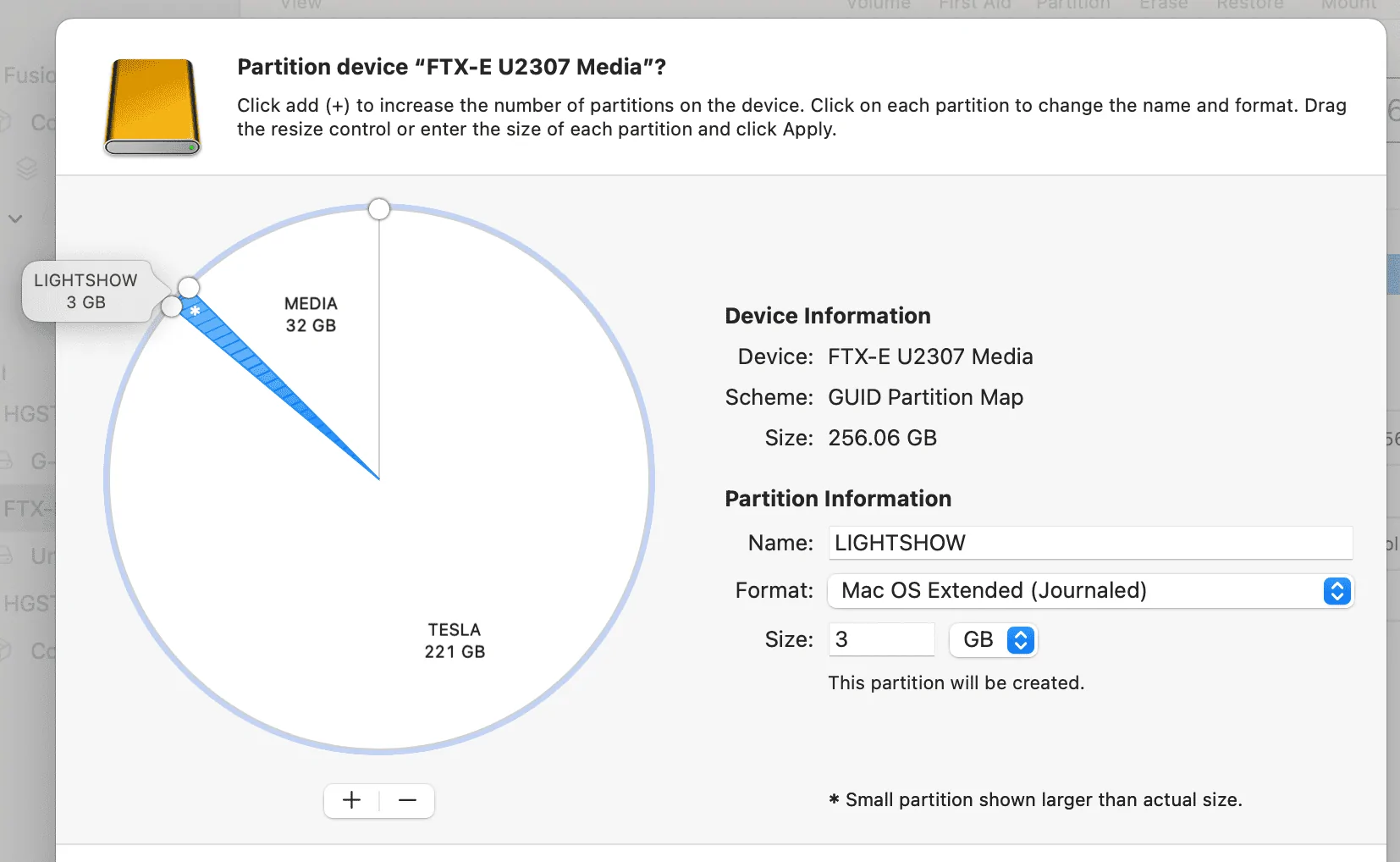
TIP: When formatting on MacOS with Disk Utility, it cannot resize exFAT partitions. Therefore, create all the partitions as "Mac OS Extended", but change them to "exFAT" before clicking Apply.

Screenshot 2024-07-19 at 7.43.04 AM.webp
Bless you Mr. Polar Bear Man ?‍❄!

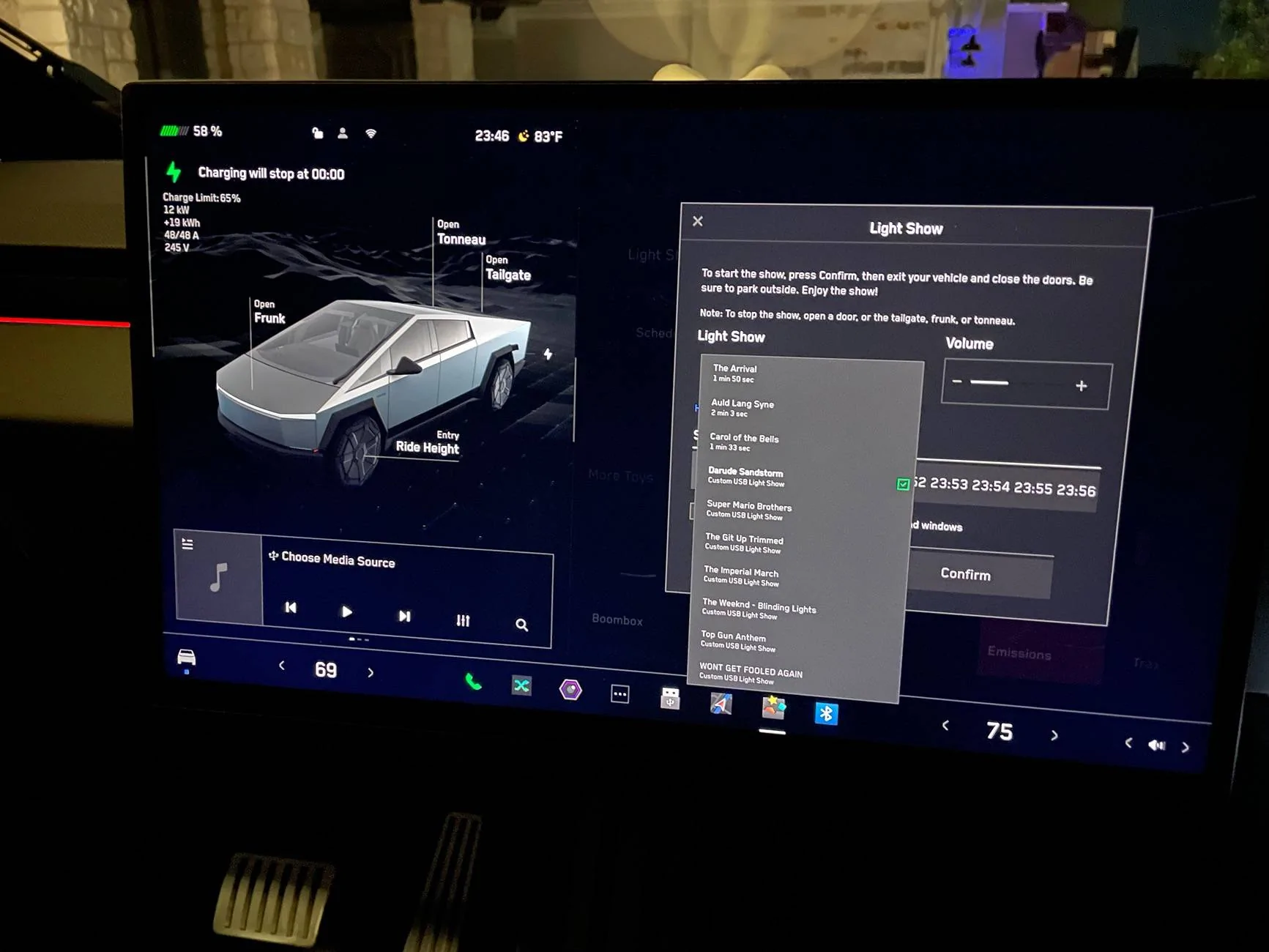
I finally got this madness to work:

Tesla Cybertruck USB Music Playback IMG_7622
 

XCeilidhX

Well-known member
First Name
Drew
Joined
Oct 25, 2022
Threads
10
Messages
405
Reaction score
724
Location
Silicon Valley & Surrounds
Vehicles
Model 3, Model Y, CB 047XXX, previously a Model S
Country flag
OK. I tried the instructions in the video at the top of this thread. Used a Samsung T7 SSD, and created 2 partitions. One is called TESLA, the other called MEDIA. Created the folders as specified in each partition. Pulled out the installed thumbdrive and plugged in the SSD. Nothing appeared to suggest that I could play the MP3 files I had loaded into the Music folder on the MEDIA partition. Just looked at the thumbdrive from the CT, and its partition is named TESLADRIVE. The new SSD is being used by the cameras, as it has video clips on it that I did not copy to it. But I'm not seeing any way to access the MP3 files through the media player. Has someone with a Cybertruck been able to do this successfully?

OK. Update. CyberGus has it correctly. Each function needs its own partition. Once I created 4 different partitions, putting TeslaCam in one, Music in a second one, Boombox in a third, and LightShow in a fourth, it all seems to be working, and I did get a USB icon showing up as a source. My only gripe now, which has been this way for several years, across all models, is that the MP3 player function does not allow you to play all songs across multiple albums from a single artist. You have to play one album at a time. This was something that was available as an option for about the first 3 years of the Model S, but then a major update deleted it. That same update also completely changed the underlying database, so that all of the songs I had marked as favs were no longer marked as such. I steamed about that update for a couple of months.....

I remember that moment in my Model S. With 65 GB of music on that stick I was salty as well.

Cheers


Aces-Truck

Well-known member
First Name
Kevin
Joined
Apr 25, 2020
Threads
11
Messages
243
Reaction score
332
Location
Snohomish County, WA
Vehicles
2024 AWD Cybertruck, 2025 MY
Occupation
Mechanical Engineer
Country flag
I have a large Flash Key setup and installed. It plays music great! But the only annoying thing is that everytime I exit the car, I need to setup playing that music. So I have to select "USB", then "genres", then tap any song to start (I use shuffle setting). I'm wondering if I set my USB folders incorrectly, or if I S.B. using an app to play the music on the USB? I have two partitions. But I think only used "Media as a folder, without a music folder underneath it.
 
OP
OP

LoL Rick

Active member
First Name
Rick
Joined
Mar 11, 2024
Threads
2
Messages
25
Reaction score
29
Location
Land O Lakes, FL
Vehicles
2014 S 85, 2018 3 Perf, CT AWD
Occupation
Retired Software Developer
Country flag
I have a large Flash Key setup and installed. It plays music great! But the only annoying thing is that everytime I exit the car, I need to setup playing that music. So I have to select "USB", then "genres", then tap any song to start (I use shuffle setting). I'm wondering if I set my USB folders incorrectly, or if I S.B. using an app to play the music on the USB? I have two partitions. But I think only used "Media as a folder, without a music folder underneath it.
Yeah, that is really annoying. Even worse, it was working for a while and then an update broke it.
Sponsored


Top