Sponsored

USB Music Playback

GuyV

Well-known member
First Name
Guy
Joined
Aug 17, 2023
Threads
1
Messages
814
Reaction score
1,073
Location
St. Louis, MO
Vehicles
Tesla Model S, FS Cybertruck AWD
Occupation
Retired
Country flag
Update: I sort of crept up on this and got it working at least for Sentry and Music. I have no idea what was actually different from my first attempts. I finally formatted two partition and put some music on both and it activated the USB icon and showed them both as 2 separate devices. Then I deleted the music from one partition and added the TeslaCom folder instead. Now Sentry works and there is one USB drive with music that works. I am tempted to see if a third partition would also show as a second USB device, but I can't think of a good reason for that. ?
Sponsored

 

GuyV

Well-known member
First Name
Guy
Joined
Aug 17, 2023
Threads
1
Messages
814
Reaction score
1,073
Location
St. Louis, MO
Vehicles
Tesla Model S, FS Cybertruck AWD
Occupation
Retired
Country flag
Update: I sort of crept up on this and got it working at least for Sentry and Music. I have no idea what was actually different from my first attempts. I finally formatted two partition and put some music on both and it activated the USB icon and showed them both as 2 separate devices. Then I deleted the music from one partition and added the TeslaCom folder instead. Now Sentry works and there is one USB drive with music that works. I am tempted to see if a third partition would also show as a second USB device, but I can't think of a good reason for that. ?
Another update: When I added a LightShow folder to the second partition the Light Show app was able to see it, but then it no longer showed up as a USB drive with my music. ?

So now I have found a good use for a third partition. Yep, that worked: Sentry, Light Show and USB music. I haven't tried the LightShow folder on the TeslaCam partition to see what happens, not curious enough atm to bother now that I have all three working.
 

CyberGus

Well-known member
First Name
Gus
Joined
May 22, 2021
Threads
91
Messages
10,245
Reaction score
33,914
Location
Austin, TX
Vehicles
1981 DeLorean, 2024 Cybertruck
Occupation
IT Specialist
Country flag
Seems like everything wants its own partition!

I also made two, and I know the 2nd one is working because it found my custom lock sound (“LockChime.wav”, saved as mono to stay under 1MB limit) in the root directory. It also found LightShow, but not the subdirs within.

What it did not find is the Music, although I could play music when I used a different USB with music only; it did find subdirs, but it organizes by Artist/Title etc. anyway.

Looks like I’m making 3 partitions! The glovebox port is the only one that works.
 

Troye

Well-known member
Joined
Dec 6, 2023
Threads
2
Messages
47
Reaction score
30
Location
Iowa
Vehicles
2024 FS Cybertruck
Country flag
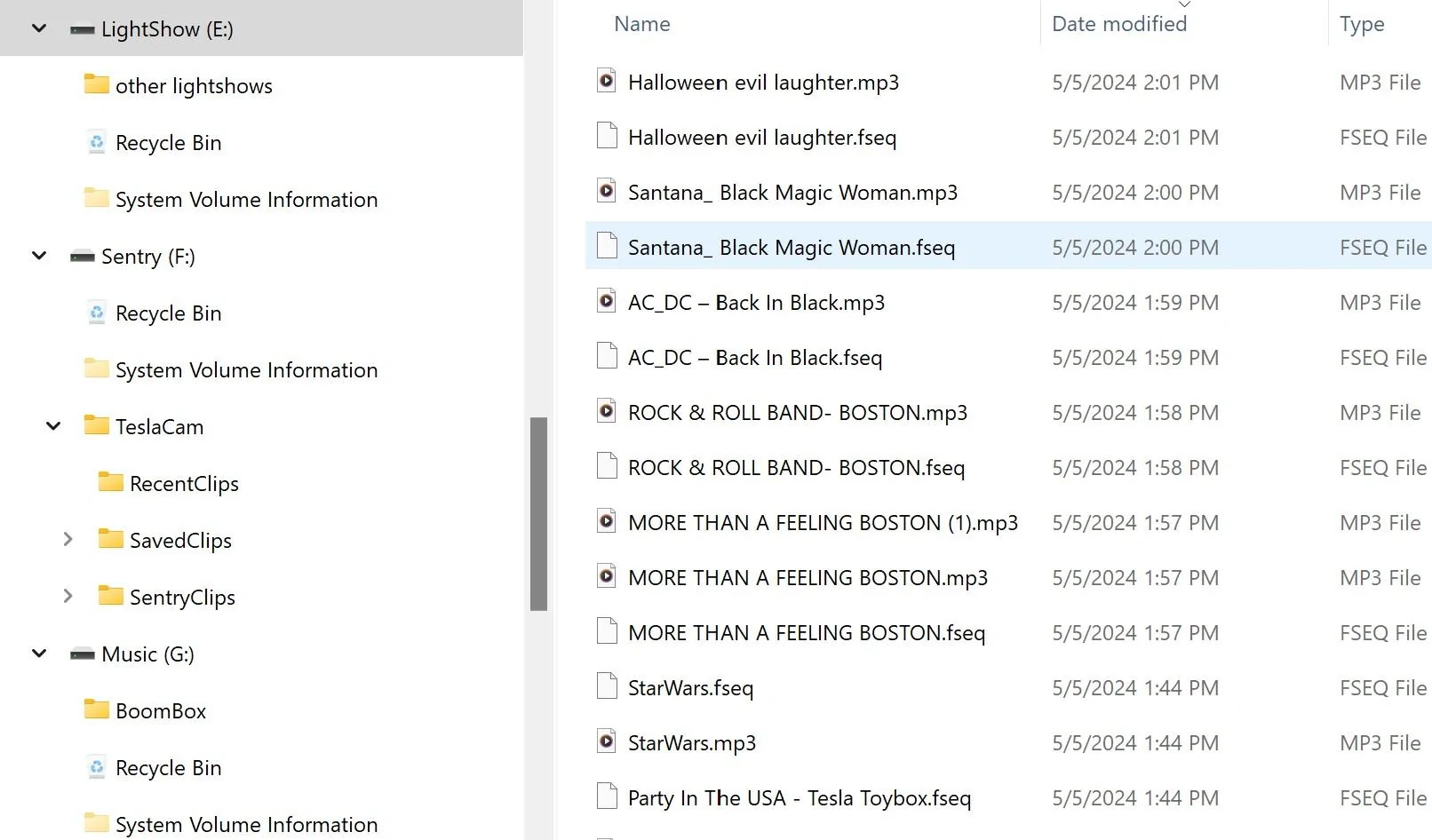
I'm hoping somebody out there can provide me some guidance. I purchased a Samsung T7 SSD drive. Partitioned it out using my PC. My goal was to be able hold much more video and to add more LightShow files. The file structure is below. I am saving video and USB shows up but nothing for LightShow. I've tried adding the files in a couple places but the LightShow app isn't seeing them. What should I do differently?
Tesla Cybertruck USB Music Playback File Structur
 

GuyV

Well-known member
First Name
Guy
Joined
Aug 17, 2023
Threads
1
Messages
814
Reaction score
1,073
Location
St. Louis, MO
Vehicles
Tesla Model S, FS Cybertruck AWD
Occupation
Retired
Country flag
I'm hoping somebody out there can provide me some guidance. I purchased a Samsung T7 SSD drive. Partitioned it out using my PC. My goal was to be able hold much more video and to add more LightShow files. The file structure is below. I am saving video and USB shows up but nothing for LightShow. I've tried adding the files in a couple places but the LightShow app isn't seeing them. What should I do differently?
File Structure.jpg
I can't be much help, but you need a folder on your lightshow drive named LightShow like you have TeslaCam on your sentry drive. I've only gotten it to see one lightshow on it so far, but I haven't given up completely yet. Like you, I am searching for better guidance. I don't know if Cybertruck is following other Tesla models exactly, and I haven't found concise consistent info on those either. :rolleyes:


CyberGus

Well-known member
First Name
Gus
Joined
May 22, 2021
Threads
91
Messages
10,245
Reaction score
33,914
Location
Austin, TX
Vehicles
1981 DeLorean, 2024 Cybertruck
Occupation
IT Specialist
Country flag
I've tried adding the files in a couple places but the LightShow app isn't seeing them.
you need a folder on your lightshow drive named LightShow
The vehicle doesn't care what you name your partitions, it is irrelevant.
  • You need a separate partition for Sentry.
  • You need a separate partition for Music.
  • You need a separate partition for LightShow.

Additionally, you need specific Folders:
  • For Sentry, you need /TeslaCam (and the appropriate subfolders).
  • For music, you need /Music (and all the subfolders you can stand).
  • For LightShow, you /LightShow (but no subfolders!).

If you put all these folders together on the same partition, some (all?) won't work.

For each LightShow there are two files, "lightshow.fseq" and "lightshow.wav" (or mp3). You can have multiples by using unique names, but make sure you use the same name for fseq file and audio file.

I have /BoomBox on the same partition as /Lightshow and I'm not seeing it. Maybe I need a 4th partition lol
 

GuyV

Well-known member
First Name
Guy
Joined
Aug 17, 2023
Threads
1
Messages
814
Reaction score
1,073
Location
St. Louis, MO
Vehicles
Tesla Model S, FS Cybertruck AWD
Occupation
Retired
Country flag
The vehicle doesn't care what you name your partitions, it is irrelevant.
  • You need a separate partition for Sentry.
  • You need a separate partition for Music.
  • You need a separate partition for LightShow.

Additionally, you need specific Folders:
  • For Sentry, you need /TeslaCam (and the appropriate subfolders).
  • For music, you need /Music (and all the subfolders you can stand).
  • For LightShow, you /LightShow (but no subfolders!).

If you put all these folders together on the same partition, some (all?) won't work.

For each LightShow there are two files, "lightshow.fseq" and "lightshow.wav" (or mp3). You can have multiples by using unique names, but make sure you use the same name for fseq file and audio file.

I have /BoomBox on the same partition as /Lightshow and I'm not seeing it. Maybe I need a 4th partition lol
That's where I am too. I don't know what is supposed to go in BoomBox ...Boombox? I was guessing MP3 files.

Experiment with this is a trial having to remove the single flash drive and reformat, set up and copy stuff on a computer, then replace it in the truck, test and repeat. ?
 

CyberGus

Well-known member
First Name
Gus
Joined
May 22, 2021
Threads
91
Messages
10,245
Reaction score
33,914
Location
Austin, TX
Vehicles
1981 DeLorean, 2024 Cybertruck
Occupation
IT Specialist
Country flag
That's where I am too. I don't know what is supposed to go in BoomBox ...Boombox? I was guessing MP3 files.

Experiment with this is a trial having to remove the single flash drive and reformat, set up and copy stuff on a computer, then replace it in the truck, test and repeat. ?
Having a USB drive in the car is great, but updating is a very "wash/rinse/repeat" iteration.

The Boombox folder can contain up to 5 custom sounds for use as the horn replacement (only the first 5 alphabetically are shown). I know MP3 is allowed but unsure of other formats. It also seems to be fussy about naming (alpahnum, dot, dash, and underscore only, no spaces).
 

GuyV

Well-known member
First Name
Guy
Joined
Aug 17, 2023
Threads
1
Messages
814
Reaction score
1,073
Location
St. Louis, MO
Vehicles
Tesla Model S, FS Cybertruck AWD
Occupation
Retired
Country flag
Having a USB drive in the car is great, but updating is a very "wash/rinse/repeat" iteration.

The Boombox folder can contain up to 5 custom sounds for use as the horn replacement (only the first 5 alphabetically are shown). I know MP3 is allowed but unsure of other formats. It also seems to be fussy about naming (alpahnum, dot, dash, and underscore only, no spaces).
Thanks. I think I saw WAV files mentioned somewhere, shades of Windows 3.0 sounds. ?
 

Troye

Well-known member
Joined
Dec 6, 2023
Threads
2
Messages
47
Reaction score
30
Location
Iowa
Vehicles
2024 FS Cybertruck
Country flag
That worked! Putting in the directory "LightShow" in the LightShow partition and moving all lightshow files to just that directory. Appreciate the help!!


TECH49

Well-known member
First Name
Philip
Joined
Nov 18, 2023
Threads
9
Messages
249
Reaction score
274
Location
Keller, TX
Vehicles
MY, DM Cybertruck, C8-Z06
Country flag
Working on a USB drive today for this. Where do the lightshow files come from?
 

sjarriel

Active member
First Name
Scott
Joined
May 10, 2024
Threads
2
Messages
44
Reaction score
61
Location
Houston, TX
Vehicles
Dual motor CyberTruck (Foundation Series)
Occupation
Retired
Country flag
OK. I tried the instructions in the video at the top of this thread. Used a Samsung T7 SSD, and created 2 partitions. One is called TESLA, the other called MEDIA. Created the folders as specified in each partition. Pulled out the installed thumbdrive and plugged in the SSD. Nothing appeared to suggest that I could play the MP3 files I had loaded into the Music folder on the MEDIA partition. Just looked at the thumbdrive from the CT, and its partition is named TESLADRIVE. The new SSD is being used by the cameras, as it has video clips on it that I did not copy to it. But I'm not seeing any way to access the MP3 files through the media player. Has someone with a Cybertruck been able to do this successfully?

OK. Update. CyberGus has it correctly. Each function needs its own partition. Once I created 4 different partitions, putting TeslaCam in one, Music in a second one, Boombox in a third, and LightShow in a fourth, it all seems to be working, and I did get a USB icon showing up as a source. My only gripe now, which has been this way for several years, across all models, is that the MP3 player function does not allow you to play all songs across multiple albums from a single artist. You have to play one album at a time. This was something that was available as an option for about the first 3 years of the Model S, but then a major update deleted it. That same update also completely changed the underlying database, so that all of the songs I had marked as favs were no longer marked as such. I steamed about that update for a couple of months.....
 
Last edited:

TECH49

Well-known member
First Name
Philip
Joined
Nov 18, 2023
Threads
9
Messages
249
Reaction score
274
Location
Keller, TX
Vehicles
MY, DM Cybertruck, C8-Z06
Country flag
I did this yesterday and got the music playing. I did it on a USB stick, not an SSD.

You have to go to sources and select USB, which appeared after I changed to the new stick.
Sponsored


Top