Sponsored

Vampire Drain

cybrtrk88

Well-known member
Joined
Feb 20, 2020
Threads
6
Messages
200
Reaction score
359
Location
San Diego
Vehicles
P3D
Country flag
Here are my steps when I'm home:

- No Sentry Mode.
- Cabin Protection Off.
- Safety/Power Off.
- Wifi Off.
- Bluetooth Off.
- Tesla App Off.

Still 2 - 3% lost overnight.

I don't use Wifi at home or work, just hot spot from my iPhone when needed. My CT is still talking to Tesla (LTE icon on top right corner) and even downloading software update by itself when I keep ignoring the pop-up reminder to connect to Wifi to download new update. I guess that's the reason for phantom drain.
Next is phone off!
Sponsored


cybrtrk88

Well-known member
Joined
Feb 20, 2020
Threads
6
Messages
200
Reaction score
359
Location
San Diego
Vehicles
P3D
Country flag
I know you're joking but I did think a similar way by removing the Tesla Key App and re-install it to drive. I still doubt it would help: no way to turn CT completely off, not talking to Tesla headquarter.
I wasnt haha! and I actually did turn off my phone for a couple hours. It still drained. At this point, nothing is stopping the drain from happening even with the phone off / bluetooth off / key off / anything off.
 

BeFamousVideo

Well-known member
First Name
Vincent
Joined
Feb 16, 2024
Threads
6
Messages
571
Reaction score
638
Location
Orange County, CA
Vehicles
CT Beast delivered May 2024
Occupation
Automation Agency
Country flag
What is making that noise
I hear that weird sound too. Sounds like its coming from the back of the truck and sounds like someone is inside the vault banging on the metal one time.
 

BeFamousVideo

Well-known member
First Name
Vincent
Joined
Feb 16, 2024
Threads
6
Messages
571
Reaction score
638
Location
Orange County, CA
Vehicles
CT Beast delivered May 2024
Occupation
Automation Agency
Country flag
Seeing about 3 miles every 6 hours which is quite a bit more than my 2018 3 had at any

I’ve turned off sentry, removed the widget from my phone, and am running software version 2024.14.11.

Is everyone seeing the same?
Any other recommendations on things to try to decrease the drain?
I also owned a 2018 Model 3 (great car). Didn't see this type of energy drain either. I'll charge CT to 80% overnight (Beast) get 240 miles charge. Then later I get in and there is only 235 miles. I'm hoping a future OTA update will reduce this draining effect.


Holgerson

New member
First Name
Jeff
Joined
May 17, 2020
Threads
0
Messages
2
Reaction score
1
Location
Sonoma county
Vehicles
M3
Occupation
Tree care
Country flag
Next is phone off!
Yep same here. Hoping for update,fix. when I am way up away from any chargers camping, I can’t stand this extra drain! I need every ounce of energy to be secure and getting back out of the forest.
 

rizvend

Well-known member
First Name
JAKEMBL
Joined
Jun 3, 2020
Threads
18
Messages
793
Reaction score
1,154
Location
66215
Vehicles
cybrtrk, aptera reserved
Occupation
Nurse Informaticist
Country flag
That a pretty close to what I see on mine, about 2% over 12 hours. Sentry off and cabin overheat off. On the same 14.11.
...yeah...and stop checking your truck app every 15 min. like I did. ?
 

TeslaKen

Well-known member
First Name
Ken
Joined
Apr 26, 2024
Threads
107
Messages
1,239
Reaction score
1,695
Location
Overland Park
Website
www.halocybertruck.com
Vehicles
Cyberbeast, M3PD+, GT4, XK140OTS
Occupation
Currently Occupied
Country flag
Just to add a data point I turned my phone off last night and left it off for 10 hours. I turned it on and checked the truck and during those 10 hours it lost 5 miles of range and had only been asleep 28 minutes when the phone reestablished connection. I don't think our trucks are sleeping like they should. 1 mile drained every 2 hours is too much.
 

Muns01

Member
Joined
May 29, 2024
Threads
2
Messages
15
Reaction score
9
Country flag
Exactly! A lot of folks are seeing it sleep less than 30 mins. In my case, every 30 mins, on the dot, it wakes up (you hear 2 clicks) and then you hear a thump about 2 -3 mins later (going to sleep). Its like clockwork. I did put in a ticket with service center but still no updates. They claim to be looking at the logs remotely. If anyone has had this fixed by the service center, I would be interested to know. Also, I am still waiting for 2024.20.1, to see if this addresses it (anyone have it?)...
 

Ward L

Well-known member
First Name
Ward
Joined
Dec 17, 2023
Threads
9
Messages
407
Reaction score
569
Location
Camarillo, CA
Vehicles
Model 3, FS CT AWD
Country flag
A test for a week in my garage while I was out of town yielded 8 miles/day loss. I had sentry mode off, but I noticed it was recording videos the whole time I was gone! On the sentry mode screen, there is a option to use “Camera Based Detection”. I had that on and even with sentry mode off, the cameras were still running and recording. Since I am in and out of my garage all day, the CT wakes up everytime I walk through. I shut down the app, and realized I had to turn off my phone Bluetooth as well to walk in the garage without the truck waking up.


OP
OP

Techy Golfer

Well-known member
First Name
Nick
Joined
Dec 28, 2023
Threads
1
Messages
61
Reaction score
98
Location
Overland Park KS
Vehicles
Model 3
Occupation
SaaS
Country flag
Exactly! A lot of folks are seeing it sleep less than 30 mins. In my case, every 30 mins, on the dot, it wakes up (you hear 2 clicks) and then you hear a thump about 2 -3 mins later (going to sleep). Its like clockwork. I did put in a ticket with service center but still no updates. They claim to be looking at the logs remotely. If anyone has had this fixed by the service center, I would be interested to know. Also, I am still waiting for 2024.20.1, to see if this addresses it (anyone have it?)...
I have the update and it looks like it stays asleep for at least 45 min now.
 

Nobell32

Well-known member
First Name
Norman
Joined
Apr 20, 2024
Threads
7
Messages
175
Reaction score
298
Location
California
Vehicles
CyberBeast Foundation
Country flag
I have the latest update still lost 8 miles overnight. I have sentry off.
 

TeslaKen

Well-known member
First Name
Ken
Joined
Apr 26, 2024
Threads
107
Messages
1,239
Reaction score
1,695
Location
Overland Park
Website
www.halocybertruck.com
Vehicles
Cyberbeast, M3PD+, GT4, XK140OTS
Occupation
Currently Occupied
Country flag
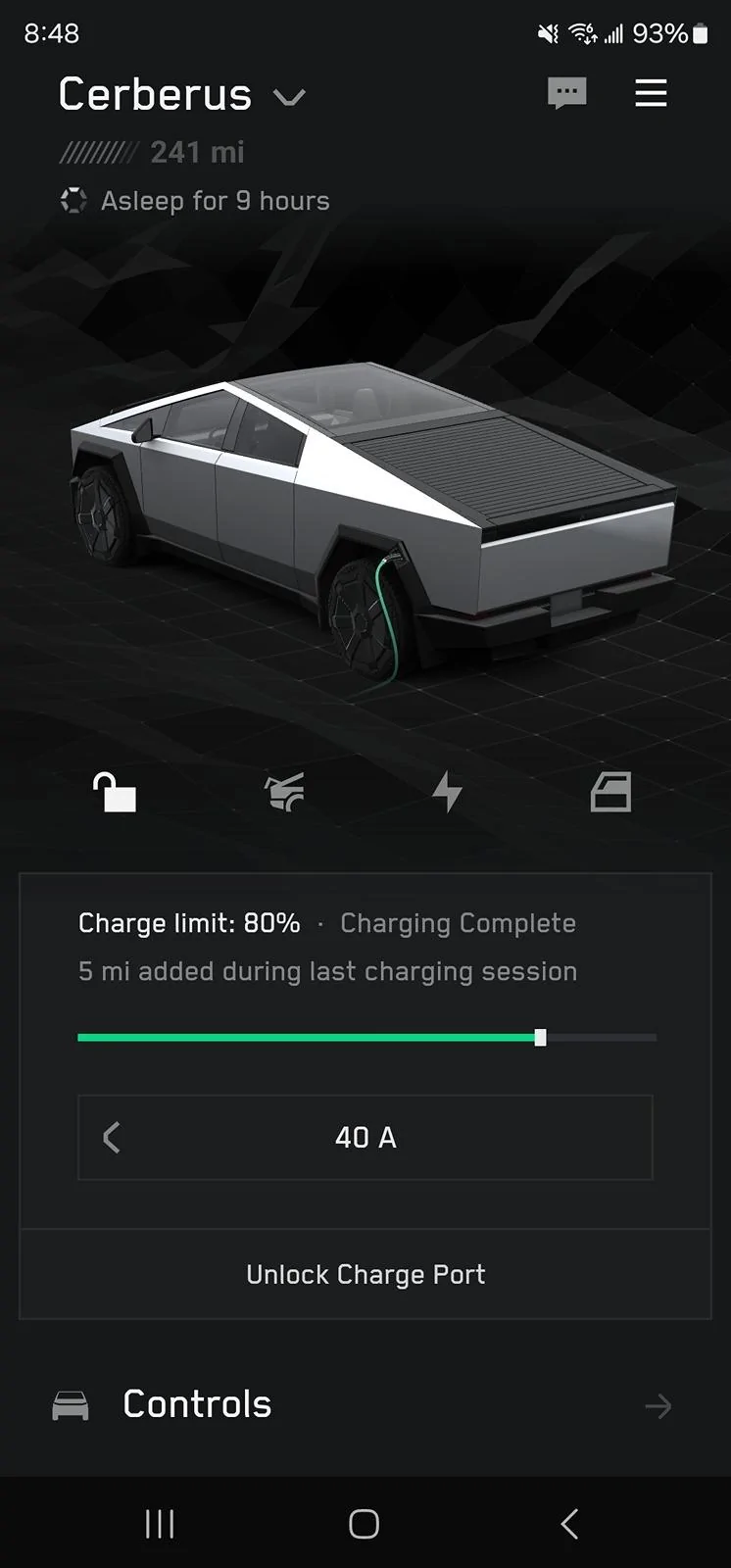
No need to do firmware the most recent update of 2024.20.1 fixes the Vampire drain. I haven't turned off camera detection. App still runs on my phone while I sleep and now the Beast goes to sleep and stays asleep. Last 9 hours has been asleep with no drain no loss of mileage, etc. Here is my app showing that my truck has been asleep for 9 hours and still charged to the max of 241 miles at 80% charge for a cyberbeast.
Tesla Cybertruck Vampire Drain Screenshot_20240609_084825_Tesla
 

Mini2nut

Well-known member
Joined
Apr 2, 2020
Threads
137
Messages
4,064
Reaction score
7,373
Location
Planet Earth
Vehicles
*Tesla MYP *SAWD Cybertruck ordered 2/20/26
Country flag
The Rivian engineers finally addressed vampire drain on the refreshed 2025 R1's. They were able to accomplish this due to the brand new electrical architecture.

The 2022-2024's had significant drain when sitting for extended periods of time.
 

cybrtrk88

Well-known member
Joined
Feb 20, 2020
Threads
6
Messages
200
Reaction score
359
Location
San Diego
Vehicles
P3D
Country flag
No need to do firmware the most recent update of 2024.20.1 fixes the Vampire drain. I haven't turned off camera detection. App still runs on my phone while I sleep and now the Beast goes to sleep and stays asleep. Last 9 hours has been asleep with no drain no loss of mileage, etc. Here is my app showing that my truck has been asleep for 9 hours and still charged to the max of 241 miles at 80% charge for a cyberbeast.
Screenshot_20240609_084825_Tesla.webp

I’m fascinated by what’s happening because i didn’t receive the new update, im still on 14.11 but all of a sudden my ct is sleeping for 4 hours and still going as of now. I did drive it to 4% on a trip last night for the first time. ?
Sponsored


Top