Sponsored

FSD on CT doesn't work when you have a 2nd Tesla with Autopilot enabled

beatmstrj

Active member
First Name
Elijah
Joined
Feb 20, 2024
Threads
4
Messages
32
Reaction score
78
Location
SoCal
Vehicles
2022 Tesla Model S Plaid
Occupation
Systems Engineer
Country flag
I have a CT and a Model S, both with FSD. I prefer to use Autopilot on my Model S because I get tired of poor lane change decisions with FSD enabled. In a perfect world, I would use FSD with the option to manually control all lane changes on the freeway, but that's a conversation for a different time.

Here's the problem: If I leave my Model S in Autopilot mode, when I get into my CT (which does not have Autopilot for some reason) it won't let me use FSD, citing some "FSD is unavailable right now" error. It took me a while to figure out that it was because my Model S is in Autopilot and the CT doesn't have Autopilot so it doesn't know what to do. As soon as I put my Model S into FSD, it works fine. So unless I feel like changing modes every time I get in the car, I have to use FSD on both.

Is anyone aware of a work around for this? Do I need to create two different profiles just so I can drive two different vehicles how I want?
Sponsored
 

scottf200

Well-known member
Joined
Jul 31, 2021
Threads
53
Messages
2,221
Reaction score
3,241
Location
Western NC
Vehicles
X; immed family 3 & Y
Country flag
I have a CT and a Model S, both with FSD. I prefer to use Autopilot on my Model S because I get tired of poor lane change decisions with FSD enabled. In a perfect world, I would use FSD with the option to manually control all lane changes on the freeway, but that's a conversation for a different time.

Here's the problem: If I leave my Model S in Autopilot mode, when I get into my CT (which does not have Autopilot for some reason) it won't let me use FSD, citing some "FSD is unavailable right now" error. It took me a while to figure out that it was because my Model S is in Autopilot and the CT doesn't have Autopilot so it doesn't know what to do. As soon as I put my Model S into FSD, it works fine. So unless I feel like changing modes every time I get in the car, I have to use FSD on both.

Is anyone aware of a work around for this? Do I need to create two different profiles just so I can drive two different vehicles how I want?
Nice find and deduction.

Others have run into incompatible issues between two models of Tesla cars and just created two unique profiles. Some do this in a single car if they want a quick way to switch between AP and FSD.

Title: Hidden Feature of Tesla's Driver Profiles (Quick Tip) -- Everyday Chris @edc
 

sefar

Well-known member
First Name
se
Joined
Jun 17, 2021
Threads
29
Messages
341
Reaction score
481
Location
Missouri
Vehicles
Model S 100d, Cyberbeast FS
Country flag
I have an 18 MS and CT, haven't noticed anything of the sort. I'd I pull the stalk in either, the vehicle drives. Am I missing what you are saying or am I just not affected?
 

dalton108

Well-known member
First Name
Dalton
Joined
Oct 17, 2020
Threads
132
Messages
3,971
Reaction score
7,916
Location
USA
Vehicles
ā€˜24 FS/CB; ā€˜24 MX; ā€˜23 MS PLAID (Prior: ā€˜20-MY; ā€˜21-M3P) (Also: ā€˜14-FJ; ā€˜21-C8)
Occupation
Lawyer
Country flag
I have an 18 MS and CT, haven't noticed anything of the sort. I'd I pull the stalk in either, the vehicle drives. Am I missing what you are saying or am I just not affected?
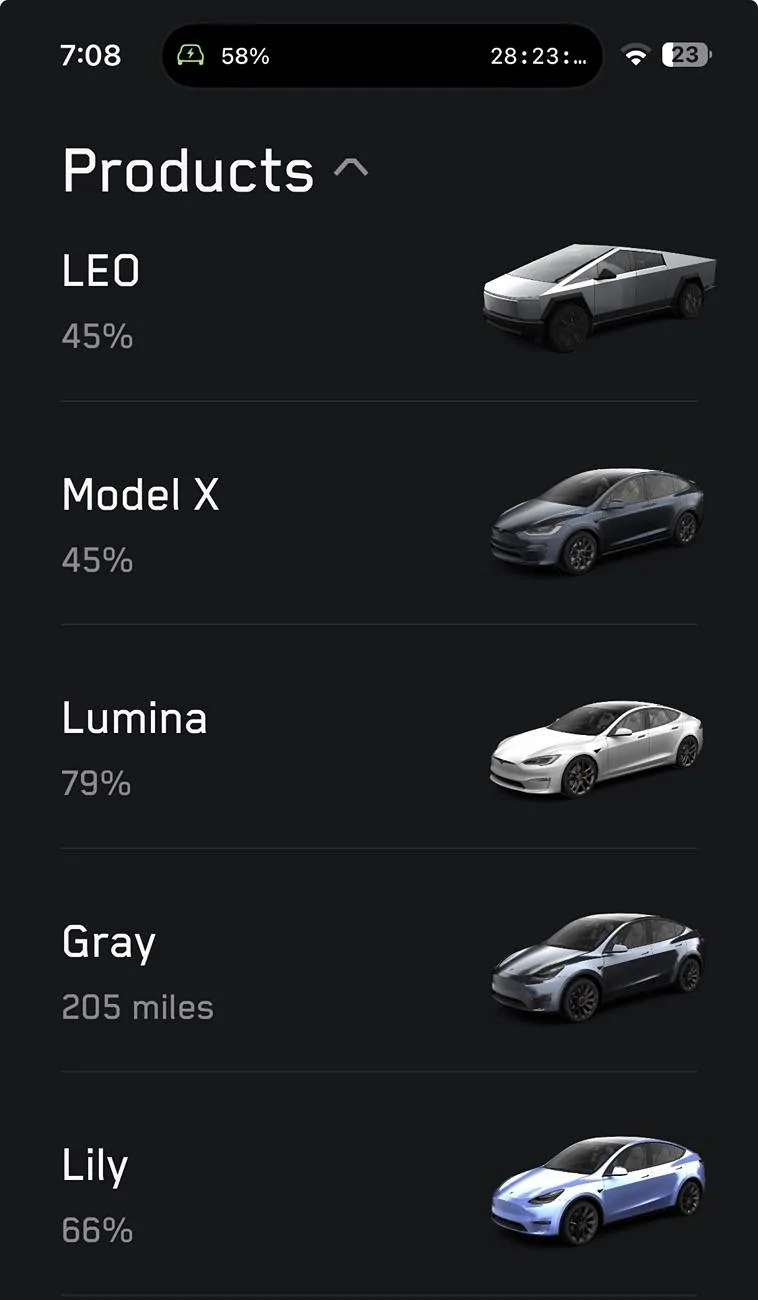
Same. I have this many:

Tesla Cybertruck FSD on CT doesn't work when you have a 2nd Tesla with Autopilot enabled IMG_2249


I have no idea what they’re talking about. ??ā€ā™‚ Each one of these cars is on FSD each one of them have their own installation three of them are on HW4 and two are on HW3 and they’re all on various branches of FSD.

How would my profile have any effect on how these cars ran auto pilot or FSD? It doesn’t run from the phone! I have one profile that runs on all of these cars - without issue.

Which is the point of having a profile! The seat settings in my Cybertruck don’t affect the seat settings in my S Plaid or our X etc

Correlation is not causation. What are you people talking about???!!!!

…

Edit: just digesting this. are you saying that because your cyber truck doesn’t have regular auto pilot and you have that profile selected in your other car that it confuses the Cybertruck? [of course you are that’s quite literally what you said] I still don’t understand why that would happen.

But, I will never find out because I certainly didn’t pay for FSD 5 times over to only use auto pilot. ??ā€ā™‚
 
Last edited:

scottf200

Well-known member
Joined
Jul 31, 2021
Threads
53
Messages
2,221
Reaction score
3,241
Location
Western NC
Vehicles
X; immed family 3 & Y
Country flag
I have an 18 MS and CT, haven't noticed anything of the sort. I'd I pull the stalk in either, the vehicle drives. Am I missing what you are saying or am I just not affected?
How would my profile have any effect on how these cars ran auto pilot or FSD? It doesn’t run from the phone! I have one profile that runs on all of these cars - without issue.

Which is the point of having a profile! The seat settings in my Cybertruck don’t affect the seat settings in my S Plaid or our X etc
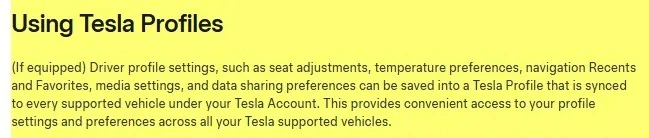
There was a new option in 2022 that saves various profile options to the cloud and it syncs them across all your cars. The article indicated this includes "autopilot"/AP.

So what happens if on some of your cars you use AP even tho that car has FSD (eg S). Now when you use a different car (eg CT) where it only has FSD and cannot do AP ... what does your cloud profile tell the CT to sync to.


Yes, a corner case. They video above claims other problems of syncing between cars.

Obviously items like seat locations could be vastly different so they have to use some formula to figure out the deltas and adjust them to be 'compatible'. Imagine in your Model 3 you set your seat and steering wheel position so the wheel is 20" from your chest and pedals 40" away ... now you get in your bigger Model S and it does the dynamic adjustments to make your S have that same distance of 20" fo the wheel and 40" for the pedals.

July 28, 2022 - Tesla launches Cloud Profiles in update 2022.24
The long-rumored "cloud profiles" are finally arriving in Tesla update 2022.24.

Tesla is officially calling the feature 'Tesla Profiles.' With this latest update, you'll be given the option to tie your driver profile to your Tesla account.

If you decide to connect your profile to your Tesla account some of your vehicle's settings will be able to travel with you from one Tesla to another.

Settings such as mirror, seat and wheel positions will be synced across other supported vehicles. So if you're lucky enough to have multiple Teslas in your household and adjust your seat in one vehicle, then the setting will automatically be synced to the other vehicle.

Once your Tesla account is linked to a car profile, that car's profile will automatically appear in any other Teslas under your account.

These vehicles could be rentals or owned by you. As long as they show up in your Tesla app then your car profile will become available on that vehicle.

Having your car profile sync to multiple vehicles will be especially useful when renting a Tesla. It'll provide a consistent experience across vehicles and it'll save you time from having to adjust preferences such as your seat, mirrors, music preferences, and more.

This could be important for certain settings such as 'Stopping Mode'.

When you first get in the car, you may expect it to behave like your own Tesla and if the Stopping Mode is set to something unexpected, like roll, it could lead to confusion.

If you rent a Tesla or use one as a loaner, it'll feel almost magical being able to get in it and have it automatically adjust to you.

Tesla Profiles will go beyond just seat adjustments. It'll also include some vehicle settings, such as Autopilot, driving preferences, and climate control settings.

According to Tesla's release notes, navigation, media and data sharing preferences will also be tied to your Tesla account and sync over to other vehicles.
From a TM3 manual (but same in other Tesla manuals including the CTs):
Tesla Cybertruck FSD on CT doesn't work when you have a 2nd Tesla with Autopilot enabled jYHIIYA
 
Last edited:


dalton108

Well-known member
First Name
Dalton
Joined
Oct 17, 2020
Threads
132
Messages
3,971
Reaction score
7,916
Location
USA
Vehicles
ā€˜24 FS/CB; ā€˜24 MX; ā€˜23 MS PLAID (Prior: ā€˜20-MY; ā€˜21-M3P) (Also: ā€˜14-FJ; ā€˜21-C8)
Occupation
Lawyer
Country flag
Yeah I use the cloud profiles and I just haven’t seen any behaviors that model what you’re saying is happening. But again since I’m not using just auto pilot in a single one of these cars I understand how I would never experience that.

But given that it’s smart enough to know seat position, steering wheel and rear mirror position among other things across multiple platforms which are different every millimeter ergonomically, I’m not sure why it wouldn’t be unable to ascertain this particular setting. But as you say… edge case.
 

scottf200

Well-known member
Joined
Jul 31, 2021
Threads
53
Messages
2,221
Reaction score
3,241
Location
Western NC
Vehicles
X; immed family 3 & Y
Country flag
I’m not sure why it wouldn’t be unable to ascertain this particular setting. But as you say… edge case.
I'm just saying it could be a bug and not something they considered or tested all use cases for.
Seats and such are consistent, simple, and exist ... what is different is that one car as FSD & AP available and the one only has FSD.
 
Last edited:

dalton108

Well-known member
First Name
Dalton
Joined
Oct 17, 2020
Threads
132
Messages
3,971
Reaction score
7,916
Location
USA
Vehicles
ā€˜24 FS/CB; ā€˜24 MX; ā€˜23 MS PLAID (Prior: ā€˜20-MY; ā€˜21-M3P) (Also: ā€˜14-FJ; ā€˜21-C8)
Occupation
Lawyer
Country flag
I'm just saying it could be a bug and not something they considered or tested all use cases for.
Seats and such are consistent, simple, and exist ... what is different is that one car as FSD & AP available and the only only has FSD.
I’m agreeing with you.
 

dalton108

Well-known member
First Name
Dalton
Joined
Oct 17, 2020
Threads
132
Messages
3,971
Reaction score
7,916
Location
USA
Vehicles
ā€˜24 FS/CB; ā€˜24 MX; ā€˜23 MS PLAID (Prior: ā€˜20-MY; ā€˜21-M3P) (Also: ā€˜14-FJ; ā€˜21-C8)
Occupation
Lawyer
Country flag
I'm just saying it could be a bug and not something they considered or tested all use cases for.
Seats and such are consistent, simple, and exist ... what is different is that one car as FSD & AP available and the only only has FSD.
Also, the reason that they did this was to prepare for Robotaxis (you jump in a car and your preferences temperature media etc. are good to go) and the idea that Robotaxis wouldn’t have FSD is obviously preposterous so - probably just be tunnel vision - they never thought about it!
 

Obsoletion

Well-known member
First Name
William
Joined
Dec 12, 2019
Threads
2
Messages
59
Reaction score
154
Location
Alta Loma, CA
Vehicles
2024-Cyberbeast 2017-MSP100D 2020-MX Perf
Country flag
I am having the same issue. I have a foundation CT (with FSD) and when I move one of my daughter's model 3's that don't have FSD, my CT FSD doesn't work when I drive again. I have to disable and re-enable FSD on the CT to get it working again


CyberZephyr

Well-known member
Joined
Jul 8, 2024
Threads
13
Messages
633
Reaction score
583
Location
Long Island, New York
Vehicles
2021 MY, 2023 MX
Country flag
Same. I have this many:

IMG_2249.jpeg


I have no idea what they’re talking about. ??ā€ā™‚ Each one of these cars is on FSD each one of them have their own installation three of them are on HW4 and two are on HW3 and they’re all on various branches of FSD.

How would my profile have any effect on how these cars ran auto pilot or FSD? It doesn’t run from the phone! I have one profile that runs on all of these cars - without issue.

Which is the point of having a profile! The seat settings in my Cybertruck don’t affect the seat settings in my S Plaid or our X etc

Correlation is not causation. What are you people talking about???!!!!

…

Edit: just digesting this. are you saying that because your cyber truck doesn’t have regular auto pilot and you have that profile selected in your other car that it confuses the Cybertruck? [of course you are that’s quite literally what you said] I still don’t understand why that would happen.

But, I will never find out because I certainly didn’t pay for FSD 5 times over to only use auto pilot. ??ā€ā™‚
No name for your X?
 

dalton108

Well-known member
First Name
Dalton
Joined
Oct 17, 2020
Threads
132
Messages
3,971
Reaction score
7,916
Location
USA
Vehicles
ā€˜24 FS/CB; ā€˜24 MX; ā€˜23 MS PLAID (Prior: ā€˜20-MY; ā€˜21-M3P) (Also: ā€˜14-FJ; ā€˜21-C8)
Occupation
Lawyer
Country flag
No name for your X?
Well, my wife, (surprise, surprise) can’t make up her mind. It’s driving me crazy trust me man! I told her if she didn’t make up her mind soon I was just gonna name it ā€œMalcolmā€ for her. It’s been two months!!!

????
 

scottf200

Well-known member
Joined
Jul 31, 2021
Threads
53
Messages
2,221
Reaction score
3,241
Location
Western NC
Vehicles
X; immed family 3 & Y
Country flag
Seems like there are several combinations of you going from one Tesla to another when you have a 'cloud' profile that is trying to be synchronized.
what if you go from:
1.i to 2.i or 2.i to 1.i​
(eg. one Tesla only has AP avail)​

1.i to 2.b.i or 2.b.i to 1.i​
(eg. one Tesla has both FSD & AP available but does not have FSD on/enabled and uses AP.​

1) Tesla CT - FSD only
1.i) FSD on (enabled)​
1.ii) FSD off​

--- person goes between above 2 options and below 3 options --

2.a)Tesla S|3|X|Y - AP only
2.i) AP on​

2.b) Tesla S|3|X|Y - Both AP & FSD avail
2.b.i) AP on [FSD off]​
2.b.ii) FSD on [AP off]
Sponsored


Top