Sponsored

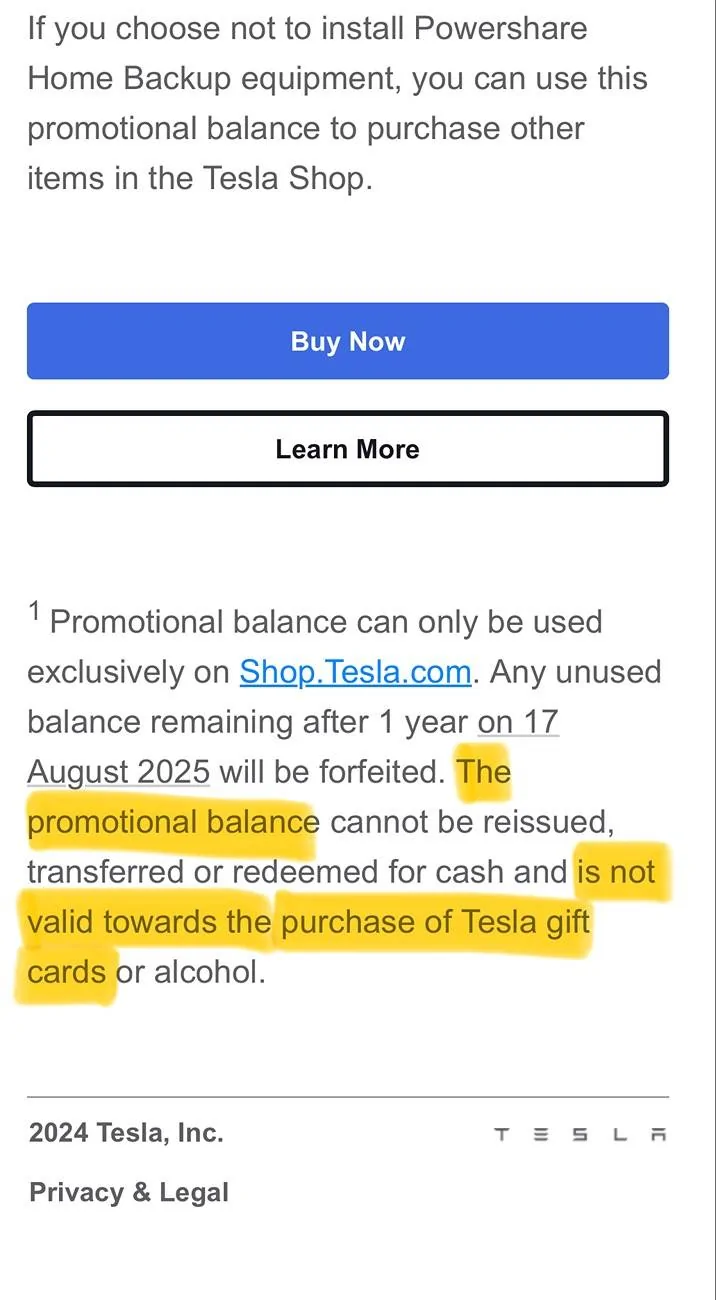
$3,500.00 has an expiry date.

DAE1

Well-known member
First Name
DAE1
Joined
Aug 12, 2024
Threads
21
Messages
278
Reaction score
260
Location
Southern California
Vehicles
CyberBeast & Model S 85D
Occupation
Engineer
Country flag
The only car that’s eligible for the light bar is the Foundation Series CyberBeast the light bar comes with it there’s no cost to install it.

She’s referring to her $3500 voucher for power share which came, again, specifically with early foundation series cyber beasts.
Since when was it $3500? I got $2500 for the power share credit.
Sponsored


stealthynorm

Member
First Name
Norm
Joined
Jan 2, 2025
Threads
0
Messages
21
Reaction score
17
Location
Mesa, AZ
Vehicles
Cybertruck
Occupation
Retired
Country flag
Tesla App > Hamburger Menu > Your picture/name > Wallet > you'll see the expiration date under Tesla Credits.
 

yyzunderdog

Member
First Name
Tim
Joined
Sep 25, 2024
Threads
1
Messages
17
Reaction score
3
Location
Toronto
Vehicles
2022 M3P which will turn into Cyberbeast
Country flag
Thanks for this heads up and details on how to check it. On mine it says “no expiry date”
 

YukonJack

Well-known member
First Name
Mark
Joined
Aug 10, 2024
Threads
3
Messages
95
Reaction score
144
Location
Greenville, SC
Vehicles
‘06 Tacoma, '24 CyberBeast
Country flag
If you just want to flip then buy 7, $500, gift cards in the shop.
 
OP
OP

Merc_s55

Well-known member
First Name
Bob
Joined
Mar 9, 2025
Threads
8
Messages
113
Reaction score
239
Location
Manitoba
Vehicles
Cybertruck
Occupation
Retired
Country flag
Stormyeyes---Start on your Tesla App. Go to the upper right corner and hit the 3 horizontal bars. Click on your name. Click on your wallet. Your Tesla credits will show the amount left and the expiry date. Happy shopping.


Top