Sponsored

Anyone mount a portable computer monitor above squircle?

Coolhandz

Well-known member
First Name
Nicholas
Joined
Jun 15, 2020
Threads
25
Messages
328
Reaction score
528
Location
Johnstown, CO
Website
ts.la
Vehicles
2026 Model Y (Jelly Bean); 2025 Cybertruck AWD (Trimaxion)
Country flag
The other day I had a ton of errands to run and work to do. Ended up taking my laptop with me and using Starlink to be productive while FSD drove me around. It was actually a pretty productive day. The only downside was i would have to occasionally look up or show my hands due to the positioning of my laptop. I took some measurements and found a nice a portable screen that works using a single USB-C/Thunderbolt port and fits nicely above the squircle while still leaving plenty of room to see over.

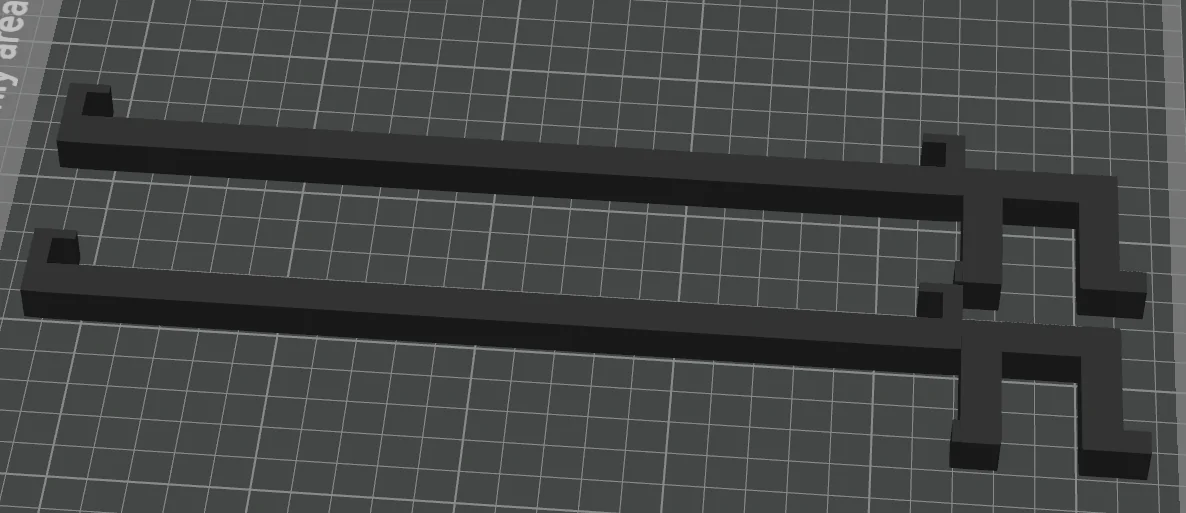
Has anyone done this? Mounting a monitor above the squircle and using a NUC or laptop to work? I 've been trying to find a mount that doesn't simply stick to the dash as I hate worrying about residue or it coming undone from heat. Instead, I am working to design a custom mount. Any input?
Sponsored
 

SteelyMcSteelFace

Well-known member
First Name
D
Joined
Apr 23, 2024
Threads
0
Messages
88
Reaction score
251
Location
Irvine, CA
Vehicles
Cybertruck, Model Y
Country flag
I wanted exactly this and ended up just draping the attached magnetic cover that came with the monitor over the squircle. That held it in place and it didn’t fall for the hour I was using it.

Wish Tesla would let us use the built in screen and car audio system directly via a HDMI port. Or even just a aux audio port. Such a waste that this nice hardware can only be used for streaming services.
 

Shrey

Well-known member
First Name
Shrey
Joined
Mar 17, 2024
Threads
2
Messages
107
Reaction score
80
Location
Canada
Vehicles
CyberBeast
Country flag
The other day I had a ton of errands to run and work to do. Ended up taking my laptop with me and using Starlink to be productive while FSD drove me around. It was actually a pretty productive day. The only downside was i would have to occasionally look up or show my hands due to the positioning of my laptop. I took some measurements and found a nice a portable screen that works using a single USB-C/Thunderbolt port and fits nicely above the squircle while still leaving plenty of room to see over.

Has anyone done this? Mounting a monitor above the squircle and using a NUC or laptop to work? I 've been trying to find a mount that doesn't simply stick to the dash as I hate worrying about residue or it coming undone from heat. Instead, I am working to design a custom mount. Any input?
So I have thought about it and you can use a couple phone mounts that are attached to the dash and then stick those phone mount holders to an iPad. then use the iPad as an additonal display for viewing purposes while having the laptop on the passenger seat. Not ideal but im contemplating it. It should technically work as you can do extended display, etc from the computer to an iPad. ofcourse you need to be in the apple ecosystem for this.
 

CyberGus

Well-known member
First Name
Gus
Joined
May 22, 2021
Threads
91
Messages
10,295
Reaction score
34,097
Location
Austin, TX
Vehicles
1981 DeLorean, 2024 Cybertruck
Occupation
IT Specialist
Country flag
Wish Tesla would let us use the built in screen and car audio system directly via a HDMI port.
There are web-based tool to let you stream your phone/laptop screen, which can be viewed with the in-vehicle browser. There are also apps specifically for mirroring to Tesla screens.
 

Gigahorse

Well-known member
Joined
Dec 19, 2023
Threads
19
Messages
2,864
Reaction score
3,239
Location
USA
Vehicles
AWD
Some of the "food" trays for the squirqkl work pretty good for small screens


OP
OP
Coolhandz

Coolhandz

Well-known member
First Name
Nicholas
Joined
Jun 15, 2020
Threads
25
Messages
328
Reaction score
528
Location
Johnstown, CO
Website
ts.la
Vehicles
2026 Model Y (Jelly Bean); 2025 Cybertruck AWD (Trimaxion)
Country flag
Some of the "food" trays for the squirqkl work pretty good for small screens
Do you know of any of these trays that you can print for the CT? I have found them for sale, but haven't found one you can print yourself. Would work perfect for my wireless Corsair 70% keyboard.

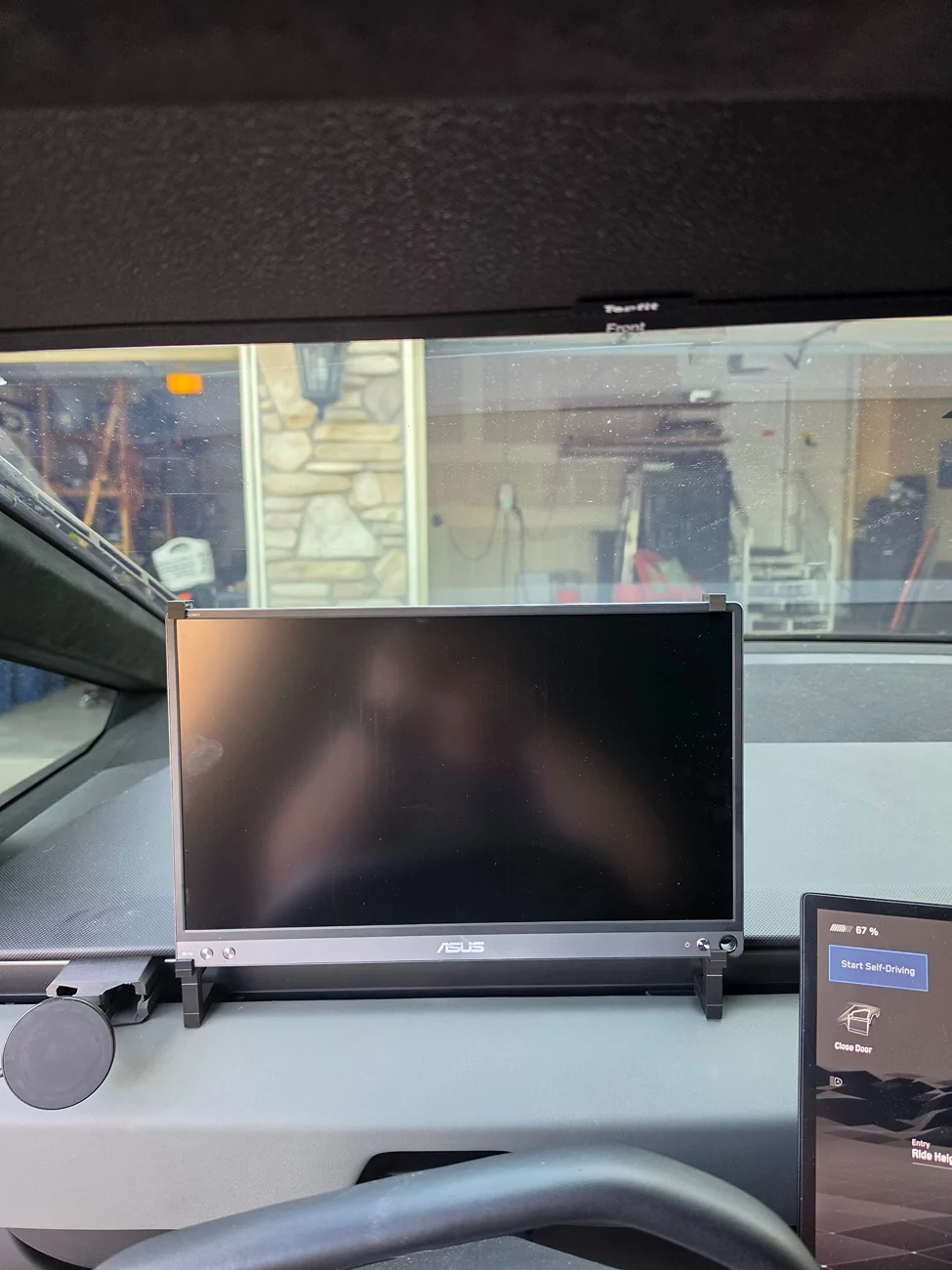
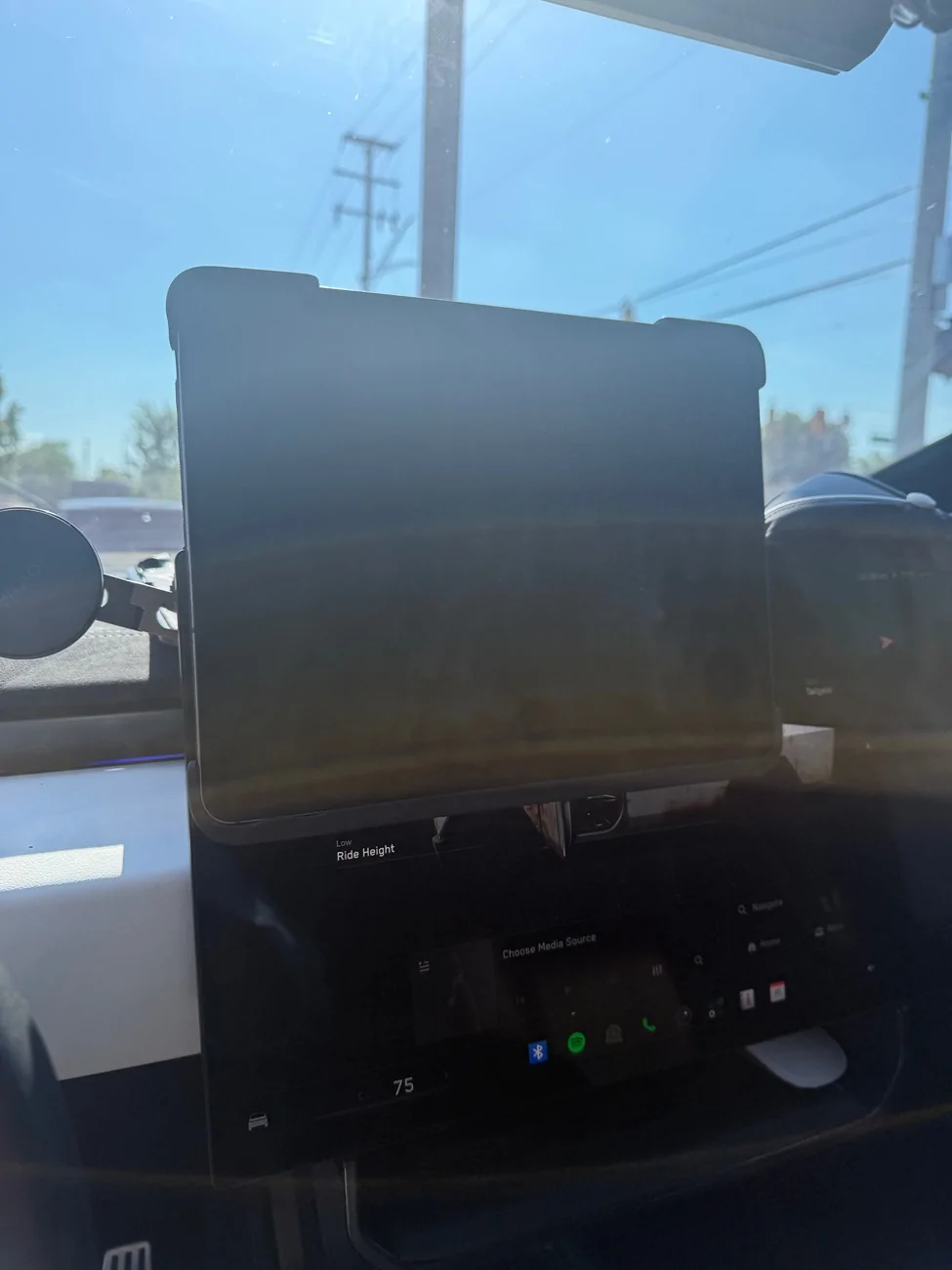
Have V1 of the monitor mount printing now. Very rough but the test fit was perfect. I am, however, second guessing the screen size. Granted I had the seat in the lowest setting so maybe once my driver's profile loads it won't be so bad. I wanted the monitor a bit higher so it wouldn't block the vents.

Tesla Cybertruck Anyone mount a portable computer monitor above squircle? 1782507668036-uf
 

jeffrey2z

Well-known member
First Name
Jeff
Joined
Sep 23, 2024
Threads
15
Messages
80
Reaction score
200
Location
Clarkston, Michigan
Vehicles
2024 Cyberbeast, 2022 MX plaid, 2021 MY 7 seat
Occupation
physician
Country flag
The other day I had a ton of errands to run and work to do. Ended up taking my laptop with me and using Starlink to be productive while FSD drove me around. It was actually a pretty productive day. The only downside was i would have to occasionally look up or show my hands due to the positioning of my laptop. I took some measurements and found a nice a portable screen that works using a single USB-C/Thunderbolt port and fits nicely above the squircle while still leaving plenty of room to see over.

Has anyone done this? Mounting a monitor above the squircle and using a NUC or laptop to work? I 've been trying to find a mount that doesn't simply stick to the dash as I hate worrying about residue or it coming undone from heat. Instead, I am working to design a custom mount. Any input?
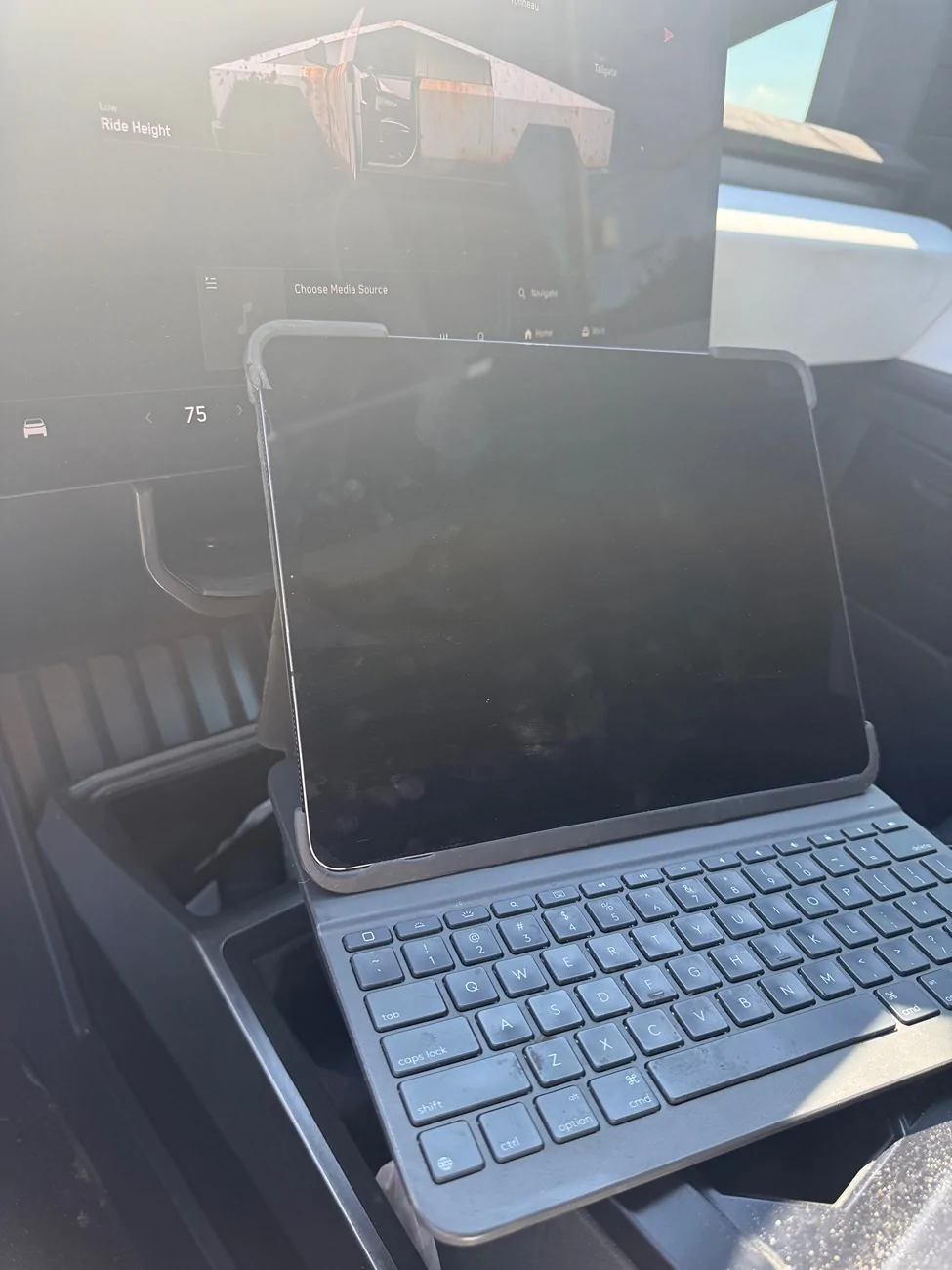
If you get the right Logitech case the iPad fits perfectly over the screen. I use a blue tooth key board and mouse and can flip it out of the way to see the screen with the touch of a finger. It’s like a workstation on wheels. And easy for passengers to see.

Tesla Cybertruck Anyone mount a portable computer monitor above squircle? IMG_7367


Tesla Cybertruck Anyone mount a portable computer monitor above squircle? IMG_7368
 

TeslaKen

Well-known member
First Name
Ken
Joined
Apr 26, 2024
Threads
110
Messages
1,259
Reaction score
1,713
Location
Overland Park
Website
www.halocybertruck.com
Vehicles
Cyberbeast, M3PD+, GT4, XK140OTS
Occupation
Currently Occupied
Country flag
Fit came out perfect. Doesn't block the vents at all which is what I was going for.

3114.webp
I would want something about 1/2 to 2/3rds this height as IMHO this blocks too much of the forward view especially of the road ahead at a distance. What is this screen connected to and what are you showing on the screen? I have that 10.88 inch screen that I installed recently as a secondary screen to show info about the truck but sadly the maker doesn't have a Cybertruck to probe for signals so a lot of features are missing or don't work correctly. I have one on my Model 3 that is great. About the only use I have for it in the Cybertruck is to run Waze when I am on trips but I don't run Waze on a daily basis, maybe I'm weird that way.

Kudos on the bracket that is a good solution for allowing air and still having a screen. I'm assuming you'd just adjust the height in your 3D printing software for a shorter screen. Looks promising for sure. I know the person who has the first truck like mine has a shorter and longer screen in his truck that he has tied into some sort of portable PC that sits down in the center column area. I need to read the rest of this thread and see what you are connecting this to. :)


raww1023

Well-known member
Joined
Dec 17, 2025
Threads
0
Messages
58
Reaction score
49
Location
NJ
Vehicles
2025 CT Beast
Country flag
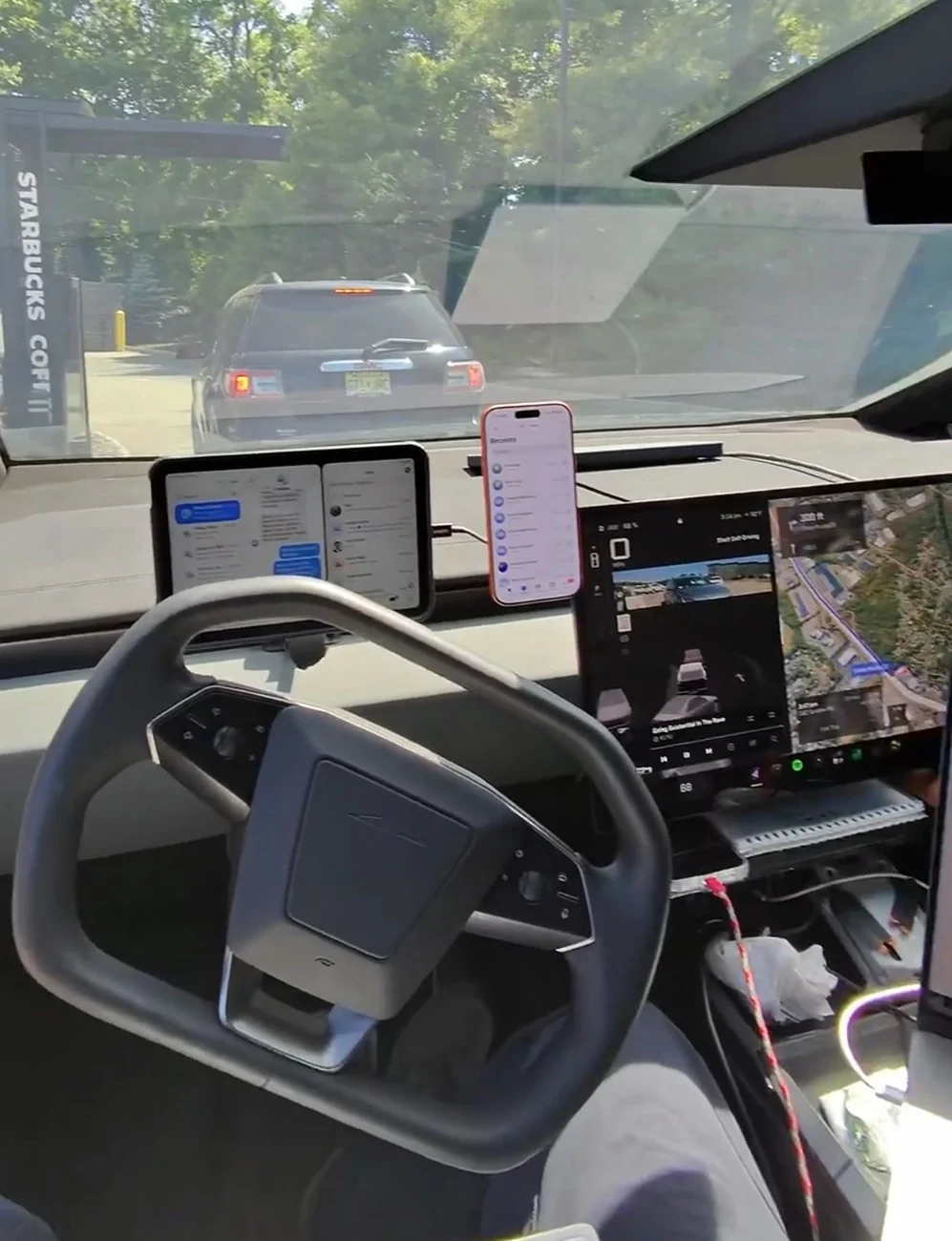
I have done something similar to this, where I mounted an iPad Mini to the dash so I can still see completely through. I also have a Bluetooth keyboard and mouse that I use. I stream my laptop to the iPad while I'm driving. It works quite well, but it is sometimes annoying to set up and get going. Once it's going, it's pretty fluent. The only other thing I would say is that it's very distracting to run that setup. Lately I just use my iPad Mini as kind of a dashboard for seeing my daily actions, where I'm not doing too much production on it until I get to my next destination, just for the simple fact of safety.

Tesla Cybertruck Anyone mount a portable computer monitor above squircle? IMG_0110
 
OP
OP
Coolhandz

Coolhandz

Well-known member
First Name
Nicholas
Joined
Jun 15, 2020
Threads
25
Messages
328
Reaction score
528
Location
Johnstown, CO
Website
ts.la
Vehicles
2026 Model Y (Jelly Bean); 2025 Cybertruck AWD (Trimaxion)
Country flag
I would want something about 1/2 to 2/3rds this height as IMHO this blocks too much of the forward view especially of the road ahead at a distance. What is this screen connected to and what are you showing on the screen? I have that 10.88 inch screen that I installed recently as a secondary screen to show info about the truck but sadly the maker doesn't have a Cybertruck to probe for signals so a lot of features are missing or don't work correctly. I have one on my Model 3 that is great. About the only use I have for it in the Cybertruck is to run Waze when I am on trips but I don't run Waze on a daily basis, maybe I'm weird that way.

Kudos on the bracket that is a good solution for allowing air and still having a screen. I'm assuming you'd just adjust the height in your 3D printing software for a shorter screen. Looks promising for sure. I know the person who has the first truck like mine has a shorter and longer screen in his truck that he has tied into some sort of portable PC that sits down in the center column area. I need to read the rest of this thread and see what you are connecting this to. :)
I'll just be using a laptop that supports display port alt mode. Then use my wireless keyboard and mouse. So I'll be running Windows 11 on it. I do a lot of driving with my job and am significantly less productive somedays due to being on the road. I've tried dictation software but find I spend just as much time correcting everything after the fact. After using my laptop side saddle for a bit, I found i was getting more work done while on the road. However, fsd nagging me was interrupting my flow.

I'm 5'10" and have the seat to the highest position. Drove around a bit today. The height of the screen does take some getting used to, but I can see cars in front of me without issue. Would I go with a smaller screen? I don't know at this point. It's very light weight, but you're right, I'd be able to adjust the mount pretty easily if I wanted something smaller. Getting it to fit firmly in the dash was the trickiest part, but everything else is simple.
Sponsored


Top