Sponsored

AJL710

Member
First Name
A.J.
Joined
May 28, 2025
Threads
1
Messages
10
Reaction score
13
Location
Texas
Vehicles
Cybertruck Dual Motor
Occupation
Electrical Engineer
Country flag
Do you ever have starlink rebooting issues when using the cybertruck USB C output? I have almost the exact same setup except I routed the wire behind the seats instead of nicely behind all of the trim and any time the starlink boosted its power consumption for a speed test or just general usage every 10 minutes or so, it was as if the cybertruck couldn't supply it and the starlink would brownout and reboot. I ended up switching to the regular power adapter instead because I couldn't deal with the constant reboots.

I had nothing else connected to any of the cybertruck USB C ports so that 65W power allocation should've been able to be used solely by the starlink. I tried it on a different USB C adapter and it worked fine.
Sponsored
 

Hammy60

Well-known member
First Name
JR
Joined
Jun 5, 2025
Threads
6
Messages
75
Reaction score
92
Location
Carmel, Indiana
Website
x.com
Vehicles
CT, MS, M3, MY
Occupation
Cybersecurity
Country flag
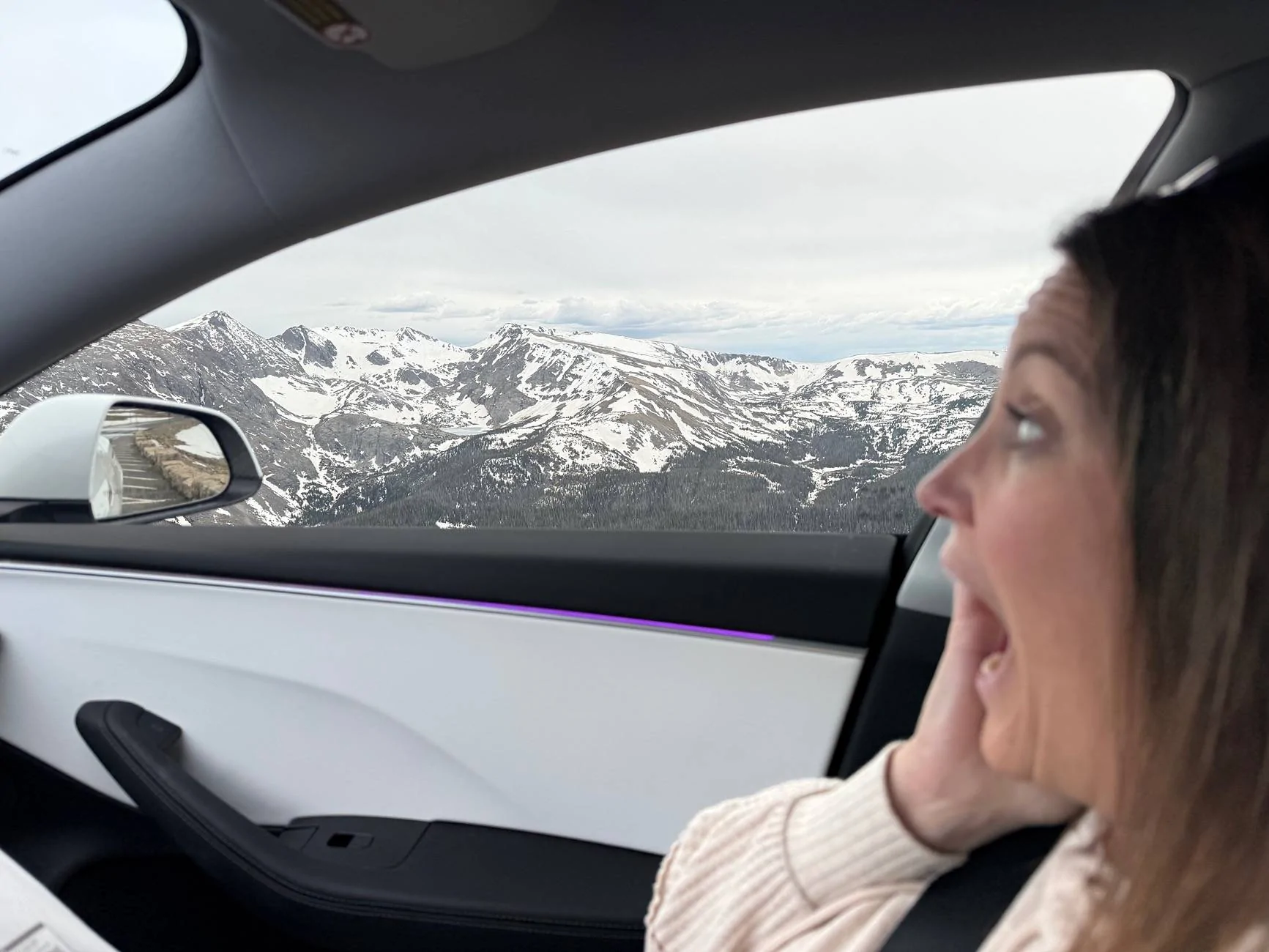
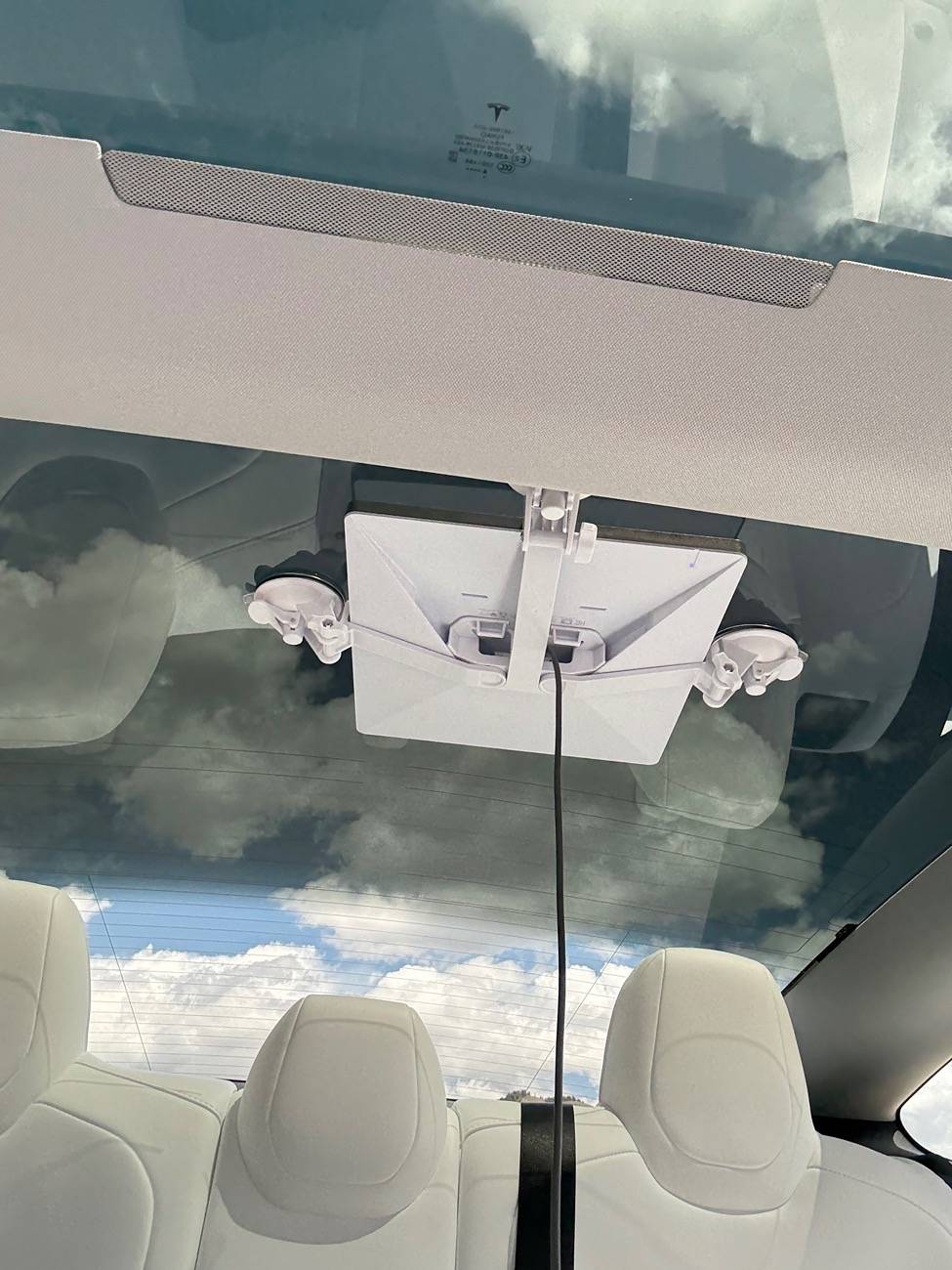
I plan to install in the CT, but I ran this setup in a 2025 model 3 last week all over the rocky mountains from Cheyenne, WY all the way around the west side of the range back, towards Denver and into Rocky Mountain National Park. I was on zoom calls and never missed a beat, was amazing. 70MPH all over the rockies was no problem with Mini mounted under the glass powered by the 40W USB-C port, using Roam plan. I don’t see why it wouldn’t be any different in the CT.

Tesla Cybertruck Clean STARLINK Mini Step-by-Step Install Tutorial (DIY). IMG_8797
Tesla Cybertruck Clean STARLINK Mini Step-by-Step Install Tutorial (DIY). IMG_8893
 

lrpena

Well-known member
First Name
Lou
Joined
May 30, 2024
Threads
9
Messages
63
Reaction score
258
Location
Ft Lauderdale
Vehicles
Cybertruck Foundation Vader Edition
Occupation
Tech
Country flag
Hey guys, just like many of you who got the STARLINK mini for the recent discounted price, I installed mine over the weekend.

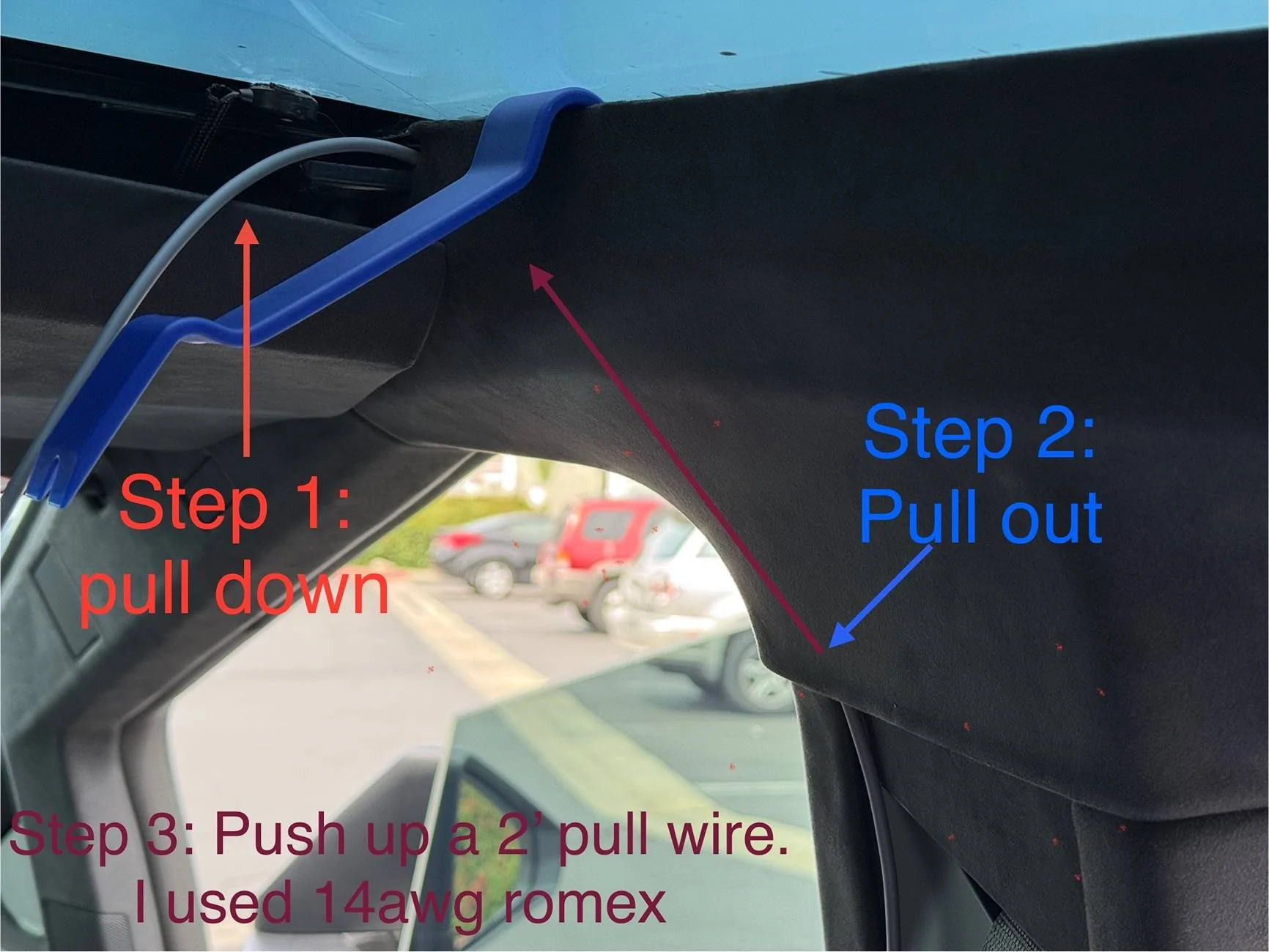
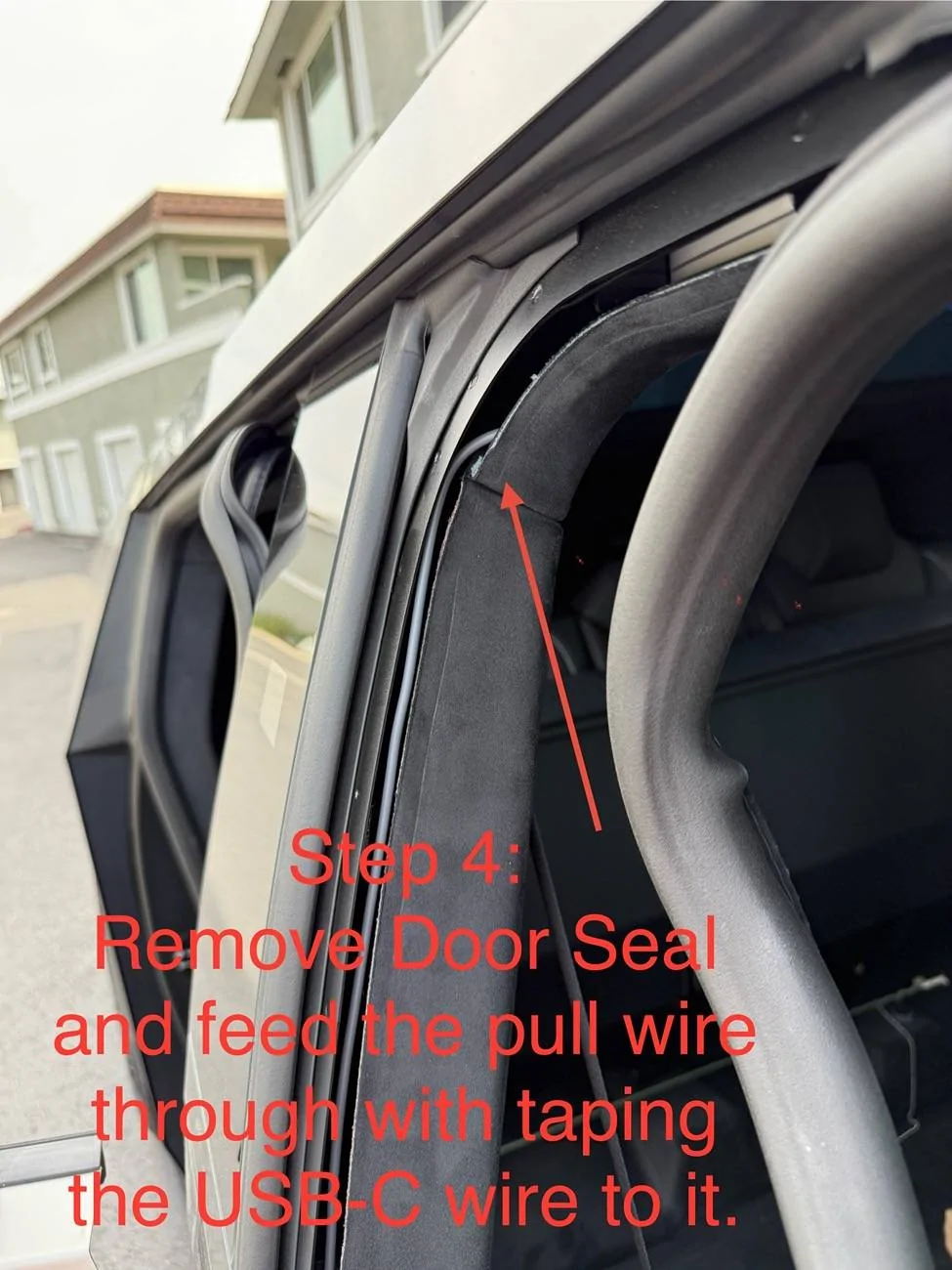
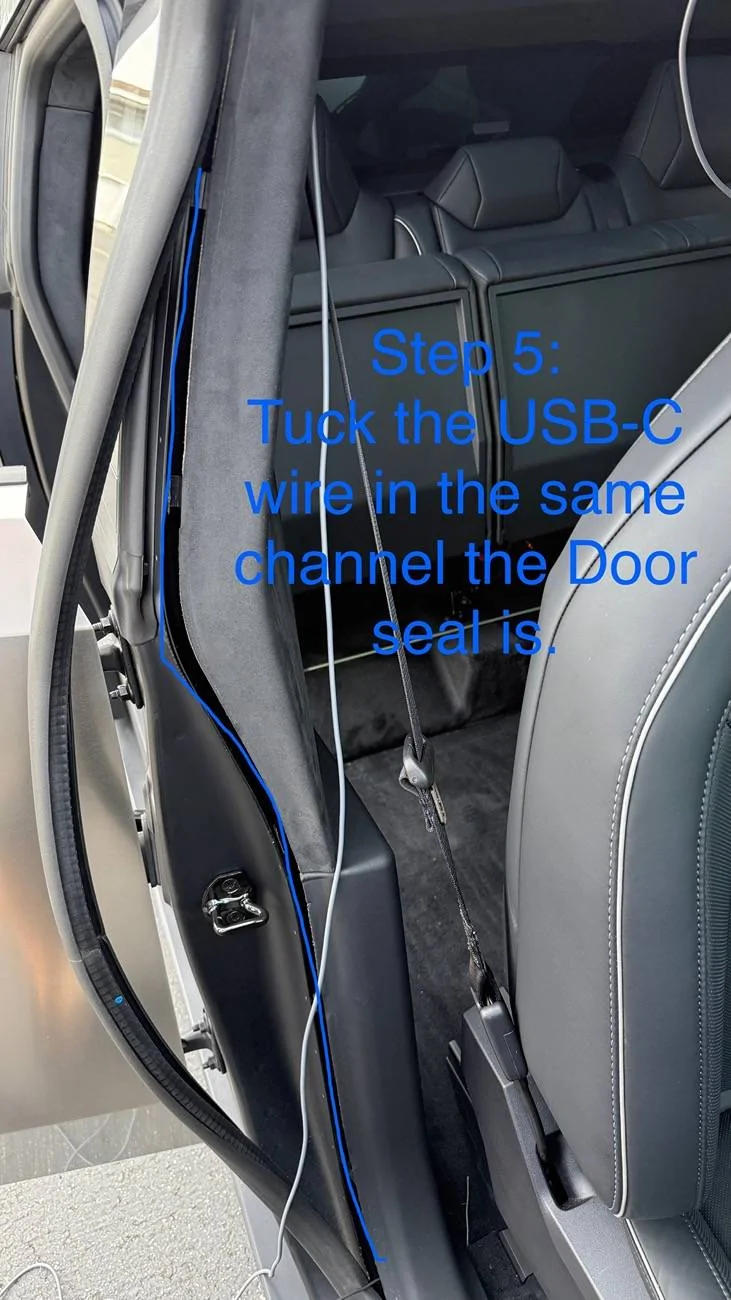
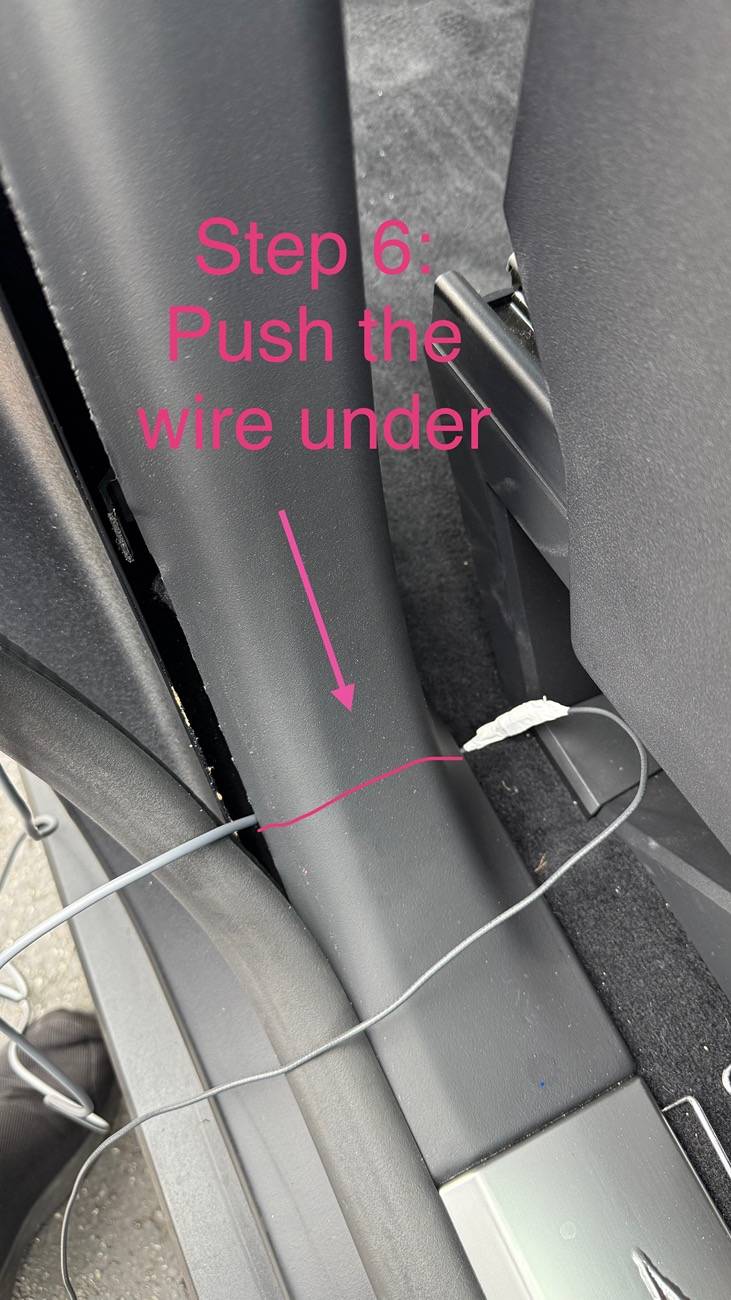
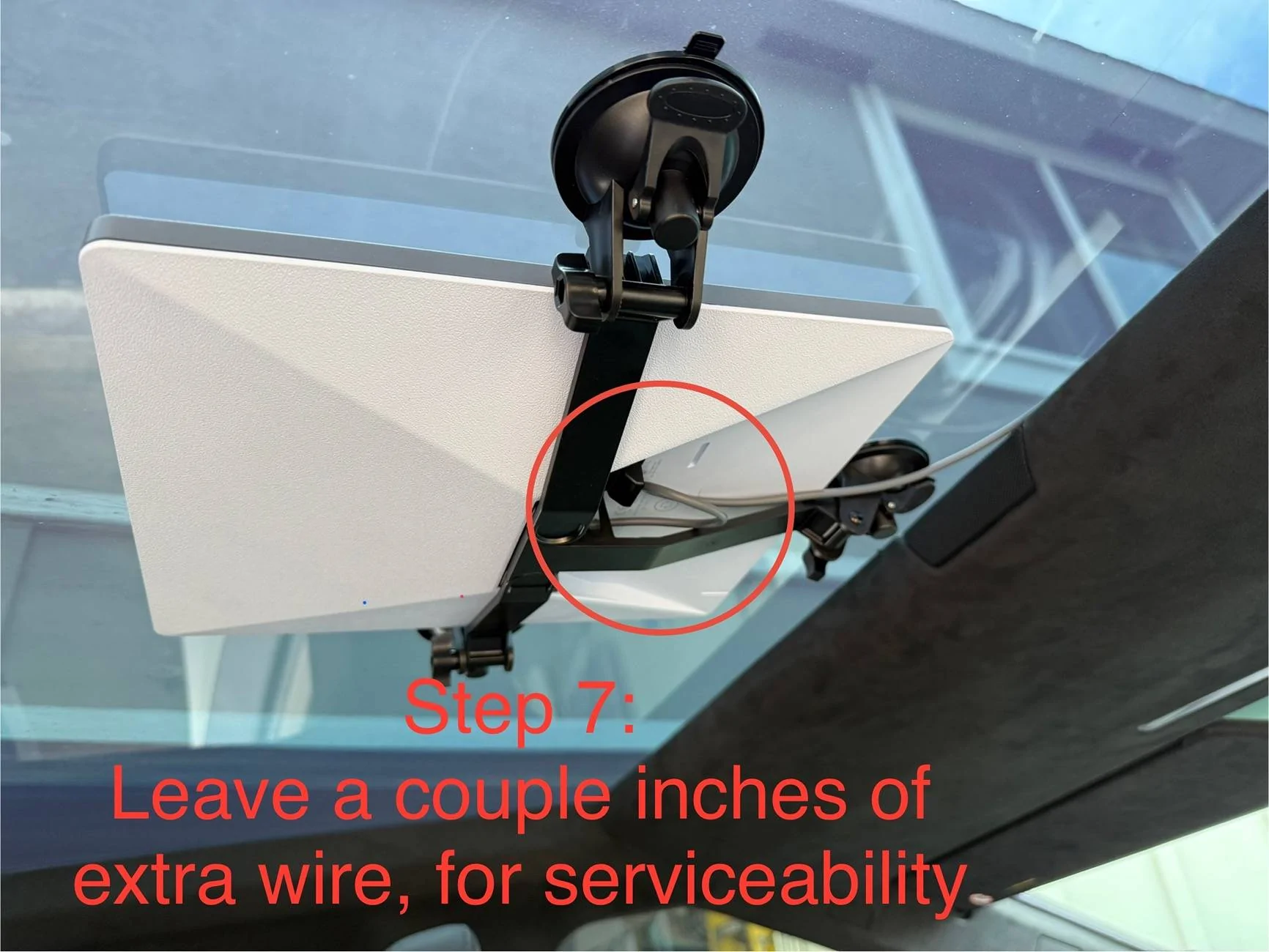
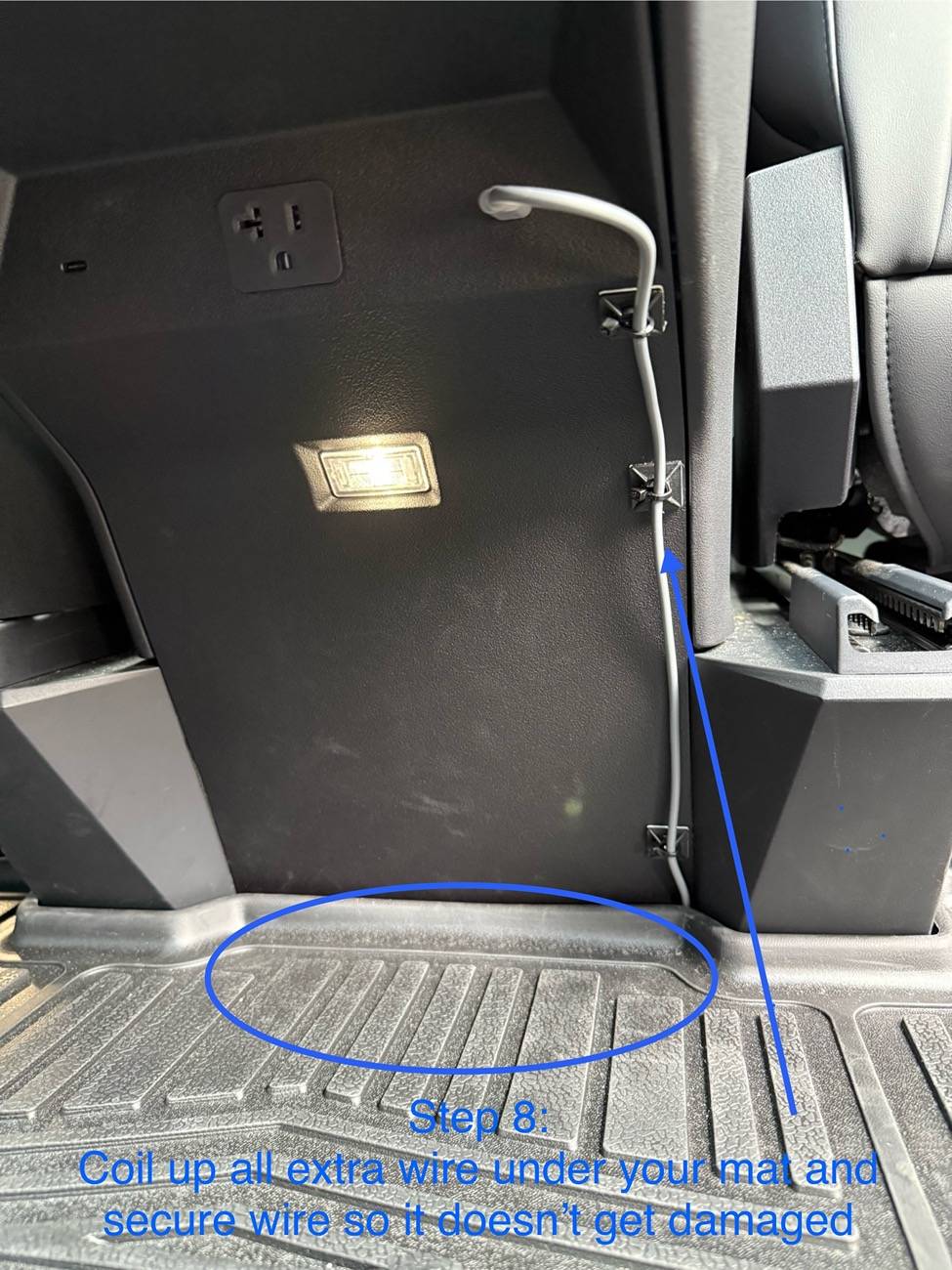
I’ll share with you the parts I used and pictures with 8 steps needed for a professional and clean installation using a suction cup glass ceiling installation.

I took some pictures to show you the path. And wrote the step-by-step instructions on each picture for convenience.

It took me about 1 hour in total, but if I were to do it again, I could reduce the time to under 30 minutes. Please note that the wire path starts at the Starlink Mini, proceeds to the passenger side, and then continues downward, finally passing under the bottom trim to reach the rear center console USB-C Port.

Tools Needed:
-Pry tool set Pry Tool
-2’ long piece of 14awg of Romex electrical wire. 14awg is thin enough to be flexible but also firm enough not to get caught. Romex
- White electrical tape (white doesn't leave stick gunk on the cable) Tape
- Cable Zip tie mounts Mounts

Parts Needed:
- STARLINK Mini
- 5m DC to USB-C cable DC>USB-C Cable
- STARLINK Mini Suction Cup Mount Suction Cup Mount

I mounted the Dish high up on the Glass Roof so as not to hit the head of anyone sitting in the middle seat. I think I will be reversing the Mini compared to what you see in the pictures, so the wire ports point to the back seats, as I've been consistently seeing alignment alerts during testing. I'll keep you updated.

Good luck! And if anyone in Orange County needs a hand, please reach out, and I'll be happy to stop by and assist you.

IMG_0508.jpeg
IMG_0516.jpeg
IMG_0511.jpeg
IMG_0512.jpeg
IMG_0527.jpeg
IMG_0533.jpeg

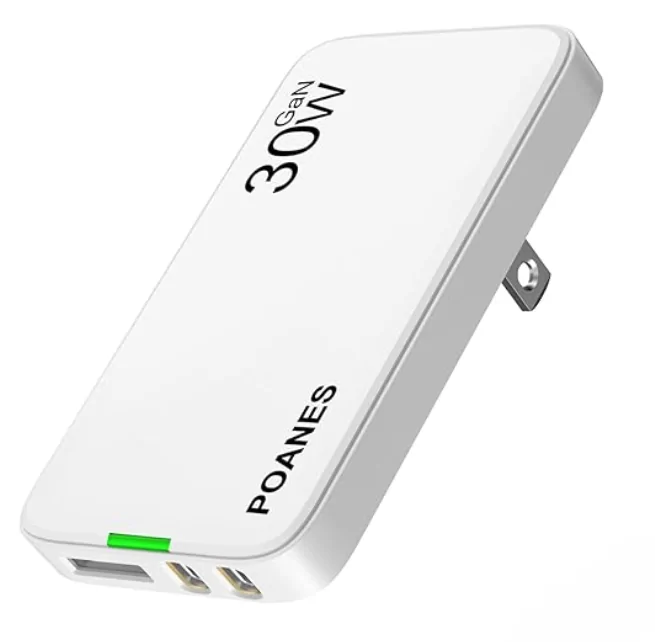
did soothing similar but needed to be able to tun on remotely when parked outside so i used this works really well and its thin so doesn't get kicked when pole sit in the back
Tesla Cybertruck Clean STARLINK Mini Step-by-Step Install Tutorial (DIY). 1749488495899-9q
 
OP
OP
CyberT

CyberT

Well-known member
Joined
May 18, 2020
Threads
23
Messages
673
Reaction score
1,416
Location
Orange County, CA
Vehicles
2024 Cybertruck AWD and 2018 Model 3 LR RWD
Occupation
Service Technician
Country flag
did soothing similar but needed to be able to tun on remotely when parked outside so i used this works really well and its thin so doesn't get kicked when pole sit in the back
1749488495899-9q.png
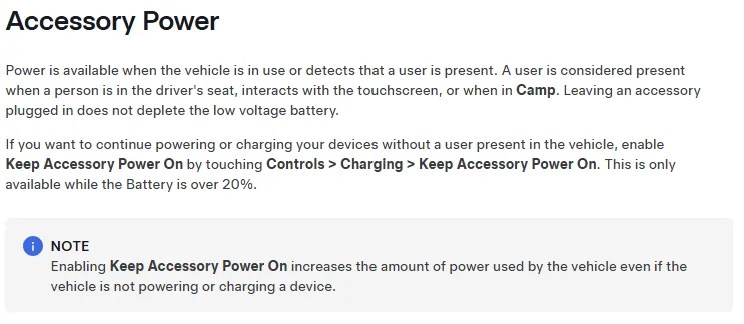
I'm curious why you need to turn on the outlets remotely when parked outside? Do you not use the "Keep Accessory Power On" feature?

Tesla Cybertruck Clean STARLINK Mini Step-by-Step Install Tutorial (DIY). 1749517915200-yf
 

hemiarch

Well-known member
First Name
Ace
Joined
Jan 22, 2025
Threads
116
Messages
8,357
Reaction score
9,589
Location
Arizona
Vehicles
2024 foundation AWD, 2024 model x
Occupation
Trauma Surgeon
Country flag
Can’t answer for him but I do something similar. The only reason I have for Starlink when I’m away from the car is to monitor fridge/feezer temp which I do with a govee WiFi thermometer.
If I want to check it remotely, I turn on the outlets and wait about a minute for the Starlink to boot.
Then I check the temp and turn everything back off.
I have a bunch of other stuff running on the usb-c’s like lights and chargers and that kind thing which there is no sense in leaving on when I’m away from the car.
I do leave accessory power on which can also power my Starlink if I’m plugged into a level 2 charger because the ac doesn’t work in that circumstance and the net energy balance is way positive anyway.
So basically I just use the interior ac plug as a fancy remote switch.
 
Last edited:


lrpena

Well-known member
First Name
Lou
Joined
May 30, 2024
Threads
9
Messages
63
Reaction score
258
Location
Ft Lauderdale
Vehicles
Cybertruck Foundation Vader Edition
Occupation
Tech
Country flag
I'm curious why you need to turn on the outlets remotely when parked outside? Do you not use the "Keep Accessory Power On" feature?

1749517915200-yf.webp

I didn't want it to be on all the time, only when I need it, to save on power consumption.
I'm curious why you need to turn on the outlets remotely when parked outside? Do you not use the "Keep Accessory Power On" feature?

1749517915200-yf.png


Didn't want it to be on all the time, only when I needed , also to save on power consumption.
 

Docedward

Well-known member
First Name
Ed
Joined
Feb 21, 2025
Threads
18
Messages
267
Reaction score
427
Location
Nashville
Vehicles
Non-FS 2024 AWD
Occupation
Ai
Country flag
Here’s my clean install. I move it back and put a grey thin shirt over it when driving. My experience with performance at a National Park is crappy. There was 75% obstruction by trees and I had intermittent service (literally up 8 seconds down 4-8 seconds). Good enough for text and email only- not for WiFi calling or work. Really hardened my heart- I had hopes it was magic. It’s not. I do get 150+ up and 14 down in the current unblocked position in the picture below. So there’s that.

Tesla Cybertruck Clean STARLINK Mini Step-by-Step Install Tutorial (DIY). imag
 

Hammy60

Well-known member
First Name
JR
Joined
Jun 5, 2025
Threads
6
Messages
75
Reaction score
92
Location
Carmel, Indiana
Website
x.com
Vehicles
CT, MS, M3, MY
Occupation
Cybersecurity
Country flag
You knew when you bought it, a clear view of the sky is required. It doesn’t work indoors a cave or underwater either. Not sure why you’re upset. It’s not magic, it’s engineering and if you use it correctly it’s fabulous. A proper roof mount would make a huge difference too.

I just drove all through Rocky Mountain nation park and it never skipped a beat. Didn’t work at the cabin because it was obscured by trees , so I moved it to a spot that was clear, no biggie.
 

Docedward

Well-known member
First Name
Ed
Joined
Feb 21, 2025
Threads
18
Messages
267
Reaction score
427
Location
Nashville
Vehicles
Non-FS 2024 AWD
Occupation
Ai
Country flag
You knew when you bought it, a clear view of the sky is required. It doesn’t work indoors a cave or underwater either. Not sure why you’re upset. It’s not magic, it’s engineering and if you use it correctly it’s fabulous. A proper roof mount would make a huge difference too.

I just drove all through Rocky Mountain nation park and it never skipped a beat. Didn’t work at the cabin because it was obscured by trees , so I moved it to a spot that was clear, no biggie.
Sassy! I like it!

I also note that connecting the CT for 1 hour and it uploaded 5gb (10% of month plan) from CT. Impressive call home but I’ve disconnected the truck until necessary.
 

BrickBungalow

Well-known member
First Name
Ryan
Joined
Dec 11, 2019
Threads
17
Messages
91
Reaction score
92
Location
Portland, OR
Vehicles
Tesla 3, Cybertruck reserved
Occupation
Gamer
Country flag
Also, is there a reason to get starlink mini past the smaller form factor? I have a full size dish already and was planning to just use that.


OP
OP
CyberT

CyberT

Well-known member
Joined
May 18, 2020
Threads
23
Messages
673
Reaction score
1,416
Location
Orange County, CA
Vehicles
2024 Cybertruck AWD and 2018 Model 3 LR RWD
Occupation
Service Technician
Country flag
Also, is there a reason to get starlink mini past the smaller form factor? I have a full size dish already and was planning to just use that.
Yes, smaller does have its advantages, but there are a few others that might have you leaning one way vs the other.

Pros for Mini:
1) Portable, easy to use in different scenarios, ie. Hiking, camping, traveling.
2) Uses significantly less power, opening the door to various power options, including a USB-C battery pack, an 18V cordless tool battery, or the USB-C port in the truck. (An important choice if using the truck to power it.)
3) Router Built-in, no need to connect a separate Router with additional cords or devices to store.

Pros for Standard:
1) Faster speeds (up to 400 Mbps down in some areas).
2) More reliable signal.
3) A more powerful router, increasing the Wi-Fi coverage area.
 

resellpanda88

Well-known member
Joined
Jan 9, 2025
Threads
0
Messages
321
Reaction score
179
Location
NY
Vehicles
Cyber Truck
Country flag
Not sure that I need this but I just want it. Which one is better or more compatible with the Cybertruck? The standard or the mini?

Planning to mount it outside of the truck with a battery pack so I don't need to run any wires. I typically only drive 6 hours max on a road trip once a month. Is there a plan that works for me? Or should I just skip this and use my phone's hotspot?

Thanks in advance.
 
OP
OP
CyberT

CyberT

Well-known member
Joined
May 18, 2020
Threads
23
Messages
673
Reaction score
1,416
Location
Orange County, CA
Vehicles
2024 Cybertruck AWD and 2018 Model 3 LR RWD
Occupation
Service Technician
Country flag
Not sure that I need this but I just want it. Which one is better or more compatible with the Cybertruck? The standard or the mini?

Planning to mount it outside of the truck with a battery pack so I don't need to run any wires. I typically only drive 6 hours max on a road trip once a month. Is there a plan that works for me? Or should I just skip this and use my phone's hotspot?

Thanks in advance.
Great questions:

Now is the lowest price for the Mini (excellent time to buy). If this is your first Starlink product, then order it via a referral link. If you know someone with Starlink service, ask them for their referral link; you both get a free month of service. You can use mine if you need https://starlink.com/residential?referral=RC-DF-7014322-18454-39

If you are planning to use this with the truck, the Mini is built for it. Consumes less power, small profile but still gives you 100-200mbps speeds.

There are lots of mounting options for the Mini and all can easily connect to the 110v outlet in the bed for temporary use cases. For permanent installations, consider using the 48V lightbar power option or using the mini inside the truck on the dash or roof glass.

You could use a "battery pack" to power the mini but your truck is a massive battery already.

After living with the mini installed in the truck for the last 6 months and lots of long multi-day road trips, it's still a "nice to have" and definitely not a "need", at least in my case. It does give me comfort knowing that I will always have a life line communication, no matter where I end up driving.

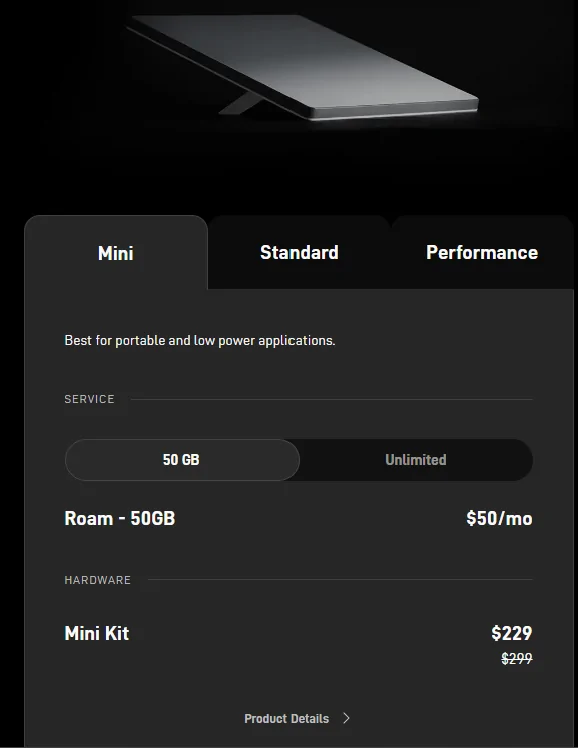
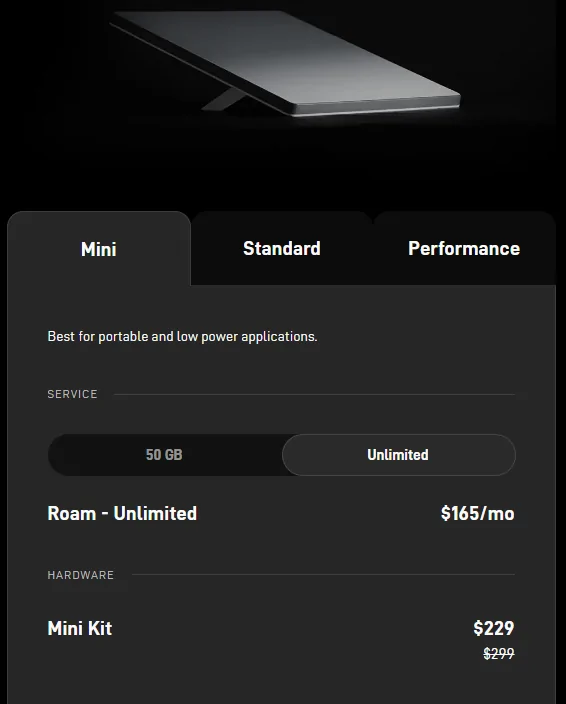
As for service plans, you will need to roam plan which starts at $50/month for 50G (perfect for if you plan on using it less) or the Unlimited is what I;m using. You can always switch to the standby service ($5/month whenever you want if you dont plan on using the service.
Tesla Cybertruck Clean STARLINK Mini Step-by-Step Install Tutorial (DIY). 1763042911343-0z
Tesla Cybertruck Clean STARLINK Mini Step-by-Step Install Tutorial (DIY). 1763043012434-7


Feel free to message me with any questions and I'll be happy to answer them.
 

hemiarch

Well-known member
First Name
Ace
Joined
Jan 22, 2025
Threads
116
Messages
8,357
Reaction score
9,589
Location
Arizona
Vehicles
2024 foundation AWD, 2024 model x
Occupation
Trauma Surgeon
Country flag
Great questions:

Now is the lowest price for the Mini (excellent time to buy). If this is your first Starlink product, then order it via a referral link. If you know someone with Starlink service, ask them for their referral link; you both get a free month of service. You can use mine if you need https://starlink.com/residential?referral=RC-DF-7014322-18454-39

If you are planning to use this with the truck, the Mini is built for it. Consumes less power, small profile but still gives you 100-200mbps speeds.

There are lots of mounting options for the Mini and all can easily connect to the 110v outlet in the bed for temporary use cases. For permanent installations, consider using the 48V lightbar power option or using the mini inside the truck on the dash or roof glass.

You could use a "battery pack" to power the mini but your truck is a massive battery already.

After living with the mini installed in the truck for the last 6 months and lots of long multi-day road trips, it's still a "nice to have" and definitely not a "need", at least in my case. It does give me comfort knowing that I will always have a life line communication, no matter where I end up driving.

As for service plans, you will need to roam plan which starts at $50/month for 50G (perfect for if you plan on using it less) or the Unlimited is what I;m using. You can always switch to the standby service ($5/month whenever you want if you dont plan on using the service.
1763042911343-0z.webp
1763043012434-7w.webp


Feel free to message me with any questions and I'll be happy to answer them.
Great response. Likewise, please reach out if you have questions.
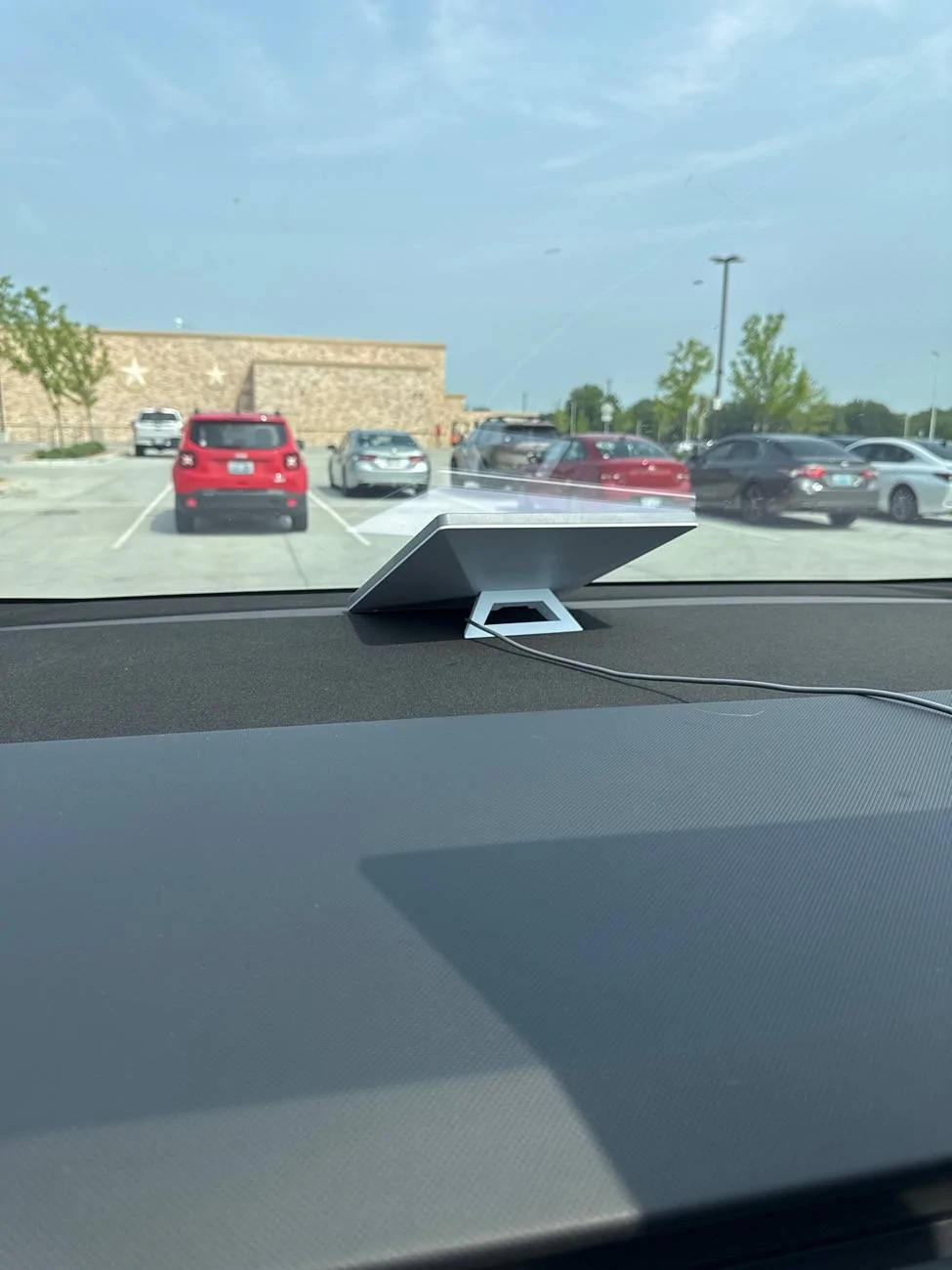
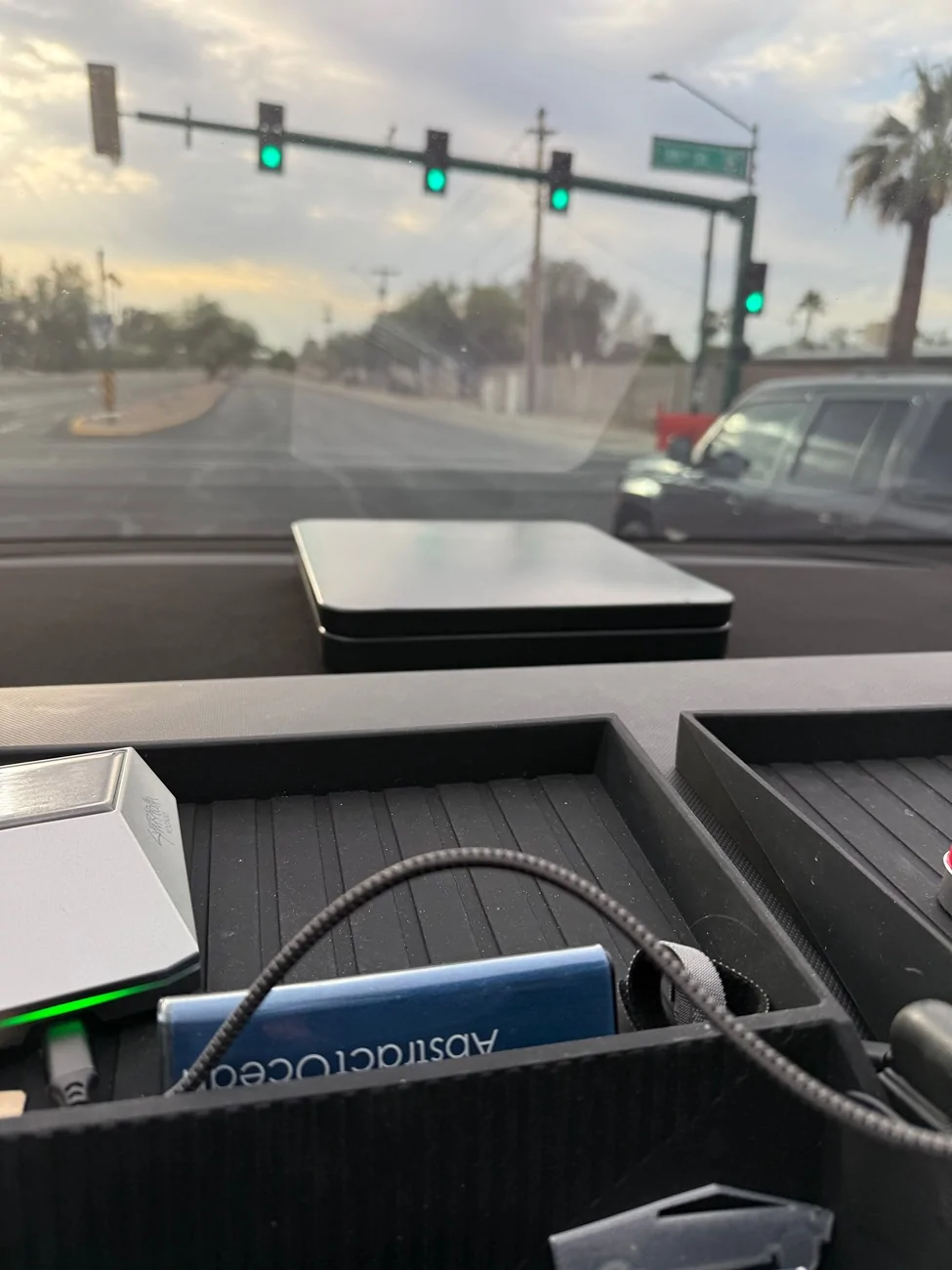
One thing I want to add is consider running the mini inside the truck as many of us do. It can’t be stolen, isnt exposed to the elements, has no aerodynamic effect and in my opinion works just as well.
Many mount them to the roof glass with suction cups.
I have mine in the windshield area.

Tesla Cybertruck Clean STARLINK Mini Step-by-Step Install Tutorial (DIY). IMG_3376
 
OP
OP
CyberT

CyberT

Well-known member
Joined
May 18, 2020
Threads
23
Messages
673
Reaction score
1,416
Location
Orange County, CA
Vehicles
2024 Cybertruck AWD and 2018 Model 3 LR RWD
Occupation
Service Technician
Country flag
Great response. Likewise, please reach out if you have questions.
One thing I want to add is consider running the mini inside the truck as many of us do. It can’t be stolen, isnt exposed to the elements, has no aerodynamic effect and in my opinion works just as well.
Many mount them to the roof glass with suction cups.
I have mine in the windshield area.

IMG_3376.webp
Those are all the reasons I installed inside.

that’s the awesome thing about pairing the Mini with a CT. Lots of options
Sponsored


Top