Sponsored

Cybertruck as mobile office

TruckElectric

Well-known member
First Name
Bryan
Joined
Jun 16, 2020
Threads
772
Messages
2,488
Reaction score
3,280
Location
Texas
Vehicles
Dodge Ram diesel
Occupation
Retired
Country flag
Anyone planning on using their CT as a mobile office?

If so what equipment do you plan to use? Such as mobile printer/scanner/copier, mobile work station
Tesla Cybertruck Cybertruck as mobile office Screen Shot 2021-12-10 at 4.01.18 PM
Sponsored


JJ_Tex

Well-known member
Joined
Apr 10, 2021
Threads
5
Messages
140
Reaction score
334
Location
Prosper, TX
Vehicles
Just Purchased: 2021 F150 Hybrid Platinum
Country flag
Anyone planning on using their CT as a mobile office?

If so what equipment do you plan to use? Such as mobile printer/scanner/copier, mobile work station
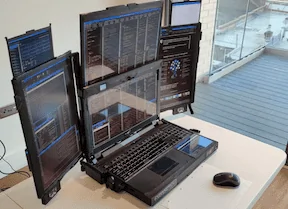
Screen Shot 2021-12-10 at 4.01.18 PM.png
Here are my thoughts:
- Flat work surface
- Wifi
- Easy access to 110 plug for laptop
- Massaging seats
- Easy to clean rubber floor mats for people going in/out of their truck all day
- Lay flat seats for snoozing if needed (Ford's are not that comfy for someone 6'2", Tesla can do better)

My F150 has all of the above, which is nice. I would also love:
- Ability to use the Tesla screen vs my laptop, either over the internet or broadcast from laptop/tablet
- Video conference abilities using the built in camera/touchscreen
- Built in cooler/warmer for lunch and drinks
- Blackberry or other work related apps on the touch screen
 

John K

Well-known member
First Name
John
Joined
Jan 2, 2020
Threads
41
Messages
2,802
Reaction score
5,776
Location
Los Angeles
Vehicles
Volt, CT reserve day 2
Country flag
As to configuration, waiting on until I get the truck. Unsure if I will build out a quick pop up for the bed or, depending on seat configurations, I can have a comfortable seat inside the cab. Most likely will stay in the cab.

Phone hotspot for work connectivity, if I could use the truck’s screen it may negate the second monitor.
 

apex2025

Member
First Name
JB
Joined
Feb 22, 2026
Threads
0
Messages
6
Reaction score
6
Location
South Korea
Vehicles
Model X
Occupation
Software Engineer
Country flag
I had the same thought with my Model X — that big screen just sitting there while I'm working on a 14" laptop felt like a waste. So I ended up building an app called SideDisplay (https://sidedisplay.co) that extends your laptop display to the Tesla screen wirelessly through the browser. Been using it as my daily mobile office setup and it works pretty well with just a phone hotspot. Supports both Mac and Windows now.


Eka

Well-known member
First Name
Ekaterine
Joined
Feb 20, 2026
Threads
1
Messages
211
Reaction score
200
Location
The land between two rivers.
Vehicles
Model Y, Cybertruck
Occupation
disabled
Country flag
I already have 2 4k OLED 15.6" monitors I hook over the steering wheel. My laptop has Thunderbolt 4 ports I can hook them up to. I use a 100W USBC auto plug power supply in my MY. I will use my docking station which uses a 120 VAC power supply in the CT.

In the MY if I put the steering wheel fully forward and up, and the seat fully back and down it is perfect for long programming or CAD sessions. I have a user profile with that seat and steering wheel setting already setup.

I used some photography camera mounting gear, 2020 aluminum extrusions, SOSS hinges, VHB tape, and other bits to make a folding structure to hold the monitors and hook it over the steering wheel. I designed it so it doesn't press on the steering wheel buttons or horn. When folded up the two monitor screens are face to face, thus protecting each other.

I used 2 150 mm long Arca Swiss type lens mounting plates VHB taped to the backs of each monitor to provide an easy means to attach and detach them from various setups I've tried over the years. At my electronics bench I now have two monitor arms with Arca Swiss clamps on their VESA mount ends. I can quickly mount the portable laptop monitors on to them for displaying documents as I work on electronics.

I first tried using Velcro. That was back when I only had one portable laptop monitor. It was only OK. The big issue was not being able to adjust monitor angle for some setups. The other issue is the Velcro insulated the back of the monitor making it get too warm.

One thing I did run into. The sheet metal backs of the monitors I have are just double stick taped on. It eventually failed. I cleaned off the tape and it's residue off. Then I cleaned and prepped the surfaces and used VHB tape to tape them back on. I have CAD files for two new backs so the next time I send in parts to laser cut I can have them made. I'll then have proper mounting holes I can screw fasteners into.

One of the setups I tried for camping in the back of the MY had the monitors held up to the bottom side of the roof glass using camera mounting suction cups. It was great for video watching, but keyboard use failed for programming or CAD work. I think I have a solution for the keyboard issue. I just need to get all the parts together and try it. Due to having ME/CFS I need to lay down flat for over half the day. Part of the reason I'm using OLED is they have very good contrast and image quality even when only lit at 15% brightness.
 

Eka

Well-known member
First Name
Ekaterine
Joined
Feb 20, 2026
Threads
1
Messages
211
Reaction score
200
Location
The land between two rivers.
Vehicles
Model Y, Cybertruck
Occupation
disabled
Country flag
I had the same thought with my Model X — that big screen just sitting there while I'm working on a 14" laptop felt like a waste. So I ended up building an app called SideDisplay (https://sidedisplay.co) that extends your laptop display to the Tesla screen wirelessly through the browser. Been using it as my daily mobile office setup and it works pretty well with just a phone hotspot. Supports both Mac and Windows now.
I thought of making a video switch to put inline with the video cable to the car's screen. I could then hook a HDMI cable from my laptop into it and fully take over the screen.
 

xenotek

Well-known member
Joined
Jan 30, 2026
Threads
14
Messages
93
Reaction score
93
Location
US
Vehicles
MSP, MYLR, GTI, R6, Supra
Country flag
Apple Vision Pro
 

apex2025

Member
First Name
JB
Joined
Feb 22, 2026
Threads
0
Messages
6
Reaction score
6
Location
South Korea
Vehicles
Model X
Occupation
Software Engineer
Country flag
I thought of making a video switch to put inline with the video cable to the car's screen. I could then hook a HDMI cable from my laptop into it and fully take over the screen.
Yeah that's probably the most ideal way to do it. I just didn't want to risk voiding the warranty by modifying the car. That's why I wanted to solve this problem through software.
 

xenotek

Well-known member
Joined
Jan 30, 2026
Threads
14
Messages
93
Reaction score
93
Location
US
Vehicles
MSP, MYLR, GTI, R6, Supra
Country flag
That's actually not a bad idea. I wonder how the motion sickness would be.
If you don’t get sea sick easily I think you’ll be fine
Sponsored


Top